Introduction to JMS
Session 1
JMS / Session 1 / 2 of 36
Session Objectives
 Describe messaging
 Discuss JMS and the different scenarios
where it can be used
 Explain the JMS architecture
 JMS components
 Approaches for implementing JMS
 JMS programming model
JMS / Session 1 / 3 of 36
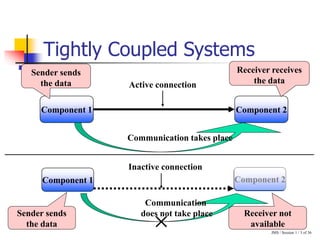
Tightly Coupled Systems
Active connection
Component 1 Component 2
Receiver receives
the data
Communication takes place
Sender sends
the data
Inactive connection
Component 1
Communication
does not take place
Component 2
Sender sends
the data
Receiver not
available
JMS / Session 1 / 4 of 36
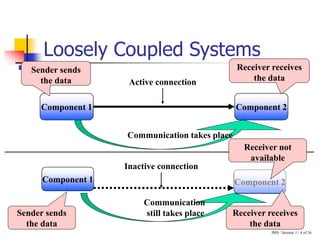
Loosely Coupled Systems
Component 1
Communication
still takes place
Component 2
Inactive connection
Sender sends
the data
Receiver receives
the data
Receiver not
available
Active connection
Component 1 Component 2
Receiver receives
the data
Communication takes place
Sender sends
the data
JMS / Session 1 / 5 of 36
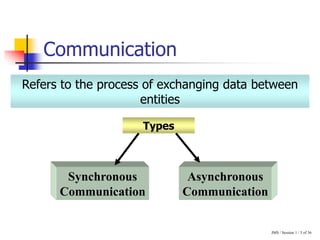
Communication
Refers to the process of exchanging data between
entities
Types
Synchronous
Communication
Asynchronous
Communication
JMS / Session 1 / 6 of 36
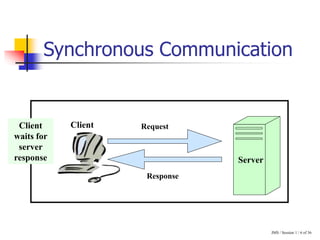
Synchronous Communication
Request
Response
Client
Server
Client
waits for
server
response
JMS / Session 1 / 7 of 36
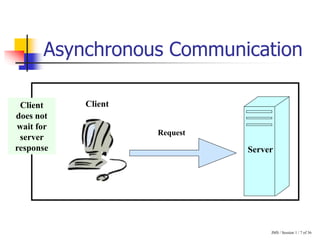
Asynchronous Communication
Request
Client
Server
Client
does not
wait for
server
response
JMS / Session 1 / 8 of 36
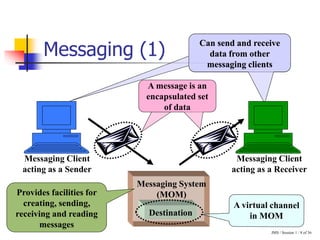
Messaging (1)
Can send and receive
data from other
messaging clients
Can send and receive
data from other
messaging clients
Messaging System
(MOM)
Messaging Client
acting as a Sender
Messaging Client
acting as a Receiver
Destination
A message is an
encapsulated set
of data
Provides facilities for
creating, sending,
receiving and reading
messages
JMS / Session 1 / 9 of 36
Messaging (2)
 Components are loosely coupled
 Application components need to continuously
communicate irrespective of component
availability
 Communication is asynchronous
Messaging can be used when:
MOM
Receiver
Destination
Sender
JMS / Session 1 / 10 of 36
Messaging (3)
 Components exchanging messages need not
be available at the same time
 Messages translated while being transmitted
 Asynchronous communication
 One message received by multiple receivers
Advantages:
MOM
Receiver
Destination
Sender
JMS / Session 1 / 11 of 36
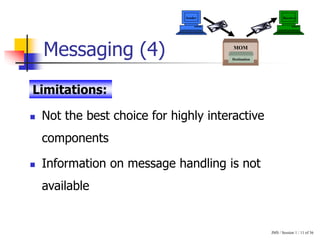
Messaging (4)
 Not the best choice for highly interactive
components
 Information on message handling is not
available
Limitations:
MOM
Receiver
Destination
Sender
JMS / Session 1 / 12 of 36
Java Message Service
Helps build asynchronous message-oriented
applications
Not a messaging system but an API
Allows application developers to create, send, receive
and read messages
JMS / Session 1 / 13 of 36
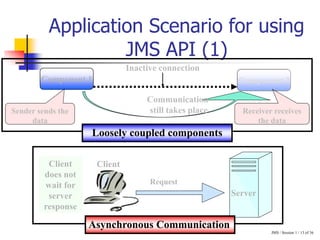
Application Scenario for using
JMS API (1)
Component 2
Component 1
Communication
still takes place
Inactive connection
Sender sends the
data
Receiver receives
the data
Loosely coupled components
Request
Client
Server
Client
does not
wait for
server
response
Asynchronous Communication
JMS / Session 1 / 14 of 36
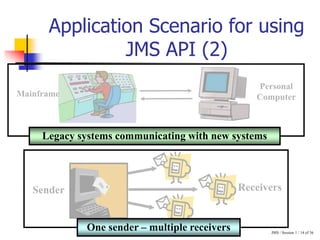
Application Scenario for using
JMS API (2)
Sender Receivers
One sender – multiple receivers
Personal
Computer
Mainframe
Legacy systems communicating with new systems
JMS / Session 1 / 15 of 36
Applications using JMS API (1)
Inventory
Component
Manufacturing
Unit
Component
Parts
Component
Parts Order
Component
Parts
Inventory
Component
Inventory Management System:
JMS / Session 1 / 16 of 36
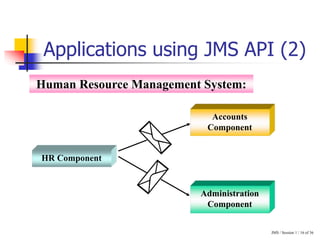
Applications using JMS API (2)
HR Component
Accounts
Component
Administration
Component
Human Resource Management System:
JMS / Session 1 / 17 of 36
JMS Architecture
JMS
Components
Messaging
Domains
JMS
Programming
Model
JMS / Session 1 / 18 of 36
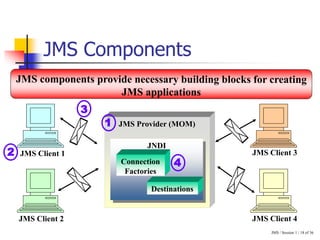
JMS Components
JMS Client 1
JMS Provider (MOM)
JNDI
Connection
Factories
Destinations
JMS Client 4
JMS Client 3
JMS Client 2
1
2
3
4
JMS / Session 1 / 19 of 36
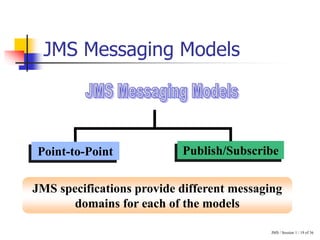
JMS Messaging Models
Point-to-Point Publish/Subscribe
JMS specifications provide different messaging
domains for each of the models
JMS / Session 1 / 20 of 36
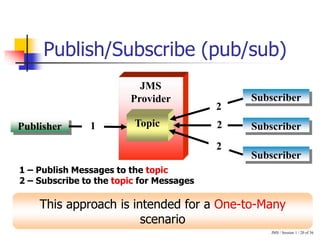
Publish/Subscribe (pub/sub)
Publisher
Subscriber
Subscriber
Subscriber
JMS
Provider
Topic
1
1 – Publish Messages to the topic
2 – Subscribe to the topic for Messages
This approach is intended for a One-to-Many
scenario
2
2
2
JMS / Session 1 / 21 of 36
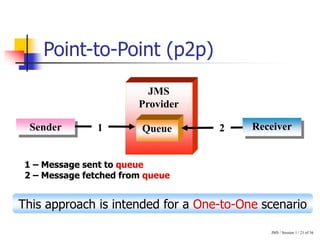
Point-to-Point (p2p)
1 – Message sent to queue
2 – Message fetched from queue
Sender
JMS
Provider
Receiver
1 Queue
This approach is intended for a One-to-One scenario
2
JMS / Session 1 / 22 of 36
JMS Programming Model
The steps are as follows…
JMS / Session 1 / 23 of 36
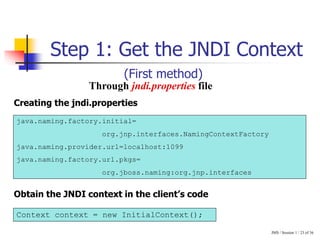
Step 1: Get the JNDI Context
Through jndi.properties file
java.naming.factory.initial=
org.jnp.interfaces.NamingContextFactory
java.naming.provider.url=localhost:1099
java.naming.factory.url.pkgs=
org.jboss.naming:org.jnp.interfaces
Creating the jndi.properties
Context context = new InitialContext();
Obtain the JNDI context in the client’s code
(First method)
JMS / Session 1 / 24 of 36
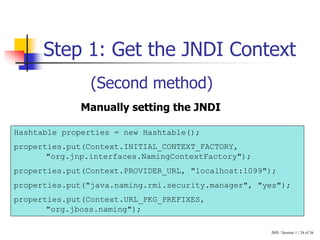
Step 1: Get the JNDI Context
Hashtable properties = new Hashtable();
properties.put(Context.INITIAL_CONTEXT_FACTORY,
"org.jnp.interfaces.NamingContextFactory");
properties.put(Context.PROVIDER_URL, "localhost:1099");
properties.put("java.naming.rmi.security.manager", "yes");
properties.put(Context.URL_PKG_PREFIXES,
"org.jboss.naming");
Manually setting the JNDI
(Second method)
JMS / Session 1 / 25 of 36
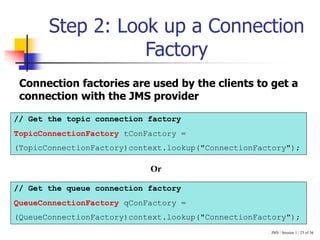
Step 2: Look up a Connection
Factory
// Get the topic connection factory
TopicConnectionFactory tConFactory =
(TopicConnectionFactory)context.lookup("ConnectionFactory");
// Get the queue connection factory
QueueConnectionFactory qConFactory =
(QueueConnectionFactory)context.lookup("ConnectionFactory");
Connection factories are used by the clients to get a
connection with the JMS provider
Or
JMS / Session 1 / 26 of 36
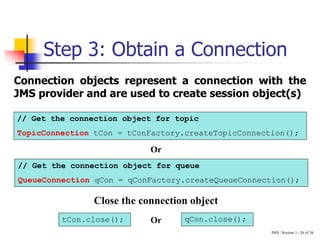
Step 3: Obtain a Connection
Connection objects represent a connection with the
JMS provider and are used to create session object(s)
// Get the connection object for topic
TopicConnection tCon = tConFactory.createTopicConnection();
// Get the connection object for queue
QueueConnection qCon = qConFactory.createQueueConnection();
tCon.close(); qCon.close();
Close the connection object
Or
Or
JMS / Session 1 / 27 of 36
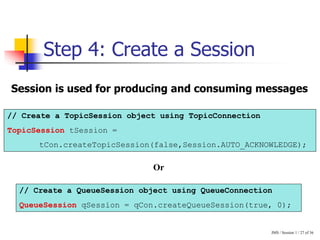
Step 4: Create a Session
Session is used for producing and consuming messages
// Create a TopicSession object using TopicConnection
TopicSession tSession =
tCon.createTopicSession(false,Session.AUTO_ACKNOWLEDGE);
// Create a QueueSession object using QueueConnection
QueueSession qSession = qCon.createQueueSession(true, 0);
Or
JMS / Session 1 / 28 of 36
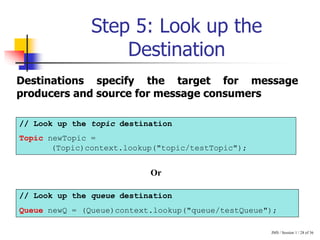
Step 5: Look up the
Destination
// Look up the topic destination
Topic newTopic =
(Topic)context.lookup("topic/testTopic");
// Look up the queue destination
Queue newQ = (Queue)context.lookup("queue/testQueue");
Destinations specify the target for message
producers and source for message consumers
Or
JMS / Session 1 / 29 of 36
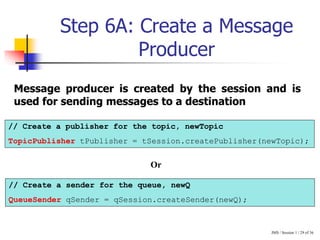
Step 6A: Create a Message
Producer
// Create a publisher for the topic, newTopic
TopicPublisher tPublisher = tSession.createPublisher(newTopic);
// Create a sender for the queue, newQ
QueueSender qSender = qSession.createSender(newQ);
Message producer is created by the session and is
used for sending messages to a destination
Or
JMS / Session 1 / 30 of 36
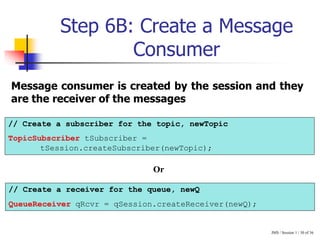
Step 6B: Create a Message
Consumer
// Create a subscriber for the topic, newTopic
TopicSubscriber tSubscriber =
tSession.createSubscriber(newTopic);
// Create a receiver for the queue, newQ
QueueReceiver qRcvr = qSession.createReceiver(newQ);
Message consumer is created by the session and they
are the receiver of the messages
Or
JMS / Session 1 / 31 of 36
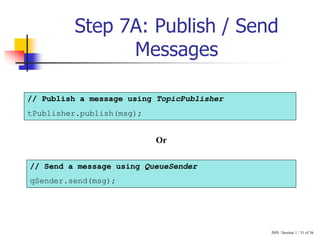
Step 7A: Publish / Send
Messages
// Publish a message using TopicPublisher
tPublisher.publish(msg);
// Send a message using QueueSender
qSender.send(msg);
Or
JMS / Session 1 / 32 of 36
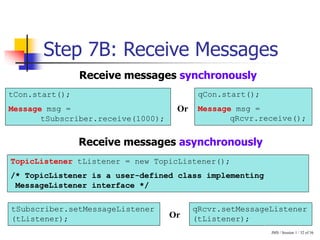
Step 7B: Receive Messages
Receive messages synchronously
tCon.start();
Message msg =
tSubscriber.receive(1000);
qCon.start();
Message msg =
qRcvr.receive();
Receive messages asynchronously
TopicListener tListener = new TopicListener();
/* TopicListener is a user-defined class implementing
MessageListener interface */
tSubscriber.setMessageListener
(tListener);
qRcvr.setMessageListener
(tListener);
Or
Or
JMS / Session 1 / 33 of 36
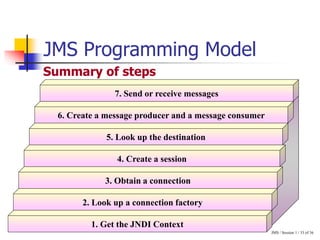
JMS Programming Model
Summary of steps
7. Send or receive messages
1. Get the JNDI Context
2. Look up a connection factory
3. Obtain a connection
5. Look up the destination
6. Create a message producer and a message consumer
4. Create a session
JMS / Session 1 / 34 of 36
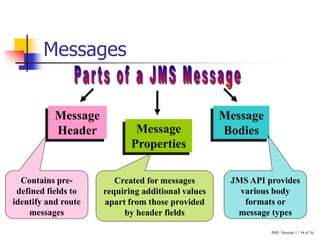
Messages
Message
Header Message
Properties
Message
Bodies
Contains pre-
defined fields to
identify and route
messages
Created for messages
requiring additional values
apart from those provided
by header fields
JMS API provides
various body
formats or
message types
JMS / Session 1 / 35 of 36
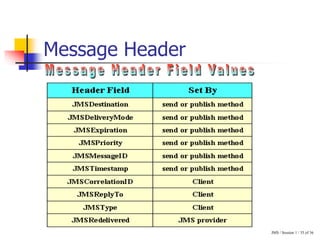
Message Header
JMS / Session 1 / 36 of 36
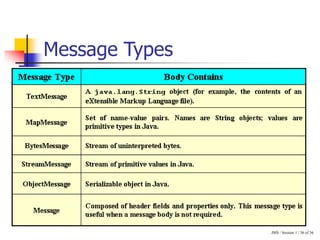
Message Types

JMSSession1TP-final.ppt

  • 1.
  • 2.
    JMS / Session1 / 2 of 36 Session Objectives  Describe messaging  Discuss JMS and the different scenarios where it can be used  Explain the JMS architecture  JMS components  Approaches for implementing JMS  JMS programming model
  • 3.
    JMS / Session1 / 3 of 36 Tightly Coupled Systems Active connection Component 1 Component 2 Receiver receives the data Communication takes place Sender sends the data Inactive connection Component 1 Communication does not take place Component 2 Sender sends the data Receiver not available
  • 4.
    JMS / Session1 / 4 of 36 Loosely Coupled Systems Component 1 Communication still takes place Component 2 Inactive connection Sender sends the data Receiver receives the data Receiver not available Active connection Component 1 Component 2 Receiver receives the data Communication takes place Sender sends the data
  • 5.
    JMS / Session1 / 5 of 36 Communication Refers to the process of exchanging data between entities Types Synchronous Communication Asynchronous Communication
  • 6.
    JMS / Session1 / 6 of 36 Synchronous Communication Request Response Client Server Client waits for server response
  • 7.
    JMS / Session1 / 7 of 36 Asynchronous Communication Request Client Server Client does not wait for server response
  • 8.
    JMS / Session1 / 8 of 36 Messaging (1) Can send and receive data from other messaging clients Can send and receive data from other messaging clients Messaging System (MOM) Messaging Client acting as a Sender Messaging Client acting as a Receiver Destination A message is an encapsulated set of data Provides facilities for creating, sending, receiving and reading messages
  • 9.
    JMS / Session1 / 9 of 36 Messaging (2)  Components are loosely coupled  Application components need to continuously communicate irrespective of component availability  Communication is asynchronous Messaging can be used when: MOM Receiver Destination Sender
  • 10.
    JMS / Session1 / 10 of 36 Messaging (3)  Components exchanging messages need not be available at the same time  Messages translated while being transmitted  Asynchronous communication  One message received by multiple receivers Advantages: MOM Receiver Destination Sender
  • 11.
    JMS / Session1 / 11 of 36 Messaging (4)  Not the best choice for highly interactive components  Information on message handling is not available Limitations: MOM Receiver Destination Sender
  • 12.
    JMS / Session1 / 12 of 36 Java Message Service Helps build asynchronous message-oriented applications Not a messaging system but an API Allows application developers to create, send, receive and read messages
  • 13.
    JMS / Session1 / 13 of 36 Application Scenario for using JMS API (1) Component 2 Component 1 Communication still takes place Inactive connection Sender sends the data Receiver receives the data Loosely coupled components Request Client Server Client does not wait for server response Asynchronous Communication
  • 14.
    JMS / Session1 / 14 of 36 Application Scenario for using JMS API (2) Sender Receivers One sender – multiple receivers Personal Computer Mainframe Legacy systems communicating with new systems
  • 15.
    JMS / Session1 / 15 of 36 Applications using JMS API (1) Inventory Component Manufacturing Unit Component Parts Component Parts Order Component Parts Inventory Component Inventory Management System:
  • 16.
    JMS / Session1 / 16 of 36 Applications using JMS API (2) HR Component Accounts Component Administration Component Human Resource Management System:
  • 17.
    JMS / Session1 / 17 of 36 JMS Architecture JMS Components Messaging Domains JMS Programming Model
  • 18.
    JMS / Session1 / 18 of 36 JMS Components JMS Client 1 JMS Provider (MOM) JNDI Connection Factories Destinations JMS Client 4 JMS Client 3 JMS Client 2 1 2 3 4
  • 19.
    JMS / Session1 / 19 of 36 JMS Messaging Models Point-to-Point Publish/Subscribe JMS specifications provide different messaging domains for each of the models
  • 20.
    JMS / Session1 / 20 of 36 Publish/Subscribe (pub/sub) Publisher Subscriber Subscriber Subscriber JMS Provider Topic 1 1 – Publish Messages to the topic 2 – Subscribe to the topic for Messages This approach is intended for a One-to-Many scenario 2 2 2
  • 21.
    JMS / Session1 / 21 of 36 Point-to-Point (p2p) 1 – Message sent to queue 2 – Message fetched from queue Sender JMS Provider Receiver 1 Queue This approach is intended for a One-to-One scenario 2
  • 22.
    JMS / Session1 / 22 of 36 JMS Programming Model The steps are as follows…
  • 23.
    JMS / Session1 / 23 of 36 Step 1: Get the JNDI Context Through jndi.properties file java.naming.factory.initial= org.jnp.interfaces.NamingContextFactory java.naming.provider.url=localhost:1099 java.naming.factory.url.pkgs= org.jboss.naming:org.jnp.interfaces Creating the jndi.properties Context context = new InitialContext(); Obtain the JNDI context in the client’s code (First method)
  • 24.
    JMS / Session1 / 24 of 36 Step 1: Get the JNDI Context Hashtable properties = new Hashtable(); properties.put(Context.INITIAL_CONTEXT_FACTORY, "org.jnp.interfaces.NamingContextFactory"); properties.put(Context.PROVIDER_URL, "localhost:1099"); properties.put("java.naming.rmi.security.manager", "yes"); properties.put(Context.URL_PKG_PREFIXES, "org.jboss.naming"); Manually setting the JNDI (Second method)
  • 25.
    JMS / Session1 / 25 of 36 Step 2: Look up a Connection Factory // Get the topic connection factory TopicConnectionFactory tConFactory = (TopicConnectionFactory)context.lookup("ConnectionFactory"); // Get the queue connection factory QueueConnectionFactory qConFactory = (QueueConnectionFactory)context.lookup("ConnectionFactory"); Connection factories are used by the clients to get a connection with the JMS provider Or
  • 26.
    JMS / Session1 / 26 of 36 Step 3: Obtain a Connection Connection objects represent a connection with the JMS provider and are used to create session object(s) // Get the connection object for topic TopicConnection tCon = tConFactory.createTopicConnection(); // Get the connection object for queue QueueConnection qCon = qConFactory.createQueueConnection(); tCon.close(); qCon.close(); Close the connection object Or Or
  • 27.
    JMS / Session1 / 27 of 36 Step 4: Create a Session Session is used for producing and consuming messages // Create a TopicSession object using TopicConnection TopicSession tSession = tCon.createTopicSession(false,Session.AUTO_ACKNOWLEDGE); // Create a QueueSession object using QueueConnection QueueSession qSession = qCon.createQueueSession(true, 0); Or
  • 28.
    JMS / Session1 / 28 of 36 Step 5: Look up the Destination // Look up the topic destination Topic newTopic = (Topic)context.lookup("topic/testTopic"); // Look up the queue destination Queue newQ = (Queue)context.lookup("queue/testQueue"); Destinations specify the target for message producers and source for message consumers Or
  • 29.
    JMS / Session1 / 29 of 36 Step 6A: Create a Message Producer // Create a publisher for the topic, newTopic TopicPublisher tPublisher = tSession.createPublisher(newTopic); // Create a sender for the queue, newQ QueueSender qSender = qSession.createSender(newQ); Message producer is created by the session and is used for sending messages to a destination Or
  • 30.
    JMS / Session1 / 30 of 36 Step 6B: Create a Message Consumer // Create a subscriber for the topic, newTopic TopicSubscriber tSubscriber = tSession.createSubscriber(newTopic); // Create a receiver for the queue, newQ QueueReceiver qRcvr = qSession.createReceiver(newQ); Message consumer is created by the session and they are the receiver of the messages Or
  • 31.
    JMS / Session1 / 31 of 36 Step 7A: Publish / Send Messages // Publish a message using TopicPublisher tPublisher.publish(msg); // Send a message using QueueSender qSender.send(msg); Or
  • 32.
    JMS / Session1 / 32 of 36 Step 7B: Receive Messages Receive messages synchronously tCon.start(); Message msg = tSubscriber.receive(1000); qCon.start(); Message msg = qRcvr.receive(); Receive messages asynchronously TopicListener tListener = new TopicListener(); /* TopicListener is a user-defined class implementing MessageListener interface */ tSubscriber.setMessageListener (tListener); qRcvr.setMessageListener (tListener); Or Or
  • 33.
    JMS / Session1 / 33 of 36 JMS Programming Model Summary of steps 7. Send or receive messages 1. Get the JNDI Context 2. Look up a connection factory 3. Obtain a connection 5. Look up the destination 6. Create a message producer and a message consumer 4. Create a session
  • 34.
    JMS / Session1 / 34 of 36 Messages Message Header Message Properties Message Bodies Contains pre- defined fields to identify and route messages Created for messages requiring additional values apart from those provided by header fields JMS API provides various body formats or message types
  • 35.
    JMS / Session1 / 35 of 36 Message Header
  • 36.
    JMS / Session1 / 36 of 36 Message Types