www.sitecore.net
Multi-Channel Paris Contest Demo
JETSTREAM DEMO
www.sitecore.net
Introduction
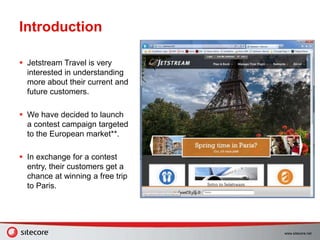
 Jetstream Travel is very
interested in understanding
more about their current and
future customers.
 We have decided to launch
a contest campaign targeted
to the European market**.
 In exchange for a contest
entry, their customers get a
chance at winning a free trip
to Paris.
www.sitecore.net
Welcome to Jetstream
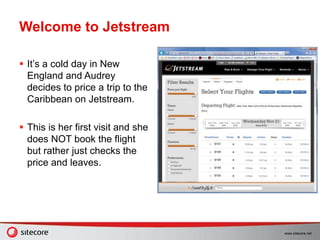
 It’s a cold day in New
England and Audrey
decides to price a trip to the
Caribbean on Jetstream.
 This is her first visit and she
does NOT book the flight
but rather just checks the
price and leaves.
www.sitecore.net
QR Code Scan
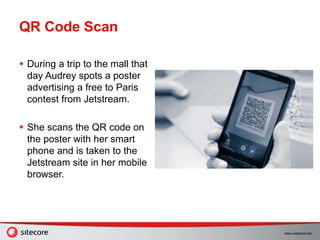
 During a trip to the mall that
day Audrey spots a poster
advertising a free to Paris
contest from Jetstream.
 She scans the QR code on
the poster with her smart
phone and is taken to the
Jetstream site in her mobile
browser.
www.sitecore.net
Enter the Contest
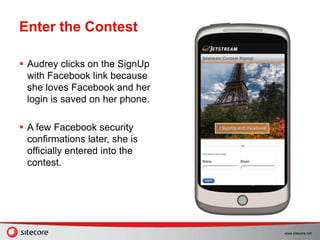
 Audrey clicks on the SignUp
with Facebook link because
she loves Facebook and her
login is saved on her phone.
 A few Facebook security
confirmations later, she is
officially entered into the
contest.
www.sitecore.net
Confirmation Email
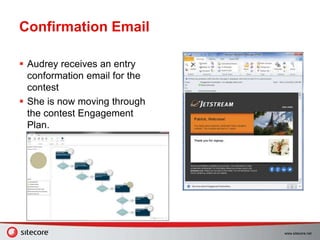
 Audrey receives an entry
conformation email for the
contest
 She is now moving through
the contest Engagement
Plan.
www.sitecore.net
Second Entry
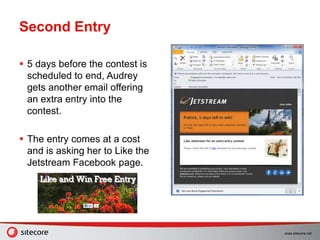
 5 days before the contest is
scheduled to end, Audrey
gets another email offering
an extra entry into the
contest.
 The entry comes at a cost
and is asking her to Like the
Jetstream Facebook page.
www.sitecore.net
Back to the Site
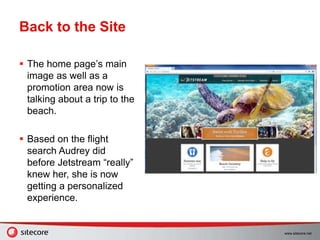
 The home page’s main
image as well as a
promotion area now is
talking about a trip to the
beach.
 Based on the flight
search Audrey did
before Jetstream “really”
knew her, she is now
getting a personalized
experience.
www.sitecore.net
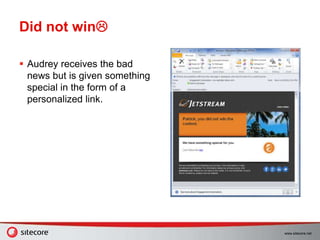
Did not win
 Audrey receives the bad
news but is given something
special in the form of a
personalized link.
www.sitecore.net
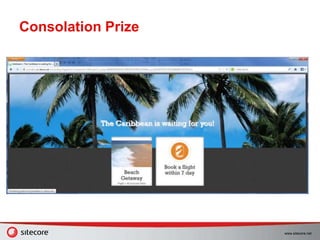
Consolation Prize

Jetstream contest demo

  • 1.
  • 2.
    www.sitecore.net Introduction  Jetstream Travelis very interested in understanding more about their current and future customers.  We have decided to launch a contest campaign targeted to the European market**.  In exchange for a contest entry, their customers get a chance at winning a free trip to Paris.
  • 3.
    www.sitecore.net Welcome to Jetstream It’s a cold day in New England and Audrey decides to price a trip to the Caribbean on Jetstream.  This is her first visit and she does NOT book the flight but rather just checks the price and leaves.
  • 4.
    www.sitecore.net QR Code Scan During a trip to the mall that day Audrey spots a poster advertising a free to Paris contest from Jetstream.  She scans the QR code on the poster with her smart phone and is taken to the Jetstream site in her mobile browser.
  • 5.
    www.sitecore.net Enter the Contest Audrey clicks on the SignUp with Facebook link because she loves Facebook and her login is saved on her phone.  A few Facebook security confirmations later, she is officially entered into the contest.
  • 6.
    www.sitecore.net Confirmation Email  Audreyreceives an entry conformation email for the contest  She is now moving through the contest Engagement Plan.
  • 7.
    www.sitecore.net Second Entry  5days before the contest is scheduled to end, Audrey gets another email offering an extra entry into the contest.  The entry comes at a cost and is asking her to Like the Jetstream Facebook page.
  • 8.
    www.sitecore.net Back to theSite  The home page’s main image as well as a promotion area now is talking about a trip to the beach.  Based on the flight search Audrey did before Jetstream “really” knew her, she is now getting a personalized experience.
  • 9.
    www.sitecore.net Did not win Audrey receives the bad news but is given something special in the form of a personalized link.
  • 10.

Editor's Notes

  • #3 Demo Setup Make a host file entry for jssandbox.sc-demo.net Make an IIS binding for jssandbox.sc-demo.net Set the mail setting in the Jetstream control panel to use http://jssandbox.sc-demo.net as the URL Load flights including PUJ Demo Reset Remove the Jetstream application from your Facebook account Delete user from Sitecore Make sure no one is in the engagement plan
  • #4 Demo Actions Make sure PUJ goes in the first (destination) box Search using Firefox or another browser that can switch user agents (mobile phone simulation) After flight search change the user agent to iPhone Talking Points She has not identified herself, she is anonymous as far as Jetstream is concerned.
  • #5 Demo Actions Goto http://jssandbox.sc-demo.net/Alternate Device Home/Landing Pages/Jetstream Contest Signup.aspx in the same browser as the flight search (should be in iPhone mode now) Talking Points The QR code relays important campaign information back to JS to help us understand the effectiveness of each individual poster. We can go as far as analyzing what type of people are scanning each poster in relation to their location. i.e. mostly men are scanning the poster next to bench outside a woman’s clothing store.
  • #6 Demo Actions Click on the Facebook login and install the app Close browser after the confirmation screen Talking Points JS wants a little something in return for the contest entry in the form of Audrey’s information (their campaign goal). Facebook login saves her from having to enter her info and is just a single step since she is already logged into Facebook on her phone. After the login and app install we have all her FB profile info and have gained a ton Customer Intelligence and ultimately how we can starting having a personalized conversation with her.
  • #7 Demo Actions Open the email Use a different browser: open Sitecore Desktop / Marketing Center / Vacation to Paris Contest Engagement Plan / Supervise Talking Points Give a 10 second description of Engagement plans Talk about her journey through the plan Emails are coming from our ECM, they are being tracked and monitored the same manor as a campaign email. They can also contain personalized content.
  • #8 Demo Actions Right click on the Like link and Copy Hyperlink Paste it in the same browser you used for the contest sign up Click Like and it will take you to the home page. Talking Points The like button control feeds information back to JS about campaign and actually confirms the person Liked the page.
  • #9 Talking Points She is now logged in using her FB info, see top bar. She was not logged in and completely anonymous to Jetstream when she did that flight search. All her “past” site history is now attached to her Jetstream account and the home page is personalized based on just that search.
  • #10 Demo Actions Open the last email of 3 emails and click on the link Talking Points She did not win but we can still try to give her what she originally wanted, a trip to the Caribbean! Goto next slide
  • #11 Next (optional) Steps Go back to the Engagement Plan for a complete overview including Segment Builder Open the home page in Page Editor and demo the rules editor for top image Click on the ECM link from the Page Editor and show the how the emails for this contest here created and maintained. Demo APS for the poster