Continuous Integration 
(Jenkins) 
Ahmed Gomaa 
22nd Oct 2014
2 
Agenda 
• What’s Continuous Integration 
• Jenkins 
–Features 
–Plugin 
–Security Management 
• Demo 
• Q&A
3 
What’s Continuous 
Integration? 
• In software engineering, continuous integration (CI) 
implements continuous processes of applying quality 
control - small pieces of effort, applied frequently. 
Continuous integration aims to improve the quality of 
software, and to reduce the time taken to deliver it, by 
replacing the traditional practice of applying quality 
control after completing all development. 
Ref: http://en.wikipedia.org/wiki/Continuous_integration
4 
History 
• Continuous Integration emerged in the Extreme 
Programming (XP) community, and XP advocates 
Martin Fowler and Kent Beck first wrote about 
continuous integration circa 1999.
5 
Continuous Integration 
• Continuous Integration is a software development 
practice where members of a team integrate their 
work frequently, usually each person integrates at 
least daily - leading to multiple integrations per day. 
Each integration is verified by an automated build 
(including test) to detect integration errors as quickly 
as possible. 
-- Martin Fowler 
Ref: http://martinfowler.com/articles/continuousIntegration.html
Why Continuous Integration? 
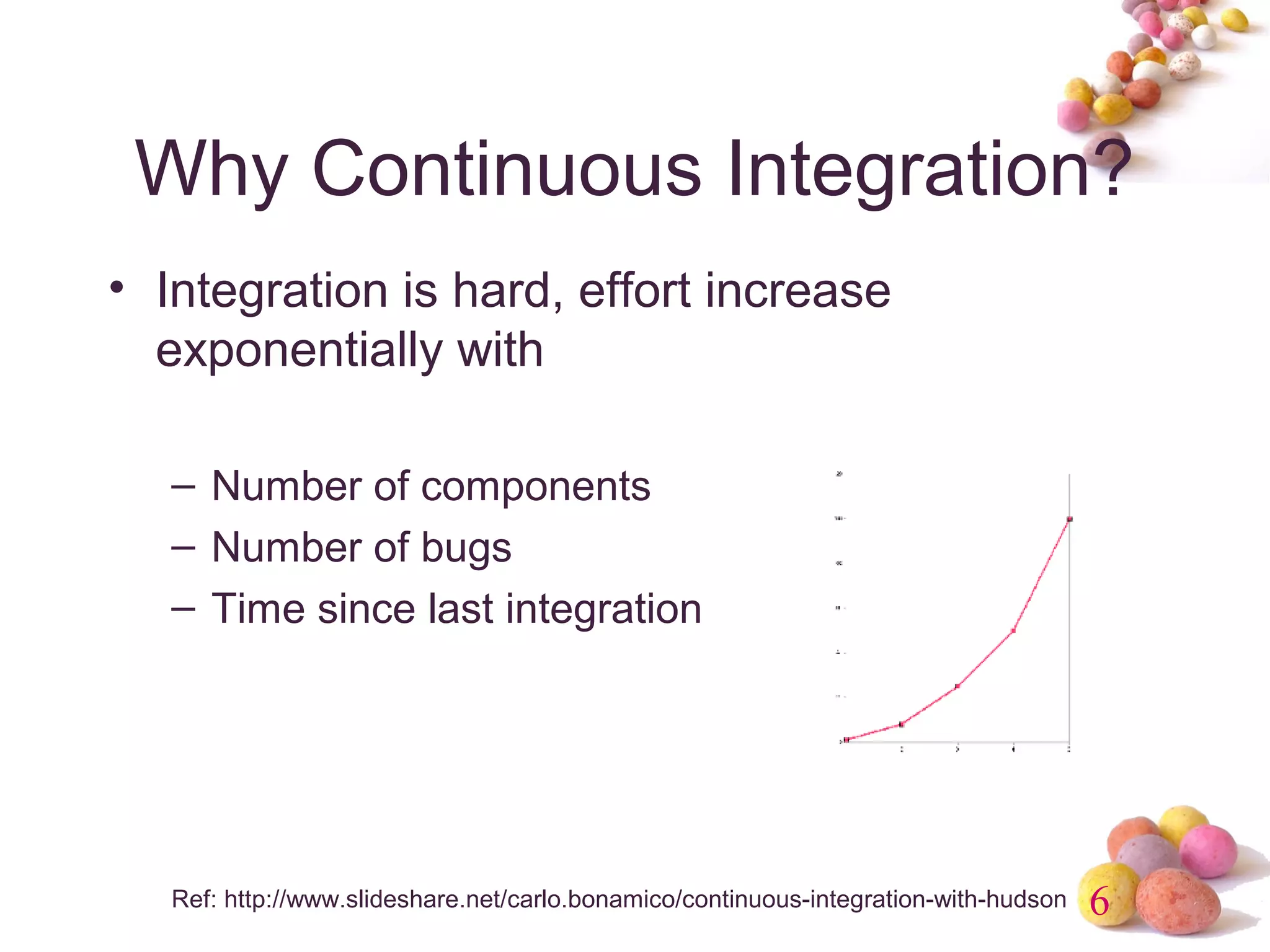
• Integration is hard, effort increase 
exponentially with 
6 
– Number of components 
– Number of bugs 
– Time since last integration 
Ref: http://www.slideshare.net/carlo.bonamico/continuous-integration-with-hudson
Continuous Integration Benefit 
• Project Management 
7 
– Detect system development problems earlier 
– Reduce risks of cost, schedule, and budget 
• Code Quality 
– Measurable and visible code quality 
– Continuous automatic regression unit test
8
9 
Best Practice of CI 
• Single Source Repository. 
• Automate the Build and Test 
• Everyone Commits Every Day 
• Keep the Build Fast 
• Everyone can see what's happening 
• Automate Deployment (Optional)
10 
What’s Jenkins 
1.An open source CI server 
2.More then 85000 installations (May 2014) 
3.Plug-in extensibility (Over 900 plugins) 
4.MIT license
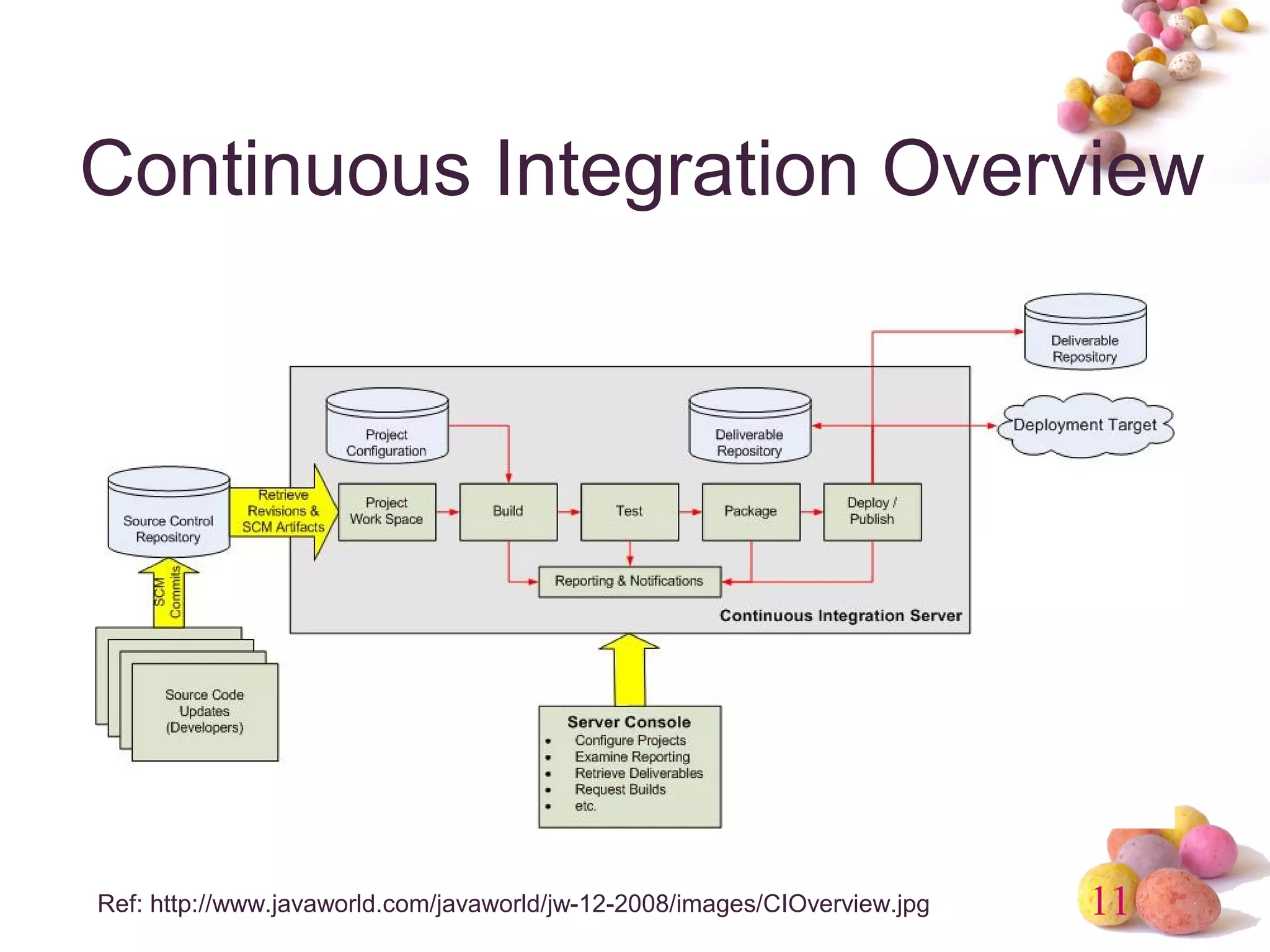
Continuous Integration Overview 
11 
Ref: http://www.javaworld.com/javaworld/jw-12-2008/images/CIOverview.jpg
12 
Jenkins Features 
• Trigger a build 
• Get source code from repository 
• Automatically build and test 
• Generate report & notify 
• Deploy 
• Distributed build
13 
Jenkins Requirement 
• Web Server (Tomcat, WebLogic, …) 
• Build tool (Maven, Ant) 
• SCM (Git, Svn, Cvs, …)
14 
Jenkins Plugins 
• Build triggers 
• Source code management 
• Build tools 
• Build notifiers 
• Build reports 
• Artifact uploaders 
• UI plugins 
• Authentication and user management
15 
Build Trigger 
• Manually click build button 
• Build periodically 
• Build whenever a SNAPSHOT 
dependency is built 
• Build after other projects are built 
• Poll SCM 
• IRC, Jabber, …
16 
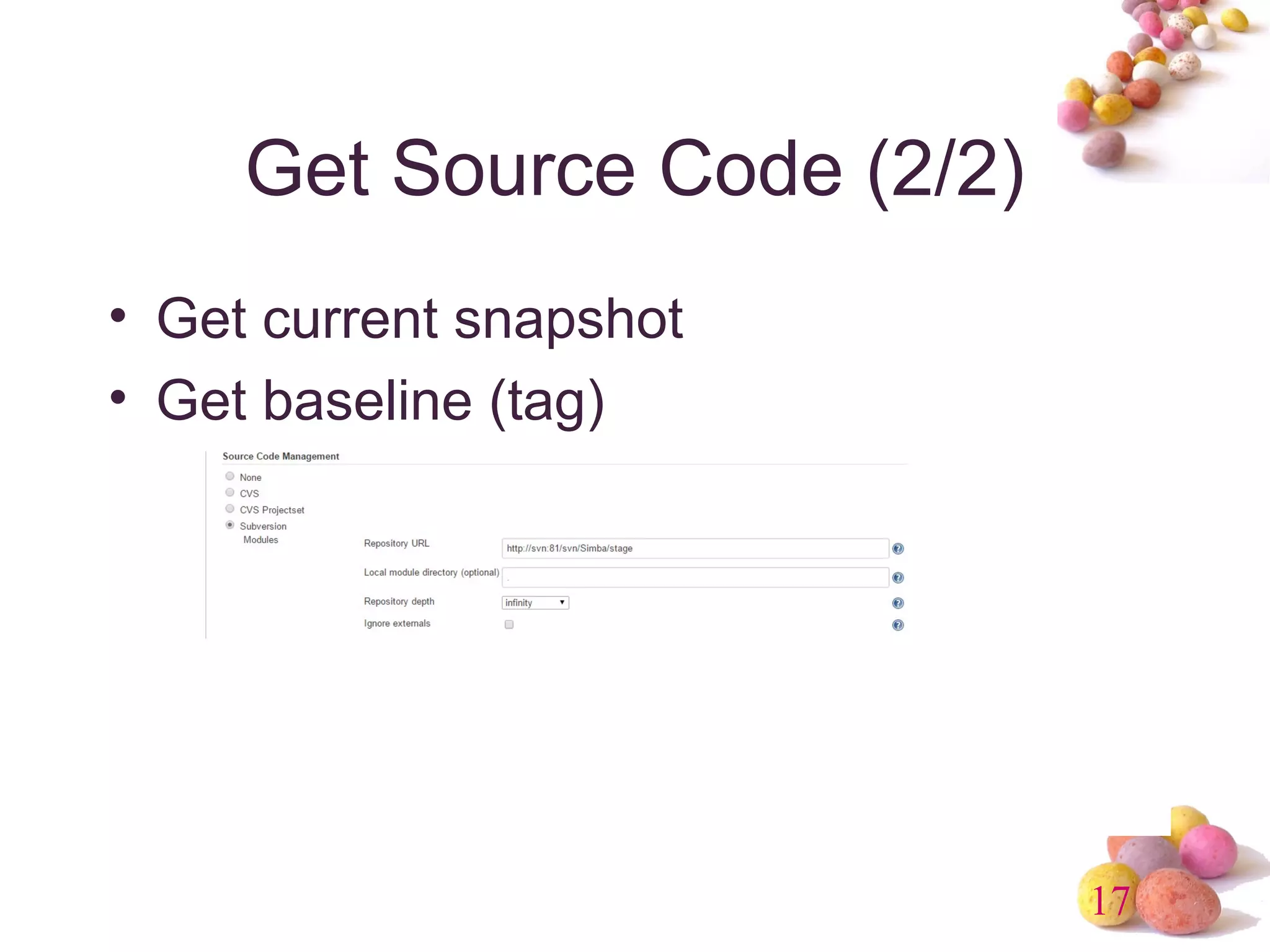
Get Source Code (1/2) 
• CVS (build-in) 
• SVN (build-in) 
• GIT (requires Git) 
• ClearCase (requires ClearCase) 
• Mercurial, PVCS, VSS, …
17 
Get Source Code (2/2) 
• Get current snapshot 
• Get baseline (tag)
18 
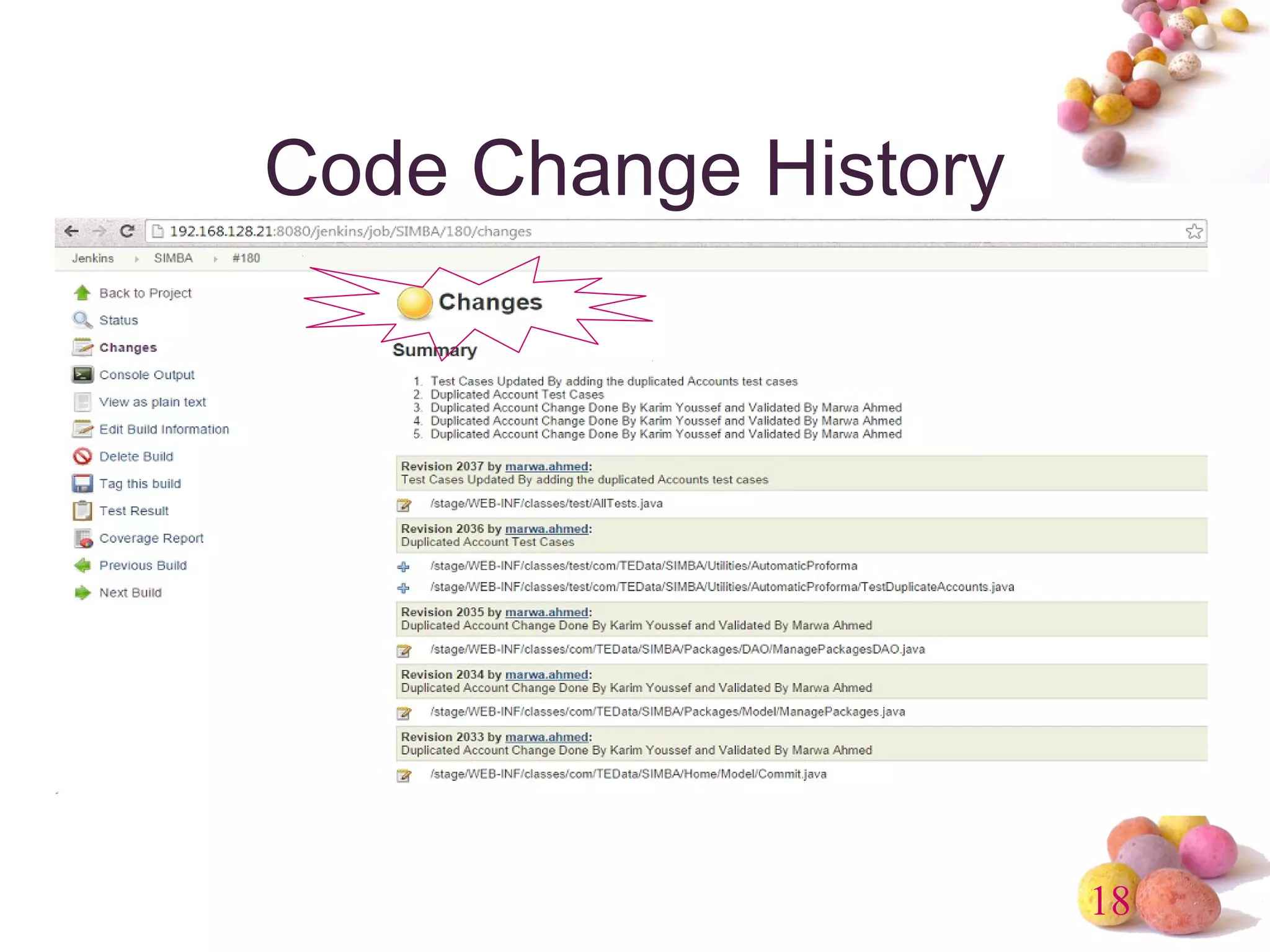
Code Change History
19 
Build Tools 
• Java 
– Maven (build-in), Ant, Gradle 
• .Net 
– MSBuild, PowerShell 
• Shell script 
– Python, Ruby, Groovy
20 
Build Wrapper 
• Build name (version no) setter 
• Virtual machine (VMWare, Virtual Box) 
• Set environment variable 
• ClearCase release plugin 
• …
21 
Build Notifier 
• E-mail 
• Twitter 
• Jabber 
• IRC 
• RSS 
• Google calendar 
• …
22 
Build Report 
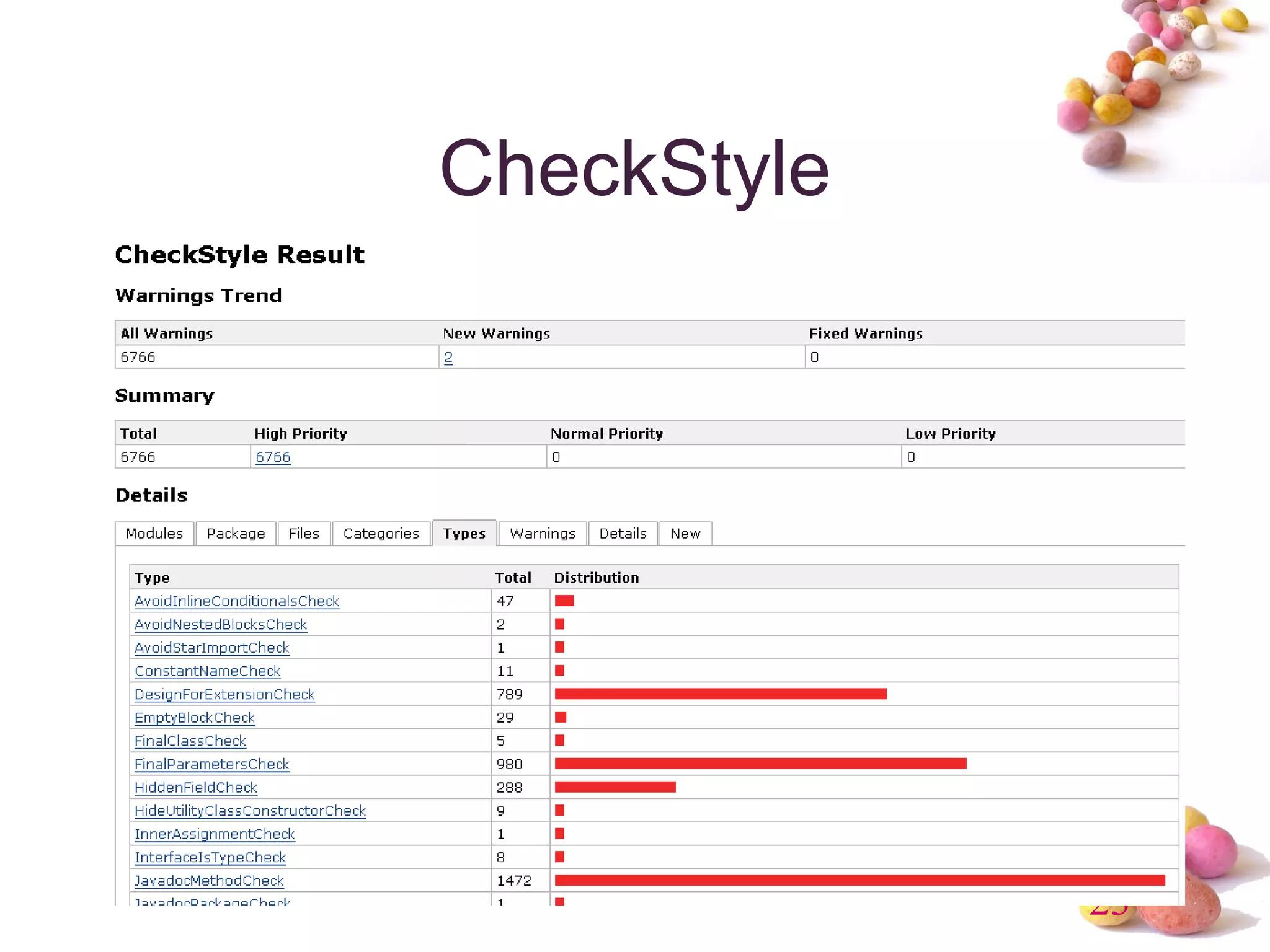
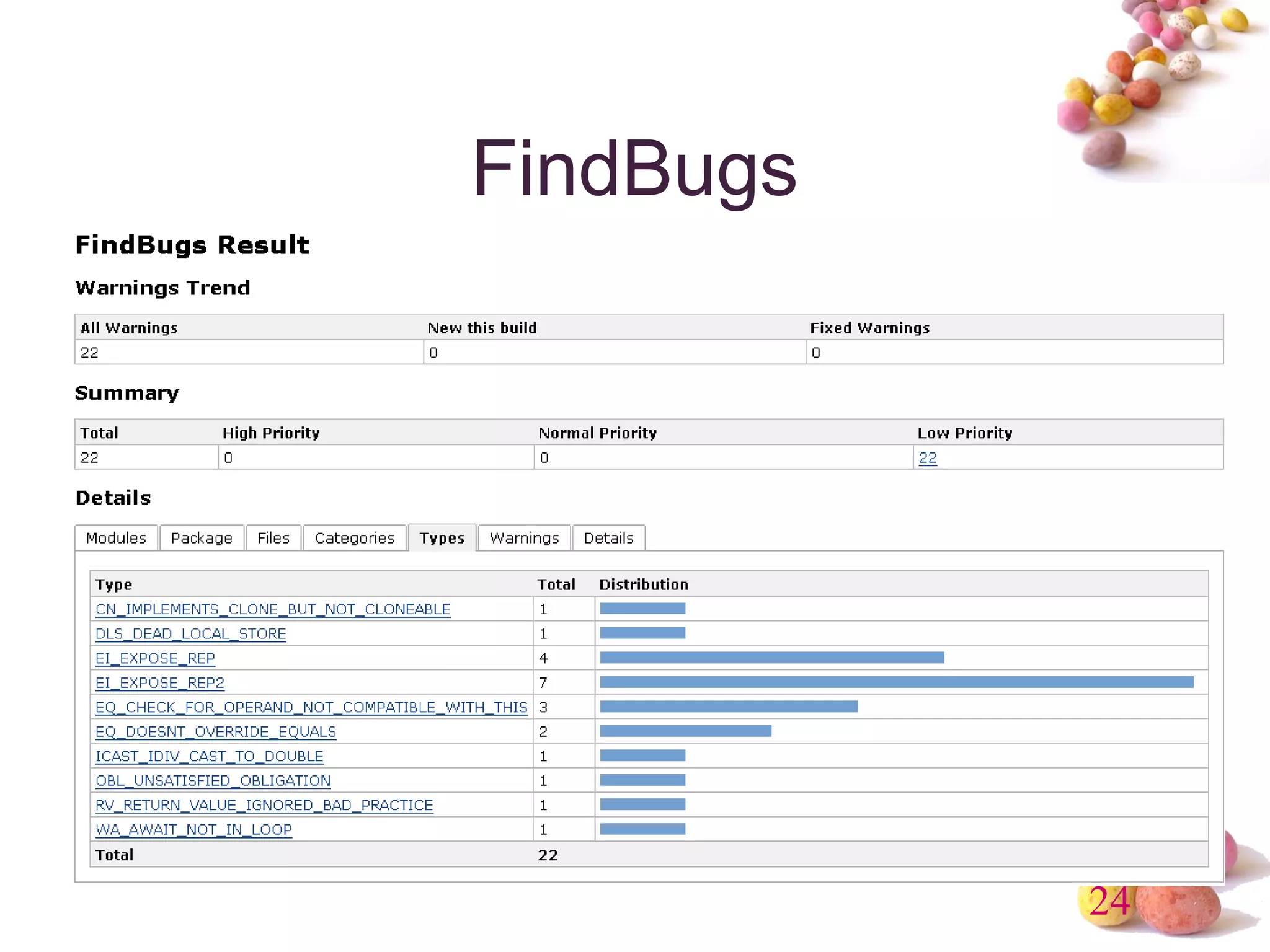
• Static Code Analysis 
– Checkstyle, PMD, Findbugs, Compiler 
Warning 
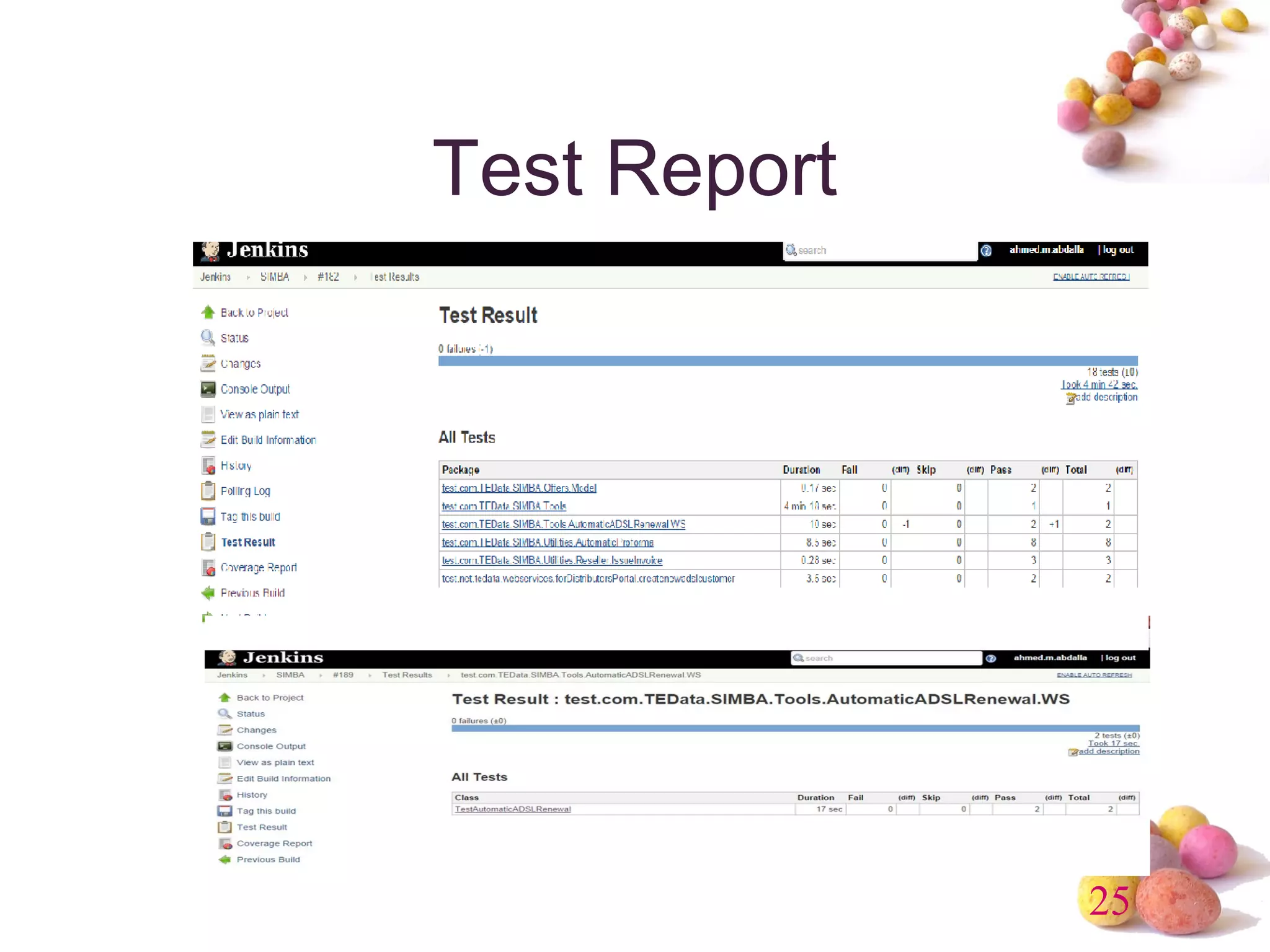
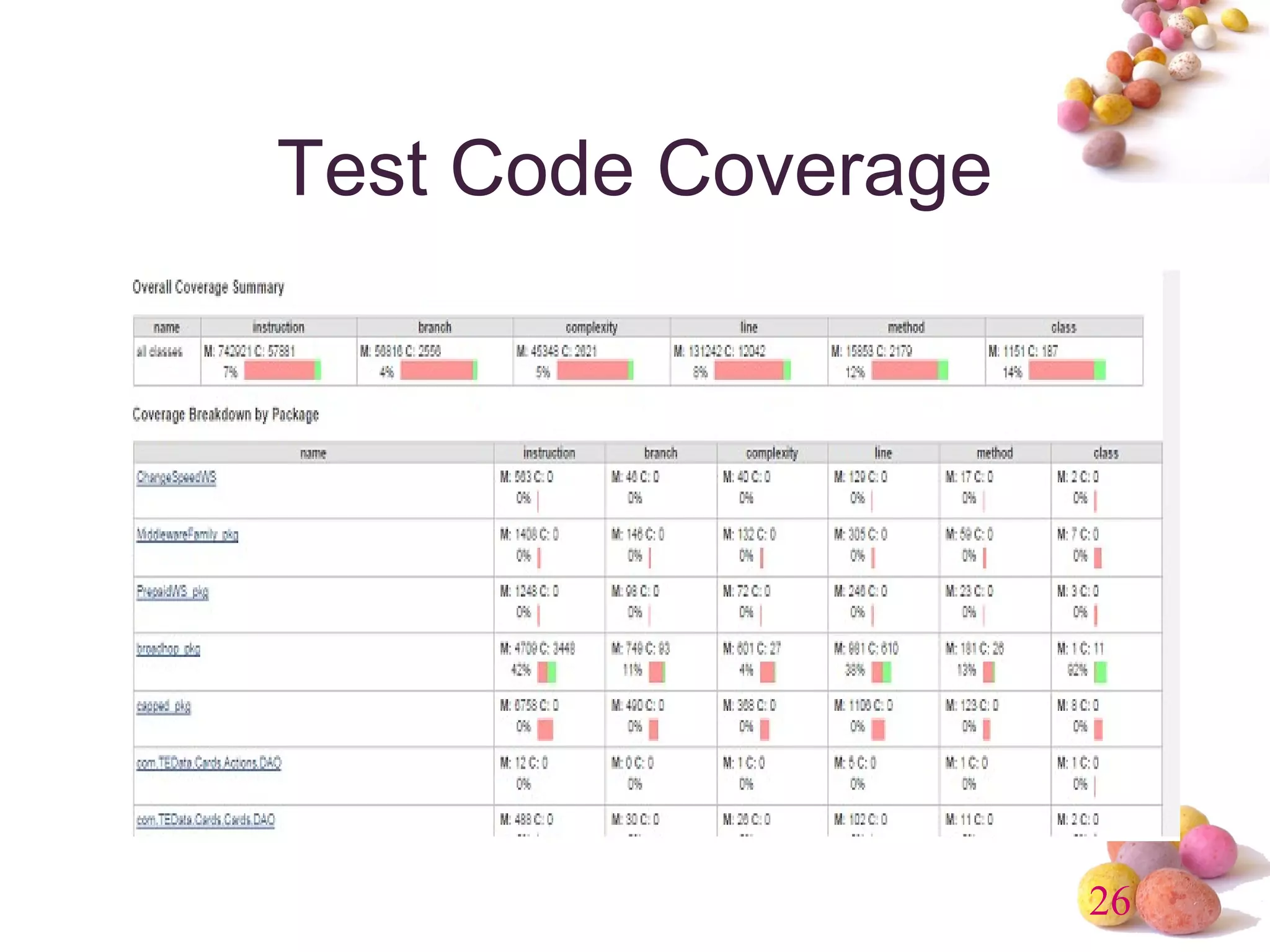
• Test Report & Code Coverage 
– JUnit, TestNG, Cobertura, Clover 
• Open Tasks
23 
CheckStyle
24 
FindBugs
25 
Test Report
26 
Test Code Coverage
27 
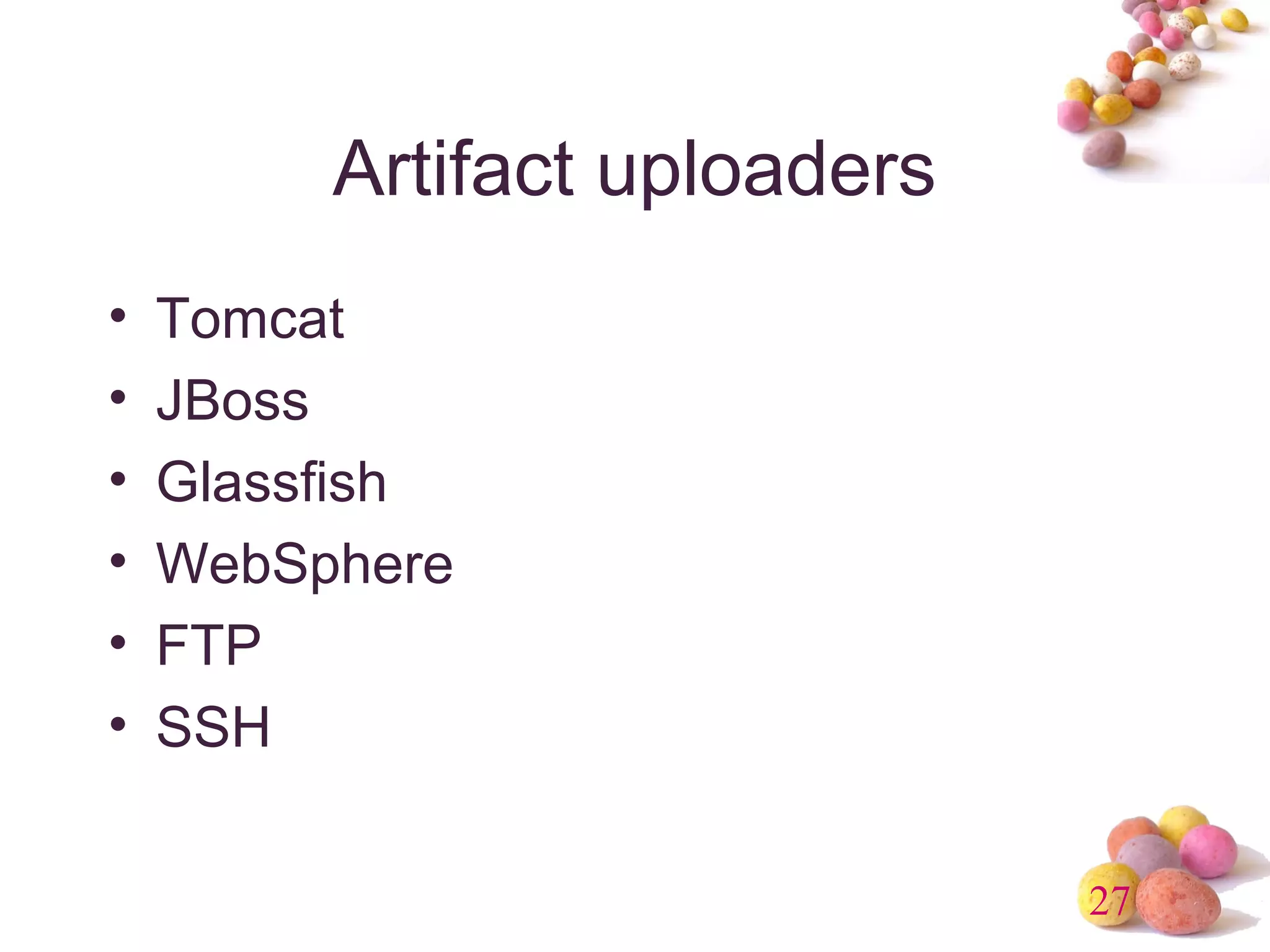
Artifact uploaders 
• Tomcat 
• JBoss 
• Glassfish 
• WebSphere 
• FTP 
• SSH
28 
UI Enhancement 
• Dashboard 
• Sectioned view 
• iPhone/Android
29 
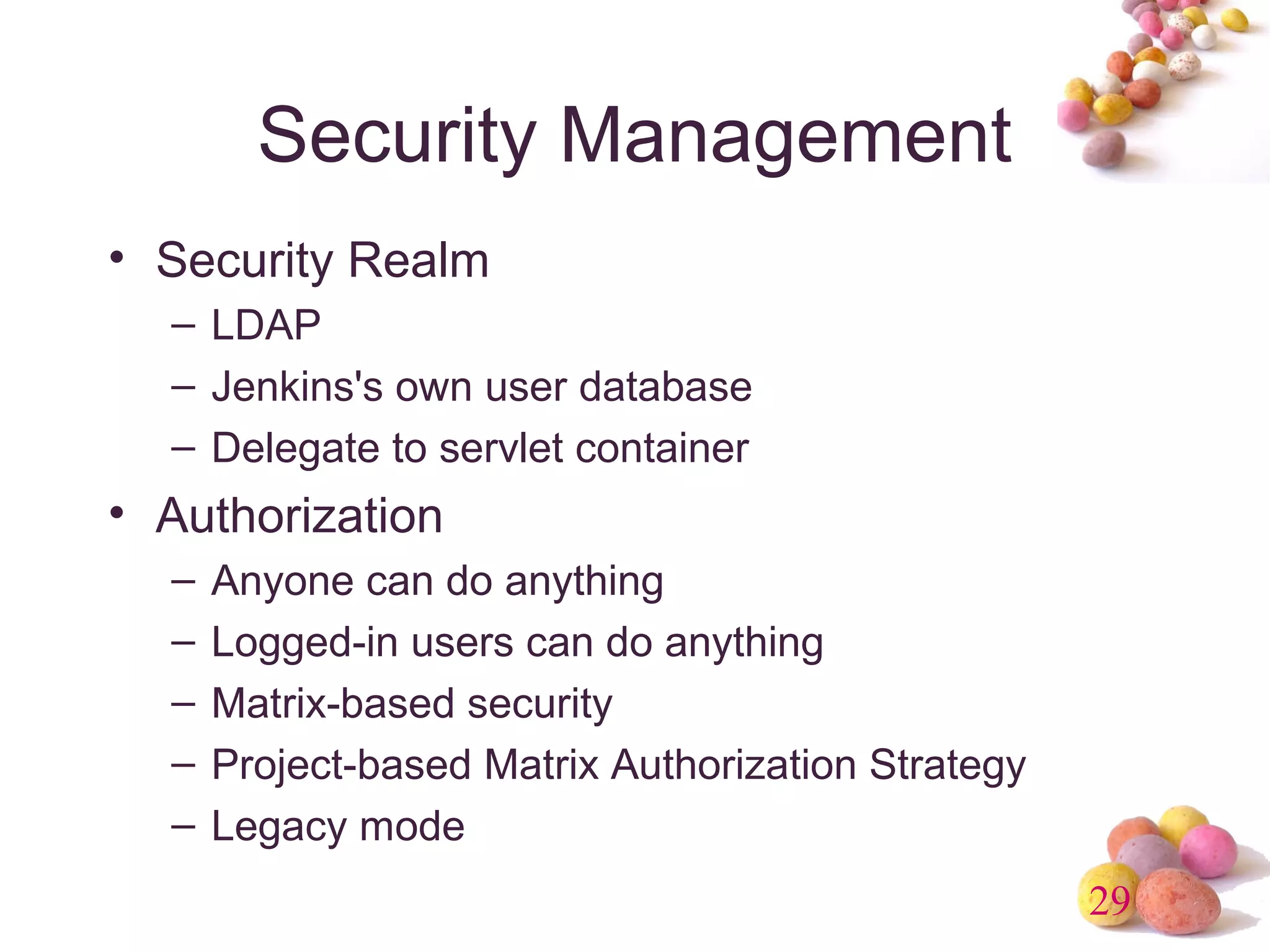
Security Management 
• Security Realm 
– LDAP 
– Jenkins's own user database 
– Delegate to servlet container 
• Authorization 
– Anyone can do anything 
– Logged-in users can do anything 
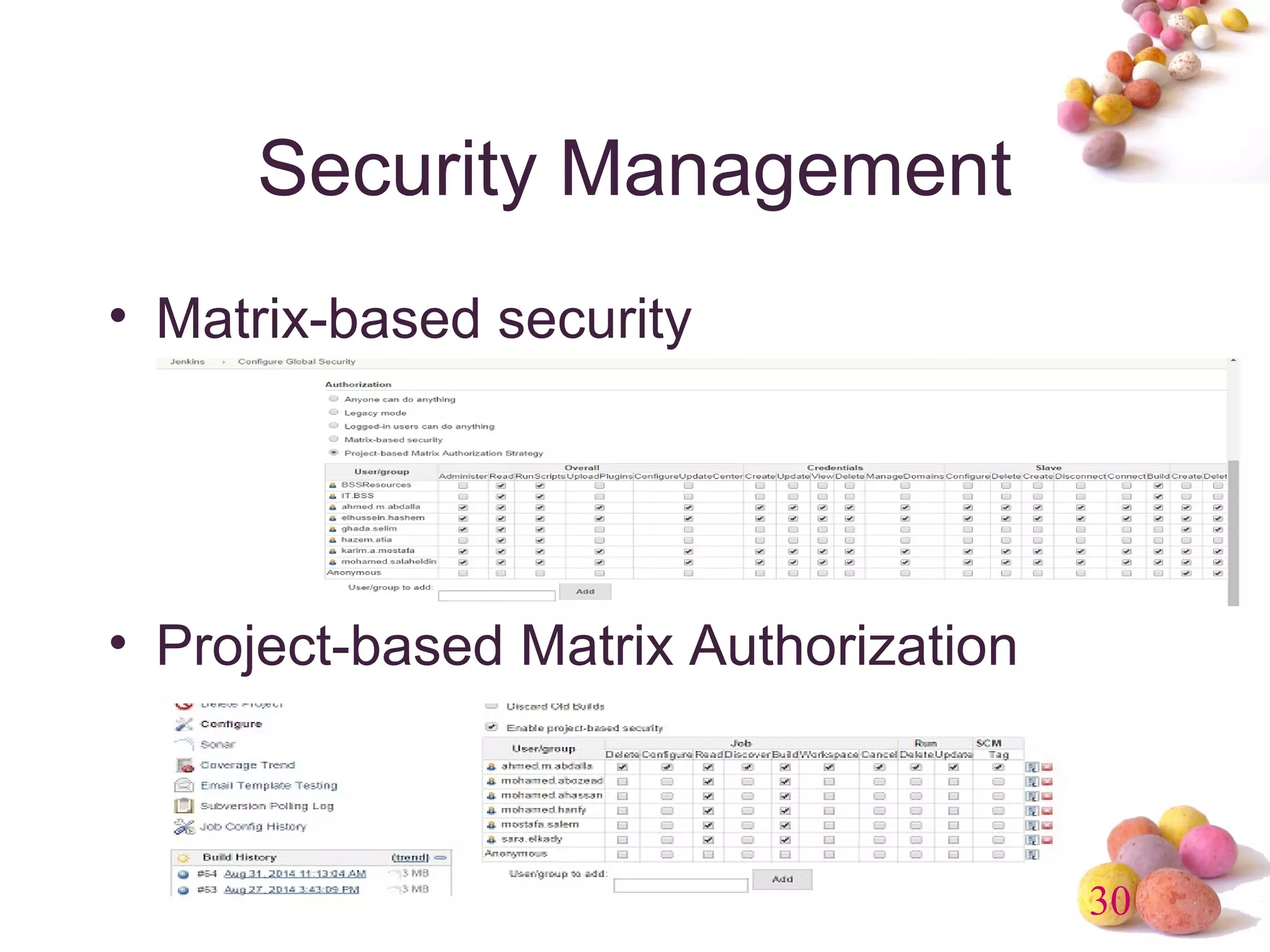
– Matrix-based security 
– Project-based Matrix Authorization Strategy 
– Legacy mode
30 
Security Management 
• Matrix-based security 
• Project-based Matrix Authorization
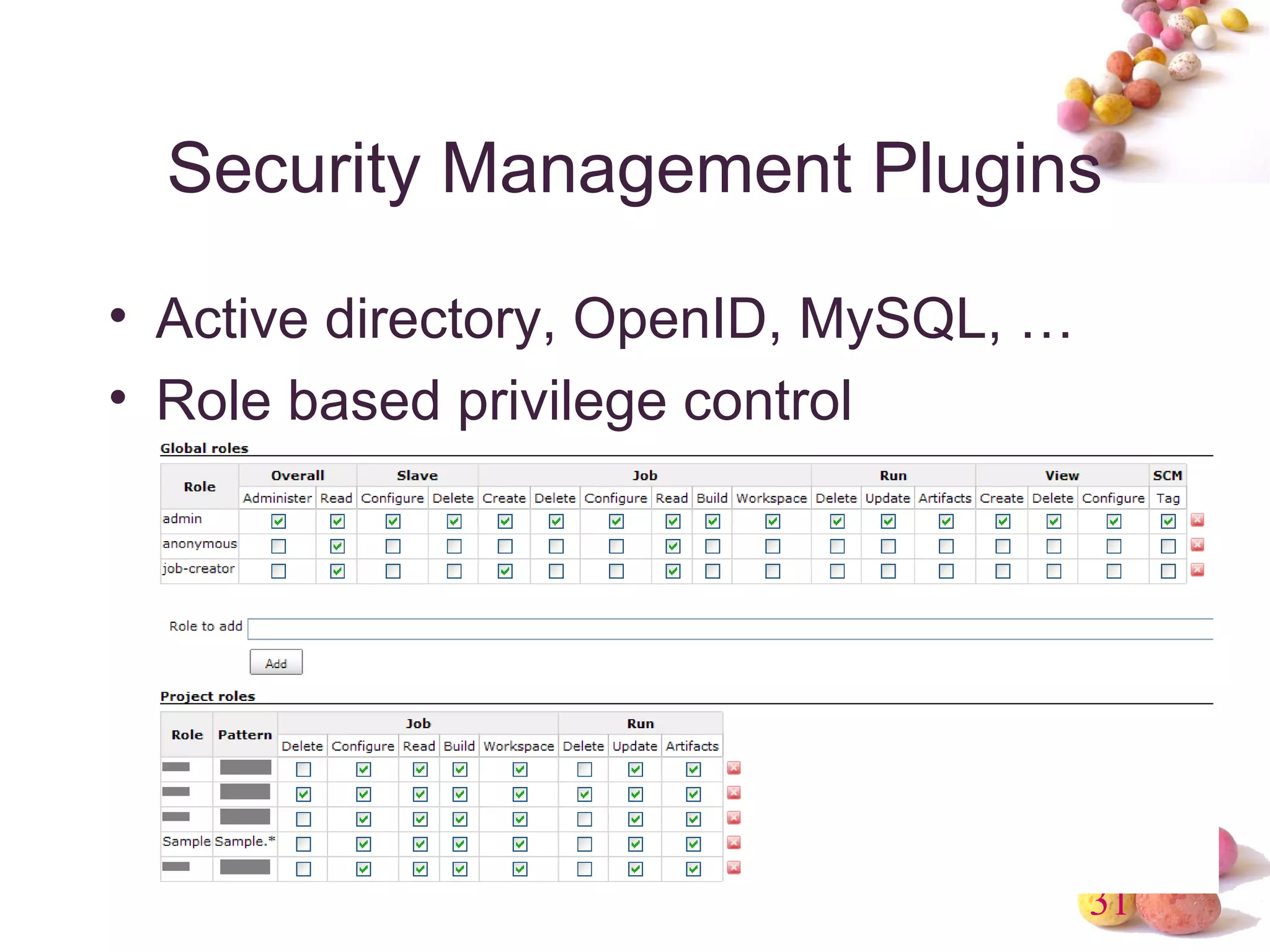
Security Management Plugins 
• Active directory, OpenID, MySQL, … 
• Role based privilege control 
31
32 
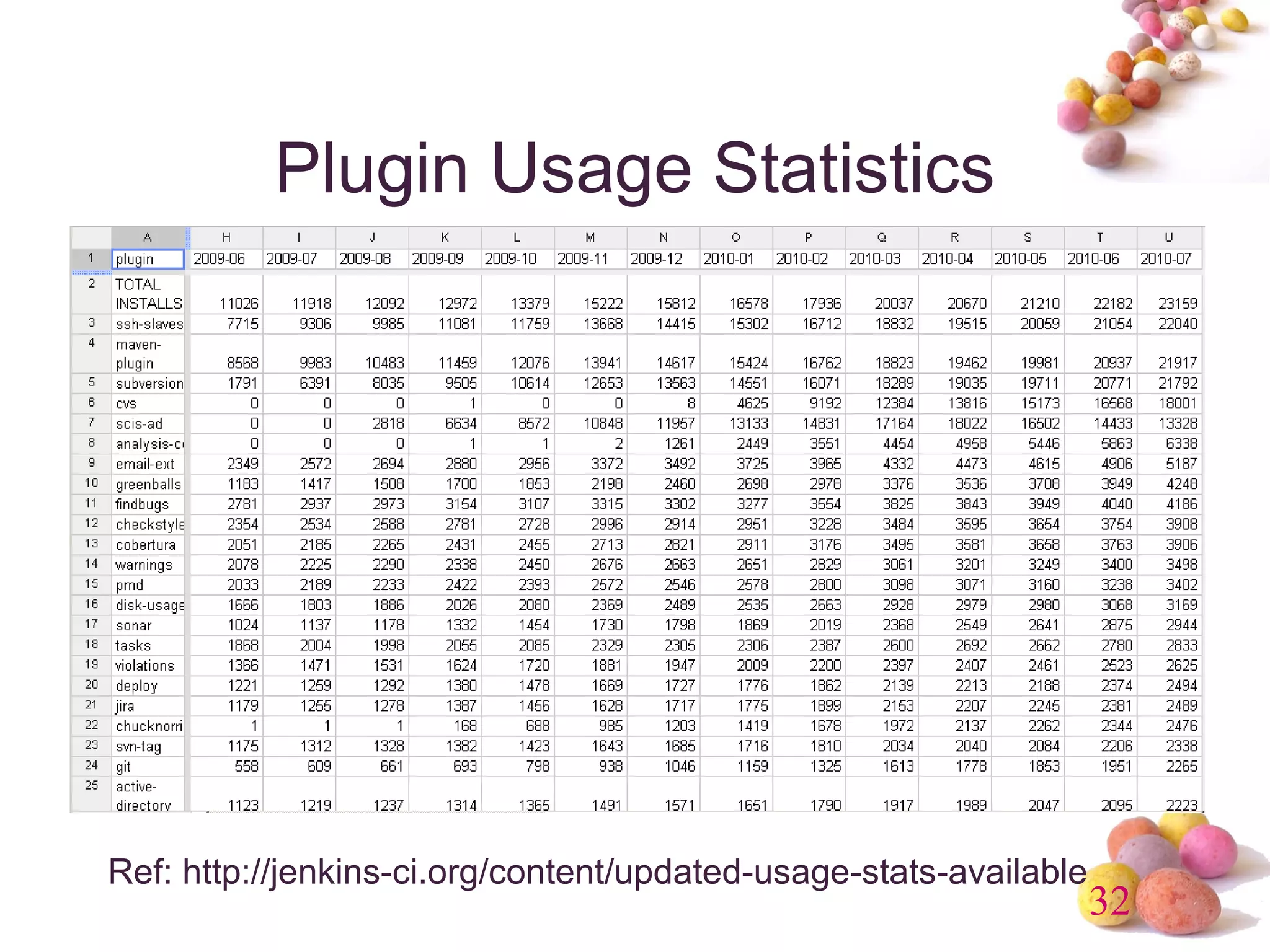
Plugin Usage Statistics 
Ref: http://jenkins-ci.org/content/updated-usage-stats-available
Demo
34 
Questions & Answers

Jenkins Overview

  • 1.
    Continuous Integration (Jenkins) Ahmed Gomaa 22nd Oct 2014
  • 2.
    2 Agenda •What’s Continuous Integration • Jenkins –Features –Plugin –Security Management • Demo • Q&A
  • 3.
    3 What’s Continuous Integration? • In software engineering, continuous integration (CI) implements continuous processes of applying quality control - small pieces of effort, applied frequently. Continuous integration aims to improve the quality of software, and to reduce the time taken to deliver it, by replacing the traditional practice of applying quality control after completing all development. Ref: http://en.wikipedia.org/wiki/Continuous_integration
  • 4.
    4 History •Continuous Integration emerged in the Extreme Programming (XP) community, and XP advocates Martin Fowler and Kent Beck first wrote about continuous integration circa 1999.
  • 5.
    5 Continuous Integration • Continuous Integration is a software development practice where members of a team integrate their work frequently, usually each person integrates at least daily - leading to multiple integrations per day. Each integration is verified by an automated build (including test) to detect integration errors as quickly as possible. -- Martin Fowler Ref: http://martinfowler.com/articles/continuousIntegration.html
  • 6.
    Why Continuous Integration? • Integration is hard, effort increase exponentially with 6 – Number of components – Number of bugs – Time since last integration Ref: http://www.slideshare.net/carlo.bonamico/continuous-integration-with-hudson
  • 7.
    Continuous Integration Benefit • Project Management 7 – Detect system development problems earlier – Reduce risks of cost, schedule, and budget • Code Quality – Measurable and visible code quality – Continuous automatic regression unit test
  • 8.
  • 9.
    9 Best Practiceof CI • Single Source Repository. • Automate the Build and Test • Everyone Commits Every Day • Keep the Build Fast • Everyone can see what's happening • Automate Deployment (Optional)
  • 10.
    10 What’s Jenkins 1.An open source CI server 2.More then 85000 installations (May 2014) 3.Plug-in extensibility (Over 900 plugins) 4.MIT license
  • 11.
    Continuous Integration Overview 11 Ref: http://www.javaworld.com/javaworld/jw-12-2008/images/CIOverview.jpg
  • 12.
    12 Jenkins Features • Trigger a build • Get source code from repository • Automatically build and test • Generate report & notify • Deploy • Distributed build
  • 13.
    13 Jenkins Requirement • Web Server (Tomcat, WebLogic, …) • Build tool (Maven, Ant) • SCM (Git, Svn, Cvs, …)
  • 14.
    14 Jenkins Plugins • Build triggers • Source code management • Build tools • Build notifiers • Build reports • Artifact uploaders • UI plugins • Authentication and user management
  • 15.
    15 Build Trigger • Manually click build button • Build periodically • Build whenever a SNAPSHOT dependency is built • Build after other projects are built • Poll SCM • IRC, Jabber, …
  • 16.
    16 Get SourceCode (1/2) • CVS (build-in) • SVN (build-in) • GIT (requires Git) • ClearCase (requires ClearCase) • Mercurial, PVCS, VSS, …
  • 17.
    17 Get SourceCode (2/2) • Get current snapshot • Get baseline (tag)
  • 18.
  • 19.
    19 Build Tools • Java – Maven (build-in), Ant, Gradle • .Net – MSBuild, PowerShell • Shell script – Python, Ruby, Groovy
  • 20.
    20 Build Wrapper • Build name (version no) setter • Virtual machine (VMWare, Virtual Box) • Set environment variable • ClearCase release plugin • …
  • 21.
    21 Build Notifier • E-mail • Twitter • Jabber • IRC • RSS • Google calendar • …
  • 22.
    22 Build Report • Static Code Analysis – Checkstyle, PMD, Findbugs, Compiler Warning • Test Report & Code Coverage – JUnit, TestNG, Cobertura, Clover • Open Tasks
  • 23.
  • 24.
  • 25.
  • 26.
    26 Test CodeCoverage
  • 27.
    27 Artifact uploaders • Tomcat • JBoss • Glassfish • WebSphere • FTP • SSH
  • 28.
    28 UI Enhancement • Dashboard • Sectioned view • iPhone/Android
  • 29.
    29 Security Management • Security Realm – LDAP – Jenkins's own user database – Delegate to servlet container • Authorization – Anyone can do anything – Logged-in users can do anything – Matrix-based security – Project-based Matrix Authorization Strategy – Legacy mode
  • 30.
    30 Security Management • Matrix-based security • Project-based Matrix Authorization
  • 31.
    Security Management Plugins • Active directory, OpenID, MySQL, … • Role based privilege control 31
  • 32.
    32 Plugin UsageStatistics Ref: http://jenkins-ci.org/content/updated-usage-stats-available
  • 33.
  • 34.

Editor's Notes