JAVA Database Connectivity
(JDBC)
Dr. Satish M.,
Associate Professor – CSE,
GMRIT, Rajam
JSP application development: Conditional processing
display values using an expression to set an attribute,
Declaring variables and methods, sharing data between
JSP pages, Requests and users passing control and data
between pages, Sharing sessions and application data,
memory usage considerations
Database Access: Database Programming using JDBC,
javax.sql. package; Accessing MySQL database- Accessing
MS Access database- Accessing a Database from a Html
Page
JSP Custom tags-Custom tag API-Custom URI
UNIT-IV 10+3 hours
Introduction
JDBC is a Java language API that provides access
to databases which utilize the Structured Query
Language(SQL)
SQL DB applications can be entirely written in
Java.
The majority of the code of these applications can
be database neutral by utilizing the SQL that is not
vendor specific
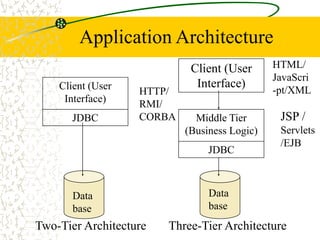
Application Architecture
Client (User
Interface)
JDBC
Data
base
Two-Tier Architecture
Middle Tier
(Business Logic)
JDBC
Data
base
Three-Tier Architecture
Client (User
Interface)
JSP /
Servlets
/EJB
HTTP/
RMI/
CORBA
HTML/
JavaScri
-pt/XML
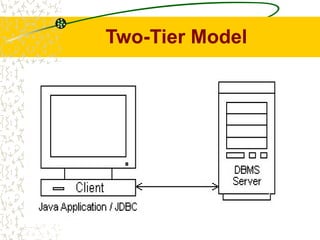
Two-Tier Model
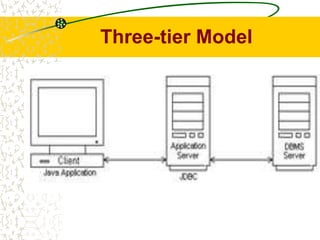
Three-tier Model
JDBC Driver
A JDBC driver implements the interface to a
particular database
This allows you to develop your program in a
database-independent way and connect to a
specific database engine by plugging in the
appropriate JDBC driver at deployment time
There are several kinds of JDBC drivers
JDBC-ODBC bridge drivers are useful for small
business applications
ODBC(Open Database Connectivity) is a
technology developed by Microsoft to allow
generic access to a DBMS on Windows platform
JDBC Driver Types
The four structurally different types of JDBC
drivers are as follows:
Type 1: JDBC-ODBC bridge plus ODBC
driver
Type 2: Native-API partly Java driver
Type 3:JDBC-Net pure Java driver
Type 4: Native-protocol pure Java driver
Type 1: JDBC-ODBC bridge
plus ODBC driver
The JDBC-ODBC bridge product provides
JDBC access via ODBC drivers. ODBC
(Open Database Connectivity) predates
JDBC and is widely used to connect to
databases in a non-Java environment.
ODBC is probably the most widely available
programming interface for accessing
relational databases.
Type 2: Native-API
partly Java driver
Type 2 drivers use a native API to communicate with a
database system. Java Native methods are used to
invoke the API functions that perform database
operations. A big advantage of Type 2 drivers is that
they are generally faster than Type 1 drivers.
The primary disadvantages of Type 2 drivers are as
follows:
Type 2 drivers require native code on the target
machine.
The Java Native Interface on which they depend is not
consistently implemented among different vendors of
Java virtual machines.
Type 3:JDBC-Net pure
Java driver
Type 3 drivers translate JDBC calls into a DBMS
independent net protocol that is then translated to
a DBMS protocol by a server.
Advantages of Type 3 drivers are the following:
Type 3 drivers do not require any native binary
code on the client.
Type 3 drivers do not need client installation.
Type 3 drivers support several networking
options, such as HTTP tunneling.
A major drawback of Type 3 drivers is that they
can be difficult to set up since the architecture is
complicated by the network interface.
Type 4: Native-protocol
pure Java driver
The Type 4 driver is a native protocol, 100-
percent Java driver. This allows direct calls from
a Java client to a DBMS server. Because the
Type 4 driver is written in 100-percent Java, it
requires no configuration on the client machine
other than telling your application where to find
the driver.
This allows a direct call from the client machine
to the DBMS server. Many of these protocols are
proprietary, so these drivers are provided by the
database vendors themselves.
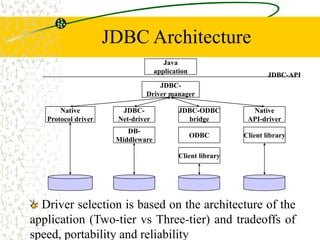
JDBC Architecture
Java
application
JDBC-
Driver manager
Native
Protocol driver
JDBC-
Net-driver
Native
API-driver
JDBC-ODBC
bridge
Client library
DB-
Middleware
ODBC
Client library
JDBC-API
Driver selection is based on the architecture of the
application (Two-tier vs Three-tier) and tradeoffs of
speed, portability and reliability
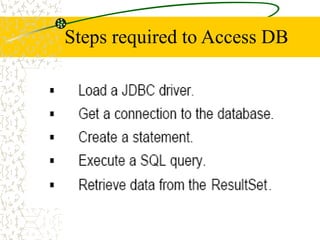
Steps required to Access DB
Driver Manager
The java.sql.DriverManager provides basic
services for managing JDBC drivers During
initialization, the DriverManager attempts to load
the driver classes referenced in the "jdbc.drivers"
system property.
Alternatively, a program can explicitly load JDBC
drivers at any time using Class.forName(). This
allows a user to customize the JDBC drivers their
applications use.
A newly loaded driver class should call
registerDriver() to make itself known to the
DriverManager. Usually, the driver does this
internally.
ODBC Data Source Administrator
You can use ODBC Data Source Administrator to
configure your applications so that they can get data
from a variety of database management systems.
Using Data Sources (ODBC)
You can use Data Sources Open Database Connectivity
(ODBC) to access data from a variety of database
management systems. For example, if you have a
program that accesses data in a SQL database, Data
Sources (ODBC) will let you use the same program to
access data in a Visual FoxPro database. To do this, you
must add software components called drivers to your
system. Data Sources (ODBC) helps you add and
configure these drivers.
Loading a Driver
import java.sql.* ;
Import the Java
SQL packages
Load the JDBC Driver
class SampleJDBC
{
public static void main(String args[])
{
Class.forName("sun.jdbc.odbc.JdbcOdbcDriver");
/* throws ClassNotFoundException, if the class
can’t be located */
Connection
A Connection object represents a connection
with a database. A connection session
includes the SQL statements that are
executed and the results that are returned
over that connection.
A single application can have one or more
connections with a single database, or it can
have connections with many different
databases.
Opening a connection
The standard way to establish a
connection with a database is to call the
method getConnection() on either a
DataSource or a DriverManager. The
Driver method connect uses this URL to
establish the connection.
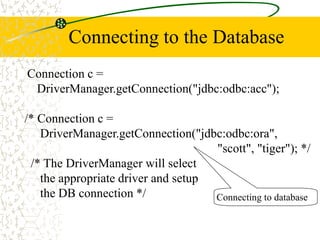
Connecting to the Database
Connection c =
DriverManager.getConnection("jdbc:odbc:acc");
/* Connection c =
DriverManager.getConnection("jdbc:odbc:ora",
"scott", "tiger"); */
/* The DriverManager will select
the appropriate driver and setup
the DB connection */ Connecting to database
SQL Statements
Once a connection is established, it is used to
pass SQL statements to the database. Since
there are no restrictions imposed on the kinds of
SQL statements that may be sent to a DBMS
using JDBC, the user has a great deal of
flexibility to use database-specific statements or
even non-SQL statements.
The JDBC core API provides these three classes
for sending SQL statements to the database:
SQL Statements cont…
Statement: A Statement object is used for
sending simple SQL statements. Statements are
created by the method createStatement().
PreparedStatement: A PreparedStatement is a
SQL statement that is precompiled and stored in
a PreparedStatement object. This object can
then be used to execute this statement multiple
times.
CallableStatement: CallableStatement is used
to execute SQL stored procedures.
CallableStatements are created by the method
prepareCall().
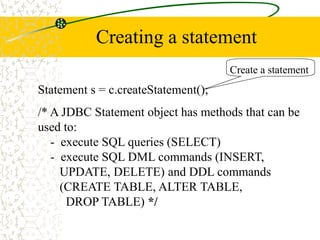
Creating a statement
Statement s = c.createStatement();
/* A JDBC Statement object has methods that can be
used to:
- execute SQL queries (SELECT)
- execute SQL DML commands (INSERT,
UPDATE, DELETE) and DDL commands
(CREATE TABLE, ALTER TABLE,
DROP TABLE) */
Create a statement
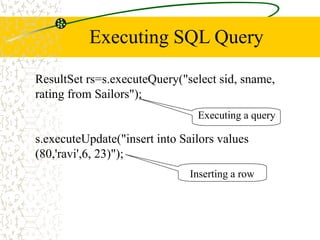
Executing SQL Query
ResultSet rs=s.executeQuery("select sid, sname,
rating from Sailors");
s.executeUpdate("insert into Sailors values
(80,'ravi',6, 23)");
Executing a query
Inserting a row
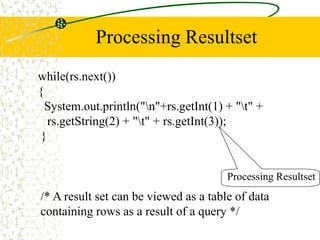
Processing Resultset
while(rs.next())
{
System.out.println("n"+rs.getInt(1) + "t" +
rs.getString(2) + "t" + rs.getInt(3));
}
Processing Resultset
/* A result set can be viewed as a table of data
containing rows as a result of a query */
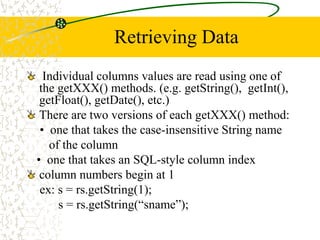
Retrieving Data
Individual columns values are read using one of
the getXXX() methods. (e.g. getString(), getInt(),
getFloat(), getDate(), etc.)
There are two versions of each getXXX() method:
• one that takes the case-insensitive String name
of the column
• one that takes an SQL-style column index
column numbers begin at 1
ex: s = rs.getString(1);
s = rs.getString(“sname”);
ResultSet MetaData
ResultSetMetaData rm=rs.getMetaData();
/* Metadata is data about data.
The resultset metadata contains
information about the columns
in the result set */
for(int i=1;i<=rm.getColumnCount();i++)
System.out.print(rm.getColumnName(i)+ "t");
Retrieving Column Info
No.of Columns &
Names of Columns
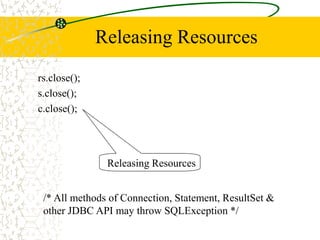
Releasing Resources
rs.close();
s.close();
c.close();
Releasing Resources
/* All methods of Connection, Statement, ResultSet &
other JDBC API may throw SQLException */
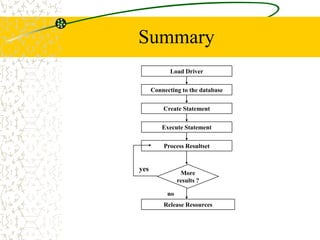
Summary
Load Driver
Connecting to the database
Create Statement
Execute Statement
Process Resultset
More
results ?
Release Resources
no
yes
Prepared Statements
If executing similar SQL statements multiple
times, using “prepared statement” may be more
efficient
Statement is created in standard form that is sent
to the database for compilation before actually
being used
Each time you use it, you simply replace some of
the marked parameters using the setXxx methods
Conclusion
Through JDBC we can create very good
Java applications which need to access
databases
JDBC is used with JSP/EJB to create web
applications
Than ‘Q’ ueries?

JDBC.ppt

  • 1.
    JAVA Database Connectivity (JDBC) Dr.Satish M., Associate Professor – CSE, GMRIT, Rajam
  • 2.
    JSP application development:Conditional processing display values using an expression to set an attribute, Declaring variables and methods, sharing data between JSP pages, Requests and users passing control and data between pages, Sharing sessions and application data, memory usage considerations Database Access: Database Programming using JDBC, javax.sql. package; Accessing MySQL database- Accessing MS Access database- Accessing a Database from a Html Page JSP Custom tags-Custom tag API-Custom URI UNIT-IV 10+3 hours
  • 3.
    Introduction JDBC is aJava language API that provides access to databases which utilize the Structured Query Language(SQL) SQL DB applications can be entirely written in Java. The majority of the code of these applications can be database neutral by utilizing the SQL that is not vendor specific
  • 4.
    Application Architecture Client (User Interface) JDBC Data base Two-TierArchitecture Middle Tier (Business Logic) JDBC Data base Three-Tier Architecture Client (User Interface) JSP / Servlets /EJB HTTP/ RMI/ CORBA HTML/ JavaScri -pt/XML
  • 5.
  • 6.
  • 7.
    JDBC Driver A JDBCdriver implements the interface to a particular database This allows you to develop your program in a database-independent way and connect to a specific database engine by plugging in the appropriate JDBC driver at deployment time There are several kinds of JDBC drivers JDBC-ODBC bridge drivers are useful for small business applications ODBC(Open Database Connectivity) is a technology developed by Microsoft to allow generic access to a DBMS on Windows platform
  • 8.
    JDBC Driver Types Thefour structurally different types of JDBC drivers are as follows: Type 1: JDBC-ODBC bridge plus ODBC driver Type 2: Native-API partly Java driver Type 3:JDBC-Net pure Java driver Type 4: Native-protocol pure Java driver
  • 9.
    Type 1: JDBC-ODBCbridge plus ODBC driver The JDBC-ODBC bridge product provides JDBC access via ODBC drivers. ODBC (Open Database Connectivity) predates JDBC and is widely used to connect to databases in a non-Java environment. ODBC is probably the most widely available programming interface for accessing relational databases.
  • 10.
    Type 2: Native-API partlyJava driver Type 2 drivers use a native API to communicate with a database system. Java Native methods are used to invoke the API functions that perform database operations. A big advantage of Type 2 drivers is that they are generally faster than Type 1 drivers. The primary disadvantages of Type 2 drivers are as follows: Type 2 drivers require native code on the target machine. The Java Native Interface on which they depend is not consistently implemented among different vendors of Java virtual machines.
  • 11.
    Type 3:JDBC-Net pure Javadriver Type 3 drivers translate JDBC calls into a DBMS independent net protocol that is then translated to a DBMS protocol by a server. Advantages of Type 3 drivers are the following: Type 3 drivers do not require any native binary code on the client. Type 3 drivers do not need client installation. Type 3 drivers support several networking options, such as HTTP tunneling. A major drawback of Type 3 drivers is that they can be difficult to set up since the architecture is complicated by the network interface.
  • 12.
    Type 4: Native-protocol pureJava driver The Type 4 driver is a native protocol, 100- percent Java driver. This allows direct calls from a Java client to a DBMS server. Because the Type 4 driver is written in 100-percent Java, it requires no configuration on the client machine other than telling your application where to find the driver. This allows a direct call from the client machine to the DBMS server. Many of these protocols are proprietary, so these drivers are provided by the database vendors themselves.
  • 13.
    JDBC Architecture Java application JDBC- Driver manager Native Protocoldriver JDBC- Net-driver Native API-driver JDBC-ODBC bridge Client library DB- Middleware ODBC Client library JDBC-API Driver selection is based on the architecture of the application (Two-tier vs Three-tier) and tradeoffs of speed, portability and reliability
  • 14.
  • 15.
    Driver Manager The java.sql.DriverManagerprovides basic services for managing JDBC drivers During initialization, the DriverManager attempts to load the driver classes referenced in the "jdbc.drivers" system property. Alternatively, a program can explicitly load JDBC drivers at any time using Class.forName(). This allows a user to customize the JDBC drivers their applications use. A newly loaded driver class should call registerDriver() to make itself known to the DriverManager. Usually, the driver does this internally.
  • 16.
    ODBC Data SourceAdministrator You can use ODBC Data Source Administrator to configure your applications so that they can get data from a variety of database management systems. Using Data Sources (ODBC) You can use Data Sources Open Database Connectivity (ODBC) to access data from a variety of database management systems. For example, if you have a program that accesses data in a SQL database, Data Sources (ODBC) will let you use the same program to access data in a Visual FoxPro database. To do this, you must add software components called drivers to your system. Data Sources (ODBC) helps you add and configure these drivers.
  • 17.
    Loading a Driver importjava.sql.* ; Import the Java SQL packages Load the JDBC Driver class SampleJDBC { public static void main(String args[]) { Class.forName("sun.jdbc.odbc.JdbcOdbcDriver"); /* throws ClassNotFoundException, if the class can’t be located */
  • 18.
    Connection A Connection objectrepresents a connection with a database. A connection session includes the SQL statements that are executed and the results that are returned over that connection. A single application can have one or more connections with a single database, or it can have connections with many different databases.
  • 19.
    Opening a connection Thestandard way to establish a connection with a database is to call the method getConnection() on either a DataSource or a DriverManager. The Driver method connect uses this URL to establish the connection.
  • 20.
    Connecting to theDatabase Connection c = DriverManager.getConnection("jdbc:odbc:acc"); /* Connection c = DriverManager.getConnection("jdbc:odbc:ora", "scott", "tiger"); */ /* The DriverManager will select the appropriate driver and setup the DB connection */ Connecting to database
  • 21.
    SQL Statements Once aconnection is established, it is used to pass SQL statements to the database. Since there are no restrictions imposed on the kinds of SQL statements that may be sent to a DBMS using JDBC, the user has a great deal of flexibility to use database-specific statements or even non-SQL statements. The JDBC core API provides these three classes for sending SQL statements to the database:
  • 22.
    SQL Statements cont… Statement:A Statement object is used for sending simple SQL statements. Statements are created by the method createStatement(). PreparedStatement: A PreparedStatement is a SQL statement that is precompiled and stored in a PreparedStatement object. This object can then be used to execute this statement multiple times. CallableStatement: CallableStatement is used to execute SQL stored procedures. CallableStatements are created by the method prepareCall().
  • 23.
    Creating a statement Statements = c.createStatement(); /* A JDBC Statement object has methods that can be used to: - execute SQL queries (SELECT) - execute SQL DML commands (INSERT, UPDATE, DELETE) and DDL commands (CREATE TABLE, ALTER TABLE, DROP TABLE) */ Create a statement
  • 24.
    Executing SQL Query ResultSetrs=s.executeQuery("select sid, sname, rating from Sailors"); s.executeUpdate("insert into Sailors values (80,'ravi',6, 23)"); Executing a query Inserting a row
  • 25.
    Processing Resultset while(rs.next()) { System.out.println("n"+rs.getInt(1) +"t" + rs.getString(2) + "t" + rs.getInt(3)); } Processing Resultset /* A result set can be viewed as a table of data containing rows as a result of a query */
  • 26.
    Retrieving Data Individual columnsvalues are read using one of the getXXX() methods. (e.g. getString(), getInt(), getFloat(), getDate(), etc.) There are two versions of each getXXX() method: • one that takes the case-insensitive String name of the column • one that takes an SQL-style column index column numbers begin at 1 ex: s = rs.getString(1); s = rs.getString(“sname”);
  • 27.
    ResultSet MetaData ResultSetMetaData rm=rs.getMetaData(); /*Metadata is data about data. The resultset metadata contains information about the columns in the result set */ for(int i=1;i<=rm.getColumnCount();i++) System.out.print(rm.getColumnName(i)+ "t"); Retrieving Column Info No.of Columns & Names of Columns
  • 28.
    Releasing Resources rs.close(); s.close(); c.close(); Releasing Resources /*All methods of Connection, Statement, ResultSet & other JDBC API may throw SQLException */
  • 29.
    Summary Load Driver Connecting tothe database Create Statement Execute Statement Process Resultset More results ? Release Resources no yes
  • 30.
    Prepared Statements If executingsimilar SQL statements multiple times, using “prepared statement” may be more efficient Statement is created in standard form that is sent to the database for compilation before actually being used Each time you use it, you simply replace some of the marked parameters using the setXxx methods
  • 31.
    Conclusion Through JDBC wecan create very good Java applications which need to access databases JDBC is used with JSP/EJB to create web applications
  • 32.

Editor's Notes