JDBC in JAVA
SQL is plain english
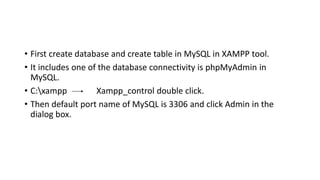
• First create database and create table in MySQL in XAMPP tool.
• It includes one of the database connectivity is phpMyAdmin in
MySQL.
• C:xampp Xampp_control double click.
• Then default port name of MySQL is 3306 and click Admin in the
dialog box.
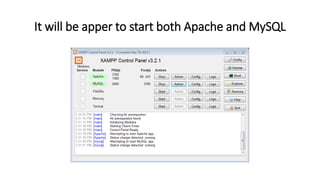
It will be apper to start both Apache and MySQL
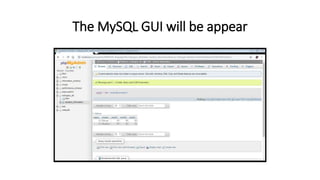
The MySQL GUI will be appear
Steps to connect Database/Table
1. Connect the driver file.
2. Connect with the database.
3. Create statement.
4. Execute Query.
5. Display the data.
1. Connect the driver file
• Device Driver Another hardware to connect communicate have
intermediate software.
• MySQL has provided one jar file. It is less than 1 MB.
• Load the driver file.
• Right click then go to the project properties.
• Go to Java Build Path and Libraries Tab.
• Click Add External Jars Button.
• Choose connector jar.
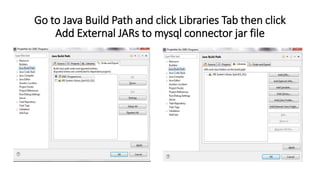
Go to Java Build Path and click Libraries Tab then click
Add External JARs to mysql connector jar file
How to connect database in JAVA to MySQL?
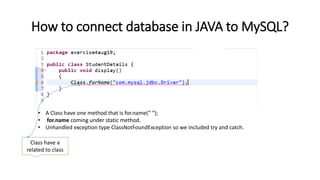
• A Class have one method that is for.name(“ “);
• for.name coming under static method.
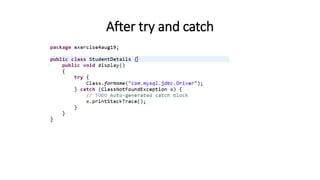
• Unhandled exception type ClassNotFoundException so we included try and catch.
Class have a
related to class
After try and catch
Types of Exception
• Unchecked Exception
• Another name is run time exception it only comes run a program then it will
alerts a exception many exception in run time.
• Checked Exception
• Another name is compile time exception it alerts a exception in typing time.
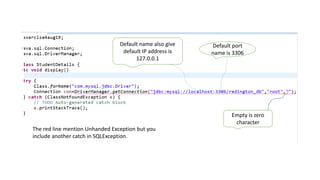
2. Connect with the database
• Driver manager class.
• getConnection(URL,UNAME,PWD) is a static method.
• Eg : URL-Unified Resource that is http://www.google.com is a domain
name and is also a IP address.
• UNAME is root is also default name of username.
• PWD is password that is no password/empty password.
• Connection is interface.
Empty is zero
character
Default name also give
default IP address is
127.0.0.1
Default port
name is 3306
The red line mention Unhanded Exception but you
include another catch in SQLException.
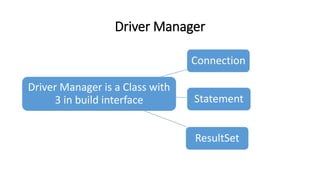
Driver Manager
Driver Manager is a Class with
3 in build interface
Connection
Statement
ResultSet
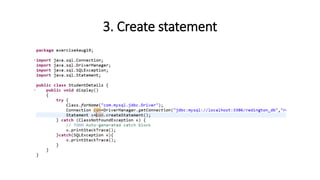
3. Create statement
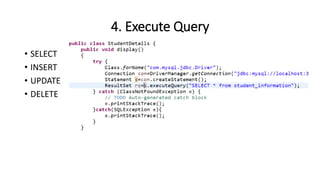
4. Execute Query
• SELECT
• INSERT
• UPDATE
• DELETE
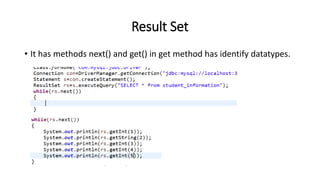
Result Set
• It has methods next() and get() in get method has identify datatypes.
5. Display the data
• It display the current output of the programs.
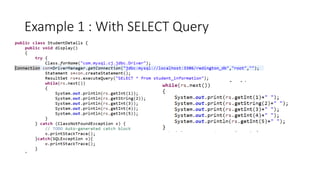
Example 1 : With SELECT Query
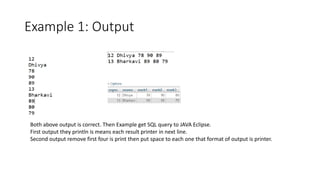
Example 1: Output
Both above output is correct. Then Example get SQL query to JAVA Eclipse.
First output they println is means each result printer in next line.
Second output remove first four is print then put space to each one that format of output is printer.
Connectivity Lines
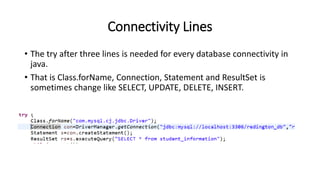
• The try after three lines is needed for every database connectivity in
java.
• That is Class.forName, Connection, Statement and ResultSet is
sometimes change like SELECT, UPDATE, DELETE, INSERT.
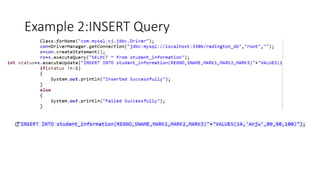
Example 2:INSERT Query
Example 2:Output
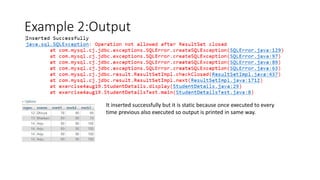
It inserted successfully but it is static because once executed to every
time previous also executed so output is printed in same way.
Example 3:INSERT Query
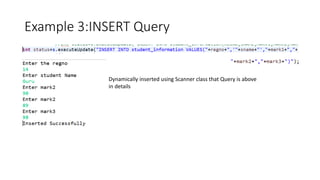
Dynamically inserted using Scanner class that Query is above
in details
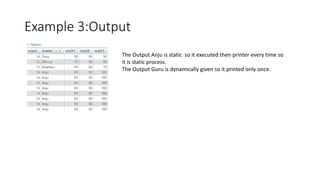
Example 3:Output
The Output Anju is static so it executed then printer every time so
it is static process.
The Output Guru is dynamically given so it printed only once.
Jdbc connectivity to java

Jdbc connectivity to java

  • 1.
    JDBC in JAVA SQLis plain english
  • 2.
    • First createdatabase and create table in MySQL in XAMPP tool. • It includes one of the database connectivity is phpMyAdmin in MySQL. • C:xampp Xampp_control double click. • Then default port name of MySQL is 3306 and click Admin in the dialog box.
  • 3.
    It will beapper to start both Apache and MySQL
  • 4.
    The MySQL GUIwill be appear
  • 5.
    Steps to connectDatabase/Table 1. Connect the driver file. 2. Connect with the database. 3. Create statement. 4. Execute Query. 5. Display the data.
  • 6.
    1. Connect thedriver file • Device Driver Another hardware to connect communicate have intermediate software. • MySQL has provided one jar file. It is less than 1 MB. • Load the driver file. • Right click then go to the project properties. • Go to Java Build Path and Libraries Tab. • Click Add External Jars Button. • Choose connector jar.
  • 7.
    Go to JavaBuild Path and click Libraries Tab then click Add External JARs to mysql connector jar file
  • 8.
    How to connectdatabase in JAVA to MySQL? • A Class have one method that is for.name(“ “); • for.name coming under static method. • Unhandled exception type ClassNotFoundException so we included try and catch. Class have a related to class
  • 9.
  • 10.
    Types of Exception •Unchecked Exception • Another name is run time exception it only comes run a program then it will alerts a exception many exception in run time. • Checked Exception • Another name is compile time exception it alerts a exception in typing time.
  • 11.
    2. Connect withthe database • Driver manager class. • getConnection(URL,UNAME,PWD) is a static method. • Eg : URL-Unified Resource that is http://www.google.com is a domain name and is also a IP address. • UNAME is root is also default name of username. • PWD is password that is no password/empty password. • Connection is interface.
  • 12.
    Empty is zero character Defaultname also give default IP address is 127.0.0.1 Default port name is 3306 The red line mention Unhanded Exception but you include another catch in SQLException.
  • 13.
    Driver Manager Driver Manageris a Class with 3 in build interface Connection Statement ResultSet
  • 14.
  • 15.
    4. Execute Query •SELECT • INSERT • UPDATE • DELETE
  • 16.
    Result Set • Ithas methods next() and get() in get method has identify datatypes.
  • 17.
    5. Display thedata • It display the current output of the programs.
  • 18.
    Example 1 :With SELECT Query
  • 19.
    Example 1: Output Bothabove output is correct. Then Example get SQL query to JAVA Eclipse. First output they println is means each result printer in next line. Second output remove first four is print then put space to each one that format of output is printer.
  • 20.
    Connectivity Lines • Thetry after three lines is needed for every database connectivity in java. • That is Class.forName, Connection, Statement and ResultSet is sometimes change like SELECT, UPDATE, DELETE, INSERT.
  • 21.
  • 22.
    Example 2:Output It insertedsuccessfully but it is static because once executed to every time previous also executed so output is printed in same way.
  • 23.
    Example 3:INSERT Query Dynamicallyinserted using Scanner class that Query is above in details
  • 24.
    Example 3:Output The OutputAnju is static so it executed then printer every time so it is static process. The Output Guru is dynamically given so it printed only once.