1
Instructor :
Alaeddine Theljani
Intro to Javascript
2
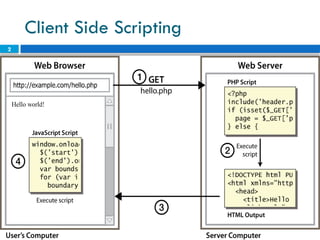
Client Side Scripting
3
Why use client-side programming?
PHP already allows us to create dynamic web pages.
Why also use client-side scripting?
 client-side scripting (JavaScript) benefits:
 usability: can modify a page without having to post
back to the server (faster UI)
 efficiency: can make small, quick changes to page
without waiting for server
 event-driven: can respond to user actions like clicks
and key presses
4
Why use client-side programming?
 server-side programming (PHP) benefits:
 security: has access to server's private data; client can't
see source code
 compatibility: not subject to browser compatibility
issues
 power: can write files, open connections to servers,
connect to databases, ...
5
What is Javascript?
 a lightweight programming language ("scripting
language")
 used to make web pages interactive
 insert dynamic text into HTML (ex: user name)
 react to events (ex: page load user click)
 get information about a user's computer (ex: browser
type)
 perform calculations on user's computer (ex: form
validation)
6
What is Javascript?
 a web standard (but not supported identically by
all browsers)
 NOT related to Java other than by name and some
syntactic similarities
7
Javascript vs Java
 interpreted, not compiled
 more relaxed syntax and rules
 fewer and "looser" data types
 variables don't need to be declared
 errors often silent (few exceptions)
 key construct is the function rather than the class
 "first-class" functions are used in many situations
 contained within a web page and integrates with its
HTML/CSS content
8
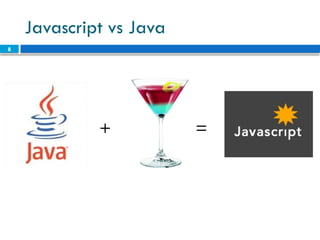
Javascript vs Java
+ =
9
JavaScript vs. PHP
 similarities:
 both are interpreted, not compiled
 both are relaxed about syntax, rules, and types
 both are case-sensitive
 both have built-in regular expressions for powerful
text processing
10
JavaScript vs. PHP
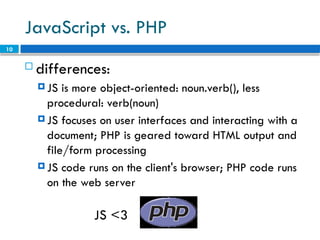
 differences:
 JS is more object-oriented: noun.verb(), less
procedural: verb(noun)
 JS focuses on user interfaces and interacting with a
document; PHP is geared toward HTML output and
file/form processing
 JS code runs on the client's browser; PHP code runs
on the web server
JS <3
11
Linking to a JavaScript file:
script
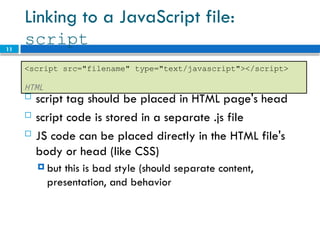
 script tag should be placed in HTML page's head
 script code is stored in a separate .js file
 JS code can be placed directly in the HTML file's
body or head (like CSS)
 but this is bad style (should separate content,
presentation, and behavior
<script src="filename" type="text/javascript"></script>
HTML
12
Event-driven programming
 split breaks apart a string into an array using a
delimiter
 can also be used with regular expressions (seen later)
 join merges an array into a single string, placing a
delimiter between them
13
A JavaScript statement: alert
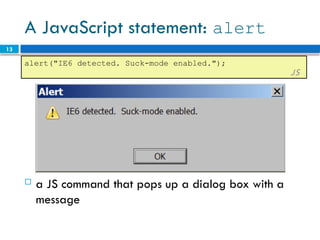
 a JS command that pops up a dialog box with a
message
alert("IE6 detected. Suck-mode enabled.");
JS
14
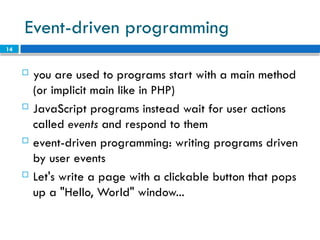
Event-driven programming
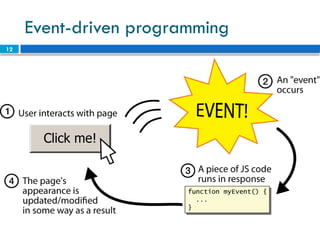
 you are used to programs start with a main method
(or implicit main like in PHP)
 JavaScript programs instead wait for user actions
called events and respond to them
 event-driven programming: writing programs driven
by user events
 Let's write a page with a clickable button that pops
up a "Hello, World" window...
15
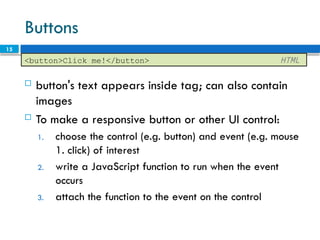
Buttons
 button's text appears inside tag; can also contain
images
 To make a responsive button or other UI control:
1. choose the control (e.g. button) and event (e.g. mouse
1. click) of interest
2. write a JavaScript function to run when the event
occurs
3. attach the function to the event on the control
<button>Click me!</button> HTML
16
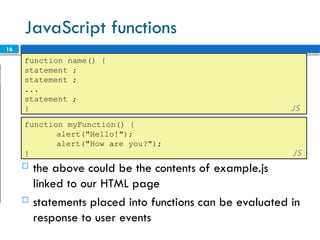
JavaScript functions
function name() {
statement ;
statement ;
...
statement ;
} JS
 the above could be the contents of example.js
linked to our HTML page
 statements placed into functions can be evaluated in
response to user events
function myFunction() {
alert("Hello!");
alert("How are you?");
} JS
17
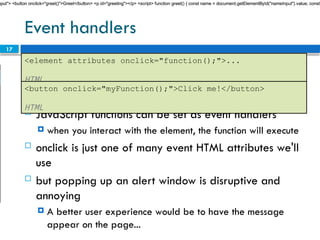
Event handlers
 JavaScript functions can be set as event handlers
 when you interact with the element, the function will execute
 onclick is just one of many event HTML attributes we'll
use
 but popping up an alert window is disruptive and
annoying
 A better user experience would be to have the message
appear on the page...
<element attributes onclick="function();">...
HTML
<button onclick="myFunction();">Click me!</button>
HTML
nput"> <button onclick="greet()">Greet</button> <p id="greeting"></p> <script> function greet() { const name = document.getElementById("nameInput").value; const
18
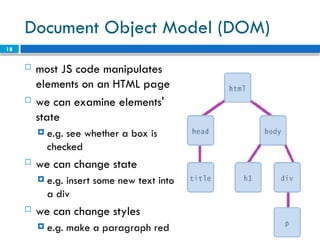
Document Object Model (DOM)
 most JS code manipulates
elements on an HTML page
 we can examine elements'
state
 e.g. see whether a box is
checked
 we can change state
 e.g. insert some new text into
a div
 we can change styles
 e.g. make a paragraph red
19
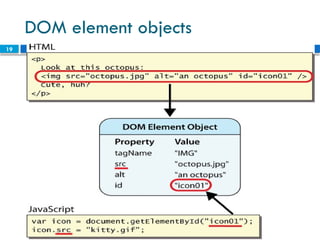
DOM element objects
20
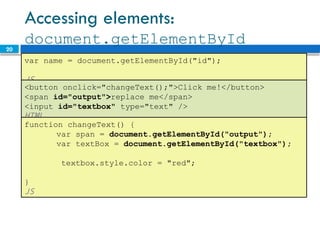
Accessing elements:
document.getElementById
var name = document.getElementById("id");
JS
<button onclick="changeText();">Click me!</button>
<span id="output">replace me</span>
<input id="textbox" type="text" />
HTML
function changeText() {
var span = document.getElementById("output");
var textBox = document.getElementById("textbox");
textbox.style.color = "red";
}
JS
21
Accessing elements:
document.getElementById
 document.getElementById returns the DOM object
for an element with a given id
 can change the text inside most elements by setting
the innerHTML property
 can change the text in form controls by setting the
value property
22
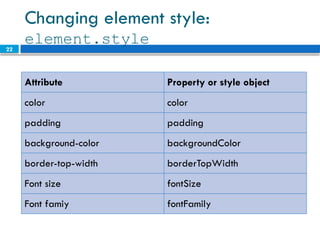
Changing element style:
element.style
Attribute Property or style object
color color
padding padding
background-color backgroundColor
border-top-width borderTopWidth
Font size fontSize
Font famiy fontFamily
23
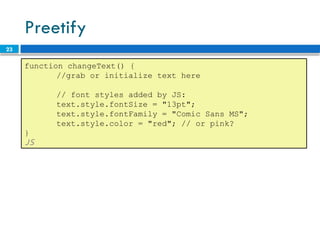
Preetify
function changeText() {
//grab or initialize text here
// font styles added by JS:
text.style.fontSize = "13pt";
text.style.fontFamily = "Comic Sans MS";
text.style.color = "red"; // or pink?
}
JS
24 More Javascript Syntax
25
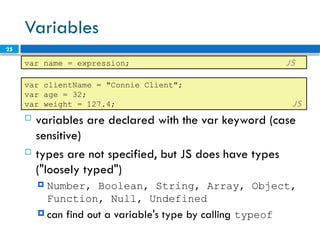
Variables
 variables are declared with the var keyword (case
sensitive)
 types are not specified, but JS does have types
("loosely typed")
 Number, Boolean, String, Array, Object,
Function, Null, Undefined
 can find out a variable's type by calling typeof
var name = expression; JS
var clientName = "Connie Client";
var age = 32;
var weight = 127.4; JS
26
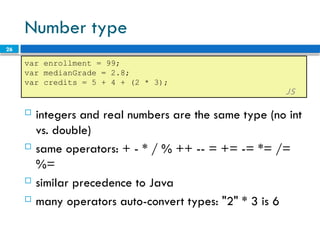
Number type
 integers and real numbers are the same type (no int
vs. double)
 same operators: + - * / % ++ -- = += -= *= /=
%=
 similar precedence to Java
 many operators auto-convert types: "2" * 3 is 6
var enrollment = 99;
var medianGrade = 2.8;
var credits = 5 + 4 + (2 * 3);
JS
27
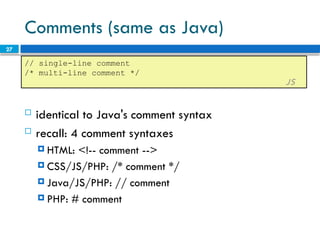
Comments (same as Java)
 identical to Java's comment syntax
 recall: 4 comment syntaxes
 HTML: <!-- comment -->
 CSS/JS/PHP: /* comment */
 Java/JS/PHP: // comment
 PHP: # comment
// single-line comment
/* multi-line comment */
JS
28
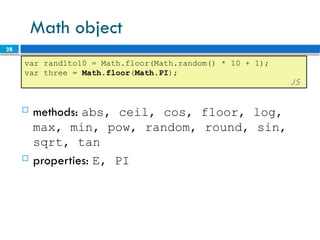
Math object
var rand1to10 = Math.floor(Math.random() * 10 + 1);
var three = Math.floor(Math.PI);
JS
 methods: abs, ceil, cos, floor, log,
max, min, pow, random, round, sin,
sqrt, tan
 properties: E, PI
29
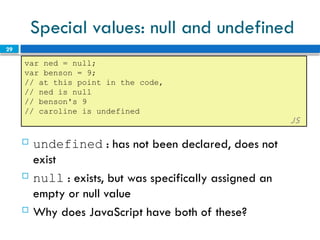
Special values: null and undefined
var ned = null;
var benson = 9;
// at this point in the code,
// ned is null
// benson's 9
// caroline is undefined
JS
 undefined : has not been declared, does not
exist
 null : exists, but was specifically assigned an
empty or null value
 Why does JavaScript have both of these?
30
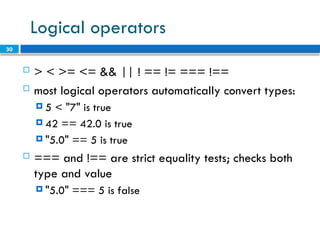
Logical operators
 > < >= <= && || ! == != === !==
 most logical operators automatically convert types:
 5 < "7" is true
 42 == 42.0 is true
 "5.0" == 5 is true
 === and !== are strict equality tests; checks both
type and value
 "5.0" === 5 is false
31
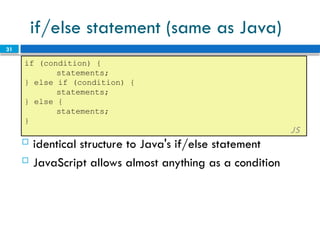
if/else statement (same as Java)
if (condition) {
statements;
} else if (condition) {
statements;
} else {
statements;
}
JS
 identical structure to Java's if/else statement
 JavaScript allows almost anything as a condition
32
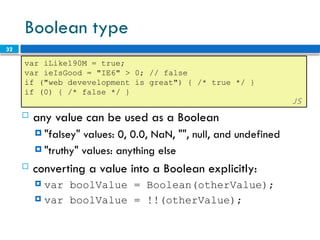
Boolean type
var iLike190M = true;
var ieIsGood = "IE6" > 0; // false
if ("web devevelopment is great") { /* true */ }
if (0) { /* false */ }
JS
 any value can be used as a Boolean
 "falsey" values: 0, 0.0, NaN, "", null, and undefined
 "truthy" values: anything else
 converting a value into a Boolean explicitly:
 var boolValue = Boolean(otherValue);
 var boolValue = !!(otherValue);
33
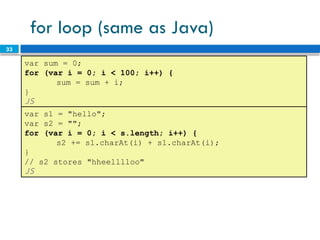
for loop (same as Java)
var sum = 0;
for (var i = 0; i < 100; i++) {
sum = sum + i;
}
JS
var s1 = "hello";
var s2 = "";
for (var i = 0; i < s.length; i++) {
s2 += s1.charAt(i) + s1.charAt(i);
}
// s2 stores "hheelllloo"
JS
34
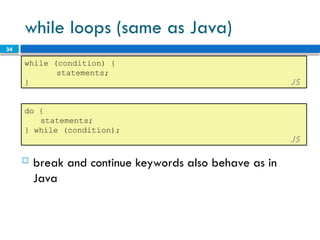
while loops (same as Java)
while (condition) {
statements;
} JS
 break and continue keywords also behave as in
Java
do {
statements;
} while (condition);
JS
35
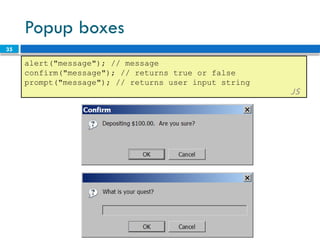
Popup boxes
alert("message"); // message
confirm("message"); // returns true or false
prompt("message"); // returns user input string
JS
36
Arrays
var name = []; // empty array
var name = [value, value, ..., value]; // pre-filled
name[index] = value; // store element
JS
var ducks = ["Huey", "Dewey", "Louie"];
var stooges = []; // stooges.length is 0
stooges[0] = "Larry"; // stooges.length is 1
stooges[1] = "Moe"; // stooges.length is 2
stooges[4] = "Curly"; // stooges.length is 5
stooges[4] = "Shemp"; // stooges.length is 5
JS
37
Array methods
var a = ["Stef", "Jason"]; // Stef, Jason
a.push("Brian"); // Stef, Jason, Brian
a.unshift("Kelly"); // Kelly, Stef, Jason, Brian
a.pop(); // Kelly, Stef, Jason
a.shift(); // Stef, Jason
a.sort(); // Jason, Stef
JS
 array serves as many data structures: list, queue,
stack, ...
 methods: concat, join, pop, push, reverse, shift,
slice, sort, splice, toString, unshift
 push and pop add / remove from back
 unshift and shift add / remove from front
 shift and pop return the element that is removed
38
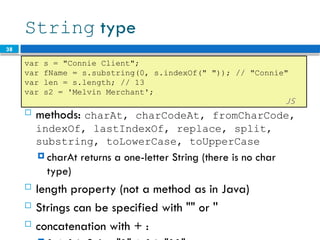
String type
 methods: charAt, charCodeAt, fromCharCode,
indexOf, lastIndexOf, replace, split,
substring, toLowerCase, toUpperCase
 charAt returns a one-letter String (there is no char
type)
 length property (not a method as in Java)
 Strings can be specified with "" or ''
 concatenation with + :
var s = "Connie Client";
var fName = s.substring(0, s.indexOf(" ")); // "Connie"
var len = s.length; // 13
var s2 = 'Melvin Merchant';
JS
39
More about String
 accessing the letters of a String:
var count = 10;
var s1 = "" + count; // "10"
var s2 = count + " bananas, ah ah ah!"; // "10 bananas, ah
ah ah!"
var n1 = parseInt("42 is the answer"); // 42
var n2 = parseFloat("booyah"); // NaN JS
 escape sequences behave as in Java: ' " & n t

 converting between numbers and Strings:
var firstLetter = s[0]; // fails in IE
var firstLetter = s.charAt(0); // does work in IE
var lastLetter = s.charAt(s.length - 1);
JS
40
Splitting strings: split and join
var s = "the quick brown fox";
var a = s.split(" "); // ["the", "quick", "brown", "fox"]
a.reverse(); // ["fox", "brown", "quick", "the"]
s = a.join("!"); // "fox!brown!quick!the"
JS
 split breaks apart a string into an array using a
delimiter
 can also be used with regular expressions (seen later)
 join merges an array into a single string, placing a
delimiter between them
41
Workshop
 To create a responsive, interactive product
showcase website using HTML, CSS, Bootstrap, and
JavaScript. Students will apply their knowledge of
these technologies to build a dynamic and
engaging user experience.
 A product list with images, names, prices, and descriptions.
 Product details page with additional information, images, and reviews.
 A shopping cart functionality.
 Responsive design to adapt to different screen sizes.
 Interactive elements like product filtering, sorting, and search.
42
Solution
1. Creating the Product List Page
2. Product Details Page
3. Implementing Shopping Cart Functionality
4. Responsive Design
5. Adding Interactivity with JavaScript
6. Putting It All Together

JavascriptCOmpleteGuideCourseFromZero.pptx

  • 1.
  • 2.
  • 3.
    3 Why use client-sideprogramming? PHP already allows us to create dynamic web pages. Why also use client-side scripting?  client-side scripting (JavaScript) benefits:  usability: can modify a page without having to post back to the server (faster UI)  efficiency: can make small, quick changes to page without waiting for server  event-driven: can respond to user actions like clicks and key presses
  • 4.
    4 Why use client-sideprogramming?  server-side programming (PHP) benefits:  security: has access to server's private data; client can't see source code  compatibility: not subject to browser compatibility issues  power: can write files, open connections to servers, connect to databases, ...
  • 5.
    5 What is Javascript? a lightweight programming language ("scripting language")  used to make web pages interactive  insert dynamic text into HTML (ex: user name)  react to events (ex: page load user click)  get information about a user's computer (ex: browser type)  perform calculations on user's computer (ex: form validation)
  • 6.
    6 What is Javascript? a web standard (but not supported identically by all browsers)  NOT related to Java other than by name and some syntactic similarities
  • 7.
    7 Javascript vs Java interpreted, not compiled  more relaxed syntax and rules  fewer and "looser" data types  variables don't need to be declared  errors often silent (few exceptions)  key construct is the function rather than the class  "first-class" functions are used in many situations  contained within a web page and integrates with its HTML/CSS content
  • 8.
  • 9.
    9 JavaScript vs. PHP similarities:  both are interpreted, not compiled  both are relaxed about syntax, rules, and types  both are case-sensitive  both have built-in regular expressions for powerful text processing
  • 10.
    10 JavaScript vs. PHP differences:  JS is more object-oriented: noun.verb(), less procedural: verb(noun)  JS focuses on user interfaces and interacting with a document; PHP is geared toward HTML output and file/form processing  JS code runs on the client's browser; PHP code runs on the web server JS <3
  • 11.
    11 Linking to aJavaScript file: script  script tag should be placed in HTML page's head  script code is stored in a separate .js file  JS code can be placed directly in the HTML file's body or head (like CSS)  but this is bad style (should separate content, presentation, and behavior <script src="filename" type="text/javascript"></script> HTML
  • 12.
    12 Event-driven programming  splitbreaks apart a string into an array using a delimiter  can also be used with regular expressions (seen later)  join merges an array into a single string, placing a delimiter between them
  • 13.
    13 A JavaScript statement:alert  a JS command that pops up a dialog box with a message alert("IE6 detected. Suck-mode enabled."); JS
  • 14.
    14 Event-driven programming  youare used to programs start with a main method (or implicit main like in PHP)  JavaScript programs instead wait for user actions called events and respond to them  event-driven programming: writing programs driven by user events  Let's write a page with a clickable button that pops up a "Hello, World" window...
  • 15.
    15 Buttons  button's textappears inside tag; can also contain images  To make a responsive button or other UI control: 1. choose the control (e.g. button) and event (e.g. mouse 1. click) of interest 2. write a JavaScript function to run when the event occurs 3. attach the function to the event on the control <button>Click me!</button> HTML
  • 16.
    16 JavaScript functions function name(){ statement ; statement ; ... statement ; } JS  the above could be the contents of example.js linked to our HTML page  statements placed into functions can be evaluated in response to user events function myFunction() { alert("Hello!"); alert("How are you?"); } JS
  • 17.
    17 Event handlers  JavaScriptfunctions can be set as event handlers  when you interact with the element, the function will execute  onclick is just one of many event HTML attributes we'll use  but popping up an alert window is disruptive and annoying  A better user experience would be to have the message appear on the page... <element attributes onclick="function();">... HTML <button onclick="myFunction();">Click me!</button> HTML nput"> <button onclick="greet()">Greet</button> <p id="greeting"></p> <script> function greet() { const name = document.getElementById("nameInput").value; const nput"> <button onclick="greet()">Greet</button> <p id="greeting"></p> <script> function greet() { const name = document.getElementById("nameInput").value; const nput"> <button onclick="greet()">Greet</button> <p id="greeting"></p> <script> function greet() { const name = document.getElementById("nameInput").value; const
  • 18.
    18 Document Object Model(DOM)  most JS code manipulates elements on an HTML page  we can examine elements' state  e.g. see whether a box is checked  we can change state  e.g. insert some new text into a div  we can change styles  e.g. make a paragraph red
  • 19.
  • 20.
    20 Accessing elements: document.getElementById var name= document.getElementById("id"); JS <button onclick="changeText();">Click me!</button> <span id="output">replace me</span> <input id="textbox" type="text" /> HTML function changeText() { var span = document.getElementById("output"); var textBox = document.getElementById("textbox"); textbox.style.color = "red"; } JS
  • 21.
    21 Accessing elements: document.getElementById  document.getElementByIdreturns the DOM object for an element with a given id  can change the text inside most elements by setting the innerHTML property  can change the text in form controls by setting the value property
  • 22.
    22 Changing element style: element.style AttributeProperty or style object color color padding padding background-color backgroundColor border-top-width borderTopWidth Font size fontSize Font famiy fontFamily
  • 23.
    23 Preetify function changeText() { //grabor initialize text here // font styles added by JS: text.style.fontSize = "13pt"; text.style.fontFamily = "Comic Sans MS"; text.style.color = "red"; // or pink? } JS
  • 24.
  • 25.
    25 Variables  variables aredeclared with the var keyword (case sensitive)  types are not specified, but JS does have types ("loosely typed")  Number, Boolean, String, Array, Object, Function, Null, Undefined  can find out a variable's type by calling typeof var name = expression; JS var clientName = "Connie Client"; var age = 32; var weight = 127.4; JS
  • 26.
    26 Number type  integersand real numbers are the same type (no int vs. double)  same operators: + - * / % ++ -- = += -= *= /= %=  similar precedence to Java  many operators auto-convert types: "2" * 3 is 6 var enrollment = 99; var medianGrade = 2.8; var credits = 5 + 4 + (2 * 3); JS
  • 27.
    27 Comments (same asJava)  identical to Java's comment syntax  recall: 4 comment syntaxes  HTML: <!-- comment -->  CSS/JS/PHP: /* comment */  Java/JS/PHP: // comment  PHP: # comment // single-line comment /* multi-line comment */ JS
  • 28.
    28 Math object var rand1to10= Math.floor(Math.random() * 10 + 1); var three = Math.floor(Math.PI); JS  methods: abs, ceil, cos, floor, log, max, min, pow, random, round, sin, sqrt, tan  properties: E, PI
  • 29.
    29 Special values: nulland undefined var ned = null; var benson = 9; // at this point in the code, // ned is null // benson's 9 // caroline is undefined JS  undefined : has not been declared, does not exist  null : exists, but was specifically assigned an empty or null value  Why does JavaScript have both of these?
  • 30.
    30 Logical operators  >< >= <= && || ! == != === !==  most logical operators automatically convert types:  5 < "7" is true  42 == 42.0 is true  "5.0" == 5 is true  === and !== are strict equality tests; checks both type and value  "5.0" === 5 is false
  • 31.
    31 if/else statement (sameas Java) if (condition) { statements; } else if (condition) { statements; } else { statements; } JS  identical structure to Java's if/else statement  JavaScript allows almost anything as a condition
  • 32.
    32 Boolean type var iLike190M= true; var ieIsGood = "IE6" > 0; // false if ("web devevelopment is great") { /* true */ } if (0) { /* false */ } JS  any value can be used as a Boolean  "falsey" values: 0, 0.0, NaN, "", null, and undefined  "truthy" values: anything else  converting a value into a Boolean explicitly:  var boolValue = Boolean(otherValue);  var boolValue = !!(otherValue);
  • 33.
    33 for loop (sameas Java) var sum = 0; for (var i = 0; i < 100; i++) { sum = sum + i; } JS var s1 = "hello"; var s2 = ""; for (var i = 0; i < s.length; i++) { s2 += s1.charAt(i) + s1.charAt(i); } // s2 stores "hheelllloo" JS
  • 34.
    34 while loops (sameas Java) while (condition) { statements; } JS  break and continue keywords also behave as in Java do { statements; } while (condition); JS
  • 35.
    35 Popup boxes alert("message"); //message confirm("message"); // returns true or false prompt("message"); // returns user input string JS
  • 36.
    36 Arrays var name =[]; // empty array var name = [value, value, ..., value]; // pre-filled name[index] = value; // store element JS var ducks = ["Huey", "Dewey", "Louie"]; var stooges = []; // stooges.length is 0 stooges[0] = "Larry"; // stooges.length is 1 stooges[1] = "Moe"; // stooges.length is 2 stooges[4] = "Curly"; // stooges.length is 5 stooges[4] = "Shemp"; // stooges.length is 5 JS
  • 37.
    37 Array methods var a= ["Stef", "Jason"]; // Stef, Jason a.push("Brian"); // Stef, Jason, Brian a.unshift("Kelly"); // Kelly, Stef, Jason, Brian a.pop(); // Kelly, Stef, Jason a.shift(); // Stef, Jason a.sort(); // Jason, Stef JS  array serves as many data structures: list, queue, stack, ...  methods: concat, join, pop, push, reverse, shift, slice, sort, splice, toString, unshift  push and pop add / remove from back  unshift and shift add / remove from front  shift and pop return the element that is removed
  • 38.
    38 String type  methods:charAt, charCodeAt, fromCharCode, indexOf, lastIndexOf, replace, split, substring, toLowerCase, toUpperCase  charAt returns a one-letter String (there is no char type)  length property (not a method as in Java)  Strings can be specified with "" or ''  concatenation with + : var s = "Connie Client"; var fName = s.substring(0, s.indexOf(" ")); // "Connie" var len = s.length; // 13 var s2 = 'Melvin Merchant'; JS
  • 39.
    39 More about String accessing the letters of a String: var count = 10; var s1 = "" + count; // "10" var s2 = count + " bananas, ah ah ah!"; // "10 bananas, ah ah ah!" var n1 = parseInt("42 is the answer"); // 42 var n2 = parseFloat("booyah"); // NaN JS  escape sequences behave as in Java: ' " & n t  converting between numbers and Strings: var firstLetter = s[0]; // fails in IE var firstLetter = s.charAt(0); // does work in IE var lastLetter = s.charAt(s.length - 1); JS
  • 40.
    40 Splitting strings: splitand join var s = "the quick brown fox"; var a = s.split(" "); // ["the", "quick", "brown", "fox"] a.reverse(); // ["fox", "brown", "quick", "the"] s = a.join("!"); // "fox!brown!quick!the" JS  split breaks apart a string into an array using a delimiter  can also be used with regular expressions (seen later)  join merges an array into a single string, placing a delimiter between them
  • 41.
    41 Workshop  To createa responsive, interactive product showcase website using HTML, CSS, Bootstrap, and JavaScript. Students will apply their knowledge of these technologies to build a dynamic and engaging user experience.  A product list with images, names, prices, and descriptions.  Product details page with additional information, images, and reviews.  A shopping cart functionality.  Responsive design to adapt to different screen sizes.  Interactive elements like product filtering, sorting, and search.
  • 42.
    42 Solution 1. Creating theProduct List Page 2. Product Details Page 3. Implementing Shopping Cart Functionality 4. Responsive Design 5. Adding Interactivity with JavaScript 6. Putting It All Together

Editor's Notes

  • #2 client-side script: code runs in browser after page is sent back from server often this code manipulates the page or responds to user actions
  • #15 Reset is not working here! Debug! test1.html
  • #20 span.innerHTML = textBox.value;
  • #36 two ways to initialize an array length property (grows as needed when elements are added)