Javascript Everywhere
   Online, Offline and on the Server

              Pascal Rettig
        http://www.cykod.com
                @cykod
Topics
• Debugging Javascript
• Optimizing Javascript
• Local Storage
• Offline Storage
• Server side Javascript + Web Sockets
  (Time permitting)
Debugging Javascript
  Or, alert(“Can only take you so far”);
Firebug
http://getfirebug.com/
Other browsers

• Chrome and IE8 have similar tools to
  Firebug built in.
• Tools -> Developer Tools in both
Firebug 101

• Inspecting
• Modifying
• Tracking resources
Firebug 102
Getting rid of alert(...)
• Firebug console
• console.log(...), console.warn(...),
  console.error(...)
• execute javascript directly from the console
• Firebug needs to be open
Javascript Debugging

• Firebug step debugger
• Setting watches
• Setting breakpoints
• Setting conditional breakpoints
The best type of bug...
... is one that’s caught
         for you.
Javascript is a
             lax language
Your javascript code will only be as rigorous as you are.
Consider lint’ing
               http://javascriptlint.com/

  Command line tool by Matthias Miller built on the
work done by Douglas Crockford (“JS, the good parts”)
Automated Testing
      Frameworks
              QUnit - used in JQuery
Jasmine - Created by Pivotal Labs, Inspired by RSpec
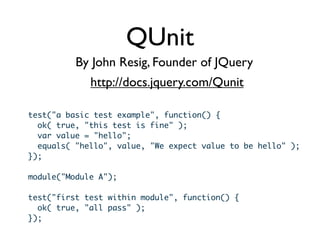
QUnit
          By John Resig, Founder of JQuery
             http://docs.jquery.com/Qunit

test("a basic test example", function() {
  ok( true, "this test is fine" );
  var value = "hello";
  equals( "hello", value, "We expect value to be hello" );
});

module("Module A");

test("first test within module", function() {
  ok( true, "all pass" );
});
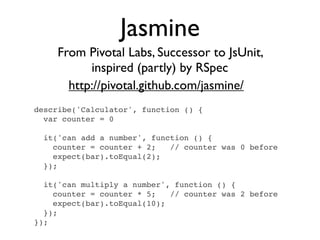
Jasmine
     From Pivotal Labs, Successor to JsUnit,
           inspired (partly) by RSpec
       http://pivotal.github.com/jasmine/
describe('Calculator', function () {
  var counter = 0

  it('can add a number', function () {
    counter = counter + 2;   // counter was 0 before
    expect(bar).toEqual(2);
  });

  it('can multiply a number', function () {
    counter = counter * 5;   // counter was 2 before
    expect(bar).toEqual(10);
  });
});
Optimizing
        Profiling
Javascript Optimization
Network Optimization
We should forget about small
efficiencies, say about 97% of the time:
premature optimization is the root of
all evil.
              - Donald Knuth
Javascript Profiling
   with Firebug
Javascript Profiling
       with Firebug

• Click “profile”
Javascript Profiling
       with Firebug

• Click “profile”
• Wait
Javascript Profiling
       with Firebug

• Click “profile”
• Wait
• Click “profile” again
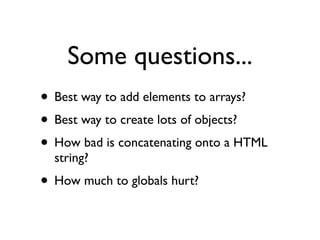
Some questions...
• Best way to add elements to arrays?
• Best way to create lots of objects?
• How bad is concatenating onto a HTML
  string?
• How much to globals hurt?
Arrays
      http://jsperf.com/array-selection-methods/2
var arr = []                      var arr = []
for (var i = 0; i < len; i++) {   for (var i = 0; i < len; i++) {
 arr.push(i)                       arr[arr.length] = i
}                                 }


var arr = new Array(len)          var arr = []
for (var i = 0; i < len; i++) {   for (var i = 0; i < len; i++) {
 arr[i] = i                        arr[i] = i
}                                 }


                                   var arr = []
var arr = []
                                   for (i = 0; i < len; i
for (i = 0; i < len; i++) {
                                   ++) {
 arr.push(i)
                                    arr[i] = i
}
                                   }
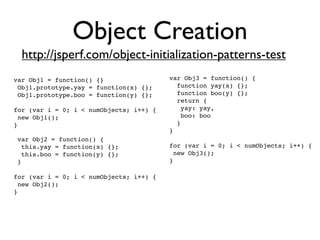
Object Creation
  http://jsperf.com/object-initialization-patterns-test
var Obj1 = function() {}                 var Obj3 = function() {
 Obj1.prototype.yay = function(x) {};      function yay(x) {};
 Obj1.prototype.boo = function(y) {};      function boo(y) {};
                                           return {
for (var i = 0; i < numObjects; i++) {      yay: yay,
 new Obj1();                                boo: boo
}                                          }
                                         }
 var Obj2 = function() {
  this.yay = function(x) {};             for (var i = 0; i < numObjects; i++) {
  this.boo = function(y) {};              new Obj3();
 }                                       }

for (var i = 0; i < numObjects; i++) {
 new Obj2();
}
Double check your
      intuition...
• http://jsperf.com
• http://jsfiddle.net/
Web Page
Performance Tuning
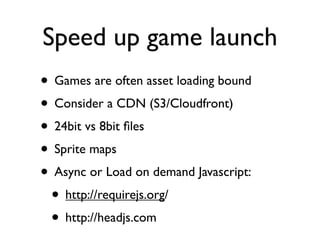
Speed up game launch
• Games are often asset loading bound
• Consider a CDN (S3/Cloudfront)
• 24bit vs 8bit files
• Sprite maps
• Async or Load on demand Javascript:
 • http://requirejs.org/
 • http://headjs.com
Taking Javascript Home


• Local Storage
• Offline storage
Local Storage
Store data on the client for later use.
Isn’t that just like
     a cookie?
Isn’t that just like
     a cookie?

   Yes and no
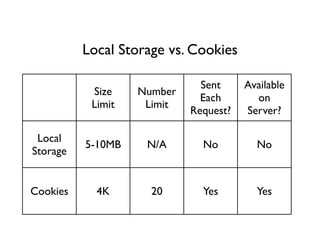
Local Storage vs. Cookies

                              Sent     Available
           Size    Number
                              Each       on
           Limit    Limit
                            Request?   Server?

 Local
          5-10MB    N/A       No         No
Storage


Cookies     4K       20       Yes        Yes
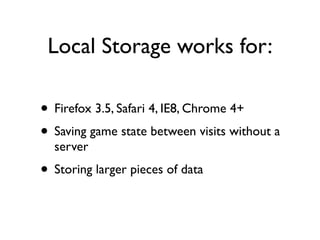
Local Storage works for:

• Firefox 3.5, Safari 4, IE8, Chrome 4+
• Saving game state between visits without a
  server
• Storing larger pieces of data
Testing for Local
             Storage
Testing directly (From Dive Into HTML5)
function supports_local_storage() {
   try {
      return 'localStorage' in window &&
              window['localStorage'] !== null;
   } catch(e){ return false; }
}

Using Modernizr
if (Modernizr.localstorage) {
   // Local Storage available
}
Using Local Storage
// Add an item to local storage
try {
  localStorage.setItem(identifierString, valueString);
  localStorage.identifierString = valueString;
} catch(e) {
  if (e == QUOTA_EXCEEDED_ERR) { /* Do something */ }
}

// Retrieve an item
localStorage.getItem(identifierString);
localStorage.identifierString;

// Remove an item
localStorage.removeItem(identifierString);
delete localStorage[identifierString];

// Clear the entire per-domain DB
localStorage.clear();
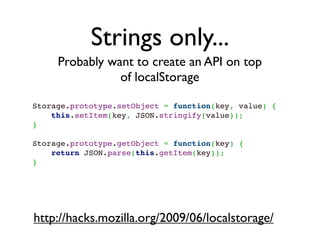
Strings only...
     Probably want to create an API on top
                of localStorage

Storage.prototype.setObject = function(key, value) {
    this.setItem(key, JSON.stringify(value));
}
 
Storage.prototype.getObject = function(key) {
    return JSON.parse(this.getItem(key));
}


http://hacks.mozilla.org/2009/06/localstorage/
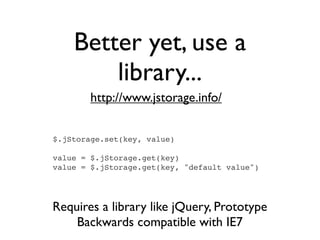
Better yet, use a
        library...
        http://www.jstorage.info/


$.jStorage.set(key, value)

value = $.jStorage.get(key)
value = $.jStorage.get(key, "default value")


Requires a library like jQuery, Prototype
    Backwards compatible with IE7
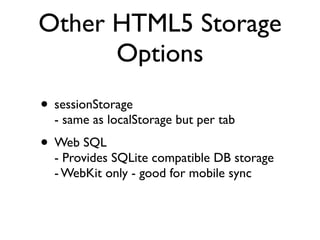
Other HTML5 Storage
      Options
• sessionStorage
  - same as localStorage but per tab
• Web SQL
  - Provides SQLite compatible DB storage
  - WebKit only - good for mobile sync
Offline Storage
Why?

• Make apps available offline (Duh!)
• Make mobile apps that sync when
  networked
• Force browsers to keep assets available
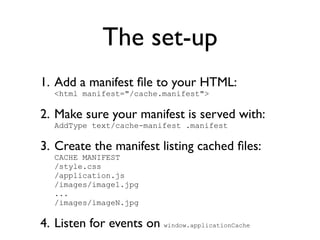
The set-up
1. Add a manifest file to your HTML:
   <html manifest="/cache.manifest">

2. Make sure your manifest is served with:
   AddType text/cache-manifest .manifest

3. Create the manifest listing cached files:
   CACHE MANIFEST
   /style.css
   /application.js
   /images/image1.jpg
   ...
   /images/imageN.jpg

4. Listen for events on window.applicationCache
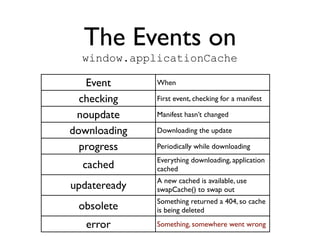
The Events on
  window.applicationCache

   Event      When

  checking    First event, checking for a manifest

 noupdate     Manifest hasn’t changed

downloading   Downloading the update

  progress    Periodically while downloading
              Everything downloading, application
  cached      cached
              A new cached is available, use
updateready   swapCache() to swap out
              Something returned a 404, so cache
 obsolete     is being deleted

   error      Something, somewhere went wrong
But...
If you have a simple app that you just want to
be cacheable online, you don’t need to do
anything special
Gotcha’s
• Disable server caching while testing or
  your will go insane
• Make sure to update your manifest file each
  time you update a resource. e.g.
  “revisionXX”
• Probably want to auto-generate your
  manifest file from a script so you aren’t
  missing files.
Javascript on the Server
Why?

• Leverage existing javascript codebase
• Async good support for realtime and
  Websockets
Introducing Node.js
            http://nodejs.org/

• Built on Embedded Google V8 Engine
• Check out nodejs.com for installation
• Single threaded async
• Lots of callbacks
Node Packages

• NPM - node package manager, sort of like
  Rubygems for node
• As easy as “npm install socket.io”
• export NODE_PATH=/path/to/node/lib to
  use in node
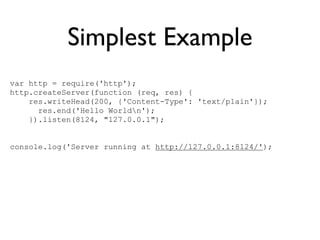
Simplest Example
var http = require('http');
http.createServer(function (req, res) {
    res.writeHead(200, {'Content-Type': 'text/plain'});
      res.end('Hello Worldn');
    }).listen(8124, "127.0.0.1");


console.log('Server running at http://127.0.0.1:8124/');
WebSockets: the
       problem

• Want realtime messaging
• Not supported in older browsers
• Removed from FF4 for the time being
WebSockets:
  a solution
      http://socket.io/

•Supports native WebSockets
•Has a fallback for flash
•Handles it all for you
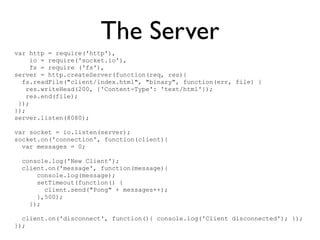
The Server
var http = require('http'),
     io = require('socket.io'),
     fs = require ('fs'),
server = http.createServer(function(req, res){
  fs.readFile("client/index.html", "binary", function(err, file) {
    res.writeHead(200, {'Content-Type': 'text/html'});
    res.end(file);
 });
});
server.listen(8080);

var socket = io.listen(server);
socket.on('connection', function(client){
  var messages = 0;

 console.log('New Client');
 client.on('message', function(message){
     console.log(message);
     setTimeout(function() {
       client.send("Pong" + messages++);
     },500);
   });

  client.on('disconnect', function(){ console.log('Client disconnected'); });
});
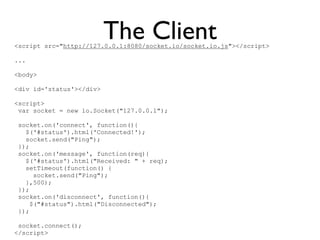
The Client
<script src="http://127.0.0.1:8080/socket.io/socket.io.js"></script>

...

<body>

<div id='status'></div>

<script>
 var socket = new io.Socket("127.0.0.1");

 socket.on('connect', function(){
   $('#status').html('Connected!');
   socket.send("Ping");
 });
 socket.on('message', function(req){
   $('#status').html("Received: " + req);
   setTimeout(function() {
      socket.send("Ping");
   },500);
 });
 socket.on('disconnect', function(){
     $("#status").html("Disconnected");
 });

 socket.connect();
</script>
Thanks!
   Pascal Rettig
pascal@cykod.com

Javascript Everywhere

  • 1.
    Javascript Everywhere Online, Offline and on the Server Pascal Rettig http://www.cykod.com @cykod
  • 2.
    Topics • Debugging Javascript •Optimizing Javascript • Local Storage • Offline Storage • Server side Javascript + Web Sockets (Time permitting)
  • 3.
    Debugging Javascript Or, alert(“Can only take you so far”);
  • 4.
  • 5.
    Other browsers • Chromeand IE8 have similar tools to Firebug built in. • Tools -> Developer Tools in both
  • 6.
    Firebug 101 • Inspecting •Modifying • Tracking resources
  • 7.
    Firebug 102 Getting ridof alert(...) • Firebug console • console.log(...), console.warn(...), console.error(...) • execute javascript directly from the console • Firebug needs to be open
  • 8.
    Javascript Debugging • Firebugstep debugger • Setting watches • Setting breakpoints • Setting conditional breakpoints
  • 9.
    The best typeof bug...
  • 10.
    The best typeof bug... ... is one that’s caught for you.
  • 11.
    Javascript is a lax language Your javascript code will only be as rigorous as you are.
  • 12.
    Consider lint’ing http://javascriptlint.com/ Command line tool by Matthias Miller built on the work done by Douglas Crockford (“JS, the good parts”)
  • 13.
    Automated Testing Frameworks QUnit - used in JQuery Jasmine - Created by Pivotal Labs, Inspired by RSpec
  • 14.
    QUnit By John Resig, Founder of JQuery http://docs.jquery.com/Qunit test("a basic test example", function() { ok( true, "this test is fine" ); var value = "hello"; equals( "hello", value, "We expect value to be hello" ); }); module("Module A"); test("first test within module", function() { ok( true, "all pass" ); });
  • 15.
    Jasmine From Pivotal Labs, Successor to JsUnit, inspired (partly) by RSpec http://pivotal.github.com/jasmine/ describe('Calculator', function () { var counter = 0 it('can add a number', function () { counter = counter + 2; // counter was 0 before expect(bar).toEqual(2); }); it('can multiply a number', function () { counter = counter * 5; // counter was 2 before expect(bar).toEqual(10); }); });
  • 16.
    Optimizing Profiling Javascript Optimization Network Optimization
  • 17.
    We should forgetabout small efficiencies, say about 97% of the time: premature optimization is the root of all evil. - Donald Knuth
  • 18.
  • 19.
    Javascript Profiling with Firebug • Click “profile”
  • 20.
    Javascript Profiling with Firebug • Click “profile” • Wait
  • 21.
    Javascript Profiling with Firebug • Click “profile” • Wait • Click “profile” again
  • 22.
    Some questions... • Bestway to add elements to arrays? • Best way to create lots of objects? • How bad is concatenating onto a HTML string? • How much to globals hurt?
  • 23.
    Arrays http://jsperf.com/array-selection-methods/2 var arr = [] var arr = [] for (var i = 0; i < len; i++) { for (var i = 0; i < len; i++) {  arr.push(i)  arr[arr.length] = i } } var arr = new Array(len) var arr = [] for (var i = 0; i < len; i++) { for (var i = 0; i < len; i++) {  arr[i] = i  arr[i] = i } } var arr = [] var arr = [] for (i = 0; i < len; i for (i = 0; i < len; i++) { ++) {  arr.push(i)  arr[i] = i } }
  • 24.
    Object Creation http://jsperf.com/object-initialization-patterns-test var Obj1 = function() {} var Obj3 = function() {  Obj1.prototype.yay = function(x) {};   function yay(x) {};  Obj1.prototype.boo = function(y) {};   function boo(y) {};   return { for (var i = 0; i < numObjects; i++) {    yay: yay,  new Obj1();    boo: boo }   } }  var Obj2 = function() {   this.yay = function(x) {}; for (var i = 0; i < numObjects; i++) {   this.boo = function(y) {};  new Obj3();  } } for (var i = 0; i < numObjects; i++) {  new Obj2(); }
  • 25.
    Double check your intuition... • http://jsperf.com • http://jsfiddle.net/
  • 26.
  • 27.
    Speed up gamelaunch • Games are often asset loading bound • Consider a CDN (S3/Cloudfront) • 24bit vs 8bit files • Sprite maps • Async or Load on demand Javascript: • http://requirejs.org/ • http://headjs.com
  • 28.
    Taking Javascript Home •Local Storage • Offline storage
  • 29.
    Local Storage Store dataon the client for later use.
  • 30.
    Isn’t that justlike a cookie?
  • 31.
    Isn’t that justlike a cookie? Yes and no
  • 32.
    Local Storage vs.Cookies Sent Available Size Number Each on Limit Limit Request? Server? Local 5-10MB N/A No No Storage Cookies 4K 20 Yes Yes
  • 33.
    Local Storage worksfor: • Firefox 3.5, Safari 4, IE8, Chrome 4+ • Saving game state between visits without a server • Storing larger pieces of data
  • 34.
    Testing for Local Storage Testing directly (From Dive Into HTML5) function supports_local_storage() { try { return 'localStorage' in window && window['localStorage'] !== null; } catch(e){ return false; } } Using Modernizr if (Modernizr.localstorage) { // Local Storage available }
  • 35.
    Using Local Storage //Add an item to local storage try { localStorage.setItem(identifierString, valueString); localStorage.identifierString = valueString; } catch(e) { if (e == QUOTA_EXCEEDED_ERR) { /* Do something */ } } // Retrieve an item localStorage.getItem(identifierString); localStorage.identifierString; // Remove an item localStorage.removeItem(identifierString); delete localStorage[identifierString]; // Clear the entire per-domain DB localStorage.clear();
  • 36.
    Strings only... Probably want to create an API on top of localStorage Storage.prototype.setObject = function(key, value) { this.setItem(key, JSON.stringify(value)); }   Storage.prototype.getObject = function(key) { return JSON.parse(this.getItem(key)); } http://hacks.mozilla.org/2009/06/localstorage/
  • 37.
    Better yet, usea library... http://www.jstorage.info/ $.jStorage.set(key, value) value = $.jStorage.get(key) value = $.jStorage.get(key, "default value") Requires a library like jQuery, Prototype Backwards compatible with IE7
  • 38.
    Other HTML5 Storage Options • sessionStorage - same as localStorage but per tab • Web SQL - Provides SQLite compatible DB storage - WebKit only - good for mobile sync
  • 39.
  • 40.
    Why? • Make appsavailable offline (Duh!) • Make mobile apps that sync when networked • Force browsers to keep assets available
  • 41.
    The set-up 1. Adda manifest file to your HTML: <html manifest="/cache.manifest"> 2. Make sure your manifest is served with: AddType text/cache-manifest .manifest 3. Create the manifest listing cached files: CACHE MANIFEST /style.css /application.js /images/image1.jpg ... /images/imageN.jpg 4. Listen for events on window.applicationCache
  • 42.
    The Events on window.applicationCache Event When checking First event, checking for a manifest noupdate Manifest hasn’t changed downloading Downloading the update progress Periodically while downloading Everything downloading, application cached cached A new cached is available, use updateready swapCache() to swap out Something returned a 404, so cache obsolete is being deleted error Something, somewhere went wrong
  • 43.
    But... If you havea simple app that you just want to be cacheable online, you don’t need to do anything special
  • 44.
    Gotcha’s • Disable servercaching while testing or your will go insane • Make sure to update your manifest file each time you update a resource. e.g. “revisionXX” • Probably want to auto-generate your manifest file from a script so you aren’t missing files.
  • 45.
  • 46.
    Why? • Leverage existingjavascript codebase • Async good support for realtime and Websockets
  • 47.
    Introducing Node.js http://nodejs.org/ • Built on Embedded Google V8 Engine • Check out nodejs.com for installation • Single threaded async • Lots of callbacks
  • 48.
    Node Packages • NPM- node package manager, sort of like Rubygems for node • As easy as “npm install socket.io” • export NODE_PATH=/path/to/node/lib to use in node
  • 49.
    Simplest Example var http= require('http'); http.createServer(function (req, res) { res.writeHead(200, {'Content-Type': 'text/plain'}); res.end('Hello Worldn'); }).listen(8124, "127.0.0.1"); console.log('Server running at http://127.0.0.1:8124/');
  • 50.
    WebSockets: the problem • Want realtime messaging • Not supported in older browsers • Removed from FF4 for the time being
  • 51.
    WebSockets: asolution http://socket.io/ •Supports native WebSockets •Has a fallback for flash •Handles it all for you
  • 52.
    The Server var http= require('http'), io = require('socket.io'), fs = require ('fs'), server = http.createServer(function(req, res){ fs.readFile("client/index.html", "binary", function(err, file) { res.writeHead(200, {'Content-Type': 'text/html'}); res.end(file); }); }); server.listen(8080); var socket = io.listen(server); socket.on('connection', function(client){ var messages = 0; console.log('New Client'); client.on('message', function(message){ console.log(message); setTimeout(function() { client.send("Pong" + messages++); },500); }); client.on('disconnect', function(){ console.log('Client disconnected'); }); });
  • 53.
    The Client <script src="http://127.0.0.1:8080/socket.io/socket.io.js"></script> ... <body> <divid='status'></div> <script> var socket = new io.Socket("127.0.0.1"); socket.on('connect', function(){ $('#status').html('Connected!'); socket.send("Ping"); }); socket.on('message', function(req){ $('#status').html("Received: " + req); setTimeout(function() { socket.send("Ping"); },500); }); socket.on('disconnect', function(){ $("#status").html("Disconnected"); }); socket.connect(); </script>
  • 54.
    Thanks! Pascal Rettig pascal@cykod.com