Your browser, my storage
a new approach on data storing


Francesco Fullone
ff AT ideato.it
Who am I

Francesco Fullone aka Fullo

- PHP developer since 1999
-               President
-         and Open Source Evangelist
- CEO @
- founder @


- Nerd and geek
What we want is a lot of storage space, on
the client, that persists beyond a page
refresh and isn’t transmitted to the server.


                                ~ M. Pilgrim
Persistent local storage is one of
     the areas where client
  applications traditionally win
    against web applications.
A jump in the past
http://www.flickr.com/photos/betsyweber/4962298614/


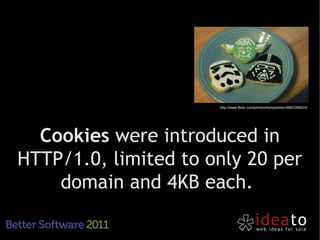
  Cookies were introduced in
HTTP/1.0, limited to only 20 per
    domain and 4KB each.
Cookies are sent to
                                                   and from client at
                                                    any connection.


http://www.flickr.com/photos/dionhinchcliffe/4326080515
Microsoft with Internet Explorer 6
   introduced dHTML and the
userData API to store up to 64KB
             of data
Mozilla introduced with Firefox 2
the DOM Storage API, it will then
     know as Web Storage.
Adobe, in 2002, created the Flash
   Cookies aka “Local Shared
       Objects” for Flash 6.
 Data storage increased to 100KB
  but it was difficult to be used.
With Flash 8, in 2006,
 Adobe introduced the
  ExternalInterface
 to allow Js to access
to the stored resources.
Between 2005 and 2007
 dojox.storage was written by
  Brad Neuberg as a Js->Flash
bridge to manage bigger chunks
           of data

      (with user prompt over 1MB).
Google created Gears in 2007,
 that introduced a database
paradigm (based on SQLite) to
    the storage problem.
All these storage systems had
  different APIs, a common
platform is needed by all the
       browser vendors.
The two approaches of storing:
      Application Cache
       Offline storage
Application Caching involves
saving the application's core logic
       and user-interface.

 http://www.whatwg.org/specs/web-apps/current-
            work/#applicationcache
It is enabled by a file .manifest
 that declares which resources
     have to be saved locally.

       (theoretically limited to 5MB).
CACHE MANIFEST

# Explicitly cached entries
CACHE:
index.html
stylesheet.css
images/logo.png
scripts/main.js
# Resources that require the user to be online.
NETWORK:
login.php
/myapi
http://api.twitter.com
# static.html will be served if main.php is inaccessible
# offline.jpg will be served in place of all images in images/large/
FALLBACK:
/main.php /static.html
images/large/ images/offline.jpg
applicationCache can use events
 to trigger application behavior

– window.applicationCache.onchecking = function(e) {
     • log("Checking for application update");
–}
If you change a
                      resource and you
                     don't update (rev)
                      the .manifest the
                       browser may not
                 download the new file!
(yes! cached resources have priority on the online ones)
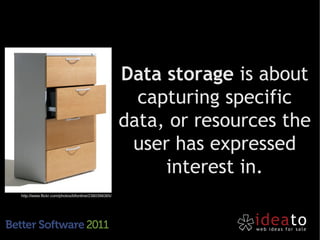
Data storage is about
                                                       capturing specific
                                                     data, or resources the
                                                      user has expressed
                                                          interest in.
http://www.flickr.com/photos/bfionline/2380398365/
Approaches to
Data Storage
Web Storage is the simpler
implementation of the Data
    Storage paradigm.

  http://dev.w3.org/html5/webstorage/
Web Storage is based on a
structure of key-value pairs like
     any JavaScript object.

localStorage.setItem("bar", foo);
Web Storage can save up to 5MB
but only as strings. So we have
 to force a casting if needed.

var bar = parseInt(localStorage["bar"]);
Web Storage should be local
 based or session based.

 var bar = localStorage["bar"];
var foo = sessionStorage["foo"];
sessionStorage mantains a
storage area that's available for
the duration of the web session.

 Opening a new window/tab will create a new
                  session.
localStorage relies only on
  client, so we have to track
changes and use storage.events
  to sync server and client if
            needed.
Web SQL Database is WAS just
an offline SQL implementation,
        based on SQLite.

   http://dev.w3.org/html5/webdatabase/
this.db = openDatabase('geomood', '1.0', 'Geo', 8192);
this.db.transaction(function(tx) {
  tx.executeSql("create table if not exists checkins(id
               integer primary key asc, time integer,
               latitude float, longitude float, mood
               string)",
               [],
                function() { console.log("siucc"); }
          »   );
});
Web SQL Database is not
  supported by Microsoft and
Mozilla, instead it is on browsers
        based on webkit.
But ...
Web SQL Database is dead!
  as being dropped by W3C from 18/11/10


             why bother more?
Web SQL Database is the only
 database storage engine
 working on mobile devices!
IndexedDB is a nice compromise
 between Web Storage and Web
        SQL Database.

     http://www.w3.org/TR/IndexedDB/
IndexedDB allows to create an
index on a certain field stored in
 a standard key->value mapping.
IndexedDB is promoted by all
browsers vendor, but is not yet
    fully supported by all

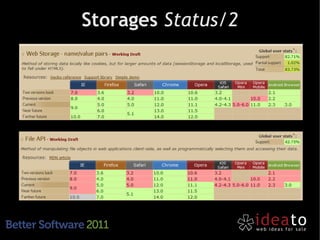
  Firefox 4, Chrome 11, have full implementation.
             Safari 5.1 and IE 10 will have
FileAPI or File Storage will give
us a way to store a lot of data.

      http://www.w3.org/TR/FileAPI/
File API includes FileReader and
         FileWriter APIs.

       Actually is supported by Chrome,
    Firefox > 3.6, Safari > 5.1, Opera > 11.1.
First steps on
                                                       offline storage
                                                       development.

http://www.flickr.com/photos/45449692@N00/3161567381
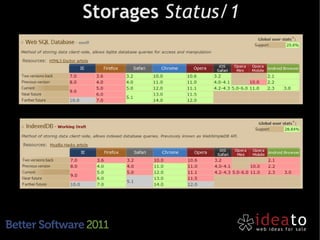
Storages Status/1
Storages Status/2
Detect if the storing feature is
 supported by the browser (with
modernizr), otherwise degradate
       to something else.
           (ie. dojox.storage)
http://www.flickr.com/photos/neate_photos/3529558272/


Protect against lost data,
  sync automatically.
http://www.flickr.com/photos/doctorow/2686237951/


            Automatically detect when
                users are online.
Do not exceed in storing data,
you can store binary data base64
  encoded but remember the
    pitfalls in performance.
Avoid race conditions.
If possible use WebSQL to use its
     transactions features.
use local storage to help your
application to become faster.
?
jsDay + phpDay 2012
 16-19 Maggio 2012 Verona
     www.phpday.it
Francesco Fullone
    ff@ideato.it
       @fullo


  via Quinto Bucci 205
   47023 Cesena (FC)
    info AT ideato.it
     www.ideato.it

your browser, your storage

  • 1.
    Your browser, mystorage a new approach on data storing Francesco Fullone ff AT ideato.it
  • 2.
    Who am I FrancescoFullone aka Fullo - PHP developer since 1999 - President - and Open Source Evangelist - CEO @ - founder @ - Nerd and geek
  • 3.
    What we wantis a lot of storage space, on the client, that persists beyond a page refresh and isn’t transmitted to the server. ~ M. Pilgrim
  • 4.
    Persistent local storageis one of the areas where client applications traditionally win against web applications.
  • 5.
    A jump inthe past
  • 6.
    http://www.flickr.com/photos/betsyweber/4962298614/ Cookieswere introduced in HTTP/1.0, limited to only 20 per domain and 4KB each.
  • 7.
    Cookies are sentto and from client at any connection. http://www.flickr.com/photos/dionhinchcliffe/4326080515
  • 8.
    Microsoft with InternetExplorer 6 introduced dHTML and the userData API to store up to 64KB of data
  • 9.
    Mozilla introduced withFirefox 2 the DOM Storage API, it will then know as Web Storage.
  • 10.
    Adobe, in 2002,created the Flash Cookies aka “Local Shared Objects” for Flash 6. Data storage increased to 100KB but it was difficult to be used.
  • 11.
    With Flash 8,in 2006, Adobe introduced the ExternalInterface to allow Js to access to the stored resources.
  • 12.
    Between 2005 and2007 dojox.storage was written by Brad Neuberg as a Js->Flash bridge to manage bigger chunks of data (with user prompt over 1MB).
  • 13.
    Google created Gearsin 2007, that introduced a database paradigm (based on SQLite) to the storage problem.
  • 14.
    All these storagesystems had different APIs, a common platform is needed by all the browser vendors.
  • 16.
    The two approachesof storing: Application Cache Offline storage
  • 17.
    Application Caching involves savingthe application's core logic and user-interface. http://www.whatwg.org/specs/web-apps/current- work/#applicationcache
  • 18.
    It is enabledby a file .manifest that declares which resources have to be saved locally. (theoretically limited to 5MB).
  • 19.
    CACHE MANIFEST # Explicitlycached entries CACHE: index.html stylesheet.css images/logo.png scripts/main.js # Resources that require the user to be online. NETWORK: login.php /myapi http://api.twitter.com # static.html will be served if main.php is inaccessible # offline.jpg will be served in place of all images in images/large/ FALLBACK: /main.php /static.html images/large/ images/offline.jpg
  • 20.
    applicationCache can useevents to trigger application behavior – window.applicationCache.onchecking = function(e) { • log("Checking for application update"); –}
  • 21.
    If you changea resource and you don't update (rev) the .manifest the browser may not download the new file! (yes! cached resources have priority on the online ones)
  • 22.
    Data storage isabout capturing specific data, or resources the user has expressed interest in. http://www.flickr.com/photos/bfionline/2380398365/
  • 23.
  • 24.
    Web Storage isthe simpler implementation of the Data Storage paradigm. http://dev.w3.org/html5/webstorage/
  • 25.
    Web Storage isbased on a structure of key-value pairs like any JavaScript object. localStorage.setItem("bar", foo);
  • 26.
    Web Storage cansave up to 5MB but only as strings. So we have to force a casting if needed. var bar = parseInt(localStorage["bar"]);
  • 27.
    Web Storage shouldbe local based or session based. var bar = localStorage["bar"]; var foo = sessionStorage["foo"];
  • 28.
    sessionStorage mantains a storagearea that's available for the duration of the web session. Opening a new window/tab will create a new session.
  • 29.
    localStorage relies onlyon client, so we have to track changes and use storage.events to sync server and client if needed.
  • 30.
    Web SQL Databaseis WAS just an offline SQL implementation, based on SQLite. http://dev.w3.org/html5/webdatabase/
  • 31.
    this.db = openDatabase('geomood','1.0', 'Geo', 8192); this.db.transaction(function(tx) { tx.executeSql("create table if not exists checkins(id integer primary key asc, time integer, latitude float, longitude float, mood string)", [], function() { console.log("siucc"); } » ); });
  • 32.
    Web SQL Databaseis not supported by Microsoft and Mozilla, instead it is on browsers based on webkit.
  • 33.
    But ... Web SQLDatabase is dead! as being dropped by W3C from 18/11/10 why bother more?
  • 34.
    Web SQL Databaseis the only database storage engine working on mobile devices!
  • 35.
    IndexedDB is anice compromise between Web Storage and Web SQL Database. http://www.w3.org/TR/IndexedDB/
  • 36.
    IndexedDB allows tocreate an index on a certain field stored in a standard key->value mapping.
  • 37.
    IndexedDB is promotedby all browsers vendor, but is not yet fully supported by all Firefox 4, Chrome 11, have full implementation. Safari 5.1 and IE 10 will have
  • 38.
    FileAPI or FileStorage will give us a way to store a lot of data. http://www.w3.org/TR/FileAPI/
  • 39.
    File API includesFileReader and FileWriter APIs. Actually is supported by Chrome, Firefox > 3.6, Safari > 5.1, Opera > 11.1.
  • 40.
    First steps on offline storage development. http://www.flickr.com/photos/45449692@N00/3161567381
  • 41.
  • 42.
  • 43.
    Detect if thestoring feature is supported by the browser (with modernizr), otherwise degradate to something else. (ie. dojox.storage)
  • 44.
  • 45.
    http://www.flickr.com/photos/doctorow/2686237951/ Automatically detect when users are online.
  • 46.
    Do not exceedin storing data, you can store binary data base64 encoded but remember the pitfalls in performance.
  • 47.
    Avoid race conditions. Ifpossible use WebSQL to use its transactions features.
  • 48.
    use local storageto help your application to become faster.
  • 49.
  • 50.
    jsDay + phpDay2012 16-19 Maggio 2012 Verona www.phpday.it
  • 51.
    Francesco Fullone ff@ideato.it @fullo via Quinto Bucci 205 47023 Cesena (FC) info AT ideato.it www.ideato.it