1
Javascript
Sai Ponduru
Parabola / Icentris
Dec 2012
2
Book Link -
http://www.syncfusion.com/resources
/techportal/ebooks/javascript
The following slides were prepared
using content from the book –
“Javascript Succinctly” by Cody
Lindley
3
console.log
● Firebug or Chrome Developer Tools
● console.log()
● typeof
● jsbin.com / jsfiddle.net
– console_log (seen in some slides) is a
function that I wrote when using JS Bin
● Examples:
var i = 5;
console.log( i );
console.log( typeof i );
4
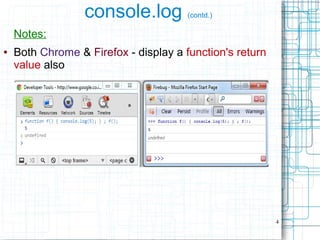
console.log (contd.)
Notes:
● Both Chrome & Firefox - display a function's return
value also
5
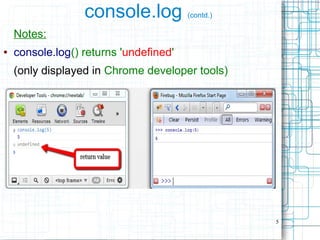
console.log (contd.)
Notes:
● console.log() returns 'undefined'
(only displayed in Chrome developer tools)
6
console.log (contd.)
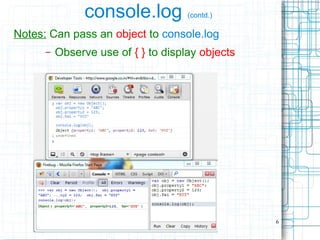
Notes: Can pass an object to console.log
– Observe use of { } to display objects
7
console.log (contd.)
Notes: Can pass an array to console.log
– Observe use of [ ] to display arrays
8
Objects, Primitive Values
Almost everything is an object
OR
acts like an object.
● Everything = Complex Objects +
Primitive Values
● Primitive Values can act like Objects
also
9
Primitive values
● String, Number, Boolean
● Examples:
5
'foo'
true
false
null
undefined
10
Things to note about Primitive values
The primitive values - String, Number, Boolean, act
like objects when used like objects
// primitive value
var primitiveString1 = "foo";
console.log(primitiveString1.length);
● length property is being accessed as if
primitiveString1 is an object
– How is this possible ?
11
Things to note about Primitive values (contd.)
This is possible because -
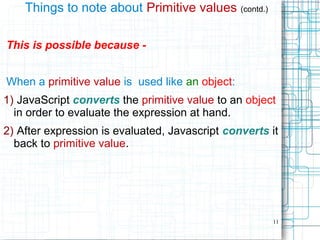
When a primitive value is used like an object:
1) JavaScript converts the primitive value to an object
in order to evaluate the expression at hand.
2) After expression is evaluated, Javascript converts it
back to primitive value.
12
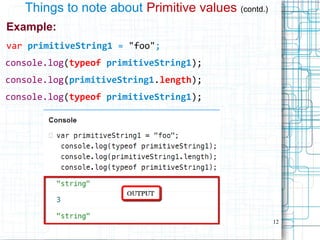
Things to note about Primitive values (contd.)
Example:
var primitiveString1 = "foo";
console.log(typeof primitiveString1);
console.log(primitiveString1.length);
console.log(typeof primitiveString1);
13
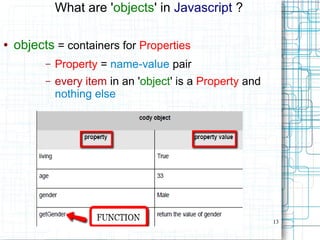
What are 'objects' in Javascript ?
● objects = containers for Properties
– Property = name-value pair
– every item in an 'object' is a Property and
nothing else
14
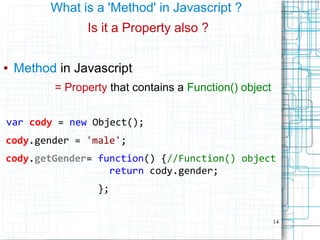
What is a 'Method' in Javascript ?
Is it a Property also ?
● Method in Javascript
= Property that contains a Function() object
var cody = new Object();
cody.gender = 'male';
cody.getGender= function() {//Function() object
return cody.gender;
};
15
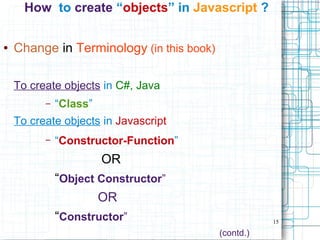
How to create “objects” in Javascript ?
● Change in Terminology (in this book)
To create objects in C#, Java
– “Class”
To create objects in Javascript
– “Constructor-Function”
OR
“Object Constructor”
OR
“Constructor”
(contd.)
16
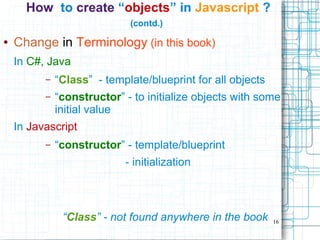
How to create “objects” in Javascript ?
(contd.)
● Change in Terminology (in this book)
In C#, Java
– “Class” - template/blueprint for all objects
– “constructor” - to initialize objects with some
initial value
In Javascript
– “constructor” - template/blueprint
- initialization
“Class” - not found anywhere in the book
17
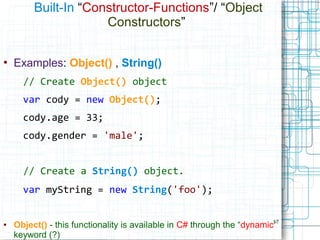
Built-In “Constructor-Functions”/ “Object
Constructors”
●
Examples: Object() , String()
// Create Object() object
var cody = new Object();
cody.age = 33;
cody.gender = 'male';
// Create a String() object.
var myString = new String('foo');
● Object() - this functionality is available in C# through the “dynamic”
keyword (?)
18
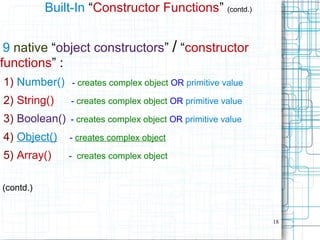
Built-In “Constructor Functions” (contd.)
9 native “object constructors” / “constructor
functions” :
1) Number() - creates complex object OR primitive value
2) String() - creates complex object OR primitive value
3) Boolean() - creates complex object OR primitive value
4) Object() - creates complex object
5) Array() - creates complex object
(contd.)
19
Built-In “Constructor Functions” (contd.)
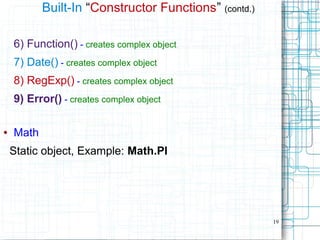
6) Function() - creates complex object
7) Date() - creates complex object
8) RegExp() - creates complex object
9) Error() - creates complex object
● Math
Static object, Example: Math.PI
20
Built-In “Constructor Functions” (contd.)
● Note:
Object(), Array(), Function() objects
● can contain other complex
objects
21
User-Defined “Constructor-Functions”
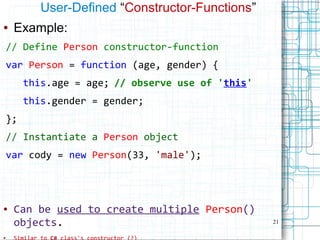
● Example:
// Define Person constructor-function
var Person = function (age, gender) {
this.age = age; // observe use of 'this'
this.gender = gender;
};
// Instantiate a Person object
var cody = new Person(33, 'male');
● Can be used to create multiple Person()
objects.
●
22
Observation: 2 ways to create custom objects
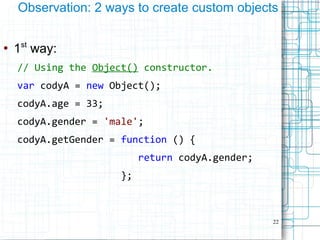
●
1st
way:
// Using the Object() constructor.
var codyA = new Object();
codyA.age = 33;
codyA.gender = 'male';
codyA.getGender = function () {
return codyA.gender;
};
23
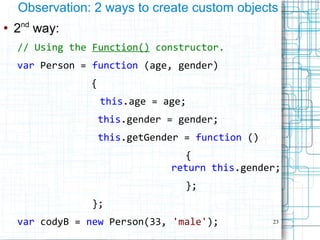
Observation: 2 ways to create custom objects
●
2nd
way:
// Using the Function() constructor.
var Person = function (age, gender)
{
this.age = age;
this.gender = gender;
this.getGender = function ()
{
return this.gender;
};
};
var codyB = new Person(33, 'male');
24
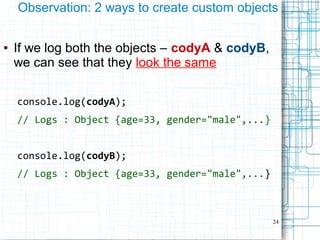
Observation: 2 ways to create custom objects
● If we log both the objects – codyA & codyB,
we can see that they look the same
console.log(codyA);
// Logs : Object {age=33, gender="male",...}
console.log(codyB);
// Logs : Object {age=33, gender="male",...}
25
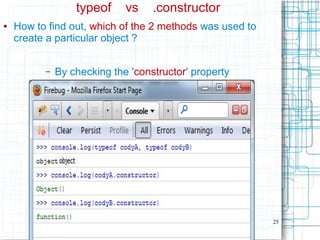
typeof vs .constructor
● How to find out, which of the 2 methods was used to
create a particular object ?
– By checking the 'constructor' property
27
'new' operator
// new – used to create objects (like in C#, Java)
var myNumber = new Number(23);
var myString = new String('male');
var myBoolean = new Boolean(false);
var myObject = new Object();
var myArray = new Array('foo', 'bar');
var myFunction = new Function("x","y","return x*y");
var myDate = new Date();
var myRegExp = new RegExp('bt[a-z]+b');
var myError = new Error('Darn!');
28
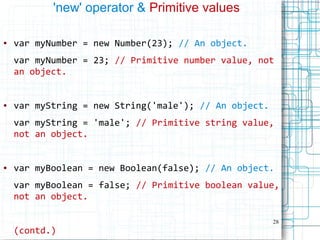
'new' operator & Primitive values
● var myNumber = new Number(23); // An object.
var myNumber = 23; // Primitive number value, not
an object.
● var myString = new String('male'); // An object.
var myString = 'male'; // Primitive string value,
not an object.
● var myBoolean = new Boolean(false); // An object.
var myBoolean = false; // Primitive boolean value,
not an object.
(contd.)
29
Terminology: Literal syntax
● Literal syntax
- what we normally use
- 'shortcuts' used for creating native object
values without having to use 'new'
● Can be used with Primitive Values & Complex
Objects
● Examples:
var s = 'foo'; //String = Primitive
var arr = [1,2,3]; //Array = Complex Object
30
'new' operator
& Literal syntax for Primitive Values
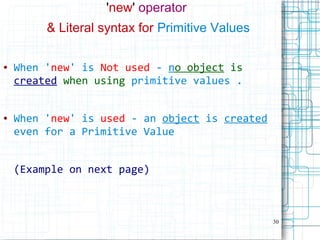
● When 'new' is Not used - no object is
created when using primitive values .
● When 'new' is used - an object is created
even for a Primitive Value
(Example on next page)
31
'new' operator
& Literal syntax for Primitive Values
(contd.)
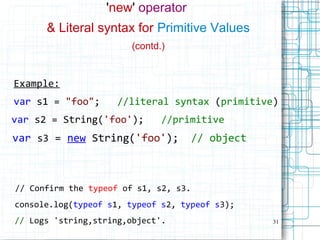
Example:
var s1 = "foo"; //literal syntax (primitive)
var s2 = String('foo'); //primitive
var s3 = new String('foo'); // object
// Confirm the typeof of s1, s2, s3.
console.log(typeof s1, typeof s2, typeof s3);
// Logs 'string,string,object'.
32
'new' operator
& Literal syntax for Primitive Values
(contd.)
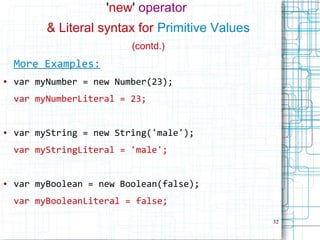
More Examples:
● var myNumber = new Number(23);
var myNumberLiteral = 23;
● var myString = new String('male');
var myStringLiteral = 'male';
● var myBoolean = new Boolean(false);
var myBooleanLiteral = false;
33
'new' operator
& Literal syntax for Non-Primitive Values
● var myObject = new Object(); // using 'new'
var myObject = {}; // literal syntax
● var myArray = new Array('foo', 'bar');
var myArray = ['foo', 'bar'];
(contd.)
34
'new' operator
& Literal syntax for Non-Primitive Values
(contd.)
● var myFunction=new Function("x","y","return x*y");
var myFunction = function(x, y){return x*y};
● var myRegExp = new RegExp('bt[a-z]+b');
var myRegExp = /bt[a-z]+b/;
35
Value Types vs Reference Types
● Primitive values – value types
– Comparison is by value
● Complex values – reference types
– Comparison is by reference
36
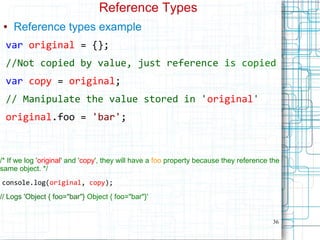
Reference Types
● Reference types example
var original = {};
//Not copied by value, just reference is copied
var copy = original;
// Manipulate the value stored in 'original'
original.foo = 'bar';
/* If we log 'original' and 'copy', they will have a foo property because they reference the
same object. */
console.log(original, copy);
// Logs 'Object { foo="bar"} Object { foo="bar"}'
37
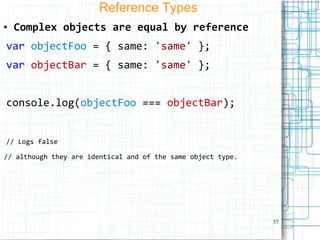
Reference Types
● Complex objects are equal by reference
var objectFoo = { same: 'same' };
var objectBar = { same: 'same' };
console.log(objectFoo === objectBar);
// Logs false
// although they are identical and of the same object type.
38
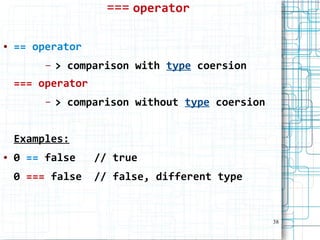
=== operator
● == operator
– > comparison with type coersion
=== operator
– > comparison without type coersion
Examples:
● 0 == false // true
0 === false // false, different type
39
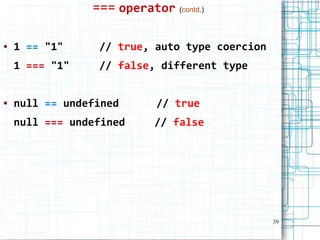
=== operator (contd.)
● 1 == "1" // true, auto type coercion
1 === "1" // false, different type
● null == undefined // true
null === undefined // false
40
● PART 2
41
Function
● In Javascript, a function can be used to:
– return a value
– simply run some code
– construct an object
42
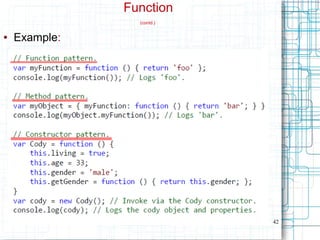
Function
(contd.)
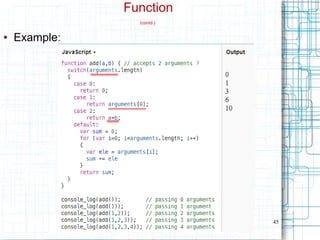
● Example:
43
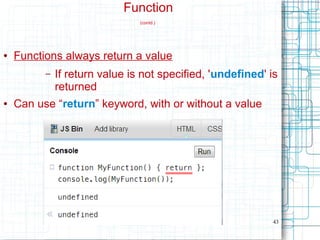
Function
(contd.)
● Functions always return a value
– If return value is not specified, 'undefined' is
returned
● Can use “return” keyword, with or without a value
44
Function
(contd.)
Passing parameters to functions:
● Can pass less parameters than function expects
– parameters, for which we do not pass values,
take 'undefined' value
● Can pass more parameters than function expects
– extra parameter values can be accessed
using 'arguments' array
– 'arguments' property –
● an array
● contains list of Passed parameters to a
function
45
Function
(contd.)
● Example:
46
Function
(contd.)
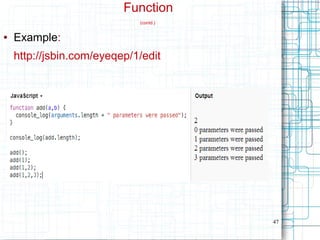
function instance 'length' property
vs
arguments.length
● function instance 'length' property
=
number of parameters that function expects
● arguments.length
=
number of parameters that were actually
passed
47
Function
(contd.)
● Example:
http://jsbin.com/eyeqep/1/edit
48
Function
(contd.)
Functions
– 1st
class citizens in Javascript
●
1st
class citizens =
– Functions can be stored in a variable
– Functions can be passed to & returned from
a function
– Functions can have properties
49
Function
(contd.)
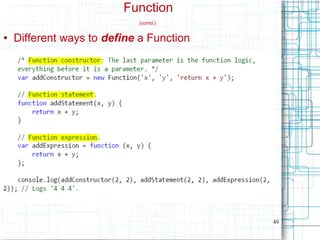
● Different ways to define a Function
50
Function
(contd.)
● When is the difference important ?
– 'function statements' can be invoked before
they are defined, but not 'function
expressions'
– Why ?
● before the code runs, 'function
statements' are interpreted, but not
'function expressions'
51
Function
(contd.)
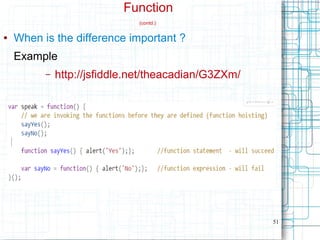
● When is the difference important ?
Example
– http://jsfiddle.net/theacadian/G3ZXm/
52
Function
(contd.)
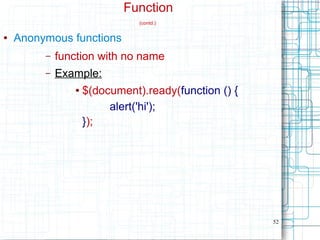
● Anonymous functions
– function with no name
– Example:
● $(document).ready(function () {
alert('hi');
});
53
Function
(contd.)
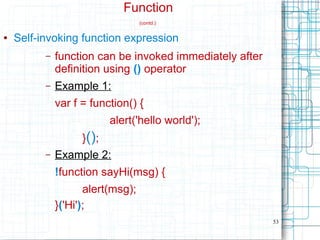
● Self-invoking function expression
– function can be invoked immediately after
definition using () operator
– Example 1:
var f = function() {
alert('hello world');
}();
– Example 2:
!function sayHi(msg) {
alert(msg);
}('Hi');
54
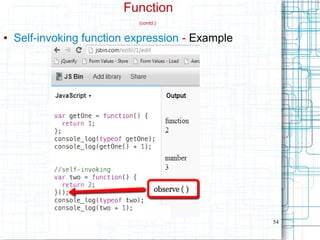
Function
(contd.)
● Self-invoking function expression - Example
55
Function
(contd.)
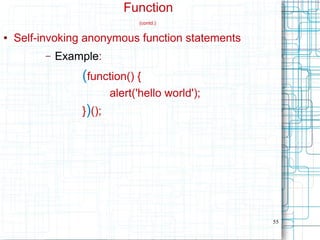
● Self-invoking anonymous function statements
– Example:
(function() {
alert('hello world');
})();
56
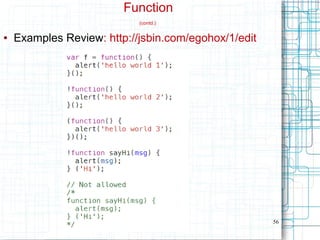
Function
(contd.)
● Examples Review: http://jsbin.com/egohox/1/edit
57
Function
(contd.)
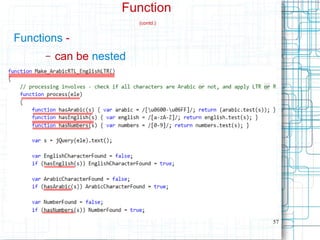
Functions -
– can be nested
58
Function
(contd.)
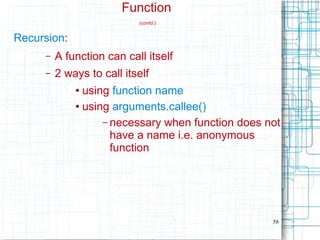
Recursion:
– A function can call itself
– 2 ways to call itself
● using function name
● using arguments.callee()
– necessary when function does not
have a name i.e. anonymous
function
59
Function
(contd.)
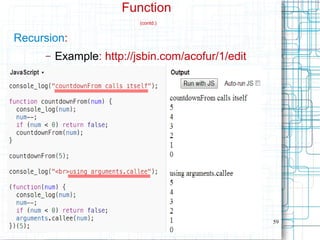
Recursion:
– Example: http://jsbin.com/acofur/1/edit
60
Properties
● Accessing Properties
● Deleting Properties
● Adding Properties
61
Accessing properties:
using “dot notation” & “bracket notation”
● An object's properties can be accessed
using
– “dot notation” OR
– “bracket notation”
62
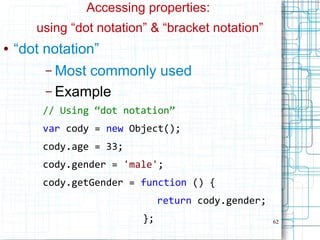
Accessing properties:
using “dot notation” & “bracket notation”
● “dot notation”
– Most commonly used
– Example
// Using “dot notation”
var cody = new Object();
cody.age = 33;
cody.gender = 'male';
cody.getGender = function () {
return cody.gender;
};
63
Accessing properties:
using “dot notation” & “bracket notation”
● “bracket notation”
– Not so commonly used
– Example
// Using “bracket notation”
var cody = new Object();
cody['age'] = 33;
cody['gender'] = 'male';
cody['getGender'] = function () {
return cody.gender;
};
64
Accessing properties:
● using “dot notation” & “bracket notation”
● “bracket notation” advantage:
– useful when the property-name is
in a variable / is computed
var cody = new Object();
cody['age'] = 33;
cody['first_name'] = 'cody';
var propertyName = 'age';
var ageOfCody = cody[propertyName];
var s = cody['first'+'_'+'name'];
65
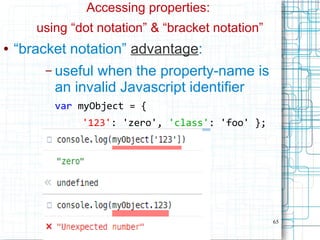
Accessing properties:
using “dot notation” & “bracket notation”
● “bracket notation” advantage:
– useful when the property-name is
an invalid Javascript identifier
var myObject = {
'123': 'zero', 'class': 'foo' };
66
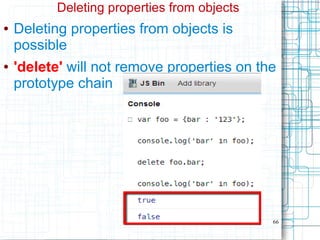
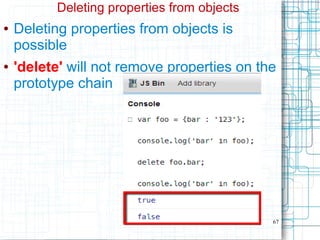
Deleting properties from objects
● Deleting properties from objects is
possible
● 'delete' will not remove properties on the
prototype chain
67
Deleting properties from objects
● Deleting properties from objects is
possible
● 'delete' will not remove properties on the
prototype chain
68
Adding Properties
● Classical objects are 'hard'
– not possible to add a new member to an
already created object
– Only way =
create a new class with the new
member and then instantiate it
● Javascript objects are 'soft' & 'flexible'
– possible to add a new member to an already
created object
● new member can be added by simple
assignment
(from 'Conclusion' in http://javascript.crockford.com/inheritance.html)
69
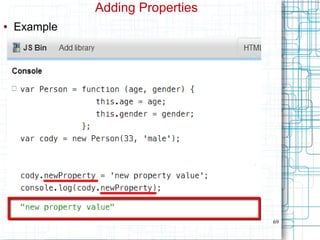
Adding Properties
● Example
70
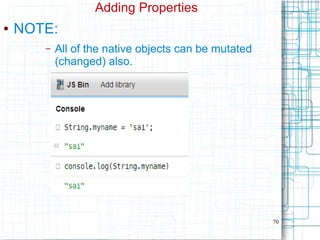
Adding Properties
● NOTE:
– All of the native objects can be mutated
(changed) also.
71
Inheritance, Prototype Chain
● Example 1:
Suppose myArray is a Array object, and we invoke
toString() method on it
var myArray = [ 'foo', 'bar' ];
var s = myArray.toString(); // s = 'foo,bar'
Search for toString() is done as follows :
– 1st
– definition of myArray is searched
– 2nd
– definition of Array.prototype is
searched
– 3rd
– definition of Object.prototype is
searched
72
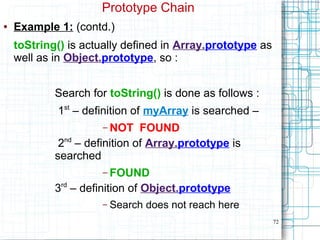
Prototype Chain
● Example 1: (contd.)
toString() is actually defined in Array.prototype as
well as in Object.prototype, so :
Search for toString() is done as follows :
1st
– definition of myArray is searched –
– NOT FOUND
2nd
– definition of Array.prototype is
searched
– FOUND
3rd
– definition of Object.prototype
– Search does not reach here
73
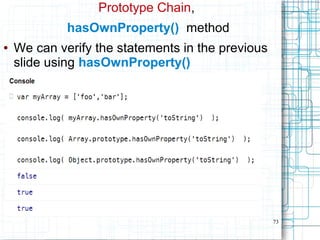
Prototype Chain,
hasOwnProperty() method
● We can verify the statements in the previous
slide using hasOwnProperty()
74
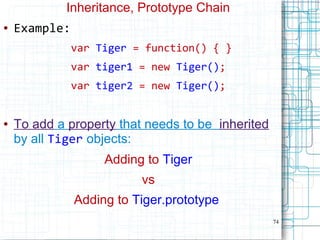
Inheritance, Prototype Chain
● Example:
var Tiger = function() { }
var tiger1 = new Tiger();
var tiger2 = new Tiger();
● To add a property that needs to be inherited
by all Tiger objects:
Adding to Tiger
vs
Adding to Tiger.prototype
75
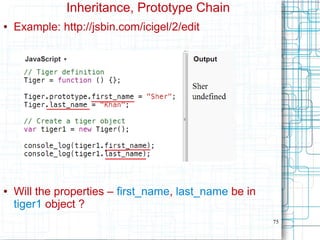
Inheritance, Prototype Chain
● Example: http://jsbin.com/icigel/2/edit
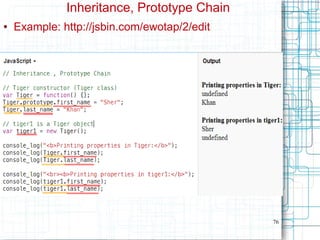
● Will the properties – first_name, last_name be in
tiger1 object ?
76
Inheritance, Prototype Chain
● Example: http://jsbin.com/ewotap/2/edit
77
Inheritance, Prototype Chain
● Properties that need to be inherited
– Have to be added to
● Tiger.prototype
● And not to Tiger
78
Inheritance, Prototype Chain
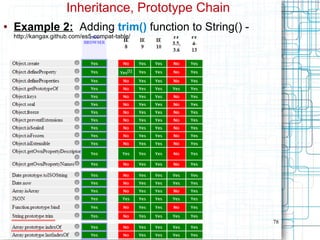
● Example 2: Adding trim() function to String() -
http://kangax.github.com/es5-compat-table/
79
Inheritance, Prototype Chain
● Example 2(contd.): adding trim() function to String()
● From Kangax's compat tables (
http://kangax.github.com/es5-compat-table/) on prev. slide:
– Some browsers like IE 8, do not provide a
trim() method for strings
//below is not possible in IE 8
var str = “ 123 ”.trim();
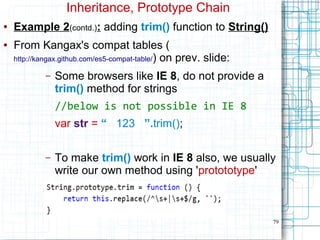
– To make trim() work in IE 8 also, we usually
write our own method using 'protototype'
80
Inheritance, Prototype Chain
● Example 2 (contd.): adding trim() function to String()
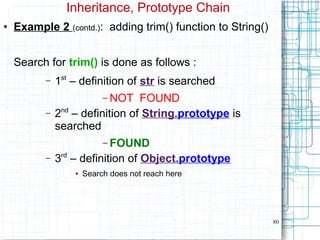
Search for trim() is done as follows :
– 1st
– definition of str is searched
– NOT FOUND
– 2nd
– definition of String.prototype is
searched
– FOUND
– 3rd
– definition of Object.prototype
● Search does not reach here
81
Inheritance, Prototype Chain
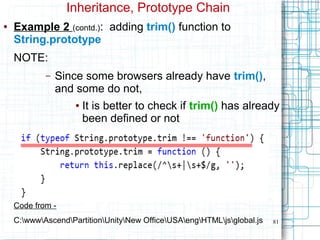
● Example 2 (contd.): adding trim() function to
String.prototype
NOTE:
– Since some browsers already have trim(),
and some do not,
● It is better to check if trim() has already
been defined or not
Code from -
C:wwwAscendPartitionUnityNew OfficeUSAengHTMLjsglobal.js
82
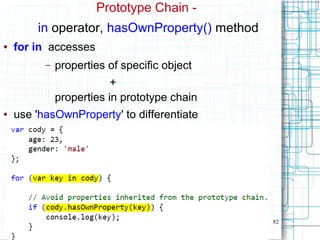
Prototype Chain -
in operator, hasOwnProperty() method
● for in accesses
– properties of specific object
+
properties in prototype chain
● use 'hasOwnProperty' to differentiate
83
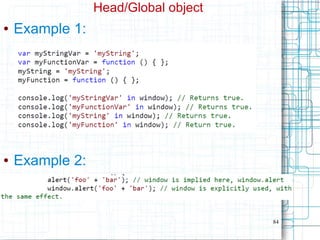
Head/Global object
● Javascript code must be contained within
an object
● In a web-browser,
– Javascript code is contained &
executed within window object
– Hence in a web-browser:
● Head object = window
84
Head/Global object
● Example 1:
● Example 2:
85
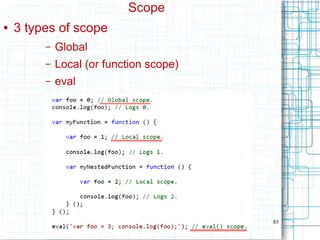
Scope
● 3 types of scope
– Global
– Local (or function scope)
– eval
86
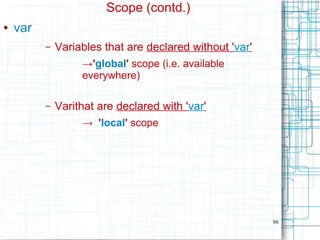
Scope (contd.)
● var
– Variables that are declared without 'var'
→'global' scope (i.e. available
everywhere)
– Varithat are declared with 'var'
→ 'local' scope
87
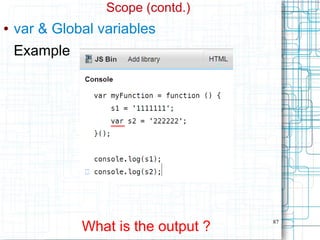
Scope (contd.)
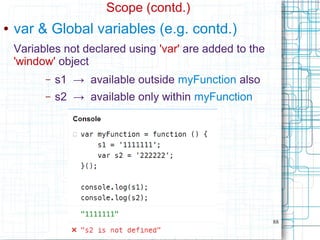
● var & Global variables
Example
What is the output ?
88
Scope (contd.)
● var & Global variables (e.g. contd.)
Variables not declared using 'var' are added to the
'window' object
– s1 → available outside myFunction also
– s2 → available only within myFunction
89
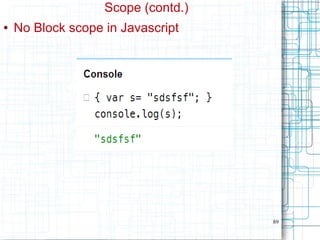
Scope (contd.)
● No Block scope in Javascript
90
Scope (contd.)
Closures
● Closures
– this is a language feature (like inheritance)
– not a keyword
– related to Scope of variables
● Because Javascript implements Closures
When using nested functions
– inner functions have access to variables of outer
functions
91
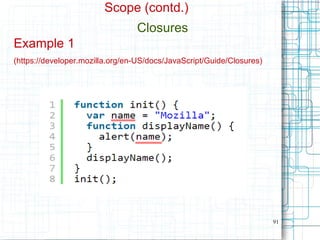
Scope (contd.)
Closures
Example 1
(https://developer.mozilla.org/en-US/docs/JavaScript/Guide/Closures)
92
Scope (contd.)
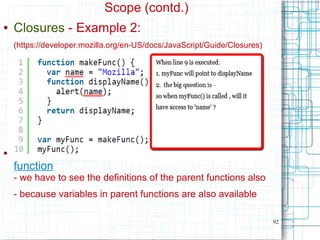
● Closures - Example 2:
(https://developer.mozilla.org/en-US/docs/JavaScript/Guide/Closures)
● To determine if a variable is available within a
function
- we have to see the definitions of the parent functions also
- because variables in parent functions are also available
93
this
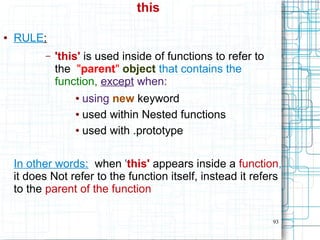
● RULE:
– 'this' is used inside of functions to refer to
the "parent" object that contains the
function, except when:
● using new keyword
● used within Nested functions
● used with .prototype
In other words: when 'this' appears inside a function,
it does Not refer to the function itself, instead it refers
to the parent of the function
94
this (contd.)
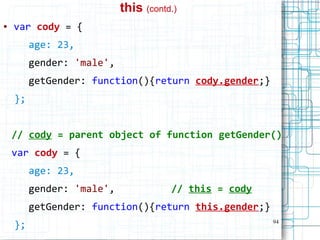
● var cody = {
age: 23,
gender: 'male',
getGender: function(){return cody.gender;}
};
// cody = parent object of function getGender()
var cody = {
age: 23,
gender: 'male', // this = cody
getGender: function(){return this.gender;}
};
95
this (contd.)
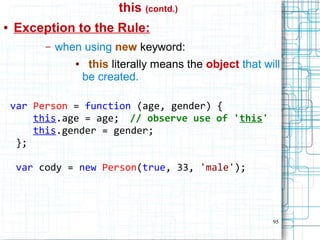
● Exception to the Rule:
– when using new keyword:
● this literally means the object that will
be created.
var Person = function (age, gender) {
this.age = age; // observe use of 'this'
this.gender = gender;
};
var cody = new Person(true, 33, 'male');
96
this (contd.)
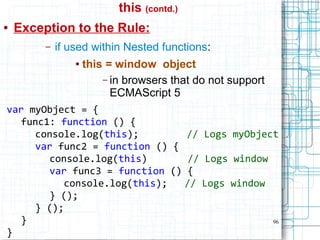
● Exception to the Rule:
– if used within Nested functions:
● this = window object
– in browsers that do not support
ECMAScript 5
var myObject = {
func1: function () {
console.log(this); // Logs myObject
var func2 = function () {
console.log(this) // Logs window
var func3 = function () {
console.log(this); // Logs window
} ();
} ();
}
}
97
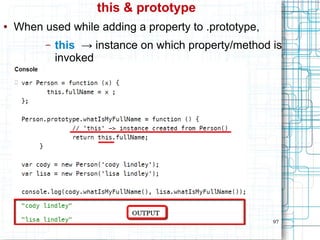
this & prototype
● When used while adding a property to .prototype,
– this → instance on which property/method is
invoked
98
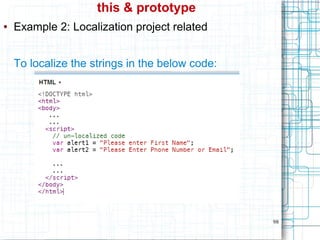
this & prototype
● Example 2: Localization project related
To localize the strings in the below code:
99
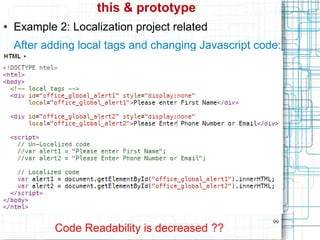
this & prototype
● Example 2: Localization project related
After adding local tags and changing Javascript code:
Code Readability is decreased ??
100
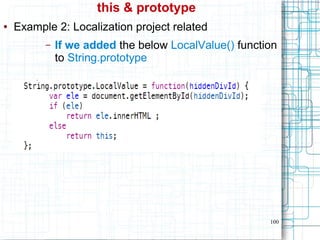
this & prototype
● Example 2: Localization project related
– If we added the below LocalValue() function
to String.prototype
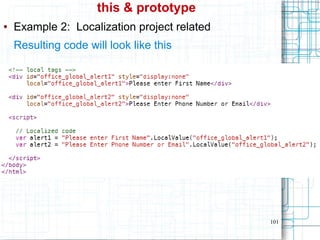
101
this & prototype
● Example 2: Localization project related
Resulting code will look like this
102
Inheritance
● Example:
– http://jsbin.com/aqicip/6/edit

Javascript

  • 1.
  • 2.
    2 Book Link - http://www.syncfusion.com/resources /techportal/ebooks/javascript Thefollowing slides were prepared using content from the book – “Javascript Succinctly” by Cody Lindley
  • 3.
    3 console.log ● Firebug orChrome Developer Tools ● console.log() ● typeof ● jsbin.com / jsfiddle.net – console_log (seen in some slides) is a function that I wrote when using JS Bin ● Examples: var i = 5; console.log( i ); console.log( typeof i );
  • 4.
    4 console.log (contd.) Notes: ● BothChrome & Firefox - display a function's return value also
  • 5.
    5 console.log (contd.) Notes: ● console.log()returns 'undefined' (only displayed in Chrome developer tools)
  • 6.
    6 console.log (contd.) Notes: Canpass an object to console.log – Observe use of { } to display objects
  • 7.
    7 console.log (contd.) Notes: Canpass an array to console.log – Observe use of [ ] to display arrays
  • 8.
    8 Objects, Primitive Values Almosteverything is an object OR acts like an object. ● Everything = Complex Objects + Primitive Values ● Primitive Values can act like Objects also
  • 9.
    9 Primitive values ● String,Number, Boolean ● Examples: 5 'foo' true false null undefined
  • 10.
    10 Things to noteabout Primitive values The primitive values - String, Number, Boolean, act like objects when used like objects // primitive value var primitiveString1 = "foo"; console.log(primitiveString1.length); ● length property is being accessed as if primitiveString1 is an object – How is this possible ?
  • 11.
    11 Things to noteabout Primitive values (contd.) This is possible because - When a primitive value is used like an object: 1) JavaScript converts the primitive value to an object in order to evaluate the expression at hand. 2) After expression is evaluated, Javascript converts it back to primitive value.
  • 12.
    12 Things to noteabout Primitive values (contd.) Example: var primitiveString1 = "foo"; console.log(typeof primitiveString1); console.log(primitiveString1.length); console.log(typeof primitiveString1);
  • 13.
    13 What are 'objects'in Javascript ? ● objects = containers for Properties – Property = name-value pair – every item in an 'object' is a Property and nothing else
  • 14.
    14 What is a'Method' in Javascript ? Is it a Property also ? ● Method in Javascript = Property that contains a Function() object var cody = new Object(); cody.gender = 'male'; cody.getGender= function() {//Function() object return cody.gender; };
  • 15.
    15 How to create“objects” in Javascript ? ● Change in Terminology (in this book) To create objects in C#, Java – “Class” To create objects in Javascript – “Constructor-Function” OR “Object Constructor” OR “Constructor” (contd.)
  • 16.
    16 How to create“objects” in Javascript ? (contd.) ● Change in Terminology (in this book) In C#, Java – “Class” - template/blueprint for all objects – “constructor” - to initialize objects with some initial value In Javascript – “constructor” - template/blueprint - initialization “Class” - not found anywhere in the book
  • 17.
    17 Built-In “Constructor-Functions”/ “Object Constructors” ● Examples:Object() , String() // Create Object() object var cody = new Object(); cody.age = 33; cody.gender = 'male'; // Create a String() object. var myString = new String('foo'); ● Object() - this functionality is available in C# through the “dynamic” keyword (?)
  • 18.
    18 Built-In “Constructor Functions”(contd.) 9 native “object constructors” / “constructor functions” : 1) Number() - creates complex object OR primitive value 2) String() - creates complex object OR primitive value 3) Boolean() - creates complex object OR primitive value 4) Object() - creates complex object 5) Array() - creates complex object (contd.)
  • 19.
    19 Built-In “Constructor Functions”(contd.) 6) Function() - creates complex object 7) Date() - creates complex object 8) RegExp() - creates complex object 9) Error() - creates complex object ● Math Static object, Example: Math.PI
  • 20.
    20 Built-In “Constructor Functions”(contd.) ● Note: Object(), Array(), Function() objects ● can contain other complex objects
  • 21.
    21 User-Defined “Constructor-Functions” ● Example: //Define Person constructor-function var Person = function (age, gender) { this.age = age; // observe use of 'this' this.gender = gender; }; // Instantiate a Person object var cody = new Person(33, 'male'); ● Can be used to create multiple Person() objects. ●
  • 22.
    22 Observation: 2 waysto create custom objects ● 1st way: // Using the Object() constructor. var codyA = new Object(); codyA.age = 33; codyA.gender = 'male'; codyA.getGender = function () { return codyA.gender; };
  • 23.
    23 Observation: 2 waysto create custom objects ● 2nd way: // Using the Function() constructor. var Person = function (age, gender) { this.age = age; this.gender = gender; this.getGender = function () { return this.gender; }; }; var codyB = new Person(33, 'male');
  • 24.
    24 Observation: 2 waysto create custom objects ● If we log both the objects – codyA & codyB, we can see that they look the same console.log(codyA); // Logs : Object {age=33, gender="male",...} console.log(codyB); // Logs : Object {age=33, gender="male",...}
  • 25.
    25 typeof vs .constructor ●How to find out, which of the 2 methods was used to create a particular object ? – By checking the 'constructor' property
  • 26.
    27 'new' operator // new– used to create objects (like in C#, Java) var myNumber = new Number(23); var myString = new String('male'); var myBoolean = new Boolean(false); var myObject = new Object(); var myArray = new Array('foo', 'bar'); var myFunction = new Function("x","y","return x*y"); var myDate = new Date(); var myRegExp = new RegExp('bt[a-z]+b'); var myError = new Error('Darn!');
  • 27.
    28 'new' operator &Primitive values ● var myNumber = new Number(23); // An object. var myNumber = 23; // Primitive number value, not an object. ● var myString = new String('male'); // An object. var myString = 'male'; // Primitive string value, not an object. ● var myBoolean = new Boolean(false); // An object. var myBoolean = false; // Primitive boolean value, not an object. (contd.)
  • 28.
    29 Terminology: Literal syntax ●Literal syntax - what we normally use - 'shortcuts' used for creating native object values without having to use 'new' ● Can be used with Primitive Values & Complex Objects ● Examples: var s = 'foo'; //String = Primitive var arr = [1,2,3]; //Array = Complex Object
  • 29.
    30 'new' operator & Literalsyntax for Primitive Values ● When 'new' is Not used - no object is created when using primitive values . ● When 'new' is used - an object is created even for a Primitive Value (Example on next page)
  • 30.
    31 'new' operator & Literalsyntax for Primitive Values (contd.) Example: var s1 = "foo"; //literal syntax (primitive) var s2 = String('foo'); //primitive var s3 = new String('foo'); // object // Confirm the typeof of s1, s2, s3. console.log(typeof s1, typeof s2, typeof s3); // Logs 'string,string,object'.
  • 31.
    32 'new' operator & Literalsyntax for Primitive Values (contd.) More Examples: ● var myNumber = new Number(23); var myNumberLiteral = 23; ● var myString = new String('male'); var myStringLiteral = 'male'; ● var myBoolean = new Boolean(false); var myBooleanLiteral = false;
  • 32.
    33 'new' operator & Literalsyntax for Non-Primitive Values ● var myObject = new Object(); // using 'new' var myObject = {}; // literal syntax ● var myArray = new Array('foo', 'bar'); var myArray = ['foo', 'bar']; (contd.)
  • 33.
    34 'new' operator & Literalsyntax for Non-Primitive Values (contd.) ● var myFunction=new Function("x","y","return x*y"); var myFunction = function(x, y){return x*y}; ● var myRegExp = new RegExp('bt[a-z]+b'); var myRegExp = /bt[a-z]+b/;
  • 34.
    35 Value Types vsReference Types ● Primitive values – value types – Comparison is by value ● Complex values – reference types – Comparison is by reference
  • 35.
    36 Reference Types ● Referencetypes example var original = {}; //Not copied by value, just reference is copied var copy = original; // Manipulate the value stored in 'original' original.foo = 'bar'; /* If we log 'original' and 'copy', they will have a foo property because they reference the same object. */ console.log(original, copy); // Logs 'Object { foo="bar"} Object { foo="bar"}'
  • 36.
    37 Reference Types ● Complexobjects are equal by reference var objectFoo = { same: 'same' }; var objectBar = { same: 'same' }; console.log(objectFoo === objectBar); // Logs false // although they are identical and of the same object type.
  • 37.
    38 === operator ● ==operator – > comparison with type coersion === operator – > comparison without type coersion Examples: ● 0 == false // true 0 === false // false, different type
  • 38.
    39 === operator (contd.) ●1 == "1" // true, auto type coercion 1 === "1" // false, different type ● null == undefined // true null === undefined // false
  • 39.
  • 40.
    41 Function ● In Javascript,a function can be used to: – return a value – simply run some code – construct an object
  • 41.
  • 42.
    43 Function (contd.) ● Functions alwaysreturn a value – If return value is not specified, 'undefined' is returned ● Can use “return” keyword, with or without a value
  • 43.
    44 Function (contd.) Passing parameters tofunctions: ● Can pass less parameters than function expects – parameters, for which we do not pass values, take 'undefined' value ● Can pass more parameters than function expects – extra parameter values can be accessed using 'arguments' array – 'arguments' property – ● an array ● contains list of Passed parameters to a function
  • 44.
  • 45.
    46 Function (contd.) function instance 'length'property vs arguments.length ● function instance 'length' property = number of parameters that function expects ● arguments.length = number of parameters that were actually passed
  • 46.
  • 47.
    48 Function (contd.) Functions – 1st class citizensin Javascript ● 1st class citizens = – Functions can be stored in a variable – Functions can be passed to & returned from a function – Functions can have properties
  • 48.
  • 49.
    50 Function (contd.) ● When isthe difference important ? – 'function statements' can be invoked before they are defined, but not 'function expressions' – Why ? ● before the code runs, 'function statements' are interpreted, but not 'function expressions'
  • 50.
    51 Function (contd.) ● When isthe difference important ? Example – http://jsfiddle.net/theacadian/G3ZXm/
  • 51.
    52 Function (contd.) ● Anonymous functions –function with no name – Example: ● $(document).ready(function () { alert('hi'); });
  • 52.
    53 Function (contd.) ● Self-invoking functionexpression – function can be invoked immediately after definition using () operator – Example 1: var f = function() { alert('hello world'); }(); – Example 2: !function sayHi(msg) { alert(msg); }('Hi');
  • 53.
  • 54.
    55 Function (contd.) ● Self-invoking anonymousfunction statements – Example: (function() { alert('hello world'); })();
  • 55.
    56 Function (contd.) ● Examples Review:http://jsbin.com/egohox/1/edit
  • 56.
  • 57.
    58 Function (contd.) Recursion: – A functioncan call itself – 2 ways to call itself ● using function name ● using arguments.callee() – necessary when function does not have a name i.e. anonymous function
  • 58.
  • 59.
    60 Properties ● Accessing Properties ●Deleting Properties ● Adding Properties
  • 60.
    61 Accessing properties: using “dotnotation” & “bracket notation” ● An object's properties can be accessed using – “dot notation” OR – “bracket notation”
  • 61.
    62 Accessing properties: using “dotnotation” & “bracket notation” ● “dot notation” – Most commonly used – Example // Using “dot notation” var cody = new Object(); cody.age = 33; cody.gender = 'male'; cody.getGender = function () { return cody.gender; };
  • 62.
    63 Accessing properties: using “dotnotation” & “bracket notation” ● “bracket notation” – Not so commonly used – Example // Using “bracket notation” var cody = new Object(); cody['age'] = 33; cody['gender'] = 'male'; cody['getGender'] = function () { return cody.gender; };
  • 63.
    64 Accessing properties: ● using“dot notation” & “bracket notation” ● “bracket notation” advantage: – useful when the property-name is in a variable / is computed var cody = new Object(); cody['age'] = 33; cody['first_name'] = 'cody'; var propertyName = 'age'; var ageOfCody = cody[propertyName]; var s = cody['first'+'_'+'name'];
  • 64.
    65 Accessing properties: using “dotnotation” & “bracket notation” ● “bracket notation” advantage: – useful when the property-name is an invalid Javascript identifier var myObject = { '123': 'zero', 'class': 'foo' };
  • 65.
    66 Deleting properties fromobjects ● Deleting properties from objects is possible ● 'delete' will not remove properties on the prototype chain
  • 66.
    67 Deleting properties fromobjects ● Deleting properties from objects is possible ● 'delete' will not remove properties on the prototype chain
  • 67.
    68 Adding Properties ● Classicalobjects are 'hard' – not possible to add a new member to an already created object – Only way = create a new class with the new member and then instantiate it ● Javascript objects are 'soft' & 'flexible' – possible to add a new member to an already created object ● new member can be added by simple assignment (from 'Conclusion' in http://javascript.crockford.com/inheritance.html)
  • 68.
  • 69.
    70 Adding Properties ● NOTE: –All of the native objects can be mutated (changed) also.
  • 70.
    71 Inheritance, Prototype Chain ●Example 1: Suppose myArray is a Array object, and we invoke toString() method on it var myArray = [ 'foo', 'bar' ]; var s = myArray.toString(); // s = 'foo,bar' Search for toString() is done as follows : – 1st – definition of myArray is searched – 2nd – definition of Array.prototype is searched – 3rd – definition of Object.prototype is searched
  • 71.
    72 Prototype Chain ● Example1: (contd.) toString() is actually defined in Array.prototype as well as in Object.prototype, so : Search for toString() is done as follows : 1st – definition of myArray is searched – – NOT FOUND 2nd – definition of Array.prototype is searched – FOUND 3rd – definition of Object.prototype – Search does not reach here
  • 72.
    73 Prototype Chain, hasOwnProperty() method ●We can verify the statements in the previous slide using hasOwnProperty()
  • 73.
    74 Inheritance, Prototype Chain ●Example: var Tiger = function() { } var tiger1 = new Tiger(); var tiger2 = new Tiger(); ● To add a property that needs to be inherited by all Tiger objects: Adding to Tiger vs Adding to Tiger.prototype
  • 74.
    75 Inheritance, Prototype Chain ●Example: http://jsbin.com/icigel/2/edit ● Will the properties – first_name, last_name be in tiger1 object ?
  • 75.
    76 Inheritance, Prototype Chain ●Example: http://jsbin.com/ewotap/2/edit
  • 76.
    77 Inheritance, Prototype Chain ●Properties that need to be inherited – Have to be added to ● Tiger.prototype ● And not to Tiger
  • 77.
    78 Inheritance, Prototype Chain ●Example 2: Adding trim() function to String() - http://kangax.github.com/es5-compat-table/
  • 78.
    79 Inheritance, Prototype Chain ●Example 2(contd.): adding trim() function to String() ● From Kangax's compat tables ( http://kangax.github.com/es5-compat-table/) on prev. slide: – Some browsers like IE 8, do not provide a trim() method for strings //below is not possible in IE 8 var str = “ 123 ”.trim(); – To make trim() work in IE 8 also, we usually write our own method using 'protototype'
  • 79.
    80 Inheritance, Prototype Chain ●Example 2 (contd.): adding trim() function to String() Search for trim() is done as follows : – 1st – definition of str is searched – NOT FOUND – 2nd – definition of String.prototype is searched – FOUND – 3rd – definition of Object.prototype ● Search does not reach here
  • 80.
    81 Inheritance, Prototype Chain ●Example 2 (contd.): adding trim() function to String.prototype NOTE: – Since some browsers already have trim(), and some do not, ● It is better to check if trim() has already been defined or not Code from - C:wwwAscendPartitionUnityNew OfficeUSAengHTMLjsglobal.js
  • 81.
    82 Prototype Chain - inoperator, hasOwnProperty() method ● for in accesses – properties of specific object + properties in prototype chain ● use 'hasOwnProperty' to differentiate
  • 82.
    83 Head/Global object ● Javascriptcode must be contained within an object ● In a web-browser, – Javascript code is contained & executed within window object – Hence in a web-browser: ● Head object = window
  • 83.
  • 84.
    85 Scope ● 3 typesof scope – Global – Local (or function scope) – eval
  • 85.
    86 Scope (contd.) ● var –Variables that are declared without 'var' →'global' scope (i.e. available everywhere) – Varithat are declared with 'var' → 'local' scope
  • 86.
    87 Scope (contd.) ● var& Global variables Example What is the output ?
  • 87.
    88 Scope (contd.) ● var& Global variables (e.g. contd.) Variables not declared using 'var' are added to the 'window' object – s1 → available outside myFunction also – s2 → available only within myFunction
  • 88.
    89 Scope (contd.) ● NoBlock scope in Javascript
  • 89.
    90 Scope (contd.) Closures ● Closures –this is a language feature (like inheritance) – not a keyword – related to Scope of variables ● Because Javascript implements Closures When using nested functions – inner functions have access to variables of outer functions
  • 90.
  • 91.
    92 Scope (contd.) ● Closures- Example 2: (https://developer.mozilla.org/en-US/docs/JavaScript/Guide/Closures) ● To determine if a variable is available within a function - we have to see the definitions of the parent functions also - because variables in parent functions are also available
  • 92.
    93 this ● RULE: – 'this'is used inside of functions to refer to the "parent" object that contains the function, except when: ● using new keyword ● used within Nested functions ● used with .prototype In other words: when 'this' appears inside a function, it does Not refer to the function itself, instead it refers to the parent of the function
  • 93.
    94 this (contd.) ● varcody = { age: 23, gender: 'male', getGender: function(){return cody.gender;} }; // cody = parent object of function getGender() var cody = { age: 23, gender: 'male', // this = cody getGender: function(){return this.gender;} };
  • 94.
    95 this (contd.) ● Exceptionto the Rule: – when using new keyword: ● this literally means the object that will be created. var Person = function (age, gender) { this.age = age; // observe use of 'this' this.gender = gender; }; var cody = new Person(true, 33, 'male');
  • 95.
    96 this (contd.) ● Exceptionto the Rule: – if used within Nested functions: ● this = window object – in browsers that do not support ECMAScript 5 var myObject = { func1: function () { console.log(this); // Logs myObject var func2 = function () { console.log(this) // Logs window var func3 = function () { console.log(this); // Logs window } (); } (); } }
  • 96.
    97 this & prototype ●When used while adding a property to .prototype, – this → instance on which property/method is invoked
  • 97.
    98 this & prototype ●Example 2: Localization project related To localize the strings in the below code:
  • 98.
    99 this & prototype ●Example 2: Localization project related After adding local tags and changing Javascript code: Code Readability is decreased ??
  • 99.
    100 this & prototype ●Example 2: Localization project related – If we added the below LocalValue() function to String.prototype
  • 100.
    101 this & prototype ●Example 2: Localization project related Resulting code will look like this
  • 101.