Introduction to
JavaScript
2
Topics
 What is JavaScript?
 Why JavaScript?
 Including JavaScript in HTML
 Hello World Example Script
 JavaScript Comments
3
What is JavaScript?
 Created by Netscape
 Originally called LiveWire then LiveScript
 A client-side scripting language
 Client-side refers to the fact that it is executed in
the client (software) that the viewer is using. In
the case of JavaScript, the client is the browser.
 A server-side language is one that runs on the
Web server. Examples: PHP, Python
 Interpreted on-the-fly by the client
 Each line is processed as it loads in the browser
4
JavaScript is not Java
 Completely different types of languages that
just happen to be similarly named
 JavaScript - programs are interpreted in the
browser
 Java - programs are compiled and can be run as
stand alone applications
5
Why JavaScript?
 It’s easier to learn than most programming
languages
 It allows you to make interactive Web pages
 It can be fun!
6
Including JavaScript in HTML
 Two ways to add JavaScript to Web pages
 Use the <script>…</script> tag
 Include the script in an external file -- more about
this later in the semester
 Initially, we will only use the
<script>…</script> tag
7
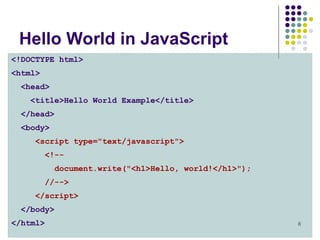
Hello, World!
 Typically, in any programming language, the
first example you learn displays “Hello,
World!”
 We are going to take a look at a Hello World
example and then examine all of its parts.
8
Hello World in JavaScript
<!DOCTYPE html>
<html>
<head>
<title>Hello World Example</title>
</head>
<body>
<script type="text/javascript">
<!--
document.write("<h1>Hello, world!</h1>");
//-->
</script>
</body>
</html>
9
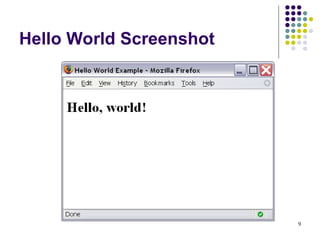
Hello World Screenshot
10
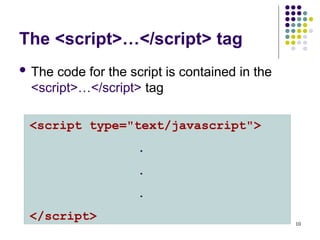
The <script>…</script> tag
 The code for the script is contained in the
<script>…</script> tag
<script type="text/javascript">
.
.
.
</script>
11
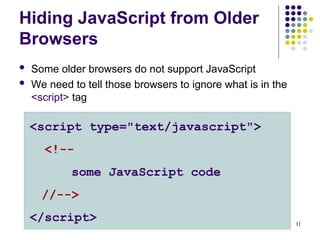
Hiding JavaScript from Older
Browsers
 Some older browsers do not support JavaScript
 We need to tell those browsers to ignore what is in the
<script> tag
<script type="text/javascript">
<!--
some JavaScript code
//-->
</script>
12
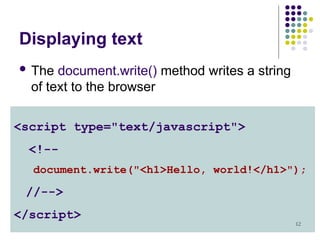
Displaying text
 The document.write() method writes a string
of text to the browser
<script type="text/javascript">
<!--
document.write("<h1>Hello, world!</h1>");
//-->
</script>
13
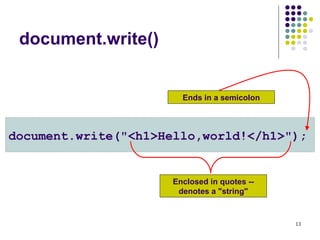
document.write()
document.write("<h1>Hello,world!</h1>");
Enclosed in quotes --
denotes a "string"
Ends in a semicolon
14
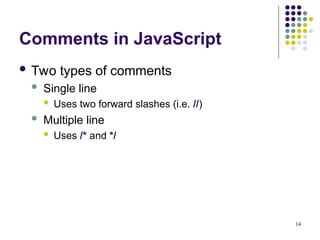
Comments in JavaScript
 Two types of comments
 Single line
 Uses two forward slashes (i.e. //)
 Multiple line
 Uses /* and */
15
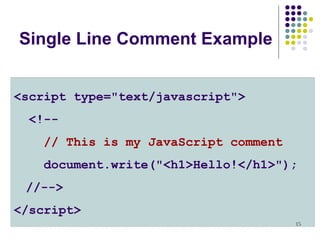
Single Line Comment Example
<script type="text/javascript">
<!--
// This is my JavaScript comment
document.write("<h1>Hello!</h1>");
//-->
</script>
16
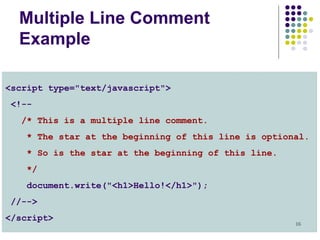
Multiple Line Comment
Example
<script type="text/javascript">
<!--
/* This is a multiple line comment.
* The star at the beginning of this line is optional.
* So is the star at the beginning of this line.
*/
document.write("<h1>Hello!</h1>");
//-->
</script>
17
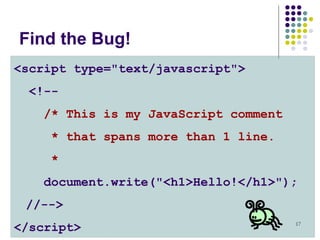
Find the Bug!
<script type="text/javascript">
<!--
/* This is my JavaScript comment
* that spans more than 1 line.
*
document.write("<h1>Hello!</h1>");
//-->
</script>
JavaScript (1).pptdffdfvdfvfvfvfefwefedfe

  • 1.
  • 2.
    2 Topics  What isJavaScript?  Why JavaScript?  Including JavaScript in HTML  Hello World Example Script  JavaScript Comments
  • 3.
    3 What is JavaScript? Created by Netscape  Originally called LiveWire then LiveScript  A client-side scripting language  Client-side refers to the fact that it is executed in the client (software) that the viewer is using. In the case of JavaScript, the client is the browser.  A server-side language is one that runs on the Web server. Examples: PHP, Python  Interpreted on-the-fly by the client  Each line is processed as it loads in the browser
  • 4.
    4 JavaScript is notJava  Completely different types of languages that just happen to be similarly named  JavaScript - programs are interpreted in the browser  Java - programs are compiled and can be run as stand alone applications
  • 5.
    5 Why JavaScript?  It’seasier to learn than most programming languages  It allows you to make interactive Web pages  It can be fun!
  • 6.
    6 Including JavaScript inHTML  Two ways to add JavaScript to Web pages  Use the <script>…</script> tag  Include the script in an external file -- more about this later in the semester  Initially, we will only use the <script>…</script> tag
  • 7.
    7 Hello, World!  Typically,in any programming language, the first example you learn displays “Hello, World!”  We are going to take a look at a Hello World example and then examine all of its parts.
  • 8.
    8 Hello World inJavaScript <!DOCTYPE html> <html> <head> <title>Hello World Example</title> </head> <body> <script type="text/javascript"> <!-- document.write("<h1>Hello, world!</h1>"); //--> </script> </body> </html>
  • 9.
  • 10.
    10 The <script>…</script> tag The code for the script is contained in the <script>…</script> tag <script type="text/javascript"> . . . </script>
  • 11.
    11 Hiding JavaScript fromOlder Browsers  Some older browsers do not support JavaScript  We need to tell those browsers to ignore what is in the <script> tag <script type="text/javascript"> <!-- some JavaScript code //--> </script>
  • 12.
    12 Displaying text  Thedocument.write() method writes a string of text to the browser <script type="text/javascript"> <!-- document.write("<h1>Hello, world!</h1>"); //--> </script>
  • 13.
  • 14.
    14 Comments in JavaScript Two types of comments  Single line  Uses two forward slashes (i.e. //)  Multiple line  Uses /* and */
  • 15.
    15 Single Line CommentExample <script type="text/javascript"> <!-- // This is my JavaScript comment document.write("<h1>Hello!</h1>"); //--> </script>
  • 16.
    16 Multiple Line Comment Example <scripttype="text/javascript"> <!-- /* This is a multiple line comment. * The star at the beginning of this line is optional. * So is the star at the beginning of this line. */ document.write("<h1>Hello!</h1>"); //--> </script>
  • 17.
    17 Find the Bug! <scripttype="text/javascript"> <!-- /* This is my JavaScript comment * that spans more than 1 line. * document.write("<h1>Hello!</h1>"); //--> </script>