Chapter 1
nlp-ai@cse.iitb
“Introduction to Programming
With Java”
nlp-ai@cse.iitb
• Structure of Java programs
• Input and output to screen with Java program
• Statements
• Conditional statements
• Loop constructs
• Arrays, character and string handling
• Functions (if time permits)
Syllabus
nlp-ai@cse.iitb
• Structure of Java programs
• Compiling and running the program
• Printing messages to the screen
Contents for Today’s Lecture
nlp-ai@cse.iitb
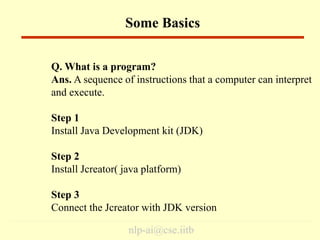
Some Basics
Q. What is a program?
Ans. A sequence of instructions that a computer can interpret
and execute.
Step 1
Install Java Development kit (JDK)
Step 2
Install Jcreator( java platform)
Step 3
Connect the Jcreator with JDK version
nlp-ai@cse.iitb
class class-name {
public static void main(String args[]) {
statement1;
statement2;
…
…
}
}
Structure of Java Programs
nlp-ai@cse.iitb
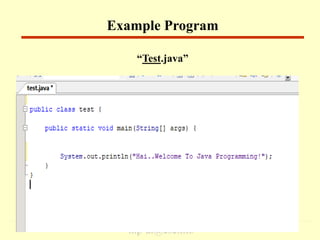
“Test.java”
Example Program
nlp-ai@cse.iitb
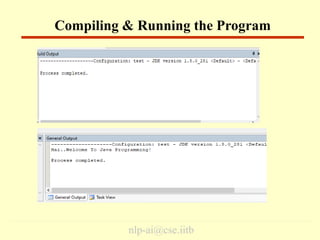
Compiling & Running the Program
nlp-ai@cse.iitb
1. System.out.println(“Hello World”); – outputs the string
“Hello World” followed by a new line on the screen.
2. System.out.print(“Hello World”); - outputs the string “Hello
World” on the screen. This string is not followed by a new
line.
3. Some Escape Sequence –
• n – stands for new line character
• t – stands for tab character
About Printing on the Screen
nlp-ai@cse.iitb
• Some common errors in the initial phase of learning
programming:
- Mismatch of parentheses
- Missing ‘;’ at the end of statement
- Case sensitivity
• The best way to learn programming is writing a lot of
programs on your own.
Some Tips About Programming
nlp-ai@cse.iitb
1. Write a program which prints the following information
about at least 5 persons:
NAME MAIL-ID EMPLOYEE-CODE PHONE
Eg. Umesh umesh@cse p03161 25764728
Salil salil@cse p03160 25764728
Each entry should be on a separate line.
2. Write a program that prints the following line on the screen
along with quotes.
“Can we print ‘’ with System.out.println() statement?”
Some Assignments 
nlp-ai@cse.iitb
Thank you…
End

java_lect_01.ppt

  • 1.
  • 2.
    nlp-ai@cse.iitb • Structure ofJava programs • Input and output to screen with Java program • Statements • Conditional statements • Loop constructs • Arrays, character and string handling • Functions (if time permits) Syllabus
  • 3.
    nlp-ai@cse.iitb • Structure ofJava programs • Compiling and running the program • Printing messages to the screen Contents for Today’s Lecture
  • 4.
    nlp-ai@cse.iitb Some Basics Q. Whatis a program? Ans. A sequence of instructions that a computer can interpret and execute. Step 1 Install Java Development kit (JDK) Step 2 Install Jcreator( java platform) Step 3 Connect the Jcreator with JDK version
  • 5.
    nlp-ai@cse.iitb class class-name { publicstatic void main(String args[]) { statement1; statement2; … … } } Structure of Java Programs
  • 6.
  • 7.
  • 8.
    nlp-ai@cse.iitb 1. System.out.println(“Hello World”);– outputs the string “Hello World” followed by a new line on the screen. 2. System.out.print(“Hello World”); - outputs the string “Hello World” on the screen. This string is not followed by a new line. 3. Some Escape Sequence – • n – stands for new line character • t – stands for tab character About Printing on the Screen
  • 9.
    nlp-ai@cse.iitb • Some commonerrors in the initial phase of learning programming: - Mismatch of parentheses - Missing ‘;’ at the end of statement - Case sensitivity • The best way to learn programming is writing a lot of programs on your own. Some Tips About Programming
  • 10.
    nlp-ai@cse.iitb 1. Write aprogram which prints the following information about at least 5 persons: NAME MAIL-ID EMPLOYEE-CODE PHONE Eg. Umesh umesh@cse p03161 25764728 Salil salil@cse p03160 25764728 Each entry should be on a separate line. 2. Write a program that prints the following line on the screen along with quotes. “Can we print ‘’ with System.out.println() statement?” Some Assignments 
  • 11.