2
Packages
●
A package isa structure in which classes can be
organized.
●
It can contain any number of classes, usually related
by purpose or by inheritance.
If not specified, classes are inserted into the default
package.
●
3.
3
Packages
●
The standard classesin the system are organized in
packages:
import java.util.*; // or import java.util.Date
class TestDate {
public static void main(String[] args) {
System.out.println(new Date());
}
}
$ java TestDate
Wed Oct 25 09:48:54 CEST 2006
4.
4
Packages
●
Package name isdefined by using the keyword
package as the first instruction:
package myBook;
class Book
{ String
title; String
author;
int
numberOfPages;
}
package myBook;
class ExampleBooks {
public static void main(String[] args) {
Book b = new Book();
b.title = "Thinking in Java";
b.author = "Bruce Eckel";
b.numberOfPages = 1129;
System.out.println(b.title + " : " +
b.author + " : " +
b.numberOfPages);
}
}
Book.java
ExampleBooks.java
5.
5
Packages
●
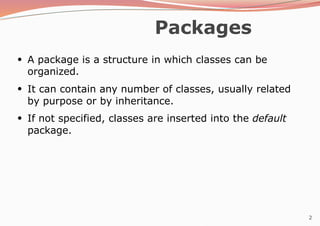
Files have tobe stored in special directories accessible
on the class path ($CLASSPATH):
package it.infn.ts;
class Book {
...
}
it
infn
ts
import it.infn.ts.Book;
class TestBook {
...
Book b = new Book(...);
...
}
Example of use:
6.
6
Access control
●
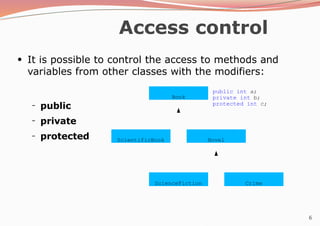
It ispossible to control the access to methods and
variables from other classes with the modifiers:
– public
private
protected
–
–
Book
ScientificBook Novel
ScienceFiction Crime
public int a;
private int b;
protected int c;
7.
7
Access control
●
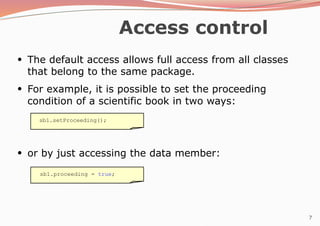
The defaultaccess allows full access from all classes
that belong to the same package.
●
For example, it is possible to set the proceeding
condition of a scientific book in two ways:
●
or by just accessing the data member:
sb1.setProceeding();
sb1.proceeding = true;
8.
8
Access control
●
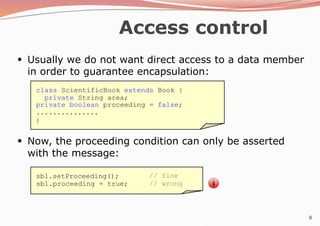
Usually wedo not want direct access to a data member
in order to guarantee encapsulation:
●
Now, the proceeding condition can only be asserted
with the message:
class ScientificBook extends Book {
private String area;
private boolean proceeding = false;
...............
}
sb1.setProceeding();
sb1.proceeding = true;
// fine
// wrong
9.
9
Access control
●
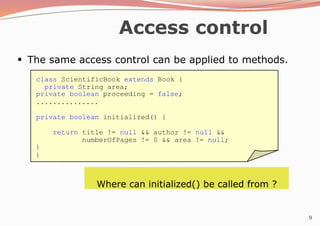
The sameaccess control can be applied to methods.
class ScientificBook extends Book {
private String area;
private boolean proceeding = false;
...............
private boolean initialized() {
return title != null && author != null &&
numberOfPages != 0 && area != null;
}
}
Where can initialized() be called from ?
10.
10
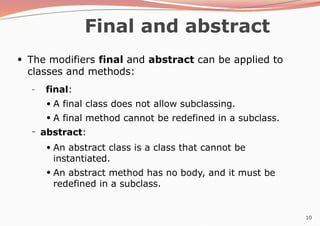
Final and abstract
●
Themodifiers final and abstract can be applied to
classes and methods:
– final:
●
●
A final class does not allow subclassing.
A final method cannot be redefined in a subclass.
– abstract:
●
●
An abstract class is a class that cannot be
instantiated.
An abstract method has no body, and it must be
redefined in a subclass.
11.
11
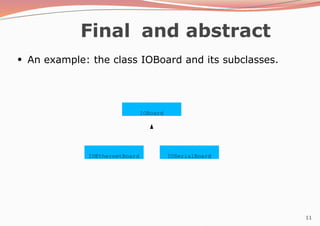
Final and abstract
●
Anexample: the class IOBoard and its subclasses.
IOBoard
IOEthernetBoard IOSerialBoard
12.
12
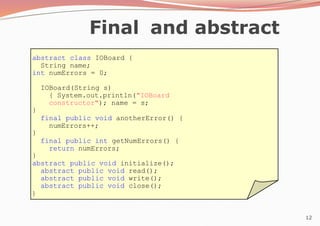
abstract class IOBoard{
String name;
int numErrors = 0;
IOBoard(String s)
{ System.out.println("IOBoard
constructor"); name = s;
}
final public void anotherError() {
numErrors++;
}
final public int getNumErrors() {
return numErrors;
}
abstract public void initialize();
abstract public void read();
abstract public void write();
abstract public void close();
}
Final and abstract
13.
13
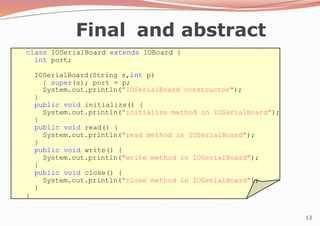
Final and abstract
classIOSerialBoard extends IOBoard {
int port;
IOSerialBoard(String s,int p)
{ super(s); port = p;
System.out.println("IOSerialBoard constructor");
}
public void initialize() {
System.out.println("initialize method in IOSerialBoard");
}
public void read() {
System.out.println("read method in IOSerialBoard");
}
public void write() {
System.out.println("write method in IOSerialBoard");
}
public void close() {
System.out.println("close method in IOSerialBoard");
}
}
14.
14
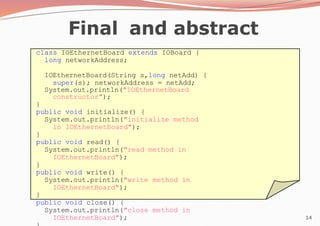
Final and abstract
classIOEthernetBoard extends IOBoard {
long networkAddress;
IOEthernetBoard(String s,long netAdd) {
super(s); networkAddress = netAdd;
System.out.println("IOEthernetBoard
constructor");
}
public void initialize() {
System.out.println("initialize method
in IOEthernetBoard");
}
public void read() {
System.out.println("read method in
IOEthernetBoard");
}
public void write() {
System.out.println("write method in
IOEthernetBoard");
}
public void close() {
System.out.println("close method in
IOEthernetBoard");
15.
15
Final and abstract
●
Creationof a serial board instance:
class TestBoards1 {
public static void main(String[] args) {
IOSerialBoard serial = new IOSerialBoard("my first port",
0x2f8);
serial.initialize();
serial.read();
serial.close();
}
}
$ java TestBoards1
IOBoard constructor
IOSerialBoard constructor
initialize method in IOSerialBoard
read method in IOSerialBoard
close method in IOSerialBoard
16.
16
Polymorphism
115
class TestBoards2 {
publicstatic void main(String[] args) {
IOBoard[] board = new IOBoard[3];
board[0] = new IOSerialBoard("my first port",0x2f8);
board[1] = new IOEthernetBoard("my second port",0x3ef8dda8);
board[2] = new IOEthernetBoard("my third port",0x3ef8dda9);
for(int i = 0;i < 3;i++)
board[i].initialize();
for(int i = 0;i < 3;i++)
board[i].read();
for(int i = 0;i < 3;i++)
board[i].close();
}
}
first second
third
[0][1][2]
17.
17
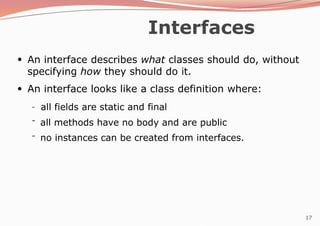
Interfaces
●
An interface describeswhat classes should do, without
specifying how they should do it.
An interface looks like a class definition where:
●
–
–
– all fields are static and final
all methods have no body and are public
no instances can be created from interfaces.
18.
18
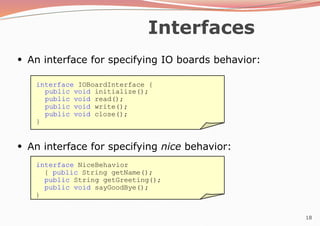
Interfaces
●
An interface forspecifying IO boards behavior:
●
An interface for specifying nice behavior:
interface IOBoardInterface {
public void initialize();
public void read();
public void write();
public void close();
}
interface NiceBehavior
{ public String getName();
public String getGreeting();
public void sayGoodBye();
}
19.
19
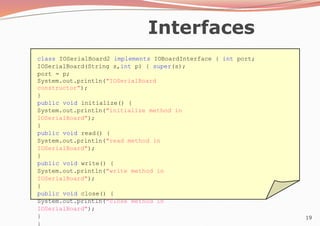
Interfaces
class IOSerialBoard2 implementsIOBoardInterface { int port;
IOSerialBoard(String s,int p) { super(s);
port = p;
System.out.println("IOSerialBoard
constructor");
}
public void initialize() {
System.out.println("initialize method in
IOSerialBoard");
}
public void read() {
System.out.println("read method in
IOSerialBoard");
}
public void write() {
System.out.println("write method in
IOSerialBoard");
}
public void close() {
System.out.println("close method in
IOSerialBoard");
}
}
20.
20
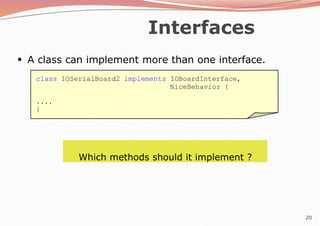
Interfaces
●
A class canimplement more than one interface.
Which methods should it implement ?
class IOSerialBoard2 implements IOBoardInterface,
NiceBehavior {
....
}
21.
21
Exceptions
●
The usual behavioron runtime errors is to abort the
execution:
class TestExceptions1 {
public static void main(String[] args) {
String s = "Hello";
System.out.print(s.charAt(10));
}
}
$ java TestExceptions1
Exception in thread "main"
java.lang.StringIndexOutOf
BoundsException:
String index out of range:
10
at
java.lang.String.charAt(St
ring.java:499)
at
22.
22
Exceptions
●
The exception canbe trapped:
class TestExceptions2 {
public static void main(String[] args) {
String s = "Hello";
try {
System.out.print(
s.charAt(10));
} catch (Exception e)
{ System.out.println("No such
position");
}
}
$ java TestExceptions2
No such position
23.
23
Exceptions
●
It is possibleto specify interest on a particular
exception:
class TestExceptions3 {
public static void main(String[] args) {
String s = "Hello";
try {
System.out.print(
s.charAt(10));
} catch (StringIndexOutOfBoundsException e) {
System.out.println("No such position");
}
}
$ java TestExceptions3
No such position
24.
24
Exceptions
●
It is possibleto send messages to an exception object:
class TestExceptions4 {
public static void main(String[] args) {
String s = "Hello";
try {
System.out.print(
s.charAt(10));
} catch (StringIndexOutOfBoundsException e) {
System.out.println("No such position");
System.out.println(e.toString());
}
}
$ java TestExceptions4
No such position
java.lang.StringIndexO
utOfBoundsException:
String index out of
range: 10
25.
25
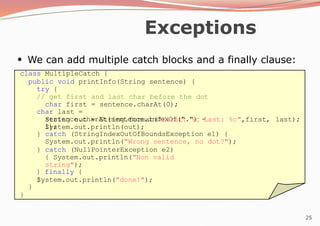
Exceptions
class MultipleCatch {
publicvoid printInfo(String sentence) {
try {
// get first and last char before the dot
char first = sentence.charAt(0);
char last =
sentence.charAt(sentence.indexOf(".") -
1);
last);
String out = String.format("First: %c Last: %c",first,
System.out.println(out);
} catch (StringIndexOutOfBoundsException e1) {
System.out.println("Wrong sentence, no dot?");
} catch (NullPointerException e2)
{ System.out.println("Non valid
string");
} finally {
System.out.println("done!");
}
}
}
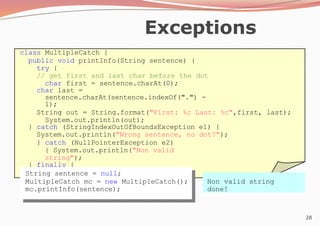
●
We can add multiple catch blocks and a finally clause:
26.
26
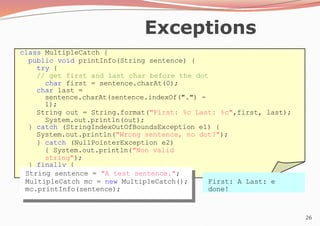
Exceptions
class MultipleCatch {
publicvoid printInfo(String sentence) {
try {
// get first and last char before the dot
char first = sentence.charAt(0);
char last =
sentence.charAt(sentence.indexOf(".") -
1);
String out = String.format("First: %c Last: %c",first, last);
System.out.println(out);
} catch (StringIndexOutOfBoundsException e1) {
System.out.println("Wrong sentence, no dot?");
} catch (NullPointerException e2)
{ System.out.println("Non valid
string");
} finally {
System.out.println("done!");
}
}
} String sentence = "A test sentence.";
MultipleCatch mc = new MultipleCatch();
mc.printInfo(sentence);
First: A Last: e
done!
27.
27
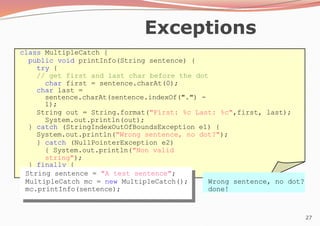
Exceptions
class MultipleCatch {
publicvoid printInfo(String sentence) {
try {
// get first and last char before the dot
char first = sentence.charAt(0);
char last =
sentence.charAt(sentence.indexOf(".") -
1);
String out = String.format("First: %c Last: %c",first, last);
System.out.println(out);
} catch (StringIndexOutOfBoundsException e1) {
System.out.println("Wrong sentence, no dot?");
} catch (NullPointerException e2)
{ System.out.println("Non valid
string");
} finally {
System.out.println("done!");
}
}
} String sentence = "A test sentence";
MultipleCatch mc = new MultipleCatch();
mc.printInfo(sentence);
Wrong sentence, no dot?
done!
28.
28
Exceptions
class MultipleCatch {
publicvoid printInfo(String sentence) {
try {
// get first and last char before the dot
char first = sentence.charAt(0);
char last =
sentence.charAt(sentence.indexOf(".") -
1);
String out = String.format("First: %c Last: %c",first, last);
System.out.println(out);
} catch (StringIndexOutOfBoundsException e1) {
System.out.println("Wrong sentence, no dot?");
} catch (NullPointerException e2)
{ System.out.println("Non valid
string");
} finally {
System.out.println("done!");
}
}
} String sentence = null;
MultipleCatch mc = new MultipleCatch();
mc.printInfo(sentence);
Non valid string
done!
29.
29
Exceptions
●
There exists aset of predefined exceptions that can
be caught.
●
In some cases it is compulsory to catch exceptions.
It is also possible to express the interest to not
to catch even compulsory exceptions.
●
30.
30
Input - Output
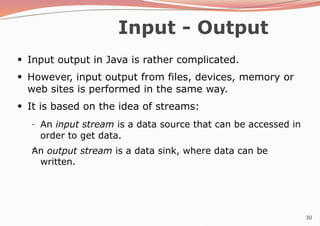
●
Inputoutput in Java is rather complicated.
However, input output from files, devices, memory or
web sites is performed in the same way.
It is based on the idea of streams:
●
●
–
– An input stream is a data source that can be accessed in
order to get data.
An output stream is a data sink, where data can be
written.
31.
31
Input - Output
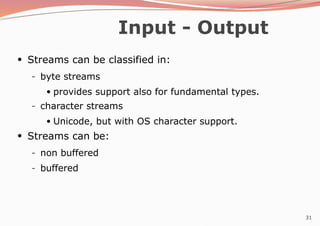
●
Streamscan be classified in:
– byte streams
●
provides support also for fundamental types.
– character streams
●
Unicode, but with OS character support.
Streams can be:
●
– non buffered
– buffered
32.
32
Input - Output
importjava.io.*;
class WriteBytes {
public static void main(String[] args) {
int data[] = { 10,20,30,40,255 };
FileOutputStream f;
try {
f = new
FileOutputStream(
"file1.data");
for(int i = 0;i < data.length;i++)
f.write(data[i]);
f.close();
} catch (IOException e) {
System.out.println("Error with
files:"+e.toString());
}
}
}
byte oriented stream
33.
33
Input - Output
importjava.io.*;
class ReadBytes {
public static void main(String[] args) {
FileInputStream f;
try {
f = new
FileInputStream(
"file1.data");
int data;
while((data = f.read()) != -1)
System.out.println(data);
f.close();
} catch (IOException e) {
System.out.println("Error with
files:"+e.toString());
}
}
}
$ java ReadBytes
10 20 30 40 255
byte oriented stream
34.
34
Input - Output
importjava.io.*;
class WriteArrayBytes {
public static void main(String[] args) {
byte data[] = { 10,20,30,40,-128 };
FileOutputStream f;
try {
f = new
FileOutputStream(
"file1.data");
f.write(data,0,data.length);
f.close();
} catch (IOException e) {
System.out.println("Error with
files:"+e.toString());
}
}
}
byte oriented stream
35.
35
Input - Output
importjava.io.*;
class WriteBufferedBytes {
public static void main(String[] args) {
int data[] = { 10,20,30,40,255 };
FileOutputStream f;
BufferedOutputStream bf;
try {
f = new FileOutputStream("file1.data");
bf = new BufferedOutputStream(f);
for(int i = 0;i < data.length;i++)
bf.write(data[i]);
bf.close();
} catch (IOException
e) {
System.out.println
("Error with
files:"+e.toString()
);
}
}
}
buffered byte oriented stream
36.
36
Input - Output
importjava.io.*;
class ReadBufferedBytes {
public static void main(String[] args)
{ FileInputStream f; BufferedInputStream
bf; try {
f = new FileInputStream("file1.data");
bf = new BufferedInputStream(f);
int data;
while((data = bf.read()) != -1)
System.out.println(data);
bf.close();
} catch (IOException e) {
System.out.println("Error with
files:"+e.toString());
}
}
}
$ java ReadBufferedBytes
10 20 30 40 255
buffered byte oriented stream
37.
37
Input - Output
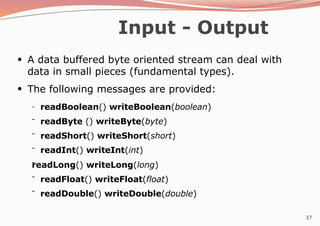
●
Adata buffered byte oriented stream can deal with
data in small pieces (fundamental types).
●
The following messages are provided:
–
–
–
–
–
–
– readBoolean() writeBoolean(boolean)
readByte () writeByte(byte)
readShort() writeShort(short)
readInt() writeInt(int)
readLong() writeLong(long)
readFloat() writeFloat(float)
readDouble() writeDouble(double)
38.
38
Input - Output
databuffered byte oriented stream
import java.io.*;
class WriteData {
public static void main(String[] args)
{ double data[] = { 10.3,20.65,8.45,-
4.12 };
FileOutputStream f; BufferedOutputStream bf;
DataOutputStream ds;
try {
f = new
FileOutputStream("
file1.data");
bf = new BufferedOutputStream(f);
ds = new DataOutputStream(bf);
ds.writeInt(data.length);
for(int i = 0;i < data.length;i++)
ds.writeDouble(data[i]);
ds.writeBoolean(true); ds.close();
} catch (IOException e) {
System.out.println("Error with
files:"+e.toString());
}
39.
39
Input - Output
databuffered byte oriented stream
import java.io.*;
class ReadData {
public static void main(String[] args)
{ FileOutputStream f; BufferedOutputStream
bf; DataOutputStream ds;
try {
f = new FileInputStream("file1.data");
bf = new BufferedInputStream(f);
ds = new DataInputStream(bf);
int length = ds.readInt();
for(int i = 0;i < length;i++)
System.out.println(ds.readD
ouble());
System.out.println(ds.readBoolean());
ds.close();
} catch (IOException e) {
System.out.println("Error with files:"+e.toString());
}
}
$ java ReadData
10.3
20.65
8.45
-4.12
true
40.
40
Input - Output
●
Thecharacter oriented streams can be used to read
and write characters.
●
There exists three methods that can be used to
write data into this kind of streams:
–
–
– write(String,int,int)
write(char[],int,int)
newLine()
41.
41
Input - Output
bufferedcharacter oriented stream
import java.io.*;
class WriteText {
public static void main(String[] args) {
FileWriter f;
BufferedWriter bf;
try {
f = new FileWriter("file1.text");
bf = new BufferedWriter(f);
String s = "Hello World!";
bf.write(s,0,s.length());
bf.newLine();
bf.write("Java is nice!!!",8,5);
bf.newLine();
bf.close();
} catch (IOException e) {
System.out.println("Error with
files:"+e.toString());
}
}
42.
42
Input - Output
bufferedcharacter oriented stream
import java.io.*;
class ReadText {
public static void main(String[] args) {
FileReader f;
BufferedReader bf;
try {
f = new FileReader("file1.text");
bf = new BufferedReader(f);
String s;
while ((s = bf.readLine()) != null)
System.out.println(s);
bf.close();
} catch (IOException e) {
System.out.println("Error with files:"+e.toString());
}
}
$ java ReadText
HelloWorld!
nice!
43.
43
Input - Output
standardinput
import java.io.*;
class StandardInput {
public static void main(String[] args) {
InputStreamReader isr;
BufferedReader br;
try {
isr = new InputStreamReader(System.in);
br = new BufferedReader(isr);
String line;
while ((line = br.readLine()) != null)
System.out.println(line);
} catch (IOException e) {
System.out.println("Error with standard
input");
}
}
correct lecture notes
44.
44
Input - Output
standardinput with scanner
import java.io.*;
class ReadWithScanner {
public static void main(String[] args) {
try {
Scanner sc = new Scanner(System.in);
int sum = 0;
while (sc.hasNextInt())
{ int anInt =
sc.nextInt(); sum +=
anInt;
}
System.out.println(sum);
} catch (IOException e) {
System.out.println("Error with standard input");
}
}
$ java ReadWithScanner
11
9
^D
20
45.
45
Threads
●
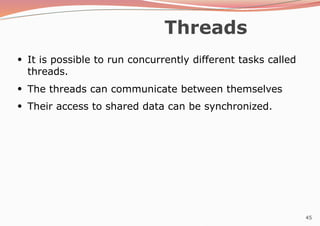
It is possibleto run concurrently different tasks called
threads.
●
The threads can communicate between themselves
Their access to shared data can be synchronized.
●
46.
46
Threads
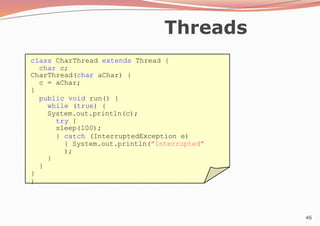
class CharThread extendsThread {
char c;
CharThread(char aChar) {
c = aChar;
}
public void run() {
while (true) {
System.out.println(c);
try {
sleep(100);
} catch (InterruptedException e)
{ System.out.println("Interrupted"
);
}
}
}
}
47.
47
Threads
class TestThreads {
publicstatic void main(String[] args) {
CharThread t1 = new CharThread(’a’);
CharThread t2 = new CharThread(’b’);
t1.start();
t2.start();
}
}
$ java TestThreads
a
b
a
b
.
.
.
48.
48
Threads
class ProducerConsumer {
publicstatic void main(String[] args) {
Buffer buffer = new Buffer(10);
Producer prod = new Producer(buffer);
Consumer cons = new Consumer(buffer);
prod.start();
cons.start();
}
}
Producer Consumer
Buffer
●
A typical producer - consumer application:
49.
49
Threads
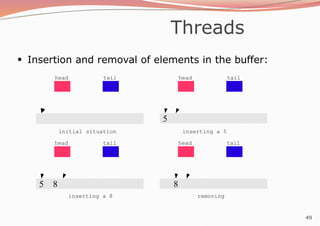
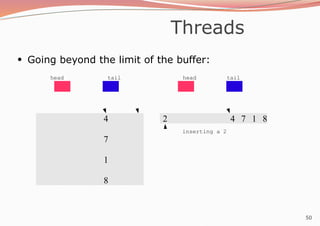
●
Insertion and removalof elements in the buffer:
head tail head tail
5
5 8
head tail
8
head tail
initial situation inserting a 5
inserting a 8 removing
51
Threads
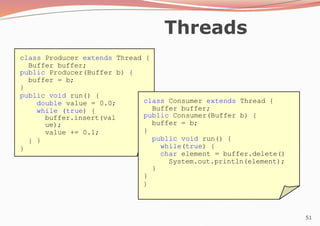
class Producer extendsThread {
Buffer buffer;
public Producer(Buffer b) {
buffer = b;
}
public void run() {
double value = 0.0;
while (true) {
buffer.insert(val
ue);
value += 0.1;
}
}
}
class Consumer extends Thread {
Buffer buffer;
public Consumer(Buffer b) {
buffer = b;
}
public void run() {
while(true) {
char element = buffer.delete()
System.out.println(element);
}
}
}
52.
52
Threads
class Buffer
{ double
buffer[];
inthead = 0,tail
= 0,size =
0,numElements =
0;
public Buffer(int s)
{ buffer = new
double[s]; size = s;
}
public void insert(double
element) {
buffer[tail] = element; tail = (tail + 1) % size;
numElements++;
}
public double delete() {
double value = buffer[head]; head = (head + 1) %
size;
numElements--;
return value;
}
}
However... it does not work
53.
53
Threads
●
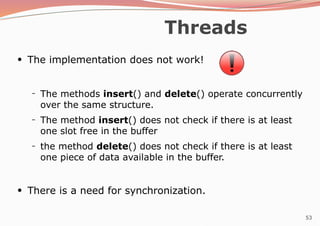
The implementation doesnot work!
– The methods insert() and delete() operate concurrently
over the same structure.
The method insert() does not check if there is at least
one slot free in the buffer
the method delete() does not check if there is at least
one piece of data available in the buffer.
–
–
●
There is a need for synchronization.
54.
54
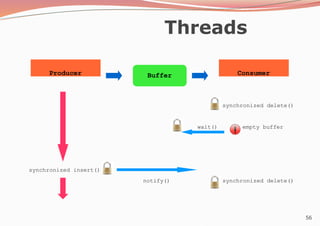
Threads
●
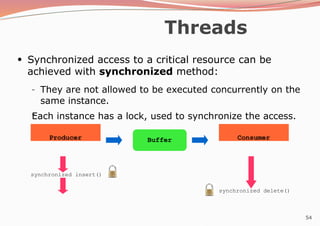
Synchronized access toa critical resource can be
achieved with synchronized method:
–
– They are not allowed to be executed concurrently on the
same instance.
Each instance has a lock, used to synchronize the access.
Producer Consumer
Buffer
synchronized insert()
synchronized delete()
55.
55
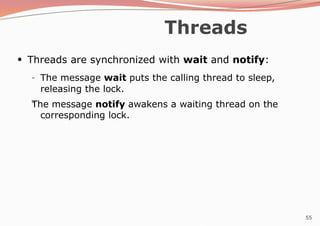
Threads
●
Threads are synchronizedwith wait and notify:
–
– The message wait puts the calling thread to sleep,
releasing the lock.
The message notify awakens a waiting thread on the
corresponding lock.
![3
Packages
●
The standard classes in the system are organized in
packages:
import java.util.*; // or import java.util.Date
class TestDate {
public static void main(String[] args) {
System.out.println(new Date());
}
}
$ java TestDate
Wed Oct 25 09:48:54 CEST 2006](https://image.slidesharecdn.com/javaprogrammingslidesharepackages-260111064036-5420420e/85/Java-Programming_Slideshare_Packages-pptx-3-320.jpg)
![4
Packages
●
Package name is defined by using the keyword
package as the first instruction:
package myBook;
class Book
{ String
title; String
author;
int
numberOfPages;
}
package myBook;
class ExampleBooks {
public static void main(String[] args) {
Book b = new Book();
b.title = "Thinking in Java";
b.author = "Bruce Eckel";
b.numberOfPages = 1129;
System.out.println(b.title + " : " +
b.author + " : " +
b.numberOfPages);
}
}
Book.java
ExampleBooks.java](https://image.slidesharecdn.com/javaprogrammingslidesharepackages-260111064036-5420420e/85/Java-Programming_Slideshare_Packages-pptx-4-320.jpg)
![15
Final and abstract
●
Creation of a serial board instance:
class TestBoards1 {
public static void main(String[] args) {
IOSerialBoard serial = new IOSerialBoard("my first port",
0x2f8);
serial.initialize();
serial.read();
serial.close();
}
}
$ java TestBoards1
IOBoard constructor
IOSerialBoard constructor
initialize method in IOSerialBoard
read method in IOSerialBoard
close method in IOSerialBoard](https://image.slidesharecdn.com/javaprogrammingslidesharepackages-260111064036-5420420e/85/Java-Programming_Slideshare_Packages-pptx-15-320.jpg)
![16
Polymorphism
115
class TestBoards2 {
public static void main(String[] args) {
IOBoard[] board = new IOBoard[3];
board[0] = new IOSerialBoard("my first port",0x2f8);
board[1] = new IOEthernetBoard("my second port",0x3ef8dda8);
board[2] = new IOEthernetBoard("my third port",0x3ef8dda9);
for(int i = 0;i < 3;i++)
board[i].initialize();
for(int i = 0;i < 3;i++)
board[i].read();
for(int i = 0;i < 3;i++)
board[i].close();
}
}
first second
third
[0][1][2]](https://image.slidesharecdn.com/javaprogrammingslidesharepackages-260111064036-5420420e/85/Java-Programming_Slideshare_Packages-pptx-16-320.jpg)
![21
Exceptions
●
The usual behavior on runtime errors is to abort the
execution:
class TestExceptions1 {
public static void main(String[] args) {
String s = "Hello";
System.out.print(s.charAt(10));
}
}
$ java TestExceptions1
Exception in thread "main"
java.lang.StringIndexOutOf
BoundsException:
String index out of range:
10
at
java.lang.String.charAt(St
ring.java:499)
at](https://image.slidesharecdn.com/javaprogrammingslidesharepackages-260111064036-5420420e/85/Java-Programming_Slideshare_Packages-pptx-21-320.jpg)
![22
Exceptions
●
The exception can be trapped:
class TestExceptions2 {
public static void main(String[] args) {
String s = "Hello";
try {
System.out.print(
s.charAt(10));
} catch (Exception e)
{ System.out.println("No such
position");
}
}
$ java TestExceptions2
No such position](https://image.slidesharecdn.com/javaprogrammingslidesharepackages-260111064036-5420420e/85/Java-Programming_Slideshare_Packages-pptx-22-320.jpg)
![23
Exceptions
●
It is possible to specify interest on a particular
exception:
class TestExceptions3 {
public static void main(String[] args) {
String s = "Hello";
try {
System.out.print(
s.charAt(10));
} catch (StringIndexOutOfBoundsException e) {
System.out.println("No such position");
}
}
$ java TestExceptions3
No such position](https://image.slidesharecdn.com/javaprogrammingslidesharepackages-260111064036-5420420e/85/Java-Programming_Slideshare_Packages-pptx-23-320.jpg)
![24
Exceptions
●
It is possible to send messages to an exception object:
class TestExceptions4 {
public static void main(String[] args) {
String s = "Hello";
try {
System.out.print(
s.charAt(10));
} catch (StringIndexOutOfBoundsException e) {
System.out.println("No such position");
System.out.println(e.toString());
}
}
$ java TestExceptions4
No such position
java.lang.StringIndexO
utOfBoundsException:
String index out of
range: 10](https://image.slidesharecdn.com/javaprogrammingslidesharepackages-260111064036-5420420e/85/Java-Programming_Slideshare_Packages-pptx-24-320.jpg)
![32
Input - Output
import java.io.*;
class WriteBytes {
public static void main(String[] args) {
int data[] = { 10,20,30,40,255 };
FileOutputStream f;
try {
f = new
FileOutputStream(
"file1.data");
for(int i = 0;i < data.length;i++)
f.write(data[i]);
f.close();
} catch (IOException e) {
System.out.println("Error with
files:"+e.toString());
}
}
}
byte oriented stream](https://image.slidesharecdn.com/javaprogrammingslidesharepackages-260111064036-5420420e/85/Java-Programming_Slideshare_Packages-pptx-32-320.jpg)
![33
Input - Output
import java.io.*;
class ReadBytes {
public static void main(String[] args) {
FileInputStream f;
try {
f = new
FileInputStream(
"file1.data");
int data;
while((data = f.read()) != -1)
System.out.println(data);
f.close();
} catch (IOException e) {
System.out.println("Error with
files:"+e.toString());
}
}
}
$ java ReadBytes
10 20 30 40 255
byte oriented stream](https://image.slidesharecdn.com/javaprogrammingslidesharepackages-260111064036-5420420e/85/Java-Programming_Slideshare_Packages-pptx-33-320.jpg)
![34
Input - Output
import java.io.*;
class WriteArrayBytes {
public static void main(String[] args) {
byte data[] = { 10,20,30,40,-128 };
FileOutputStream f;
try {
f = new
FileOutputStream(
"file1.data");
f.write(data,0,data.length);
f.close();
} catch (IOException e) {
System.out.println("Error with
files:"+e.toString());
}
}
}
byte oriented stream](https://image.slidesharecdn.com/javaprogrammingslidesharepackages-260111064036-5420420e/85/Java-Programming_Slideshare_Packages-pptx-34-320.jpg)
![35
Input - Output
import java.io.*;
class WriteBufferedBytes {
public static void main(String[] args) {
int data[] = { 10,20,30,40,255 };
FileOutputStream f;
BufferedOutputStream bf;
try {
f = new FileOutputStream("file1.data");
bf = new BufferedOutputStream(f);
for(int i = 0;i < data.length;i++)
bf.write(data[i]);
bf.close();
} catch (IOException
e) {
System.out.println
("Error with
files:"+e.toString()
);
}
}
}
buffered byte oriented stream](https://image.slidesharecdn.com/javaprogrammingslidesharepackages-260111064036-5420420e/85/Java-Programming_Slideshare_Packages-pptx-35-320.jpg)
![36
Input - Output
import java.io.*;
class ReadBufferedBytes {
public static void main(String[] args)
{ FileInputStream f; BufferedInputStream
bf; try {
f = new FileInputStream("file1.data");
bf = new BufferedInputStream(f);
int data;
while((data = bf.read()) != -1)
System.out.println(data);
bf.close();
} catch (IOException e) {
System.out.println("Error with
files:"+e.toString());
}
}
}
$ java ReadBufferedBytes
10 20 30 40 255
buffered byte oriented stream](https://image.slidesharecdn.com/javaprogrammingslidesharepackages-260111064036-5420420e/85/Java-Programming_Slideshare_Packages-pptx-36-320.jpg)
![38
Input - Output
data buffered byte oriented stream
import java.io.*;
class WriteData {
public static void main(String[] args)
{ double data[] = { 10.3,20.65,8.45,-
4.12 };
FileOutputStream f; BufferedOutputStream bf;
DataOutputStream ds;
try {
f = new
FileOutputStream("
file1.data");
bf = new BufferedOutputStream(f);
ds = new DataOutputStream(bf);
ds.writeInt(data.length);
for(int i = 0;i < data.length;i++)
ds.writeDouble(data[i]);
ds.writeBoolean(true); ds.close();
} catch (IOException e) {
System.out.println("Error with
files:"+e.toString());
}](https://image.slidesharecdn.com/javaprogrammingslidesharepackages-260111064036-5420420e/85/Java-Programming_Slideshare_Packages-pptx-38-320.jpg)
![39
Input - Output
data buffered byte oriented stream
import java.io.*;
class ReadData {
public static void main(String[] args)
{ FileOutputStream f; BufferedOutputStream
bf; DataOutputStream ds;
try {
f = new FileInputStream("file1.data");
bf = new BufferedInputStream(f);
ds = new DataInputStream(bf);
int length = ds.readInt();
for(int i = 0;i < length;i++)
System.out.println(ds.readD
ouble());
System.out.println(ds.readBoolean());
ds.close();
} catch (IOException e) {
System.out.println("Error with files:"+e.toString());
}
}
$ java ReadData
10.3
20.65
8.45
-4.12
true](https://image.slidesharecdn.com/javaprogrammingslidesharepackages-260111064036-5420420e/85/Java-Programming_Slideshare_Packages-pptx-39-320.jpg)
![40
Input - Output
●
The character oriented streams can be used to read
and write characters.
●
There exists three methods that can be used to
write data into this kind of streams:
–
–
– write(String,int,int)
write(char[],int,int)
newLine()](https://image.slidesharecdn.com/javaprogrammingslidesharepackages-260111064036-5420420e/85/Java-Programming_Slideshare_Packages-pptx-40-320.jpg)
![41
Input - Output
buffered character oriented stream
import java.io.*;
class WriteText {
public static void main(String[] args) {
FileWriter f;
BufferedWriter bf;
try {
f = new FileWriter("file1.text");
bf = new BufferedWriter(f);
String s = "Hello World!";
bf.write(s,0,s.length());
bf.newLine();
bf.write("Java is nice!!!",8,5);
bf.newLine();
bf.close();
} catch (IOException e) {
System.out.println("Error with
files:"+e.toString());
}
}](https://image.slidesharecdn.com/javaprogrammingslidesharepackages-260111064036-5420420e/85/Java-Programming_Slideshare_Packages-pptx-41-320.jpg)
![42
Input - Output
buffered character oriented stream
import java.io.*;
class ReadText {
public static void main(String[] args) {
FileReader f;
BufferedReader bf;
try {
f = new FileReader("file1.text");
bf = new BufferedReader(f);
String s;
while ((s = bf.readLine()) != null)
System.out.println(s);
bf.close();
} catch (IOException e) {
System.out.println("Error with files:"+e.toString());
}
}
$ java ReadText
HelloWorld!
nice!](https://image.slidesharecdn.com/javaprogrammingslidesharepackages-260111064036-5420420e/85/Java-Programming_Slideshare_Packages-pptx-42-320.jpg)
![43
Input - Output
standard input
import java.io.*;
class StandardInput {
public static void main(String[] args) {
InputStreamReader isr;
BufferedReader br;
try {
isr = new InputStreamReader(System.in);
br = new BufferedReader(isr);
String line;
while ((line = br.readLine()) != null)
System.out.println(line);
} catch (IOException e) {
System.out.println("Error with standard
input");
}
}
correct lecture notes](https://image.slidesharecdn.com/javaprogrammingslidesharepackages-260111064036-5420420e/85/Java-Programming_Slideshare_Packages-pptx-43-320.jpg)
![44
Input - Output
standard input with scanner
import java.io.*;
class ReadWithScanner {
public static void main(String[] args) {
try {
Scanner sc = new Scanner(System.in);
int sum = 0;
while (sc.hasNextInt())
{ int anInt =
sc.nextInt(); sum +=
anInt;
}
System.out.println(sum);
} catch (IOException e) {
System.out.println("Error with standard input");
}
}
$ java ReadWithScanner
11
9
^D
20](https://image.slidesharecdn.com/javaprogrammingslidesharepackages-260111064036-5420420e/85/Java-Programming_Slideshare_Packages-pptx-44-320.jpg)
![47
Threads
class TestThreads {
public static void main(String[] args) {
CharThread t1 = new CharThread(’a’);
CharThread t2 = new CharThread(’b’);
t1.start();
t2.start();
}
}
$ java TestThreads
a
b
a
b
.
.
.](https://image.slidesharecdn.com/javaprogrammingslidesharepackages-260111064036-5420420e/85/Java-Programming_Slideshare_Packages-pptx-47-320.jpg)
![48
Threads
class ProducerConsumer {
public static void main(String[] args) {
Buffer buffer = new Buffer(10);
Producer prod = new Producer(buffer);
Consumer cons = new Consumer(buffer);
prod.start();
cons.start();
}
}
Producer Consumer
Buffer
●
A typical producer - consumer application:](https://image.slidesharecdn.com/javaprogrammingslidesharepackages-260111064036-5420420e/85/Java-Programming_Slideshare_Packages-pptx-48-320.jpg)
![52
Threads
class Buffer
{ double
buffer[];
int head = 0,tail
= 0,size =
0,numElements =
0;
public Buffer(int s)
{ buffer = new
double[s]; size = s;
}
public void insert(double
element) {
buffer[tail] = element; tail = (tail + 1) % size;
numElements++;
}
public double delete() {
double value = buffer[head]; head = (head + 1) %
size;
numElements--;
return value;
}
}
However... it does not work](https://image.slidesharecdn.com/javaprogrammingslidesharepackages-260111064036-5420420e/85/Java-Programming_Slideshare_Packages-pptx-52-320.jpg)
![57
Threads
public synchronized void insert(double element) {
if (numElements == size) {
try {
wait();
} catch(InterruptedException e)
{ System.out.println("Interrupted"
);
}
}
buffer[tail] = element;
tail = (tail + 1) % size;
numElements++;
notify();
}](https://image.slidesharecdn.com/javaprogrammingslidesharepackages-260111064036-5420420e/85/Java-Programming_Slideshare_Packages-pptx-57-320.jpg)
![58
Threads
public synchronized double delete() {
if (numElements == 0) {
try {
wait();
} catch(InterruptedException e)
{ System.out.println("Interrupted"
);
}
}
double value = buffer[head];
head = (head + 1) % size;
numElements--;
notify();
return value;
}](https://image.slidesharecdn.com/javaprogrammingslidesharepackages-260111064036-5420420e/85/Java-Programming_Slideshare_Packages-pptx-58-320.jpg)


![[FREE PDF sample] Object Oriented Programming and Java Second Edition Danny P...](https://cdn.slidesharecdn.com/ss_thumbnails/34511-250218165353-f258b159-thumbnail.jpg?width=640&height=640&fit=bounds)


