Java
Introduction
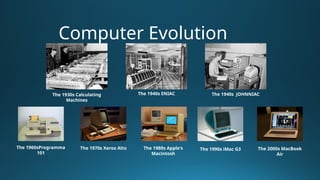
Computer Evolution
The 1930s Calculating
Machines
The 1940s ENIAC The 1940s JOHNNIAC
The 1960sProgramma
101
The 1970s Xerox Alto The 1980s Apple's
Macintosh
The 1990s iMac G3 The 2000s MacBook
Air
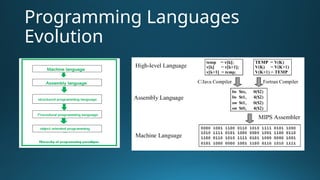
Programming Languages
Evolution
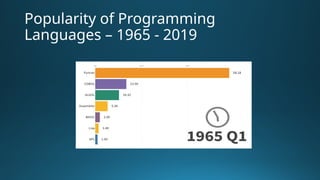
Popularity of Programming
Languages – 1965 - 2019
Java History
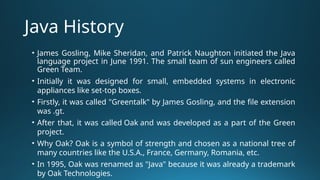
‱ James Gosling, Mike Sheridan, and Patrick Naughton initiated the Java
language project in June 1991. The small team of sun engineers called
Green Team.
‱ Initially it was designed for small, embedded systems in electronic
appliances like set-top boxes.
‱ Firstly, it was called "Greentalk" by James Gosling, and the file extension
was .gt.
‱ After that, it was called Oak and was developed as a part of the Green
project.
‱ Why Oak? Oak is a symbol of strength and chosen as a national tree of
many countries like the U.S.A., France, Germany, Romania, etc.
‱ In 1995, Oak was renamed as "Java" because it was already a trademark
by Oak Technologies.
Java History
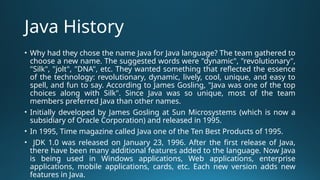
‱ Why had they chose the name Java for Java language? The team gathered to
choose a new name. The suggested words were "dynamic", "revolutionary",
"Silk", "jolt", "DNA", etc. They wanted something that reflected the essence
of the technology: revolutionary, dynamic, lively, cool, unique, and easy to
spell, and fun to say. According to James Gosling, "Java was one of the top
choices along with Silk". Since Java was so unique, most of the team
members preferred Java than other names.
‱ Initially developed by James Gosling at Sun Microsystems (which is now a
subsidiary of Oracle Corporation) and released in 1995.
‱ In 1995, Time magazine called Java one of the Ten Best Products of 1995.
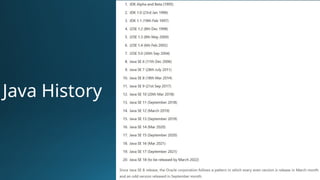
‱ JDK 1.0 was released on January 23, 1996. After the first release of Java,
there have been many additional features added to the language. Now Java
is being used in Windows applications, Web applications, enterprise
applications, mobile applications, cards, etc. Each new version adds new
features in Java.
Java History
Character set
‱ Letters: Both lowercase (a, b, c, d, e, etc. ) and uppercase
(A, B, C, D, E, etc.) letters.
‱ Digits: 0, 1, 2, 3, 4, 5, 6, 7, 8, 9.
‱ Special symbols: _, (, ), {, }, [, ], +, -, *, /, %, !, &, |, ~, ^, <, =,
>, $, #, ?, Comma (,), Dot (.), Colon (:), Semi-colon (;), Single
quote (‘), Double quote (“), Back slash ().
‱ White space: Space, Tab, New line.
Key Words
Introduction
‱ Variable names are case-sensitive. A variable's name an
unlimited-length sequence of Unicode letters and digits,
beginning with a letter, "$", or the underscore "_".
‱ Subsequent characters may be letters, digits, dollar signs,
or underscore characters.
‱ If the name consists of only one word, spell that word in all
lowercase letters, else capitalize the first letter of each
subsequent word.
Data Types
‱ Integers This group includes byte, short, int, and long, which are
for whole-valued signed numbers.
‱ Floating-point numbers This group includes float and double,
which represent numbers with fractional precision.
‱ Characters This group includes char, which represents symbols in a
character set, like letters and numbers.
‱ Boolean This group includes boolean, which is a special type for
representing true/false values.
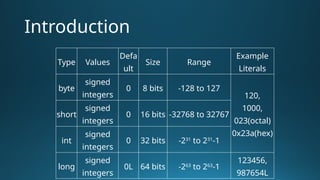
Introduction
Type Values
Defa
ult
Size Range
Example
Literals
byte
signed
integers
0 8 bits -128 to 127
120,
1000,
023(octal)
0x23a(hex)
short
signed
integers
0 16 bits -32768 to 32767
int
signed
integers
0 32 bits -231
to 231
-1
long
signed
integers
0L 64 bits -263
to 263
-1
123456,
987654L
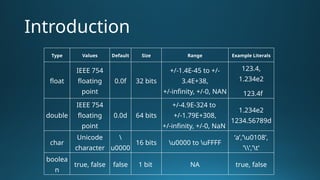
Introduction
Type Values Default Size Range Example Literals
float
IEEE 754
floating
point
0.0f 32 bits
+/-1.4E-45 to +/-
3.4E+38,
+/-infinity, +/-0, NAN
123.4,
1.234e2
123.4f
double
IEEE 754
floating
point
0.0d 64 bits
+/-4.9E-324 to
+/-1.79E+308,
+/-infinity, +/-0, NaN
1.234e2
1234.56789d
char
Unicode
character

u0000
16 bits u0000 to uFFFF
‘a’,’u0108’,
’’,’t’
boolea
n
true, false false 1 bit NA true, false
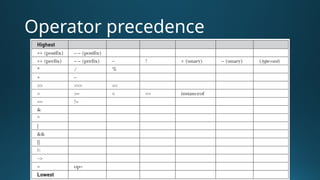
Operator precedence

Java Introduction for B. Tech. 2nd year.pptx

  • 1.
  • 2.
    Computer Evolution The 1930sCalculating Machines The 1940s ENIAC The 1940s JOHNNIAC The 1960sProgramma 101 The 1970s Xerox Alto The 1980s Apple's Macintosh The 1990s iMac G3 The 2000s MacBook Air
  • 3.
  • 4.
  • 5.
    Java History ‱ JamesGosling, Mike Sheridan, and Patrick Naughton initiated the Java language project in June 1991. The small team of sun engineers called Green Team. ‱ Initially it was designed for small, embedded systems in electronic appliances like set-top boxes. ‱ Firstly, it was called "Greentalk" by James Gosling, and the file extension was .gt. ‱ After that, it was called Oak and was developed as a part of the Green project. ‱ Why Oak? Oak is a symbol of strength and chosen as a national tree of many countries like the U.S.A., France, Germany, Romania, etc. ‱ In 1995, Oak was renamed as "Java" because it was already a trademark by Oak Technologies.
  • 6.
    Java History ‱ Whyhad they chose the name Java for Java language? The team gathered to choose a new name. The suggested words were "dynamic", "revolutionary", "Silk", "jolt", "DNA", etc. They wanted something that reflected the essence of the technology: revolutionary, dynamic, lively, cool, unique, and easy to spell, and fun to say. According to James Gosling, "Java was one of the top choices along with Silk". Since Java was so unique, most of the team members preferred Java than other names. ‱ Initially developed by James Gosling at Sun Microsystems (which is now a subsidiary of Oracle Corporation) and released in 1995. ‱ In 1995, Time magazine called Java one of the Ten Best Products of 1995. ‱ JDK 1.0 was released on January 23, 1996. After the first release of Java, there have been many additional features added to the language. Now Java is being used in Windows applications, Web applications, enterprise applications, mobile applications, cards, etc. Each new version adds new features in Java.
  • 7.
  • 8.
    Character set ‱ Letters:Both lowercase (a, b, c, d, e, etc. ) and uppercase (A, B, C, D, E, etc.) letters. ‱ Digits: 0, 1, 2, 3, 4, 5, 6, 7, 8, 9. ‱ Special symbols: _, (, ), {, }, [, ], +, -, *, /, %, !, &, |, ~, ^, <, =, >, $, #, ?, Comma (,), Dot (.), Colon (:), Semi-colon (;), Single quote (‘), Double quote (“), Back slash (). ‱ White space: Space, Tab, New line.
  • 9.
  • 10.
    Introduction ‱ Variable namesare case-sensitive. A variable's name an unlimited-length sequence of Unicode letters and digits, beginning with a letter, "$", or the underscore "_". ‱ Subsequent characters may be letters, digits, dollar signs, or underscore characters. ‱ If the name consists of only one word, spell that word in all lowercase letters, else capitalize the first letter of each subsequent word.
  • 11.
    Data Types ‱ IntegersThis group includes byte, short, int, and long, which are for whole-valued signed numbers. ‱ Floating-point numbers This group includes float and double, which represent numbers with fractional precision. ‱ Characters This group includes char, which represents symbols in a character set, like letters and numbers. ‱ Boolean This group includes boolean, which is a special type for representing true/false values.
  • 12.
    Introduction Type Values Defa ult Size Range Example Literals byte signed integers 08 bits -128 to 127 120, 1000, 023(octal) 0x23a(hex) short signed integers 0 16 bits -32768 to 32767 int signed integers 0 32 bits -231 to 231 -1 long signed integers 0L 64 bits -263 to 263 -1 123456, 987654L
  • 13.
    Introduction Type Values DefaultSize Range Example Literals float IEEE 754 floating point 0.0f 32 bits +/-1.4E-45 to +/- 3.4E+38, +/-infinity, +/-0, NAN 123.4, 1.234e2 123.4f double IEEE 754 floating point 0.0d 64 bits +/-4.9E-324 to +/-1.79E+308, +/-infinity, +/-0, NaN 1.234e2 1234.56789d char Unicode character u0000 16 bits u0000 to uFFFF ‘a’,’u0108’, ’’,’t’ boolea n true, false false 1 bit NA true, false
  • 14.