contents 
History Of Java 
Java Versions 
What is Java 
Java Features 
Simple java program 
Understanding first java program 
How to set path of JDK in windows 
Variable 
Package
History of java 
James Gosling initiated the Java language project in June 1991. 
Firstly, it was called "Greentalk" by James Gosling and file extension was .gt. 
After that, it was called Oak and was developed as a part of the Green project. 
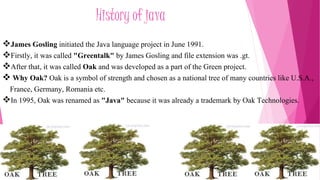
 Why Oak? Oak is a symbol of strength and chosen as a national tree of many countries like U.S.A., 
France, Germany, Romania etc. 
In 1995, Oak was renamed as "Java" because it was already a trademark by Oak Technologies.
Java Versions 
There are many java versions like as:: 
1. JDK Alpha and Beta (1995) 
2. JDK 1.0 (23rd Jan, 1996) 
3. JDK 1.1 (19th Feb, 1997) 
4. J2SE 1.2 (8th Dec, 1998) 
5. J2SE 1.3 (8th May, 2000) 
6. J2SE 1.4 (6th Feb, 2002) 
7. J2SE 5.0 (30th Sep, 2004) 
8. Java SE 6 (11th Dec, 2006) 
9. Java SE 7 (28th July, 2011)
What is java 
Java is a programming language and a platform independent language. 
Platform :-Any hardware or software environment in which a program runs, known 
as a platform. Since Java has its own Runtime Environment (JRE) and API, it is called 
platform 
According to Sun, 3 billion devices run java. There are many devices where java is 
currently used. Some of them are as follows: 
1. Desktop Applications such as acrobat reader, media player, antivirus etc. 
2. Web Applications such as irctc.co.in, javatpoint.com etc. 
3. Enterprise Applications such as banking applications. 
4. Mobile 
5. Embedded System 
6. Smart Card 
7. Robotics 
8. Games etc.
Features of java 
 Simple 
 Object-oriented 
 Platform indepented 
 Secured 
 Portable 
 Dynamic 
 High performance 
 Multithreaded
simple 
According to sun, Java language is simple . 
Syntax is based on C++ (so easier for programmers to learn it 
after C++). 
Removed many confusing and/or rarely-used features e.g., 
explicit pointers, operator overloading etc. 
No need to remove unreferenced objects because there is 
Automatic Garbage Collection in java.
Object-oriented 
Object-oriented programming(OOPs) is a methodology that 
simplify software development and maintenance by providing 
some rules. 
We can do program with the help of object. 
Basic concepts of OOPs are: 
1.Object 
2.Class 
3.Inheritance 
4.Polymorphism 
5.Abstraction 
6.Encapsulation
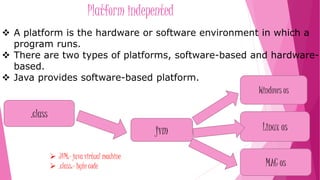
Platform indepented 
 A platform is the hardware or software environment in which a 
program runs. 
 There are two types of platforms, software-based and hardware-based. 
 Java provides software-based platform. 
.class 
jvm 
Windows os 
Linux os 
MAC os 
 JVM:- java virtual machine 
 .class:- byte code
secured 
Java is secured because: 
•No explicit pointer & operator overloading. 
•Programs run inside virtual machine sandbox. 
multithreaded 
Multithreaded means handling multiple tasks simultaneously. 
Java supports multithreaded programs. This means that we need not wait for the 
application to finish one task before beginning another.
portable 
 Java is portable because we can move the bytecode to any platform as well as 
run successfully.
Simple java program 
class Simple{ 
public static void main(String args[]){ 
System.out.println(“Amlendu kumar Dubey") 
} 
} 
save this file as Simple.java 
Run Program 
To compile: javac Simple.java 
To execute: java Simple 
Output:- Amlendu kumar Dubey
Understanding first java program 
 class is used to declare a class in java. 
 public is an access modifier which represents visibility, it means it is visible to 
all. 
 static is a keyword, if we declare any method as static, it is known as static 
method. The core advantage of static method is that there is no need to create 
object to invoke the static method. The main method is executed by the JVM, 
so it doesn't require to create object to invoke the main method. So it saves 
memory. 
 void is the return type of the method, it means it doesn't return any value. 
 main represents start-up of the program. 
 String[] args is used for command line argument. 
 System.out.println() is used print statement.
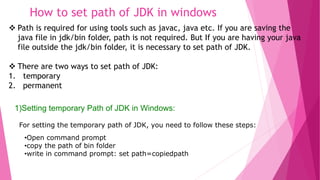
How to set path of JDK in windows 
 Path is required for using tools such as javac, java etc. If you are saving the 
java file in jdk/bin folder, path is not required. But If you are having your java 
file outside the jdk/bin folder, it is necessary to set path of JDK. 
 There are two ways to set path of JDK: 
1. temporary 
2. permanent 
1)Setting temporary Path of JDK in Windows: 
For setting the temporary path of JDK, you need to follow these steps: 
•Open command prompt 
•copy the path of bin folder 
•write in command prompt: set path=copiedpath
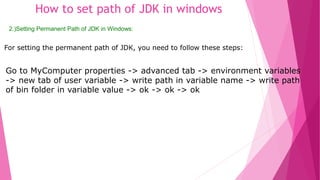
How to set path of JDK in windows 
2.)Setting Permanent Path of JDK in Windows: 
For setting the permanent path of JDK, you need to follow these steps: 
Go to MyComputer properties -> advanced tab -> environment variables 
-> new tab of user variable -> write path in variable name -> write path 
of bin folder in variable value -> ok -> ok -> ok
Variable 
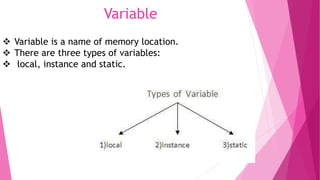
 Variable is a name of memory location. 
 There are three types of variables: 
 local, instance and static.
Variable 
local variable :- A variable that is declared inside the method is called 
local variable. 
Instance variable:-A variable that is declared inside the class but outside 
the method is called instance variable . It is not declared as static. 
Static variable:-A variable that is declared as static is called static 
variable. It cannot be local.
Example of variable 
class variable 
{ 
int x; //Instance variable 
static int y; //Static variable 
void sum() // Non Static method 
{ 
int x=5; // local variable 
} 
public static void main(String args[]) // Static 
method 
{ 
System.out.println("Example of variable"); 
} 
} 
Run Program
Package 
A package is a group of similar types of classes, interfaces and sub-packages. 
More importantly, it helps improve re-usability . 
 Package is used to categorize the classes and interfaces so that they 
can be easily maintained. 
 Package provids access protection. 
 Package removes naming collision.
Example of package:: 
package p1; 
class c1 
{ 
public void m1() 
{ 
System.out.println("method m1 of class c1"); 
} 
public static void main(String arg[]) 
{ 
c1 obj=new c1(); 
obj.m1(); 
} 
} 
Save the file as : demo.java 
To Compile: javac -d . demo.java 
To Run: java p1.c1
java basic for begginers

java basic for begginers

  • 2.
    contents History OfJava Java Versions What is Java Java Features Simple java program Understanding first java program How to set path of JDK in windows Variable Package
  • 3.
    History of java James Gosling initiated the Java language project in June 1991. Firstly, it was called "Greentalk" by James Gosling and file extension was .gt. After that, it was called Oak and was developed as a part of the Green project.  Why Oak? Oak is a symbol of strength and chosen as a national tree of many countries like U.S.A., France, Germany, Romania etc. In 1995, Oak was renamed as "Java" because it was already a trademark by Oak Technologies.
  • 4.
    Java Versions Thereare many java versions like as:: 1. JDK Alpha and Beta (1995) 2. JDK 1.0 (23rd Jan, 1996) 3. JDK 1.1 (19th Feb, 1997) 4. J2SE 1.2 (8th Dec, 1998) 5. J2SE 1.3 (8th May, 2000) 6. J2SE 1.4 (6th Feb, 2002) 7. J2SE 5.0 (30th Sep, 2004) 8. Java SE 6 (11th Dec, 2006) 9. Java SE 7 (28th July, 2011)
  • 5.
    What is java Java is a programming language and a platform independent language. Platform :-Any hardware or software environment in which a program runs, known as a platform. Since Java has its own Runtime Environment (JRE) and API, it is called platform According to Sun, 3 billion devices run java. There are many devices where java is currently used. Some of them are as follows: 1. Desktop Applications such as acrobat reader, media player, antivirus etc. 2. Web Applications such as irctc.co.in, javatpoint.com etc. 3. Enterprise Applications such as banking applications. 4. Mobile 5. Embedded System 6. Smart Card 7. Robotics 8. Games etc.
  • 6.
    Features of java  Simple  Object-oriented  Platform indepented  Secured  Portable  Dynamic  High performance  Multithreaded
  • 7.
    simple According tosun, Java language is simple . Syntax is based on C++ (so easier for programmers to learn it after C++). Removed many confusing and/or rarely-used features e.g., explicit pointers, operator overloading etc. No need to remove unreferenced objects because there is Automatic Garbage Collection in java.
  • 8.
    Object-oriented Object-oriented programming(OOPs)is a methodology that simplify software development and maintenance by providing some rules. We can do program with the help of object. Basic concepts of OOPs are: 1.Object 2.Class 3.Inheritance 4.Polymorphism 5.Abstraction 6.Encapsulation
  • 9.
    Platform indepented A platform is the hardware or software environment in which a program runs.  There are two types of platforms, software-based and hardware-based.  Java provides software-based platform. .class jvm Windows os Linux os MAC os  JVM:- java virtual machine  .class:- byte code
  • 10.
    secured Java issecured because: •No explicit pointer & operator overloading. •Programs run inside virtual machine sandbox. multithreaded Multithreaded means handling multiple tasks simultaneously. Java supports multithreaded programs. This means that we need not wait for the application to finish one task before beginning another.
  • 11.
    portable  Javais portable because we can move the bytecode to any platform as well as run successfully.
  • 12.
    Simple java program class Simple{ public static void main(String args[]){ System.out.println(“Amlendu kumar Dubey") } } save this file as Simple.java Run Program To compile: javac Simple.java To execute: java Simple Output:- Amlendu kumar Dubey
  • 13.
    Understanding first javaprogram  class is used to declare a class in java.  public is an access modifier which represents visibility, it means it is visible to all.  static is a keyword, if we declare any method as static, it is known as static method. The core advantage of static method is that there is no need to create object to invoke the static method. The main method is executed by the JVM, so it doesn't require to create object to invoke the main method. So it saves memory.  void is the return type of the method, it means it doesn't return any value.  main represents start-up of the program.  String[] args is used for command line argument.  System.out.println() is used print statement.
  • 14.
    How to setpath of JDK in windows  Path is required for using tools such as javac, java etc. If you are saving the java file in jdk/bin folder, path is not required. But If you are having your java file outside the jdk/bin folder, it is necessary to set path of JDK.  There are two ways to set path of JDK: 1. temporary 2. permanent 1)Setting temporary Path of JDK in Windows: For setting the temporary path of JDK, you need to follow these steps: •Open command prompt •copy the path of bin folder •write in command prompt: set path=copiedpath
  • 15.
    How to setpath of JDK in windows 2.)Setting Permanent Path of JDK in Windows: For setting the permanent path of JDK, you need to follow these steps: Go to MyComputer properties -> advanced tab -> environment variables -> new tab of user variable -> write path in variable name -> write path of bin folder in variable value -> ok -> ok -> ok
  • 16.
    Variable  Variableis a name of memory location.  There are three types of variables:  local, instance and static.
  • 17.
    Variable local variable:- A variable that is declared inside the method is called local variable. Instance variable:-A variable that is declared inside the class but outside the method is called instance variable . It is not declared as static. Static variable:-A variable that is declared as static is called static variable. It cannot be local.
  • 18.
    Example of variable class variable { int x; //Instance variable static int y; //Static variable void sum() // Non Static method { int x=5; // local variable } public static void main(String args[]) // Static method { System.out.println("Example of variable"); } } Run Program
  • 19.
    Package A packageis a group of similar types of classes, interfaces and sub-packages. More importantly, it helps improve re-usability .  Package is used to categorize the classes and interfaces so that they can be easily maintained.  Package provids access protection.  Package removes naming collision.
  • 20.
    Example of package:: package p1; class c1 { public void m1() { System.out.println("method m1 of class c1"); } public static void main(String arg[]) { c1 obj=new c1(); obj.m1(); } } Save the file as : demo.java To Compile: javac -d . demo.java To Run: java p1.c1