Chef-SoloからItamae
に完全移行した話+
Itamae Meetup 2015/12/9
@toritori0318
自己紹介
• 鳥居 剛司 (@toritori0318/アルパカ大明神)
• 株式会社HAROiD
• http://www.haroid.co.jp/
• サーバ / オペレーションエンジニア
• Lua / Golang / Python / Node.js / Perl / Ruby
• 二児の父
Itamae
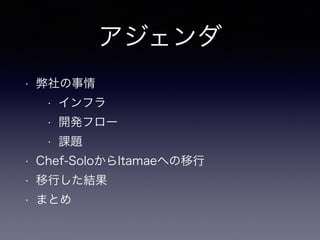
アジェンダ
• 弊社の事情
• インフラ
• 開発フロー
• 課題
• Chef-SoloからItamaeへの移行
• 移行した結果
• まとめ
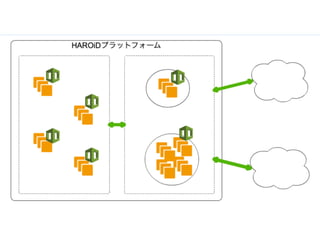
弊社のインフラ事情
開発フロー
開発フロー
• 事前準備
• 独自configにvm情報追記/nodes.json作る/…
• AMI作成
• rake aws:up vm=<vm>
• rake aws:provision vm=<vm>
• rake aws:spec vm=<vm>
• rake aws:create_ami vm=<vm>
• クラスタ操作
• rake aws:cf:create_stack env=<env>
• rake aws:cf:update_stack env=<env> params=<params>
• rake aws:cf:delete_stack env=<env>
ツール
• Vagrant
• Vagrant-aws
• Vagrant-ami
• Chef-Solo
• Berkshelf
Itamae
Gemfile
Chef-Solo時代の課題
Chef-Solo+ Berkshelfの煩雑化
• コミュニティクックブック多用
• プロビジョニングが遅い
• Chef-Soloの終焉?
• そしてChef-Zeroへ…
_人人人人人人人人_
> 突然のItamae <
 ̄Y^Y^Y^Y^Y^Y^Y ̄
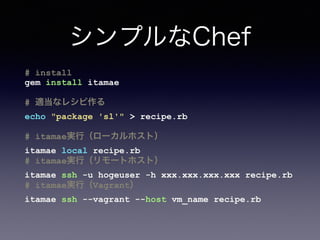
シンプルなChef
# install
gem install itamae
# 適当なレシピ作る
echo "package 'sl'" > recipe.rb
# itamae実行(ローカルホスト)
itamae local recipe.rb
# itamae実行(リモートホスト)
itamae ssh -u hogeuser -h xxx.xxx.xxx.xxx recipe.rb
# itamae実行(Vagrant)
itamae ssh --vagrant --host vm_name recipe.rb
シンプルなChef
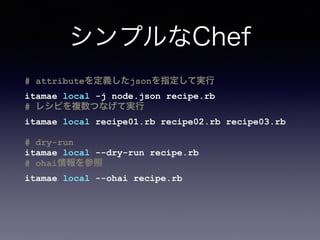
# attributeを定義したjsonを指定して実行
itamae local -j node.json recipe.rb
# レシピを複数つなげて実行
itamae local recipe01.rb recipe02.rb recipe03.rb
# dry-run
itamae local --dry-run recipe.rb
# ohai情報を参照
itamae local --ohai recipe.rb
_人人人人人人_
> これだ! <
 ̄Y^Y^Y^Y^Y ̄
Chef-Soloからの移行
ただし既存のフローや構造は(ほぼ)そのままで
ディレクトリ/ファイル構造
(Chef-Solo)
PROJECT_ROOT/
cookbooks/ # Berksfileクックブック群
site-cookbooks/ # プロジェクト固有クックブック群
roles/ # ロール群
nodes/ # vm毎のnode.json
vm_app.json
vm_db.json
...
data_bags/ # 秘密情報
Berksfile # Berksfile
Vagrantfile # Vagrantfile
ディレクトリ/ファイル構造
(Itamae)
PROJECT_ROOT/
cookbooks/ # プロジェクト固有クックブック群
base-cookbooks/ # 共通クックブック群
roles/ # ロール群
nodes/ # vm毎のnode.json
vm_app.json
vm_db.json
...
secret/ # 秘密情報
entrypoint.rb # Itamaeから実行されるレシピのエントリポイント
Gemfile # Itamaeプラグインなどの依存が書かれたGemfile
Vagrantfile # Vagrantfile
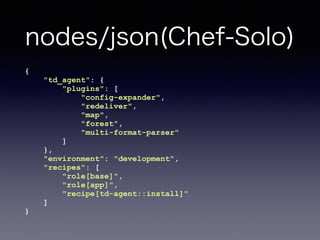
nodes/json(Chef-Solo)
{
"td_agent": {
"plugins": [
"config-expander",
"redeliver",
"map",
"forest",
"multi-format-parser"
]
},
"environment": "development",
"recipes": [
"role[base]",
"role[app]",
"recipe[td-agent::install]"
]
}
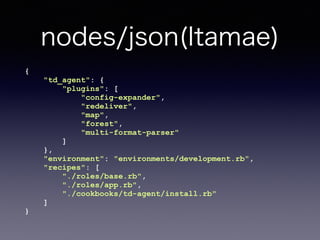
nodes/json(Itamae)
{
"td_agent": {
"plugins": [
"config-expander",
"redeliver",
"map",
"forest",
"multi-format-parser"
]
},
"environment": "environments/development.rb",
"recipes": [
"./roles/base.rb",
"./roles/app.rb",
"./cookbooks/td-agent/install.rb"
]
}
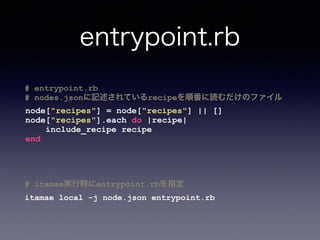
entrypoint.rb
# entrypoint.rb
# nodes.jsonに記述されているrecipeを順番に読むだけのファイル
node["recipes"] = node["recipes"] || []
node["recipes"].each do |recipe|
include_recipe recipe
end
# itamae実行時にentrypoint.rbを指定
itamae local -j node.json entrypoint.rb
クックブック(Chef-Solo)
<cookbook_name>
CHANGELOG.md
README.md
attributes/
default.rb
definitions/
files/
libraries/
metadata.rb
providers/
recipes/
default.rb
クックブック(Itamae)
<cookbook_name>
attributes.rb # attributesをまとめたファイル
xxx_recipe.rb # なんかレシピ
templates/ # テンプレートファイル
xxx.conf.erb
Berkshelf > Gemfile
# itamae
gem 'json'
gem 'itamae'
gem 'itamae-secrets'
# plugins
gem 'itamae-plugin-recipe-supervisor', 
:github => 'toritori0318/itamae-plugin-recipe-supervisor'
gem 'itamae-plugin-recipe-consul', 
:github => 'toritori0318/itamae-plugin-recipe-consul'
Gemfile
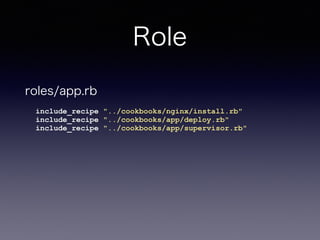
Role
include_recipe "../cookbooks/nginx/install.rb"
include_recipe "../cookbooks/app/deploy.rb"
include_recipe "../cookbooks/app/supervisor.rb"
roles/app.rb
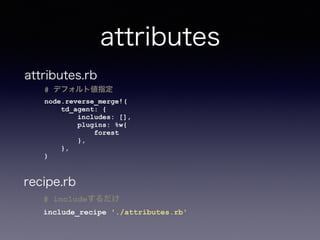
attributes
# includeするだけ
include_recipe './attributes.rb'
attributes.rb
# デフォルト値指定
node.reverse_merge!(
td_agent: {
includes: [],
plugins: %w{
forest
},
},
)
recipe.rb
Qiita書いた時に
課題になってたこと
Databags
↓
itamae-secrets
itamae-secrets
# インストール
gem install itamae-secrets
# ベースディレクトリを設定ファイルに書いとく
echo 'base: ./secret' >> .itamae-secrets.yml
# 秘密 生成 > ‘<basedir>/keys/default’
itamae-secrets newkey --method=aes-passphrase
(パスフレーズ入力)
# 値保存
itamae-secrets set itakey itavalue
# 値取得
itamae-secrets get itakey
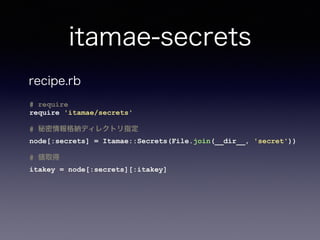
itamae-secrets
# require
require 'itamae/secrets'
# 秘密情報格納ディレクトリ指定
node[:secrets] = Itamae::Secrets(File.join(__dir__, 'secret'))
# 値取得
itakey = node[:secrets][:itakey]
recipe.rb
itamae-secrets
• .gitignoreに秘密 ディレクトリ指定するのを忘
れずに!
echo 'secret/keys' >> .gitignore
Chef-Server
↓
Consul?
ex) Consulと組み合わせて
ロール単位にレシピ実行
# 1. 各ノードはイベントwatchしとく
consul watch -type event -name itamae /path/to/watch_itamae.sh
# 2. レシピをgit(or S3)にアップロードしておく
# 3. プロビジョニングしたいタイミングでevent発行
consul event -name itamae -service web 'vm=web recipe=nginx'
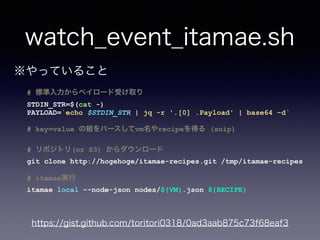
watch_event_itamae.sh
# 標準入力からペイロード受け取り
STDIN_STR=$(cat -)
PAYLOAD=`echo $STDIN_STR | jq -r '.[0] .Payload' | base64 -d`
# key=value の組をパースしてvm名やrecipeを得る (snip)
# リポジトリ(or S3) からダウンロード
git clone http://hogehoge/itamae-recipes.git /tmp/itamae-recipes
# itamae実行
itamae local --node-json nodes/${VM}.json ${RECIPE}
※やっていること
https://gist.github.com/toritori0318/0ad3aab875c73f68eaf3
Itamae移行後
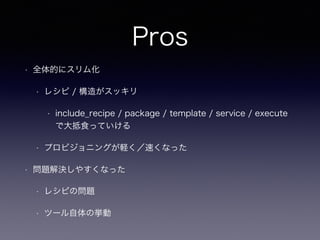
Pros
• 全体的にスリム化
• レシピ / 構造がスッキリ
• include_recipe / package / template / service / execute
で大抵食っていける
• プロビジョニングが軽く/速くなった
• 問題解決しやすくなった
• レシピの問題
• ツール自体の挙動
Cons
• エコシステム
• Snippetsサイトがあると良いのかも…?
まとめ
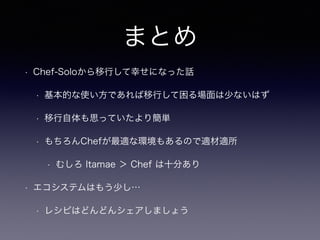
まとめ
• Chef-Soloから移行して幸せになった話
• 基本的な使い方であれば移行して困る場面は少ないはず
• 移行自体も思っていたより簡単
• もちろんChefが最適な環境もあるので適材適所
• むしろ Itamae > Chef は十分あり
• エコシステムはもう少し…
• レシピはどんどんシェアしましょう
https://github.com/itamae-kitchen/itamae/wiki/Best-
Practice
現在はオフィシャルWikiに
ベストプラクティスが掲載されています
参考
参考
• 今回のプロジェクト構成サンプル
• ベーシック
• https://github.com/toritori0318/itamae-sample-project
• environmentsバージョン
• https://github.com/toritori0318/itamae-sample-project/
tree/environments_version
• itamae-secretsバージョン
• https://github.com/toritori0318/itamae-sample-project/
tree/itamae-secrets-version
ご清聴
ありがとうございました

Chef SoloからItamaeに完全移行した話+