
AUTOMATION TESTING
WITH TESTCOMPLETE
Ionela Ursu & Adrian Apostolache
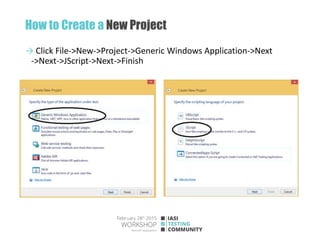
How to Create a New Project
→ Click File->New->Project->Generic Windows Application->Next
->Next->JScript->Next->Finish
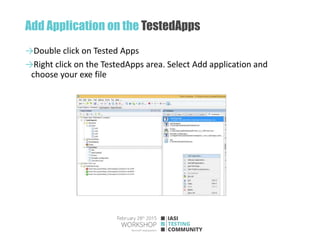
Add Application on the TestedApps
→Double click on Tested Apps
→Right click on the TestedApps area. Select Add application and
choose your exe file
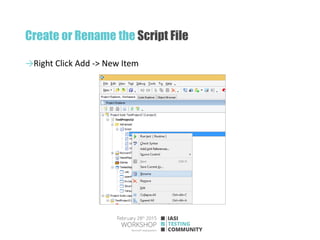
Create or Rename the Script File
→Right Click Add -> New Item
Open PrcView Application
//Step_1:Launch PrcView application
function test()
{
TestedApps.PrcView.Run();
}
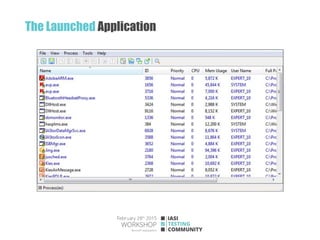
Right click on the work area and click Run application. The exe file
should start and a report will be created with pass/failed output
The Launched Application
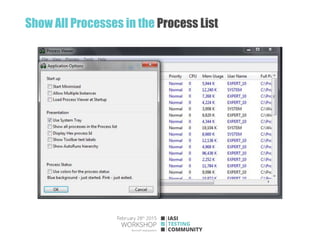
Show All Processes in the Process List
//Step_2:Click on "Show all processes in the Process list" checkbox from Tools-->Options
//Step_2_1:Click on the Tool button
var principalMenu=Sys.Process("PrcView").Window("PrcView", "Process Viewer",
1).MainMenu;
principalMenu.Click("Tools");
//Step_2_2:Click on the Options button
var toolButton=principalMenu.Items("Tools");
toolButton.SubMenu.Click("Options...");
//Step_2_3:Set to true the "Show all processes in the Process list" checkbox if is false
Sys.Process("PrcView").Window("PVIEW95DLG", "Application Options",
1).Window("Button", "Show all processes in the Process list", 13).wState=1;
//Step_2_4:Click on the Ok button
var okButton=Sys.Process("PrcView").Window("PVIEW95DLG", "Application Options",
1).Window("Button", "OK", 1);
okButton.Click(1,1);
Show All Processes in the Process List
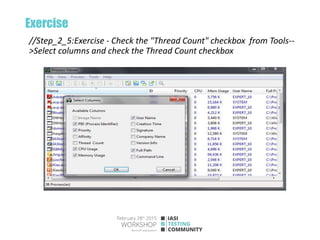
Exercise
//Step_2_5:Exercise - Check the "Thread Count" checkbox from Tools--
>Select columns and check the Thread Count checkbox
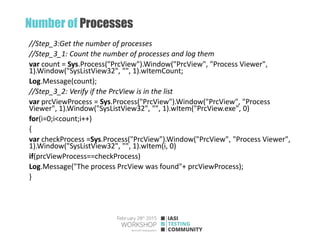
Number of Processes
//Step_3:Get the number of processes
//Step_3_1: Count the number of processes and log them
var count = Sys.Process("PrcView").Window("PrcView", "Process Viewer",
1).Window("SysListView32", "", 1).wItemCount;
Log.Message(count);
//Step_3_2: Verify if the PrcView is in the list
var prcViewProcess = Sys.Process("PrcView").Window("PrcView", "Process
Viewer", 1).Window("SysListView32", "", 1).wItem("PrcView.exe", 0)
for(i=0;i<count;i++)
{
var checkProcess =Sys.Process("PrcView").Window("PrcView", "Process Viewer",
1).Window("SysListView32", "", 1).wItem(i, 0)
if(prcViewProcess==checkProcess)
Log.Message("The process PrcView was found"+ prcViewProcess);
}
Exercise
// Step_3_3:Exercise - Verify if the "TestComplete.exe" process is in the
list
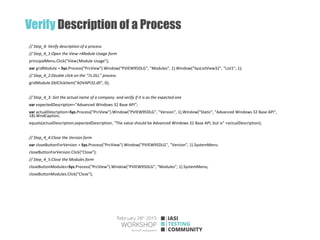
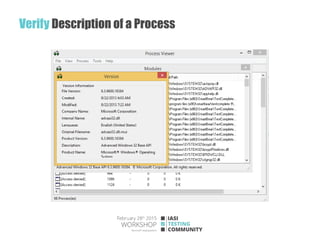
Verify Description of a Process
// Step_4: Verify description of a process
// Step_4_1:Open the View->Module Usage form
principalMenu.Click("View|Module Usage");
var gridModule = Sys.Process("PrcView").Window("PVIEW95DLG", "Modules", 1).Window("SysListView32", "List1", 1);
// Step_4_2:Double click on the "7z.DLL" process
gridModule.DblClickItem("ADVAPI32.dll", 0);
// Step_4_3: Get the actual name of a company and verify if it is as the expected one
var expectedDescription="Advanced Windows 32 Base API";
var actualDescription=Sys.Process("PrcView").Window("PVIEW95DLG", "Version", 1).Window("Static", "Advanced Windows 32 Base API",
18).WndCaption;
equals(actualDescription,expectedDescription, "The value should be Advanced Windows 32 Base API, but is" +actualDescription);
// Step_4_4:Close the Version form
var closeButtonForVersion = Sys.Process("PrcView").Window("PVIEW95DLG", "Version", 1).SystemMenu
closeButtonForVersion.Click("Close");
// Step_4_5:Close the Modules form
closeButtonModules=Sys.Process("PrcView").Window("PVIEW95DLG", "Modules", 1).SystemMenu;
closeButtonModules.Click("Close");
Verify Description of a Process
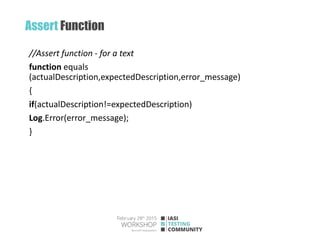
Assert Function
//Assert function - for a text
function equals
(actualDescription,expectedDescription,error_message)
{
if(actualDescription!=expectedDescription)
Log.Error(error_message);
}
Exercise
// Step_4_6: Exercise - Verify Product Version for the next module
from the list
//...
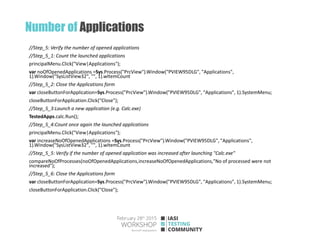
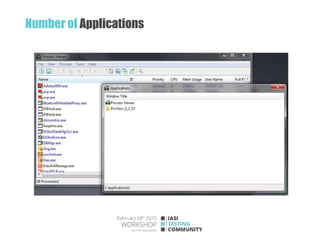
Number of Applications
//Step_5: Verify the number of opened applications
//Step_5_1: Count the launched applications
principalMenu.Click("View|Applications");
var noOfOpenedApplications =Sys.Process("PrcView").Window("PVIEW95DLG", "Applications",
1).Window("SysListView32", "", 1).wItemCount
//Step_5_2: Close the Applications form
var closeButtonForApplication=Sys.Process("PrcView").Window("PVIEW95DLG", "Applications", 1).SystemMenu;
closeButtonForApplication.Click("Close");
//Step_5_3:Launch a new application (e.g. Calc.exe)
TestedApps.calc.Run();
//Step_5_4:Count once again the launched applications
principalMenu.Click("View|Applications");
var increaseNoOfOpenedApplications =Sys.Process("PrcView").Window("PVIEW95DLG", "Applications",
1).Window("SysListView32", "", 1).wItemCount
//Step_5_5: Verify if the number of opened application was increased after launching "Calc.exe"
compareNoOfProcesses(noOfOpenedApplications,increaseNoOfOpenedApplications,"No of processed were not
increased");
//Step_5_6: Close the Applications form
var closeButtonForApplication=Sys.Process("PrcView").Window("PVIEW95DLG", "Applications", 1).SystemMenu;
closeButtonForApplication.Click("Close");
Number of Applications
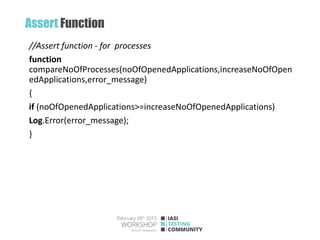
Assert Function
//Assert function - for processes
function
compareNoOfProcesses(noOfOpenedApplications,increaseNoOfOpen
edApplications,error_message)
{
if (noOfOpenedApplications>=increaseNoOfOpenedApplications)
Log.Error(error_message);
}
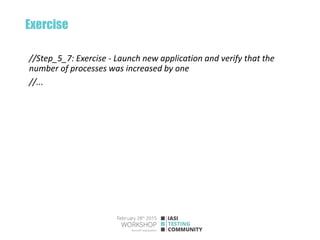
Exercise
//Step_5_7: Exercise - Launch new application and verify that the
number of processes was increased by one
//...
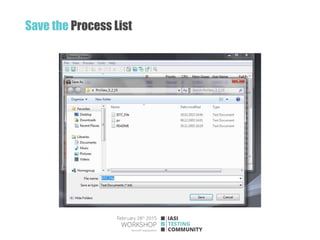
Save the Process List
//Step_6: Save the process list into a file using File --> Save As
//Step_6_1:Click on File --> Save As
principalMenu.Click("File|Save as...");
//Step_6_2: Enter the name of file
var nameofFile=Aliases.PrcView.Window("#32770", "Save As",
1).Window("DUIViewWndClassName", "", 1).Window("DirectUIHWND", "",
1).Window("FloatNotifySink", "", 1).Window("ComboBox", "", 1)
nameofFile.Keys("ISTC_File");
//Step_6_2:Click on the Save button
var saveButton = Sys.Process("PrcView").Window("#32770", "Save As",
1).Window("Button", "&Save", 1)
saveButton.Click(1,1);
Log.Message("The ISTC file was saved");
principalMenu["Click"]("File|Exit");
Save the Process List

Automation Testing with TestComplete

  • 1.
  • 2.
    How to Createa New Project → Click File->New->Project->Generic Windows Application->Next ->Next->JScript->Next->Finish
  • 3.
    Add Application onthe TestedApps →Double click on Tested Apps →Right click on the TestedApps area. Select Add application and choose your exe file
  • 4.
    Create or Renamethe Script File →Right Click Add -> New Item
  • 5.
    Open PrcView Application //Step_1:LaunchPrcView application function test() { TestedApps.PrcView.Run(); } Right click on the work area and click Run application. The exe file should start and a report will be created with pass/failed output
  • 6.
  • 7.
    Show All Processesin the Process List //Step_2:Click on "Show all processes in the Process list" checkbox from Tools-->Options //Step_2_1:Click on the Tool button var principalMenu=Sys.Process("PrcView").Window("PrcView", "Process Viewer", 1).MainMenu; principalMenu.Click("Tools"); //Step_2_2:Click on the Options button var toolButton=principalMenu.Items("Tools"); toolButton.SubMenu.Click("Options..."); //Step_2_3:Set to true the "Show all processes in the Process list" checkbox if is false Sys.Process("PrcView").Window("PVIEW95DLG", "Application Options", 1).Window("Button", "Show all processes in the Process list", 13).wState=1; //Step_2_4:Click on the Ok button var okButton=Sys.Process("PrcView").Window("PVIEW95DLG", "Application Options", 1).Window("Button", "OK", 1); okButton.Click(1,1);
  • 8.
    Show All Processesin the Process List
  • 9.
    Exercise //Step_2_5:Exercise - Checkthe "Thread Count" checkbox from Tools-- >Select columns and check the Thread Count checkbox
  • 10.
    Number of Processes //Step_3:Getthe number of processes //Step_3_1: Count the number of processes and log them var count = Sys.Process("PrcView").Window("PrcView", "Process Viewer", 1).Window("SysListView32", "", 1).wItemCount; Log.Message(count); //Step_3_2: Verify if the PrcView is in the list var prcViewProcess = Sys.Process("PrcView").Window("PrcView", "Process Viewer", 1).Window("SysListView32", "", 1).wItem("PrcView.exe", 0) for(i=0;i<count;i++) { var checkProcess =Sys.Process("PrcView").Window("PrcView", "Process Viewer", 1).Window("SysListView32", "", 1).wItem(i, 0) if(prcViewProcess==checkProcess) Log.Message("The process PrcView was found"+ prcViewProcess); }
  • 11.
    Exercise // Step_3_3:Exercise -Verify if the "TestComplete.exe" process is in the list
  • 12.
    Verify Description ofa Process // Step_4: Verify description of a process // Step_4_1:Open the View->Module Usage form principalMenu.Click("View|Module Usage"); var gridModule = Sys.Process("PrcView").Window("PVIEW95DLG", "Modules", 1).Window("SysListView32", "List1", 1); // Step_4_2:Double click on the "7z.DLL" process gridModule.DblClickItem("ADVAPI32.dll", 0); // Step_4_3: Get the actual name of a company and verify if it is as the expected one var expectedDescription="Advanced Windows 32 Base API"; var actualDescription=Sys.Process("PrcView").Window("PVIEW95DLG", "Version", 1).Window("Static", "Advanced Windows 32 Base API", 18).WndCaption; equals(actualDescription,expectedDescription, "The value should be Advanced Windows 32 Base API, but is" +actualDescription); // Step_4_4:Close the Version form var closeButtonForVersion = Sys.Process("PrcView").Window("PVIEW95DLG", "Version", 1).SystemMenu closeButtonForVersion.Click("Close"); // Step_4_5:Close the Modules form closeButtonModules=Sys.Process("PrcView").Window("PVIEW95DLG", "Modules", 1).SystemMenu; closeButtonModules.Click("Close");
  • 13.
  • 14.
    Assert Function //Assert function- for a text function equals (actualDescription,expectedDescription,error_message) { if(actualDescription!=expectedDescription) Log.Error(error_message); }
  • 15.
    Exercise // Step_4_6: Exercise- Verify Product Version for the next module from the list //...
  • 16.
    Number of Applications //Step_5:Verify the number of opened applications //Step_5_1: Count the launched applications principalMenu.Click("View|Applications"); var noOfOpenedApplications =Sys.Process("PrcView").Window("PVIEW95DLG", "Applications", 1).Window("SysListView32", "", 1).wItemCount //Step_5_2: Close the Applications form var closeButtonForApplication=Sys.Process("PrcView").Window("PVIEW95DLG", "Applications", 1).SystemMenu; closeButtonForApplication.Click("Close"); //Step_5_3:Launch a new application (e.g. Calc.exe) TestedApps.calc.Run(); //Step_5_4:Count once again the launched applications principalMenu.Click("View|Applications"); var increaseNoOfOpenedApplications =Sys.Process("PrcView").Window("PVIEW95DLG", "Applications", 1).Window("SysListView32", "", 1).wItemCount //Step_5_5: Verify if the number of opened application was increased after launching "Calc.exe" compareNoOfProcesses(noOfOpenedApplications,increaseNoOfOpenedApplications,"No of processed were not increased"); //Step_5_6: Close the Applications form var closeButtonForApplication=Sys.Process("PrcView").Window("PVIEW95DLG", "Applications", 1).SystemMenu; closeButtonForApplication.Click("Close");
  • 17.
  • 18.
    Assert Function //Assert function- for processes function compareNoOfProcesses(noOfOpenedApplications,increaseNoOfOpen edApplications,error_message) { if (noOfOpenedApplications>=increaseNoOfOpenedApplications) Log.Error(error_message); }
  • 19.
    Exercise //Step_5_7: Exercise -Launch new application and verify that the number of processes was increased by one //...
  • 20.
    Save the ProcessList //Step_6: Save the process list into a file using File --> Save As //Step_6_1:Click on File --> Save As principalMenu.Click("File|Save as..."); //Step_6_2: Enter the name of file var nameofFile=Aliases.PrcView.Window("#32770", "Save As", 1).Window("DUIViewWndClassName", "", 1).Window("DirectUIHWND", "", 1).Window("FloatNotifySink", "", 1).Window("ComboBox", "", 1) nameofFile.Keys("ISTC_File"); //Step_6_2:Click on the Save button var saveButton = Sys.Process("PrcView").Window("#32770", "Save As", 1).Window("Button", "&Save", 1) saveButton.Click(1,1); Log.Message("The ISTC file was saved"); principalMenu["Click"]("File|Exit");
  • 21.