



iPhoneHistory, hardware &Software
Historywww.3aroundweb.in
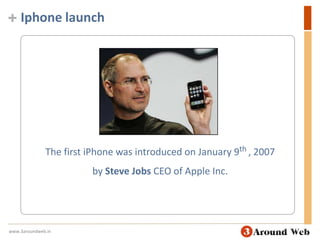
Iphone launchThe first iPhone was introduced on January 9th, 2007 by Steve Jobs CEO of Apple Inc.www.3aroundweb.in
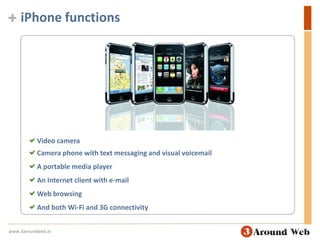
iPhone functions Video camera Camera phone with text messaging and visual voicemail A portable media player An Internet client with e-mail Web browsing And both Wi-Fi and 3G connectivitywww.3aroundweb.in
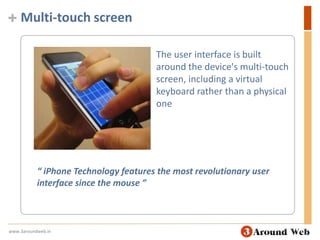
Multi-touch screen The user interface is built around the device's multi-touch screen, including a virtual keyboard rather than a physical one“ iPhone Technology features the most revolutionary user interface since the mouse ”www.3aroundweb.in
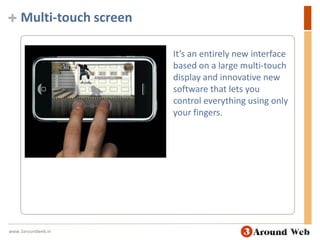
Multi-touch screen It’s an entirely new interface based on a large multi-touch display and innovative new software that lets you control everything using only your fingers. www.3aroundweb.in
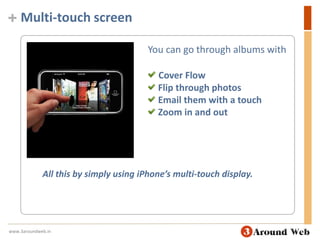
Multi-touch screen You can go through albums with Cover Flow Flip through photos Email them with a touch Zoom in and outAll this by simply using iPhone’s multi-touch display.www.3aroundweb.in
Collaboration with AT&T MobilityApple created the device during a collaboration with AT&T Mobility—Cingular Wireless at the time—at an estimated development cost of US $150 million over thirty months.www.3aroundweb.in
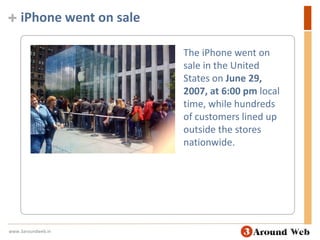
iPhone went on saleThe iPhone went on sale in the United States on June 29, 2007, at 6:00 pm local time, while hundreds of customers lined up outside the stores nationwide.www.3aroundweb.in
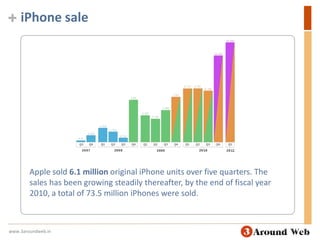
iPhone saleApple sold 6.1 million original iPhone units over five quarters. The sales has been growing steadily thereafter, by the end of fiscal year 2010, a total of 73.5 million iPhones were sold.www.3aroundweb.in
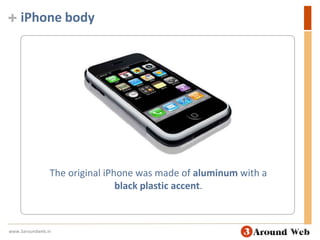
iPhone bodyThe original iPhone was made of aluminum with a black plastic accent.www.3aroundweb.in
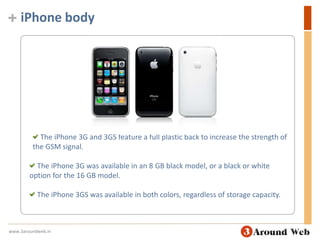
iPhone body The iPhone 3G and 3GS feature a full plastic back to increase the strength of the GSM signal. The iPhone 3G was available in an 8 GB black model, or a black or white option for the 16 GB model.  The iPhone 3GS was available in both colors, regardless of storage capacity. www.3aroundweb.in
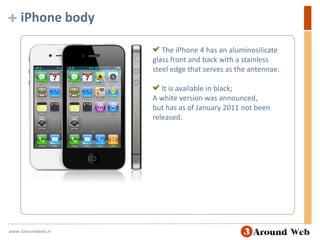
iPhone body The iPhone 4 has an aluminosilicate glass front and back with a stainless steel edge that serves as the antennae.  It is available in black;A white version was announced, but has as of January 2011 not been released.www.3aroundweb.in
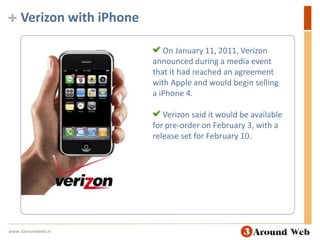
Verizon with iPhoneOn January 11, 2011, Verizon announced during a media event that it had reached an agreement with Apple and would begin selling a iPhone 4.  Verizon said it would be available for pre-order on February 3, with a release set for February 10.www.3aroundweb.in
Hardwarewww.3aroundweb.in
iPhone Hardwarewww.3aroundweb.in
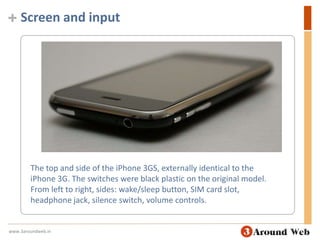
Screen and inputThe top and side of the iPhone 3GS, externally identical to the iPhone 3G. The switches were black plastic on the original model. From left to right, sides: wake/sleep button, SIM card slot, headphone jack, silence switch, volume controls.www.3aroundweb.in
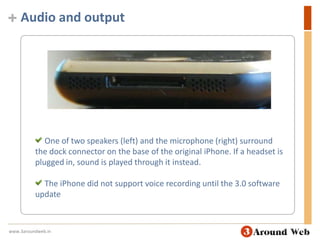
Audio and output One of two speakers (left) and the microphone (right) surround the dock connector on the base of the original iPhone. If a headset is plugged in, sound is played through it instead. The iPhone did not support voice recording until the 3.0 software updatewww.3aroundweb.in
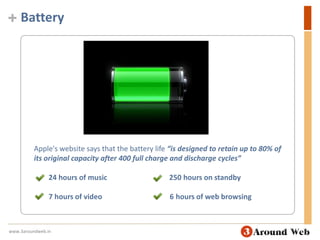
BatteryApple's website says that the battery life “is designed to retain up to 80% of its original capacity after 400 full charge and discharge cycles”24 hours of music                                  250 hours on standby        7 hours of video                                     6 hours of web browsingwww.3aroundweb.in
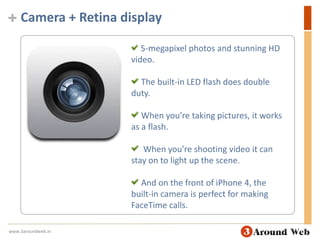
Camera + Retina display 5-megapixel photos and stunning HD video.  The built-in LED flash does double duty.  When you’re taking pictures, it works as a flash.  When you’re shooting video it can stay on to light up the scene.  And on the front of iPhone 4, the built-in camera is perfect for making FaceTime calls.www.3aroundweb.in
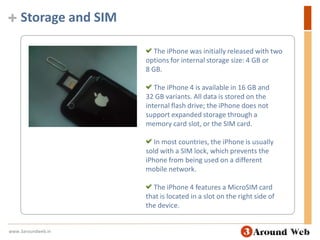
Storage and SIM The iPhone was initially released with two options for internal storage size: 4 GB or 8 GB. The iPhone 4 is available in 16 GB and 32 GB variants. All data is stored on the internal flash drive; the iPhone does not support expanded storage through a memory card slot, or the SIM card. In most countries, the iPhone is usually sold with a SIM lock, which prevents the iPhone from being used on a different mobile network. The iPhone 4 features a MicroSIM card that is located in a slot on the right side of the device.www.3aroundweb.in
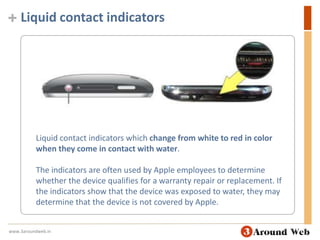
Liquid contact indicatorsLiquid contact indicators which change from white to red in color when they come in contact with water.The indicators are often used by Apple employees to determine whether the device qualifies for a warranty repair or replacement. If the indicators show that the device was exposed to water, they may determine that the device is not covered by Apple.www.3aroundweb.in
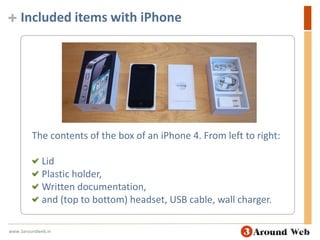
Included items with iPhoneThe contents of the box of an iPhone 4. From left to right: Lid Plastic holder, Written documentation,  and (top to bottom) headset, USB cable, wall charger.www.3aroundweb.in
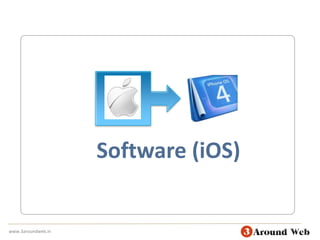
Software (iOS)www.3aroundweb.in
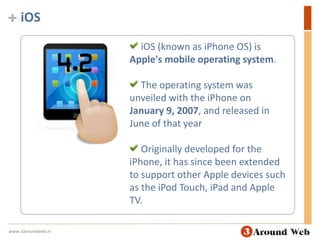
iOSiOS (known as iPhone OS) is Apple's mobile operating system.  The operating system was unveiled with the iPhone on January 9, 2007, and released in June of that year Originally developed for the iPhone, it has since been extended to support other Apple devices such as the iPod Touch, iPad and Apple TV.www.3aroundweb.in
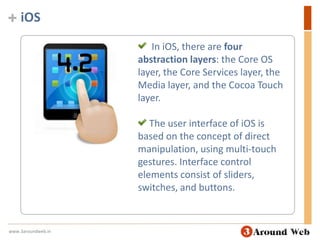
iOS  In iOS, there are four abstraction layers: the Core OS layer, the Core Services layer, the Media layer, and the Cocoa Touch layer. The user interface of iOS is based on the concept of direct manipulation, using multi-touch gestures. Interface control elements consist of sliders, switches, and buttons.www.3aroundweb.in
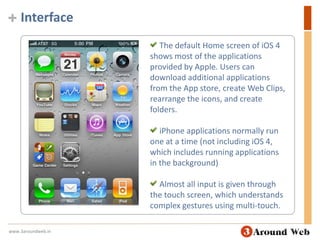
Interface The default Home screen of iOS 4 shows most of the applications provided by Apple. Users can download additional applications from the App store, create Web Clips, rearrange the icons, and create folders. iPhone applications normally run one at a time (not including iOS 4, which includes running applications in the background) Almost all input is given through the touch screen, which understands complex gestures using multi-touch.www.3aroundweb.in
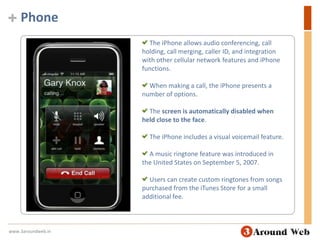
Phone The iPhone allows audio conferencing, call holding, call merging, caller ID, and integration with other cellular network features and iPhone functions. When making a call, the iPhone presents a number of options. The screen is automatically disabled when held close to the face. The iPhone includes a visual voicemail feature. A music ringtone feature was introduced in the United States on September 5, 2007.  Users can create custom ringtones from songs purchased from the iTunes Store for a small additional fee.www.3aroundweb.in
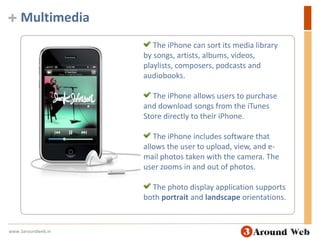
Multimedia The iPhone can sort its media library by songs, artists, albums, videos, playlists, composers, podcasts and audiobooks. The iPhone allows users to purchase and download songs from the iTunes Store directly to their iPhone. The iPhone includes software that allows the user to upload, view, and e-mail photos taken with the camera. The user zooms in and out of photos. The photo display application supports both portrait and landscape orientations.www.3aroundweb.in
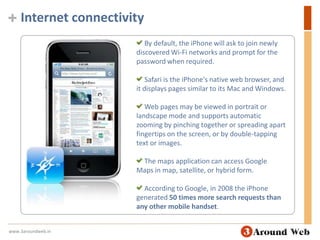
Internet connectivity By default, the iPhone will ask to join newly discovered Wi-Fi networks and prompt for the password when required. Safari is the iPhone's native web browser, and it displays pages similar to its Mac and Windows. Web pages may be viewed in portrait or landscape mode and supports automatic zooming by pinching together or spreading apart fingertips on the screen, or by double-tapping text or images. The maps application can access Google Maps in map, satellite, or hybrid form. According to Google, in 2008 the iPhone generated 50 times more search requests than any other mobile handset. www.3aroundweb.in
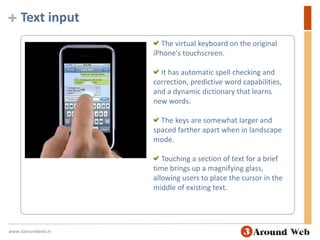
Text input The virtual keyboard on the original iPhone's touchscreen. It has automatic spell checking and correction, predictive word capabilities, and a dynamic dictionary that learns new words. The keys are somewhat larger and spaced farther apart when in landscape mode.  Touching a section of text for a brief time brings up a magnifying glass, allowing users to place the cursor in the middle of existing text. www.3aroundweb.in
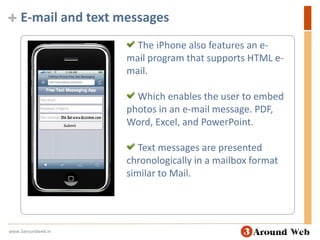
E-mail and text messages The iPhone also features an e-mail program that supports HTML e-mail. Which enables the user to embed photos in an e-mail message. PDF, Word, Excel, and PowerPoint. Text messages are presented chronologically in a mailbox format similar to Mail.www.3aroundweb.in
App store
App Storewww.3aroundweb.in
What are application stores?www.3aroundweb.in
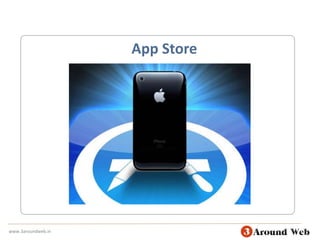
App Store The Apple App Store is a service for iOS devices (the iPhone, iPod Touch and iPad) offered by Apple Inc. The App Store opened on July 10, 2008 via an update to iTunes. The App Store is accessible from the iPhone, iPod Touch and iPad. The store is also accessible on computers running Mac OS X and Windows through iTunes.www.3aroundweb.in
App Store Best place to discover apps. On click downloads. Free & Paid apps (70/30) Automatic installation. Automatic apps updates. www.3aroundweb.in
Apple say’s Apple allows 70% of revenues from the store to instantly go to the seller of the application, and 30% go to Apple. 10 billion apps was downloaded from Apple App Store.  The median revenue per developed application is estimated to be $700, while the average costs range from $15,000 to $50,000www.3aroundweb.in
iPhone SDKwww.3aroundweb.in
iPhone SDKThe Software Development Kit for iPhone OS was announced at the iPhone Software Roadmap event on March 6, 2008. The SDK allows developers to create applications using Xcode that will natively run on the iPhone, iPod Touch and iPad. Developers who publish their applications on the App Store will receive 70% of sales revenue, and will not have to pay any distribution costs for the application. However, an annual fee is required to use the iPhone SDK and upload applications to the store.www.3aroundweb.in
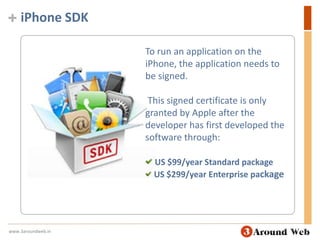
iPhone SDKTo run an application on the iPhone, the application needs to be signed. This signed certificate is only granted by Apple after the developer has first developed the software through:US $99/year Standard packageUS $299/year Enterprise packagewww.3aroundweb.in
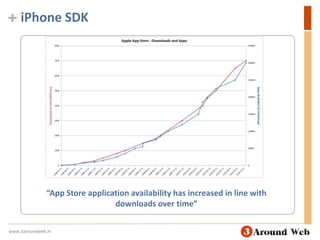
iPhone SDK“App Store application availability has increased in line with downloads over time”www.3aroundweb.in
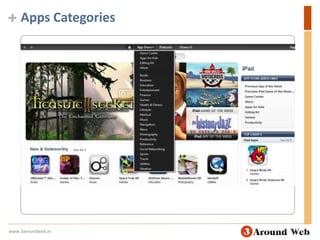
Apps Categorieswww.3aroundweb.in
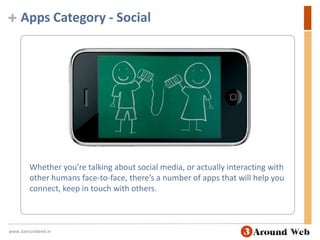
Apps Category - SocialWhether you’re talking about social media, or actually interacting with other humans face-to-face, there’s a number of apps that will help you connect, keep in touch with others.www.3aroundweb.in
Apps Category - Business & NewsThese apps will help you get work done and stay on top of what’s happening in the news.www.3aroundweb.in
Apps Category - Entertainment, Music, & GamesCheck out these great games and other amusements that will surely keep your accelerometer… accelerating.www.3aroundweb.in
Apps Category - Family, Shopping, & TravelThese apps will help keep the kids in line, get your dream vacation in gear, and hopefully save you some money in the process.www.3aroundweb.in
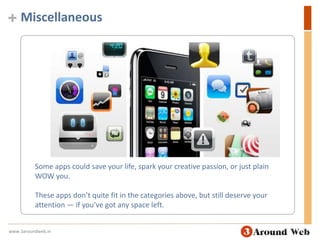
MiscellaneousSome apps could save your life, spark your creative passion, or just plain WOW you. These apps don’t quite fit in the categories above, but still deserve your attention — if you’ve got any space left.www.3aroundweb.in
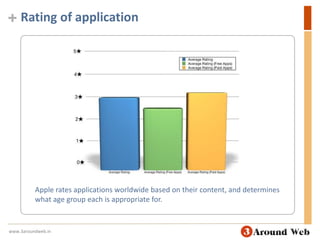
Rating of applicationApple rates applications worldwide based on their content, and determines what age group each is appropriate for.www.3aroundweb.in
Approval process To get applications into the App Store, developers were required to submit their app and wait for approval or rejection by Apple.  Rejected apps were given feedback on the reason they were rejected so they could be modified and resubmitted. Over time, requirements have evolved as trends have appeared in application development.www.3aroundweb.in
Install Applications on Your iPhone
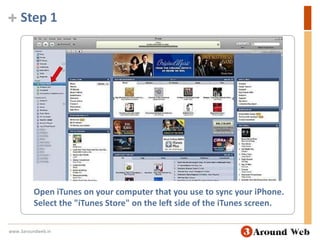
Step 1Open iTunes on your computer that you use to sync your iPhone. Select the "iTunes Store" on the left side of the iTunes screen.www.3aroundweb.in
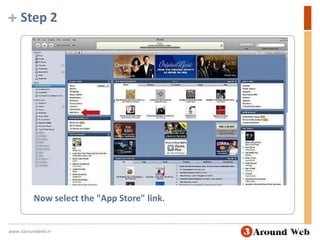
Step 2Now select the "App Store" link.www.3aroundweb.in
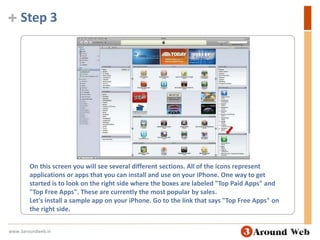
Step 3On this screen you will see several different sections. All of the icons represent applications or apps that you can install and use on your iPhone. One way to get started is to look on the right side where the boxes are labeled "Top Paid Apps" and "Top Free Apps". These are currently the most popular by sales.Let's install a sample app on your iPhone. Go to the link that says "Top Free Apps" on the right side. www.3aroundweb.in
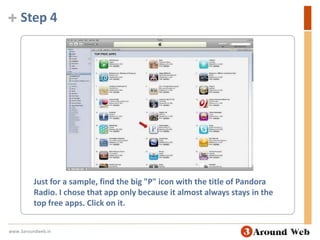
Step 4Just for a sample, find the big "P" icon with the title of Pandora Radio. I chose that app only because it almost always stays in the top free apps. Click on it.www.3aroundweb.in
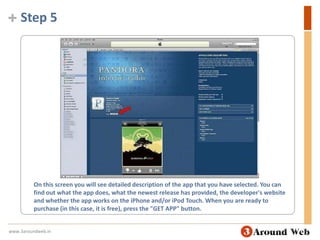
Step 5On this screen you will see detailed description of the app that you have selected. You can find out what the app does, what the newest release has provided, the developer's website and whether the app works on the iPhone and/or iPod Touch. When you are ready to purchase (in this case, it is free), press the "GET APP" button.www.3aroundweb.in
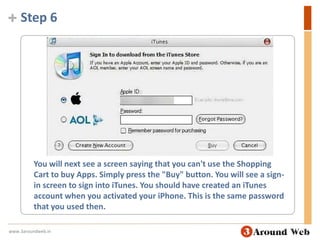
Step 6You will next see a screen saying that you can't use the Shopping Cart to buy Apps. Simply press the "Buy" button. You will see a sign-in screen to sign into iTunes. You should have created an iTunes account when you activated your iPhone. This is the same password that you used then.www.3aroundweb.in
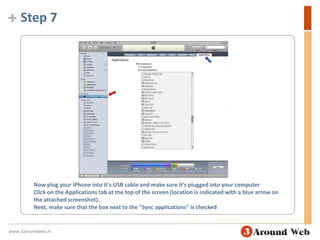
Step 7Now plug your iPhone into it's USB cable and make sure it's plugged into your computerClick on the Applications tab at the top of the screen (location is indicated with a blue arrow on the attached screenshot). Next, make sure that the box next to the "Sync applications" is checkedwww.3aroundweb.in
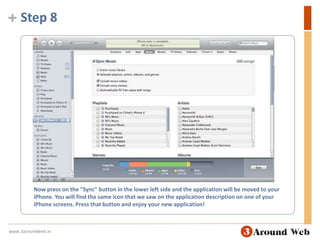
Step 8Now press on the "Sync" button in the lower left side and the application will be moved to your iPhone. You will find the same icon that we saw on the application description on one of your iPhone screens. Press that button and enjoy your new application!www.3aroundweb.in
Now let’s see some applications … www.3aroundweb.in
Thank Youwww.3aroundweb.inwww.3aroundweb.in

Iphone application developement seminar

  • 2.
  • 3.
  • 4.
    Iphone launchThe firstiPhone was introduced on January 9th, 2007 by Steve Jobs CEO of Apple Inc.www.3aroundweb.in
  • 5.
    iPhone functions Videocamera Camera phone with text messaging and visual voicemail A portable media player An Internet client with e-mail Web browsing And both Wi-Fi and 3G connectivitywww.3aroundweb.in
  • 6.
    Multi-touch screen Theuser interface is built around the device's multi-touch screen, including a virtual keyboard rather than a physical one“ iPhone Technology features the most revolutionary user interface since the mouse ”www.3aroundweb.in
  • 7.
    Multi-touch screen It’san entirely new interface based on a large multi-touch display and innovative new software that lets you control everything using only your fingers. www.3aroundweb.in
  • 8.
    Multi-touch screen Youcan go through albums with Cover Flow Flip through photos Email them with a touch Zoom in and outAll this by simply using iPhone’s multi-touch display.www.3aroundweb.in
  • 9.
    Collaboration with AT&TMobilityApple created the device during a collaboration with AT&T Mobility—Cingular Wireless at the time—at an estimated development cost of US $150 million over thirty months.www.3aroundweb.in
  • 10.
    iPhone went onsaleThe iPhone went on sale in the United States on June 29, 2007, at 6:00 pm local time, while hundreds of customers lined up outside the stores nationwide.www.3aroundweb.in
  • 11.
    iPhone saleApple sold6.1 million original iPhone units over five quarters. The sales has been growing steadily thereafter, by the end of fiscal year 2010, a total of 73.5 million iPhones were sold.www.3aroundweb.in
  • 12.
    iPhone bodyThe originaliPhone was made of aluminum with a black plastic accent.www.3aroundweb.in
  • 13.
    iPhone body TheiPhone 3G and 3GS feature a full plastic back to increase the strength of the GSM signal. The iPhone 3G was available in an 8 GB black model, or a black or white option for the 16 GB model. The iPhone 3GS was available in both colors, regardless of storage capacity. www.3aroundweb.in
  • 14.
    iPhone body TheiPhone 4 has an aluminosilicate glass front and back with a stainless steel edge that serves as the antennae. It is available in black;A white version was announced, but has as of January 2011 not been released.www.3aroundweb.in
  • 15.
    Verizon with iPhoneOnJanuary 11, 2011, Verizon announced during a media event that it had reached an agreement with Apple and would begin selling a iPhone 4. Verizon said it would be available for pre-order on February 3, with a release set for February 10.www.3aroundweb.in
  • 16.
  • 17.
  • 18.
    Screen and inputThetop and side of the iPhone 3GS, externally identical to the iPhone 3G. The switches were black plastic on the original model. From left to right, sides: wake/sleep button, SIM card slot, headphone jack, silence switch, volume controls.www.3aroundweb.in
  • 19.
    Audio and outputOne of two speakers (left) and the microphone (right) surround the dock connector on the base of the original iPhone. If a headset is plugged in, sound is played through it instead. The iPhone did not support voice recording until the 3.0 software updatewww.3aroundweb.in
  • 20.
    BatteryApple's website saysthat the battery life “is designed to retain up to 80% of its original capacity after 400 full charge and discharge cycles”24 hours of music 250 hours on standby 7 hours of video 6 hours of web browsingwww.3aroundweb.in
  • 21.
    Camera + Retinadisplay 5-megapixel photos and stunning HD video. The built-in LED flash does double duty. When you’re taking pictures, it works as a flash. When you’re shooting video it can stay on to light up the scene. And on the front of iPhone 4, the built-in camera is perfect for making FaceTime calls.www.3aroundweb.in
  • 22.
    Storage and SIMThe iPhone was initially released with two options for internal storage size: 4 GB or 8 GB. The iPhone 4 is available in 16 GB and 32 GB variants. All data is stored on the internal flash drive; the iPhone does not support expanded storage through a memory card slot, or the SIM card. In most countries, the iPhone is usually sold with a SIM lock, which prevents the iPhone from being used on a different mobile network. The iPhone 4 features a MicroSIM card that is located in a slot on the right side of the device.www.3aroundweb.in
  • 23.
    Liquid contact indicatorsLiquidcontact indicators which change from white to red in color when they come in contact with water.The indicators are often used by Apple employees to determine whether the device qualifies for a warranty repair or replacement. If the indicators show that the device was exposed to water, they may determine that the device is not covered by Apple.www.3aroundweb.in
  • 24.
    Included items withiPhoneThe contents of the box of an iPhone 4. From left to right: Lid Plastic holder, Written documentation, and (top to bottom) headset, USB cable, wall charger.www.3aroundweb.in
  • 25.
  • 26.
    iOSiOS (known asiPhone OS) is Apple's mobile operating system. The operating system was unveiled with the iPhone on January 9, 2007, and released in June of that year Originally developed for the iPhone, it has since been extended to support other Apple devices such as the iPod Touch, iPad and Apple TV.www.3aroundweb.in
  • 27.
    iOS IniOS, there are four abstraction layers: the Core OS layer, the Core Services layer, the Media layer, and the Cocoa Touch layer. The user interface of iOS is based on the concept of direct manipulation, using multi-touch gestures. Interface control elements consist of sliders, switches, and buttons.www.3aroundweb.in
  • 28.
    Interface The defaultHome screen of iOS 4 shows most of the applications provided by Apple. Users can download additional applications from the App store, create Web Clips, rearrange the icons, and create folders. iPhone applications normally run one at a time (not including iOS 4, which includes running applications in the background) Almost all input is given through the touch screen, which understands complex gestures using multi-touch.www.3aroundweb.in
  • 29.
    Phone The iPhoneallows audio conferencing, call holding, call merging, caller ID, and integration with other cellular network features and iPhone functions. When making a call, the iPhone presents a number of options. The screen is automatically disabled when held close to the face. The iPhone includes a visual voicemail feature. A music ringtone feature was introduced in the United States on September 5, 2007. Users can create custom ringtones from songs purchased from the iTunes Store for a small additional fee.www.3aroundweb.in
  • 30.
    Multimedia The iPhonecan sort its media library by songs, artists, albums, videos, playlists, composers, podcasts and audiobooks. The iPhone allows users to purchase and download songs from the iTunes Store directly to their iPhone. The iPhone includes software that allows the user to upload, view, and e-mail photos taken with the camera. The user zooms in and out of photos. The photo display application supports both portrait and landscape orientations.www.3aroundweb.in
  • 31.
    Internet connectivity Bydefault, the iPhone will ask to join newly discovered Wi-Fi networks and prompt for the password when required. Safari is the iPhone's native web browser, and it displays pages similar to its Mac and Windows. Web pages may be viewed in portrait or landscape mode and supports automatic zooming by pinching together or spreading apart fingertips on the screen, or by double-tapping text or images. The maps application can access Google Maps in map, satellite, or hybrid form. According to Google, in 2008 the iPhone generated 50 times more search requests than any other mobile handset. www.3aroundweb.in
  • 32.
    Text input Thevirtual keyboard on the original iPhone's touchscreen. It has automatic spell checking and correction, predictive word capabilities, and a dynamic dictionary that learns new words. The keys are somewhat larger and spaced farther apart when in landscape mode. Touching a section of text for a brief time brings up a magnifying glass, allowing users to place the cursor in the middle of existing text. www.3aroundweb.in
  • 33.
    E-mail and textmessages The iPhone also features an e-mail program that supports HTML e-mail. Which enables the user to embed photos in an e-mail message. PDF, Word, Excel, and PowerPoint. Text messages are presented chronologically in a mailbox format similar to Mail.www.3aroundweb.in
  • 34.
  • 35.
  • 36.
    What are applicationstores?www.3aroundweb.in
  • 37.
    What are applicationstores?www.3aroundweb.in
  • 38.
    App Store TheApple App Store is a service for iOS devices (the iPhone, iPod Touch and iPad) offered by Apple Inc. The App Store opened on July 10, 2008 via an update to iTunes. The App Store is accessible from the iPhone, iPod Touch and iPad. The store is also accessible on computers running Mac OS X and Windows through iTunes.www.3aroundweb.in
  • 39.
    App Store Bestplace to discover apps. On click downloads. Free & Paid apps (70/30) Automatic installation. Automatic apps updates. www.3aroundweb.in
  • 40.
    Apple say’s Appleallows 70% of revenues from the store to instantly go to the seller of the application, and 30% go to Apple. 10 billion apps was downloaded from Apple App Store. The median revenue per developed application is estimated to be $700, while the average costs range from $15,000 to $50,000www.3aroundweb.in
  • 41.
  • 42.
    iPhone SDKThe SoftwareDevelopment Kit for iPhone OS was announced at the iPhone Software Roadmap event on March 6, 2008. The SDK allows developers to create applications using Xcode that will natively run on the iPhone, iPod Touch and iPad. Developers who publish their applications on the App Store will receive 70% of sales revenue, and will not have to pay any distribution costs for the application. However, an annual fee is required to use the iPhone SDK and upload applications to the store.www.3aroundweb.in
  • 43.
    iPhone SDKTo runan application on the iPhone, the application needs to be signed. This signed certificate is only granted by Apple after the developer has first developed the software through:US $99/year Standard packageUS $299/year Enterprise packagewww.3aroundweb.in
  • 44.
    iPhone SDK“App Storeapplication availability has increased in line with downloads over time”www.3aroundweb.in
  • 45.
  • 46.
    Apps Category -SocialWhether you’re talking about social media, or actually interacting with other humans face-to-face, there’s a number of apps that will help you connect, keep in touch with others.www.3aroundweb.in
  • 47.
    Apps Category -Business & NewsThese apps will help you get work done and stay on top of what’s happening in the news.www.3aroundweb.in
  • 48.
    Apps Category -Entertainment, Music, & GamesCheck out these great games and other amusements that will surely keep your accelerometer… accelerating.www.3aroundweb.in
  • 49.
    Apps Category -Family, Shopping, & TravelThese apps will help keep the kids in line, get your dream vacation in gear, and hopefully save you some money in the process.www.3aroundweb.in
  • 50.
    MiscellaneousSome apps couldsave your life, spark your creative passion, or just plain WOW you. These apps don’t quite fit in the categories above, but still deserve your attention — if you’ve got any space left.www.3aroundweb.in
  • 51.
    Rating of applicationApplerates applications worldwide based on their content, and determines what age group each is appropriate for.www.3aroundweb.in
  • 52.
    Approval process Toget applications into the App Store, developers were required to submit their app and wait for approval or rejection by Apple. Rejected apps were given feedback on the reason they were rejected so they could be modified and resubmitted. Over time, requirements have evolved as trends have appeared in application development.www.3aroundweb.in
  • 53.
  • 54.
    Step 1Open iTuneson your computer that you use to sync your iPhone. Select the "iTunes Store" on the left side of the iTunes screen.www.3aroundweb.in
  • 55.
    Step 2Now selectthe "App Store" link.www.3aroundweb.in
  • 56.
    Step 3On thisscreen you will see several different sections. All of the icons represent applications or apps that you can install and use on your iPhone. One way to get started is to look on the right side where the boxes are labeled "Top Paid Apps" and "Top Free Apps". These are currently the most popular by sales.Let's install a sample app on your iPhone. Go to the link that says "Top Free Apps" on the right side. www.3aroundweb.in
  • 57.
    Step 4Just fora sample, find the big "P" icon with the title of Pandora Radio. I chose that app only because it almost always stays in the top free apps. Click on it.www.3aroundweb.in
  • 58.
    Step 5On thisscreen you will see detailed description of the app that you have selected. You can find out what the app does, what the newest release has provided, the developer's website and whether the app works on the iPhone and/or iPod Touch. When you are ready to purchase (in this case, it is free), press the "GET APP" button.www.3aroundweb.in
  • 59.
    Step 6You willnext see a screen saying that you can't use the Shopping Cart to buy Apps. Simply press the "Buy" button. You will see a sign-in screen to sign into iTunes. You should have created an iTunes account when you activated your iPhone. This is the same password that you used then.www.3aroundweb.in
  • 60.
    Step 7Now plugyour iPhone into it's USB cable and make sure it's plugged into your computerClick on the Applications tab at the top of the screen (location is indicated with a blue arrow on the attached screenshot). Next, make sure that the box next to the "Sync applications" is checkedwww.3aroundweb.in
  • 61.
    Step 8Now presson the "Sync" button in the lower left side and the application will be moved to your iPhone. You will find the same icon that we saw on the application description on one of your iPhone screens. Press that button and enjoy your new application!www.3aroundweb.in
  • 62.
    Now let’s seesome applications … www.3aroundweb.in
  • 63.