Introduction to Web Development
Session 1: HTML
Sharvaani Thoguluva
Technical
and
Non-Technical
Team Member
Achutha Dharani
Technical
and
Non-Technical Team
Member
Basic Web Architecture
Web Architecture is made up of three essential elements:
● Website
● Server
● IP Address
What is HTML?
● HTML is the language in which most websites are written.
● It is used to create pages and make them functional.
● Each retrieval unit is known as a Web page (from World Wide Web).
● Such pages frequently contain hypertext links that allow related pages to
be retrieved.
History of HTML
● HTML was first created by Tim Berners-Lee, Robert Cailliau, and others
starting in 1989.
● It stands for Hypertext Markup Language.
● A Markup Language is a way that computers speak to each other to
control how text is processed and presented.
● HTML uses two things: tags and attributes.
Why to Learn HTML?
● Create Web site - You can create a website or customize an existing web template if you know HTML well.
● Become a web designer - If you want to start a career as a professional web designer, HTML and CSS
designing is a must skill.
● Understand web - If you want to optimize your website, to boost its speed and performance, it is good to know
HTML to yield best results.
● Learn other languages - Once you understands the basic of HTML then other related technologies like
javascript, php, or angular are become easier to understand.
Structure of HTML
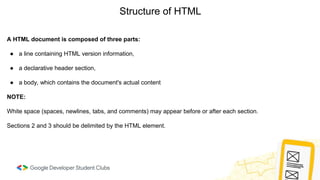
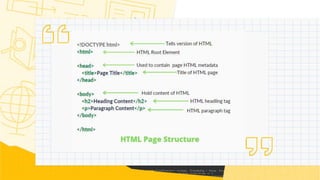
A HTML document is composed of three parts:
● a line containing HTML version information,
● a declarative header section,
● a body, which contains the document's actual content
NOTE:
White space (spaces, newlines, tabs, and comments) may appear before or after each section.
Sections 2 and 3 should be delimited by the HTML element.
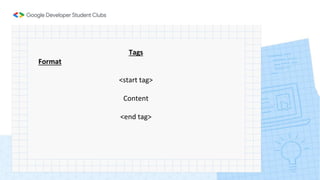
Tags
Format
<start tag>
Content
<end tag>
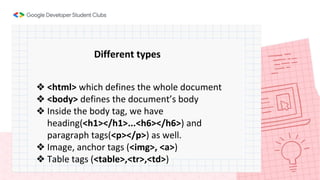
❖ <html> which defines the whole document
❖ <body> defines the document’s body
❖ Inside the body tag, we have
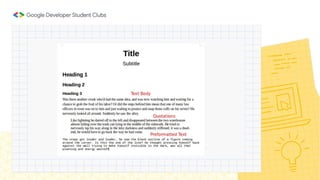
heading(<h1></h1>...<h6></h6>) and
paragraph tags(<p></p>) as well.
❖ Image, anchor tags (<img>, <a>)
❖ Table tags (<table>,<tr>,<td>)
Different types
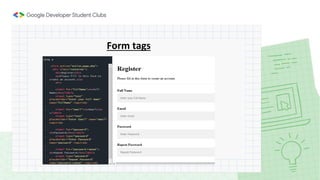
Form tags
Q and A?

Introduction to Web Development - HTML

  • 1.
    Introduction to WebDevelopment Session 1: HTML Sharvaani Thoguluva Technical and Non-Technical Team Member Achutha Dharani Technical and Non-Technical Team Member
  • 2.
    Basic Web Architecture WebArchitecture is made up of three essential elements: ● Website ● Server ● IP Address
  • 3.
    What is HTML? ●HTML is the language in which most websites are written. ● It is used to create pages and make them functional. ● Each retrieval unit is known as a Web page (from World Wide Web). ● Such pages frequently contain hypertext links that allow related pages to be retrieved.
  • 4.
    History of HTML ●HTML was first created by Tim Berners-Lee, Robert Cailliau, and others starting in 1989. ● It stands for Hypertext Markup Language. ● A Markup Language is a way that computers speak to each other to control how text is processed and presented. ● HTML uses two things: tags and attributes.
  • 5.
    Why to LearnHTML? ● Create Web site - You can create a website or customize an existing web template if you know HTML well. ● Become a web designer - If you want to start a career as a professional web designer, HTML and CSS designing is a must skill. ● Understand web - If you want to optimize your website, to boost its speed and performance, it is good to know HTML to yield best results. ● Learn other languages - Once you understands the basic of HTML then other related technologies like javascript, php, or angular are become easier to understand.
  • 6.
    Structure of HTML AHTML document is composed of three parts: ● a line containing HTML version information, ● a declarative header section, ● a body, which contains the document's actual content NOTE: White space (spaces, newlines, tabs, and comments) may appear before or after each section. Sections 2 and 3 should be delimited by the HTML element.
  • 9.
  • 10.
    ❖ <html> whichdefines the whole document ❖ <body> defines the document’s body ❖ Inside the body tag, we have heading(<h1></h1>...<h6></h6>) and paragraph tags(<p></p>) as well. ❖ Image, anchor tags (<img>, <a>) ❖ Table tags (<table>,<tr>,<td>) Different types
  • 11.
  • 12.