This work is licensed under the Apache 2.0 License
Android Study Jams
Session 3
T R Sai Rakshith
Technical Team Member
This work is licensed under the Apache 2.0 License
Let’s get started
This work is licensed under the Apache 2.0 License
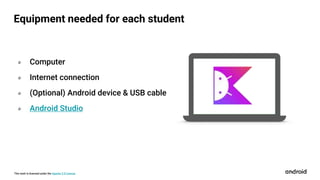
Equipment needed for each student
० Computer
० Internet connection
० (Optional) Android device & USB cable
० Android Studio
This work is licensed under the Apache 2.0 License
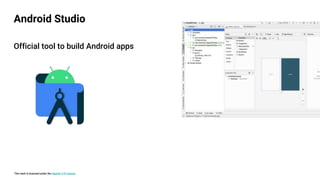
Official tool to build Android apps
Android Studio
This work is licensed under the Apache 2.0 License
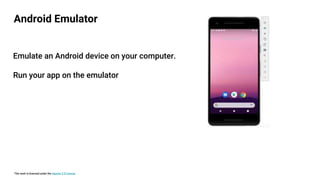
Android Emulator
Emulate an Android device on your computer.
Run your app on the emulator
This work is licensed under the Apache 2.0 License
० Basic computer literacy
० Basic math skills
० Computer & headphones
० Internet connection
० (Optional) Android device & USB cable
Prerequisites
This work is licensed under the Apache 2.0 License
Learning Objectives
० Build your first Android apps
० Set up Android Studio on your computer
० Learn the basics of the Kotlin programming language
This work is licensed under the Apache 2.0 License
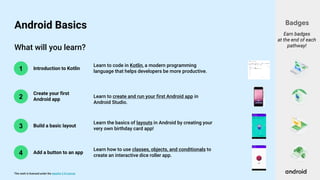
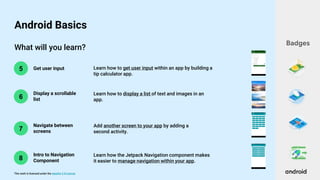
What will you learn?
2
3
4
1 Introduction to Kotlin
Create your first
Android app
Build a basic layout
Add a button to an app
Learn to code in Kotlin, a modern programming
language that helps developers be more productive.
Learn to create and run your first Android app in
Android Studio.
Learn the basics of layouts in Android by creating your
very own birthday card app!
Learn how to use classes, objects, and conditionals to
create an interactive dice roller app.
Badges
Earn badges
at the end of each
pathway!
Android Basics
This work is licensed under the Apache 2.0 License
What will you learn?
6
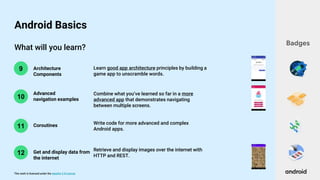
5 Get user input
Display a scrollable
list
Learn how to get user input within an app by building a
tip calculator app.
Learn how to display a list of text and images in an
app.
Badges
Android Basics
7
Navigate between
screens
Add another screen to your app by adding a
second activity.
8
Intro to Navigation
Component
Learn how the Jetpack Navigation component makes
it easier to manage navigation within your app.
This work is licensed under the Apache 2.0 License
What will you learn?
10
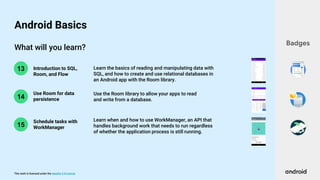
9 Architecture
Components
Advanced
navigation examples
Learn good app architecture principles by building a
game app to unscramble words.
Combine what you’ve learned so far in a more
advanced app that demonstrates navigating
between multiple screens.
Badges
Android Basics
11 Coroutines Write code for more advanced and complex
Android apps.
12 Get and display data from
the internet
Retrieve and display images over the internet with
HTTP and REST.
This work is licensed under the Apache 2.0 License
What will you learn?
14
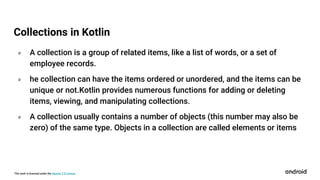
13 Introduction to SQL,
Room, and Flow
Use Room for data
persistence
Learn the basics of reading and manipulating data with
SQL, and how to create and use relational databases in
an Android app with the Room library.
Use the Room library to allow your apps to read
and write from a database.
Badges
Android Basics
15
Learn when and how to use WorkManager, an API that
handles background work that needs to run regardless
of whether the application process is still running.
Schedule tasks with
WorkManager
This work is licensed under the Apache 2.0 License
Concept Overview
This work is licensed under the Apache 2.0 License
० A collection is a group of related items, like a list of words, or a set of
employee records.
० he collection can have the items ordered or unordered, and the items can be
unique or not.Kotlin provides numerous functions for adding or deleting
items, viewing, and manipulating collections.
० A collection usually contains a number of objects (this number may also be
zero) of the same type. Objects in a collection are called elements or items
Collections in Kotlin
This work is licensed under the Apache 2.0 License
० Another type of collection in Kotlin is a set.
० It's a group of related items, but unlike a list, there can't be any duplicates,
and the order doesn't matter.
० An item can be in the set or not, but if it's in the set, there is only one copy
of it. This is similar to the mathematical concept of a set.
Sets in Kotlin
This work is licensed under the Apache 2.0 License
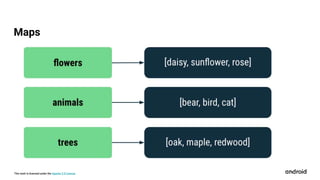
० The last type of collection you'll learn about is a map or dictionary. A map is
a set of key-value pairs, designed to make it easy to look up a value given a
particular key.
० Keys are unique, and each key maps to exactly one value, but the values can
have duplicates.
० Values in a map can be strings, numbers, or objects—even another
collection like a list or a set.
Maps and Navigation Components
This work is licensed under the Apache 2.0 License
Maps
This work is licensed under the Apache 2.0 License
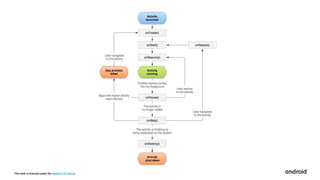
० As a user navigates through, out of, and back to your app, the Activity
instances in your app transition through different states in their lifecycle.
० The Activity class provides a number of callbacks that allow the activity to
know that a state has changed.
० The system is creating, stopping, or resuming an activity, or destroying the
process in which the activity resides.
Activities and Stages of Activity Lifecycle
This work is licensed under the Apache 2.0 License
० Within the lifecycle callback methods, you can declare how your activity
behaves when the user leaves and re-enters the activity.
० If you're building a streaming video player, you might pause the video and
terminate the network connection when the user switches to another app.
० These can be buttons, lists, edittexts etc. The activity however has its own
lifecycle and you can listen to the events emitted by the activity through
lifecycle methods.
Activities and Stages of Activity Lifecycle
This work is licensed under the Apache 2.0 License
THANK YOU

Android Study Jams - Session 3

  • 1.
    This work islicensed under the Apache 2.0 License Android Study Jams Session 3 T R Sai Rakshith Technical Team Member
  • 2.
    This work islicensed under the Apache 2.0 License Let’s get started
  • 3.
    This work islicensed under the Apache 2.0 License Equipment needed for each student ० Computer ० Internet connection ० (Optional) Android device & USB cable ० Android Studio
  • 4.
    This work islicensed under the Apache 2.0 License Official tool to build Android apps Android Studio
  • 5.
    This work islicensed under the Apache 2.0 License Android Emulator Emulate an Android device on your computer. Run your app on the emulator
  • 6.
    This work islicensed under the Apache 2.0 License ० Basic computer literacy ० Basic math skills ० Computer & headphones ० Internet connection ० (Optional) Android device & USB cable Prerequisites
  • 7.
    This work islicensed under the Apache 2.0 License Learning Objectives ० Build your first Android apps ० Set up Android Studio on your computer ० Learn the basics of the Kotlin programming language
  • 8.
    This work islicensed under the Apache 2.0 License What will you learn? 2 3 4 1 Introduction to Kotlin Create your first Android app Build a basic layout Add a button to an app Learn to code in Kotlin, a modern programming language that helps developers be more productive. Learn to create and run your first Android app in Android Studio. Learn the basics of layouts in Android by creating your very own birthday card app! Learn how to use classes, objects, and conditionals to create an interactive dice roller app. Badges Earn badges at the end of each pathway! Android Basics
  • 9.
    This work islicensed under the Apache 2.0 License What will you learn? 6 5 Get user input Display a scrollable list Learn how to get user input within an app by building a tip calculator app. Learn how to display a list of text and images in an app. Badges Android Basics 7 Navigate between screens Add another screen to your app by adding a second activity. 8 Intro to Navigation Component Learn how the Jetpack Navigation component makes it easier to manage navigation within your app.
  • 10.
    This work islicensed under the Apache 2.0 License What will you learn? 10 9 Architecture Components Advanced navigation examples Learn good app architecture principles by building a game app to unscramble words. Combine what you’ve learned so far in a more advanced app that demonstrates navigating between multiple screens. Badges Android Basics 11 Coroutines Write code for more advanced and complex Android apps. 12 Get and display data from the internet Retrieve and display images over the internet with HTTP and REST.
  • 11.
    This work islicensed under the Apache 2.0 License What will you learn? 14 13 Introduction to SQL, Room, and Flow Use Room for data persistence Learn the basics of reading and manipulating data with SQL, and how to create and use relational databases in an Android app with the Room library. Use the Room library to allow your apps to read and write from a database. Badges Android Basics 15 Learn when and how to use WorkManager, an API that handles background work that needs to run regardless of whether the application process is still running. Schedule tasks with WorkManager
  • 12.
    This work islicensed under the Apache 2.0 License Concept Overview
  • 13.
    This work islicensed under the Apache 2.0 License ० A collection is a group of related items, like a list of words, or a set of employee records. ० he collection can have the items ordered or unordered, and the items can be unique or not.Kotlin provides numerous functions for adding or deleting items, viewing, and manipulating collections. ० A collection usually contains a number of objects (this number may also be zero) of the same type. Objects in a collection are called elements or items Collections in Kotlin
  • 14.
    This work islicensed under the Apache 2.0 License ० Another type of collection in Kotlin is a set. ० It's a group of related items, but unlike a list, there can't be any duplicates, and the order doesn't matter. ० An item can be in the set or not, but if it's in the set, there is only one copy of it. This is similar to the mathematical concept of a set. Sets in Kotlin
  • 15.
    This work islicensed under the Apache 2.0 License ० The last type of collection you'll learn about is a map or dictionary. A map is a set of key-value pairs, designed to make it easy to look up a value given a particular key. ० Keys are unique, and each key maps to exactly one value, but the values can have duplicates. ० Values in a map can be strings, numbers, or objects—even another collection like a list or a set. Maps and Navigation Components
  • 16.
    This work islicensed under the Apache 2.0 License Maps
  • 17.
    This work islicensed under the Apache 2.0 License ० As a user navigates through, out of, and back to your app, the Activity instances in your app transition through different states in their lifecycle. ० The Activity class provides a number of callbacks that allow the activity to know that a state has changed. ० The system is creating, stopping, or resuming an activity, or destroying the process in which the activity resides. Activities and Stages of Activity Lifecycle
  • 18.
    This work islicensed under the Apache 2.0 License ० Within the lifecycle callback methods, you can declare how your activity behaves when the user leaves and re-enters the activity. ० If you're building a streaming video player, you might pause the video and terminate the network connection when the user switches to another app. ० These can be buttons, lists, edittexts etc. The activity however has its own lifecycle and you can listen to the events emitted by the activity through lifecycle methods. Activities and Stages of Activity Lifecycle
  • 19.
    This work islicensed under the Apache 2.0 License
  • 20.
    This work islicensed under the Apache 2.0 License THANK YOU

Editor's Notes

  • #3 That’s all we’ll cover for today -- let’s get started!
  • #5 Pathway 2 is where you create your first app! You will need to download and install Android Studio on your computer. This is the official tool that professional developers use for Android development. This is where you’ll be writing your Kotlin code and building your apps.
  • #6 In Android Studio, you can also use the Android Emulator, which can emulate various Android devices on your computer. The emulator allows you to run your app and it provides almost all capabilities that a real Android device would have. If you do have a physical device and want to use it, there are also instructions in Pathway 2 to get you setup. [Students can either use the emulator or a physical device to test their app, it’s up to personal preference.]
  • #7 Here are some the prerequisites that will be helpful. Having basic computer literacy and basic math skills is recommended. You’ll also need a computer and access to the internet to take the online course. [Mention WiFi instructions if necessary.] After this short presentation, we’ll all be working independently on the course. Use headphones to play the videos, so it doesn’t disrupt others around you. It’s also helpful if you have an Android device so you can test your app. A USB cable will be needed for connecting your phone to the computer. If you don’t have an Android device, don’t worry, you can still use your computer to emulate an Android device.
  • #8 Let’s talk about what you will learn as part of Android Basics. First and foremost, the goal is for you to build your first Android apps. To do this, you’ll install Android Studio on your computer, which is an application to build Android apps. Along the way, you will be exposed to programming concepts and the Kotlin language. At the end, we’ll also talk about resources on how you can continue learning and building apps beyond this event.
  • #13 Now that you’re familiar with the learning platform and how the course looks, let’s dive into some important concepts that you’ll be learning about.