Introduction to the Pods 
JSON API 
Josh Pollock, @josh412 
Building Applications: Introduction to the Pods JSON API // Josh Pollock // PodsCamp 2014
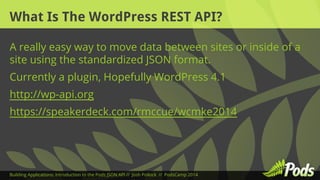
What Is The WordPress REST API? 
A really easy way to move data between sites or inside of a 
site using the standardized JSON format. 
Currently a plugin, Hopefully WordPress 4.1 
http://wp-api.org 
https://speakerdeck.com/rmccue/wcmke2014 
Building Applications: Introduction to the Pods JSON API // Josh Pollock // PodsCamp 2014
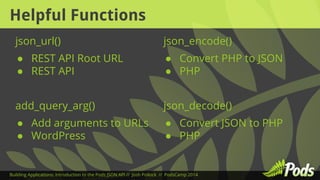
Helpful Functions 
json_url() 
● REST API Root URL 
● REST API 
add_query_arg() 
● Add arguments to URLs 
● WordPress 
json_encode() 
● Convert PHP to JSON 
● PHP 
json_decode() 
● Convert JSON to PHP 
● PHP 
Building Applications: Introduction to the Pods JSON API // Josh Pollock // PodsCamp 2014
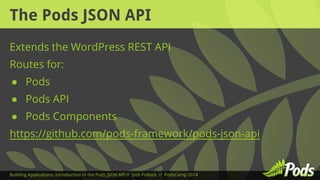
The Pods JSON API 
Extends the WordPress REST API 
Routes for: 
● Pods 
● Pods API 
● Pods Components 
https://github.com/pods-framework/pods-json-api 
Building Applications: Introduction to the Pods JSON API // Josh Pollock // PodsCamp 2014
Authentication Options 
● Basic Authentication 
● Nonce/Cookie 
● Key pairs 
● oAuth1 
Building Applications: Introduction to the Pods JSON API // Josh Pollock // PodsCamp 2014
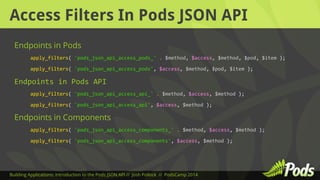
Access Filters In Pods JSON API 
Endpoints in Pods 
apply_filters( 'pods_json_api_access_pods_' . $method, $access, $method, $pod, $item ); 
apply_filters( 'pods_json_api_access_pods', $access, $method, $pod, $item ); 
Endpoints in Pods API 
apply_filters( 'pods_json_api_access_api_' . $method, $access, $method ); 
apply_filters( 'pods_json_api_access_api', $access, $method ); 
Endpoints in Components 
apply_filters( 'pods_json_api_access_components_' . $method, $access, $method ); 
apply_filters( 'pods_json_api_access_components', $access, $method ); 
Building Applications: Introduction to the Pods JSON API // Josh Pollock // PodsCamp 2014
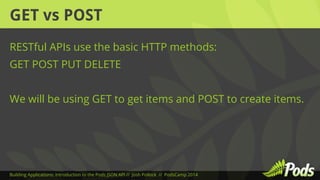
GET vs POST 
RESTful APIs use the basic HTTP methods: 
GET POST PUT DELETE 
We will be using GET to get items and POST to create items. 
Building Applications: Introduction to the Pods JSON API // Josh Pollock // PodsCamp 2014
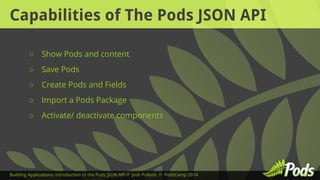
Capabilities of The Pods JSON API 
○ Show Pods and content 
○ Save Pods 
○ Create Pods and Fields 
○ Import a Pods Package 
○ Activate/ deactivate components 
Building Applications: Introduction to the Pods JSON API // Josh Pollock // PodsCamp 2014
The WordPress HTTP API 
A simple PHP API in WordPress for making HTTP requests. 
Helpful functions such as: 
wp_remote_get() 
http://codex.wordpress.org/Function_Reference/wp_remote_get 
wp_remote_retrieve_body() 
http://codex.wordpress.org/Function_API/wp_remote_retrieve_body 
Building Applications: Introduction to the Pods JSON API // Josh Pollock // PodsCamp 2014
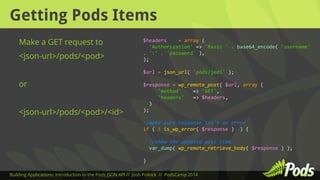
Getting Pods Items 
Make a GET request to 
<json-url>/pods/<pod> 
or 
<json-url>/pods/<pod>/<id> 
$headers = array ( 
'Authorization' => 'Basic ' . base64_encode( 'username' 
. ':' . 'password' ), 
); 
$url = json_url( 'pods/jedi' ); 
$response = wp_remote_post( $url, array ( 
'method' => 'GET', 
'headers' => $headers, 
) 
); 
//make sure response isn't an error 
if ( ! is_wp_error( $response ) ) { 
//show the updated post item 
var_dump( wp_remote_retrieve_body( $response ) ); 
} 
Building Applications: Introduction to the Pods JSON API // Josh Pollock // PodsCamp 2014
Using Pods Find 
Add the parameters to the URL, 
using add_query_arg() 
$headers = array ( 
'Authorization' => 'Basic ' . base64_encode( 'username' . ':' 
. 'password' ), 
); 
$url = json_url( 'pods/jedi' ); 
$params = array( 
'home_world.post_title' => 'Tatooine' 
); 
$url = add_query_arg( $params, $url ); 
$response = wp_remote_post( $url, array ( 
'method' => 'GET', 
'headers' => $headers, 
) 
); 
//make sure response isn't an error 
if ( ! is_wp_error( $response ) ) { 
//show the updated post item 
var_dump( wp_remote_retrieve_body( $response ) ); 
} 
Building Applications: Introduction to the Pods JSON API // Josh Pollock // PodsCamp 2014
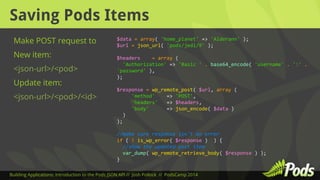
Saving Pods Items 
Make POST request to 
New item: 
<json-url>/<pod> 
Update item: 
<json-url>/<pod>/<id> 
$data = array( 'home_planet' => 'Alderann' ); 
$url = json_url( 'pods/jedi/9' ); 
$headers = array ( 
'Authorization' => 'Basic ' . base64_encode( 'username' . ':' . 
'password' ), 
); 
$response = wp_remote_post( $url, array ( 
'method' => 'POST', 
'headers' => $headers, 
'body' => json_encode( $data ) 
) 
); 
//make sure response isn't an error 
if ( ! is_wp_error( $response ) ) { 
//show the updated post item 
var_dump( wp_remote_retrieve_body( $response ) ); 
} 
Building Applications: Introduction to the Pods JSON API // Josh Pollock // PodsCamp 2014
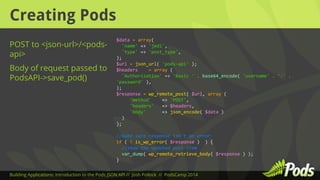
Creating Pods 
POST to <json-url>/<pods-api> 
Body of request passed to 
PodsAPI->save_pod() 
$data = array( 
'name' => 'jedi', 
'type' => 'post_type', 
); 
$url = json_url( 'pods-api' ); 
$headers = array ( 
'Authorization' => 'Basic ' . base64_encode( 'username' . ':' . 
'password' ), 
); 
$response = wp_remote_post( $url, array ( 
'method' => 'POST', 
'headers' => $headers, 
'body' => json_encode( $data ) 
) 
); 
//make sure response isn't an error 
if ( ! is_wp_error( $response ) ) { 
//show the updated post item 
var_dump( wp_remote_retrieve_body( $response ) ); 
} 
Building Applications: Introduction to the Pods JSON API // Josh Pollock // PodsCamp 2014
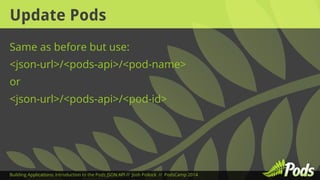
Update Pods 
Same as before but use: 
<json-url>/<pods-api>/<pod-name> 
or 
<json-url>/<pods-api>/<pod-id> 
Building Applications: Introduction to the Pods JSON API // Josh Pollock // PodsCamp 2014
AJAX Time! 
GET or POST data asynchronously, and render it in the 
browser. 
Make your site more dynamic and “app” like. 
Building Applications: Introduction to the Pods JSON API // Josh Pollock // PodsCamp 2014
Using The REST API Client-JS 
Provides Backbone collections and models for all REST API 
endpoints. 
No Pods integration, but… 
Gives us an easy way to handle authentication 
https://github.com/WP-API/client-js 
Building Applications: Introduction to the Pods JSON API // Josh Pollock // PodsCamp 2014
Preparing To Use Client JS 
Enqueue The Script 
Localize a nonce and the root 
JSON url. 
add_action( 'wp_enqueue_scripts', 'json_api_client_js' 
); 
add_action( 'wp_enqueue_scripts', 
'json_api_talk_scripts' ); 
function json_api_talk_scripts() { 
if ( ! function_exists( 'json_get_url_prefix' ) ) { 
return; 
} 
wp_enqueue_script( 'json-api-talk', plugins_url( 
'/json-api-talk.js', __FILE__ ), array( 'jquery' ), 
'1.0', true ); 
} 
Building Applications: Introduction to the Pods JSON API // Josh Pollock // PodsCamp 2014
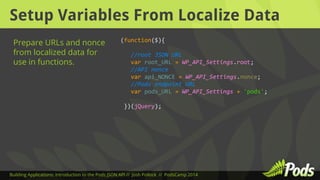
Setup Variables From Localize Data 
(function($){ 
//root JSON URL 
var root_URL = WP_API_Settings.root; 
//API nonce 
var api_NONCE = WP_API_Settings.nonce; 
//Pods endpoint URL 
var pods_URL = WP_API_Settings + 'pods'; 
})(jQuery); 
Prepare URLs and nonce 
from localized data for 
use in functions. 
Building Applications: Introduction to the Pods JSON API // Josh Pollock // PodsCamp 2014
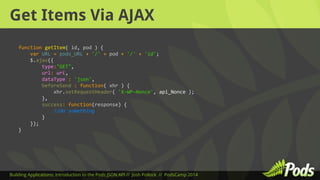
Get Items Via AJAX 
function getItem( id, pod ) { 
var URL = pods_URL + '/' + pod + '/' + 'id'; 
$.ajax({ 
type:"GET", 
url: url, 
dataType : 'json', 
beforeSend : function( xhr ) { 
xhr.setRequestHeader( 'X-WP-Nonce', api_Nonce ); 
}, 
success: function(response) { 
//do something 
} 
}); 
} 
Building Applications: Introduction to the Pods JSON API // Josh Pollock // PodsCamp 2014
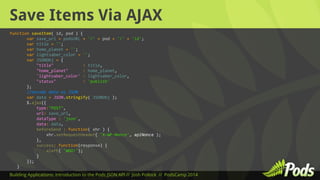
Save Items Via AJAX 
function saveItem( id, pod ) { 
var save_url = podsURL + '/' + pod + '/' + 'id'; 
var title = ''; 
var home_planet = ''; 
var lightsaber_color = ''; 
var JSONObj = { 
"title" : title, 
"home_planet" : home_planet, 
'lightsaber_color' : lightsaber_color, 
"status" : 'publish' 
}; 
//encode data as JSON 
var data = JSON.stringify( JSONObj ); 
$.ajax({ 
type:"POST", 
url: save_url, 
dataType : 'json', 
data: data, 
beforeSend : function( xhr ) { 
xhr.setRequestHeader( 'X-WP-Nonce', apiNonce ); 
}, 
success: function(response) { 
alert( 'WOO!'); 
} 
}); 
} 
Building Applications: Introduction to the Pods JSON API // Josh Pollock // PodsCamp 2014
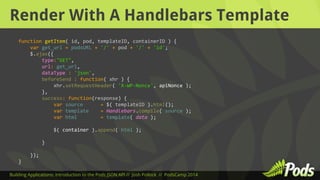
Render With A Handlebars Template 
function getItem( id, pod, templateID, containerID ) { 
var get_url = podsURL + '/' + pod + '/' + 'id'; 
$.ajax({ 
type:"GET", 
url: get_url, 
dataType : 'json', 
beforeSend : function( xhr ) { 
xhr.setRequestHeader( 'X-WP-Nonce', apiNonce ); 
}, 
success: function(response) { 
var source = $( templateID ).html(); 
var template = Handlebars.compile( source ); 
var html = template( data ); 
$( container ).append( html ); 
} 
}); 
} 
Building Applications: Introduction to the Pods JSON API // Josh Pollock // PodsCamp 2014
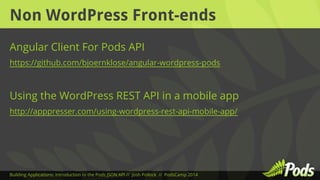
Non WordPress Front-ends 
Angular Client For Pods API 
https://github.com/bjoernklose/angular-wordpress-pods 
Using the WordPress REST API in a mobile app 
http://apppresser.com/using-wordpress-rest-api-mobile-app/ 
Building Applications: Introduction to the Pods JSON API // Josh Pollock // PodsCamp 2014
Questions? 
Building Applications: Introduction to the Pods JSON API // Josh Pollock // PodsCamp 2014

Introduction to the Pods JSON API

  • 1.
    Introduction to thePods JSON API Josh Pollock, @josh412 Building Applications: Introduction to the Pods JSON API // Josh Pollock // PodsCamp 2014
  • 2.
    What Is TheWordPress REST API? A really easy way to move data between sites or inside of a site using the standardized JSON format. Currently a plugin, Hopefully WordPress 4.1 http://wp-api.org https://speakerdeck.com/rmccue/wcmke2014 Building Applications: Introduction to the Pods JSON API // Josh Pollock // PodsCamp 2014
  • 3.
    Helpful Functions json_url() ● REST API Root URL ● REST API add_query_arg() ● Add arguments to URLs ● WordPress json_encode() ● Convert PHP to JSON ● PHP json_decode() ● Convert JSON to PHP ● PHP Building Applications: Introduction to the Pods JSON API // Josh Pollock // PodsCamp 2014
  • 4.
    The Pods JSONAPI Extends the WordPress REST API Routes for: ● Pods ● Pods API ● Pods Components https://github.com/pods-framework/pods-json-api Building Applications: Introduction to the Pods JSON API // Josh Pollock // PodsCamp 2014
  • 5.
    Authentication Options ●Basic Authentication ● Nonce/Cookie ● Key pairs ● oAuth1 Building Applications: Introduction to the Pods JSON API // Josh Pollock // PodsCamp 2014
  • 6.
    Access Filters InPods JSON API Endpoints in Pods apply_filters( 'pods_json_api_access_pods_' . $method, $access, $method, $pod, $item ); apply_filters( 'pods_json_api_access_pods', $access, $method, $pod, $item ); Endpoints in Pods API apply_filters( 'pods_json_api_access_api_' . $method, $access, $method ); apply_filters( 'pods_json_api_access_api', $access, $method ); Endpoints in Components apply_filters( 'pods_json_api_access_components_' . $method, $access, $method ); apply_filters( 'pods_json_api_access_components', $access, $method ); Building Applications: Introduction to the Pods JSON API // Josh Pollock // PodsCamp 2014
  • 7.
    GET vs POST RESTful APIs use the basic HTTP methods: GET POST PUT DELETE We will be using GET to get items and POST to create items. Building Applications: Introduction to the Pods JSON API // Josh Pollock // PodsCamp 2014
  • 8.
    Capabilities of ThePods JSON API ○ Show Pods and content ○ Save Pods ○ Create Pods and Fields ○ Import a Pods Package ○ Activate/ deactivate components Building Applications: Introduction to the Pods JSON API // Josh Pollock // PodsCamp 2014
  • 9.
    The WordPress HTTPAPI A simple PHP API in WordPress for making HTTP requests. Helpful functions such as: wp_remote_get() http://codex.wordpress.org/Function_Reference/wp_remote_get wp_remote_retrieve_body() http://codex.wordpress.org/Function_API/wp_remote_retrieve_body Building Applications: Introduction to the Pods JSON API // Josh Pollock // PodsCamp 2014
  • 10.
    Getting Pods Items Make a GET request to <json-url>/pods/<pod> or <json-url>/pods/<pod>/<id> $headers = array ( 'Authorization' => 'Basic ' . base64_encode( 'username' . ':' . 'password' ), ); $url = json_url( 'pods/jedi' ); $response = wp_remote_post( $url, array ( 'method' => 'GET', 'headers' => $headers, ) ); //make sure response isn't an error if ( ! is_wp_error( $response ) ) { //show the updated post item var_dump( wp_remote_retrieve_body( $response ) ); } Building Applications: Introduction to the Pods JSON API // Josh Pollock // PodsCamp 2014
  • 11.
    Using Pods Find Add the parameters to the URL, using add_query_arg() $headers = array ( 'Authorization' => 'Basic ' . base64_encode( 'username' . ':' . 'password' ), ); $url = json_url( 'pods/jedi' ); $params = array( 'home_world.post_title' => 'Tatooine' ); $url = add_query_arg( $params, $url ); $response = wp_remote_post( $url, array ( 'method' => 'GET', 'headers' => $headers, ) ); //make sure response isn't an error if ( ! is_wp_error( $response ) ) { //show the updated post item var_dump( wp_remote_retrieve_body( $response ) ); } Building Applications: Introduction to the Pods JSON API // Josh Pollock // PodsCamp 2014
  • 12.
    Saving Pods Items Make POST request to New item: <json-url>/<pod> Update item: <json-url>/<pod>/<id> $data = array( 'home_planet' => 'Alderann' ); $url = json_url( 'pods/jedi/9' ); $headers = array ( 'Authorization' => 'Basic ' . base64_encode( 'username' . ':' . 'password' ), ); $response = wp_remote_post( $url, array ( 'method' => 'POST', 'headers' => $headers, 'body' => json_encode( $data ) ) ); //make sure response isn't an error if ( ! is_wp_error( $response ) ) { //show the updated post item var_dump( wp_remote_retrieve_body( $response ) ); } Building Applications: Introduction to the Pods JSON API // Josh Pollock // PodsCamp 2014
  • 13.
    Creating Pods POSTto <json-url>/<pods-api> Body of request passed to PodsAPI->save_pod() $data = array( 'name' => 'jedi', 'type' => 'post_type', ); $url = json_url( 'pods-api' ); $headers = array ( 'Authorization' => 'Basic ' . base64_encode( 'username' . ':' . 'password' ), ); $response = wp_remote_post( $url, array ( 'method' => 'POST', 'headers' => $headers, 'body' => json_encode( $data ) ) ); //make sure response isn't an error if ( ! is_wp_error( $response ) ) { //show the updated post item var_dump( wp_remote_retrieve_body( $response ) ); } Building Applications: Introduction to the Pods JSON API // Josh Pollock // PodsCamp 2014
  • 14.
    Update Pods Sameas before but use: <json-url>/<pods-api>/<pod-name> or <json-url>/<pods-api>/<pod-id> Building Applications: Introduction to the Pods JSON API // Josh Pollock // PodsCamp 2014
  • 15.
    AJAX Time! GETor POST data asynchronously, and render it in the browser. Make your site more dynamic and “app” like. Building Applications: Introduction to the Pods JSON API // Josh Pollock // PodsCamp 2014
  • 16.
    Using The RESTAPI Client-JS Provides Backbone collections and models for all REST API endpoints. No Pods integration, but… Gives us an easy way to handle authentication https://github.com/WP-API/client-js Building Applications: Introduction to the Pods JSON API // Josh Pollock // PodsCamp 2014
  • 17.
    Preparing To UseClient JS Enqueue The Script Localize a nonce and the root JSON url. add_action( 'wp_enqueue_scripts', 'json_api_client_js' ); add_action( 'wp_enqueue_scripts', 'json_api_talk_scripts' ); function json_api_talk_scripts() { if ( ! function_exists( 'json_get_url_prefix' ) ) { return; } wp_enqueue_script( 'json-api-talk', plugins_url( '/json-api-talk.js', __FILE__ ), array( 'jquery' ), '1.0', true ); } Building Applications: Introduction to the Pods JSON API // Josh Pollock // PodsCamp 2014
  • 18.
    Setup Variables FromLocalize Data (function($){ //root JSON URL var root_URL = WP_API_Settings.root; //API nonce var api_NONCE = WP_API_Settings.nonce; //Pods endpoint URL var pods_URL = WP_API_Settings + 'pods'; })(jQuery); Prepare URLs and nonce from localized data for use in functions. Building Applications: Introduction to the Pods JSON API // Josh Pollock // PodsCamp 2014
  • 19.
    Get Items ViaAJAX function getItem( id, pod ) { var URL = pods_URL + '/' + pod + '/' + 'id'; $.ajax({ type:"GET", url: url, dataType : 'json', beforeSend : function( xhr ) { xhr.setRequestHeader( 'X-WP-Nonce', api_Nonce ); }, success: function(response) { //do something } }); } Building Applications: Introduction to the Pods JSON API // Josh Pollock // PodsCamp 2014
  • 20.
    Save Items ViaAJAX function saveItem( id, pod ) { var save_url = podsURL + '/' + pod + '/' + 'id'; var title = ''; var home_planet = ''; var lightsaber_color = ''; var JSONObj = { "title" : title, "home_planet" : home_planet, 'lightsaber_color' : lightsaber_color, "status" : 'publish' }; //encode data as JSON var data = JSON.stringify( JSONObj ); $.ajax({ type:"POST", url: save_url, dataType : 'json', data: data, beforeSend : function( xhr ) { xhr.setRequestHeader( 'X-WP-Nonce', apiNonce ); }, success: function(response) { alert( 'WOO!'); } }); } Building Applications: Introduction to the Pods JSON API // Josh Pollock // PodsCamp 2014
  • 21.
    Render With AHandlebars Template function getItem( id, pod, templateID, containerID ) { var get_url = podsURL + '/' + pod + '/' + 'id'; $.ajax({ type:"GET", url: get_url, dataType : 'json', beforeSend : function( xhr ) { xhr.setRequestHeader( 'X-WP-Nonce', apiNonce ); }, success: function(response) { var source = $( templateID ).html(); var template = Handlebars.compile( source ); var html = template( data ); $( container ).append( html ); } }); } Building Applications: Introduction to the Pods JSON API // Josh Pollock // PodsCamp 2014
  • 22.
    Non WordPress Front-ends Angular Client For Pods API https://github.com/bjoernklose/angular-wordpress-pods Using the WordPress REST API in a mobile app http://apppresser.com/using-wordpress-rest-api-mobile-app/ Building Applications: Introduction to the Pods JSON API // Josh Pollock // PodsCamp 2014
  • 23.
    Questions? Building Applications:Introduction to the Pods JSON API // Josh Pollock // PodsCamp 2014