A. SARANG
INTRODUCTION
TO
SSH & PGP
Agenda
 Dial Up & broadband connections
 Introduction to SSH protocol & applications
 SSH-TRANS
 Client- Server Authentication
 SSH configuration
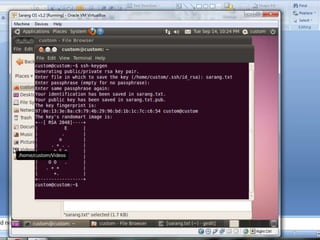
 Public & Private key pair generation
 Digital Signatures
 Use of SSH in Port Forwarding
 SSH in subversion control
 Introduction to PGP protocol & applications
 Email compatibility of PGP
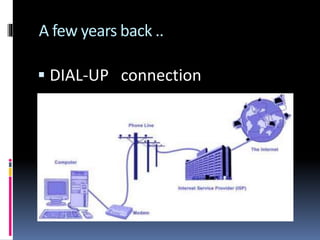
A few years back ..
 DIAL-UP connection
Dial up connection
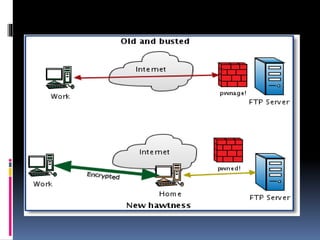
 Passwords were sent over
phoneline or LAN.
 Was it secure ?
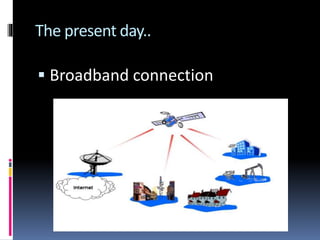
The present day..
 Broadband connection
Broad band connection
 Passwords go through ISPs/
untrusted networks.
 How can there be a secure way of
sending passwords across the
internet ?
The need for encryption
 This can be solved by encrption of
the data sent over the untrusted
networks .
 This improves the strength of the
authentication mechanism people
use to login.
 We call this mechanism as …
SSH
Secure SHell
protocol & applications
SSH
 Replaces less secure telnet &
rlogin* programs.
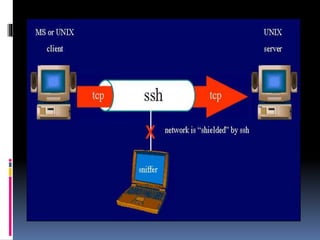
 Uses public key cryptography to
authenticate remote PCs.
 *rlogin is a software utility for Unix-like computer operating
systems that allows users to log in on another host via
a network, communicating viaTCP port 513.
SSH can
 Execute commands & transfer files
(like unix rsh & rcp commands).
 Provides strong client/server
authentications
 Message integrity.
SSH can protect against ..
 Manipulation of data at intermediate
elements in the network.
 IP address spoofing where attack
hosts pretends to be trusted host by
sending packets with source address
of trusted hosts
 DNS spoofing.
SSH will not protect against ..
 A compromised root account .
 Insecure home directories
 Eg : if an attacker tries to modify
files in the home directory.
SSH version 2 protocols
 SSH-TRANS , a transport layer
protocol
 SSH-AUTH , an authentication
protocol.
 SSH-CONN , a connection
protocol.
 SSH-AUTH & SSH-TRANS are used for remote
login.
SSH - TRANS
 Provides encrypted channel
between client & server machines.
 Runs on top of TCP connection.
SSH-TRANS mechanism
 Client authenticates server using RSA
algorithm.
 After authentication , it establishes a
session key to encrypt data sent over
the channel.
 Message integrity check is done for
all data exchanged over the channel.
 Public key is owned by the server .
 How come client possesses the
server’s public key?
Step-1 : Client authenticates the server
 The server tells the client its public
key at the connection time.
 During first time , SSH application
warns the client that it has never
connected to the server before .
 The client remembers the server’s
public key.
 From the second time, the client
compares the key with the stored
public key.
Step 2 : Client authenticates itself to the
server
 This can be done in 3 ways :-
 User sends his password to user
directly in the secure channel.
 This is safe as the password is
encrypted.
 Public key is placed on the server
prior to connection .
 HOST BASED AUTHENTICATION
 The server has a set of trusted
hosts.
 Client claims to be a “trusted
host” .
Installing SSH on YOUR PC
 You can download the source code
from
 http://www.openssh.com/
Configuration files
 SSH has 2 different sets of
configuration files :-
 System wide configuration files
 User specific config files
System Wide Configuration Filles
 Stored in /etc/ssh directory
 Ssh_config : client config file.
 Sshd_config : sshd server config
files.
 Sshd.pid : Server’s pid in stored
here.
User specific configuration files ..
 Stored in ~UserName/.ssh
directory.
 Known_hosts : This file contains
host keys of SSH server s accessed
by the user.
 Authorized_keys2 : holds a list of
authorized public keys for users.
 When a client connects to a server
, server authenticates client by
checking the public key stored
here.
Why config files are important :
 Specify authentication methods.
 Specify SSH protocols supported .
 Behavior of server can be
controlled by :-
 Compling time configuration
 Config file
 Command line options
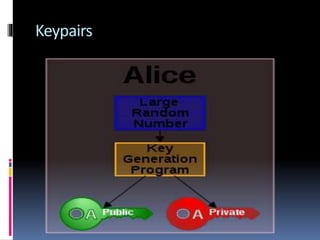
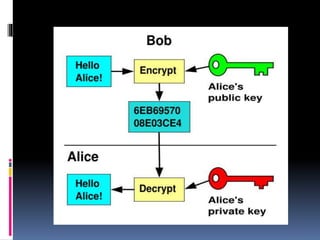
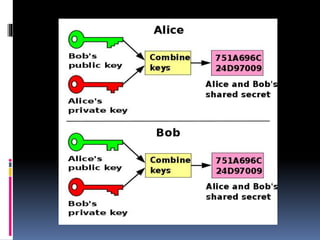
Key management in SSH
 SSH authenticates users using
keypairs :-
 Private key
 Public key
Keypairs
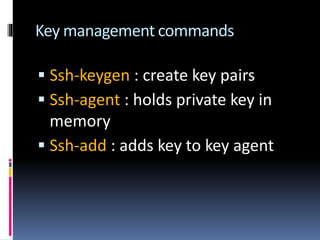
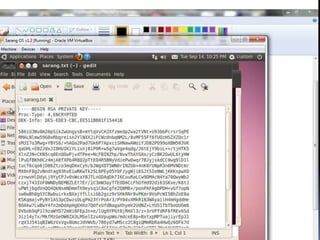
Key management commands
 Ssh-keygen : create key pairs
 Ssh-agent : holds private key in
memory
 Ssh-add : adds key to key agent
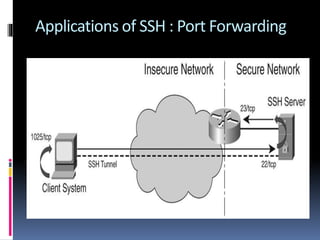
Applications of SSH : Port Forwarding
More practical application :
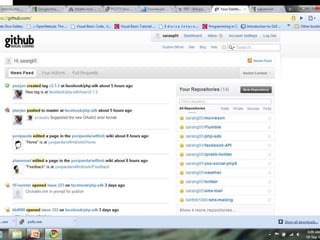
 Subversion control :-
 Github
 Gitorious
 svn
PGP
Pretty Good Privacy
 PGP is a data encryption and
decryption computer program that
provides cryptographic privacy
and authentication for data
communication.
 PGP combines the best available
cryptographic algorithms to achieve
secure e-mail communication.
PGP encryption is a serial combination
of :-
 Hashing
 Data Compression
 Symmetric Key Cryptography
 Public Key Cryptography
Supports
 Message Authentication
 Integrity Checking
(checking if message was altered
since completion ).
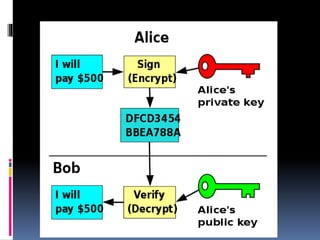
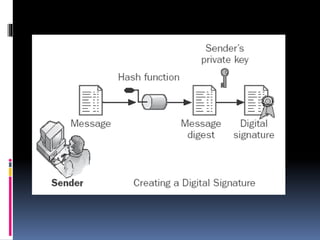
Using PGP to create Digital Signatures
 *plaintext : information a sender wishes to transmit to a receiver
 Hash function from plaintext*
 +
 Sender’s private keys
Using PGP in emails
 Authentication
 Confidentiality
 Compression
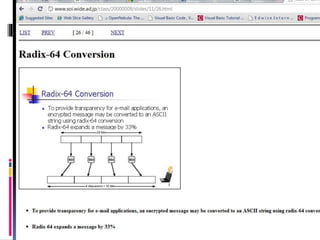
 Email compatibility using Radix 64
conversion
Alice sends Bob an email , again !
 Ad/Ae = private/public keypair
 m = digitally signed message
 SHA-1 = hashing function
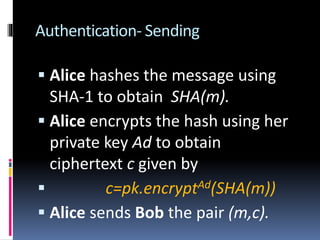
Authentication- Sending
 Alice hashes the message using
SHA-1 to obtain SHA(m).
 Alice encrypts the hash using her
private key Ad to obtain
ciphertext c given by
 c=pk.encryptAd(SHA(m))
 Alice sends Bob the pair (m,c).
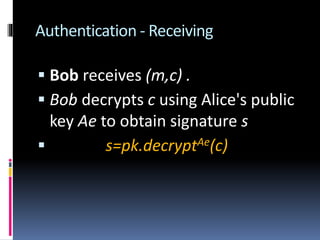
Authentication - Receiving
 Bob receives (m,c) .
 Bob decrypts c using Alice's public
key Ae to obtain signature s
 s=pk.decryptAe(c)
 Bob computes hash of m to get
signature s
 If s==m ,
Authenticated !! 
Confidentiality – Added Security
 Process is repeated with session
key sk
 m=sk.decryptk(c)
 NOTE : encryption is done for
session key+public key (same
time)
E-Mail compatibility
 Modern email system can transmit
only blocks of ASCII text.
 Encrypted ciphertext blocks may
not correspond to ASCII characters
.
 This problem is overcome by …
Radix-64 conversion/base 64 encoding
 The binary input is split into blocks of 24 bits
(3 bytes).
 Each 24 block is then split into four sets each
of 6-bits.
 Each 6-bit set will then have a value between
0 and 26-1 (=63).
 This value is encoded into a printable
character.
That’s all folks
THANK YOU !! 

Introduction to SSH & PGP

  • 1.
  • 2.
    Agenda  Dial Up& broadband connections  Introduction to SSH protocol & applications  SSH-TRANS  Client- Server Authentication  SSH configuration  Public & Private key pair generation  Digital Signatures  Use of SSH in Port Forwarding
  • 3.
     SSH insubversion control  Introduction to PGP protocol & applications  Email compatibility of PGP
  • 4.
    A few yearsback ..  DIAL-UP connection
  • 5.
    Dial up connection Passwords were sent over phoneline or LAN.  Was it secure ?
  • 6.
    The present day.. Broadband connection
  • 7.
    Broad band connection Passwords go through ISPs/ untrusted networks.  How can there be a secure way of sending passwords across the internet ?
  • 8.
    The need forencryption  This can be solved by encrption of the data sent over the untrusted networks .  This improves the strength of the authentication mechanism people use to login.  We call this mechanism as …
  • 9.
  • 11.
    SSH  Replaces lesssecure telnet & rlogin* programs.  Uses public key cryptography to authenticate remote PCs.  *rlogin is a software utility for Unix-like computer operating systems that allows users to log in on another host via a network, communicating viaTCP port 513.
  • 12.
    SSH can  Executecommands & transfer files (like unix rsh & rcp commands).  Provides strong client/server authentications  Message integrity.
  • 14.
    SSH can protectagainst ..  Manipulation of data at intermediate elements in the network.  IP address spoofing where attack hosts pretends to be trusted host by sending packets with source address of trusted hosts  DNS spoofing.
  • 15.
    SSH will notprotect against ..  A compromised root account .  Insecure home directories  Eg : if an attacker tries to modify files in the home directory.
  • 16.
    SSH version 2protocols  SSH-TRANS , a transport layer protocol  SSH-AUTH , an authentication protocol.  SSH-CONN , a connection protocol.  SSH-AUTH & SSH-TRANS are used for remote login.
  • 17.
    SSH - TRANS Provides encrypted channel between client & server machines.  Runs on top of TCP connection.
  • 18.
    SSH-TRANS mechanism  Clientauthenticates server using RSA algorithm.  After authentication , it establishes a session key to encrypt data sent over the channel.  Message integrity check is done for all data exchanged over the channel.
  • 19.
     Public keyis owned by the server .  How come client possesses the server’s public key?
  • 20.
    Step-1 : Clientauthenticates the server  The server tells the client its public key at the connection time.  During first time , SSH application warns the client that it has never connected to the server before .
  • 21.
     The clientremembers the server’s public key.  From the second time, the client compares the key with the stored public key.
  • 22.
    Step 2 :Client authenticates itself to the server  This can be done in 3 ways :-  User sends his password to user directly in the secure channel.  This is safe as the password is encrypted.
  • 23.
     Public keyis placed on the server prior to connection .  HOST BASED AUTHENTICATION  The server has a set of trusted hosts.  Client claims to be a “trusted host” .
  • 24.
    Installing SSH onYOUR PC  You can download the source code from  http://www.openssh.com/
  • 25.
    Configuration files  SSHhas 2 different sets of configuration files :-  System wide configuration files  User specific config files
  • 26.
    System Wide ConfigurationFilles  Stored in /etc/ssh directory  Ssh_config : client config file.  Sshd_config : sshd server config files.  Sshd.pid : Server’s pid in stored here.
  • 27.
    User specific configurationfiles ..  Stored in ~UserName/.ssh directory.  Known_hosts : This file contains host keys of SSH server s accessed by the user.
  • 28.
     Authorized_keys2 :holds a list of authorized public keys for users.  When a client connects to a server , server authenticates client by checking the public key stored here.
  • 29.
    Why config filesare important :  Specify authentication methods.  Specify SSH protocols supported .  Behavior of server can be controlled by :-  Compling time configuration  Config file  Command line options
  • 30.
    Key management inSSH  SSH authenticates users using keypairs :-  Private key  Public key
  • 31.
  • 35.
    Key management commands Ssh-keygen : create key pairs  Ssh-agent : holds private key in memory  Ssh-add : adds key to key agent
  • 38.
    Applications of SSH: Port Forwarding
  • 39.
    More practical application:  Subversion control :-  Github  Gitorious  svn
  • 41.
  • 42.
     PGP isa data encryption and decryption computer program that provides cryptographic privacy and authentication for data communication.  PGP combines the best available cryptographic algorithms to achieve secure e-mail communication.
  • 43.
    PGP encryption isa serial combination of :-  Hashing  Data Compression  Symmetric Key Cryptography  Public Key Cryptography
  • 44.
    Supports  Message Authentication Integrity Checking (checking if message was altered since completion ).
  • 45.
    Using PGP tocreate Digital Signatures  *plaintext : information a sender wishes to transmit to a receiver  Hash function from plaintext*  +  Sender’s private keys
  • 47.
    Using PGP inemails  Authentication  Confidentiality  Compression  Email compatibility using Radix 64 conversion
  • 48.
    Alice sends Boban email , again !  Ad/Ae = private/public keypair  m = digitally signed message  SHA-1 = hashing function
  • 49.
    Authentication- Sending  Alicehashes the message using SHA-1 to obtain SHA(m).  Alice encrypts the hash using her private key Ad to obtain ciphertext c given by  c=pk.encryptAd(SHA(m))  Alice sends Bob the pair (m,c).
  • 50.
    Authentication - Receiving Bob receives (m,c) .  Bob decrypts c using Alice's public key Ae to obtain signature s  s=pk.decryptAe(c)
  • 51.
     Bob computeshash of m to get signature s  If s==m , Authenticated !! 
  • 52.
    Confidentiality – AddedSecurity  Process is repeated with session key sk  m=sk.decryptk(c)  NOTE : encryption is done for session key+public key (same time)
  • 53.
    E-Mail compatibility  Modernemail system can transmit only blocks of ASCII text.  Encrypted ciphertext blocks may not correspond to ASCII characters .  This problem is overcome by …
  • 54.
    Radix-64 conversion/base 64encoding  The binary input is split into blocks of 24 bits (3 bytes).  Each 24 block is then split into four sets each of 6-bits.  Each 6-bit set will then have a value between 0 and 26-1 (=63).  This value is encoded into a printable character.
  • 56.