It contains basics of c programming including c why one should start using c as the fundamental language and how c is important and all important topics anyone who is beginner should go through.
Introduction to CProgramming
•Developed by Dennis Ritchie in 1972 at Bell Labs.
•A general-purpose, procedural programming language.
•Known for its efficiency and low-level system access.
Features of C
•Simple and structured language.
•Rich set of built-in functions and operators.
•Allows direct memory access through pointers.
•Portable and efficient for system programming.
•Supports modular programming with functions.
3.
Basic Structure ofa C Program
•#include <stdio.h>: Includes standard input/output functions.
•main(): Entry point of the program.
•printf(): Prints output.
•return 0;: Indicates successful execution.
4.
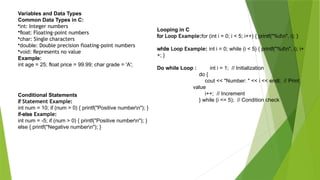
Variables and DataTypes
Common Data Types in C:
•int: Integer numbers
•float: Floating-point numbers
•char: Single characters
•double: Double precision floating-point numbers
•void: Represents no value
Example:
int age = 25; float price = 99.99; char grade = 'A';
Conditional Statements
if Statement Example:
int num = 10; if (num > 0) { printf("Positive numbern"); }
if-else Example:
int num = -5; if (num > 0) { printf("Positive numbern"); }
else { printf("Negative numbern"); }
Looping in C
for Loop Example:for (int i = 0; i < 5; i++) { printf("%dn", i); }
while Loop Example: int i = 0; while (i < 5) { printf("%dn", i); i+
+; }
Do while Loop : int i = 1; // Initialization
do {
cout << "Number: " << i << endl; // Print
value
i++; // Increment
} while (i <= 5); // Condition check
5.
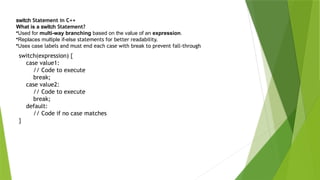
switch Statement inC++
What is a switch Statement?
•Used for multi-way branching based on the value of an expression.
•Replaces multiple if-else statements for better readability.
•Uses case labels and must end each case with break to prevent fall-through
switch(expression) {
case value1:
// Code to execute
break;
case value2:
// Code to execute
break;
default:
// Code if no case matches
}
6.
#include <stdio.h>
int main(){
int age;
float height;
char name[50];
// Taking input from user
printf("Enter your name: ");
scanf("%s", name);
printf("Enter your age: ");
scanf("%d", &age);
printf("Enter your height in meters: ");
scanf("%f", &height);
// Printing the input values
printf("nName: %sn", name);
printf("Age: %dn", age);
printf("Height: %.2f metersn", height);
return 0;
}
Taking Inputs from user
scanf is a function in C that reads formatted input from the user and stores it in variables using format specifiers (e.g., %d
for integers, %f for floats). It requires the address-of operator (&) for non-string variables to store the input correctly.
7.
printf() – PrintOutput
•Used to print formatted output to the console.
•Supports format specifiers like %d, %f, %s, etc.
#include <stdio.h>
int main() {
printf("Hello, World!n");
printf("Age: %dn", 25);
return 0;
}
O/P- Hello, World!
Age: 25
gets() – Read Input (Deprecated in C11)
•Used to read a string input including spaces.
#include <stdio.h>
int main() {
char name[50];
printf("Enter your name: ");
gets(name); // Reads input with spaces (not recommended)
printf("Hello, %s!n", name);
return 0;
}
puts() – Print a String
•Used to print a string with a newline (
n) at the end.
•Simpler than printf() for printing
strings.
#include <stdio.h>
int main() {
char message[] = "Welcome to C
Programming!";
puts(message); // Automatically
adds a newline
return 0;
}
8.
Operators & TheirHierarchy in
Types of Operators in
1.Arithmetic Operators: +, -, *, /, %
2.Relational Operators: ==, !=, <, >, <=, >=
3.Logical Operators: &&, ||, !
4.Bitwise Operators: &, |, ^, <<, >>
5.Assignment Operators: =, +=, -=, *=, /=, %=, &=, |=, ^=
6.Increment & Decrement: ++, --
7.Ternary Operator: condition ? expr1 : expr2
n (Newline Character)
•Moves the cursor to a new line when printing.
•Example:
cpp
cout << "HellonWorld!";
o/p -Hello
World!
0 (Null Character)
•Used to terminate a string in C and C++.
•Example:
char str[] = "Hello";
cout << str; // Implicitly ends with '0'
9.
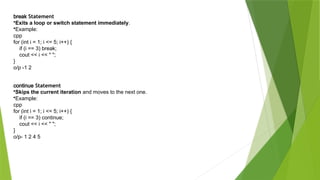
break Statement
•Exits aloop or switch statement immediately.
•Example:
cpp
for (int i = 1; i <= 5; i++) {
if (i == 3) break;
cout << i << " ";
}
o/p -1 2
continue Statement
•Skips the current iteration and moves to the next one.
•Example:
cpp
for (int i = 1; i <= 5; i++) {
if (i == 3) continue;
cout << i << " ";
}
o/p- 1 2 4 5
10.
Strings in C
Whatare Strings?
•A string in C is an array of characters terminated by a null character (0).
•Strings are stored as character arrays.
•C does not have a built-in string type like other languages (e.g., Python, Java)
char str1[] = "Hello"; // String literal
char str2[10] = "World"; // Fixed-size character array
char str3[20]; // Empty string (uninitialized)
Taking user input
#include <stdio.h>
int main() {
char name[50]; // Declaring a character array
printf("Enter your name: ");
scanf("%s", name); // Reads input until space is
encountered
printf("Hello, %s!n", name); // Printing the string
return 0;
}
11.
Functions in C
FunctionExample:
Function Example:
#include <stdio.h> void greet() { printf("Hello, User!n"); } int main() { greet(); return 0; }
•Functions help break a program into smaller reusable parts.
•void greet(): A function with no return value.
•greet();: Function call inside main().
Arrays in C
Example of an Array:int numbers[5] = {1, 2, 3, 4, 5}; for (int i = 0; i < 5; i++) { printf("%dn", numbers[i]); }
•Arrays store multiple values of the same type.
•Index starts from 0.
Pseudocode Basics
Example: Find the Largest of Two Numbers
BEGIN
INPUT num1, num2
IF num1 > num2
THEN PRINT "num1 is larger“
ELSE PRINT "num2 is larger"
ENDIF
END
12.
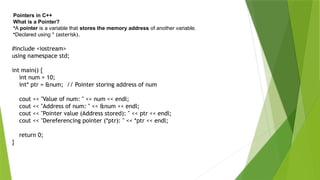
Pointers in C++
Whatis a Pointer?
•A pointer is a variable that stores the memory address of another variable.
•Declared using * (asterisk).
#include <iostream>
using namespace std;
int main() {
int num = 10;
int* ptr = # // Pointer storing address of num
cout << "Value of num: " << num << endl;
cout << "Address of num: " << &num << endl;
cout << "Pointer value (Address stored): " << ptr << endl;
cout << "Dereferencing pointer (*ptr): " << *ptr << endl;
return 0;
}
![#include <stdio.h>
int main() {
int age;
float height;
char name[50];
// Taking input from user
printf("Enter your name: ");
scanf("%s", name);
printf("Enter your age: ");
scanf("%d", &age);
printf("Enter your height in meters: ");
scanf("%f", &height);
// Printing the input values
printf("nName: %sn", name);
printf("Age: %dn", age);
printf("Height: %.2f metersn", height);
return 0;
}
Taking Inputs from user
scanf is a function in C that reads formatted input from the user and stores it in variables using format specifiers (e.g., %d
for integers, %f for floats). It requires the address-of operator (&) for non-string variables to store the input correctly.](https://image.slidesharecdn.com/introductiontocprogramming-251225091446-76b54ddd/85/Introduction-to-C-Programming-for-begginers-pptx-6-320.jpg)
![printf() – Print Output
•Used to print formatted output to the console.
•Supports format specifiers like %d, %f, %s, etc.
#include <stdio.h>
int main() {
printf("Hello, World!n");
printf("Age: %dn", 25);
return 0;
}
O/P- Hello, World!
Age: 25
gets() – Read Input (Deprecated in C11)
•Used to read a string input including spaces.
#include <stdio.h>
int main() {
char name[50];
printf("Enter your name: ");
gets(name); // Reads input with spaces (not recommended)
printf("Hello, %s!n", name);
return 0;
}
puts() – Print a String
•Used to print a string with a newline (
n) at the end.
•Simpler than printf() for printing
strings.
#include <stdio.h>
int main() {
char message[] = "Welcome to C
Programming!";
puts(message); // Automatically
adds a newline
return 0;
}](https://image.slidesharecdn.com/introductiontocprogramming-251225091446-76b54ddd/85/Introduction-to-C-Programming-for-begginers-pptx-7-320.jpg)
![Operators & Their Hierarchy in
Types of Operators in
1.Arithmetic Operators: +, -, *, /, %
2.Relational Operators: ==, !=, <, >, <=, >=
3.Logical Operators: &&, ||, !
4.Bitwise Operators: &, |, ^, <<, >>
5.Assignment Operators: =, +=, -=, *=, /=, %=, &=, |=, ^=
6.Increment & Decrement: ++, --
7.Ternary Operator: condition ? expr1 : expr2
n (Newline Character)
•Moves the cursor to a new line when printing.
•Example:
cpp
cout << "HellonWorld!";
o/p -Hello
World!
0 (Null Character)
•Used to terminate a string in C and C++.
•Example:
char str[] = "Hello";
cout << str; // Implicitly ends with '0'](https://image.slidesharecdn.com/introductiontocprogramming-251225091446-76b54ddd/85/Introduction-to-C-Programming-for-begginers-pptx-8-320.jpg)
![Strings in C
What are Strings?
•A string in C is an array of characters terminated by a null character (0).
•Strings are stored as character arrays.
•C does not have a built-in string type like other languages (e.g., Python, Java)
char str1[] = "Hello"; // String literal
char str2[10] = "World"; // Fixed-size character array
char str3[20]; // Empty string (uninitialized)
Taking user input
#include <stdio.h>
int main() {
char name[50]; // Declaring a character array
printf("Enter your name: ");
scanf("%s", name); // Reads input until space is
encountered
printf("Hello, %s!n", name); // Printing the string
return 0;
}](https://image.slidesharecdn.com/introductiontocprogramming-251225091446-76b54ddd/85/Introduction-to-C-Programming-for-begginers-pptx-10-320.jpg)
![Functions in C
Function Example:
Function Example:
#include <stdio.h> void greet() { printf("Hello, User!n"); } int main() { greet(); return 0; }
•Functions help break a program into smaller reusable parts.
•void greet(): A function with no return value.
•greet();: Function call inside main().
Arrays in C
Example of an Array:int numbers[5] = {1, 2, 3, 4, 5}; for (int i = 0; i < 5; i++) { printf("%dn", numbers[i]); }
•Arrays store multiple values of the same type.
•Index starts from 0.
Pseudocode Basics
Example: Find the Largest of Two Numbers
BEGIN
INPUT num1, num2
IF num1 > num2
THEN PRINT "num1 is larger“
ELSE PRINT "num2 is larger"
ENDIF
END](https://image.slidesharecdn.com/introductiontocprogramming-251225091446-76b54ddd/85/Introduction-to-C-Programming-for-begginers-pptx-11-320.jpg)