Unit I
PM 23UAC101-PYTHON PROGRAMMING | 1
Introduction to Python
Python is a general purpose, high-level, interpreted programming language developed
by Guido van Rossum in 1991 at the National Research Institute for
Mathematics and Computer Science in the Netherlands.
Python is one of the most popular and widely used programming language used for set of
tasks including console based, GUI based, web programming and data analysis. Python is a easy
to learn and simple programming language so even if you are new to programming, you can
learn python without facing any problems.
Python History
o Python laid/setup its foundation in the late 1980s.
o The implementation of Python was started in December 1989 by Guido Van Rossum at
CWI in Netherland.
o In February 1991, Guido Van Rossum published the code (labeled version 0.9.0) to
alt.sources.
o In 1994, Python 1.0 was released with new features like lambda, map, filter, and reduce.
o Python 2.0 added new features such as list comprehensions, garbage collection systems.
o On December 3, 2008, Python 3.0 (also called "Py3K") was released. It was designed to
rectify the fundamental flaw of the language.
o ABC programming language is said to be the predecessor of Python language, which was
capable of Exception Handling and interfacing with the Amoeba Operating System.
o The following programming languages influence Python:
o ABC language.
o Modula-3
3.
Unit I
PM 23UAC101-PYTHON PROGRAMMING | 2
Python Versions:
Python Version Released Date
Python 1.0 January 1994
Python 1.5 December 31, 1997
Python 1.6 September 5, 2000
Python 2.0 October 16, 2000
Python 2.1 April 17, 2001
Python 2.2 December 21, 2001
Python 2.3 July 29, 2003
Python 2.4 November 30, 2004
Python 2.5 September 19, 2006
Python 2.7 July 3, 2010
Python 3.0 December 3, 2008
Python 3.1 June 27, 2009
Python 3.2 February 20, 2011
Python 3.3 September 29, 2012
Python 3.4 March 16, 2014
Python 3.5 September 13, 2015
Python 3.6 December 23, 2016
4.
Unit I
PM 23UAC101-PYTHON PROGRAMMING | 3
Latest Version : 3.11.4 release on June 6, 2023
Features of Python
Python provides lots of features that are listed below.
Easy to Learn and Use
Python is easy to learn and use compared with other programming languages. It is developer-
friendly and high level programming language.
Interpreted Language
Python is an interpreted language because no need of compilation. This makes debugging easy
and thus suitable for beginners.
Cross-platform Language
Python can run equally on different platforms such as Windows, Linux, Unix and Macintosh etc.
So, we can say that Python is a portable language.
Free and Open Source
The Python interpreter is developed under an open-source license, making it free to install, use,
and distribute.
Object-Oriented Language
Python supports object oriented language and concepts of classes and objects come into
existence.
GUI Programming Support
Graphical user interfaces can be developed using Python.
Integrated
It can be easily integrated with languages like C, C++, and JAVA etc.
5.
Unit I
PM 23UAC101-PYTHON PROGRAMMING | 4
Python Applications
Python is a general purpose programming language that makes it applicable in almost all
domains of software development. Python as a whole can be used to develop any type of
applications.
Here, we are providing some specific application areas where python can be applied.
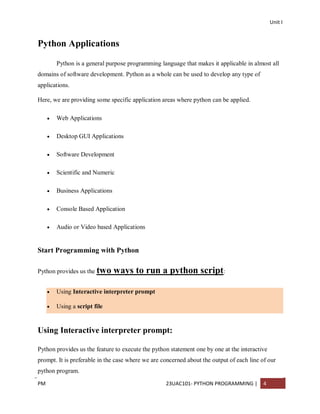
Web Applications
Desktop GUI Applications
Software Development
Scientific and Numeric
Business Applications
Console Based Application
Audio or Video based Applications
Start Programming with Python
Python provides us the two ways to run a python script:
Using Interactive interpreter prompt
Using a script file
Using Interactive interpreter prompt:
Python provides us the feature to execute the python statement one by one at the interactive
prompt. It is preferable in the case where we are concerned about the output of each line of our
python program.
6.
Unit I
PM 23UAC101-PYTHON PROGRAMMING | 5
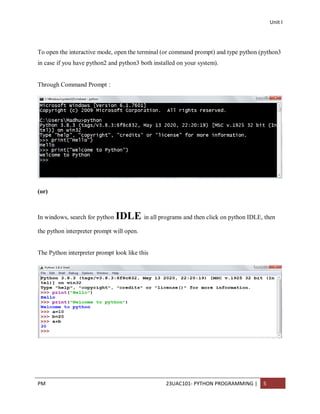
To open the interactive mode, open the terminal (or command prompt) and type python (python3
in case if you have python2 and python3 both installed on your system).
Through Command Prompt :
(or)
In windows, search for python IDLE in all programs and then click on python IDLE, then
the python interpreter prompt will open.
The Python interpreter prompt look like this
7.
Unit I
PM 23UAC101-PYTHON PROGRAMMING | 6
Using Script File :
Interpreter prompt is good to run the individual statements of the code. However if we want to
execute multiple python statements at a time instead of executing one by one, then we can
use script file.
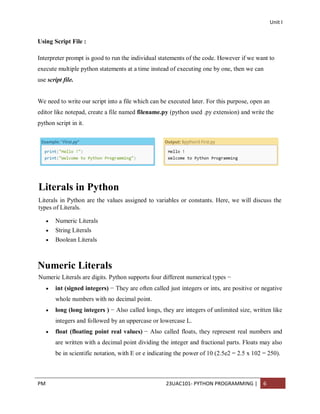
We need to write our script into a file which can be executed later. For this purpose, open an
editor like notepad, create a file named filename.py (python used .py extension) and write the
python script in it.
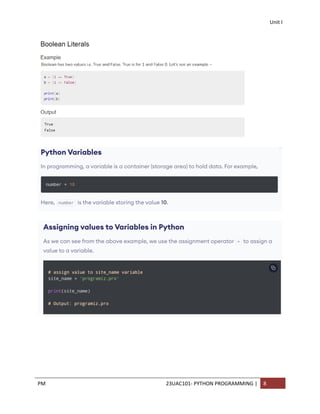
Literals in Python
Literals in Python are the values assigned to variables or constants. Here, we will discuss the
types of Literals.
Numeric Literals
String Literals
Boolean Literals
Numeric Literals
Numeric Literals are digits. Python supports four different numerical types −
int (signed integers) − They are often called just integers or ints, are positive or negative
whole numbers with no decimal point.
long (long integers ) − Also called longs, they are integers of unlimited size, written like
integers and followed by an uppercase or lowercase L.
float (floating point real values) − Also called floats, they represent real numbers and
are written with a decimal point dividing the integer and fractional parts. Floats may also
be in scientific notation, with E or e indicating the power of 10 (2.5e2 = 2.5 x 102 = 250).
8.
Unit I
PM 23UAC101-PYTHON PROGRAMMING | 7
complex (complex numbers) − are of the form a + bJ, where a and b are floats and J (or
j) represents the square root of -1 (which is an imaginary number). The real part of the
number is a, and the imaginary part is b. Complex numbers are not used much in Python
programming.
String Literals
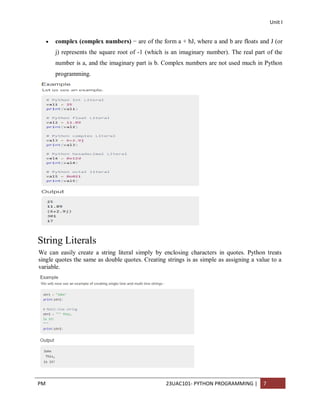
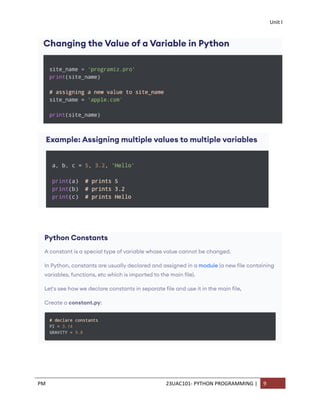
We can easily create a string literal simply by enclosing characters in quotes. Python treats
single quotes the same as double quotes. Creating strings is as simple as assigning a value to a
variable.
Unit I
PM 23UAC101-PYTHON PROGRAMMING | 10
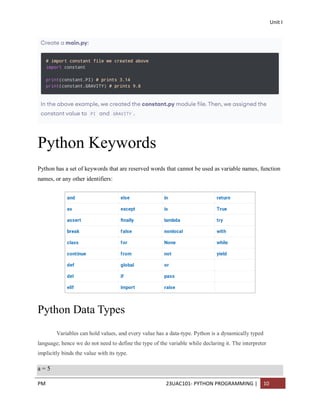
Python Keywords
Python has a set of keywords that are reserved words that cannot be used as variable names, function
names, or any other identifiers:
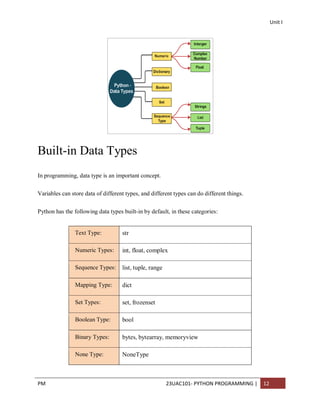
Python Data Types
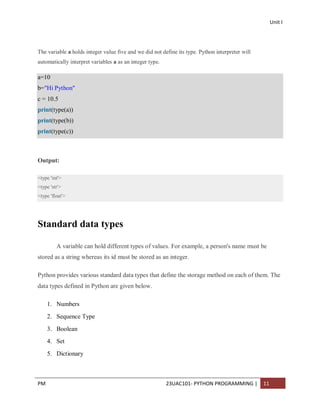
Variables can hold values, and every value has a data-type. Python is a dynamically typed
language; hence we do not need to define the type of the variable while declaring it. The interpreter
implicitly binds the value with its type.
a = 5
12.
Unit I
PM 23UAC101-PYTHON PROGRAMMING | 11
The variable a holds integer value five and we did not define its type. Python interpreter will
automatically interpret variables a as an integer type.
a=10
b="Hi Python"
c = 10.5
print(type(a))
print(type(b))
print(type(c))
Output:
<type 'int'>
<type 'str'>
<type 'float'>
Standard data types
A variable can hold different types of values. For example, a person's name must be
stored as a string whereas its id must be stored as an integer.
Python provides various standard data types that define the storage method on each of them. The
data types defined in Python are given below.
1. Numbers
2. Sequence Type
3. Boolean
4. Set
5. Dictionary
13.
Unit I
PM 23UAC101-PYTHON PROGRAMMING | 12
Built-in Data Types
In programming, data type is an important concept.
Variables can store data of different types, and different types can do different things.
Python has the following data types built-in by default, in these categories:
Text Type: str
Numeric Types: int, float, complex
Sequence Types: list, tuple, range
Mapping Type: dict
Set Types: set, frozenset
Boolean Type: bool
Binary Types: bytes, bytearray, memoryview
None Type: NoneType
14.
Unit I
PM 23UAC101-PYTHON PROGRAMMING | 13
Python input() Function
Python input() function is used to get input from the user. It prompts for the user input and reads
a line. After reading data, it converts it into a string and returns that. It throws an error EOFError
if EOF is read.
Signature
1. input ([prompt])
Parameters
prompt: It is a string message which prompts for the user input.
Return
It returns user input after converting into a string.
Let's see some examples of input() function to understand it's functionality.
Python input() Function Example 1
Here, we are using this function get user input and display to the user as well.
# Python input() function example
# Calling function
val = input("Enter a value: ")
# Displaying result
print("You entered:",val)
Output:
Enter a value: 45
You entered: 45
15.
Unit I
PM 23UAC101-PYTHON PROGRAMMING | 14
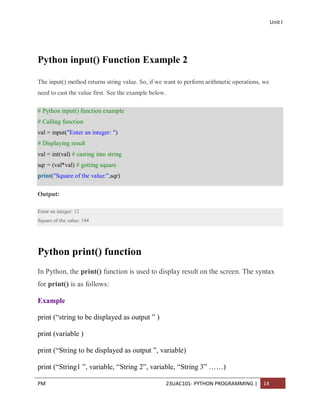
Python input() Function Example 2
The input() method returns string value. So, if we want to perform arithmetic operations, we
need to cast the value first. See the example below.
# Python input() function example
# Calling function
val = input("Enter an integer: ")
# Displaying result
val = int(val) # casting into string
sqr = (val*val) # getting square
print("Square of the value:",sqr)
Output:
Enter an integer: 12
Square of the value: 144
Python print() function
In Python, the print() function is used to display result on the screen. The syntax
for print() is as follows:
Example
print (“string to be displayed as output ” )
print (variable )
print (“String to be displayed as output ”, variable)
print (“String1 ”, variable, “String 2”, variable, “String 3” ……)
16.
Unit I
PM 23UAC101-PYTHON PROGRAMMING | 15
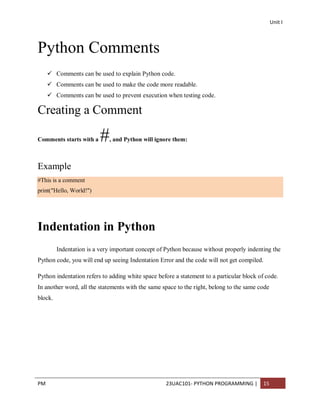
Python Comments
Comments can be used to explain Python code.
Comments can be used to make the code more readable.
Comments can be used to prevent execution when testing code.
Creating a Comment
Comments starts with a #, and Python will ignore them:
Example
#This is a comment
print("Hello, World!")
Indentation in Python
Indentation is a very important concept of Python because without properly indenting the
Python code, you will end up seeing Indentation Error and the code will not get compiled.
Python indentation refers to adding white space before a statement to a particular block of code.
In another word, all the statements with the same space to the right, belong to the same code
block.
17.
Unit I
PM 23UAC101-PYTHON PROGRAMMING | 16
Python indentation is a way of telling a Python interpreter that the group of statements
belongs to a particular block of code. A block is a combination of all these statements.
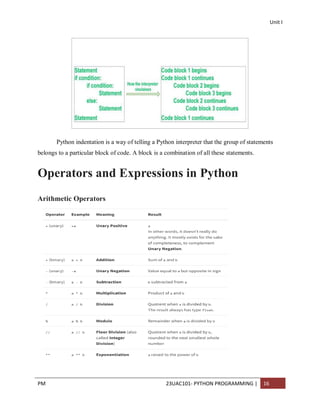
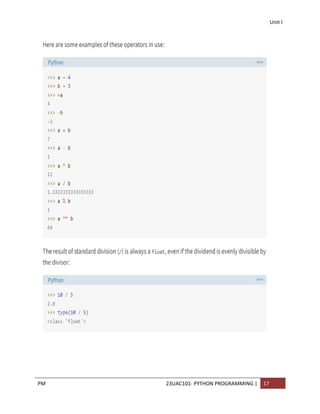
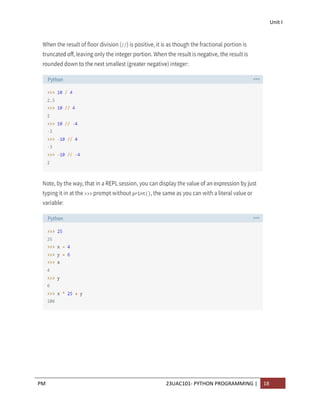
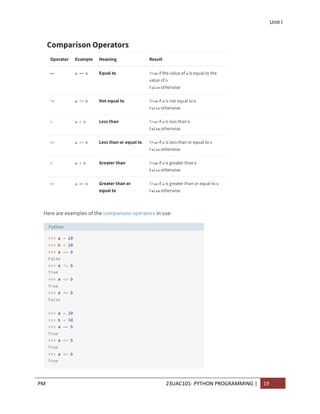
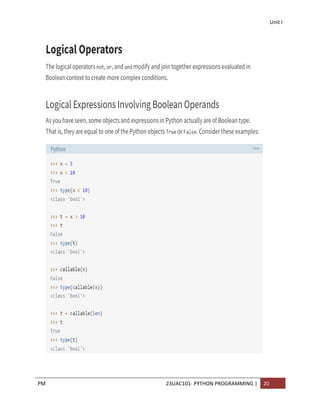
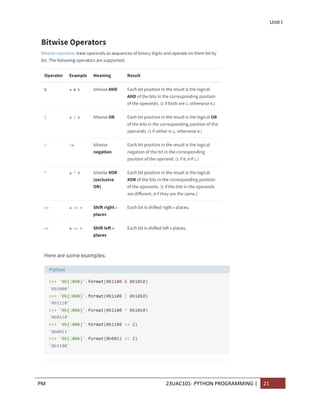
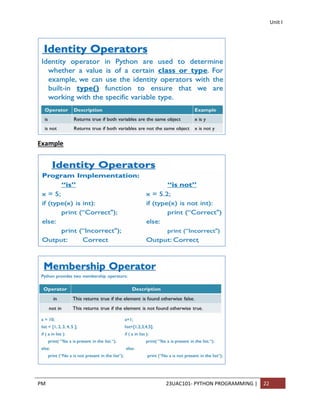
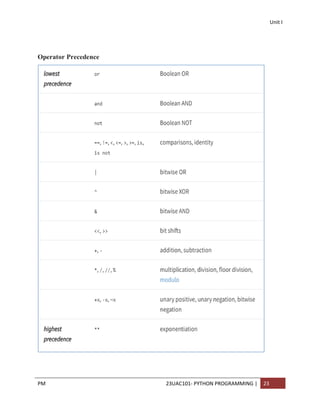
Operators and Expressions in Python
Arithmetic Operators
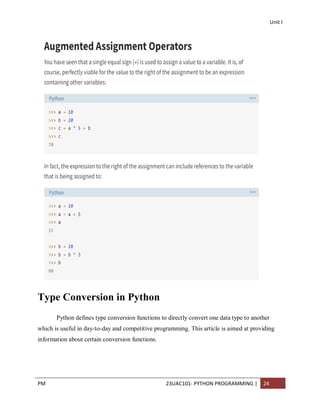
Unit I
PM 23UAC101-PYTHON PROGRAMMING | 24
Type Conversion in Python
Python defines type conversion functions to directly convert one data type to another
which is useful in day-to-day and competitive programming. This article is aimed at providing
information about certain conversion functions.
26.
Unit I
PM 23UAC101-PYTHON PROGRAMMING | 25
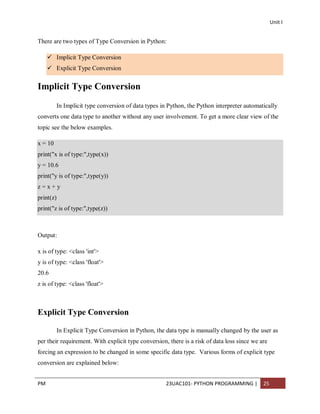
There are two types of Type Conversion in Python:
Implicit Type Conversion
Explicit Type Conversion
Implicit Type Conversion
In Implicit type conversion of data types in Python, the Python interpreter automatically
converts one data type to another without any user involvement. To get a more clear view of the
topic see the below examples.
x = 10
print("x is of type:",type(x))
y = 10.6
print("y is of type:",type(y))
z = x + y
print(z)
print("z is of type:",type(z))
Output:
x is of type: <class 'int'>
y is of type: <class 'float'>
20.6
z is of type: <class 'float'>
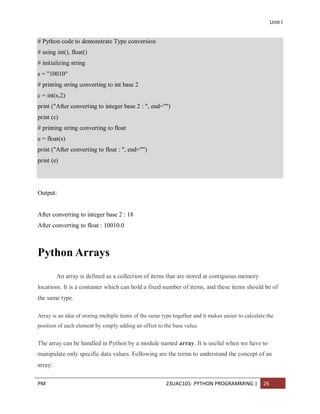
Explicit Type Conversion
In Explicit Type Conversion in Python, the data type is manually changed by the user as
per their requirement. With explicit type conversion, there is a risk of data loss since we are
forcing an expression to be changed in some specific data type. Various forms of explicit type
conversion are explained below:
27.
Unit I
PM 23UAC101-PYTHON PROGRAMMING | 26
# Python code to demonstrate Type conversion
# using int(), float()
# initializing string
s = "10010"
# printing string converting to int base 2
c = int(s,2)
print ("After converting to integer base 2 : ", end="")
print (c)
# printing string converting to float
e = float(s)
print ("After converting to float : ", end="")
print (e)
Output:
After converting to integer base 2 : 18
After converting to float : 10010.0
Python Arrays
An array is defined as a collection of items that are stored at contiguous memory
locations. It is a container which can hold a fixed number of items, and these items should be of
the same type.
Array is an idea of storing multiple items of the same type together and it makes easier to calculate the
position of each element by simply adding an offset to the base value.
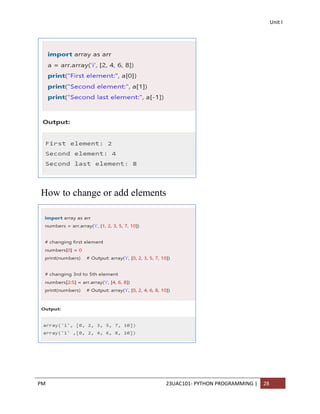
The array can be handled in Python by a module named array. It is useful when we have to
manipulate only specific data values. Following are the terms to understand the concept of an
array:
28.
Unit I
PM 23UAC101-PYTHON PROGRAMMING | 27
Element - Each item stored in an array is called an element.
Index - The location of an element in an array has a numerical index, which is used to identify
the position of the element.
Array Representation
An array can be declared in various ways and different languages. The important points that
should be considered are as follows:
o Index starts with 0.
o We can access each element via its index.
o The length of the array defines the capacity to store the elements.
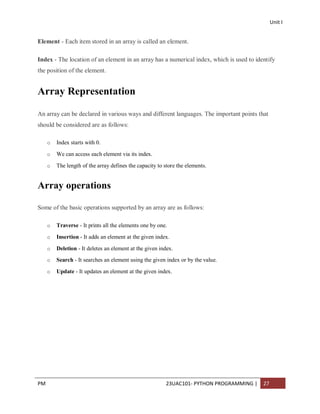
Array operations
Some of the basic operations supported by an array are as follows:
o Traverse - It prints all the elements one by one.
o Insertion - It adds an element at the given index.
o Deletion - It deletes an element at the given index.
o Search - It searches an element using the given index or by the value.
o Update - It updates an element at the given index.
Unit I
PM 23UAC101-PYTHON PROGRAMMING | 29
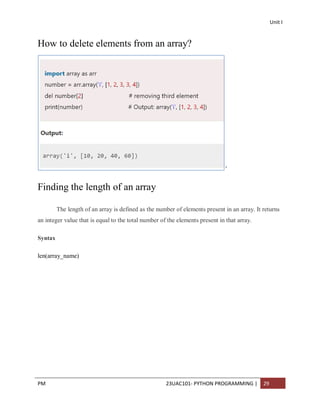
How to delete elements from an array?
’
Finding the length of an array
The length of an array is defined as the number of elements present in an array. It returns
an integer value that is equal to the total number of the elements present in that array.
Syntax
len(array_name)
Unit II
PM 23UAC101-PYTHON PROGRAMMING 1
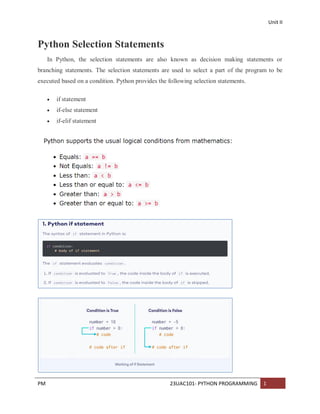
Python Selection Statements
In Python, the selection statements are also known as decision making statements or
branching statements. The selection statements are used to select a part of the program to be
executed based on a condition. Python provides the following selection statements.
if statement
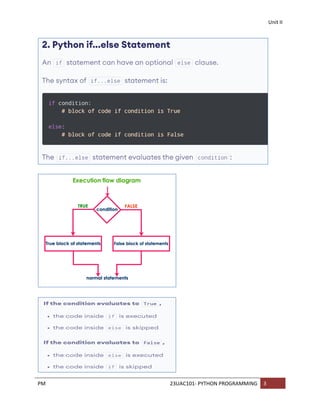
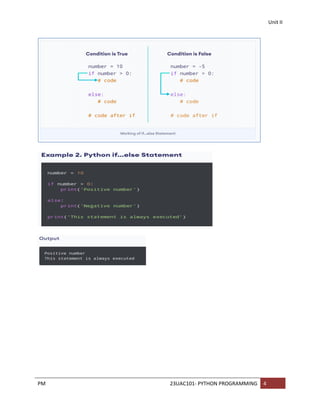
if-else statement
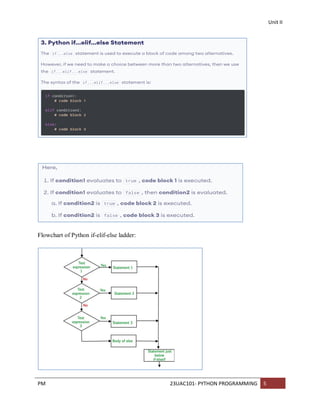
if-elif statement
34.
Unit II
PM 23UAC101-PYTHON PROGRAMMING 2
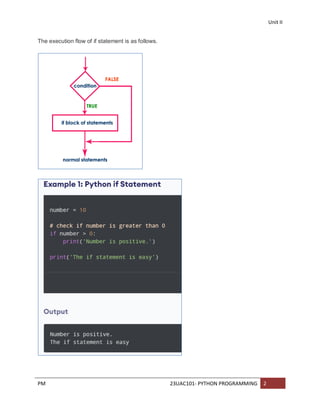
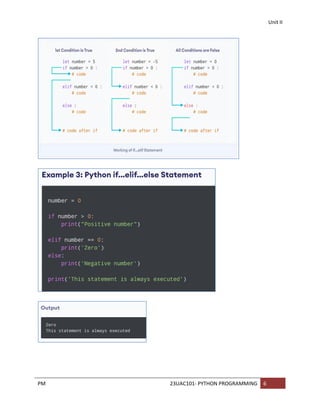
The execution flow of if statement is as follows.
Unit II
PM 23UAC101-PYTHON PROGRAMMING 7
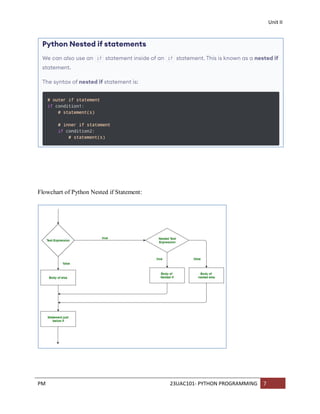
Flowchart of Python Nested if Statement:
40.
Unit II
PM 23UAC101-PYTHON PROGRAMMING 8
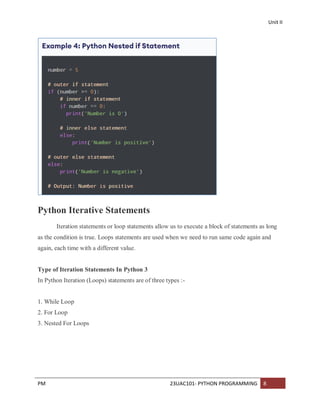
Python Iterative Statements
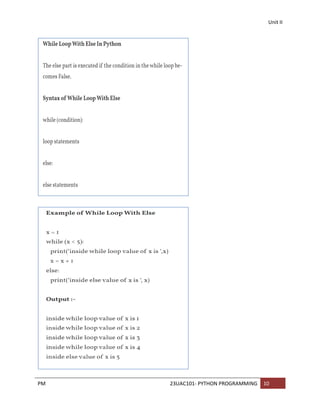
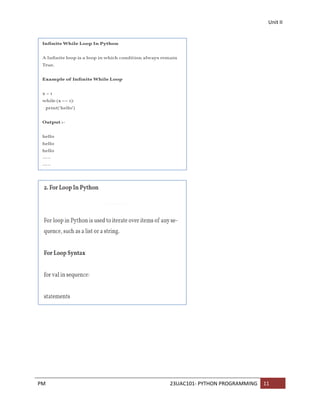
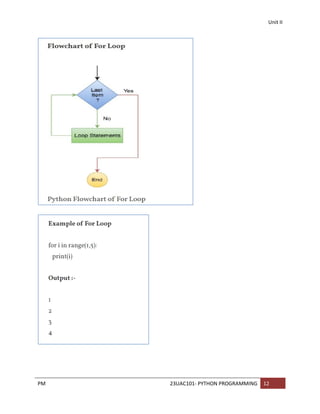
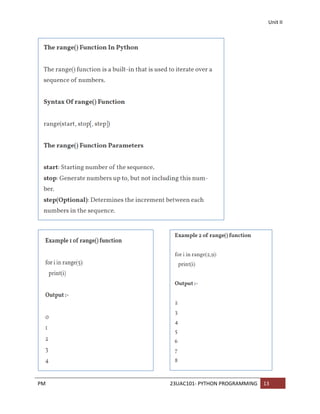
Iteration statements or loop statements allow us to execute a block of statements as long
as the condition is true. Loops statements are used when we need to run same code again and
again, each time with a different value.
Type of Iteration Statements In Python 3
In Python Iteration (Loops) statements are of three types :-
1. While Loop
2. For Loop
3. Nested For Loops
41.
Unit II
PM 23UAC101-PYTHON PROGRAMMING 9
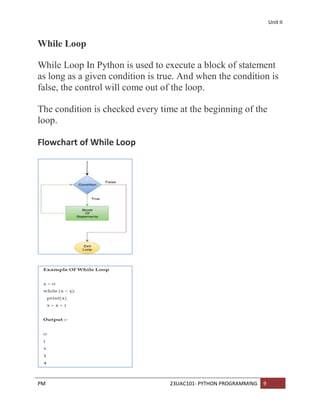
While Loop
While Loop In Python is used to execute a block of statement
as long as a given condition is true. And when the condition is
false, the control will come out of the loop.
The condition is checked every time at the beginning of the
loop.
Flowchart of While Loop
Unit II
PM 23UAC101-PYTHON PROGRAMMING 15
Python Jump Statements
Jump statements are used to skip, jump, or exit from the running program inside
from the loop at the particular condition. They are used mainly to interrupt switch
statements and loops. Jump statements are break, continue, return, and exit statement.
Jump Statements in Python
Break Statement
Continue Statement
Pass Statement
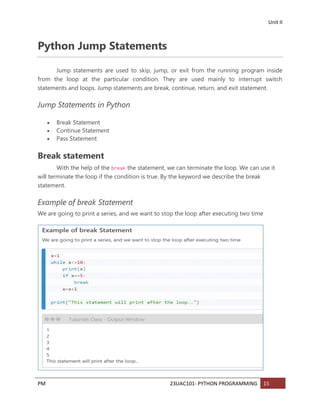
Break statement
With the help of the break the statement, we can terminate the loop. We can use it
will terminate the loop if the condition is true. By the keyword we describe the break
statement.
Example of break Statement
We are going to print a series, and we want to stop the loop after executing two time
48.
Unit II
PM 23UAC101-PYTHON PROGRAMMING 16
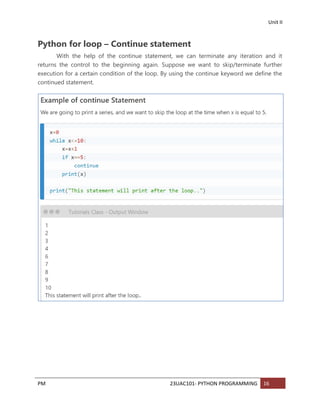
Python for loop – Continue statement
With the help of the continue statement, we can terminate any iteration and it
returns the control to the beginning again. Suppose we want to skip/terminate further
execution for a certain condition of the loop. By using the continue keyword we define the
continued statement.
49.
Unit II
PM 23UAC101-PYTHON PROGRAMMING 17
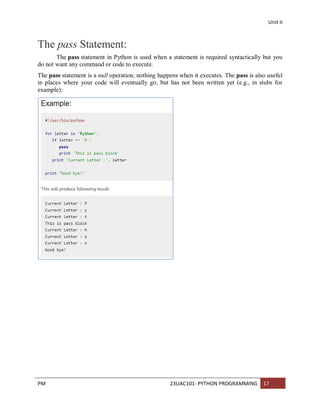
The pass Statement:
The pass statement in Python is used when a statement is required syntactically but you
do not want any command or code to execute.
The pass statement is a null operation; nothing happens when it executes. The pass is also useful
in places where your code will eventually go, but has not been written yet (e.g., in stubs for
example):
Unit III
PM 23UAC101-PYTHON PROGRAMMING 1
Python Function:
A function is a block of organized, reusable code that is used to perform a single, related
action.
A function is a block of code which only runs when it is called.
You can pass data, known as parameters, into a function.
A function can return data as a result.p
Types of function
There are two types of function in Python programming:
Standard library functions - These are built-in functions in Python that are available to use.
User-defined functions - We can create our own functions based on our requirements.
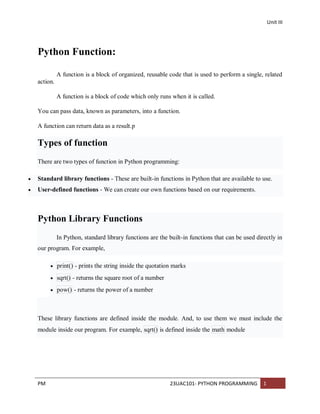
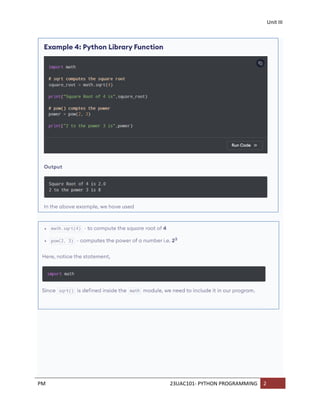
Python Library Functions
In Python, standard library functions are the built-in functions that can be used directly in
our program. For example,
print() - prints the string inside the quotation marks
sqrt() - returns the square root of a number
pow() - returns the power of a number
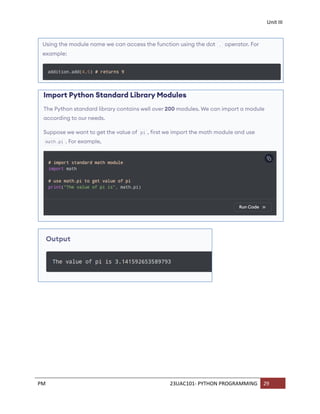
These library functions are defined inside the module. And, to use them we must include the
module inside our program. For example, sqrt() is defined inside the math module
Unit III
PM 23UAC101-PYTHON PROGRAMMING 3
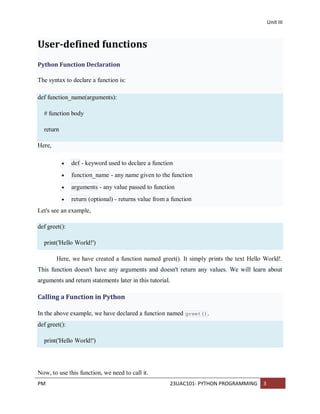
User-defined functions
Python Function Declaration
The syntax to declare a function is:
def function_name(arguments):
# function body
return
Here,
def - keyword used to declare a function
function_name - any name given to the function
arguments - any value passed to function
return (optional) - returns value from a function
Let's see an example,
def greet():
print('Hello World!')
Here, we have created a function named greet(). It simply prints the text Hello World!.
This function doesn't have any arguments and doesn't return any values. We will learn about
arguments and return statements later in this tutorial.
Calling a Function in Python
In the above example, we have declared a function named greet().
def greet():
print('Hello World!')
Now, to use this function, we need to call it.
54.
Unit III
PM 23UAC101-PYTHON PROGRAMMING 4
Here's how we can call the greet() function in Python.
# call the function
greet()
Example: Python Function
def greet():
print('Hello World!')
# call the function
greet()
print('Outside function')
Output
Hello World!
Outside function
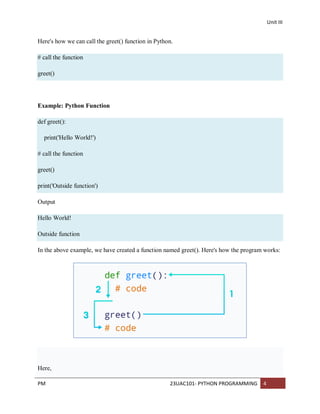
In the above example, we have created a function named greet(). Here's how the program works:
Here,
55.
Unit III
PM 23UAC101-PYTHON PROGRAMMING 5
When the function is called, the control of the program goes to the function
definition.
All codes inside the function are executed.
The control of the program jumps to the next statement after the function call.
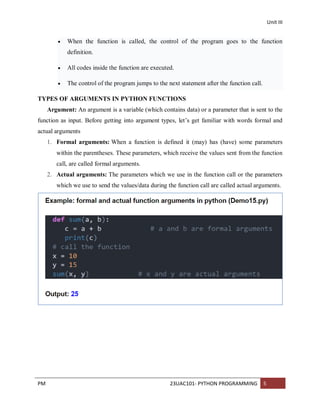
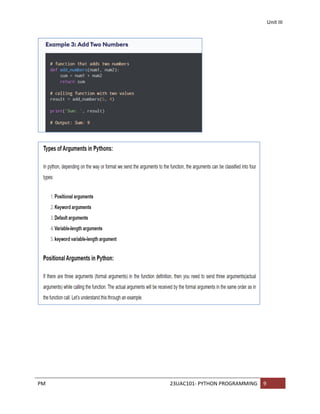
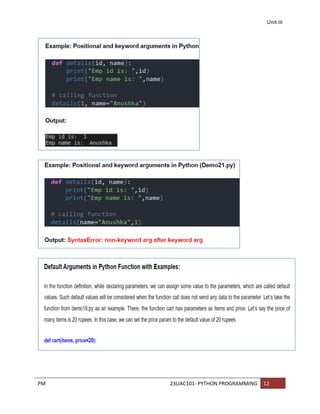
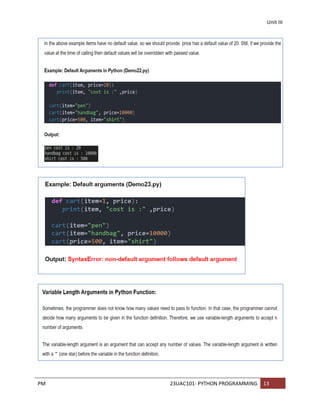
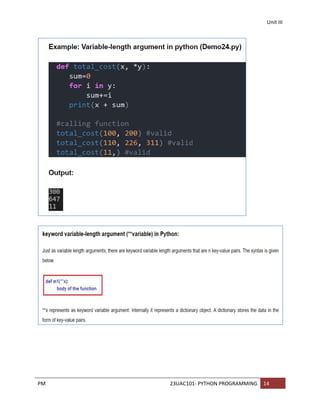
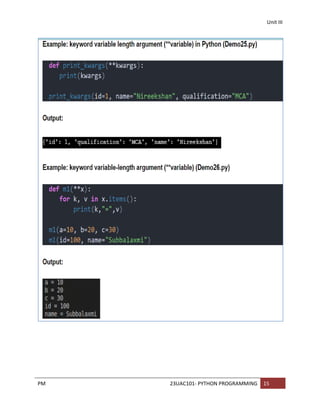
TYPES OF ARGUMENTS IN PYTHON FUNCTIONS
Argument: An argument is a variable (which contains data) or a parameter that is sent to the
function as input. Before getting into argument types, let’s get familiar with words formal and
actual arguments
1. Formal arguments: When a function is defined it (may) has (have) some parameters
within the parentheses. These parameters, which receive the values sent from the function
call, are called formal arguments.
2. Actual arguments: The parameters which we use in the function call or the parameters
which we use to send the values/data during the function call are called actual arguments.
56.
Unit III
PM 23UAC101-PYTHON PROGRAMMING 6
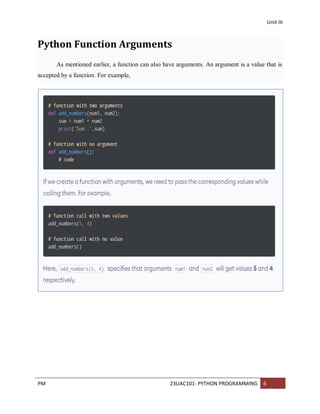
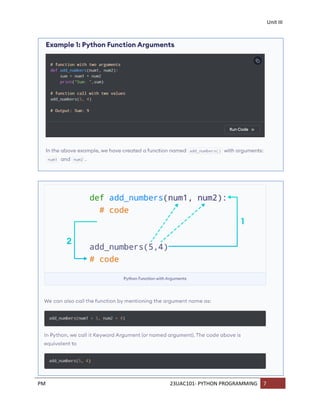
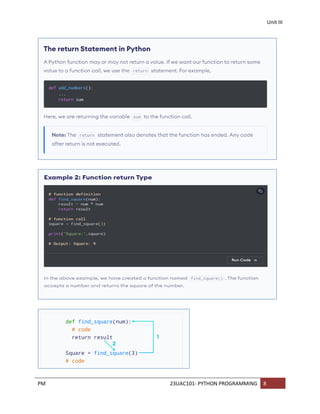
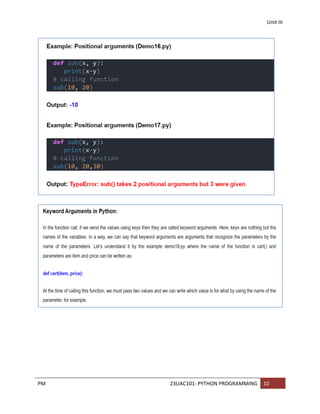
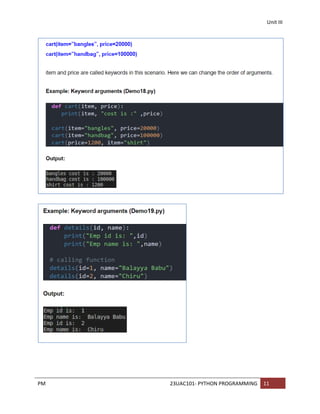
Python Function Arguments
As mentioned earlier, a function can also have arguments. An argument is a value that is
accepted by a function. For example,
Unit III
PM 23UAC101-PYTHON PROGRAMMING 16
Function vs Module vs Library in Python:
1. A group of lines with some name is called a function
2. A group of functions saved to a file is called Module
3. A group of Modules is nothing but Library
Unit III
PM 23UAC101-PYTHON PROGRAMMING 20
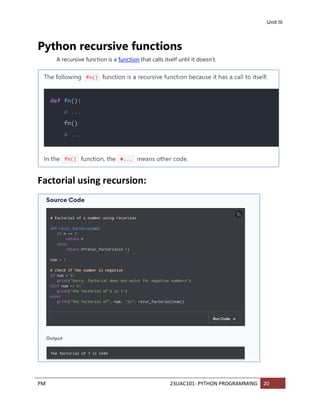
Python recursive functions
A recursive function is a function that calls itself until it doesn’t.
Factorial using recursion:
Unit III
PM 23UAC101-PYTHON PROGRAMMING 36
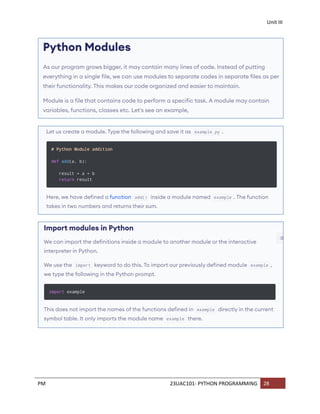
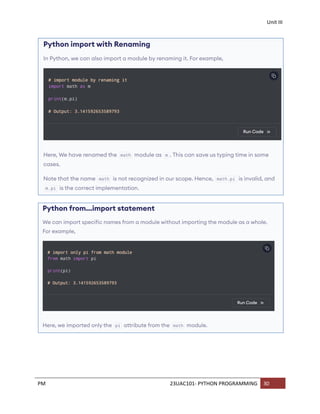
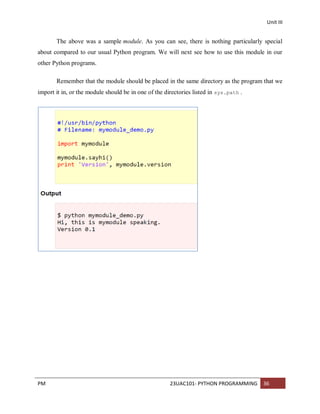
The above was a sample module. As you can see, there is nothing particularly special
about compared to our usual Python program. We will next see how to use this module in our
other Python programs.
Remember that the module should be placed in the same directory as the program that we
import it in, or the module should be in one of the directories listed in sys.path .
Unit IV
PM 23UAC101-PYTHON PROGRAMMING 1
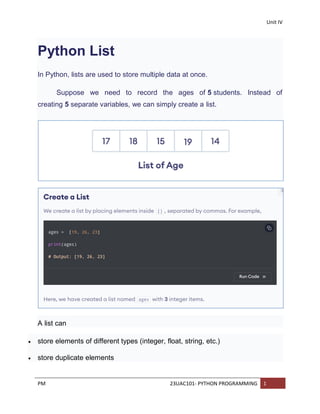
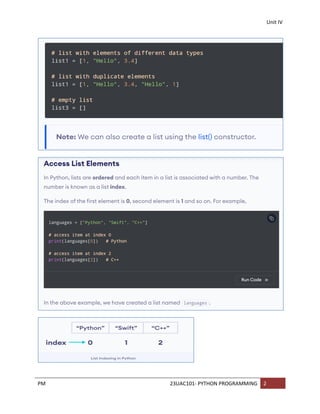
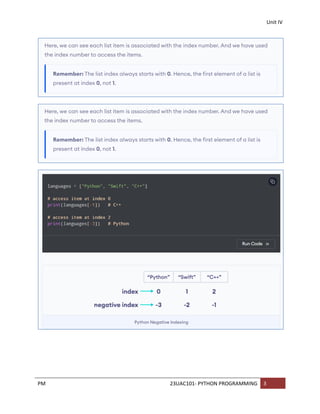
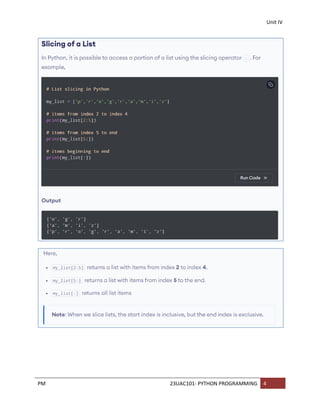
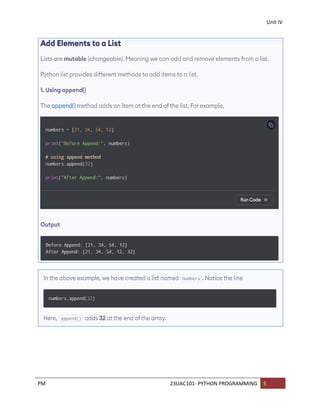
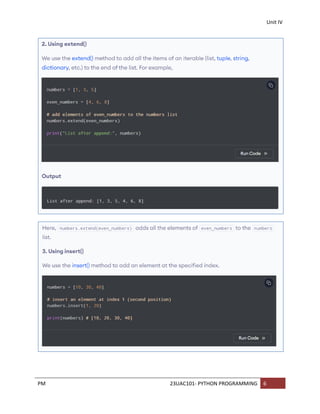
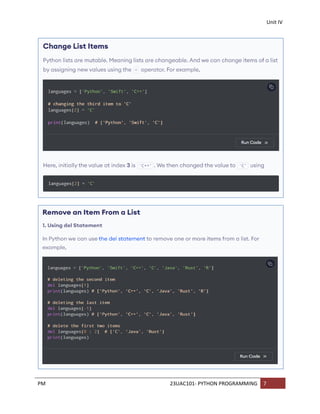
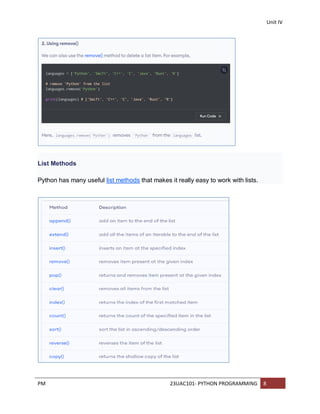
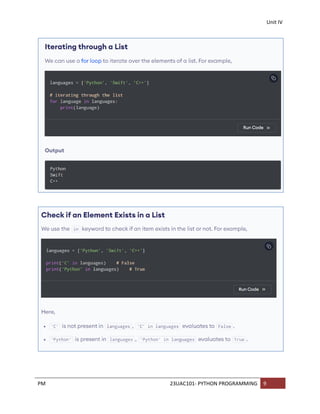
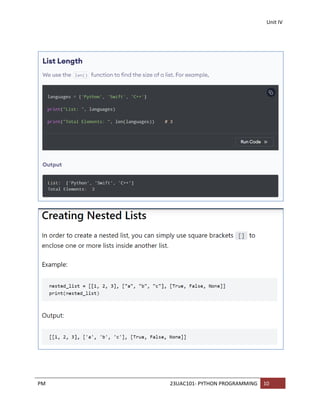
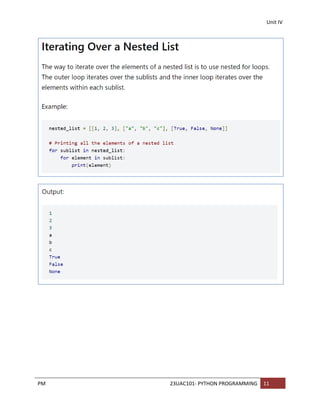
Python List
In Python, lists are used to store multiple data at once.
Suppose we need to record the ages of 5 students. Instead of
creating 5 separate variables, we can simply create a list.
A list can
store elements of different types (integer, float, string, etc.)
store duplicate elements
Unit IV
PM 23UAC101-PYTHON PROGRAMMING 19
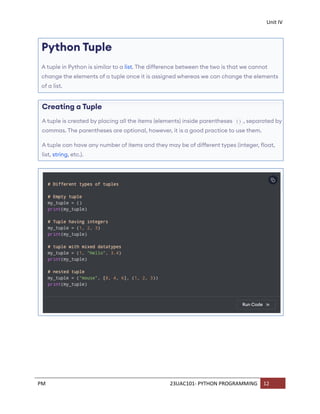
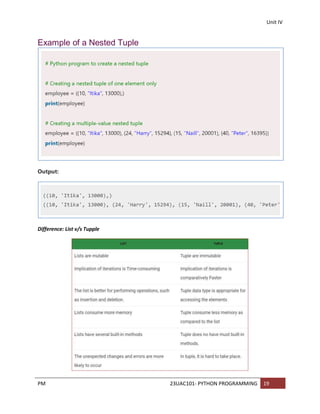
Example of a Nested Tuple
Output:
Difference: List v/s Tupple
107.
Unit IV
PM 23UAC101-PYTHON PROGRAMMING 20
Python Dictionary
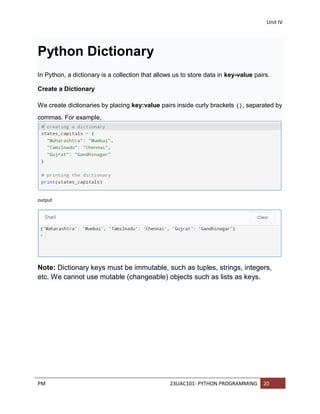
In Python, a dictionary is a collection that allows us to store data in key-value pairs.
Create a Dictionary
We create dictionaries by placing key:value pairs inside curly brackets {}, separated by
commas. For example,
output
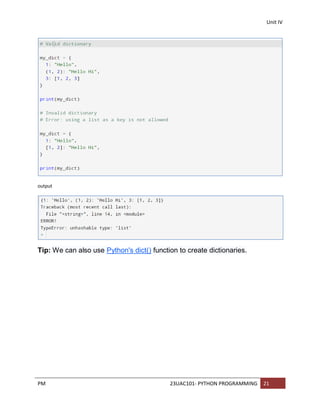
Note: Dictionary keys must be immutable, such as tuples, strings, integers,
etc. We cannot use mutable (changeable) objects such as lists as keys.
108.
Unit IV
PM 23UAC101-PYTHON PROGRAMMING 21
output
Tip: We can also use Python's dict() function to create dictionaries.
Unit IV
PM 23UAC101-PYTHON PROGRAMMING 23
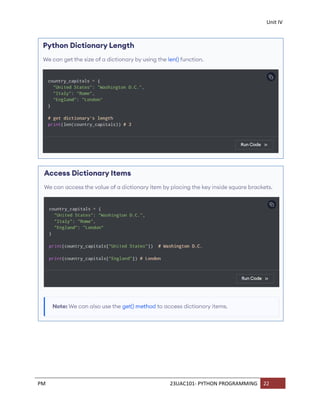
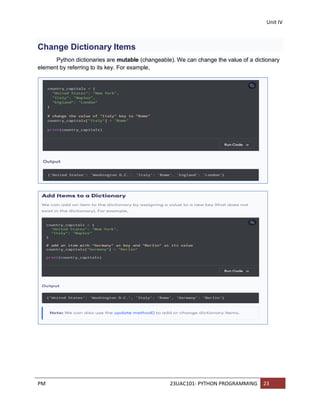
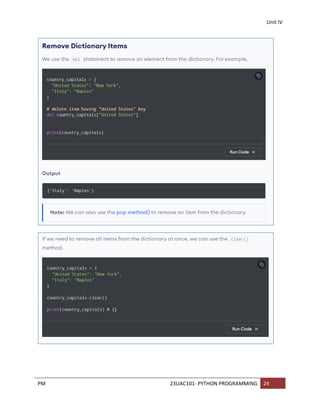
Change Dictionary Items
Python dictionaries are mutable (changeable). We can change the value of a dictionary
element by referring to its key. For example,
Unit IV
PM 23UAC101-PYTHON PROGRAMMING 26
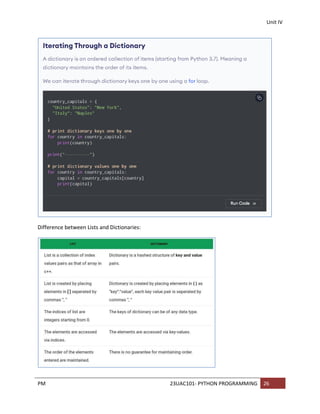
Difference between Lists and Dictionaries:
114.
Unit V
PM 23UAC101-PYTHON PROGRAMMING 1
Python Files
What is a File?
A file is a resource to store data. As part of the programming requirement, we may have
to store our data permanently for future purpose. For this requirement we should go for files.
Files are very common permanent storage areas to store our data
Types of Files:
There can be two types of files based on the type of information they store. They are:
1. Text files
2. Binary files
Text files:
Text files are those which store data in the form of characters or strings.
Binary files:
Binary files are those which store entire data in the form of bytes, i.e. a group of 8 bits
each. While retrieving data from the binary file, the programmer can retrieve it in the form of
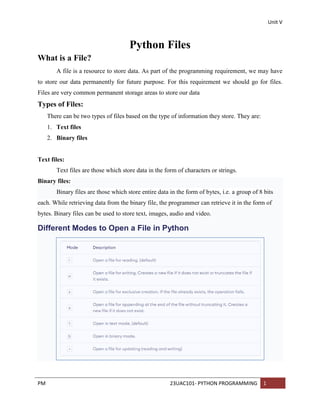
bytes. Binary files can be used to store text, images, audio and video.
Different Modes to Open a File in Python
115.
Unit V
PM 23UAC101-PYTHON PROGRAMMING 2
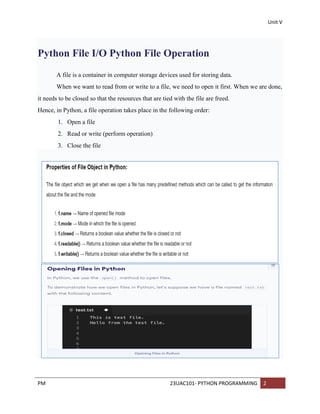
Python File I/O Python File Operation
A file is a container in computer storage devices used for storing data.
When we want to read from or write to a file, we need to open it first. When we are done,
it needs to be closed so that the resources that are tied with the file are freed.
Hence, in Python, a file operation takes place in the following order:
1. Open a file
2. Read or write (perform operation)
3. Close the file
116.
Unit V
PM 23UAC101-PYTHON PROGRAMMING 3
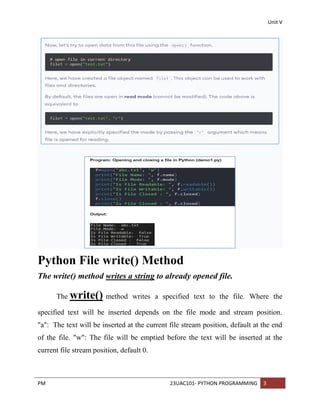
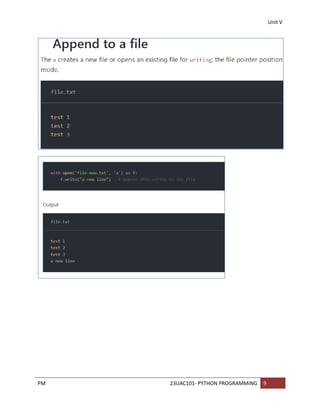
Python File write() Method
The write() method writes a string to already opened file.
The write() method writes a specified text to the file. Where the
specified text will be inserted depends on the file mode and stream position.
"a": The text will be inserted at the current file stream position, default at the end
of the file. "w": The file will be emptied before the text will be inserted at the
current file stream position, default 0.
117.
Unit V
PM 23UAC101-PYTHON PROGRAMMING 4
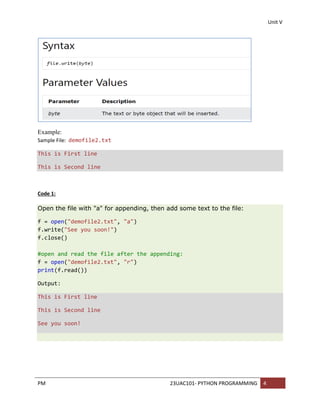
Example:
Sample File: demofile2.txt
This is First line
This is Second line
Code 1:
Open the file with "a" for appending, then add some text to the file:
f = open("demofile2.txt", "a")
f.write("See you soon!")
f.close()
#open and read the file after the appending:
f = open("demofile2.txt", "r")
print(f.read())
Output:
This is First line
This is Second line
See you soon!
118.
Unit V
PM 23UAC101-PYTHON PROGRAMMING 5
Python File writelines() Method
The writelines() method writes the items of a list to the file. Where the texts will be
inserted depends on the file mode and stream position. "a": The texts will be inserted at the
current file stream position, default at the end of the file. "w": The file will be emptied before the
texts will be inserted at the current file stream position, default 0.
Example:
Open the file with "a" for appending, then add a list of texts to append to the file:
f = open("demofile3.txt", "a")
f.writelines(["See you soon!", "Over and out."])
f.close()
#open and read the file after the appending:
f = open("demofile3.txt", "r")
print(f.read())
Output:
This is First line
This is Second line
See you soon! Over and out.
119.
Unit V
PM 23UAC101-PYTHON PROGRAMMING 6
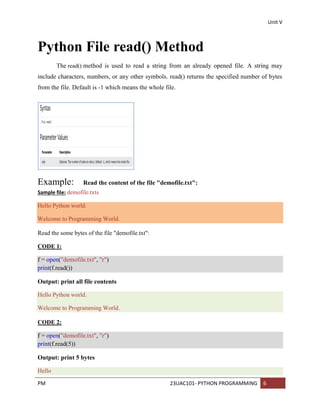
Python File read() Method
The read() method is used to read a string from an already opened file. A string may
include characters, numbers, or any other symbols. read() returns the specified number of bytes
from the file. Default is -1 which means the whole file.
Example: Read the content of the file "demofile.txt":
Sample file: demofile.txts
Hello Python world.
Welcome to Programming World.
Read the some bytes of the file "demofile.txt":
CODE 1:
f = open("demofile.txt", "r")
print(f.read())
Output: print all file contents
Hello Python world.
Welcome to Programming World.
CODE 2:
f = open("demofile.txt", "r")
print(f.read(5))
Output: print 5 bytes
Hello
120.
Unit V
PM 23UAC101-PYTHON PROGRAMMING 7
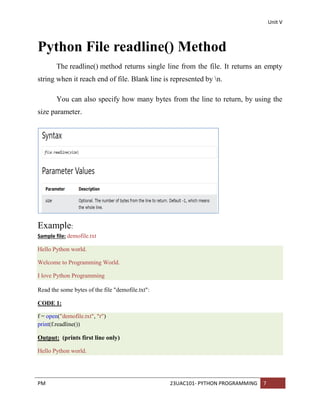
Python File readline() Method
The readline() method returns single line from the file. It returns an empty
string when it reach end of file. Blank line is represented by n.
You can also specify how many bytes from the line to return, by using the
size parameter.
Example:
Sample file: demofile.txt
Hello Python world.
Welcome to Programming World.
I love Python Programming
Read the some bytes of the file "demofile.txt":
CODE 1:
f = open("demofile.txt", "r")
print(f.readline())
Output: (prints first line only)
Hello Python world.
121.
Unit V
PM 23UAC101-PYTHON PROGRAMMING 8
CODE 2:
f = open("demofile.txt", "r")
print(f.readline())
print(f.readline())
Output: (prints first and second lines only)
Hello Python world.
Welcome to Programming World.
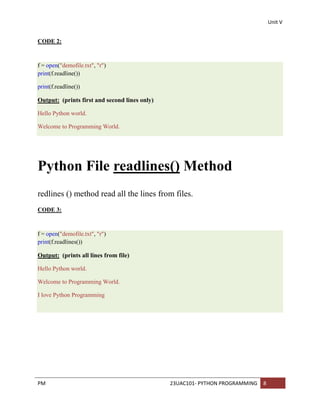
Python File readlines() Method
redlines () method read all the lines from files.
CODE 3:
f = open("demofile.txt", "r")
print(f.readlines())
Output: (prints all lines from file)
Hello Python world.
Welcome to Programming World.
I love Python Programming
Unit V
PM 23UAC101-PYTHON PROGRAMMING 14
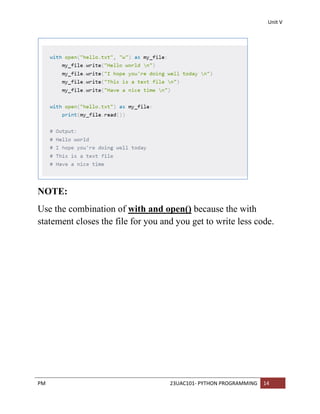
NOTE:
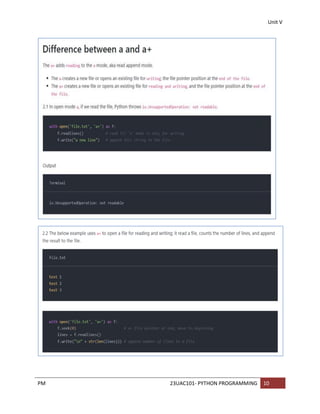
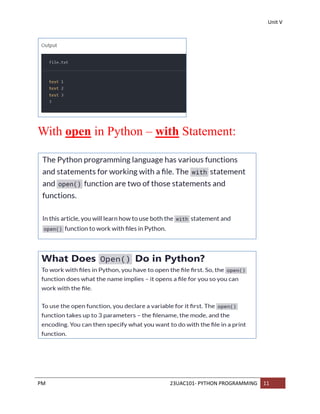
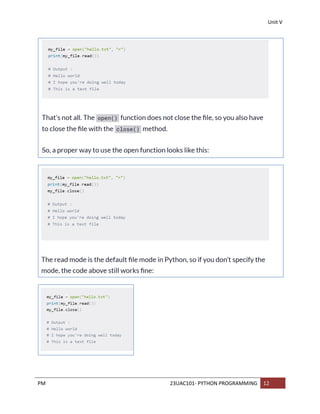
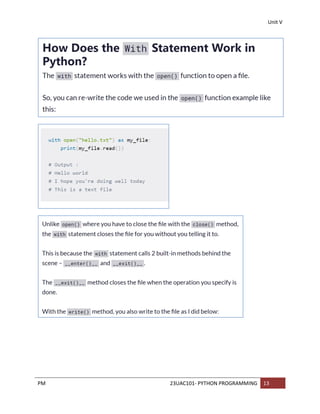
Use the combination of with and open() because the with
statement closes the file for you and you get to write less code.
128.
Unit V
PM 23UAC101-PYTHON PROGRAMMING 15
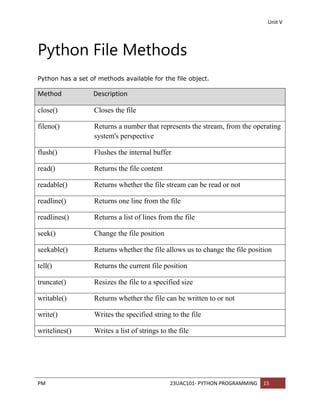
Python File Methods
Python has a set of methods available for the file object.
Method Description
close() Closes the file
fileno() Returns a number that represents the stream, from the operating
system's perspective
flush() Flushes the internal buffer
read() Returns the file content
readable() Returns whether the file stream can be read or not
readline() Returns one line from the file
readlines() Returns a list of lines from the file
seek() Change the file position
seekable() Returns whether the file allows us to change the file position
tell() Returns the current file position
truncate() Resizes the file to a specified size
writable() Returns whether the file can be written to or not
write() Writes the specified string to the file
writelines() Writes a list of strings to the file
129.
Unit V
PM 23UAC101-PYTHON PROGRAMMING 16
Splitting Words:
Python allows us to read lines(s) from a file and splits the line (treated as a string)
based on a character, By default, this character is space but you can even specify
any other character to split words in the string.
Example 1:
with open(“file.txt”, “r” ) as f:
line=f.readline()
words=line.split()
print(words)
Output: [„Hello‟, „World‟, „Welcome‟, „to‟, „the‟, „world‟, „of‟, „python‟]
Example 2:
with open(“file.txt”, “r”) as f:
line=f.readline()
words=line.split(„,‟)
print(words)
Output:
[„Hello World”, “Welcome to the world of pythonn”]
130.
Unit V
PM 23UAC101-PYTHON PROGRAMMING 17
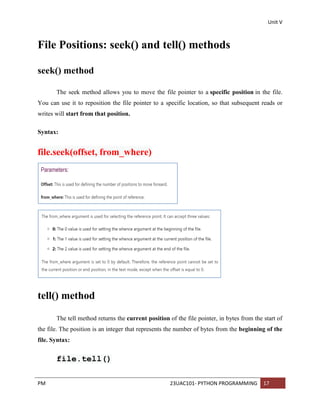
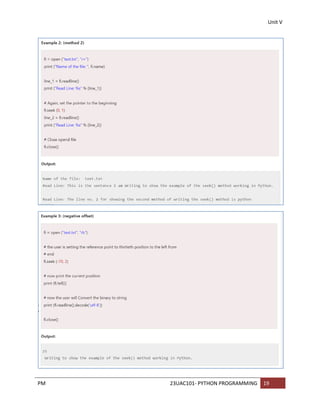
File Positions: seek() and tell() methods
seek() method
The seek method allows you to move the file pointer to a specific position in the file.
You can use it to reposition the file pointer to a specific location, so that subsequent reads or
writes will start from that position.
Syntax:
file.seek(offset, from_where)
tell() method
The tell method returns the current position of the file pointer, in bytes from the start of
the file. The position is an integer that represents the number of bytes from the beginning of the
file. Syntax:
file.tell()
131.
Unit V
PM 23UAC101-PYTHON PROGRAMMING 18
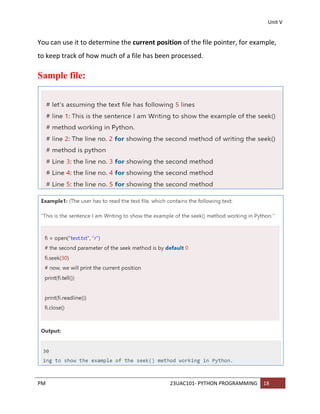
You can use it to determine the current position of the file pointer, for example,
to keep track of how much of a file has been processed.
Sample file:
Unit V
PM 23UAC101-PYTHON PROGRAMMING 20
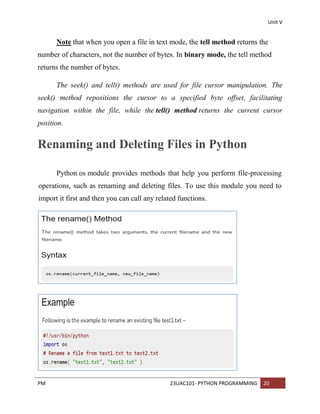
Note that when you open a file in text mode, the tell method returns the
number of characters, not the number of bytes. In binary mode, the tell method
returns the number of bytes.
The seek() and tell() methods are used for file cursor manipulation. The
seek() method repositions the cursor to a specified byte offset, facilitating
navigation within the file, while the tell() method returns the current cursor
position.
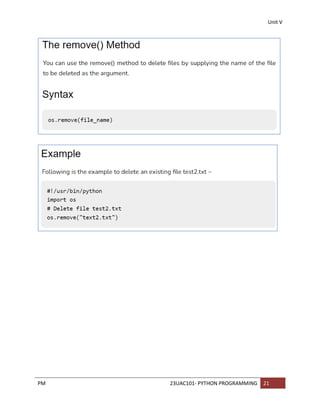
Renaming and Deleting Files in Python
Python os module provides methods that help you perform file-processing
operations, such as renaming and deleting files. To use this module you need to
import it first and then you can call any related functions.

![Unit I
PM 23UAC101- PYTHON PROGRAMMING | 13
Python input() Function
Python input() function is used to get input from the user. It prompts for the user input and reads
a line. After reading data, it converts it into a string and returns that. It throws an error EOFError
if EOF is read.
Signature
1. input ([prompt])
Parameters
prompt: It is a string message which prompts for the user input.
Return
It returns user input after converting into a string.
Let's see some examples of input() function to understand it's functionality.
Python input() Function Example 1
Here, we are using this function get user input and display to the user as well.
# Python input() function example
# Calling function
val = input("Enter a value: ")
# Displaying result
print("You entered:",val)
Output:
Enter a value: 45
You entered: 45](https://image.slidesharecdn.com/pythonprogramming-250627141221-5421e571/85/Introduction-Python-Programming-Concepts-for-Beginers-14-320.jpg)
![Unit V
PM 23UAC101- PYTHON PROGRAMMING 5
Python File writelines() Method
The writelines() method writes the items of a list to the file. Where the texts will be
inserted depends on the file mode and stream position. "a": The texts will be inserted at the
current file stream position, default at the end of the file. "w": The file will be emptied before the
texts will be inserted at the current file stream position, default 0.
Example:
Open the file with "a" for appending, then add a list of texts to append to the file:
f = open("demofile3.txt", "a")
f.writelines(["See you soon!", "Over and out."])
f.close()
#open and read the file after the appending:
f = open("demofile3.txt", "r")
print(f.read())
Output:
This is First line
This is Second line
See you soon! Over and out.](https://image.slidesharecdn.com/pythonprogramming-250627141221-5421e571/85/Introduction-Python-Programming-Concepts-for-Beginers-118-320.jpg)
![Unit V
PM 23UAC101- PYTHON PROGRAMMING 16
Splitting Words:
Python allows us to read lines(s) from a file and splits the line (treated as a string)
based on a character, By default, this character is space but you can even specify
any other character to split words in the string.
Example 1:
with open(“file.txt”, “r” ) as f:
line=f.readline()
words=line.split()
print(words)
Output: [„Hello‟, „World‟, „Welcome‟, „to‟, „the‟, „world‟, „of‟, „python‟]
Example 2:
with open(“file.txt”, “r”) as f:
line=f.readline()
words=line.split(„,‟)
print(words)
Output:
[„Hello World”, “Welcome to the world of pythonn”]](https://image.slidesharecdn.com/pythonprogramming-250627141221-5421e571/85/Introduction-Python-Programming-Concepts-for-Beginers-129-320.jpg)


![Human Reproduction [ Reproductive System ] Notes @irfanullah_mehar Irfanullah...](https://cdn.slidesharecdn.com/ss_thumbnails/humanreproductionreproductivesystemnotesirfanullahmeharirfanullahmeharjanantantra-260111172350-56e85778-thumbnail.jpg?width=640&height=640&fit=bounds)


