Unit 2: Interaction With Computers
FIT
Computer Software
• Set of computer programs, procedures and associated documents(flowcharts , manuals)
describing the program and how they can be used.
• Software package is a group of programs that solve a specific problem or perform a
specific task. Example a word processing package contains programs for text editing,
text formatting, drawing graphics, spelling check. Etc
Types of software
System software
• Set of one or more programs which controls the operation and/or extends the processing
capability of a computer system.
• Its functions are:
• Supports development of other application software
• Supports execution of other application software
• Monitors effective use of various hardware resources like CPU, Memory, peripherals etc
• Communicate with and controls operation of printer, disk, tape etc (peripheral devices)
• The programs included in a system software package are called system software and
programmers who prepare them are called system programmers.
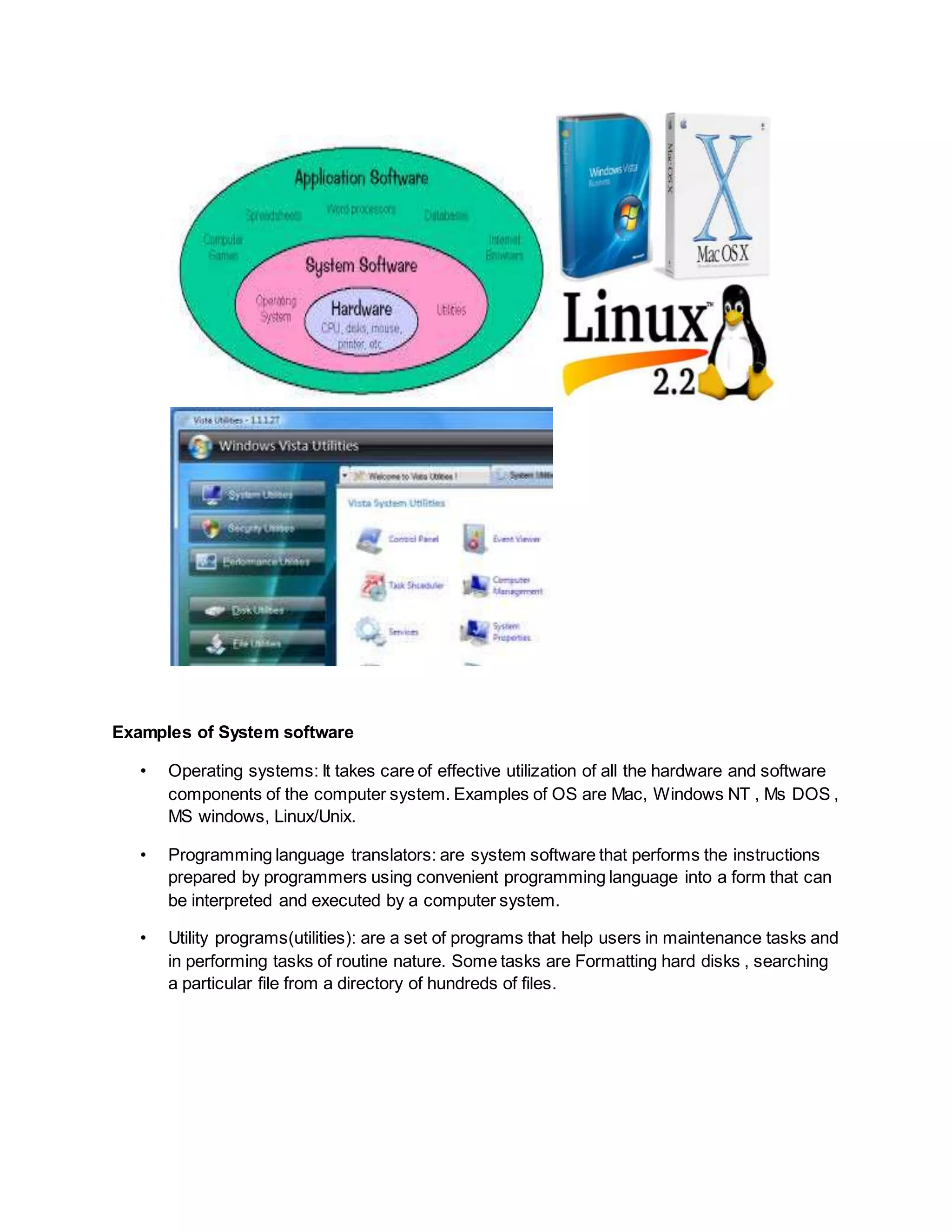
Examples of System software
• Operating systems: It takes care of effective utilization of all the hardware and software
components of the computer system. Examples of OS are Mac, Windows NT , Ms DOS ,
MS windows, Linux/Unix.
• Programming language translators: are system software that performs the instructions
prepared by programmers using convenient programming language into a form that can
be interpreted and executed by a computer system.
• Utility programs(utilities): are a set of programs that help users in maintenance tasks and
in performing tasks of routine nature. Some tasks are Formatting hard disks , searching
a particular file from a directory of hundreds of files.
Application Software
• Is a set of one or more programs which solves a specific problem or does a specific task.
Example. Payroll processing software, examination results processing software,
computer games software.
• The programs included in an application software packages are called application
programs and the programmers who prepare application software are referred as
application Programmers.
Examples of Application software
• Word Processing software: It is used to create, edit, view, format, store and print
documents. It comes with WYSIWYG (what you see is what you get) feature can display
a document on screen in a form that closely resembles what a printed document will look
like
• Other features: Search and Replace, Spell checker, grammar checker.
• Spreadsheet Software: Is a numeric data analysis tool that allows you to create a kind of
computerised ledger. It is useful for any numerical analysis problem whose data can be
organised in rows and columns.
• With computerised ledger, we are no longer confined to use pencils, erasers and
calculators.
• Other examples include Database software(mysql, apache, Microsoft access), Graphics
software (Photoshop, paint), Personal assistance software (calendar, to-do list, address
book), Entertainment software (video games).
Programming Languages
• They are means of communication between a computer and a user.
• They can be classified into 3 categories:
1. Machine language
2. Assembly language
3. High level language
1. Machine Language:
 In a machine language, the sequence of instructions are written in the form of binary
numbers consisting of 1s and 0s to which computer responds directly.
 It is considered to be First Generation Language.
 They are machine dependent.
 An instruction prepared in any machine language will have 2 parts. Operation
(opcode/operation code) and Operand(address) .It is also called low level programming
language.
Advantage:
• Faster in execution : because machine instructions are directly understood by computer
and no translation is required.
Disadvantages:
• Machine dependent: because internal design of type of computer is different from every
other type of computer. Thus machine language differs as well from computer to
computer.
• Error Prone: Since a programmer has to remember the opcodes and must also keep
track of the storage locations of data and instructions, it becomes very difficult to focus
on the logic of the problem.
2. Assembly language
It is a low level programming languages that allows a computer programmer to write a
program using symbols (letters, digits or special characters) also called MNEMONICS
This is considered to be second generation language.
An assembly language program cannot be executed by a machine directly as it is not in
a binary form therefore a language translator is needed.
Advantages:
• Easier to understand and use: Due to the use of mnemonics instead of numeric op
codes, assembly language programs are much easier to understand.
• Easier to locate and correct errors: As programmers need not keep track of storage
locations , fewer errors are made while writing programs in assembly language.
• Easier to modify: because they are easier to understand, it is easier to locate , correct
and modify instructions.
Disadvantages:
• Knowledge of hardware is required: An assembly language programmer must have a
good knowledge of the characteristics and the logical structure of computer in order to
write good assembly language program.
• Slower in execution: As a translator is needed in assembly language so they are slower
in execution.
Assembler
• An assembly language program must be converted into its equivalent machine
language program before execution. This translation is done with the help of translator
called ASSEMBLER.
• Source code Assembler Output
3. High level language/HLL
• It allows the programmer to write a program in English like language instead of binary
digits or mnemonics.
• This is considered to be third generation language.
• We need a translator as computers do not directly executes high level language
program.
Features
• They are machine independent
• They do not require programmers to know anything about the internal structure of the
computer.
• They do not deal with machine level coding
Advantages of HLL
• Machine independent: A program written in HLL can be easily ported and executed on
any other machine.
• Easier to learn and use: they are easier to learn as they are similar to natural languages.
• Fewer errors: A programmer need not worry about how and where to store the
instructions and date of the programs and need not write machine level instructions. All
these factors lead to fewer programming errors.
Limitations of HLL
• Lower efficiency: because it takes more time for execution and require more main
memory space. So when it is about performance, critical parts of the program are written
in assembly language and non critical parts are written in high level language.
• Less flexible: HLL are less flexible because they do not normally have instructions to
control the computer’s CPU,memory and registers.
Translators :
• Compilers
• Interpreters
Compiler
• Compiler is a translator program that translates a HLL program to its equivalent machine
language program(binary file).
• It is called a compiler because it compiles the set of machine language instructions for
every program instructions of high level language.
• There are different compilers for each HLL.
• While compiling, it can also detect certain errors in source program. It can detect syntax
errors and not semantic errors(logical).
• Compilers can also take source code and convert it into executable files by linking binary
file with several libraries of code.
• In this case, a program called Linker is used to properly combine all the object program
files and convert them into final executable file. This approach is said to be Modular
approach in software development.
Interpreter
• An interpreter is another type of translator used for translating programs written in HLL. It
takes one statement of HLL program translates in machine instructions and then
immediately executes the resulting machine language instructions.
Questions?
• Difference between Interpreter and compiler?
• Interpreter flags a syntax error in a program statement to a programmer as soon as it
interprets the program statement. This allows the programmer to make corrections
during interactive program development. Therefore, interpreters make it easier and
faster to correct programs. (fast debugging)
• BUT they are slower than compilers when running a finished program.
Functions of Operating System
• Process management: A process is a program in execution. During execution, it needs
resources such as CPU time, memory space, files and I/O devices. At a particular
instance of time, a computer system consists of a collection of processes. Process
management module takes care of creation and deletion of processes, scheduling of
system resources to different processes, providing mechanisms for synchronization and
communication among processes.
• Memory management: It takes care of allocation and de-allocation of memory space to
programs that need it.
• File management: Processes read information from files and create new files for storing
newly generated information. It takes care of file-related activities such as organization,
storage ,retrieval ,naming , sharing and protection of files.
• Device management: It controls all I/O devices . It keep track of I/O requests from
processes, issues commands to I/O devices, and ensures correct data transmission
to/from an I/O device. It also provides a simple and easy to use interface between the
devices and rest of the system.
• Security: It protects the resources and information of a system against destruction and
unauthorized access. It also ensures that when the system executes several disjoint
processes simultaneously, one process does not interfere with others or with the
operating system itself.
Some popular operating systems
• UNIX= multi user, time sharing O.S but not free to use.
• LINUX= free to use, open source, multi user, time sharing O.S eg: Ubuntu
• MS-DOS (developed by IBM and Microsoft)
• MS-Windows (developed by Microsoft ) -single user
• Mac –OS (Apple)
Algorithms
• It refers to the logic of a program. It is a step by step description of how to arrive at a
solution to a given problem.
• An algorithm must posses certain characteristics. They are:
 Each instruction should be precise and unambiguous.
 It should be executed in a finite time.
 It should deliver desired results after its successful execution.
Quality of Algorithm
• Time requirement: This is the time required to execute the program on a given computer
system. The lesser is the time requirement , the better is the algorithm
• Memory requirement: this is the memory required to execute the given program on the
computer system. Lesser the memory, better is the algorithm.
• It should provide accurate results. There can be multiple algorithms to solve a problem
• A generalized algorithm should be able to handle a range of input data rather than
handling a single input data. (scalability- any scale of data )
Representation of Algorithms:
• As program
• As flowchart
• As pseudo code
• As decision tables
Flowchart
• It is a pictorial representation of an algorithm. First, An algorithm is represented as a
flowchart and then it is converted in a computer program. Flowchart help programmer to
focus on the logic of the solution to a given problem without paying attention to the
syntax and other details of programming language.
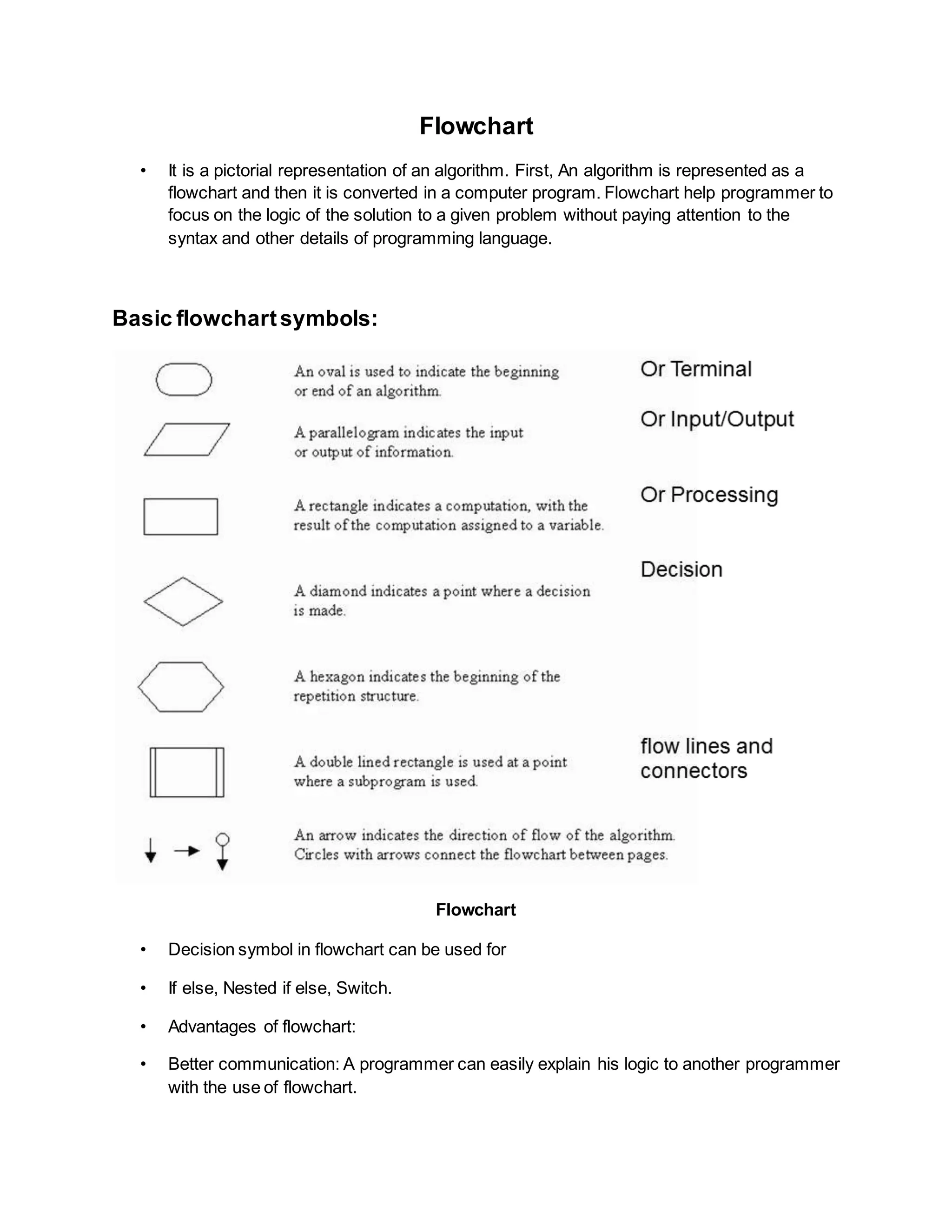
Basic flowchartsymbols:
Flowchart
• Decision symbol in flowchart can be used for
• If else, Nested if else, Switch.
• Advantages of flowchart:
• Better communication: A programmer can easily explain his logic to another programmer
with the use of flowchart.
• It is easy to analyse a flowchart for better understanding.
• It can also be used for documentation purposes which involves collecting, organizing ,
storing and maintaining historical records of a program.
• Effective coding: It is easy to write a program once flowchart is ready.
• Systematic debugging : once an error is detected, it is clear to find out the reason for the
bug by going through the logic of the program in the form of flowchart.
Limitations: they are time consuming and tiring to draw with proper symbols . They consume
more space in case of large complex programs.
Any modification in the logic will usually require a completely new flowchart.
There are no standards determining the amount of detail that should be included in a flowchart.
Pseudo code
• It is another programming analysis tool used for planning logic. Pseudo code
means imitation or false code!
• Instructions are written in natural language(English, German etc), hence they are
not understood by a computer.
• Pseudo code is also called Program Design Language (PDL) because it
emphasis the design of the program.
Basic Logic structures
• Sequence logic: It is used for performing instructions one after another in a
sequence.
• Selection Logic : It is used for selecting the proper path out of two or more
alternative paths in the program logic.
• If..then..else or If then or switch case
• Iteration logic: It is used to produce loops in the logic. It uses mainly two loops.
Do while and repeat until.
Advantages:
• Writing a Pseudo code involves less time than drawing a flowchart.
• It is easier to modify the pseudo code as compared to flowchart.
Disadvantages:
• There are no standard rules to follow in using pseudo code.
• For a beginner, it is more difficult to follow the logic of program in pseudo code as
compared to flowcharting.
• Graphic representation of the logic is not available.
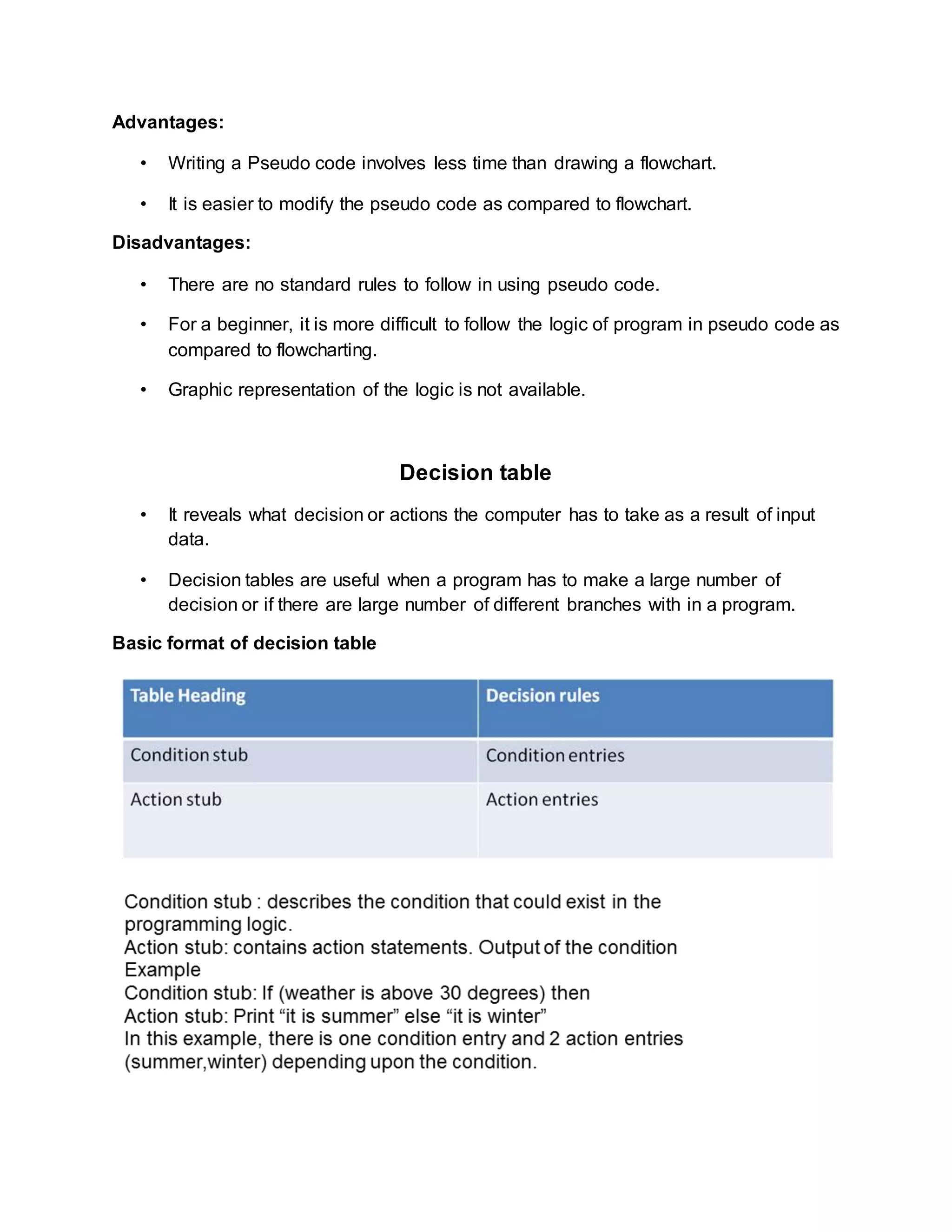
Decision table
• It reveals what decision or actions the computer has to take as a result of input
data.
• Decision tables are useful when a program has to make a large number of
decision or if there are large number of different branches with in a program.
Basic format of decision table
Advantages and Limitations
• They provide concise description of logically complex situation.
• They are easier to draw and modify as compared to flowcharts.
• They provide more compact documentation. A small table can replace several pages of
flowchart.
• Limitations:
• Large decision tables for complicated programs can become difficult to modify.
• Flowcharts are more familiar and preferred by many programmers and beginners.

Interaction With Computers FIT

  • 1.
    Unit 2: InteractionWith Computers FIT Computer Software • Set of computer programs, procedures and associated documents(flowcharts , manuals) describing the program and how they can be used. • Software package is a group of programs that solve a specific problem or perform a specific task. Example a word processing package contains programs for text editing, text formatting, drawing graphics, spelling check. Etc Types of software System software • Set of one or more programs which controls the operation and/or extends the processing capability of a computer system. • Its functions are: • Supports development of other application software • Supports execution of other application software • Monitors effective use of various hardware resources like CPU, Memory, peripherals etc • Communicate with and controls operation of printer, disk, tape etc (peripheral devices) • The programs included in a system software package are called system software and programmers who prepare them are called system programmers.
  • 2.
    Examples of Systemsoftware • Operating systems: It takes care of effective utilization of all the hardware and software components of the computer system. Examples of OS are Mac, Windows NT , Ms DOS , MS windows, Linux/Unix. • Programming language translators: are system software that performs the instructions prepared by programmers using convenient programming language into a form that can be interpreted and executed by a computer system. • Utility programs(utilities): are a set of programs that help users in maintenance tasks and in performing tasks of routine nature. Some tasks are Formatting hard disks , searching a particular file from a directory of hundreds of files.
  • 3.
    Application Software • Isa set of one or more programs which solves a specific problem or does a specific task. Example. Payroll processing software, examination results processing software, computer games software. • The programs included in an application software packages are called application programs and the programmers who prepare application software are referred as application Programmers. Examples of Application software • Word Processing software: It is used to create, edit, view, format, store and print documents. It comes with WYSIWYG (what you see is what you get) feature can display a document on screen in a form that closely resembles what a printed document will look like • Other features: Search and Replace, Spell checker, grammar checker. • Spreadsheet Software: Is a numeric data analysis tool that allows you to create a kind of computerised ledger. It is useful for any numerical analysis problem whose data can be organised in rows and columns. • With computerised ledger, we are no longer confined to use pencils, erasers and calculators. • Other examples include Database software(mysql, apache, Microsoft access), Graphics software (Photoshop, paint), Personal assistance software (calendar, to-do list, address book), Entertainment software (video games).
  • 4.
    Programming Languages • Theyare means of communication between a computer and a user. • They can be classified into 3 categories: 1. Machine language 2. Assembly language 3. High level language 1. Machine Language:  In a machine language, the sequence of instructions are written in the form of binary numbers consisting of 1s and 0s to which computer responds directly.  It is considered to be First Generation Language.  They are machine dependent.  An instruction prepared in any machine language will have 2 parts. Operation (opcode/operation code) and Operand(address) .It is also called low level programming language. Advantage: • Faster in execution : because machine instructions are directly understood by computer and no translation is required. Disadvantages: • Machine dependent: because internal design of type of computer is different from every other type of computer. Thus machine language differs as well from computer to computer. • Error Prone: Since a programmer has to remember the opcodes and must also keep track of the storage locations of data and instructions, it becomes very difficult to focus on the logic of the problem.
  • 5.
    2. Assembly language Itis a low level programming languages that allows a computer programmer to write a program using symbols (letters, digits or special characters) also called MNEMONICS This is considered to be second generation language. An assembly language program cannot be executed by a machine directly as it is not in a binary form therefore a language translator is needed. Advantages: • Easier to understand and use: Due to the use of mnemonics instead of numeric op codes, assembly language programs are much easier to understand. • Easier to locate and correct errors: As programmers need not keep track of storage locations , fewer errors are made while writing programs in assembly language. • Easier to modify: because they are easier to understand, it is easier to locate , correct and modify instructions. Disadvantages: • Knowledge of hardware is required: An assembly language programmer must have a good knowledge of the characteristics and the logical structure of computer in order to write good assembly language program. • Slower in execution: As a translator is needed in assembly language so they are slower in execution. Assembler • An assembly language program must be converted into its equivalent machine language program before execution. This translation is done with the help of translator called ASSEMBLER. • Source code Assembler Output
  • 6.
    3. High levellanguage/HLL • It allows the programmer to write a program in English like language instead of binary digits or mnemonics. • This is considered to be third generation language. • We need a translator as computers do not directly executes high level language program. Features • They are machine independent • They do not require programmers to know anything about the internal structure of the computer. • They do not deal with machine level coding Advantages of HLL • Machine independent: A program written in HLL can be easily ported and executed on any other machine. • Easier to learn and use: they are easier to learn as they are similar to natural languages. • Fewer errors: A programmer need not worry about how and where to store the instructions and date of the programs and need not write machine level instructions. All these factors lead to fewer programming errors. Limitations of HLL • Lower efficiency: because it takes more time for execution and require more main memory space. So when it is about performance, critical parts of the program are written in assembly language and non critical parts are written in high level language. • Less flexible: HLL are less flexible because they do not normally have instructions to control the computer’s CPU,memory and registers.
  • 7.
    Translators : • Compilers •Interpreters Compiler • Compiler is a translator program that translates a HLL program to its equivalent machine language program(binary file). • It is called a compiler because it compiles the set of machine language instructions for every program instructions of high level language. • There are different compilers for each HLL. • While compiling, it can also detect certain errors in source program. It can detect syntax errors and not semantic errors(logical). • Compilers can also take source code and convert it into executable files by linking binary file with several libraries of code. • In this case, a program called Linker is used to properly combine all the object program files and convert them into final executable file. This approach is said to be Modular approach in software development. Interpreter • An interpreter is another type of translator used for translating programs written in HLL. It takes one statement of HLL program translates in machine instructions and then immediately executes the resulting machine language instructions. Questions? • Difference between Interpreter and compiler? • Interpreter flags a syntax error in a program statement to a programmer as soon as it interprets the program statement. This allows the programmer to make corrections during interactive program development. Therefore, interpreters make it easier and faster to correct programs. (fast debugging) • BUT they are slower than compilers when running a finished program.
  • 8.
    Functions of OperatingSystem • Process management: A process is a program in execution. During execution, it needs resources such as CPU time, memory space, files and I/O devices. At a particular instance of time, a computer system consists of a collection of processes. Process management module takes care of creation and deletion of processes, scheduling of system resources to different processes, providing mechanisms for synchronization and communication among processes. • Memory management: It takes care of allocation and de-allocation of memory space to programs that need it. • File management: Processes read information from files and create new files for storing newly generated information. It takes care of file-related activities such as organization, storage ,retrieval ,naming , sharing and protection of files. • Device management: It controls all I/O devices . It keep track of I/O requests from processes, issues commands to I/O devices, and ensures correct data transmission to/from an I/O device. It also provides a simple and easy to use interface between the devices and rest of the system. • Security: It protects the resources and information of a system against destruction and unauthorized access. It also ensures that when the system executes several disjoint processes simultaneously, one process does not interfere with others or with the operating system itself. Some popular operating systems • UNIX= multi user, time sharing O.S but not free to use. • LINUX= free to use, open source, multi user, time sharing O.S eg: Ubuntu • MS-DOS (developed by IBM and Microsoft) • MS-Windows (developed by Microsoft ) -single user • Mac –OS (Apple)
  • 9.
    Algorithms • It refersto the logic of a program. It is a step by step description of how to arrive at a solution to a given problem. • An algorithm must posses certain characteristics. They are:  Each instruction should be precise and unambiguous.  It should be executed in a finite time.  It should deliver desired results after its successful execution. Quality of Algorithm • Time requirement: This is the time required to execute the program on a given computer system. The lesser is the time requirement , the better is the algorithm • Memory requirement: this is the memory required to execute the given program on the computer system. Lesser the memory, better is the algorithm. • It should provide accurate results. There can be multiple algorithms to solve a problem • A generalized algorithm should be able to handle a range of input data rather than handling a single input data. (scalability- any scale of data ) Representation of Algorithms: • As program • As flowchart • As pseudo code • As decision tables
  • 10.
    Flowchart • It isa pictorial representation of an algorithm. First, An algorithm is represented as a flowchart and then it is converted in a computer program. Flowchart help programmer to focus on the logic of the solution to a given problem without paying attention to the syntax and other details of programming language. Basic flowchartsymbols: Flowchart • Decision symbol in flowchart can be used for • If else, Nested if else, Switch. • Advantages of flowchart: • Better communication: A programmer can easily explain his logic to another programmer with the use of flowchart.
  • 11.
    • It iseasy to analyse a flowchart for better understanding. • It can also be used for documentation purposes which involves collecting, organizing , storing and maintaining historical records of a program. • Effective coding: It is easy to write a program once flowchart is ready. • Systematic debugging : once an error is detected, it is clear to find out the reason for the bug by going through the logic of the program in the form of flowchart. Limitations: they are time consuming and tiring to draw with proper symbols . They consume more space in case of large complex programs. Any modification in the logic will usually require a completely new flowchart. There are no standards determining the amount of detail that should be included in a flowchart. Pseudo code • It is another programming analysis tool used for planning logic. Pseudo code means imitation or false code! • Instructions are written in natural language(English, German etc), hence they are not understood by a computer. • Pseudo code is also called Program Design Language (PDL) because it emphasis the design of the program. Basic Logic structures • Sequence logic: It is used for performing instructions one after another in a sequence. • Selection Logic : It is used for selecting the proper path out of two or more alternative paths in the program logic. • If..then..else or If then or switch case • Iteration logic: It is used to produce loops in the logic. It uses mainly two loops. Do while and repeat until.
  • 12.
    Advantages: • Writing aPseudo code involves less time than drawing a flowchart. • It is easier to modify the pseudo code as compared to flowchart. Disadvantages: • There are no standard rules to follow in using pseudo code. • For a beginner, it is more difficult to follow the logic of program in pseudo code as compared to flowcharting. • Graphic representation of the logic is not available. Decision table • It reveals what decision or actions the computer has to take as a result of input data. • Decision tables are useful when a program has to make a large number of decision or if there are large number of different branches with in a program. Basic format of decision table
  • 13.
    Advantages and Limitations •They provide concise description of logically complex situation. • They are easier to draw and modify as compared to flowcharts. • They provide more compact documentation. A small table can replace several pages of flowchart. • Limitations: • Large decision tables for complicated programs can become difficult to modify. • Flowcharts are more familiar and preferred by many programmers and beginners.