4.2 IMPOSSIBLE TO ZERO
Adjustment screw is at its limit Check alignment of mount
to barrel
Impact point is moving Check mount stability
CHAPTER V
MAINTENANCE
a) This reflex sight does not require any particular maintenance while
used under normal conditions.
b) Under severe weather conditions please refer to chapter III.
c) Keep lens covers closed whenever the sight is not in use.
d) Warehouse storage: Remove battery and allow lens surfaces to dry
completely (if wet) before closing the lens covers.
e) To clean lenses refer to CAUTION in chapter III.
CHAPTER III
OPERATION UNDER EXTREME CONDITIONS
a) Extreme heat (moist or dry). No special procedures required.
b) Extreme cold. Extreme cold might shorten battery life.
c) Salt air. No special procedures required.
d) Sea spray, water, mud and snow. Ensure that battery cap and two
adjustment screw caps are tight before exposing the sight to sea
spray, mud, snow or before immersing the sight in water. Hand tighten
only. Keep lens covers closed when sight is not being used. Clean
lenses with lens paper/cloth and wipe the sight dry as soon as pos-
sible after exposure to water, sea spray, mud or snow.
e) Dust storms and sand storms. Keep lens caps closed when sight is
not being used.
f) High altitudes. No special procedures required.
CAUTION: The lenses shall never be cleaned with fingers but with lens
paper/cloth. If no lens paper/cloth available:
– To clear away debris (sand, grass etc): blow away the dirt.
– To clean lenses: mist up the lenses and dry them with a clean and soft
piece of cloth.
CHAPTER IV
TROUBLE SHOOTING PROCEDURES
4.1 RED DOT DOES NOT APPEAR
Discharged battery Replace battery
Battery installed incorrectly Remove and reinstall battery
with (+) toward cap
Battery is not making good contact Clean contact surfaces and
reinstall battery.
Defective rotary switch Notify dealer/armourer
d) Insert adjustment tool (coin, screwdriver, knife) or cartridge casing in
adjustment screw slot and turn as follows:
• To move the point of impact to the right, turn windage adjustment
screw counter clockwise (clockwise if screw located on left side).
• To move the point of impact to the left, turn windage adjustment
screw clockwise (counter clockwise if screw located on left side).
• To move the point of impact up, turn elevation adjustment screw
counter clockwise.
• To move the point of impact down, turn elevation adjustment screw
clockwise.
e) Confirm zeroing by firing at least three shots at a zeroing target.
Check impact points on zeroing target to confirm accuracy and repeat
above procedure if required.
f) After initial firing, ensure that the mount and sight are secure.
g) Turn rotary switch to OFF position (counter clockwise).
h) Close front and rear lens covers.
2.1.3 Installing the Rubber Cover on CompM3 and ML3
NOTE: The Rubber Cover shall be mounted to the CompM3 and ML3
after the sight has been installed in the ring.
a) Remove the lens covers (front and rear) and the rubber strap.
b) Put the front part of the sight into the lower opening of the Rubber
Cover and pull the Cover backwards over the rear part of the sight.
Be careful not to pull too hard and far, the rubber could be destroyed
(fig.2).
c) Reinstall the lens covers and the rubber strap.
When removing the rubber cover from the Sight, do the opposite way.
Start to pull off the rear part of the sight by gripping the lower rear part of
the rubber cover, pulling the rubber backwards and up over the sight.
2.2 OPERATING PROCEDURES
2.2.1 Zeroing
Aimpoint’s sights are delivered in a centered position. Normally this means
that only small adjustments are necessary, providing that the base(s) are
properly aligned.
CAUTION: Do not continue to adjust windage and elevation mechanisms
if you encounter resistance.
The elevation adjustment screw is located on top of the sight, while the
windage screw is located on the right side of the sight (fig.3).
a) Open front and rear lens covers.
b) Turn the rotary switch clockwise until the red dot has a sufficient inten-
sity to contrast against the target.
c) Remove the windage and elevation adjustment caps.
NOTE: Each click of the adjustment screw corresponds to a 10 mm move-
ment of the point of impact at 80 meters, (3 mm at 25 meters, 13 mm at
100 meters and 25 mm at 200 meters or 1/4” at 50 yds, 1/2” at 100 yds
and 1” at 200 yds).
User’s Manual for
Aimpoint CompM3
and
Aimpoint CompML3
© 2008 - Contents property of Aimpoint - All rights reserved - Art. No. 11432-1
Aimpoint AB
Jägershillgatan 15
SE- 213 75 Malmö, Sweden
Phone +46 (0)40 671 50 20
Fax +46 (0)40 21 92 38
e-mail: info@aimpoint.se
www.aimpoint.com
Aimpoint Inc.
14103 Mariah Court
Chantilly, VA 20151-2113, USA
Phone +1 703-263-9795
Fax +1 703-263-9463
e-mail: info@aimpoint.com
www.aimpoint.com
CHAPTER I
1.1 PRESENTATION
Aimpoint’s Reflex Sights are rugged precision electronic optical red dot
sights developed for civilian, military and law enforcement applications.
Aimpoint sights are designed for the ”two eyes open” method of sight-
ing, which greatly enhances situational awareness and target acquisition
speed. Thanks to the parallax-free design, the dot follows the movement
of the user’s eye while remaining fixed on the target, eliminating any
need for centering. Further, the sight allows for unlimited eye-relief. The
CompM3 is compatible with 1st , 2nd and 3rd generation night vision
devices, while the CompML3 is optimized for applications, which do not
require night vision compatibility.
The new CompM3 and CompML3 sights are using the new revolution-
ary Advanced Circuit Efficiency Technology, called ACET, introduced in
2005.
ACET combines Aimpoint’s superior accuracy and ease of use with
significantly lower power usage.
1.2 Specification – Model CompM3, CompML3
Material – housing: Extruded, high strength aluminum, anodized
Material – rubber cover: Chloroprene rubber (corresponding to
MIL-R-6855)
Material – lens covers: Thermoplastic elastomer, black, non-glare
Surface finish: Hard Anodized, Dark Graphite Grey, matte
Rubber cover: Black or Dark Earth Brown
Optical magnification: 1X
Eye relief: Unlimited, no centering required
Optical coating: Anti Reflex coating, all surfaces
Multi-layer coating for reflection
Band Pass coating for NVD compatibility
(CompM3)
Dot size: 2 and 4 MOA
Switch, dot brightness: CompM3: 10 positions: 4 NVD, 6 daylight of
which 1 Extra Bright
CompML3: 10 positions: 1 Off, 9 daylight of
which 1 Extra Bright
Battery: One 3 Volt Lithium battery type
2L76 or DL1/3N
Battery life (hours): 50,000 h on setting 7 out of 10,
(ACET Diode)
Typically 500,000 h at NVD setting (CompM3)
Length (incl. lens covers): 130 mm (5.1”)
Width: 62 mm (2.4”), incl rubber cover,
55 mm (2.2”) without
Height: 58 mm (2.3”), incl rubber cover,
55 mm (2.2”) without
Weight: 270 gram (9.5 oz), incl rubber cover,
220 gram (7.8 oz) without
Adjustment: Range ±2 m at 100 meters, in windage and
elevation 1 click = 10 mm at 80 meters =
13 mm at 100 meters = 1/2” at 100 yards.
Mounting: One wide ring, 30 mm diam, or Aimpoint QR
Ring
Max temperature range: -45 ºC to +70 ºC (-50 ºF to +160 ºF)
Water resistance: Submersible to 45 m (135 ft) water depth
MOA: Minute Of Angle 1MOA = 30 mm at 100 meters = 1” at 100 yards
NVD: Night Vision Device
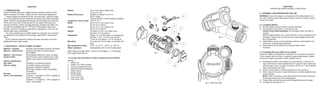
1.3 Location and description of major components and functions
See fig. 1
1. Battery Lid
2. Battery (DL1/3N or similar)
3. Cover for adjustment screw
4. Adjustment Screw (elevation)
5. Rotary Switch
6. Rubber Strap
7. Eye Protection
8. Lens Cover, rear
9. Lens Cover, front
CHAPTER II
OPERATION UNDER NORMAL CONDITIONS
2.1 ASSEMBLY AND PREPARATION FOR USE
WARNING: Insure the weapon is unloaded and the safety selector is in
the ”safe” position before attempting to install, remove or perform mainte-
nance on the sight.
2.1.1 Installing Battery
a) Remove battery cap by turning it counter clockwise.
b) Insert battery with positive (+) end toward cap.
Caution while replacing battery (not necessary when the sight is
unused)
Before installing battery cap, inspect that the O-ring is present and not
damaged. Failure to do so could result in water leakage into the bat-
tery compartment.
c) Install battery cap by turning clockwise until snug. Hand tighten only.
Using tools could damage equipment.
d) Verify that red dot is present by turning the rotary switch
clockwise.
2.1.2 Installing Ring and Sight on the weapon
Aimpoint’s sights are designed for installation on most types of weapons.
If your weapon does not have or support an appropriate base(s), please
consult your dealer, gunsmith or other qualified source.
a) Assemble the sight to the weapon by using Aimpoint´s wide 30 mm
ring or QR-mount. If other standard 30 mm rings are used, make sure
that the ring(s) covers a length of minimum 25 mm or 1” (two standard
rings could possibly be used).
b) Ensure that the sight is correctly positioned in the ring (fig.3).
c) When using lens covers, ensure that they are correctly positioned and
can be opened.
NOTE: make sure that you have space between the bottom front part
of the sight and the top of the base/weapon.
d) Finally, make sure that all screws are firmly tightened around the sight.
e) Complete the zeroing (2.2.1).
fig. 2
fig. 1
fig. 3: Seen from rear

Instructions AIMPOINT CompM3, CompML3 | Optics Trade

  • 1.
    4.2 IMPOSSIBLE TOZERO Adjustment screw is at its limit Check alignment of mount to barrel Impact point is moving Check mount stability CHAPTER V MAINTENANCE a) This reflex sight does not require any particular maintenance while used under normal conditions. b) Under severe weather conditions please refer to chapter III. c) Keep lens covers closed whenever the sight is not in use. d) Warehouse storage: Remove battery and allow lens surfaces to dry completely (if wet) before closing the lens covers. e) To clean lenses refer to CAUTION in chapter III. CHAPTER III OPERATION UNDER EXTREME CONDITIONS a) Extreme heat (moist or dry). No special procedures required. b) Extreme cold. Extreme cold might shorten battery life. c) Salt air. No special procedures required. d) Sea spray, water, mud and snow. Ensure that battery cap and two adjustment screw caps are tight before exposing the sight to sea spray, mud, snow or before immersing the sight in water. Hand tighten only. Keep lens covers closed when sight is not being used. Clean lenses with lens paper/cloth and wipe the sight dry as soon as pos- sible after exposure to water, sea spray, mud or snow. e) Dust storms and sand storms. Keep lens caps closed when sight is not being used. f) High altitudes. No special procedures required. CAUTION: The lenses shall never be cleaned with fingers but with lens paper/cloth. If no lens paper/cloth available: – To clear away debris (sand, grass etc): blow away the dirt. – To clean lenses: mist up the lenses and dry them with a clean and soft piece of cloth. CHAPTER IV TROUBLE SHOOTING PROCEDURES 4.1 RED DOT DOES NOT APPEAR Discharged battery Replace battery Battery installed incorrectly Remove and reinstall battery with (+) toward cap Battery is not making good contact Clean contact surfaces and reinstall battery. Defective rotary switch Notify dealer/armourer d) Insert adjustment tool (coin, screwdriver, knife) or cartridge casing in adjustment screw slot and turn as follows: • To move the point of impact to the right, turn windage adjustment screw counter clockwise (clockwise if screw located on left side). • To move the point of impact to the left, turn windage adjustment screw clockwise (counter clockwise if screw located on left side). • To move the point of impact up, turn elevation adjustment screw counter clockwise. • To move the point of impact down, turn elevation adjustment screw clockwise. e) Confirm zeroing by firing at least three shots at a zeroing target. Check impact points on zeroing target to confirm accuracy and repeat above procedure if required. f) After initial firing, ensure that the mount and sight are secure. g) Turn rotary switch to OFF position (counter clockwise). h) Close front and rear lens covers. 2.1.3 Installing the Rubber Cover on CompM3 and ML3 NOTE: The Rubber Cover shall be mounted to the CompM3 and ML3 after the sight has been installed in the ring. a) Remove the lens covers (front and rear) and the rubber strap. b) Put the front part of the sight into the lower opening of the Rubber Cover and pull the Cover backwards over the rear part of the sight. Be careful not to pull too hard and far, the rubber could be destroyed (fig.2). c) Reinstall the lens covers and the rubber strap. When removing the rubber cover from the Sight, do the opposite way. Start to pull off the rear part of the sight by gripping the lower rear part of the rubber cover, pulling the rubber backwards and up over the sight. 2.2 OPERATING PROCEDURES 2.2.1 Zeroing Aimpoint’s sights are delivered in a centered position. Normally this means that only small adjustments are necessary, providing that the base(s) are properly aligned. CAUTION: Do not continue to adjust windage and elevation mechanisms if you encounter resistance. The elevation adjustment screw is located on top of the sight, while the windage screw is located on the right side of the sight (fig.3). a) Open front and rear lens covers. b) Turn the rotary switch clockwise until the red dot has a sufficient inten- sity to contrast against the target. c) Remove the windage and elevation adjustment caps. NOTE: Each click of the adjustment screw corresponds to a 10 mm move- ment of the point of impact at 80 meters, (3 mm at 25 meters, 13 mm at 100 meters and 25 mm at 200 meters or 1/4” at 50 yds, 1/2” at 100 yds and 1” at 200 yds). User’s Manual for Aimpoint CompM3 and Aimpoint CompML3 © 2008 - Contents property of Aimpoint - All rights reserved - Art. No. 11432-1 Aimpoint AB Jägershillgatan 15 SE- 213 75 Malmö, Sweden Phone +46 (0)40 671 50 20 Fax +46 (0)40 21 92 38 e-mail: info@aimpoint.se www.aimpoint.com Aimpoint Inc. 14103 Mariah Court Chantilly, VA 20151-2113, USA Phone +1 703-263-9795 Fax +1 703-263-9463 e-mail: info@aimpoint.com www.aimpoint.com
  • 2.
    CHAPTER I 1.1 PRESENTATION Aimpoint’sReflex Sights are rugged precision electronic optical red dot sights developed for civilian, military and law enforcement applications. Aimpoint sights are designed for the ”two eyes open” method of sight- ing, which greatly enhances situational awareness and target acquisition speed. Thanks to the parallax-free design, the dot follows the movement of the user’s eye while remaining fixed on the target, eliminating any need for centering. Further, the sight allows for unlimited eye-relief. The CompM3 is compatible with 1st , 2nd and 3rd generation night vision devices, while the CompML3 is optimized for applications, which do not require night vision compatibility. The new CompM3 and CompML3 sights are using the new revolution- ary Advanced Circuit Efficiency Technology, called ACET, introduced in 2005. ACET combines Aimpoint’s superior accuracy and ease of use with significantly lower power usage. 1.2 Specification – Model CompM3, CompML3 Material – housing: Extruded, high strength aluminum, anodized Material – rubber cover: Chloroprene rubber (corresponding to MIL-R-6855) Material – lens covers: Thermoplastic elastomer, black, non-glare Surface finish: Hard Anodized, Dark Graphite Grey, matte Rubber cover: Black or Dark Earth Brown Optical magnification: 1X Eye relief: Unlimited, no centering required Optical coating: Anti Reflex coating, all surfaces Multi-layer coating for reflection Band Pass coating for NVD compatibility (CompM3) Dot size: 2 and 4 MOA Switch, dot brightness: CompM3: 10 positions: 4 NVD, 6 daylight of which 1 Extra Bright CompML3: 10 positions: 1 Off, 9 daylight of which 1 Extra Bright Battery: One 3 Volt Lithium battery type 2L76 or DL1/3N Battery life (hours): 50,000 h on setting 7 out of 10, (ACET Diode) Typically 500,000 h at NVD setting (CompM3) Length (incl. lens covers): 130 mm (5.1”) Width: 62 mm (2.4”), incl rubber cover, 55 mm (2.2”) without Height: 58 mm (2.3”), incl rubber cover, 55 mm (2.2”) without Weight: 270 gram (9.5 oz), incl rubber cover, 220 gram (7.8 oz) without Adjustment: Range ±2 m at 100 meters, in windage and elevation 1 click = 10 mm at 80 meters = 13 mm at 100 meters = 1/2” at 100 yards. Mounting: One wide ring, 30 mm diam, or Aimpoint QR Ring Max temperature range: -45 ºC to +70 ºC (-50 ºF to +160 ºF) Water resistance: Submersible to 45 m (135 ft) water depth MOA: Minute Of Angle 1MOA = 30 mm at 100 meters = 1” at 100 yards NVD: Night Vision Device 1.3 Location and description of major components and functions See fig. 1 1. Battery Lid 2. Battery (DL1/3N or similar) 3. Cover for adjustment screw 4. Adjustment Screw (elevation) 5. Rotary Switch 6. Rubber Strap 7. Eye Protection 8. Lens Cover, rear 9. Lens Cover, front CHAPTER II OPERATION UNDER NORMAL CONDITIONS 2.1 ASSEMBLY AND PREPARATION FOR USE WARNING: Insure the weapon is unloaded and the safety selector is in the ”safe” position before attempting to install, remove or perform mainte- nance on the sight. 2.1.1 Installing Battery a) Remove battery cap by turning it counter clockwise. b) Insert battery with positive (+) end toward cap. Caution while replacing battery (not necessary when the sight is unused) Before installing battery cap, inspect that the O-ring is present and not damaged. Failure to do so could result in water leakage into the bat- tery compartment. c) Install battery cap by turning clockwise until snug. Hand tighten only. Using tools could damage equipment. d) Verify that red dot is present by turning the rotary switch clockwise. 2.1.2 Installing Ring and Sight on the weapon Aimpoint’s sights are designed for installation on most types of weapons. If your weapon does not have or support an appropriate base(s), please consult your dealer, gunsmith or other qualified source. a) Assemble the sight to the weapon by using Aimpoint´s wide 30 mm ring or QR-mount. If other standard 30 mm rings are used, make sure that the ring(s) covers a length of minimum 25 mm or 1” (two standard rings could possibly be used). b) Ensure that the sight is correctly positioned in the ring (fig.3). c) When using lens covers, ensure that they are correctly positioned and can be opened. NOTE: make sure that you have space between the bottom front part of the sight and the top of the base/weapon. d) Finally, make sure that all screws are firmly tightened around the sight. e) Complete the zeroing (2.2.1). fig. 2 fig. 1 fig. 3: Seen from rear