College of Engineering and Information Technology
Document Management and Electronic Archiving Committee
First Academic Semester (2019-2020)
https://Musaab.info
Dr. Haytham Elmessiry
Committee Head
h.elmessiry@ustf.ac.ae
Eng.Musaab Hasan
System Administrator
m.mohammad@ustf.ac.ae
Instruction Manual
For uploading the course file documents to the online
electronic system
Prepared by Eng.Musaab Hasan 2
Step 1: Prepare your files
• Prepare your files in electronic format (Word, PDF, PowerPoint).
• Hard copied materials can be scanned within a few minutes by the copying
center on the ground floor (Mr.Abdul Salam).
• All the documents must be ready and complete
• Course Syllabus
• Course material
• Copies of all assessments instruments
• Instructor worked answers
• Graded Students’ Performance
• Instructor Course Assessment Report (ICAR)
Prepared by Eng.Musaab Hasan 3
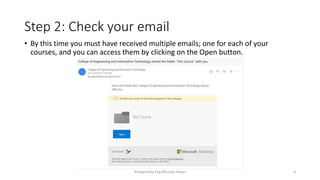
Step 2: Check your email
• By this time you must have received multiple emails; one for each of your
courses, and you can access them by clicking on the Open button.
Prepared by Eng.Musaab Hasan 4
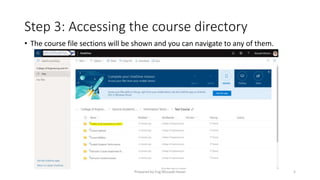
Step 3: Accessing the course directory
• The course file sections will be shown and you can navigate to any of them.
Prepared by Eng.Musaab Hasan 5
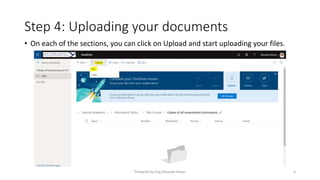
Step 4: Uploading your documents
• On each of the sections, you can click on Upload and start uploading your files.
Prepared by Eng.Musaab Hasan 6
For any assistance please contact
Dr. Haytham Elmessiry
Committee Head
h.elmessiry@ustf.ac.ae
Eng.Musaab Hasan
System Administrator
m.mohammad@ustf.ac.ae
Prepared by Eng.Musaab Hasan 7

Instruction manual for E Archiving

  • 1.
    College of Engineeringand Information Technology Document Management and Electronic Archiving Committee First Academic Semester (2019-2020) https://Musaab.info Dr. Haytham Elmessiry Committee Head h.elmessiry@ustf.ac.ae Eng.Musaab Hasan System Administrator m.mohammad@ustf.ac.ae
  • 2.
    Instruction Manual For uploadingthe course file documents to the online electronic system Prepared by Eng.Musaab Hasan 2
  • 3.
    Step 1: Prepareyour files • Prepare your files in electronic format (Word, PDF, PowerPoint). • Hard copied materials can be scanned within a few minutes by the copying center on the ground floor (Mr.Abdul Salam). • All the documents must be ready and complete • Course Syllabus • Course material • Copies of all assessments instruments • Instructor worked answers • Graded Students’ Performance • Instructor Course Assessment Report (ICAR) Prepared by Eng.Musaab Hasan 3
  • 4.
    Step 2: Checkyour email • By this time you must have received multiple emails; one for each of your courses, and you can access them by clicking on the Open button. Prepared by Eng.Musaab Hasan 4
  • 5.
    Step 3: Accessingthe course directory • The course file sections will be shown and you can navigate to any of them. Prepared by Eng.Musaab Hasan 5
  • 6.
    Step 4: Uploadingyour documents • On each of the sections, you can click on Upload and start uploading your files. Prepared by Eng.Musaab Hasan 6
  • 7.
    For any assistanceplease contact Dr. Haytham Elmessiry Committee Head h.elmessiry@ustf.ac.ae Eng.Musaab Hasan System Administrator m.mohammad@ustf.ac.ae Prepared by Eng.Musaab Hasan 7