Slide 1
• What is Anaconda Distribution?
• How it is different from Python Distribution?
• How to install Anaconda?
• conda repository
• Anaconda Navigator
• pip and conda to get new package
• pip and conda commands
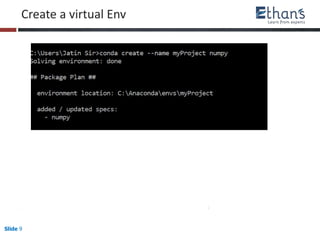
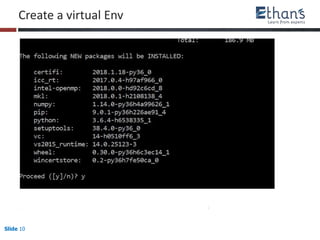
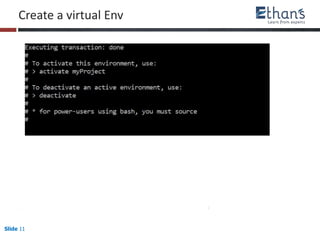
• set Virtual
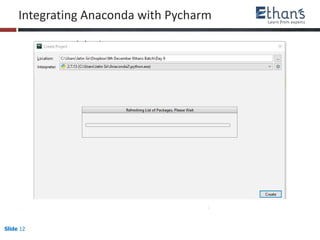
• Integrating Anaconda with Pycharm
Objective of the class
Installing Anaconda
Slide 2 www.ethans.co.in
• Anaconda is a freemium open source distribution of the Python and R programming
languages for large-scale data processing, predictive analytics, and scientific computing,
that aims to simplify package management and deployment.Package versions are
managed by the package management system conda.
• With over 4.5 million users, the open source Anaconda Distribution is the easiest way to
do Python data science and machine learning. It includes hundreds of popular data
science packages and the conda package and virtual environment manager for
Windows, Linux, and MacOS. Conda makes it quick and easy to install, run, and upgrade
complex data science and machine learning environments like scikit-learn, TensorFlow,
and SciPy.
What is Anaconda Distribution
Slide 3 www.ethans.co.in
• Anaconda Data Science Libraries
• Over 1,000 Anaconda-curated and community data science packages
• Develop data science projects using your favorite IDEs, including Jupyter, JupyterLab,
Spyder and RStudio
• Analyze data with scalability and performance with Dask, numpy, pandas and
Numba
• Visualize your data with Bokeh, Datashader, Holoviews or Matplotlib
• Create machine learning and deep learning models with Scikit-learn, Tensorflow, h20
and theano
How it is different from Python Distribution?
Slide 4
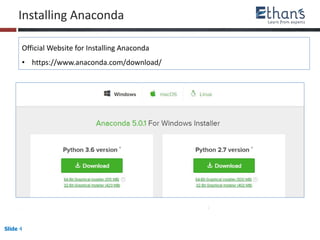
Installing Anaconda
Official Website for Installing Anaconda
• https://www.anaconda.com/download/
Slide 5
Conda Repository
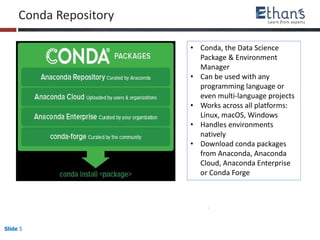
• Conda, the Data Science
Package & Environment
Manager
• Can be used with any
programming language or
even multi-language projects
• Works across all platforms:
Linux, macOS, Windows
• Handles environments
natively
• Download conda packages
from Anaconda, Anaconda
Cloud, Anaconda Enterprise
or Conda Forge
Slide 6
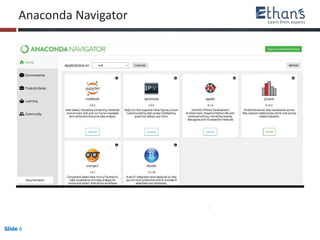
Anaconda Navigator
Slide 7 www.ethans.co.in
Pip and conda Installer
• pip is a package management system used to install and manage software packages
written in Python. Many packages can be found in the Python Package Index (PyPI).
• Python 2.7.9 and later (on the python2 series), and Python 3.4 and later include pip
(pip3 for Python 3) by default.
• pip is a recursive acronym that can stand for either "Pip Installs Packages" or "Pip
Installs Python".
• pip is quite similar to easy_install. It is a python module that lets you download,
build, install, and manage Python packages automatically.
• To install pip, download the get-pip.py file from
https://pip.pypa.io/en/latest/installing.html
• To install the package using pip, supply the filename only.
Slide 8 www.ethans.co.in
The most common scenario to install a package using pip is:
• pip –h # to display the help page
• pip list # to display the installed packages
• pip list –outdated # to display all outdated package
• pip search xlrd # to search the package in repo
• pip install Package # latest version
• pip install Package==1.0.4 # specific version
• pip install ‘Package>=1.0.4' # minimum version requirement
• pip uninstall package # to uninstall the package
• pip install –upgrade # to upgrade the package
Pip commands
Slide 9
Create a virtual Env
Slide 10
Create a virtual Env
Slide 11
Create a virtual Env
Slide 12
Integrating Anaconda with Pycharm

Installing Anaconda Distribution of Python

  • 1.
    Slide 1 • Whatis Anaconda Distribution? • How it is different from Python Distribution? • How to install Anaconda? • conda repository • Anaconda Navigator • pip and conda to get new package • pip and conda commands • set Virtual • Integrating Anaconda with Pycharm Objective of the class Installing Anaconda
  • 2.
    Slide 2 www.ethans.co.in •Anaconda is a freemium open source distribution of the Python and R programming languages for large-scale data processing, predictive analytics, and scientific computing, that aims to simplify package management and deployment.Package versions are managed by the package management system conda. • With over 4.5 million users, the open source Anaconda Distribution is the easiest way to do Python data science and machine learning. It includes hundreds of popular data science packages and the conda package and virtual environment manager for Windows, Linux, and MacOS. Conda makes it quick and easy to install, run, and upgrade complex data science and machine learning environments like scikit-learn, TensorFlow, and SciPy. What is Anaconda Distribution
  • 3.
    Slide 3 www.ethans.co.in •Anaconda Data Science Libraries • Over 1,000 Anaconda-curated and community data science packages • Develop data science projects using your favorite IDEs, including Jupyter, JupyterLab, Spyder and RStudio • Analyze data with scalability and performance with Dask, numpy, pandas and Numba • Visualize your data with Bokeh, Datashader, Holoviews or Matplotlib • Create machine learning and deep learning models with Scikit-learn, Tensorflow, h20 and theano How it is different from Python Distribution?
  • 4.
    Slide 4 Installing Anaconda OfficialWebsite for Installing Anaconda • https://www.anaconda.com/download/
  • 5.
    Slide 5 Conda Repository •Conda, the Data Science Package & Environment Manager • Can be used with any programming language or even multi-language projects • Works across all platforms: Linux, macOS, Windows • Handles environments natively • Download conda packages from Anaconda, Anaconda Cloud, Anaconda Enterprise or Conda Forge
  • 6.
  • 7.
    Slide 7 www.ethans.co.in Pipand conda Installer • pip is a package management system used to install and manage software packages written in Python. Many packages can be found in the Python Package Index (PyPI). • Python 2.7.9 and later (on the python2 series), and Python 3.4 and later include pip (pip3 for Python 3) by default. • pip is a recursive acronym that can stand for either "Pip Installs Packages" or "Pip Installs Python". • pip is quite similar to easy_install. It is a python module that lets you download, build, install, and manage Python packages automatically. • To install pip, download the get-pip.py file from https://pip.pypa.io/en/latest/installing.html • To install the package using pip, supply the filename only.
  • 8.
    Slide 8 www.ethans.co.in Themost common scenario to install a package using pip is: • pip –h # to display the help page • pip list # to display the installed packages • pip list –outdated # to display all outdated package • pip search xlrd # to search the package in repo • pip install Package # latest version • pip install Package==1.0.4 # specific version • pip install ‘Package>=1.0.4' # minimum version requirement • pip uninstall package # to uninstall the package • pip install –upgrade # to upgrade the package Pip commands
  • 9.
    Slide 9 Create avirtual Env
  • 10.
    Slide 10 Create avirtual Env
  • 11.
    Slide 11 Create avirtual Env
  • 12.