Instruction Manual Page 1
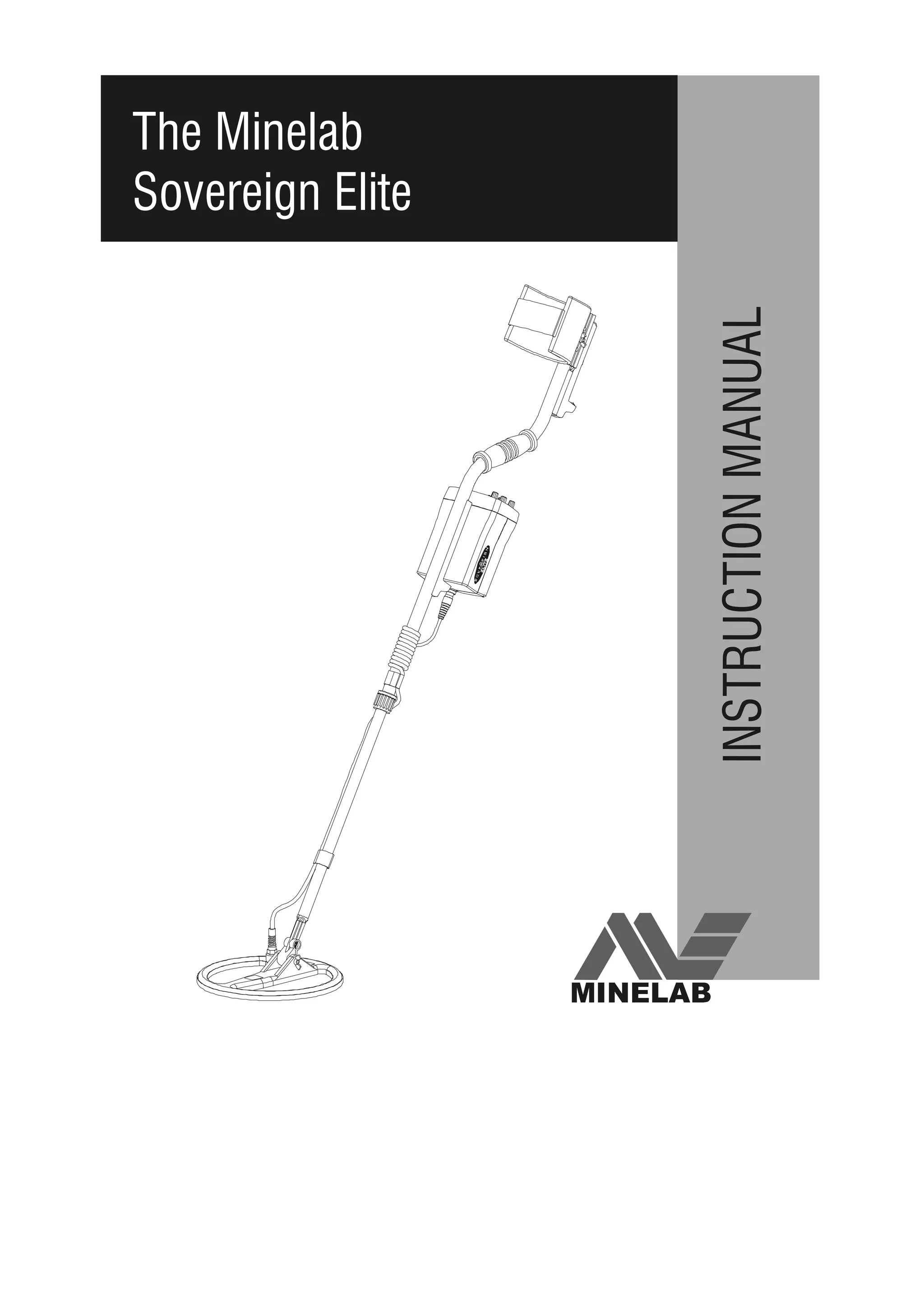
The Minelab
Sovereign Elite
INSTRUCTIONMANUAL
MINELAB
The Minelab Sovereign ElitePage 2
WARNING
THIS DOCUMENT CONTAINS
MINELAB ELECTRONICS PTY LTD
RIGHTS TECHNICAL DATA OR
RESTRICTED RIGHTS DATA OR BOTH.
 Minelab Electronics Pty Ltd
This work is copyright. Apart from any use
as permitted under the Copyright Act 1968,
no part may be reproduced by any process
without written permission from
Minelab Electronics Pty Ltd,
118 Hayward Avenue,
Torrensville, SA 5031,
Australia.
4901-0044-1.3 January 2003
Instruction Manual Page 3
The Minelab Sovereign Elite
Instruction Manual
1. Introduction .............................................................................4
2. BBS Technology ......................................................................5
3. List of Parts .............................................................................7
4. Accessories ............................................................................7
5. Assembling the Detector .......................................................8
5.1 Armrest / Upper Shaft Assembly ...............................................8
5.2 Lower Shaft Assembly ..............................................................8
5.3 Completing the Shaft Assembly ................................................9
5.4 Shaft Mount ...............................................................................9
5.5 Rear Shaft Mount .......................................................................10
5.6 Hipmounting .............................................................................11
6. Batteries .............................................................................12
6.1 Installation of NiMH Battery Pack ......................................... 12
6.2 Installation of Alkaline Batteries ............................................. 12

6.3 Low Battery Warning and NiMH Recharging .........................13
6.4 Using your NiMH Chargers ...................................................13
7. Control Panel .....................................................................13
7.1 Quickstart Operating Instructions ............................................14
7.2 Volume Control and On/Off Switch .........................................15
7.3 Sensitivity Control ....................................................................15
7.4 Threshold Control ....................................................................16
7.5 Disc/All Metal Switch ................................................................17
7.6 Disc. Control ............................................................................19
7.7 Notch Control ..........................................................................21
7.8 Tone ID Switch ..........................................................................23
7.9 Noise Cancel.............................................................................23
7.10 Audio Output ...........................................................................24
The Minelab Sovereign ElitePage 4
8. Digital Target Indication Meter ..........................................25
8.1 Installation.................................................................................25
8.2 Callibration................................................................................26
9. Quick Operating Instructions ...........................................28
9.1 Disc Mode................................................................................ 28
9.2 All Metals Mode........................................................................ 28
10. Practising the Controls ...................................................29
11. Treasure Hunting Tips .....................................................31
11.1 Pinpointing the Target ...........................................................32
11.2 Recovering the Object ...........................................................33
12. Environmental Concerns .................................................34
13. Detector Care ...................................................................35
14. Troubleshooting Guide ....................................................36
15. Specifications ..................................................................37
16. Warranty and Service ......................................................38
Since there may be a range of options available in this detector
type, equipment may vary according to the model or country of
issue. Certain descriptions and illustrations may differ (in this
manual) from the exact model that you have purchased. In
addition, Minelab reserve the right to respond to ongoing
technical progress by introducing changes in design, equipment
and technical features at any time.
Instruction Manual Page 5
1. Introduction
Congratulations on purchasing Minelab’s Sovereign Elite detector. The
Sovereign Elite metal detector has been designed for general purpose
treasure hunting and is an improved version of the highly successful
Sovereign eXtra Sensitive detector which was voted America’s “Detector
of the Year 1997” by Treasure Hunter’s Gazette.
Sovereign Elite detectors use Minelab’s unique Broad Band
Spectrum (BBS) technology, which enables the Sovereign Elite to
automatically transmit 17 individual frequencies at the same time.
The benefits of multiple frequency technology are numerous and include
increased depth, greater sensitivity to non-ferrous metal objects, increased
accuracy in discrimination, increased accuracy in target indication and
increased stability under most ground conditions.
Sovereign Elite detectors are designed to locate valuable metal objects
in high trash areas and in areas of either extreme salt or ground
mineralisation, conditions which are commonly encountered by
treasure hunters around the world. When using a single or
dual-frequency detector under these conditions, a treasure hunter may
experience a significant loss of detection depth and discrimination
accuracy. However, the Sovereign Elite, with its 17 individual
frequencies, compensates for interference from these ground
conditions and enables you to penetrate deeply and discriminate
accurately at full depth.
Sovereign Elite detectors are simple to operate, having very few
controls that require adjustment after they have been set. The
extremely advanced, yet simple-to-use, discrimination features enable
you to accurately select only the types of metal objects that you want to
find and to ignore the rest. The variable signal tone responses enable
you to accurately identify the object found before you recover it.
If you have any questions or comments regarding the Sovereign Elite or
any other Minelab product, then please feel free to contact us via your
local Authorised Minelab Dealer or write to us direct.
Minelab Electronics wish you every success in your treasure hunting.
The Minelab Sovereign ElitePage 6
2. BBS Technology
When developing BBS technology, Minelab’s scientists first looked at
technology that was already available in the market and identified its
limitations in field use. Discussions with seasoned treasure hunters from
around the world identified a number of common problems facing
detector operators. These problems included:
• Loss of detection depth in highly mineralised ground.
• Inaccurate target identification beyond 5 or 6 inches.
• Inability to detect good targets in close proximity to iron trash.
• Erratic operation when searching salt-water beaches.
Most detectors on the market operate on a single (or dual) frequency,
ranging from 1 to 70 kHz. Although this technology has served the
industry well for years, Minelab’s scientists found that a frequency that
worked well in one area would often offer only marginal performance
when used in another location. Ground mineralisation, trash content, and
target size all had an effect on how well a detector transmitting a single
frequency would operate.
The BBS circuit automatically transmits 17 frequencies simultaneously;
a feature which is unique to Minelab metal detectors. Ranging from 1.5
to 25.5 kHz in 1.5 kHz increments, the signal received from the coil is
analysed and information is relayed to the operator via the speaker,
headphone, and meter (if attached). Through the use of its 17
frequencies, the Sovereign Elite is designed to locate and accurately
identify valuable targets in variable ground and high trash areas.
Essentially, when using a Sovereign Elite with BBS technology, it is like
swinging 17 single-frequency detectors at the same time. Because BBS
operates at a number of frequencies that no other detector does, BBS
detectors such as the Sovereign Elite can find a broad range of objects
that no other individual detector has the ability to find.
BBS technology combines Minelab’s unique multiple frequency BBS
technology with improved signal processing to give:
• Greater detecting depth.
• Consistent sensitivity over a wide range of targets.
• Less interference from electromagnetic sources.
Instruction Manual Page 7
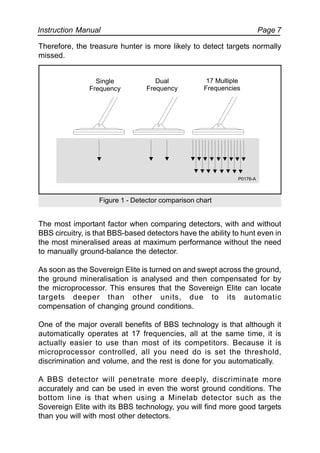
Therefore, the treasure hunter is more likely to detect targets normally
missed.
The most important factor when comparing detectors, with and without
BBS circuitry, is that BBS-based detectors have the ability to hunt even in
the most mineralised areas at maximum performance without the need
to manually ground-balance the detector.
As soon as the Sovereign Elite is turned on and swept across the ground,
the ground mineralisation is analysed and then compensated for by
the microprocessor. This ensures that the Sovereign Elite can locate
targets deeper than other units, due to its automatic
compensation of changing ground conditions.
One of the major overall benefits of BBS technology is that although it
automatically operates at 17 frequencies, all at the same time, it is
actually easier to use than most of its competitors. Because it is
microprocessor controlled, all you need do is set the threshold,
discrimination and volume, and the rest is done for you automatically.
A BBS detector will penetrate more deeply, discriminate more
accurately and can be used in even the worst ground conditions. The
bottom line is that when using a Minelab detector such as the
Sovereign Elite with its BBS technology, you will find more good targets
than you will with most other detectors.
Figure 1 - Detector comparison chart
Single
Frequency
Dual
Frequency
17 Multiple
Frequencies
P0176-A
The Minelab Sovereign ElitePage 8
3. List of Parts
The box in which the Sovereign Elite is shipped should contain the
following items. Please check that all of these items are in the box:
Control Box !
10” or 8” Round Tornado coil (inc. skid plate attached) !
2-Piece Shaft Assembly(inc. Fiberglass lower shaft) !
Black Aluminium Armrest (inc. nuts & bolts) (2 part) !
Arm Rest Neoprene Cover !
Arm Rest Strap (2 part) !
Rear Control Box Bracket !
Detector Stand !
NiMH Battery Pack !
Mains NiMH Charger !
VelcroTM
Straps (2 pair) !
Teardrop Washers (2) !
Nylon Nuts and Bolts !
Warranty Card !
Instruction Manual !
4. Accessories
The following accessories are available to further improve your machine.
• Digital Target Identification Meter
• Alkaline Battery Holder for 8 x ‘AA’ Batteries
• 12V NiMH Battery Vehicle Charger
• Headphones
• Hipmount Bag with Raincoat Protective Cover for Control Box
• Meter Hipmount Bag
• Padded Detector Transport Bag
• Blue Minelab Polo Shirt
• Blue Minelab Cap
For further information on these and other Minelab products call your
Minelab dealer.
Instruction Manual Page 9
5. Assembling the Detector
Please follow these instructions to assemble the Sovereign Elite. Refer
to the drawings to identify parts and how they are positioned. Please
contact your Minelab dealer for further instructions should any
difficulties arise.
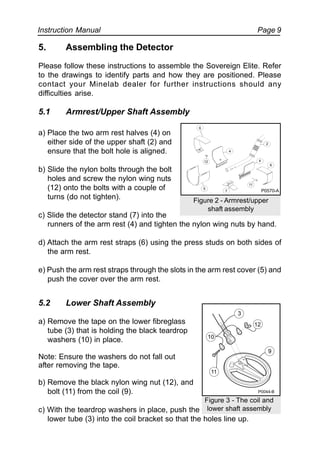
5.1 Armrest/Upper Shaft Assembly
a) Place the two arm rest halves (4) on
either side of the upper shaft (2) and
ensure that the bolt hole is aligned.
b) Slide the nylon bolts through the bolt
holes and screw the nylon wing nuts
(12) onto the bolts with a couple of
turns (do not tighten).
c) Slide the detector stand (7) into the
runners of the arm rest (4) and tighten the nylon wing nuts by hand.
d) Attach the arm rest straps (6) using the press studs on both sides of
the arm rest.
e) Push the arm rest straps through the slots in the arm rest cover (5) and
push the cover over the arm rest.
5.2 Lower Shaft Assembly
a) Remove the tape on the lower fibreglass
tube (3) that is holding the black teardrop
washers (10) in place.
Note: Ensure the washers do not fall out
after removing the tape.
b) Remove the black nylon wing nut (12), and
bolt (11) from the coil (9).
c) With the teardrop washers in place, push the
lower tube (3) into the coil bracket so that the holes line up.
Figure 2 - Armrest/upper
shaft assembly
6
4
12
5
7
11
2
4
6
Figure 3 - The coil and
lower shaft assembly
12
11
10
3
9
P0044-B
P0570-A
The Minelab Sovereign ElitePage 10
Note: Ensure that the black nylon spring clip near the top of the fibreglass
tube is pointing toward the rear of the coil.
d) Push the black nylon bolt (11) through the holes in the bracket on the
coil from the cable entry side and tighten the wing nut (12) by hand.
5.3 Completing the Shaft Assembly
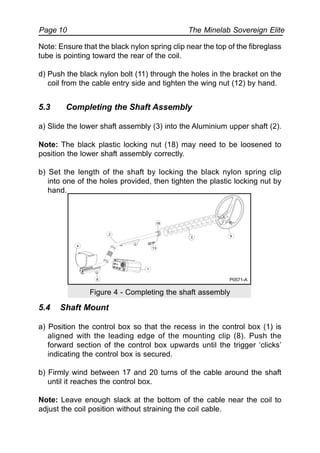
a) Slide the lower shaft assembly (3) into the Aluminium upper shaft (2).
Note: The black plastic locking nut (18) may need to be loosened to
position the lower shaft assembly correctly.
b) Set the length of the shaft by locking the black nylon spring clip
into one of the holes provided, then tighten the plastic locking nut by
hand.
Figure 4 - Completing the shaft assembly
5.4 Shaft Mount
a) Position the control box so that the recess in the control box (1) is
aligned with the leading edge of the mounting clip (8). Push the
forward section of the control box upwards until the trigger ‘clicks’
indicating the control box is secured.
b) Firmly wind between 17 and 20 turns of the cable around the shaft
until it reaches the control box.
Note: Leave enough slack at the bottom of the cable near the coil to
adjust the coil position without straining the coil cable.
4
2
18
93
13
1
8 P0571-A
Instruction Manual Page 11
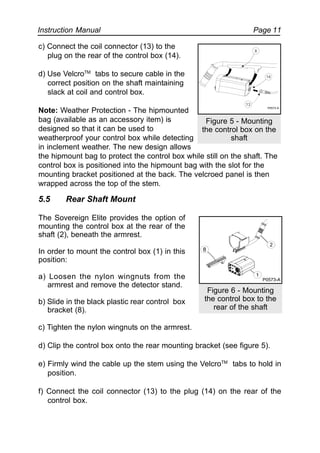
c) Connect the coil connector (13) to the
plug on the rear of the control box (14).
d) Use VelcroTM
tabs to secure cable in the
correct position on the shaft maintaining
slack at coil and control box.
Note: Weather Protection - The hipmounted
bag (available as an accessory item) is
designed so that it can be used to
weatherproof your control box while detecting
in inclement weather. The new design allows
the hipmount bag to protect the control box while still on the shaft. The
control box is positioned into the hipmount bag with the slot for the
mounting bracket positioned at the back. The velcroed panel is then
wrapped across the top of the stem.
5.5 Rear Shaft Mount
The Sovereign Elite provides the option of
mounting the control box at the rear of the
shaft (2), beneath the armrest.
In order to mount the control box (1) in this
position:
a) Loosen the nylon wingnuts from the
armrest and remove the detector stand.
b) Slide in the black plastic rear control box
bracket (8).
c) Tighten the nylon wingnuts on the armrest.
d) Clip the control box onto the rear mounting bracket (see figure 5).
e) Firmly wind the cable up the stem using the VelcroTM
tabs to hold in
position.
f) Connect the coil connector (13) to the plug (14) on the rear of the
control box.
Figure 5 - Mounting
the control box on the
shaft
Figure 6 - Mounting
the control box to the
rear of the shaft
8
2
1
P0573-A
P0572-A
13
8
14
The Minelab Sovereign ElitePage 12
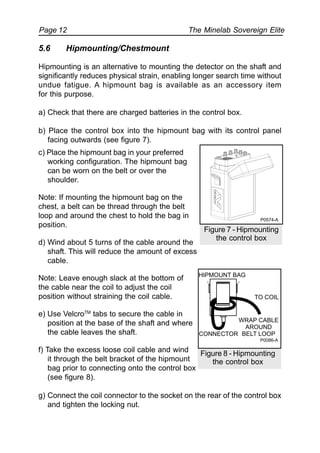
c) Place the hipmount bag in your preferred
working configuration. The hipmount bag
can be worn on the belt or over the
shoulder.
Note: If mounting the hipmount bag on the
chest, a belt can be thread through the belt
loop and around the chest to hold the bag in
position.
d) Wind about 5 turns of the cable around the
shaft. This will reduce the amount of excess
cable.
Note: Leave enough slack at the bottom of
the cable near the coil to adjust the coil
position without straining the coil cable.
e) Use VelcroTM
tabs to secure the cable in
position at the base of the shaft and where
the cable leaves the shaft.
f) Take the excess loose coil cable and wind
it through the belt bracket of the hipmount
bag prior to connecting onto the control box
(see figure 8).
g) Connect the coil connector to the socket on the rear of the control box
and tighten the locking nut.
Figure 7 - Hipmounting
the control box
5.6 Hipmounting/Chestmount
Hipmounting is an alternative to mounting the detector on the shaft and
significantly reduces physical strain, enabling longer search time without
undue fatigue. A hipmount bag is available as an accessory item
for this purpose.
a) Check that there are charged batteries in the control box.
b) Place the control box into the hipmount bag with its control panel
facing outwards (see figure 7).
Figure 8 - Hipmounting
the control box
P0574-A
TO COIL
HIPMOUNT BAG
CONNECTOR
WRAP CABLE
AROUND
BELT LOOP
P0086-A
Instruction Manual Page 13
6. Batteries
Your Sovereign Elite is supplied with a rechargeable 12 Volt NiMH
battery pack and mains charger. A car charger is also available as an
accessory item from your authorised Minelab Dealer.
6.1 Installation of NiMH Battery Pack
a) Ensure your NiMH pack is fully charged.
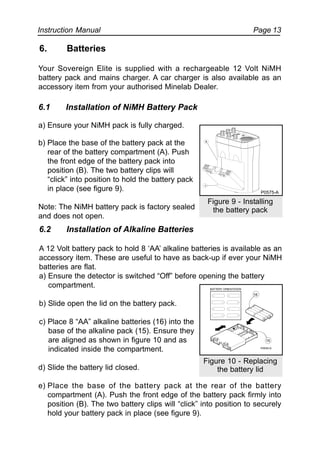
b) Place the base of the battery pack at the
rear of the battery compartment (A). Push
the front edge of the battery pack into
position (B). The two battery clips will
“click” into position to hold the battery pack
in place (see figure 9).
Note: The NiMH battery pack is factory sealed
and does not open.
6.2 Installation of Alkaline Batteries
A 12 Volt battery pack to hold 8 ‘AA’ alkaline batteries is available as an
accessory item. These are useful to have as back-up if ever your NiMH
batteries are flat.
a) Ensure the detector is switched “Off” before opening the battery
compartment.
b) Slide open the lid on the battery pack.
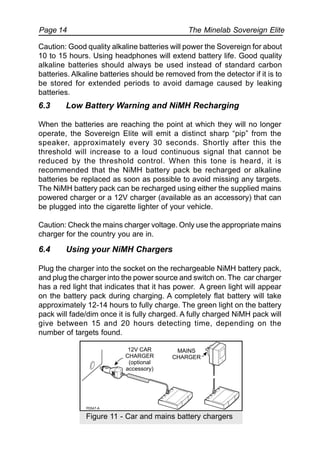
c) Place 8 “AA” alkaline batteries (16) into the
base of the alkaline pack (15). Ensure they
are aligned as shown in figure 10 and as
indicated inside the compartment.
d) Slide the battery lid closed.
e) Place the base of the battery pack at the rear of the battery
compartment (A). Push the front edge of the battery pack firmly into
position (B). The two battery clips will “click” into position to securely
hold your battery pack in place (see figure 9).
Figure 10 - Replacing
the battery lid
16
15
Figure 9 - Installing
the battery pack
B
A
P0575-A
The Minelab Sovereign ElitePage 14
Caution: Good quality alkaline batteries will power the Sovereign for about
10 to 15 hours. Using headphones will extend battery life. Good quality
alkaline batteries should always be used instead of standard carbon
batteries. Alkaline batteries should be removed from the detector if it is to
be stored for extended periods to avoid damage caused by leaking
batteries.
6.3 Low Battery Warning and NiMH Recharging
When the batteries are reaching the point at which they will no longer
operate, the Sovereign Elite will emit a distinct sharp “pip” from the
speaker, approximately every 30 seconds. Shortly after this the
threshold will increase to a loud continuous signal that cannot be
reduced by the threshold control. When this tone is heard, it is
recommended that the NiMH battery pack be recharged or alkaline
batteries be replaced as soon as possible to avoid missing any targets.
The NiMH battery pack can be recharged using either the supplied mains
powered charger or a 12V charger (available as an accessory) that can
be plugged into the cigarette lighter of your vehicle.
Caution: Check the mains charger voltage. Only use the appropriate mains
charger for the country you are in.
6.4 Using your NiMH Chargers
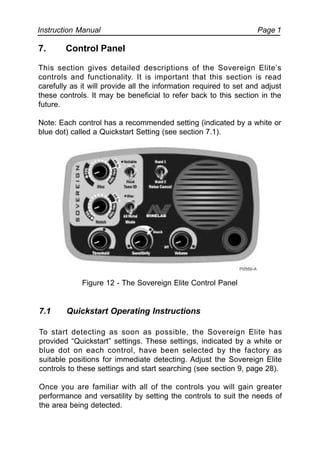
Plug the charger into the socket on the rechargeable NiMH battery pack,
and plug the charger into the power source and switch on. The car charger
has a red light that indicates that it has power. A green light will appear
on the battery pack during charging. A completely flat battery will take
approximately 12-14 hours to fully charge. The green light on the battery
pack will fade/dim once it is fully charged. A fully charged NiMH pack will
give between 15 and 20 hours detecting time, depending on the
number of targets found.
Figure 11 - Car and mains battery chargers
Instruction Manual Page 1
7. Control Panel
This section gives detailed descriptions of the Sovereign Elite’s
controls and functionality. It is important that this section is read
carefully as it will provide all the information required to set and adjust
these controls. It may be beneficial to refer back to this section in the
future.
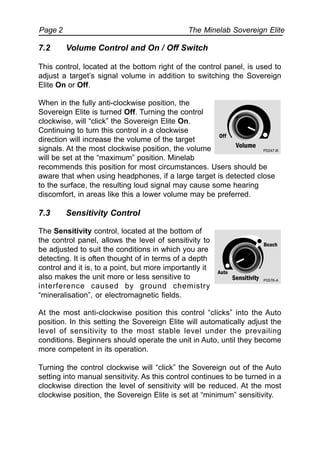
Note: Each control has a recommended setting (indicated by a white or
blue dot) called a Quickstart Setting (see section 7.1).
Figure 12 - The Sovereign Elite Control Panel
7.1 Quickstart Operating Instructions
To start detecting as soon as possible, the Sovereign Elite has
provided “Quickstart” settings. These settings, indicated by a white or
blue dot on each control, have been selected by the factory as
suitable positions for immediate detecting. Adjust the Sovereign Elite
controls to these settings and start searching (see section 9, page 28).
Once you are familiar with all of the controls you will gain greater
performance and versatility by setting the controls to suit the needs of
the area being detected.
The Minelab Sovereign ElitePage 2
When in the fully anti-clockwise position, the
Sovereign Elite is turned Off. Turning the control
clockwise, will “click” the Sovereign Elite On.
Continuing to turn this control in a clockwise
direction will increase the volume of the target
signals. At the most clockwise position, the volume
will be set at the “maximum” position. Minelab
recommends this position for most circumstances. Users should be
aware that when using headphones, if a large target is detected close
to the surface, the resulting loud signal may cause some hearing
discomfort, in areas like this a lower volume may be preferred.
7.3 Sensitivity Control
The Sensitivity control, located at the bottom of
the control panel, allows the level of sensitivity to
be adjusted to suit the conditions in which you are
detecting. It is often thought of in terms of a depth
control and it is, to a point, but more importantly it
also makes the unit more or less sensitive to
interference caused by ground chemistry
“mineralisation”, or electromagnetic fields.
At the most anti-clockwise position this control “clicks” into the Auto
position. In this setting the Sovereign Elite will automatically adjust the
level of sensitivity to the most stable level under the prevailing
conditions. Beginners should operate the unit in Auto, until they become
more competent in its operation.
Turning the control clockwise will “click” the Sovereign out of the Auto
setting into manual sensitivity. As this control continues to be turned in a
clockwise direction the level of sensitivity will be reduced. At the most
clockwise position, the Sovereign Elite is set at “minimum” sensitivity.
7.2 Volume Control and On / Off Switch
This control, located at the bottom right of the control panel, is used to
adjust a target’s signal volume in addition to switching the Sovereign
Elite On or Off.
P0247-B
Instruction Manual Page 3
The incidence of false signalling is minimised if the operator
concentrates on sweeping the coil as parallel and even to the beach
sand surface as possible, whether in or out of the water. In summary, for
greatest detection depth:
• Keep the coil sweep as parallel to the beach sand as possible.
• Turn the sensitivity knob as anti-clockwise as possible,
(within the manual region) so that minimal false signals occurs.
• This setting will need to be altered, depending on the sand
moisture level.
Advanced users operating inland can operate the unit in either Auto or in
Manual. In more mineralised soils Auto is recommended. Note that “hot
rocks”, “Roman Pennies” or some ancient red/orange/brown pottery or
tiles may cause the unit to respond as if the targets are ferrous. This
is not a false signal but the correct response, and indicates that the unit
is set at a relatively high sensitivity.
Advanced users operating in non-mineralised soils or areas of high trash
concentration should set the sensitivity control out of Auto and into the
variable Manual region. The requirements of this setting are the same as
those for the advanced beach detection. The control should be set as
anti-clockwise as possible (out of Auto and into the variable manual
region), so that minimal false signalling occurs. This setting will depend
on the degree of soil mineralisation and metal junk concentration.
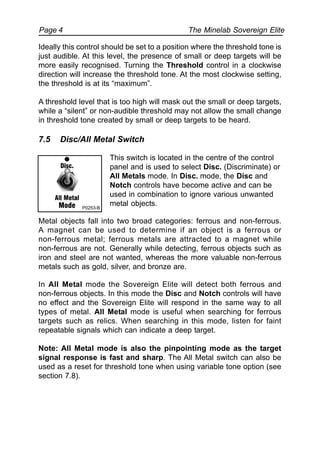
7.4 Threshold Control
Located at the bottom left of the control panel, the
Threshold control allows for adjustment of the
background threshold level. This background
“threshold” or “hum” aids in the location of targets.
Small or large deep targets may not produce a
distinct target signal but rather cause only a slight
change in the threshold tone.
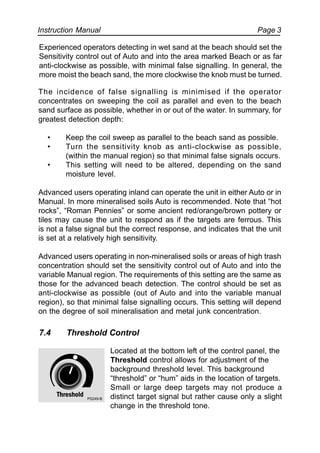
Experienced operators detecting in wet sand at the beach should set the
Sensitivity control out of Auto and into the area marked Beach or as far
anti-clockwise as possible, with minimal false signalling. In general, the
more moist the beach sand, the more clockwise the knob must be turned.
P0249-B
The Minelab Sovereign ElitePage 4
Ideally this control should be set to a position where the threshold tone is
just audible. At this level, the presence of small or deep targets will be
more easily recognised. Turning the Threshold control in a clockwise
direction will increase the threshold tone. At the most clockwise setting,
the threshold is at its “maximum”.
A threshold level that is too high will mask out the small or deep targets,
while a “silent” or non-audible threshold may not allow the small change
in threshold tone created by small or deep targets to be heard.
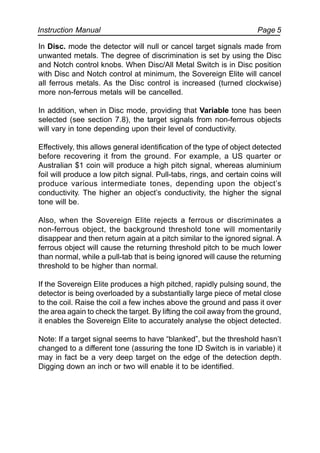
7.5 Disc/All Metal Switch
This switch is located in the centre of the control
panel and is used to select Disc. (Discriminate) or
All Metals mode. In Disc. mode, the Disc and
Notch controls have become active and can be
used in combination to ignore various unwanted
metal objects.
Metal objects fall into two broad categories: ferrous and non-ferrous.
A magnet can be used to determine if an object is a ferrous or
non-ferrous metal; ferrous metals are attracted to a magnet while
non-ferrous are not. Generally while detecting, ferrous objects such as
iron and steel are not wanted, whereas the more valuable non-ferrous
metals such as gold, silver, and bronze are.
In All Metal mode the Sovereign Elite will detect both ferrous and
non-ferrous objects. In this mode the Disc and Notch controls will have
no effect and the Sovereign Elite will respond in the same way to all
types of metal. All Metal mode is useful when searching for ferrous
targets such as relics. When searching in this mode, listen for faint
repeatable signals which can indicate a deep target.
Note: All Metal mode is also the pinpointing mode as the target
signal response is fast and sharp. The All Metal switch can also be
used as a reset for threshold tone when using variable tone option (see
section 7.8).
P0253-B
Instruction Manual Page 5
In Disc. mode the detector will null or cancel target signals made from
unwanted metals. The degree of discrimination is set by using the Disc
and Notch control knobs. When Disc/All Metal Switch is in Disc position
with Disc and Notch control at minimum, the Sovereign Elite will cancel
all ferrous metals. As the Disc control is increased (turned clockwise)
more non-ferrous metals will be cancelled.
In addition, when in Disc mode, providing that Variable tone has been
selected (see section 7.8), the target signals from non-ferrous objects
will vary in tone depending upon their level of conductivity.
Effectively, this allows general identification of the type of object detected
before recovering it from the ground. For example, a US quarter or
Australian $1 coin will produce a high pitch signal, whereas aluminium
foil will produce a low pitch signal. Pull-tabs, rings, and certain coins will
produce various intermediate tones, depending upon the object’s
conductivity. The higher an object’s conductivity, the higher the signal
tone will be.
Also, when the Sovereign Elite rejects a ferrous or discriminates a
non-ferrous object, the background threshold tone will momentarily
disappear and then return again at a pitch similar to the ignored signal. A
ferrous object will cause the returning threshold pitch to be much lower
than normal, while a pull-tab that is being ignored will cause the returning
threshold to be higher than normal.
If the Sovereign Elite produces a high pitched, rapidly pulsing sound, the
detector is being overloaded by a substantially large piece of metal close
to the coil. Raise the coil a few inches above the ground and pass it over
the area again to check the target. By lifting the coil away from the ground,
it enables the Sovereign Elite to accurately analyse the object detected.
Note: If a target signal seems to have “blanked”, but the threshold hasn’t
changed to a different tone (assuring the tone ID Switch is in variable) it
may in fact be a very deep target on the edge of the detection depth.
Digging down an inch or two will enable it to be identified.
The Minelab Sovereign ElitePage 6
Elite will not produce a “signal beep” (large ferrous objects may produce
short “pops” or “clicks”). However, non-ferrous targets will be “accepted”
and give a “signal beep”.
Typical ferrous objects encountered by treasure hunters are nails, screws,
washers, bits of wire, etc. These objects are generally not considered to
be of value, so it is a distinct advantage to be able to ignore them while
detecting. Objects that will cause the Sovereign Elite to produce a “signal
beep” will be non-ferrous metals, including such items as aluminium foil,
most jewelry, pull-tabs, coins, bottle tops, gold, silver, brass, etc.
Not all of these non-ferrous objects are considered valuable. Therefore,
by using the Disc control, the Sovereign Elite can be adjusted to ignore
some of the less valuable non-ferrous objects while still locating more
valuable targets. The Disc control is a one-turn pot, continuously
variable with numerous graduations as a guide for the setting of the
control. Turning the Disc control clockwise will increase the
“discrimination” level, and non-ferrous objects of lower conductivity will
be ignored.
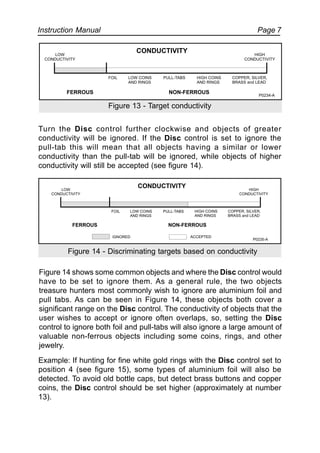
The Sovereign Elite uses the electrical conductivity of the object to
determine the type of metal detected, and based upon the Disc control
setting, will either ignore or accept the object. The most effective way to
demonstrate this is to consider a number of objects, all of varying
conductivity, placed in a line on the ground. As the detector is moved
from left to right, the objects increase in conductivity (see figure 13).
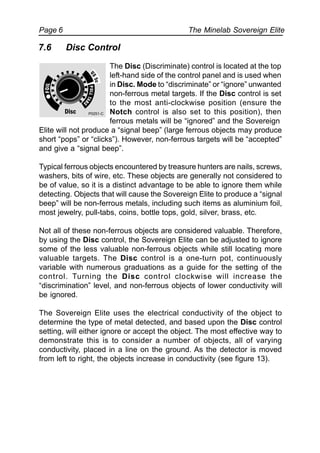
7.6 Disc Control
The Disc (Discriminate) control is located at the top
left-hand side of the control panel and is used when
in Disc. Mode to “discriminate” or “ignore” unwanted
non-ferrous metal targets. If the Disc control is set
to the most anti-clockwise position (ensure the
Notch control is also set to this position), then
ferrous metals will be “ignored” and the Sovereign
P0251-C
Instruction Manual Page 7
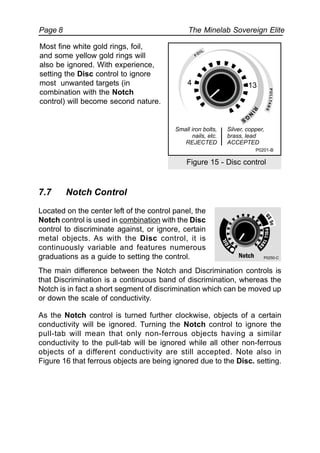
Turn the Disc control further clockwise and objects of greater
conductivity will be ignored. If the Disc control is set to ignore the
pull-tab this will mean that all objects having a similar or lower
conductivity than the pull-tab will be ignored, while objects of higher
conductivity will still be accepted (see figure 14).
Figure 14 shows some common objects and where the Disc control would
have to be set to ignore them. As a general rule, the two objects
treasure hunters most commonly wish to ignore are aluminium foil and
pull tabs. As can be seen in Figure 14, these objects both cover a
significant range on the Disc control. The conductivity of objects that the
user wishes to accept or ignore often overlaps, so, setting the Disc
control to ignore both foil and pull-tabs will also ignore a large amount of
valuable non-ferrous objects including some coins, rings, and other
jewelry.
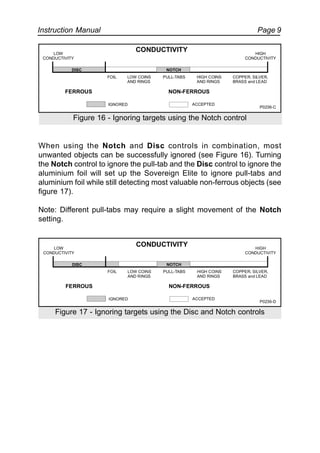
Example: If hunting for fine white gold rings with the Disc control set to
position 4 (see figure 15), some types of aluminium foil will also be
detected. To avoid old bottle caps, but detect brass buttons and copper
coins, the Disc control should be set higher (approximately at number
13).
Figure 13 - Target conductivity
Figure 14 - Discriminating targets based on conductivity
LOW
CONDUCTIVITY
HIGH
CONDUCTIVITY
FOIL
FERROUS NON-FERROUS
CONDUCTIVITY
PULL-TABS HIGH COINS
AND RINGS
COPPER, SILVER,
BRASS and LEAD
LOW COINS
AND RINGS
P0234-A
LOW
CONDUCTIVITY
HIGH
CONDUCTIVITY
FOIL
IGNORED ACCEPTED
FERROUS NON-FERROUS
CONDUCTIVITY
PULL-TABS HIGH COINS
AND RINGS
COPPER, SILVER,
BRASS and LEAD
LOW COINS
AND RINGS
P0235-A
The Minelab Sovereign ElitePage 8
Most fine white gold rings, foil,
and some yellow gold rings will
also be ignored. With experience,
setting the Disc control to ignore
most unwanted targets (in
combination with the Notch
control) will become second nature.
Figure 15 - Disc control
7.7 Notch Control
Located on the center left of the control panel, the
Notch control is used in combination with the Disc
control to discriminate against, or ignore, certain
metal objects. As with the Disc control, it is
continuously variable and features numerous
graduations as a guide to setting the control.
The main difference between the Notch and Discrimination controls is
that Discrimination is a continuous band of discrimination, whereas the
Notch is in fact a short segment of discrimination which can be moved up
or down the scale of conductivity.
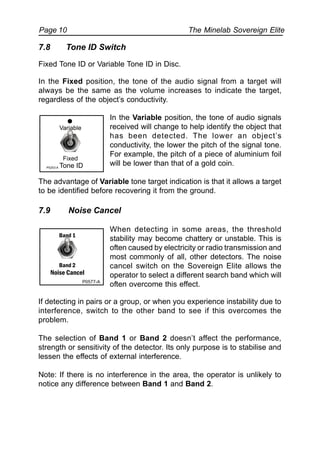
As the Notch control is turned further clockwise, objects of a certain
conductivity will be ignored. Turning the Notch control to ignore the
pull-tab will mean that only non-ferrous objects having a similar
conductivity to the pull-tab will be ignored while all other non-ferrous
objects of a different conductivity are still accepted. Note also in
Figure 16 that ferrous objects are being ignored due to the Disc. setting.
P0250-C
Small iron bolts,
nails, etc.
REJECTED
Silver, copper,
brass, lead
ACCEPTED
P0201-B
R
IN
G
S
PULLTABS
FO
IL
4 13
Instruction Manual Page 9
When using the Notch and Disc controls in combination, most
unwanted objects can be successfully ignored (see Figure 16). Turning
the Notch control to ignore the pull-tab and the Disc control to ignore the
aluminium foil will set up the Sovereign Elite to ignore pull-tabs and
aluminium foil while still detecting most valuable non-ferrous objects (see
figure 17).
Note: Different pull-tabs may require a slight movement of the Notch
setting.
LOW
CONDUCTIVITY
HIGH
CONDUCTIVITY
FOIL
IGNORED ACCEPTED
FERROUS NON-FERROUS
CONDUCTIVITY
PULL-TABS HIGH COINS
AND RINGS
COPPER, SILVER,
BRASS and LEAD
LOW COINS
AND RINGS
P0236-C
NOTCHDISC
Figure 16 - Ignoring targets using the Notch control
HIGH
CONDUCTIVITY
P0236-D
LOW
CONDUCTIVITY
FOIL
IGNORED ACCEPTED
FERROUS NON-FERROUS
CONDUCTIVITY
PULL-TABS HIGH COINS
AND RINGS
COPPER, SILVER,
BRASS and LEAD
LOW COINS
AND RINGS
NOTCHDISC
Figure 17 - Ignoring targets using the Disc and Notch controls
The Minelab Sovereign ElitePage 10
7.8 Tone ID Switch
Fixed Tone ID or Variable Tone ID in Disc.
In the Fixed position, the tone of the audio signal from a target will
always be the same as the volume increases to indicate the target,
regardless of the object’s conductivity.
In the Variable position, the tone of audio signals
received will change to help identify the object that
has been detected. The lower an object’s
conductivity, the lower the pitch of the signal tone.
For example, the pitch of a piece of aluminium foil
will be lower than that of a gold coin.
The advantage of Variable tone target indication is that it allows a target
to be identified before recovering it from the ground.
7.9 Noise Cancel
When detecting in some areas, the threshold
stability may become chattery or unstable. This is
often caused by electricity or radio transmission and
most commonly of all, other detectors. The noise
cancel switch on the Sovereign Elite allows the
operator to select a different search band which will
often overcome this effect.
If detecting in pairs or a group, or when you experience instability due to
interference, switch to the other band to see if this overcomes the
problem.
The selection of Band 1 or Band 2 doesn’t affect the performance,
strength or sensitivity of the detector. Its only purpose is to stabilise and
lessen the effects of external interference.
Note: If there is no interference in the area, the operator is unlikely to
notice any difference between Band 1 and Band 2.
P0577-A
Band 1
Band 2
Noise Cancel
Fixed
Variable
Tone IDP0253-A
Instruction Manual Page 11
loudspeaker and their use will increase battery life. Headphones used
should be of a low impedance. The socket will accept most stereo
headphones with a 1/4” jack. If these headphones have a “Stereo/Mono”
switch, set it to “Stereo”. Minelab recommends headphones to be
32 ohms or less.
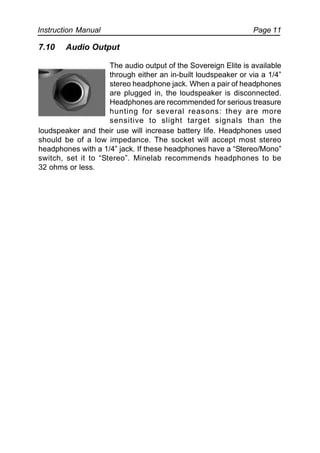
7.10 Audio Output
The audio output of the Sovereign Elite is available
through either an in-built loudspeaker or via a 1/4”
stereo headphone jack. When a pair of headphones
are plugged in, the loudspeaker is disconnected.
Headphones are recommended for serious treasure
hunting for several reasons: they are more
sensitive to slight target signals than the
Instruction Manual Page 1
8. Digital Target Indication Meter (available as accessory)
The Digital Target meter has been designed to aid in the identification of
metal targets before their recovery. It provides a digital display of the
target ID tones produced by the Sovereign Elite detector, and connects
between the search coil and the control box without requiring any
modification to the detector’s electronics.
Note: The meter has no negative effect upon the operation or overall
performance of the detector, it simply provides for easier target
recognition. It is also very useful for people with tonal hearing loss.
8.1 Installation
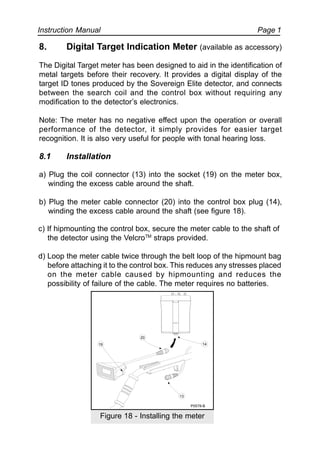
a) Plug the coil connector (13) into the socket (19) on the meter box,
winding the excess cable around the shaft.
b) Plug the meter cable connector (20) into the control box plug (14),
winding the excess cable around the shaft (see figure 18).
c) If hipmounting the control box, secure the meter cable to the shaft of
the detector using the VelcroTM
straps provided.
d) Loop the meter cable twice through the belt loop of the hipmount bag
before attaching it to the control box. This reduces any stresses placed
on the meter cable caused by hipmounting and reduces the
possibility of failure of the cable. The meter requires no batteries.
20
19
13
14
P0578-B
Figure 18 - Installing the meter
The Minelab Sovereign ElitePage 2
8.2 Calibration
Before using the Digital Target meter, it is necessary to calibrate it as
follows:
a) Set the Calibration control knob (situated to the rear of the meter) to
the center position of its range.
b) Place the detector in a stationary position with the coil flat on the ground.
c) Set the Sensitivity control on the Control box to Auto (extreme
anti-clockwise).
d) If the threshold is varying because of electrical interference, adjust
Sensitivity clockwise towards minimum until a constant threshold is
present.
e) Slowly pass a common coin across the coil and finely adjust the
Calibration control to the nearest number, devisible by 5 e.g. US
quarter (set to 550), AUS 20c
(set to 500).
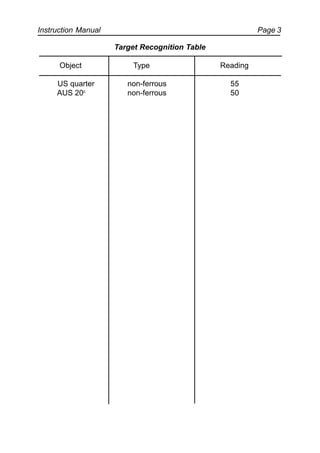
f) Slowly pass additional coins and other common targets across the
coil and record the results on the target recognition table shown on
page 28.
This table will become an excellent guide when used in conjunction with
the Digital Target Indicator until the various target responses become
familiar. This meter should not be soley relied upon for
discrimination. It is important to use the other features of the Sovereign
Elite to aid in the process of discrimination.
Be aware that some similar objects may vary in Target Indication
readings because of changes in composition. For example, a gold
ring will vary depending upon the purity of the gold and the size of the
band. Coins minted in different years may have different alloy
combinations and so the reading will differ. The Target Indication
readings will also be influenced by an object’s orientation, the length
of time it has been buried in the ground as well as different ground
conditions.
Instruction Manual Page 3
Target Recognition Table
Object Type Reading
US quarter non-ferrous 55
AUS 20c
non-ferrous 50
The Minelab Sovereign ElitePage 4
9. Quick Operating Instructions
9.1 Disc Mode
a) Install charged batteries.
b) Set the Mode switch to Disc.
c) Turn the Sovereign Elite On by turning the Volume control to the most
clockwise or “maximum” setting.
d) Turn the Threshold control in a clockwise direction until the tone
becomes “just” audible.
e) Set the Sensitivity control to Auto or at the maximum manual
setting without interference.
f) Set the Disc control to the white dot until you better understand its
appropriate settings.
g) Set the Notch control to the white dot until you better understand its
appropriate settings and start searching.
9.2 All Metals Mode
a) Install charged batteries.
b) Set the Mode switch to All Metals.
c) Turn the Sovereign Elite On by turning the Volume control to the most
clockwise or “maximum” setting.
d) Turn the Threshold control in a clockwise direction until the tone
becomes “just” audible.
e) Set the Sensitivity control to Auto or at the maximum manual setting
without interference and start searching.
Instruction Manual Page 5
10. Practising the Controls
Take some time to become familiar with how the Sovereign Elite responds
to various metal objects.
a) Gather a collection of different metal objects such as a rusted nail,
pull-tab, brass button, aluminium foil, various coins, and some gold
and silver jewelry.
b) Take the detector outside, away from known electromagnetic devices
or metal objects. Lay the various objects out on an area of ground
known to be barren of other metal objects.
c) Switch the Sovereign Elite On and select Disc. Mode.
d) Select Tone ID to Variable.
e) Turn the Disc and Notch controls to their most anti-clockwise
positions.
f) Turn the Sensitivity control to “maximum”, the most anti-clockwise
position without clicking into Auto. If excessive interference is heard,
turn the Sensitivity control clockwise until the threshold tone is stable.
g) Pass the coil across the test objects one at a time. The Sovereign Elite
should “beep” on the non-ferrous objects and ignore the ferrous ojects.
h) Take note that as the coil passes over the ferrous nail, the threshold
tone disappears. As this tone returns it will have a lower than normal
pitch, indicating that the object ignored was ferrous.
i) Passing the coil over different non-ferrous objects will produce
different signal tones. Objects with high conductivity, such as silver or
lead, will produce a high-pitched signal tone while objects with lower
conductivity, such as aluminium foil, will produce a low-pitched signal
tone. With experience it will be possible to use the signal pitch from an
object to accurately determine the type of object discovered before
recovering it from the ground.
The Minelab Sovereign ElitePage 6
j) Turn the Disc control progressively clockwise in steps and pass the
coil over the objects. Take note of when certain objects are rejected,
this will enable more accurate discrimination of these objects in the
field.
k) Turn the Disc control to the position where it ignores the
pull-tab. Passing the coil over objects with lower conductivity (such as
the aluminium foil) will not produce a signal. Take note of the
threshold tone as it disappears and then returns again. It should
return at a slightly different pitch than normal. This indicates that the
Sovereign Elite ignored a non-ferrous object.
l) Turn the Disc control back to the most anti-clockwise position.
m)Progressively turn the Notch control in a clockwise direction, again
passing the coil over the test objects. The Notch control enables the
detector to ignore a small number of objects with similar conductivity
while still detecting other valuable non-ferrous objects, even if they
are of lower conductivity.
n) Turn the Notch control to ignore the pull-tab. Objects with similar
conductivity to the pull-tab will be ignored. Pass the coil over the
aluminium foil and the Sovereign Elite will produce a signal. This would
not be possible using the Disc control.
o) Turn the Disc control to ignore the aluminium foil.
The Sovereign Elite is now set to ignore the types of objects most
commonly unwanted by treasure hunters.
Instruction Manual Page 7
11. Treasure Hunting Tips
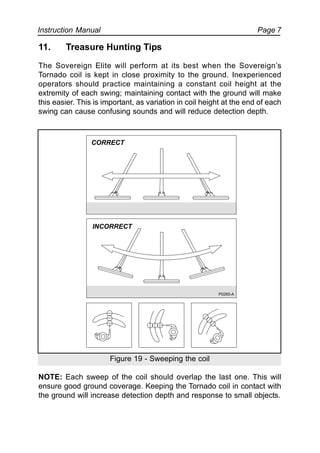
The Sovereign Elite will perform at its best when the Sovereign’s
Tornado coil is kept in close proximity to the ground. Inexperienced
operators should practice maintaining a constant coil height at the
extremity of each swing; maintaining contact with the ground will make
this easier. This is important, as variation in coil height at the end of each
swing can cause confusing sounds and will reduce detection depth.
Figure 19 - Sweeping the coil
NOTE: Each sweep of the coil should overlap the last one. This will
ensure good ground coverage. Keeping the Tornado coil in contact with
the ground will increase detection depth and response to small objects.
P0265-A
CORRECT
INCORRECT
The Minelab Sovereign ElitePage 8
11.1 Pinpointing the Target
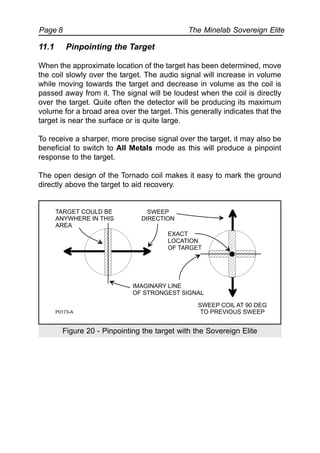
When the approximate location of the target has been determined, move
the coil slowly over the target. The audio signal will increase in volume
while moving towards the target and decrease in volume as the coil is
passed away from it. The signal will be loudest when the coil is directly
over the target. Quite often the detector will be producing its maximum
volume for a broad area over the target. This generally indicates that the
target is near the surface or is quite large.
To receive a sharper, more precise signal over the target, it may also be
beneficial to switch to All Metals mode as this will produce a pinpoint
response to the target.
The open design of the Tornado coil makes it easy to mark the ground
directly above the target to aid recovery.
Figure 20 - Pinpointing the target with the Sovereign Elite
IMAGINARY LINE
OF STRONGEST SIGNAL
SWEEP
DIRECTION
SWEEP COIL AT 90 DEG
TO PREVIOUS SWEEP
EXACT
LOCATION
OF TARGET
P0173-A
TARGET COULD BE
ANYWHERE IN THIS
AREA
Instruction Manual Page 9
11.2 Recovering the Object
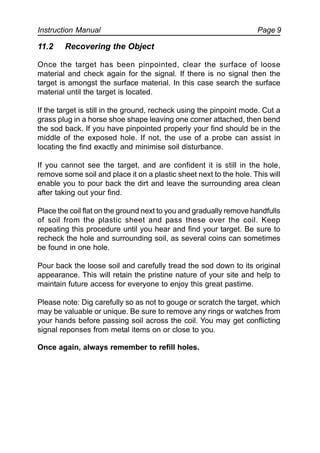
Once the target has been pinpointed, clear the surface of loose
material and check again for the signal. If there is no signal then the
target is amongst the surface material. In this case search the surface
material until the target is located.
If the target is still in the ground, recheck using the pinpoint mode. Cut a
grass plug in a horse shoe shape leaving one corner attached, then bend
the sod back. If you have pinpointed properly your find should be in the
middle of the exposed hole. If not, the use of a probe can assist in
locating the find exactly and minimise soil disturbance.
If you cannot see the target, and are confident it is still in the hole,
remove some soil and place it on a plastic sheet next to the hole. This will
enable you to pour back the dirt and leave the surrounding area clean
after taking out your find.
Place the coil flat on the ground next to you and gradually remove handfulls
of soil from the plastic sheet and pass these over the coil. Keep
repeating this procedure until you hear and find your target. Be sure to
recheck the hole and surrounding soil, as several coins can sometimes
be found in one hole.
Pour back the loose soil and carefully tread the sod down to its original
appearance. This will retain the pristine nature of your site and help to
maintain future access for everyone to enjoy this great pastime.
Please note: Dig carefully so as not to gouge or scratch the target, which
may be valuable or unique. Be sure to remove any rings or watches from
your hands before passing soil across the coil. You may get conflicting
signal reponses from metal items on or close to you.
Once again, always remember to refill holes.
The Minelab Sovereign ElitePage 10
12. Environmental Concerns
Firstly, it should be pointed out that treasure hunting with a metal
detector is the most environmentally friendly way to recover coins, rings,
and other treasure items. However, it is important to leave an area
searched in the same condition you found it.
When searching parklands or properties where the grassland or lawn is
sensitive to disturbance, always use special tools to enable the recovery
of targets without digging large holes. This retains the surface “plug” of
grass and soil to be returned undisturbed.
All holes that have been dug must be properly refilled. Not only is it
environmentally unacceptable to not fill in holes, it is also
dangerous.
The use of headphones when detecting will also reduce noise, another
important environmental concern.
Take away and properly dispose of any junk that is found or produced,
such as nails, tin cans, or flat batteries. Leaving an area “scarred” can
result in action being taken to prevent the use of metal detectors, which
will spoil this fascinating hobby.
Instruction Manual Page 11
13. Detector Care
The Sovereign Elite is a high-quality electronic instrument, finely
engineered and packaged in a durable housing. Taking proper care of
the detector is mostly common sense.
• Do not leave alkaline batteries in the control box when the
detector is not in use for any period exceeding two weeks.
Damage caused by leaking batteries would be severe and would
void the warranty through user negligence.
• If temperatures are very high, do not leave the detector in the
sun for longer than necessary. Covering it when not in use will
help protect it. Try to avoid leaving it in a closed trunk or in a car
sitting in sunlight.
• While the coil of the detector is designed to be waterproof, the
control box is quite susceptible to water intrusion. Always protect
it when using the detector in rain or on the beach where salt
spray is prevalent. Using the accessory hipmount bag to protect
the control box will overcome this in most weather.
• Never allow the box to come into contact with gasoline or
other oil-based liquids.
• Keep the detector clean and dry and avoid getting sand and
grit into the shafts or the tightening nuts. Do not use solvents to
clean the detector. Use a damp cloth with mild soap detergent.
• Flat or faulty batteries cause many detector problems. Ensure
that only quality alkaline batteries are used, and that they are
replaced when the warning signal indicated through the
headphones or speaker is heard.
• Ensure the coil cable is in good condition and not subject to
undue stress. Do not undo or loosen the coil connector at the
base of the cable where it enters the coil. This should always be
firmly tight.
The Minelab Sovereign ElitePage 12
14. Troubleshooting Guide
Fault Solution
No Sound Check batteries and battery connections.
Check headphones and their connection.
Erratic Noises Check battery charge and battery connections.
Ensure coil connector is tightened firmly.
Reduce the Sensitivity by turning clockwise or
return to the Auto position.
Switch Noise Cancel switch to other Band
Check headphones and their connection.
Check for sand or grit between coil cover and
coil.
No Target Response Ensure the unit is turned On.
Check battery charge and battery connections.
Check coil connection.
Check headphones and their connection.
Check Disc and Notch settings.
In the unfortunate circumstance that the detector needs to be returned to
Minelab for service, please fill out the Minelab Service Repair Form (on
page 40, or a photocopy of the same) and enclose it with the detector.
Please supply as much detail about the fault as possible as this will
assist our service engineers to rectify the problem quickly and efficiently.
Instruction Manual Page 13
15. Specifications
These specifications are subject to change without notice.
Applications: Coin, relic, and treasure hunting
Inland, beach or shallow water
Length: Extended 55” (1400mm)
Unextended 33” (840mm)
Weight: Control Box (excl. Batt) 550 g
8” Tornado Coil 590 g
10” Tornado Coil 780 g
Batteries: Alkaline Cells Eight 1.5V “AA”
NiMH Battery Pack 12V, 1000 mA/hr
Coil: 8” “Double D” w/proof Tornado 800
10” “Double D” w/proof Tornado 1000
Headphones: Jack - Stereo/Mono 1/4”
Transmission: Broad Band Spectrum(BBS): multiple
simultaneous frequency transmission at
1.5, 3, 4.5, 6 ... 25.5 kHz
Ground Rejection: Automatic Ground Tracking
Detection Modes:
All Metals/Pinpoint: Detects ferrous/non-ferrous metals
Disc/Iron Mask: Rejects ferrous/unwanted non-ferrous metals
Controls: Volume (On/Off) Pot and Switch
Sensitivity (Auto/Man) Pot and Switch
Threshold Pot. 1 Rotation
Disc Pot. 1 Rotation
Notch Pot. 1 Rotation
Mode Switch 2 Position
Tone ID Switch Switch 2 Position
Noise Cancel Switch 2 Position
Visual Display: Display 2.5 digit LCD digital meter
(optional accessory).
Warranty: Control Box 2 years
Coil 2 years
Patents: Patents apply
The Minelab Sovereign ElitePage 14
16. Warranty and Service
There is a two-year parts and labour warranty for the electronic control
box and Tornado Coils of the Sovereign Elite. Conditions apply, please
refer to the Warranty Card for further details.
Note: Please return the enclosed warranty card, correctly filled out,
to your dealer or direct to Minelab Electronics. This will assist Minelab
to service your needs promptly.
The Minelab warranty does not cover damage caused by accident,
misuse, neglect, alteration, modifications, or unauthorised service.
Instruction Manual Page 15
FCC Compliance
NOTE:
This equipment has been tested and found to comply with the limits for a
Class B digital device, pursuant to part 15 of the FCC rules. These limits
are designed to provide reasonable protection against harmful
interference in a residential installation. This equipment generates, uses
and can radiate radio frequency energy and, if not installed and used in
accordance with the instructions, may cause harmful
interference to radio communications. However, there is no guarantee
that interference will not occur in a particular installation. If this
equipment does cause harmful interference to radio or television
reception, which can be determined by turning the equipment off and on,
the user is encouraged to try to correct the interference by one or more of
the following measures:
· Re-orient or relocate the receiving antenna.
· Increase the separation between the equipment and receiver.
· Consult the dealer or an experienced radio/TV technician for
help.
EC Conformity
NOTE:
This product complies with the essential requirements of
EMC Directive 89/336/EEC.
The Minelab Sovereign ElitePage 16
Minelab Service Repair Form
Today’s Date: ..........................................................
Detector Model: ...............................Serial No.: .................................
Purchased From: ...................................................................................
Purchase Date: .........................................................
Parts being returned: ..........................................................................
..........................................................................................................
Description of Fault: ................................................................................
.............................................................................................................................................
.............................................................................................................................................
.............................................................................................................................................
Owner’s Name: .......................................................................................
Address: ................................................................................................
.............................................................................................................................................
Phone: Day ( ) ..............................Home ( ) .......................................
Fax: ( ) ...................................Email: ............................................

Instruction Manual Minelab Sovereign Elite Metal Detector English Language

  • 1.
    Instruction Manual Page1 The Minelab Sovereign Elite INSTRUCTIONMANUAL MINELAB
  • 2.
    The Minelab SovereignElitePage 2 WARNING THIS DOCUMENT CONTAINS MINELAB ELECTRONICS PTY LTD RIGHTS TECHNICAL DATA OR RESTRICTED RIGHTS DATA OR BOTH.  Minelab Electronics Pty Ltd This work is copyright. Apart from any use as permitted under the Copyright Act 1968, no part may be reproduced by any process without written permission from Minelab Electronics Pty Ltd, 118 Hayward Avenue, Torrensville, SA 5031, Australia. 4901-0044-1.3 January 2003
  • 3.
    Instruction Manual Page3 The Minelab Sovereign Elite Instruction Manual 1. Introduction .............................................................................4 2. BBS Technology ......................................................................5 3. List of Parts .............................................................................7 4. Accessories ............................................................................7 5. Assembling the Detector .......................................................8 5.1 Armrest / Upper Shaft Assembly ...............................................8 5.2 Lower Shaft Assembly ..............................................................8 5.3 Completing the Shaft Assembly ................................................9 5.4 Shaft Mount ...............................................................................9 5.5 Rear Shaft Mount .......................................................................10 5.6 Hipmounting .............................................................................11 6. Batteries .............................................................................12 6.1 Installation of NiMH Battery Pack ......................................... 12 6.2 Installation of Alkaline Batteries ............................................. 12 6.3 Low Battery Warning and NiMH Recharging .........................13 6.4 Using your NiMH Chargers ...................................................13 7. Control Panel .....................................................................13 7.1 Quickstart Operating Instructions ............................................14 7.2 Volume Control and On/Off Switch .........................................15 7.3 Sensitivity Control ....................................................................15 7.4 Threshold Control ....................................................................16 7.5 Disc/All Metal Switch ................................................................17 7.6 Disc. Control ............................................................................19 7.7 Notch Control ..........................................................................21 7.8 Tone ID Switch ..........................................................................23 7.9 Noise Cancel.............................................................................23 7.10 Audio Output ...........................................................................24
  • 4.
    The Minelab SovereignElitePage 4 8. Digital Target Indication Meter ..........................................25 8.1 Installation.................................................................................25 8.2 Callibration................................................................................26 9. Quick Operating Instructions ...........................................28 9.1 Disc Mode................................................................................ 28 9.2 All Metals Mode........................................................................ 28 10. Practising the Controls ...................................................29 11. Treasure Hunting Tips .....................................................31 11.1 Pinpointing the Target ...........................................................32 11.2 Recovering the Object ...........................................................33 12. Environmental Concerns .................................................34 13. Detector Care ...................................................................35 14. Troubleshooting Guide ....................................................36 15. Specifications ..................................................................37 16. Warranty and Service ......................................................38 Since there may be a range of options available in this detector type, equipment may vary according to the model or country of issue. Certain descriptions and illustrations may differ (in this manual) from the exact model that you have purchased. In addition, Minelab reserve the right to respond to ongoing technical progress by introducing changes in design, equipment and technical features at any time.
  • 5.
    Instruction Manual Page5 1. Introduction Congratulations on purchasing Minelab’s Sovereign Elite detector. The Sovereign Elite metal detector has been designed for general purpose treasure hunting and is an improved version of the highly successful Sovereign eXtra Sensitive detector which was voted America’s “Detector of the Year 1997” by Treasure Hunter’s Gazette. Sovereign Elite detectors use Minelab’s unique Broad Band Spectrum (BBS) technology, which enables the Sovereign Elite to automatically transmit 17 individual frequencies at the same time. The benefits of multiple frequency technology are numerous and include increased depth, greater sensitivity to non-ferrous metal objects, increased accuracy in discrimination, increased accuracy in target indication and increased stability under most ground conditions. Sovereign Elite detectors are designed to locate valuable metal objects in high trash areas and in areas of either extreme salt or ground mineralisation, conditions which are commonly encountered by treasure hunters around the world. When using a single or dual-frequency detector under these conditions, a treasure hunter may experience a significant loss of detection depth and discrimination accuracy. However, the Sovereign Elite, with its 17 individual frequencies, compensates for interference from these ground conditions and enables you to penetrate deeply and discriminate accurately at full depth. Sovereign Elite detectors are simple to operate, having very few controls that require adjustment after they have been set. The extremely advanced, yet simple-to-use, discrimination features enable you to accurately select only the types of metal objects that you want to find and to ignore the rest. The variable signal tone responses enable you to accurately identify the object found before you recover it. If you have any questions or comments regarding the Sovereign Elite or any other Minelab product, then please feel free to contact us via your local Authorised Minelab Dealer or write to us direct. Minelab Electronics wish you every success in your treasure hunting.
  • 6.
    The Minelab SovereignElitePage 6 2. BBS Technology When developing BBS technology, Minelab’s scientists first looked at technology that was already available in the market and identified its limitations in field use. Discussions with seasoned treasure hunters from around the world identified a number of common problems facing detector operators. These problems included: • Loss of detection depth in highly mineralised ground. • Inaccurate target identification beyond 5 or 6 inches. • Inability to detect good targets in close proximity to iron trash. • Erratic operation when searching salt-water beaches. Most detectors on the market operate on a single (or dual) frequency, ranging from 1 to 70 kHz. Although this technology has served the industry well for years, Minelab’s scientists found that a frequency that worked well in one area would often offer only marginal performance when used in another location. Ground mineralisation, trash content, and target size all had an effect on how well a detector transmitting a single frequency would operate. The BBS circuit automatically transmits 17 frequencies simultaneously; a feature which is unique to Minelab metal detectors. Ranging from 1.5 to 25.5 kHz in 1.5 kHz increments, the signal received from the coil is analysed and information is relayed to the operator via the speaker, headphone, and meter (if attached). Through the use of its 17 frequencies, the Sovereign Elite is designed to locate and accurately identify valuable targets in variable ground and high trash areas. Essentially, when using a Sovereign Elite with BBS technology, it is like swinging 17 single-frequency detectors at the same time. Because BBS operates at a number of frequencies that no other detector does, BBS detectors such as the Sovereign Elite can find a broad range of objects that no other individual detector has the ability to find. BBS technology combines Minelab’s unique multiple frequency BBS technology with improved signal processing to give: • Greater detecting depth. • Consistent sensitivity over a wide range of targets. • Less interference from electromagnetic sources.
  • 7.
    Instruction Manual Page7 Therefore, the treasure hunter is more likely to detect targets normally missed. The most important factor when comparing detectors, with and without BBS circuitry, is that BBS-based detectors have the ability to hunt even in the most mineralised areas at maximum performance without the need to manually ground-balance the detector. As soon as the Sovereign Elite is turned on and swept across the ground, the ground mineralisation is analysed and then compensated for by the microprocessor. This ensures that the Sovereign Elite can locate targets deeper than other units, due to its automatic compensation of changing ground conditions. One of the major overall benefits of BBS technology is that although it automatically operates at 17 frequencies, all at the same time, it is actually easier to use than most of its competitors. Because it is microprocessor controlled, all you need do is set the threshold, discrimination and volume, and the rest is done for you automatically. A BBS detector will penetrate more deeply, discriminate more accurately and can be used in even the worst ground conditions. The bottom line is that when using a Minelab detector such as the Sovereign Elite with its BBS technology, you will find more good targets than you will with most other detectors. Figure 1 - Detector comparison chart Single Frequency Dual Frequency 17 Multiple Frequencies P0176-A
  • 8.
    The Minelab SovereignElitePage 8 3. List of Parts The box in which the Sovereign Elite is shipped should contain the following items. Please check that all of these items are in the box: Control Box ! 10” or 8” Round Tornado coil (inc. skid plate attached) ! 2-Piece Shaft Assembly(inc. Fiberglass lower shaft) ! Black Aluminium Armrest (inc. nuts & bolts) (2 part) ! Arm Rest Neoprene Cover ! Arm Rest Strap (2 part) ! Rear Control Box Bracket ! Detector Stand ! NiMH Battery Pack ! Mains NiMH Charger ! VelcroTM Straps (2 pair) ! Teardrop Washers (2) ! Nylon Nuts and Bolts ! Warranty Card ! Instruction Manual ! 4. Accessories The following accessories are available to further improve your machine. • Digital Target Identification Meter • Alkaline Battery Holder for 8 x ‘AA’ Batteries • 12V NiMH Battery Vehicle Charger • Headphones • Hipmount Bag with Raincoat Protective Cover for Control Box • Meter Hipmount Bag • Padded Detector Transport Bag • Blue Minelab Polo Shirt • Blue Minelab Cap For further information on these and other Minelab products call your Minelab dealer.
  • 9.
    Instruction Manual Page9 5. Assembling the Detector Please follow these instructions to assemble the Sovereign Elite. Refer to the drawings to identify parts and how they are positioned. Please contact your Minelab dealer for further instructions should any difficulties arise. 5.1 Armrest/Upper Shaft Assembly a) Place the two arm rest halves (4) on either side of the upper shaft (2) and ensure that the bolt hole is aligned. b) Slide the nylon bolts through the bolt holes and screw the nylon wing nuts (12) onto the bolts with a couple of turns (do not tighten). c) Slide the detector stand (7) into the runners of the arm rest (4) and tighten the nylon wing nuts by hand. d) Attach the arm rest straps (6) using the press studs on both sides of the arm rest. e) Push the arm rest straps through the slots in the arm rest cover (5) and push the cover over the arm rest. 5.2 Lower Shaft Assembly a) Remove the tape on the lower fibreglass tube (3) that is holding the black teardrop washers (10) in place. Note: Ensure the washers do not fall out after removing the tape. b) Remove the black nylon wing nut (12), and bolt (11) from the coil (9). c) With the teardrop washers in place, push the lower tube (3) into the coil bracket so that the holes line up. Figure 2 - Armrest/upper shaft assembly 6 4 12 5 7 11 2 4 6 Figure 3 - The coil and lower shaft assembly 12 11 10 3 9 P0044-B P0570-A
  • 10.
    The Minelab SovereignElitePage 10 Note: Ensure that the black nylon spring clip near the top of the fibreglass tube is pointing toward the rear of the coil. d) Push the black nylon bolt (11) through the holes in the bracket on the coil from the cable entry side and tighten the wing nut (12) by hand. 5.3 Completing the Shaft Assembly a) Slide the lower shaft assembly (3) into the Aluminium upper shaft (2). Note: The black plastic locking nut (18) may need to be loosened to position the lower shaft assembly correctly. b) Set the length of the shaft by locking the black nylon spring clip into one of the holes provided, then tighten the plastic locking nut by hand. Figure 4 - Completing the shaft assembly 5.4 Shaft Mount a) Position the control box so that the recess in the control box (1) is aligned with the leading edge of the mounting clip (8). Push the forward section of the control box upwards until the trigger ‘clicks’ indicating the control box is secured. b) Firmly wind between 17 and 20 turns of the cable around the shaft until it reaches the control box. Note: Leave enough slack at the bottom of the cable near the coil to adjust the coil position without straining the coil cable. 4 2 18 93 13 1 8 P0571-A
  • 11.
    Instruction Manual Page11 c) Connect the coil connector (13) to the plug on the rear of the control box (14). d) Use VelcroTM tabs to secure cable in the correct position on the shaft maintaining slack at coil and control box. Note: Weather Protection - The hipmounted bag (available as an accessory item) is designed so that it can be used to weatherproof your control box while detecting in inclement weather. The new design allows the hipmount bag to protect the control box while still on the shaft. The control box is positioned into the hipmount bag with the slot for the mounting bracket positioned at the back. The velcroed panel is then wrapped across the top of the stem. 5.5 Rear Shaft Mount The Sovereign Elite provides the option of mounting the control box at the rear of the shaft (2), beneath the armrest. In order to mount the control box (1) in this position: a) Loosen the nylon wingnuts from the armrest and remove the detector stand. b) Slide in the black plastic rear control box bracket (8). c) Tighten the nylon wingnuts on the armrest. d) Clip the control box onto the rear mounting bracket (see figure 5). e) Firmly wind the cable up the stem using the VelcroTM tabs to hold in position. f) Connect the coil connector (13) to the plug (14) on the rear of the control box. Figure 5 - Mounting the control box on the shaft Figure 6 - Mounting the control box to the rear of the shaft 8 2 1 P0573-A P0572-A 13 8 14
  • 12.
    The Minelab SovereignElitePage 12 c) Place the hipmount bag in your preferred working configuration. The hipmount bag can be worn on the belt or over the shoulder. Note: If mounting the hipmount bag on the chest, a belt can be thread through the belt loop and around the chest to hold the bag in position. d) Wind about 5 turns of the cable around the shaft. This will reduce the amount of excess cable. Note: Leave enough slack at the bottom of the cable near the coil to adjust the coil position without straining the coil cable. e) Use VelcroTM tabs to secure the cable in position at the base of the shaft and where the cable leaves the shaft. f) Take the excess loose coil cable and wind it through the belt bracket of the hipmount bag prior to connecting onto the control box (see figure 8). g) Connect the coil connector to the socket on the rear of the control box and tighten the locking nut. Figure 7 - Hipmounting the control box 5.6 Hipmounting/Chestmount Hipmounting is an alternative to mounting the detector on the shaft and significantly reduces physical strain, enabling longer search time without undue fatigue. A hipmount bag is available as an accessory item for this purpose. a) Check that there are charged batteries in the control box. b) Place the control box into the hipmount bag with its control panel facing outwards (see figure 7). Figure 8 - Hipmounting the control box P0574-A TO COIL HIPMOUNT BAG CONNECTOR WRAP CABLE AROUND BELT LOOP P0086-A
  • 13.
    Instruction Manual Page13 6. Batteries Your Sovereign Elite is supplied with a rechargeable 12 Volt NiMH battery pack and mains charger. A car charger is also available as an accessory item from your authorised Minelab Dealer. 6.1 Installation of NiMH Battery Pack a) Ensure your NiMH pack is fully charged. b) Place the base of the battery pack at the rear of the battery compartment (A). Push the front edge of the battery pack into position (B). The two battery clips will “click” into position to hold the battery pack in place (see figure 9). Note: The NiMH battery pack is factory sealed and does not open. 6.2 Installation of Alkaline Batteries A 12 Volt battery pack to hold 8 ‘AA’ alkaline batteries is available as an accessory item. These are useful to have as back-up if ever your NiMH batteries are flat. a) Ensure the detector is switched “Off” before opening the battery compartment. b) Slide open the lid on the battery pack. c) Place 8 “AA” alkaline batteries (16) into the base of the alkaline pack (15). Ensure they are aligned as shown in figure 10 and as indicated inside the compartment. d) Slide the battery lid closed. e) Place the base of the battery pack at the rear of the battery compartment (A). Push the front edge of the battery pack firmly into position (B). The two battery clips will “click” into position to securely hold your battery pack in place (see figure 9). Figure 10 - Replacing the battery lid 16 15 Figure 9 - Installing the battery pack B A P0575-A
  • 14.
    The Minelab SovereignElitePage 14 Caution: Good quality alkaline batteries will power the Sovereign for about 10 to 15 hours. Using headphones will extend battery life. Good quality alkaline batteries should always be used instead of standard carbon batteries. Alkaline batteries should be removed from the detector if it is to be stored for extended periods to avoid damage caused by leaking batteries. 6.3 Low Battery Warning and NiMH Recharging When the batteries are reaching the point at which they will no longer operate, the Sovereign Elite will emit a distinct sharp “pip” from the speaker, approximately every 30 seconds. Shortly after this the threshold will increase to a loud continuous signal that cannot be reduced by the threshold control. When this tone is heard, it is recommended that the NiMH battery pack be recharged or alkaline batteries be replaced as soon as possible to avoid missing any targets. The NiMH battery pack can be recharged using either the supplied mains powered charger or a 12V charger (available as an accessory) that can be plugged into the cigarette lighter of your vehicle. Caution: Check the mains charger voltage. Only use the appropriate mains charger for the country you are in. 6.4 Using your NiMH Chargers Plug the charger into the socket on the rechargeable NiMH battery pack, and plug the charger into the power source and switch on. The car charger has a red light that indicates that it has power. A green light will appear on the battery pack during charging. A completely flat battery will take approximately 12-14 hours to fully charge. The green light on the battery pack will fade/dim once it is fully charged. A fully charged NiMH pack will give between 15 and 20 hours detecting time, depending on the number of targets found. Figure 11 - Car and mains battery chargers
  • 15.
    Instruction Manual Page1 7. Control Panel This section gives detailed descriptions of the Sovereign Elite’s controls and functionality. It is important that this section is read carefully as it will provide all the information required to set and adjust these controls. It may be beneficial to refer back to this section in the future. Note: Each control has a recommended setting (indicated by a white or blue dot) called a Quickstart Setting (see section 7.1). Figure 12 - The Sovereign Elite Control Panel 7.1 Quickstart Operating Instructions To start detecting as soon as possible, the Sovereign Elite has provided “Quickstart” settings. These settings, indicated by a white or blue dot on each control, have been selected by the factory as suitable positions for immediate detecting. Adjust the Sovereign Elite controls to these settings and start searching (see section 9, page 28). Once you are familiar with all of the controls you will gain greater performance and versatility by setting the controls to suit the needs of the area being detected.
  • 16.
    The Minelab SovereignElitePage 2 When in the fully anti-clockwise position, the Sovereign Elite is turned Off. Turning the control clockwise, will “click” the Sovereign Elite On. Continuing to turn this control in a clockwise direction will increase the volume of the target signals. At the most clockwise position, the volume will be set at the “maximum” position. Minelab recommends this position for most circumstances. Users should be aware that when using headphones, if a large target is detected close to the surface, the resulting loud signal may cause some hearing discomfort, in areas like this a lower volume may be preferred. 7.3 Sensitivity Control The Sensitivity control, located at the bottom of the control panel, allows the level of sensitivity to be adjusted to suit the conditions in which you are detecting. It is often thought of in terms of a depth control and it is, to a point, but more importantly it also makes the unit more or less sensitive to interference caused by ground chemistry “mineralisation”, or electromagnetic fields. At the most anti-clockwise position this control “clicks” into the Auto position. In this setting the Sovereign Elite will automatically adjust the level of sensitivity to the most stable level under the prevailing conditions. Beginners should operate the unit in Auto, until they become more competent in its operation. Turning the control clockwise will “click” the Sovereign out of the Auto setting into manual sensitivity. As this control continues to be turned in a clockwise direction the level of sensitivity will be reduced. At the most clockwise position, the Sovereign Elite is set at “minimum” sensitivity. 7.2 Volume Control and On / Off Switch This control, located at the bottom right of the control panel, is used to adjust a target’s signal volume in addition to switching the Sovereign Elite On or Off. P0247-B
  • 17.
    Instruction Manual Page3 The incidence of false signalling is minimised if the operator concentrates on sweeping the coil as parallel and even to the beach sand surface as possible, whether in or out of the water. In summary, for greatest detection depth: • Keep the coil sweep as parallel to the beach sand as possible. • Turn the sensitivity knob as anti-clockwise as possible, (within the manual region) so that minimal false signals occurs. • This setting will need to be altered, depending on the sand moisture level. Advanced users operating inland can operate the unit in either Auto or in Manual. In more mineralised soils Auto is recommended. Note that “hot rocks”, “Roman Pennies” or some ancient red/orange/brown pottery or tiles may cause the unit to respond as if the targets are ferrous. This is not a false signal but the correct response, and indicates that the unit is set at a relatively high sensitivity. Advanced users operating in non-mineralised soils or areas of high trash concentration should set the sensitivity control out of Auto and into the variable Manual region. The requirements of this setting are the same as those for the advanced beach detection. The control should be set as anti-clockwise as possible (out of Auto and into the variable manual region), so that minimal false signalling occurs. This setting will depend on the degree of soil mineralisation and metal junk concentration. 7.4 Threshold Control Located at the bottom left of the control panel, the Threshold control allows for adjustment of the background threshold level. This background “threshold” or “hum” aids in the location of targets. Small or large deep targets may not produce a distinct target signal but rather cause only a slight change in the threshold tone. Experienced operators detecting in wet sand at the beach should set the Sensitivity control out of Auto and into the area marked Beach or as far anti-clockwise as possible, with minimal false signalling. In general, the more moist the beach sand, the more clockwise the knob must be turned. P0249-B
  • 18.
    The Minelab SovereignElitePage 4 Ideally this control should be set to a position where the threshold tone is just audible. At this level, the presence of small or deep targets will be more easily recognised. Turning the Threshold control in a clockwise direction will increase the threshold tone. At the most clockwise setting, the threshold is at its “maximum”. A threshold level that is too high will mask out the small or deep targets, while a “silent” or non-audible threshold may not allow the small change in threshold tone created by small or deep targets to be heard. 7.5 Disc/All Metal Switch This switch is located in the centre of the control panel and is used to select Disc. (Discriminate) or All Metals mode. In Disc. mode, the Disc and Notch controls have become active and can be used in combination to ignore various unwanted metal objects. Metal objects fall into two broad categories: ferrous and non-ferrous. A magnet can be used to determine if an object is a ferrous or non-ferrous metal; ferrous metals are attracted to a magnet while non-ferrous are not. Generally while detecting, ferrous objects such as iron and steel are not wanted, whereas the more valuable non-ferrous metals such as gold, silver, and bronze are. In All Metal mode the Sovereign Elite will detect both ferrous and non-ferrous objects. In this mode the Disc and Notch controls will have no effect and the Sovereign Elite will respond in the same way to all types of metal. All Metal mode is useful when searching for ferrous targets such as relics. When searching in this mode, listen for faint repeatable signals which can indicate a deep target. Note: All Metal mode is also the pinpointing mode as the target signal response is fast and sharp. The All Metal switch can also be used as a reset for threshold tone when using variable tone option (see section 7.8). P0253-B
  • 19.
    Instruction Manual Page5 In Disc. mode the detector will null or cancel target signals made from unwanted metals. The degree of discrimination is set by using the Disc and Notch control knobs. When Disc/All Metal Switch is in Disc position with Disc and Notch control at minimum, the Sovereign Elite will cancel all ferrous metals. As the Disc control is increased (turned clockwise) more non-ferrous metals will be cancelled. In addition, when in Disc mode, providing that Variable tone has been selected (see section 7.8), the target signals from non-ferrous objects will vary in tone depending upon their level of conductivity. Effectively, this allows general identification of the type of object detected before recovering it from the ground. For example, a US quarter or Australian $1 coin will produce a high pitch signal, whereas aluminium foil will produce a low pitch signal. Pull-tabs, rings, and certain coins will produce various intermediate tones, depending upon the object’s conductivity. The higher an object’s conductivity, the higher the signal tone will be. Also, when the Sovereign Elite rejects a ferrous or discriminates a non-ferrous object, the background threshold tone will momentarily disappear and then return again at a pitch similar to the ignored signal. A ferrous object will cause the returning threshold pitch to be much lower than normal, while a pull-tab that is being ignored will cause the returning threshold to be higher than normal. If the Sovereign Elite produces a high pitched, rapidly pulsing sound, the detector is being overloaded by a substantially large piece of metal close to the coil. Raise the coil a few inches above the ground and pass it over the area again to check the target. By lifting the coil away from the ground, it enables the Sovereign Elite to accurately analyse the object detected. Note: If a target signal seems to have “blanked”, but the threshold hasn’t changed to a different tone (assuring the tone ID Switch is in variable) it may in fact be a very deep target on the edge of the detection depth. Digging down an inch or two will enable it to be identified.
  • 20.
    The Minelab SovereignElitePage 6 Elite will not produce a “signal beep” (large ferrous objects may produce short “pops” or “clicks”). However, non-ferrous targets will be “accepted” and give a “signal beep”. Typical ferrous objects encountered by treasure hunters are nails, screws, washers, bits of wire, etc. These objects are generally not considered to be of value, so it is a distinct advantage to be able to ignore them while detecting. Objects that will cause the Sovereign Elite to produce a “signal beep” will be non-ferrous metals, including such items as aluminium foil, most jewelry, pull-tabs, coins, bottle tops, gold, silver, brass, etc. Not all of these non-ferrous objects are considered valuable. Therefore, by using the Disc control, the Sovereign Elite can be adjusted to ignore some of the less valuable non-ferrous objects while still locating more valuable targets. The Disc control is a one-turn pot, continuously variable with numerous graduations as a guide for the setting of the control. Turning the Disc control clockwise will increase the “discrimination” level, and non-ferrous objects of lower conductivity will be ignored. The Sovereign Elite uses the electrical conductivity of the object to determine the type of metal detected, and based upon the Disc control setting, will either ignore or accept the object. The most effective way to demonstrate this is to consider a number of objects, all of varying conductivity, placed in a line on the ground. As the detector is moved from left to right, the objects increase in conductivity (see figure 13). 7.6 Disc Control The Disc (Discriminate) control is located at the top left-hand side of the control panel and is used when in Disc. Mode to “discriminate” or “ignore” unwanted non-ferrous metal targets. If the Disc control is set to the most anti-clockwise position (ensure the Notch control is also set to this position), then ferrous metals will be “ignored” and the Sovereign P0251-C
  • 21.
    Instruction Manual Page7 Turn the Disc control further clockwise and objects of greater conductivity will be ignored. If the Disc control is set to ignore the pull-tab this will mean that all objects having a similar or lower conductivity than the pull-tab will be ignored, while objects of higher conductivity will still be accepted (see figure 14). Figure 14 shows some common objects and where the Disc control would have to be set to ignore them. As a general rule, the two objects treasure hunters most commonly wish to ignore are aluminium foil and pull tabs. As can be seen in Figure 14, these objects both cover a significant range on the Disc control. The conductivity of objects that the user wishes to accept or ignore often overlaps, so, setting the Disc control to ignore both foil and pull-tabs will also ignore a large amount of valuable non-ferrous objects including some coins, rings, and other jewelry. Example: If hunting for fine white gold rings with the Disc control set to position 4 (see figure 15), some types of aluminium foil will also be detected. To avoid old bottle caps, but detect brass buttons and copper coins, the Disc control should be set higher (approximately at number 13). Figure 13 - Target conductivity Figure 14 - Discriminating targets based on conductivity LOW CONDUCTIVITY HIGH CONDUCTIVITY FOIL FERROUS NON-FERROUS CONDUCTIVITY PULL-TABS HIGH COINS AND RINGS COPPER, SILVER, BRASS and LEAD LOW COINS AND RINGS P0234-A LOW CONDUCTIVITY HIGH CONDUCTIVITY FOIL IGNORED ACCEPTED FERROUS NON-FERROUS CONDUCTIVITY PULL-TABS HIGH COINS AND RINGS COPPER, SILVER, BRASS and LEAD LOW COINS AND RINGS P0235-A
  • 22.
    The Minelab SovereignElitePage 8 Most fine white gold rings, foil, and some yellow gold rings will also be ignored. With experience, setting the Disc control to ignore most unwanted targets (in combination with the Notch control) will become second nature. Figure 15 - Disc control 7.7 Notch Control Located on the center left of the control panel, the Notch control is used in combination with the Disc control to discriminate against, or ignore, certain metal objects. As with the Disc control, it is continuously variable and features numerous graduations as a guide to setting the control. The main difference between the Notch and Discrimination controls is that Discrimination is a continuous band of discrimination, whereas the Notch is in fact a short segment of discrimination which can be moved up or down the scale of conductivity. As the Notch control is turned further clockwise, objects of a certain conductivity will be ignored. Turning the Notch control to ignore the pull-tab will mean that only non-ferrous objects having a similar conductivity to the pull-tab will be ignored while all other non-ferrous objects of a different conductivity are still accepted. Note also in Figure 16 that ferrous objects are being ignored due to the Disc. setting. P0250-C Small iron bolts, nails, etc. REJECTED Silver, copper, brass, lead ACCEPTED P0201-B R IN G S PULLTABS FO IL 4 13
  • 23.
    Instruction Manual Page9 When using the Notch and Disc controls in combination, most unwanted objects can be successfully ignored (see Figure 16). Turning the Notch control to ignore the pull-tab and the Disc control to ignore the aluminium foil will set up the Sovereign Elite to ignore pull-tabs and aluminium foil while still detecting most valuable non-ferrous objects (see figure 17). Note: Different pull-tabs may require a slight movement of the Notch setting. LOW CONDUCTIVITY HIGH CONDUCTIVITY FOIL IGNORED ACCEPTED FERROUS NON-FERROUS CONDUCTIVITY PULL-TABS HIGH COINS AND RINGS COPPER, SILVER, BRASS and LEAD LOW COINS AND RINGS P0236-C NOTCHDISC Figure 16 - Ignoring targets using the Notch control HIGH CONDUCTIVITY P0236-D LOW CONDUCTIVITY FOIL IGNORED ACCEPTED FERROUS NON-FERROUS CONDUCTIVITY PULL-TABS HIGH COINS AND RINGS COPPER, SILVER, BRASS and LEAD LOW COINS AND RINGS NOTCHDISC Figure 17 - Ignoring targets using the Disc and Notch controls
  • 24.
    The Minelab SovereignElitePage 10 7.8 Tone ID Switch Fixed Tone ID or Variable Tone ID in Disc. In the Fixed position, the tone of the audio signal from a target will always be the same as the volume increases to indicate the target, regardless of the object’s conductivity. In the Variable position, the tone of audio signals received will change to help identify the object that has been detected. The lower an object’s conductivity, the lower the pitch of the signal tone. For example, the pitch of a piece of aluminium foil will be lower than that of a gold coin. The advantage of Variable tone target indication is that it allows a target to be identified before recovering it from the ground. 7.9 Noise Cancel When detecting in some areas, the threshold stability may become chattery or unstable. This is often caused by electricity or radio transmission and most commonly of all, other detectors. The noise cancel switch on the Sovereign Elite allows the operator to select a different search band which will often overcome this effect. If detecting in pairs or a group, or when you experience instability due to interference, switch to the other band to see if this overcomes the problem. The selection of Band 1 or Band 2 doesn’t affect the performance, strength or sensitivity of the detector. Its only purpose is to stabilise and lessen the effects of external interference. Note: If there is no interference in the area, the operator is unlikely to notice any difference between Band 1 and Band 2. P0577-A Band 1 Band 2 Noise Cancel Fixed Variable Tone IDP0253-A
  • 25.
    Instruction Manual Page11 loudspeaker and their use will increase battery life. Headphones used should be of a low impedance. The socket will accept most stereo headphones with a 1/4” jack. If these headphones have a “Stereo/Mono” switch, set it to “Stereo”. Minelab recommends headphones to be 32 ohms or less. 7.10 Audio Output The audio output of the Sovereign Elite is available through either an in-built loudspeaker or via a 1/4” stereo headphone jack. When a pair of headphones are plugged in, the loudspeaker is disconnected. Headphones are recommended for serious treasure hunting for several reasons: they are more sensitive to slight target signals than the
  • 26.
    Instruction Manual Page1 8. Digital Target Indication Meter (available as accessory) The Digital Target meter has been designed to aid in the identification of metal targets before their recovery. It provides a digital display of the target ID tones produced by the Sovereign Elite detector, and connects between the search coil and the control box without requiring any modification to the detector’s electronics. Note: The meter has no negative effect upon the operation or overall performance of the detector, it simply provides for easier target recognition. It is also very useful for people with tonal hearing loss. 8.1 Installation a) Plug the coil connector (13) into the socket (19) on the meter box, winding the excess cable around the shaft. b) Plug the meter cable connector (20) into the control box plug (14), winding the excess cable around the shaft (see figure 18). c) If hipmounting the control box, secure the meter cable to the shaft of the detector using the VelcroTM straps provided. d) Loop the meter cable twice through the belt loop of the hipmount bag before attaching it to the control box. This reduces any stresses placed on the meter cable caused by hipmounting and reduces the possibility of failure of the cable. The meter requires no batteries. 20 19 13 14 P0578-B Figure 18 - Installing the meter
  • 27.
    The Minelab SovereignElitePage 2 8.2 Calibration Before using the Digital Target meter, it is necessary to calibrate it as follows: a) Set the Calibration control knob (situated to the rear of the meter) to the center position of its range. b) Place the detector in a stationary position with the coil flat on the ground. c) Set the Sensitivity control on the Control box to Auto (extreme anti-clockwise). d) If the threshold is varying because of electrical interference, adjust Sensitivity clockwise towards minimum until a constant threshold is present. e) Slowly pass a common coin across the coil and finely adjust the Calibration control to the nearest number, devisible by 5 e.g. US quarter (set to 550), AUS 20c (set to 500). f) Slowly pass additional coins and other common targets across the coil and record the results on the target recognition table shown on page 28. This table will become an excellent guide when used in conjunction with the Digital Target Indicator until the various target responses become familiar. This meter should not be soley relied upon for discrimination. It is important to use the other features of the Sovereign Elite to aid in the process of discrimination. Be aware that some similar objects may vary in Target Indication readings because of changes in composition. For example, a gold ring will vary depending upon the purity of the gold and the size of the band. Coins minted in different years may have different alloy combinations and so the reading will differ. The Target Indication readings will also be influenced by an object’s orientation, the length of time it has been buried in the ground as well as different ground conditions.
  • 28.
    Instruction Manual Page3 Target Recognition Table Object Type Reading US quarter non-ferrous 55 AUS 20c non-ferrous 50
  • 29.
    The Minelab SovereignElitePage 4 9. Quick Operating Instructions 9.1 Disc Mode a) Install charged batteries. b) Set the Mode switch to Disc. c) Turn the Sovereign Elite On by turning the Volume control to the most clockwise or “maximum” setting. d) Turn the Threshold control in a clockwise direction until the tone becomes “just” audible. e) Set the Sensitivity control to Auto or at the maximum manual setting without interference. f) Set the Disc control to the white dot until you better understand its appropriate settings. g) Set the Notch control to the white dot until you better understand its appropriate settings and start searching. 9.2 All Metals Mode a) Install charged batteries. b) Set the Mode switch to All Metals. c) Turn the Sovereign Elite On by turning the Volume control to the most clockwise or “maximum” setting. d) Turn the Threshold control in a clockwise direction until the tone becomes “just” audible. e) Set the Sensitivity control to Auto or at the maximum manual setting without interference and start searching.
  • 30.
    Instruction Manual Page5 10. Practising the Controls Take some time to become familiar with how the Sovereign Elite responds to various metal objects. a) Gather a collection of different metal objects such as a rusted nail, pull-tab, brass button, aluminium foil, various coins, and some gold and silver jewelry. b) Take the detector outside, away from known electromagnetic devices or metal objects. Lay the various objects out on an area of ground known to be barren of other metal objects. c) Switch the Sovereign Elite On and select Disc. Mode. d) Select Tone ID to Variable. e) Turn the Disc and Notch controls to their most anti-clockwise positions. f) Turn the Sensitivity control to “maximum”, the most anti-clockwise position without clicking into Auto. If excessive interference is heard, turn the Sensitivity control clockwise until the threshold tone is stable. g) Pass the coil across the test objects one at a time. The Sovereign Elite should “beep” on the non-ferrous objects and ignore the ferrous ojects. h) Take note that as the coil passes over the ferrous nail, the threshold tone disappears. As this tone returns it will have a lower than normal pitch, indicating that the object ignored was ferrous. i) Passing the coil over different non-ferrous objects will produce different signal tones. Objects with high conductivity, such as silver or lead, will produce a high-pitched signal tone while objects with lower conductivity, such as aluminium foil, will produce a low-pitched signal tone. With experience it will be possible to use the signal pitch from an object to accurately determine the type of object discovered before recovering it from the ground.
  • 31.
    The Minelab SovereignElitePage 6 j) Turn the Disc control progressively clockwise in steps and pass the coil over the objects. Take note of when certain objects are rejected, this will enable more accurate discrimination of these objects in the field. k) Turn the Disc control to the position where it ignores the pull-tab. Passing the coil over objects with lower conductivity (such as the aluminium foil) will not produce a signal. Take note of the threshold tone as it disappears and then returns again. It should return at a slightly different pitch than normal. This indicates that the Sovereign Elite ignored a non-ferrous object. l) Turn the Disc control back to the most anti-clockwise position. m)Progressively turn the Notch control in a clockwise direction, again passing the coil over the test objects. The Notch control enables the detector to ignore a small number of objects with similar conductivity while still detecting other valuable non-ferrous objects, even if they are of lower conductivity. n) Turn the Notch control to ignore the pull-tab. Objects with similar conductivity to the pull-tab will be ignored. Pass the coil over the aluminium foil and the Sovereign Elite will produce a signal. This would not be possible using the Disc control. o) Turn the Disc control to ignore the aluminium foil. The Sovereign Elite is now set to ignore the types of objects most commonly unwanted by treasure hunters.
  • 32.
    Instruction Manual Page7 11. Treasure Hunting Tips The Sovereign Elite will perform at its best when the Sovereign’s Tornado coil is kept in close proximity to the ground. Inexperienced operators should practice maintaining a constant coil height at the extremity of each swing; maintaining contact with the ground will make this easier. This is important, as variation in coil height at the end of each swing can cause confusing sounds and will reduce detection depth. Figure 19 - Sweeping the coil NOTE: Each sweep of the coil should overlap the last one. This will ensure good ground coverage. Keeping the Tornado coil in contact with the ground will increase detection depth and response to small objects. P0265-A CORRECT INCORRECT
  • 33.
    The Minelab SovereignElitePage 8 11.1 Pinpointing the Target When the approximate location of the target has been determined, move the coil slowly over the target. The audio signal will increase in volume while moving towards the target and decrease in volume as the coil is passed away from it. The signal will be loudest when the coil is directly over the target. Quite often the detector will be producing its maximum volume for a broad area over the target. This generally indicates that the target is near the surface or is quite large. To receive a sharper, more precise signal over the target, it may also be beneficial to switch to All Metals mode as this will produce a pinpoint response to the target. The open design of the Tornado coil makes it easy to mark the ground directly above the target to aid recovery. Figure 20 - Pinpointing the target with the Sovereign Elite IMAGINARY LINE OF STRONGEST SIGNAL SWEEP DIRECTION SWEEP COIL AT 90 DEG TO PREVIOUS SWEEP EXACT LOCATION OF TARGET P0173-A TARGET COULD BE ANYWHERE IN THIS AREA
  • 34.
    Instruction Manual Page9 11.2 Recovering the Object Once the target has been pinpointed, clear the surface of loose material and check again for the signal. If there is no signal then the target is amongst the surface material. In this case search the surface material until the target is located. If the target is still in the ground, recheck using the pinpoint mode. Cut a grass plug in a horse shoe shape leaving one corner attached, then bend the sod back. If you have pinpointed properly your find should be in the middle of the exposed hole. If not, the use of a probe can assist in locating the find exactly and minimise soil disturbance. If you cannot see the target, and are confident it is still in the hole, remove some soil and place it on a plastic sheet next to the hole. This will enable you to pour back the dirt and leave the surrounding area clean after taking out your find. Place the coil flat on the ground next to you and gradually remove handfulls of soil from the plastic sheet and pass these over the coil. Keep repeating this procedure until you hear and find your target. Be sure to recheck the hole and surrounding soil, as several coins can sometimes be found in one hole. Pour back the loose soil and carefully tread the sod down to its original appearance. This will retain the pristine nature of your site and help to maintain future access for everyone to enjoy this great pastime. Please note: Dig carefully so as not to gouge or scratch the target, which may be valuable or unique. Be sure to remove any rings or watches from your hands before passing soil across the coil. You may get conflicting signal reponses from metal items on or close to you. Once again, always remember to refill holes.
  • 35.
    The Minelab SovereignElitePage 10 12. Environmental Concerns Firstly, it should be pointed out that treasure hunting with a metal detector is the most environmentally friendly way to recover coins, rings, and other treasure items. However, it is important to leave an area searched in the same condition you found it. When searching parklands or properties where the grassland or lawn is sensitive to disturbance, always use special tools to enable the recovery of targets without digging large holes. This retains the surface “plug” of grass and soil to be returned undisturbed. All holes that have been dug must be properly refilled. Not only is it environmentally unacceptable to not fill in holes, it is also dangerous. The use of headphones when detecting will also reduce noise, another important environmental concern. Take away and properly dispose of any junk that is found or produced, such as nails, tin cans, or flat batteries. Leaving an area “scarred” can result in action being taken to prevent the use of metal detectors, which will spoil this fascinating hobby.
  • 36.
    Instruction Manual Page11 13. Detector Care The Sovereign Elite is a high-quality electronic instrument, finely engineered and packaged in a durable housing. Taking proper care of the detector is mostly common sense. • Do not leave alkaline batteries in the control box when the detector is not in use for any period exceeding two weeks. Damage caused by leaking batteries would be severe and would void the warranty through user negligence. • If temperatures are very high, do not leave the detector in the sun for longer than necessary. Covering it when not in use will help protect it. Try to avoid leaving it in a closed trunk or in a car sitting in sunlight. • While the coil of the detector is designed to be waterproof, the control box is quite susceptible to water intrusion. Always protect it when using the detector in rain or on the beach where salt spray is prevalent. Using the accessory hipmount bag to protect the control box will overcome this in most weather. • Never allow the box to come into contact with gasoline or other oil-based liquids. • Keep the detector clean and dry and avoid getting sand and grit into the shafts or the tightening nuts. Do not use solvents to clean the detector. Use a damp cloth with mild soap detergent. • Flat or faulty batteries cause many detector problems. Ensure that only quality alkaline batteries are used, and that they are replaced when the warning signal indicated through the headphones or speaker is heard. • Ensure the coil cable is in good condition and not subject to undue stress. Do not undo or loosen the coil connector at the base of the cable where it enters the coil. This should always be firmly tight.
  • 37.
    The Minelab SovereignElitePage 12 14. Troubleshooting Guide Fault Solution No Sound Check batteries and battery connections. Check headphones and their connection. Erratic Noises Check battery charge and battery connections. Ensure coil connector is tightened firmly. Reduce the Sensitivity by turning clockwise or return to the Auto position. Switch Noise Cancel switch to other Band Check headphones and their connection. Check for sand or grit between coil cover and coil. No Target Response Ensure the unit is turned On. Check battery charge and battery connections. Check coil connection. Check headphones and their connection. Check Disc and Notch settings. In the unfortunate circumstance that the detector needs to be returned to Minelab for service, please fill out the Minelab Service Repair Form (on page 40, or a photocopy of the same) and enclose it with the detector. Please supply as much detail about the fault as possible as this will assist our service engineers to rectify the problem quickly and efficiently.
  • 38.
    Instruction Manual Page13 15. Specifications These specifications are subject to change without notice. Applications: Coin, relic, and treasure hunting Inland, beach or shallow water Length: Extended 55” (1400mm) Unextended 33” (840mm) Weight: Control Box (excl. Batt) 550 g 8” Tornado Coil 590 g 10” Tornado Coil 780 g Batteries: Alkaline Cells Eight 1.5V “AA” NiMH Battery Pack 12V, 1000 mA/hr Coil: 8” “Double D” w/proof Tornado 800 10” “Double D” w/proof Tornado 1000 Headphones: Jack - Stereo/Mono 1/4” Transmission: Broad Band Spectrum(BBS): multiple simultaneous frequency transmission at 1.5, 3, 4.5, 6 ... 25.5 kHz Ground Rejection: Automatic Ground Tracking Detection Modes: All Metals/Pinpoint: Detects ferrous/non-ferrous metals Disc/Iron Mask: Rejects ferrous/unwanted non-ferrous metals Controls: Volume (On/Off) Pot and Switch Sensitivity (Auto/Man) Pot and Switch Threshold Pot. 1 Rotation Disc Pot. 1 Rotation Notch Pot. 1 Rotation Mode Switch 2 Position Tone ID Switch Switch 2 Position Noise Cancel Switch 2 Position Visual Display: Display 2.5 digit LCD digital meter (optional accessory). Warranty: Control Box 2 years Coil 2 years Patents: Patents apply
  • 39.
    The Minelab SovereignElitePage 14 16. Warranty and Service There is a two-year parts and labour warranty for the electronic control box and Tornado Coils of the Sovereign Elite. Conditions apply, please refer to the Warranty Card for further details. Note: Please return the enclosed warranty card, correctly filled out, to your dealer or direct to Minelab Electronics. This will assist Minelab to service your needs promptly. The Minelab warranty does not cover damage caused by accident, misuse, neglect, alteration, modifications, or unauthorised service.
  • 40.
    Instruction Manual Page15 FCC Compliance NOTE: This equipment has been tested and found to comply with the limits for a Class B digital device, pursuant to part 15 of the FCC rules. These limits are designed to provide reasonable protection against harmful interference in a residential installation. This equipment generates, uses and can radiate radio frequency energy and, if not installed and used in accordance with the instructions, may cause harmful interference to radio communications. However, there is no guarantee that interference will not occur in a particular installation. If this equipment does cause harmful interference to radio or television reception, which can be determined by turning the equipment off and on, the user is encouraged to try to correct the interference by one or more of the following measures: · Re-orient or relocate the receiving antenna. · Increase the separation between the equipment and receiver. · Consult the dealer or an experienced radio/TV technician for help. EC Conformity NOTE: This product complies with the essential requirements of EMC Directive 89/336/EEC.
  • 41.
    The Minelab SovereignElitePage 16 Minelab Service Repair Form Today’s Date: .......................................................... Detector Model: ...............................Serial No.: ................................. Purchased From: ................................................................................... Purchase Date: ......................................................... Parts being returned: .......................................................................... .......................................................................................................... Description of Fault: ................................................................................ ............................................................................................................................................. ............................................................................................................................................. ............................................................................................................................................. Owner’s Name: ....................................................................................... Address: ................................................................................................ ............................................................................................................................................. Phone: Day ( ) ..............................Home ( ) ....................................... Fax: ( ) ...................................Email: ............................................