LOGO
USER GUIDE
INSIGHT REPORT
http://insightreport.vn/
LOGO
CONTENT
1. INTRODUCTION
2. USER GUIDE
3. CONTACT INFORMATION
http://insightreport.vn/
LOGO
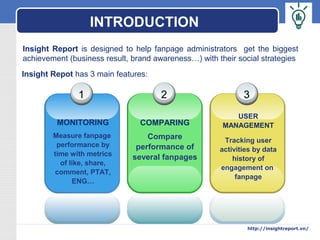
INTRODUCTION
1
MONITORING
Measure fanpage
performance by
time with metrics
of like, share,
comment, PTAT,
ENG…
2
COMPARING
Compare
performance of
several fanpages
3
USER
MANAGEMENT
Tracking user
activities by data
history of
engagement on
fanpage
Insight Report is designed to help fanpage administrators get the biggest
achievement (business result, brand awareness…) with their social strategies
http://insightreport.vn/
Insight Repot has 3 main features:
LOGO
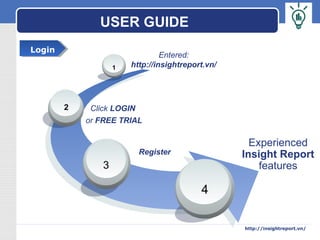
USER GUIDE
Experienced
Insight Report
features
4
3
2
1
Entered:
http://insightreport.vn/
Click LOGIN
or FREE TRIAL
Register
LoginLogin
http://insightreport.vn/
LOGO
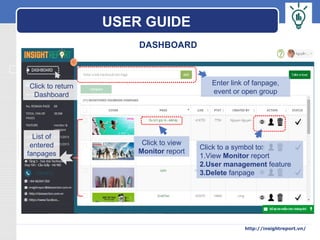
DASHBOARD
List of
entered
fanpages
Click to return
Dashboard
Enter link of fanpage,
event or open group
Click to view
Monitor report
Click to a symbol to:
1.View Monitor report
2.User management feature
3.Delete fanpage
USER GUIDE
http://insightreport.vn/
LOGO
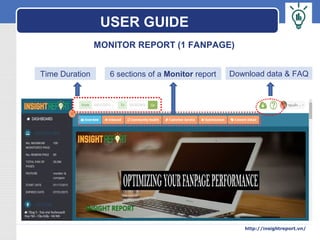
Time Duration 6 sections of a Monitor report Download data & FAQ
MONITOR REPORT (1 FANPAGE)
USER GUIDE
http://insightreport.vn/
LOGO
USER GUIDE
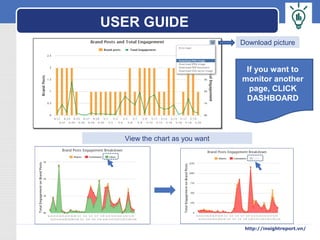
Download picture
View the chart as you want
If you want to
monitor another
page, CLICK
DASHBOARD
http://insightreport.vn/
LOGO
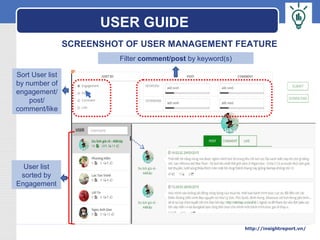
SCREENSHOT OF USER MANAGEMENT FEATURE
User list
sorted by
Engagement
Sort User list
by number of
engagement/
post/
comment/like
Filter comment/post by keyword(s)
USER GUIDE
http://insightreport.vn/
LOGO
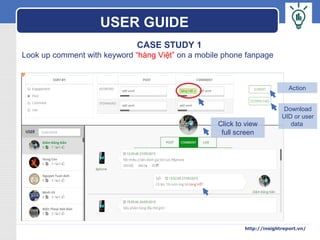
CASE STUDY 1
Look up comment with keyword “hàng Việt” on a mobile phone fanpage
Click to view
full screen
Download
UID or user
data
Action
USER GUIDE
http://insightreport.vn/
LOGO
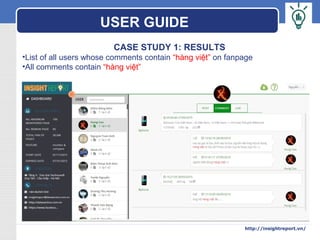
CASE STUDY 1: RESULTS
•List of all users whose comments contain “hàng việt” on fanpage
•All comments contain “hàng việt”
USER GUIDE
http://insightreport.vn/
LOGO
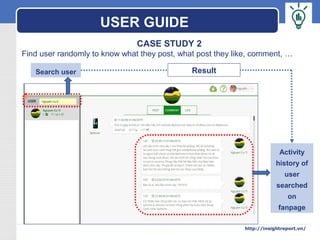
CASE STUDY 2
Find user randomly to know what they post, what post they like, comment, …
Search user
Activity
history of
user
searched
on
fanpage
Result
USER GUIDE
http://insightreport.vn/
LOGO
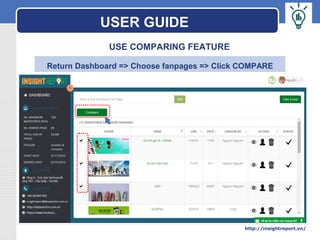
USE COMPARING FEATURE
Return Dashboard => Choose fanpages => Click COMPARE
USER GUIDE
http://insightreport.vn/
LOGO
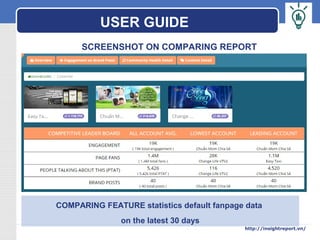
SCREENSHOT ON COMPARING REPORT
COMPARING FEATURE statistics default fanpage data
on the latest 30 days
USER GUIDE
http://insightreport.vn/
LOGO
Link: http://insightreport.vn/ 
Support Center:
Datasection Vietnam Co.Ltd
Add: 5th
 Floor, Technosoft Bldg, Duy Tan St., Cau Giay Dist., HN
SĐT: (+84-4) 6294 1359
Email: info@datasection.com.vn
Hopefully you have the best experience with Insight Report!
THANKS & BEST REGARDS!
***
CONTACT INFORMATION
http://insightreport.vn/

Insight Report User Guide_English Version