IMAGE COMPRESSION
Presented By,
M.Ramya,
MSc(CS&IT),
Nadar Saraswathi college of Arts & Science,
Theni.
INTRODUCTION
• Audio, image and video require vast amounts of data.
 320x240x8bits grayscale image: 77Kb
 ‰1100x900x24bits color image: 3MB
 ‰640x480x24x30frames/sec: 27.6 MB/sec
• ‰Low network’s bandwidth doesn't allow for real time video transmission.
• ‰Slow storage devices don't allow for fast playing back ‰Compression
reduces storage requirements.
TYPES OF IMAGE
There are 5 main formats in which to store images.
 TIFF
 JPEG
 GIF
 PNG
 Raw image files
TIFF
• TIFF stands for Tagged Image File Format.
• TIFF images create very large file sizes.
• TIFF images are uncompressed and thus contain a lot of detailed image
data.
• TIFFs are also extremely flexible in terms of and content.
• TIFF is the most common file type used in photo software as well as page
layout software.
• TIFF contains a lot of image data.
• TIFF file types ending in .tif
JPEG
• JPEG stands for Joint Photographic Experts Group, which created this
standard for this type of image formatting.
• JPEG files are images that have been compressed to store a lot of
information in a small-size file.
• A JPEG is compressed in a way that loses some of the image detail during
the compression in order to make the file small.
• JPEG files are bad for line drawings or logos or graphics, as the
compression makes them look “bitmappy”.
• JPEG file types ending in .jpg
GIF
• GIF stands for Graphic Interchange Format.
• This format compresses images but, as different from JPEG, the
compression is lossless.
• GIFs also have an extremely limited color range suitable for the web but
not for printing.
• This format is never used for photography, because of the limited number
of colors.
• GIFs can also be used for animations.
• GIF file types ending in .gif
PNG
• PNG stands for Portable Network Graphics.
• It also allows for a full range of color and better compression.
• It’s used almost exclusively for web images , never for print images.
• For photographs , PNG is not as good as JPEG , because it creates a larger
file.
• It was created as an open format to replace GIF , because the patent for GIF
was owned by one company and nobody else wanted to pay licensing fees.
• PNG file types ending in .png
RAW IMAGE FILES
• Raw image files contain data from a digital camera.
• The files are called raw because they haven’t been processed and therefore
can’t be edited or printed.
• Raw files usually contain a vast amount of data that is uncompressed.
• The size of a raw file is extremely large.
• They are converted to TIFF before editing and color-correcting
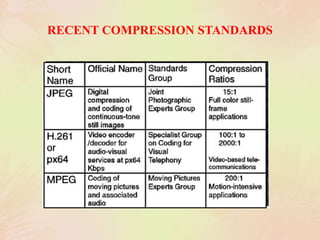
RECENT COMPRESSION STANDARDS
JPEG
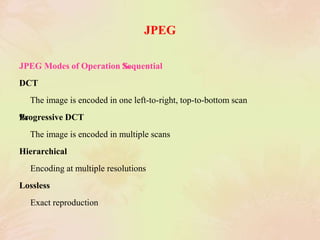
JPEG Modes of Operation ‰Sequential
DCT
The image is encoded in one left-to-right, top-to-bottom scan
‰Progressive DCT
The image is encoded in multiple scans
Hierarchical
Encoding at multiple resolutions
Lossless
Exact reproduction
JPEG BLOCK DIAGRAMS
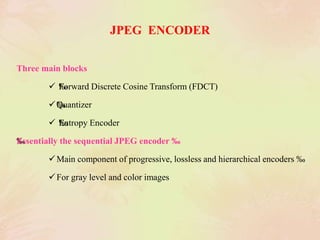
JPEG ENCODER
Three main blocks
 ‰Forward Discrete Cosine Transform (FDCT)
‰Quantizer
 ‰Entropy Encoder
‰Essentially the sequential JPEG encoder ‰
Main component of progressive, lossless and hierarchical encoders ‰
For gray level and color images
JPEG DECODER
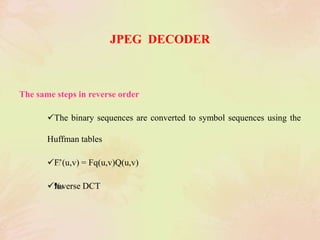
The same steps in reverse order
The binary sequences are converted to symbol sequences using the
Huffman tables
‰F’(u,v) = Fq(u,v)Q(u,v)
‰Inverse DCT
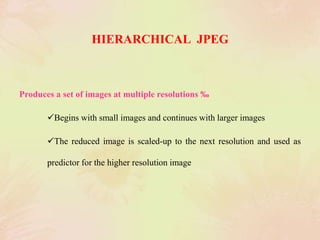
HIERARCHICAL JPEG
Produces a set of images at multiple resolutions ‰
Begins with small images and continues with larger images
The reduced image is scaled-up to the next resolution and used as
predictor for the higher resolution image
MPEG
• The Moving Picture Coding Experts Group (MPEG) is a working group for
the development of standards for compression, decompression, processing,
and coded representation of moving pictures and audio
• ‰MPEG groups are open and have attracted large participation
MPEG FEATURES
• Random access
• ‰Fast forward / reverse searches
• ‰Reverse playback
• ‰Audio – visual synchronization
• ‰Robustness to errors
• ‰Auditability
• ‰Cost trade-off
MPEG ENCODING
• I frames are JPEG compressed
• ‰P, B frames are encoded in terms of future or previous frames
• ‰Motion vectors are estimated and differences between predicted and actual
blocks are computed ‰
These error terms are DCT encoded
 ‰Entropy encoding produces a compact binary code
‰Special cases: static and intracoded blocks
px64
• H.261 (px64) was designed for data rates which are multiples of 64kbit/s
and is sometimes called px64kbit/s (p is in the range 1-30).
• These data rates suit ISDN lines , for which this video code was designed
• Intended for videophone and video conferencing systems
• Compressed data stream.
p*64 Kbits/s , p = (1,……,30)
• Video compression for video conferences
Compression in real-time
Targeted to ISDN
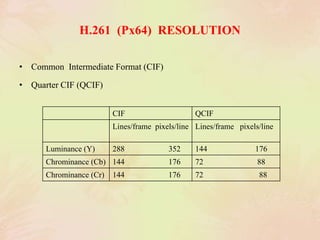
H.261 (Px64) RESOLUTION
• Common Intermediate Format (CIF)
• Quarter CIF (QCIF)
CIF QCIF
Lines/frame pixels/line Lines/frame pixels/line
Luminance (Y) 288 352 144 176
Chrominance (Cb) 144 176 72 88
Chrominance (Cr) 144 176 72 88
Image processing

Image processing

  • 1.
    IMAGE COMPRESSION Presented By, M.Ramya, MSc(CS&IT), NadarSaraswathi college of Arts & Science, Theni.
  • 2.
    INTRODUCTION • Audio, imageand video require vast amounts of data.  320x240x8bits grayscale image: 77Kb  ‰1100x900x24bits color image: 3MB  ‰640x480x24x30frames/sec: 27.6 MB/sec • ‰Low network’s bandwidth doesn't allow for real time video transmission. • ‰Slow storage devices don't allow for fast playing back ‰Compression reduces storage requirements.
  • 3.
    TYPES OF IMAGE Thereare 5 main formats in which to store images.  TIFF  JPEG  GIF  PNG  Raw image files
  • 4.
    TIFF • TIFF standsfor Tagged Image File Format. • TIFF images create very large file sizes. • TIFF images are uncompressed and thus contain a lot of detailed image data. • TIFFs are also extremely flexible in terms of and content. • TIFF is the most common file type used in photo software as well as page layout software. • TIFF contains a lot of image data. • TIFF file types ending in .tif
  • 5.
    JPEG • JPEG standsfor Joint Photographic Experts Group, which created this standard for this type of image formatting. • JPEG files are images that have been compressed to store a lot of information in a small-size file. • A JPEG is compressed in a way that loses some of the image detail during the compression in order to make the file small. • JPEG files are bad for line drawings or logos or graphics, as the compression makes them look “bitmappy”. • JPEG file types ending in .jpg
  • 6.
    GIF • GIF standsfor Graphic Interchange Format. • This format compresses images but, as different from JPEG, the compression is lossless. • GIFs also have an extremely limited color range suitable for the web but not for printing. • This format is never used for photography, because of the limited number of colors. • GIFs can also be used for animations. • GIF file types ending in .gif
  • 7.
    PNG • PNG standsfor Portable Network Graphics. • It also allows for a full range of color and better compression. • It’s used almost exclusively for web images , never for print images. • For photographs , PNG is not as good as JPEG , because it creates a larger file. • It was created as an open format to replace GIF , because the patent for GIF was owned by one company and nobody else wanted to pay licensing fees. • PNG file types ending in .png
  • 8.
    RAW IMAGE FILES •Raw image files contain data from a digital camera. • The files are called raw because they haven’t been processed and therefore can’t be edited or printed. • Raw files usually contain a vast amount of data that is uncompressed. • The size of a raw file is extremely large. • They are converted to TIFF before editing and color-correcting
  • 9.
  • 10.
    JPEG JPEG Modes ofOperation ‰Sequential DCT The image is encoded in one left-to-right, top-to-bottom scan ‰Progressive DCT The image is encoded in multiple scans Hierarchical Encoding at multiple resolutions Lossless Exact reproduction
  • 11.
  • 12.
    JPEG ENCODER Three mainblocks  ‰Forward Discrete Cosine Transform (FDCT) ‰Quantizer  ‰Entropy Encoder ‰Essentially the sequential JPEG encoder ‰ Main component of progressive, lossless and hierarchical encoders ‰ For gray level and color images
  • 13.
    JPEG DECODER The samesteps in reverse order The binary sequences are converted to symbol sequences using the Huffman tables ‰F’(u,v) = Fq(u,v)Q(u,v) ‰Inverse DCT
  • 14.
    HIERARCHICAL JPEG Produces aset of images at multiple resolutions ‰ Begins with small images and continues with larger images The reduced image is scaled-up to the next resolution and used as predictor for the higher resolution image
  • 15.
    MPEG • The MovingPicture Coding Experts Group (MPEG) is a working group for the development of standards for compression, decompression, processing, and coded representation of moving pictures and audio • ‰MPEG groups are open and have attracted large participation
  • 16.
    MPEG FEATURES • Randomaccess • ‰Fast forward / reverse searches • ‰Reverse playback • ‰Audio – visual synchronization • ‰Robustness to errors • ‰Auditability • ‰Cost trade-off
  • 17.
    MPEG ENCODING • Iframes are JPEG compressed • ‰P, B frames are encoded in terms of future or previous frames • ‰Motion vectors are estimated and differences between predicted and actual blocks are computed ‰ These error terms are DCT encoded  ‰Entropy encoding produces a compact binary code ‰Special cases: static and intracoded blocks
  • 18.
    px64 • H.261 (px64)was designed for data rates which are multiples of 64kbit/s and is sometimes called px64kbit/s (p is in the range 1-30). • These data rates suit ISDN lines , for which this video code was designed • Intended for videophone and video conferencing systems • Compressed data stream. p*64 Kbits/s , p = (1,……,30) • Video compression for video conferences Compression in real-time Targeted to ISDN
  • 19.
    H.261 (Px64) RESOLUTION •Common Intermediate Format (CIF) • Quarter CIF (QCIF) CIF QCIF Lines/frame pixels/line Lines/frame pixels/line Luminance (Y) 288 352 144 176 Chrominance (Cb) 144 176 72 88 Chrominance (Cr) 144 176 72 88