Workshop: designing learning spaces with Web 2.0 tools iLearning Forum 2008 Ada Giannatelli, Simona Azzali METID Centre - Politecnico di Milano
General info Duration:   1h 30 min   Contact data:  Ada Giannatelli [ada.giannatelli@polimi.it] Simona Azzali [simona.azzali@polimi.it] METID Centre – Politecnico di Milano [http://www.metid.polimi.it] Workshop material  available online at http://pipes.yahoo.com/pipes/pipe.info?_id=e427f142893fb773dc60704d5bfa74eb Aim of the workshop:  giving an overview of design of Web 2.0 tools for learning environments (education and training, formal and informal learning) totally online, blended, and web-enhanced
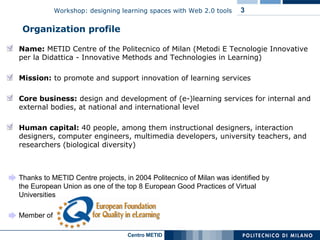
Organization profile Thanks to METID Centre projects, in 2004 Politecnico of Milan was identified by the European Union as one of the top 8 European Good Practices of Virtual Universities Member of  Name:  METID Centre of the Politecnico of Milan (Metodi E Tecnologie Innovative per la Didattica -  Innovative Methods and Technologies in Learning )  Mission:  to promote and support innovation of learning services  Core business:   design and development of (e-)learning services  for internal and external bodies, at national and international level Human capital:  40 people, among them instructional designers, interaction designers, computer engineers, multimedia developers, university teachers, and researchers (biological diversity)
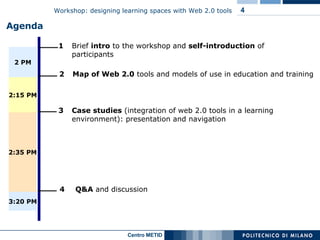
Agenda 3  Case studies  (integration of web 2.0 tools in a learning environment): presentation and navigation 4     Q&A  and discussion 2 Map of Web 2.0  tools and models of use in education and training 1 Brief  intro  to the workshop   and  self-introduction  of participants 2 PM 2:35 PM 3:20 PM 2:15 PM
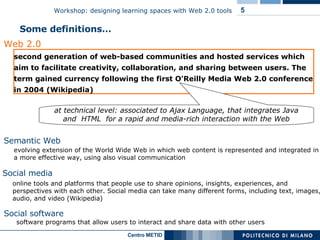
Semantic Web evolving extension of the World Wide Web in which web content is represented and integrated in a more effective way, using also visual communication Web 2.0 second generation of web-based communities and hosted services which aim to facilitate creativity, collaboration, and sharing between users. The term gained currency following the first O'Reilly Media Web 2.0 conference in 2004 (Wikipedia) Some definitions… software programs that allow users to interact and share data with other users Social software  online tools and platforms that people use to share opinions, insights, experiences, and perspectives with each other. Social media can take many different forms, including text, images, audio, and video (Wikipedia)  Social media at technical level: associated to Ajax Language, that integrates Java and  HTML  for a rapid and media-rich interaction with the Web
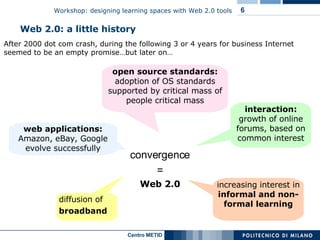
After 2000 dot com crash, during the following 3 or 4 years for business Internet seemed to be an empty promise…but later on… Web 2.0: a little history convergence = Web 2.0 diffusion of  broadband interaction:  growth of online forums, based on common interest web applications:  Amazon, eBay, Google evolve successfully open source standards:  adoption of OS standards supported by critical mass of people critical mass increasing interest in  informal and non-formal learning
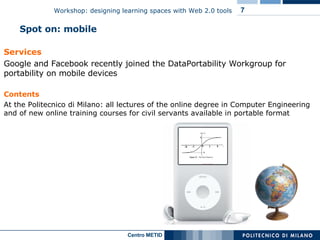
Spot on: mobile Services Google and Facebook recently joined the DataPortability Workgroup for portability on mobile devices Contents At the Politecnico di Milano: all lectures of the online degree in Computer Engineering and of new online training courses for civil servants available in portable format
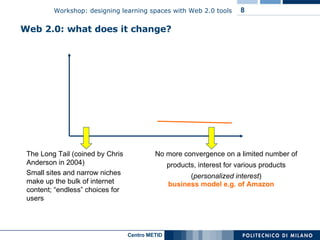
The Long Tail (coined by Chris Anderson in 2004)  Small sites and narrow niches make up the bulk of internet content; “endless” choices for users No more convergence on a limited number of products, interest for various products  ( personalized interest ) business model e.g. of Amazon Web 2.0: what does it change?
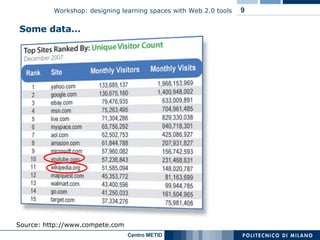
Some data… Source: http://www.compete.com
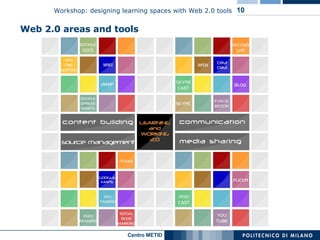
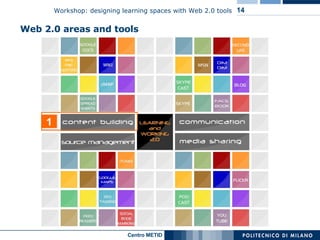
Web 2.0 areas and tools
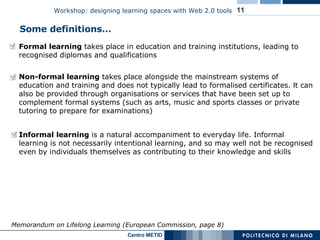
Some definitions… Formal learning  takes place in education and training institutions, leading to recognised diplomas and qualifications Memorandum on Lifelong Learning (European Commission, page 8) Non-formal learning  takes place alongside the mainstream systems of education and training and does not typically lead to formalised certificates. lt can also be provided through organisations or services that have been set up to complement formal systems (such as arts, music and sports classes or private tutoring to prepare for examinations) Informal learning  is a natural accompaniment to everyday life. Informal learning is not necessarily intentional learning, and so may well not be recognised even by individuals themselves as contributing to their knowledge and skills
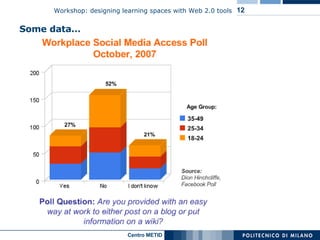
Some data…
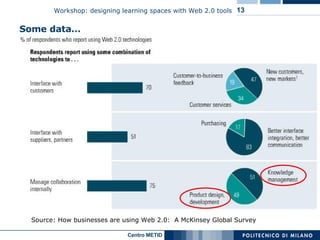
Some data… Source:  How businesses are using Web 2.0:  A McKinsey Global Survey
Web 2.0 areas and tools 1
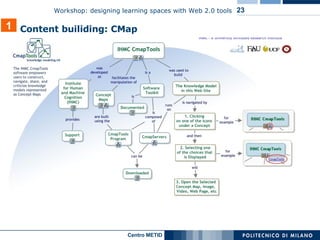
Wiki Spreadsheets  e.g. Google Docs and Spreadsheets  http://docs.google.com Web presenters  e.g. Zoho   http://show.zoho.com cMap  e.g. http://cmap.ihmc.us (collaborative concept maps) 1 Content builiding: some tools
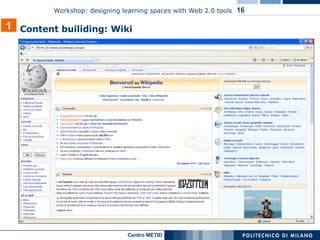
1 Content builiding: Wiki
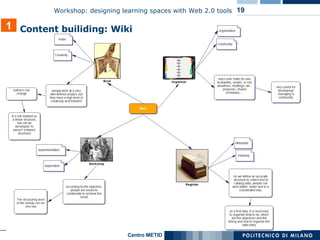
Definition   Wiki is software that allows users to create, edit, and link web pages easily. Wikis are often used to create collaborative websites and to power community websites. Ward Cunningham, developer of the first wiki, WikiWikiWeb, originally described it as "the simplest online database that could possibly work". One of the best known wikis is Wikipedia. A single page     a "wiki page",  the entire collection of pages    "the wiki".  Primary features Wiki enables documents to be written  collaboratively , in a simple markup language, using a web browser most wikis keep a record of changes made to wiki pages    authors can revert to an older version of the page ( versioning ) 1 Content builiding: Wiki
Other features many wikis are open to the general public without requiring them to register user accounts. Sometimes logging in for a session is recommended users can create any number of index or table of contents pages, with hierarchical categorization or whatever form of organization they like. Wikis generally provide one or more ways to categorize or tag pages, to support the maintenance of such index pages. to create links to pages that do not yet exist, as a way to invite others to share what they know about a subject new to the wiki ? 1 Content builiding: Wiki  Comparison of wiki software:   http://en.wikipedia.org/wiki/Comparison_of_wiki_software
1 Content builiding: Wiki
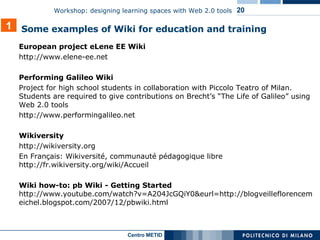
European project eLene EE Wiki  http://www.elene-ee.net  Performing Galileo Wiki Project for high school students in collaboration with Piccolo Teatro of Milan. Students are required to give contributions on Brecht’s “The Life of Galileo” using Web 2.0 tools  http://www.performingalileo.net  Wikiversity http://wikiversity.org En Français: Wikiversité, communauté pédagogique libre http://fr.wikiversity.org/wiki/Accueil Wiki how-to: pb Wiki - Getting Started  http://www.youtube.com/watch?v=A204JcGQiY0&eurl=http://blogveilleflorencemeichel.blogspot.com/2007/12/pbwiki.html 1 Some examples of Wiki for education and training
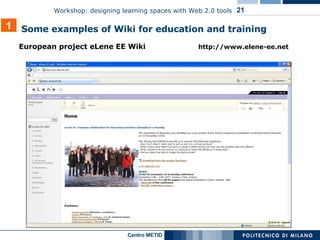
European project eLene EE Wiki  http://www.elene-ee.net 1 Some examples of Wiki for education and training
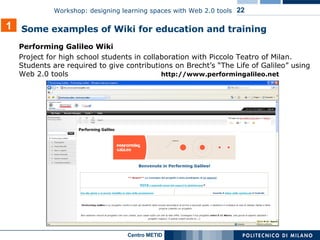
Performing Galileo Wiki Project for high school students in collaboration with Piccolo Teatro of Milan. Students are required to give contributions on Brecht’s “The Life of Galileo” using Web 2.0 tools  http://www.performingalileo.net   1 Some examples of Wiki for education and training
1 Content builiding: CMap
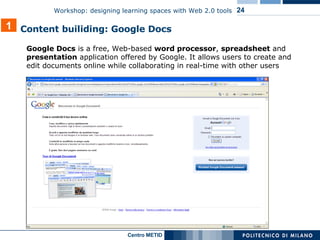
Google Docs  is a free, Web-based  word processor ,  spreadsheet  and  presentation  application offered by Google. It allows users to create and edit documents online while collaborating in real-time with other users 1 Content builiding: Google Docs
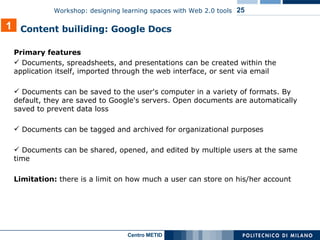
Primary features Documents, spreadsheets, and presentations can be created within the application itself, imported through the web interface, or sent via email Documents can be saved to the user's computer in a variety of formats. By default, they are saved to Google's servers. Open documents are automatically saved to prevent data loss Documents can be tagged and archived for organizational purposes Documents can be shared, opened, and edited by multiple users at the same time Limitation:  there is a limit on how much a user can store on his/her account 1 Content builiding: Google Docs
Production of  teacher-authored  content Production of collaborative,  student-authored  content Planning   learning  activities (e.g. class activities) ore task / projects, setting goals Assessing and monitoring  progress on learner learning 1 Some  models of use  of content building tools for learning
Users can upload content and to edit it online: no issues of operating system compatibility and versioning Tools allow (and encourage) shared responsibility for development of course materials. Colleagues can cross institutional boundaries to collaborate on projects and research 1 Value added of content building tools for learning
3 1 4 2
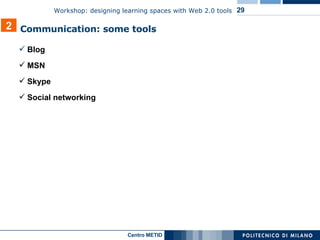
Blog MSN Skype Social networking 2 Communication: some tools
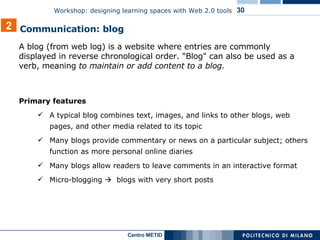
A   blog (from web log) is a website where entries are commonly displayed in reverse chronological order. "Blog" can also be used as a verb, meaning  to maintain or add content to a blog. Primary features A typical blog combines text, images, and links to other blogs, web pages, and other media related to its topic Many blogs provide commentary or news on a particular subject; others function as more personal online diaries  Many blogs allow readers to leave comments in an interactive format Micro-blogging     blogs with very short posts 2 Communication: blog
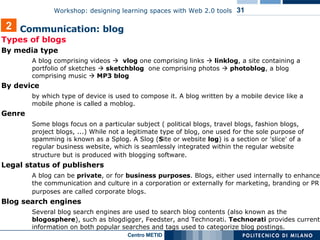
Types of blogs By media type  A blog comprising videos     vlog  one comprising links     linklog , a site containing a portfolio of sketches     sketchblog   one comprising photos     photoblog ,  a blog comprising music    MP3 blog By device  by which type of device is used to compose it. A blog written by a mobile device like a mobile phone is called a moblog. Genre  Some blogs focus on a particular subject ( political blogs, travel blogs, fashion blogs, project blogs, ...) While not a legitimate type of blog, one used for the sole purpose of spamming is known as a Splog. A Slog ( S ite or website  log ) is a section or 'slice' of a regular business website, which is seamlessly integrated within the regular website structure but is produced with blogging software.   Legal status of publishers  A blog can be  private , or for  business   purposes . Blogs, either used internally to enhance the communication and culture in a corporation or externally for marketing, branding or PR purposes are called corporate blogs.   Blog search engines  Several blog search engines are used to search blog contents (also known as the  blogosphere ), such as blogdigger, Feedster, and Technorati.  Technorati  provides current information on both popular searches and tags used to categorize blog postings.  2 Communication: blog
2 Communication: blog
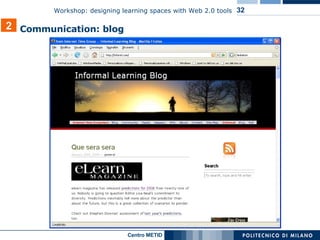
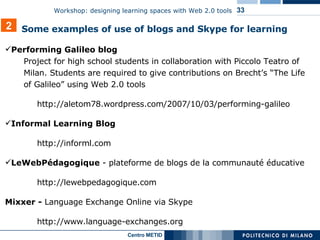
Performing Galileo blog Project for high school students in collaboration with Piccolo Teatro of Milan. Students are required to give contributions on Brecht’s “The Life of Galileo” using Web 2.0 tools  http://aletom78.wordpress.com/2007/10/03/performing-galileo Informal Learning Blog  http://informl.com LeWebPédagogique  - plateforme de blogs de la communauté éducative  http://lewebpedagogique.com Mixxer -  Language Exchange Online via Skype http://www.language-exchanges.org 2 Some examples of use of blogs and Skype for learning
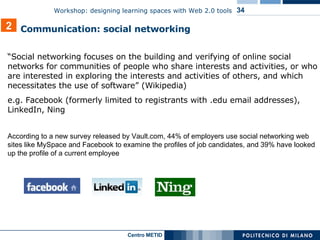
“ Social networking focuses on the building and verifying of online social networks for communities of people who share interests and activities, or who are interested in exploring the interests and activities of others, and which necessitates the use of software” (Wikipedia) e.g. Facebook ( formerly limited to registrants with .edu email addresses ), LinkedIn, Ning According to a new survey released by Vault.com, 44% of employers use social networking web sites like MySpace and Facebook to examine the profiles of job candidates, and 39% have looked up the profile of a current employee 2 Communication: social networking
Primary features The Wall The Wall is a space on each user's profile page that allows friends to post messages and attachments for the user to see. One user's wall is visible to anyone with the ability to see their full profile, and different users' wall posts show up in an individual's News Feed Photos Here users can upload albums of photos, tag friends, and comment on photos Events Events are a way for members to let friends know about upcoming events in their community and to organize social gatherings. Events require an event name, tagline, network, host name, event type, start and end time, location & city, and a guest list of friends invited. Events can be open, closed, or secret. When setting up an event the user can choose to allow friends to upload photos, video, and posted items 2 Social networking: Facebook
Facebook Paris Tech  ( collective entity that includes ten of the most prestigious French engineering schools ) http://www.facebook.com/group.php?gid=2382238262 Groupe des étudiants Paris Descartes http://www.facebook.com/group.php?gid=2446212231 Public Speaking Workshop of Oxford university student union (event group) http://oxford.facebook.com/event.php?eid=5333414263&ref=mf Université de Montréal  http://www.facebook.com/pages/Montreal-QC/Universit-de- Montral/14096350493?ref=s LinkedIn Careerservice of Politecnico di Milano, external relations http://www.linkedin.com Ning French Teachers in the 21st century (open network)  http://frenchteachers.ning.com 2 Some examples of s ocial networking  for learning
Online  discussion  / seminar (e.g. on blog, Skype) Conversation : practice of a foreign language via VOIP call (e.g. on Skype) Inter-institutional  collaboration  and  networking  (e.g. on Facebook) Tracing of competences and work experiences ( e-portfolio ) 2 Some models   of   use   of communication tools for learning
Campus-based social networking tools offer a safe space for community and self-expression (e.g. incoming freshmen can begin to get to know their classmates before arriving on campus) Encourage idea sharing and community networking Extending the impact and life span of conferences and workshops. Attendees can begin to network before they even get to the hallways, and the group’s wisdom can be collected and preserved, increasing and prolonging usefulness of the conference 2 Value added   of social   networking   tools for learning
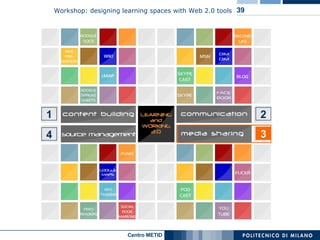
2 1 4 3
Flickr Podcast YouTube 3 Media sharing: some tools
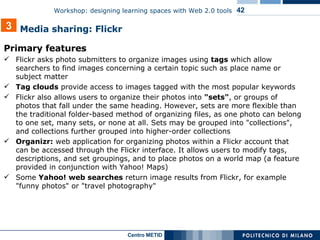
Flickr is  a photo sharing website  and web services suite, and an online community platform. One of the earliest Web 2.0 applications   In addition to being a popular Web site for users to share personal photographs, the service is widely used by bloggers as a photo repository Its popularity has been fueled by its innovative online community tools that allow photos to be tagged and browsed by folksonomic means 3 Media sharing: Flickr
Primary features Flickr asks photo submitters to organize images using  tags  which allow searchers to find images concerning a certain topic such as place name or subject matter Tag clouds  provide access to images tagged with the most popular keywords Flickr also allows users to organize their photos into  "sets" , or groups of photos that fall under the same heading. However, sets are more flexible than the traditional folder-based method of organizing files, as one photo can belong to one set, many sets, or none at all. Sets may be grouped into "collections", and collections further grouped into higher-order collections Organizr:  web application for organizing photos within a Flickr account that can be accessed through the Flickr interface. It allows users to modify tags, descriptions, and set groupings, and to place photos on a world map (a feature provided in conjunction with Yahoo! Maps) Some  Yahoo! web searches  return image results from Flickr, for example "funny photos" or "travel photography" 3 Media sharing: Flickr
A  podcast  is a collection of digital media files which is distributed over the Internet using syndication feeds for playback on portable media players and personal computers. The term can refer either to the content itself or to the method by which it is syndicated; the latter is also termed  podcasting The term "podcast" is a mix of the acronym "Pod" – standing for "Portable on Demand" – and "broadcast". The iPod name was coined with Pod, prefixed with the "i" commonly used by Apple for its products and services. The first podcasting scripts were developed for the iPod. These scripts allow podcasts to be automatically transferred to a mobile device after they are downloaded. Though podcasters' web sites may also offer direct download or streaming of their content, a podcast is distinguished from other digital media formats by its ability to be syndicated, subscribed to, and downloaded automatically when new content is added, using an aggregator or feed reader capable of reading feed formats such as RSS or Atom. 3 Media sharing: podcast
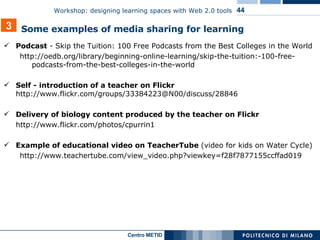
Podcast  -  Skip the Tuition: 100 Free Podcasts from the Best Colleges in the World http://oedb.org/library/beginning-online-learning/skip-the-tuition:-100-free-podcasts-from-the-best-colleges-in-the-world   Self - introduction of a teacher on Flickr  http://www.flickr.com/groups/33384223@N00/discuss/28846 Delivery of biology content produced by the teacher on Flickr   http://www.flickr.com/photos/cpurrin1 Example of educational video on TeacherTube  (video for kids on Water Cycle) http://www.teachertube.com/view_video.php?viewkey=f28f7877155ccffad019 3 Some examples of media sharing for learning
eLene consortium channel on Youtube http://it.youtube.com/user/eLeneTeam OtisCollege's Channel on YouTube http://www.youtube.com/profile?user=OtisCollege Value Step Scales using Gouache (Otis College)  http://www.youtube.com/watch?v=mTPwkJI1I9g BBC world news channel on Youtube  http://it.youtube.com/user/bbcworldnews Youtube – Conceptrice Rédactrice junior http://it.youtube.com/watch?v=pYBN9Y6ymaQ SuTree - Knowledge community and an aggregator of instructional & educational videos  http://www.sutree.com 3 Some examples of media sharing for learning
Lecture  (e.g. podcast, Youtube, Teachertube) teacher-authored content integrating content authored by others Creation of  representations , for example of artifacts (e.g. on Flickr, Youtube) Presentation  (e.g. on Flickr, Youtube) of a self-produced work / artifact of the course Comments  / review of learning material  (e.g. on Flickr, Youtube) Asynchronous  public   feedback  on assignments, such as posting, organizing, sharing,and critiquing other students’ work for each assignment  (e.g. on Flickr, Youtube) 3 Some models   of   use   of media sharing for learning
Comparing their work to that of others can give students a valuable perspective on their own abilities and inspire them to try new ideas or techniques) Users can upload content and to edit it online: no issues of operating system compatibility Learners can show their skills as soon as they develop them ( progress  monitoring and a ssessment on learner learning ) 3 Value added of media sharing for learning
2 3 1 4
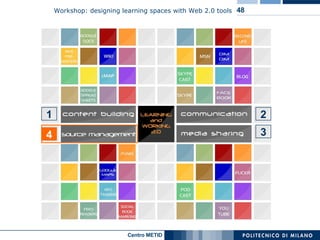
Why is source management so important? Increasing number of applications Importance of an efficient management of content and services available on the Internet Efficient identification of updates on web (2.0) services 4 Source management: some tools
iTunes Social bookmarking Aggregators Geo tagging    Google maps Mashups 4 Source management: some tools
Social bookmarking  is a method to store, organize, search and manage bookmarks of web pages on the Internet by using key words ( tags ).  Primary features users save links to web pages that they want to remember and/or share. These  bookmarks  are usually  public , and can be saved  privately , shared only with specified people or groups, shared only inside certain networks, or another combination of public and private domains informal tags  to organize bookmarks bookmarks can be displayed  chronologically, by category or tags, or via a search engine information about the  number of users  who bookmarked the same link extra features such as ratings and comments on bookmarks, import / export bookmarks from / to browsers, emailing of bookmarks, web annotation… 4 Source management: tools
Advantages All tag-based classification of Internet resources (such as web sites) is done  by human beings , who understand the content of the resource semantically classified tags , which are hard to find with contemporary search engines  resources that are of more use are bookmarked by more users    a system will "rank" a resource based on its  perceived utility Disadvantages No standard set of keywords No standard for the structure of tags  (e.g. singular vs. plural, capitalization, etc.) Mistagging due to  spelling errors , tags with  more than one meaning,  unclear tags… No possibility to define hierarchical relationships between tags  4 Source management: tools
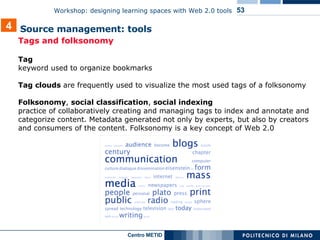
Tags and folksonomy  Tag  keyword used to organize bookmarks Tag clouds  are frequently used to visualize the most used tags of a folksonomy   Folksonomy ,  social classification ,  social indexing practice of collaboratively creating and managing tags to index and annotate and categorize content. Metadata generated not only by experts, but also by creators and consumers of the content. Folksonomy is a key concept of Web 2.0 4 Source management: tools
Use of del.icio.us in health sciences libraries, for reference and research http://vielmetti.typepad.com/superpatron/2007/03/social_bookmark.html   Pages tagged with "math+lesson" on del.icio.us http://del.icio.us/search/?fr=del_icio_us&p=math%2Blesson&type=all 4 Some examples of social bookmarking for learning
Production of  teacher-authored  list of resources Recommendation  of relevant resources to specific users Production of  collaborative, student-authored  list of resources 4 Some models of use   of social bookmarking for learning
Social bookmarking tools allow (and encourage) shared responsibility for development of course resources. Colleagues can cross institutional boundaries to collaborate on projects and research 4 Value   added   of social bookmarking for learning
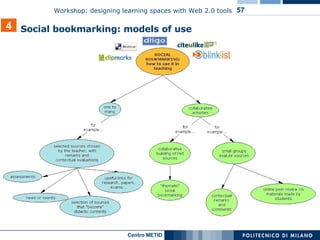
4 Social bookmarking: models of use
In the table below, some examples of the most significant social bookmarking   4 Source management: tools  saving “clips” as private or public voting clips sending clips by email or posting them in a blog searching by keywords in links, clips, tags or descriptions added by users it is possible to add a comment directly on the tagged pages and to share comments, Highlights and Sticky-Notes More “social” and intaractive then delicious: groups can modify remarks and notes from Diigo or directy on the clipped website Private or public bookmarks It is possible to share bookmarks as a list, in blogs, by email or feed Tags can be stored in folders  Public or private bookmarks it is possible to share bookmarks Bundle tags: to group together several tags Tagrolls: to show my own tags on my own blog/website Links for you: to suggest links to other people from your network Other features People all over the world can clip the best parts of web pages (few sentences, images or videos) instead of the entire web page "Social Annotation": it is possible to the save a link with some remarks or highlighting only some part of the page (Highlight).. It is possible to insert Sticky-Note e tagging videos, images (Clip) or other multimedia elements. Created in 2003 First  social bookmarking application The Most used instrument In 2005, bought by Yahoo!  Del.icio.us Guide for Educators [http://pedersondesigns.com/2006/11/24/delicious-guide-for-educators-part-1-tools-tagging/] Primary  features http://www.clipmarks.com/ http://www.diigo.com/ http://del.icio.us/ URL Clipmarks Diigo del.icio.us  
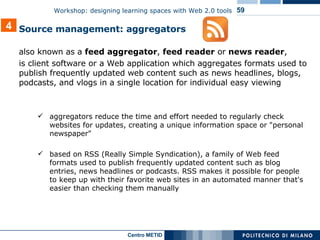
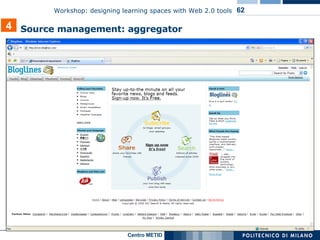
also known as a  feed aggregator ,  feed reader  or  news reader ,  is client software or a Web application which aggregates  formats used to publish frequently updated  web content such as news headlines, blogs, podcasts, and vlogs in a single location for individual easy viewing aggregators reduce the time and effort needed to regularly check websites for updates, creating a unique information space or "personal newspaper"  based on RSS (Really Simple Syndication), a family of Web feed formats used to publish frequently updated content such as blog entries, news headlines or podcasts. RSS makes it possible for people to keep up with their favorite web sites in an automated manner that's easier than checking them manually 4 Source management: aggregators
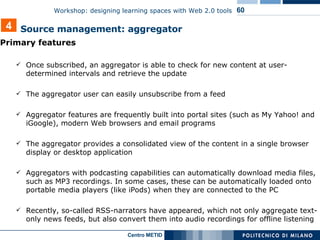
Primary features Once subscribed, an aggregator is able to check for new content at user-determined intervals and retrieve the update The aggregator user can easily unsubscribe from a feed  Aggregator features are frequently built into portal sites (such as My Yahoo! and iGoogle), modern Web browsers and email programs The aggregator provides a consolidated view of the content in a single browser display or desktop application Aggregators with podcasting capabilities can automatically download media files, such as MP3 recordings. In some cases, these can be automatically loaded onto portable media players (like iPods) when they are connected to the PC Recently, so-called RSS-narrators have appeared, which not only aggregate text-only news feeds, but also convert them into audio recordings for offline listening 4 Source management: aggregator
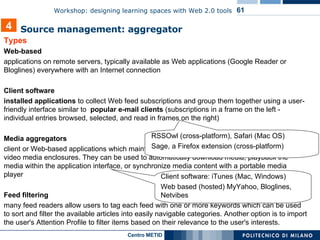
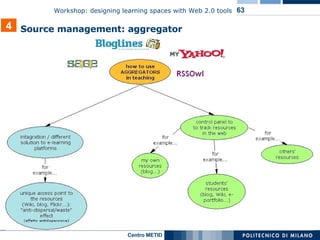
Types Web-based applications on remote servers, typically available as Web applications (Google Reader or Bloglines) everywhere with an Internet connection Client software installed applications  to collect Web feed subscriptions and group them together using a user-friendly interface similar to  popular e-mail clients  (subscriptions in a frame on the left - individual entries browsed, selected, and read in frames on the right) Media aggregators client or Web-based applications which maintain subscriptions to feeds that contain audio or video media enclosures. They can be used to automatically download media, playback the media within the application interface, or synchronize media content with a portable media player Feed filtering many feed readers allow users to tag each feed with one or more keywords which can be used to sort and filter the available articles into easily navigable categories. Another option is to import the user's Attention Profile to filter items based on their relevance to the user's interests. 4 Source management: aggregator   RSSOwl (cross-platform), Safari (Mac OS)  Sage, a Firefox extension (cross-platform) Client software: iTunes (Mac, Windows)  Web based (hosted) MyYahoo, Bloglines, Netvibes
4 Source management: aggregator
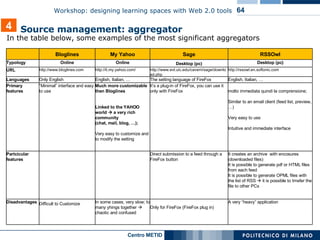
In the table below, some examples of the most significant aggregators  4 Source management: aggregator   A very “heavy” application Only for FireFox (FireFox plug in) In some cases, very slow; to many yhings together    chaotic and confused Difficult to Customize   Disadvantages It creates an archive  with encosures (downloaded files) It is possible to generate pdf or HTML files from each feed It is possible to generate OPML files with the list of RSS    it is possible to trnsfer the file to other PCs  Direct submission to a feed through a FireFox button Partcicular features molto immediata quindi la comprensione;  Similar to an email client (feed list, preview, …)  Very easy to use Intuitive and immediate interface It’s a plug-in of FireFox, you can use it only with FireFox Much more customizable then Bloglines Linked to the YAHOO world    a very rich community  (chat, mail, blog, …);  Very easy to customize and to modify the setting “ Minimal” interface and easy to use Primary features English, Italian, … The setting language of FireFox English, Italian, … Only English Languages http://rssowl.en.softonic.com http://www.evl.uic.edu/cavern/sage/download.php http://it.my.yahoo.com/ http://www.bloglines.com URL Desktop (pc) Desktop (pc) Online Online Typology RSSOwl Sage My Yahoo Bloglines
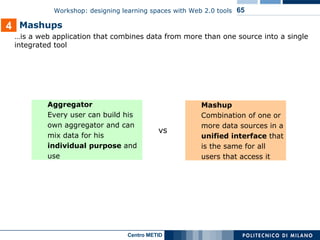
… is a web application that combines data from more than one source into a single integrated tool Mashups Aggregator   Every user can build his own aggregator and can mix data for his individual   purpose  and use Mashup Combination of one or more data sources in a unified interface  that is the same for all users that access it vs 4
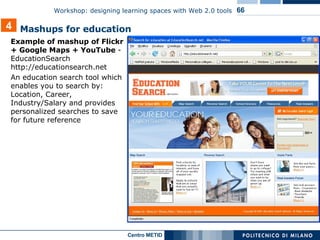
Example of mashup of Flickr + Google Maps + YouTube  - EducationSearch http://educationsearch.net An education search tool which enables you to search by: Location, Career, Industry/Salary and provides personalized searches to save for future reference Mashups for education 4
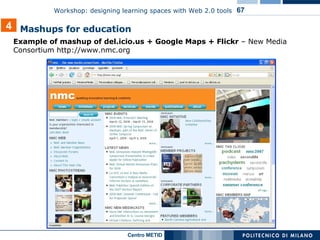
Example of mashup of del.icio.us + Google Maps + Flickr  – New Media Consortium http://www.nmc.org Mashups for education 4
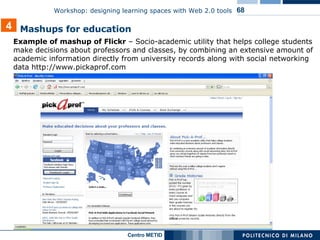
Example of mashup of Flickr  – S ocio-academic utility that helps college students make decisions about professors and classes, by combining an extensive amount of academic information directly from university records along with social networking data  http://www.pickaprof.com Mashups for education 4
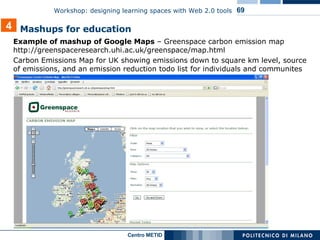
Example of mashup of Google Maps  – Greenspace carbon emission map  http://greenspaceresearch.uhi.ac.uk/greenspace/map.html Carbon Emissions Map for UK showing emissions down to square km level, source of emissions, and an emission reduction todo list for individuals and communites  Mashups for education 4
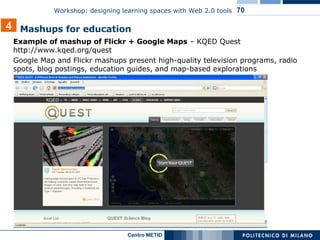
Example of mashup of Flickr + Google Maps  – KQED Quest  http://www.kqed.org/quest Google Map and Flickr mashups present high-quality television programs, radio spots, blog postings, education guides, and map-based explorations Mashups for education 4
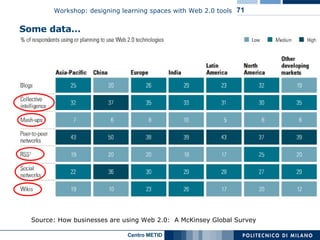
Some data… Source:  How businesses are using Web 2.0:  A McKinsey Global Survey
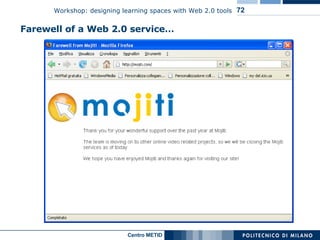
Farewell of a Web 2.0 service…
Web 2.0    conclusion -   reliability of  persistence on the time  + collaboration and integration + costs +  ubiquitous accessibility +  customizability (OS) -   l imitations on how much can be stored on his/her account

I Learn Workshop 01

  • 1.
    Workshop: designing learningspaces with Web 2.0 tools iLearning Forum 2008 Ada Giannatelli, Simona Azzali METID Centre - Politecnico di Milano
  • 2.
    General info Duration: 1h 30 min Contact data: Ada Giannatelli [ada.giannatelli@polimi.it] Simona Azzali [simona.azzali@polimi.it] METID Centre – Politecnico di Milano [http://www.metid.polimi.it] Workshop material available online at http://pipes.yahoo.com/pipes/pipe.info?_id=e427f142893fb773dc60704d5bfa74eb Aim of the workshop: giving an overview of design of Web 2.0 tools for learning environments (education and training, formal and informal learning) totally online, blended, and web-enhanced
  • 3.
    Organization profile Thanksto METID Centre projects, in 2004 Politecnico of Milan was identified by the European Union as one of the top 8 European Good Practices of Virtual Universities Member of Name: METID Centre of the Politecnico of Milan (Metodi E Tecnologie Innovative per la Didattica - Innovative Methods and Technologies in Learning ) Mission: to promote and support innovation of learning services Core business: design and development of (e-)learning services for internal and external bodies, at national and international level Human capital: 40 people, among them instructional designers, interaction designers, computer engineers, multimedia developers, university teachers, and researchers (biological diversity)
  • 4.
    Agenda 3 Case studies (integration of web 2.0 tools in a learning environment): presentation and navigation 4 Q&A and discussion 2 Map of Web 2.0 tools and models of use in education and training 1 Brief intro to the workshop and self-introduction of participants 2 PM 2:35 PM 3:20 PM 2:15 PM
  • 5.
    Semantic Web evolvingextension of the World Wide Web in which web content is represented and integrated in a more effective way, using also visual communication Web 2.0 second generation of web-based communities and hosted services which aim to facilitate creativity, collaboration, and sharing between users. The term gained currency following the first O'Reilly Media Web 2.0 conference in 2004 (Wikipedia) Some definitions… software programs that allow users to interact and share data with other users Social software online tools and platforms that people use to share opinions, insights, experiences, and perspectives with each other. Social media can take many different forms, including text, images, audio, and video (Wikipedia) Social media at technical level: associated to Ajax Language, that integrates Java and HTML for a rapid and media-rich interaction with the Web
  • 6.
    After 2000 dotcom crash, during the following 3 or 4 years for business Internet seemed to be an empty promise…but later on… Web 2.0: a little history convergence = Web 2.0 diffusion of broadband interaction: growth of online forums, based on common interest web applications: Amazon, eBay, Google evolve successfully open source standards: adoption of OS standards supported by critical mass of people critical mass increasing interest in informal and non-formal learning
  • 7.
    Spot on: mobileServices Google and Facebook recently joined the DataPortability Workgroup for portability on mobile devices Contents At the Politecnico di Milano: all lectures of the online degree in Computer Engineering and of new online training courses for civil servants available in portable format
  • 8.
    The Long Tail(coined by Chris Anderson in 2004) Small sites and narrow niches make up the bulk of internet content; “endless” choices for users No more convergence on a limited number of products, interest for various products ( personalized interest ) business model e.g. of Amazon Web 2.0: what does it change?
  • 9.
    Some data… Source:http://www.compete.com
  • 10.
    Web 2.0 areasand tools
  • 11.
    Some definitions… Formallearning takes place in education and training institutions, leading to recognised diplomas and qualifications Memorandum on Lifelong Learning (European Commission, page 8) Non-formal learning takes place alongside the mainstream systems of education and training and does not typically lead to formalised certificates. lt can also be provided through organisations or services that have been set up to complement formal systems (such as arts, music and sports classes or private tutoring to prepare for examinations) Informal learning is a natural accompaniment to everyday life. Informal learning is not necessarily intentional learning, and so may well not be recognised even by individuals themselves as contributing to their knowledge and skills
  • 12.
  • 13.
    Some data… Source: How businesses are using Web 2.0: A McKinsey Global Survey
  • 14.
    Web 2.0 areasand tools 1
  • 15.
    Wiki Spreadsheets e.g. Google Docs and Spreadsheets http://docs.google.com Web presenters e.g. Zoho http://show.zoho.com cMap e.g. http://cmap.ihmc.us (collaborative concept maps) 1 Content builiding: some tools
  • 16.
  • 17.
    Definition Wiki is software that allows users to create, edit, and link web pages easily. Wikis are often used to create collaborative websites and to power community websites. Ward Cunningham, developer of the first wiki, WikiWikiWeb, originally described it as "the simplest online database that could possibly work". One of the best known wikis is Wikipedia. A single page  a "wiki page", the entire collection of pages  "the wiki". Primary features Wiki enables documents to be written collaboratively , in a simple markup language, using a web browser most wikis keep a record of changes made to wiki pages  authors can revert to an older version of the page ( versioning ) 1 Content builiding: Wiki
  • 18.
    Other features manywikis are open to the general public without requiring them to register user accounts. Sometimes logging in for a session is recommended users can create any number of index or table of contents pages, with hierarchical categorization or whatever form of organization they like. Wikis generally provide one or more ways to categorize or tag pages, to support the maintenance of such index pages. to create links to pages that do not yet exist, as a way to invite others to share what they know about a subject new to the wiki ? 1 Content builiding: Wiki Comparison of wiki software: http://en.wikipedia.org/wiki/Comparison_of_wiki_software
  • 19.
  • 20.
    European project eLeneEE Wiki http://www.elene-ee.net Performing Galileo Wiki Project for high school students in collaboration with Piccolo Teatro of Milan. Students are required to give contributions on Brecht’s “The Life of Galileo” using Web 2.0 tools http://www.performingalileo.net Wikiversity http://wikiversity.org En Français: Wikiversité, communauté pédagogique libre http://fr.wikiversity.org/wiki/Accueil Wiki how-to: pb Wiki - Getting Started http://www.youtube.com/watch?v=A204JcGQiY0&eurl=http://blogveilleflorencemeichel.blogspot.com/2007/12/pbwiki.html 1 Some examples of Wiki for education and training
  • 21.
    European project eLeneEE Wiki http://www.elene-ee.net 1 Some examples of Wiki for education and training
  • 22.
    Performing Galileo WikiProject for high school students in collaboration with Piccolo Teatro of Milan. Students are required to give contributions on Brecht’s “The Life of Galileo” using Web 2.0 tools http://www.performingalileo.net 1 Some examples of Wiki for education and training
  • 23.
  • 24.
    Google Docs is a free, Web-based word processor , spreadsheet and presentation application offered by Google. It allows users to create and edit documents online while collaborating in real-time with other users 1 Content builiding: Google Docs
  • 25.
    Primary features Documents,spreadsheets, and presentations can be created within the application itself, imported through the web interface, or sent via email Documents can be saved to the user's computer in a variety of formats. By default, they are saved to Google's servers. Open documents are automatically saved to prevent data loss Documents can be tagged and archived for organizational purposes Documents can be shared, opened, and edited by multiple users at the same time Limitation: there is a limit on how much a user can store on his/her account 1 Content builiding: Google Docs
  • 26.
    Production of teacher-authored content Production of collaborative, student-authored content Planning learning activities (e.g. class activities) ore task / projects, setting goals Assessing and monitoring progress on learner learning 1 Some models of use of content building tools for learning
  • 27.
    Users can uploadcontent and to edit it online: no issues of operating system compatibility and versioning Tools allow (and encourage) shared responsibility for development of course materials. Colleagues can cross institutional boundaries to collaborate on projects and research 1 Value added of content building tools for learning
  • 28.
  • 29.
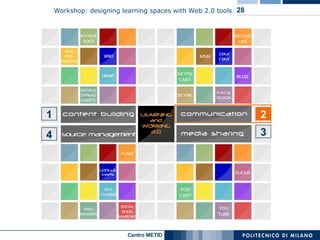
    Blog MSN SkypeSocial networking 2 Communication: some tools
  • 30.
    A blog (from web log) is a website where entries are commonly displayed in reverse chronological order. "Blog" can also be used as a verb, meaning to maintain or add content to a blog. Primary features A typical blog combines text, images, and links to other blogs, web pages, and other media related to its topic Many blogs provide commentary or news on a particular subject; others function as more personal online diaries Many blogs allow readers to leave comments in an interactive format Micro-blogging  blogs with very short posts 2 Communication: blog
  • 31.
    Types of blogsBy media type A blog comprising videos  vlog one comprising links  linklog , a site containing a portfolio of sketches  sketchblog one comprising photos  photoblog , a blog comprising music  MP3 blog By device by which type of device is used to compose it. A blog written by a mobile device like a mobile phone is called a moblog. Genre Some blogs focus on a particular subject ( political blogs, travel blogs, fashion blogs, project blogs, ...) While not a legitimate type of blog, one used for the sole purpose of spamming is known as a Splog. A Slog ( S ite or website log ) is a section or 'slice' of a regular business website, which is seamlessly integrated within the regular website structure but is produced with blogging software. Legal status of publishers A blog can be private , or for business purposes . Blogs, either used internally to enhance the communication and culture in a corporation or externally for marketing, branding or PR purposes are called corporate blogs. Blog search engines Several blog search engines are used to search blog contents (also known as the blogosphere ), such as blogdigger, Feedster, and Technorati. Technorati provides current information on both popular searches and tags used to categorize blog postings. 2 Communication: blog
  • 32.
  • 33.
    Performing Galileo blogProject for high school students in collaboration with Piccolo Teatro of Milan. Students are required to give contributions on Brecht’s “The Life of Galileo” using Web 2.0 tools http://aletom78.wordpress.com/2007/10/03/performing-galileo Informal Learning Blog http://informl.com LeWebPédagogique - plateforme de blogs de la communauté éducative http://lewebpedagogique.com Mixxer - Language Exchange Online via Skype http://www.language-exchanges.org 2 Some examples of use of blogs and Skype for learning
  • 34.
    “ Social networkingfocuses on the building and verifying of online social networks for communities of people who share interests and activities, or who are interested in exploring the interests and activities of others, and which necessitates the use of software” (Wikipedia) e.g. Facebook ( formerly limited to registrants with .edu email addresses ), LinkedIn, Ning According to a new survey released by Vault.com, 44% of employers use social networking web sites like MySpace and Facebook to examine the profiles of job candidates, and 39% have looked up the profile of a current employee 2 Communication: social networking
  • 35.
    Primary features TheWall The Wall is a space on each user's profile page that allows friends to post messages and attachments for the user to see. One user's wall is visible to anyone with the ability to see their full profile, and different users' wall posts show up in an individual's News Feed Photos Here users can upload albums of photos, tag friends, and comment on photos Events Events are a way for members to let friends know about upcoming events in their community and to organize social gatherings. Events require an event name, tagline, network, host name, event type, start and end time, location & city, and a guest list of friends invited. Events can be open, closed, or secret. When setting up an event the user can choose to allow friends to upload photos, video, and posted items 2 Social networking: Facebook
  • 36.
    Facebook Paris Tech ( collective entity that includes ten of the most prestigious French engineering schools ) http://www.facebook.com/group.php?gid=2382238262 Groupe des étudiants Paris Descartes http://www.facebook.com/group.php?gid=2446212231 Public Speaking Workshop of Oxford university student union (event group) http://oxford.facebook.com/event.php?eid=5333414263&ref=mf Université de Montréal http://www.facebook.com/pages/Montreal-QC/Universit-de- Montral/14096350493?ref=s LinkedIn Careerservice of Politecnico di Milano, external relations http://www.linkedin.com Ning French Teachers in the 21st century (open network) http://frenchteachers.ning.com 2 Some examples of s ocial networking for learning
  • 37.
    Online discussion / seminar (e.g. on blog, Skype) Conversation : practice of a foreign language via VOIP call (e.g. on Skype) Inter-institutional collaboration and networking (e.g. on Facebook) Tracing of competences and work experiences ( e-portfolio ) 2 Some models of use of communication tools for learning
  • 38.
    Campus-based social networkingtools offer a safe space for community and self-expression (e.g. incoming freshmen can begin to get to know their classmates before arriving on campus) Encourage idea sharing and community networking Extending the impact and life span of conferences and workshops. Attendees can begin to network before they even get to the hallways, and the group’s wisdom can be collected and preserved, increasing and prolonging usefulness of the conference 2 Value added of social networking tools for learning
  • 39.
  • 40.
    Flickr Podcast YouTube3 Media sharing: some tools
  • 41.
    Flickr is a photo sharing website and web services suite, and an online community platform. One of the earliest Web 2.0 applications In addition to being a popular Web site for users to share personal photographs, the service is widely used by bloggers as a photo repository Its popularity has been fueled by its innovative online community tools that allow photos to be tagged and browsed by folksonomic means 3 Media sharing: Flickr
  • 42.
    Primary features Flickrasks photo submitters to organize images using tags which allow searchers to find images concerning a certain topic such as place name or subject matter Tag clouds provide access to images tagged with the most popular keywords Flickr also allows users to organize their photos into "sets" , or groups of photos that fall under the same heading. However, sets are more flexible than the traditional folder-based method of organizing files, as one photo can belong to one set, many sets, or none at all. Sets may be grouped into "collections", and collections further grouped into higher-order collections Organizr: web application for organizing photos within a Flickr account that can be accessed through the Flickr interface. It allows users to modify tags, descriptions, and set groupings, and to place photos on a world map (a feature provided in conjunction with Yahoo! Maps) Some Yahoo! web searches return image results from Flickr, for example "funny photos" or "travel photography" 3 Media sharing: Flickr
  • 43.
    A podcast is a collection of digital media files which is distributed over the Internet using syndication feeds for playback on portable media players and personal computers. The term can refer either to the content itself or to the method by which it is syndicated; the latter is also termed podcasting The term "podcast" is a mix of the acronym "Pod" – standing for "Portable on Demand" – and "broadcast". The iPod name was coined with Pod, prefixed with the "i" commonly used by Apple for its products and services. The first podcasting scripts were developed for the iPod. These scripts allow podcasts to be automatically transferred to a mobile device after they are downloaded. Though podcasters' web sites may also offer direct download or streaming of their content, a podcast is distinguished from other digital media formats by its ability to be syndicated, subscribed to, and downloaded automatically when new content is added, using an aggregator or feed reader capable of reading feed formats such as RSS or Atom. 3 Media sharing: podcast
  • 44.
    Podcast - Skip the Tuition: 100 Free Podcasts from the Best Colleges in the World http://oedb.org/library/beginning-online-learning/skip-the-tuition:-100-free-podcasts-from-the-best-colleges-in-the-world Self - introduction of a teacher on Flickr http://www.flickr.com/groups/33384223@N00/discuss/28846 Delivery of biology content produced by the teacher on Flickr http://www.flickr.com/photos/cpurrin1 Example of educational video on TeacherTube (video for kids on Water Cycle) http://www.teachertube.com/view_video.php?viewkey=f28f7877155ccffad019 3 Some examples of media sharing for learning
  • 45.
    eLene consortium channelon Youtube http://it.youtube.com/user/eLeneTeam OtisCollege's Channel on YouTube http://www.youtube.com/profile?user=OtisCollege Value Step Scales using Gouache (Otis College) http://www.youtube.com/watch?v=mTPwkJI1I9g BBC world news channel on Youtube http://it.youtube.com/user/bbcworldnews Youtube – Conceptrice Rédactrice junior http://it.youtube.com/watch?v=pYBN9Y6ymaQ SuTree - Knowledge community and an aggregator of instructional & educational videos http://www.sutree.com 3 Some examples of media sharing for learning
  • 46.
    Lecture (e.g.podcast, Youtube, Teachertube) teacher-authored content integrating content authored by others Creation of representations , for example of artifacts (e.g. on Flickr, Youtube) Presentation (e.g. on Flickr, Youtube) of a self-produced work / artifact of the course Comments / review of learning material (e.g. on Flickr, Youtube) Asynchronous public feedback on assignments, such as posting, organizing, sharing,and critiquing other students’ work for each assignment (e.g. on Flickr, Youtube) 3 Some models of use of media sharing for learning
  • 47.
    Comparing their workto that of others can give students a valuable perspective on their own abilities and inspire them to try new ideas or techniques) Users can upload content and to edit it online: no issues of operating system compatibility Learners can show their skills as soon as they develop them ( progress monitoring and a ssessment on learner learning ) 3 Value added of media sharing for learning
  • 48.
  • 49.
    Why is sourcemanagement so important? Increasing number of applications Importance of an efficient management of content and services available on the Internet Efficient identification of updates on web (2.0) services 4 Source management: some tools
  • 50.
    iTunes Social bookmarkingAggregators Geo tagging  Google maps Mashups 4 Source management: some tools
  • 51.
    Social bookmarking is a method to store, organize, search and manage bookmarks of web pages on the Internet by using key words ( tags ). Primary features users save links to web pages that they want to remember and/or share. These bookmarks are usually public , and can be saved privately , shared only with specified people or groups, shared only inside certain networks, or another combination of public and private domains informal tags to organize bookmarks bookmarks can be displayed chronologically, by category or tags, or via a search engine information about the number of users who bookmarked the same link extra features such as ratings and comments on bookmarks, import / export bookmarks from / to browsers, emailing of bookmarks, web annotation… 4 Source management: tools
  • 52.
    Advantages All tag-basedclassification of Internet resources (such as web sites) is done by human beings , who understand the content of the resource semantically classified tags , which are hard to find with contemporary search engines resources that are of more use are bookmarked by more users  a system will "rank" a resource based on its perceived utility Disadvantages No standard set of keywords No standard for the structure of tags (e.g. singular vs. plural, capitalization, etc.) Mistagging due to spelling errors , tags with more than one meaning, unclear tags… No possibility to define hierarchical relationships between tags 4 Source management: tools
  • 53.
    Tags and folksonomy Tag keyword used to organize bookmarks Tag clouds are frequently used to visualize the most used tags of a folksonomy Folksonomy , social classification , social indexing practice of collaboratively creating and managing tags to index and annotate and categorize content. Metadata generated not only by experts, but also by creators and consumers of the content. Folksonomy is a key concept of Web 2.0 4 Source management: tools
  • 54.
    Use of del.icio.usin health sciences libraries, for reference and research http://vielmetti.typepad.com/superpatron/2007/03/social_bookmark.html Pages tagged with "math+lesson" on del.icio.us http://del.icio.us/search/?fr=del_icio_us&p=math%2Blesson&type=all 4 Some examples of social bookmarking for learning
  • 55.
    Production of teacher-authored list of resources Recommendation of relevant resources to specific users Production of collaborative, student-authored list of resources 4 Some models of use of social bookmarking for learning
  • 56.
    Social bookmarking toolsallow (and encourage) shared responsibility for development of course resources. Colleagues can cross institutional boundaries to collaborate on projects and research 4 Value added of social bookmarking for learning
  • 57.
    4 Social bookmarking:models of use
  • 58.
    In the tablebelow, some examples of the most significant social bookmarking 4 Source management: tools saving “clips” as private or public voting clips sending clips by email or posting them in a blog searching by keywords in links, clips, tags or descriptions added by users it is possible to add a comment directly on the tagged pages and to share comments, Highlights and Sticky-Notes More “social” and intaractive then delicious: groups can modify remarks and notes from Diigo or directy on the clipped website Private or public bookmarks It is possible to share bookmarks as a list, in blogs, by email or feed Tags can be stored in folders Public or private bookmarks it is possible to share bookmarks Bundle tags: to group together several tags Tagrolls: to show my own tags on my own blog/website Links for you: to suggest links to other people from your network Other features People all over the world can clip the best parts of web pages (few sentences, images or videos) instead of the entire web page "Social Annotation": it is possible to the save a link with some remarks or highlighting only some part of the page (Highlight).. It is possible to insert Sticky-Note e tagging videos, images (Clip) or other multimedia elements. Created in 2003 First social bookmarking application The Most used instrument In 2005, bought by Yahoo! Del.icio.us Guide for Educators [http://pedersondesigns.com/2006/11/24/delicious-guide-for-educators-part-1-tools-tagging/] Primary features http://www.clipmarks.com/ http://www.diigo.com/ http://del.icio.us/ URL Clipmarks Diigo del.icio.us  
  • 59.
    also known asa feed aggregator , feed reader or news reader , is client software or a Web application which aggregates formats used to publish frequently updated web content such as news headlines, blogs, podcasts, and vlogs in a single location for individual easy viewing aggregators reduce the time and effort needed to regularly check websites for updates, creating a unique information space or "personal newspaper" based on RSS (Really Simple Syndication), a family of Web feed formats used to publish frequently updated content such as blog entries, news headlines or podcasts. RSS makes it possible for people to keep up with their favorite web sites in an automated manner that's easier than checking them manually 4 Source management: aggregators
  • 60.
    Primary features Oncesubscribed, an aggregator is able to check for new content at user-determined intervals and retrieve the update The aggregator user can easily unsubscribe from a feed Aggregator features are frequently built into portal sites (such as My Yahoo! and iGoogle), modern Web browsers and email programs The aggregator provides a consolidated view of the content in a single browser display or desktop application Aggregators with podcasting capabilities can automatically download media files, such as MP3 recordings. In some cases, these can be automatically loaded onto portable media players (like iPods) when they are connected to the PC Recently, so-called RSS-narrators have appeared, which not only aggregate text-only news feeds, but also convert them into audio recordings for offline listening 4 Source management: aggregator
  • 61.
    Types Web-based applicationson remote servers, typically available as Web applications (Google Reader or Bloglines) everywhere with an Internet connection Client software installed applications to collect Web feed subscriptions and group them together using a user-friendly interface similar to popular e-mail clients (subscriptions in a frame on the left - individual entries browsed, selected, and read in frames on the right) Media aggregators client or Web-based applications which maintain subscriptions to feeds that contain audio or video media enclosures. They can be used to automatically download media, playback the media within the application interface, or synchronize media content with a portable media player Feed filtering many feed readers allow users to tag each feed with one or more keywords which can be used to sort and filter the available articles into easily navigable categories. Another option is to import the user's Attention Profile to filter items based on their relevance to the user's interests. 4 Source management: aggregator RSSOwl (cross-platform), Safari (Mac OS) Sage, a Firefox extension (cross-platform) Client software: iTunes (Mac, Windows) Web based (hosted) MyYahoo, Bloglines, Netvibes
  • 62.
  • 63.
  • 64.
    In the tablebelow, some examples of the most significant aggregators 4 Source management: aggregator A very “heavy” application Only for FireFox (FireFox plug in) In some cases, very slow; to many yhings together  chaotic and confused Difficult to Customize Disadvantages It creates an archive with encosures (downloaded files) It is possible to generate pdf or HTML files from each feed It is possible to generate OPML files with the list of RSS  it is possible to trnsfer the file to other PCs Direct submission to a feed through a FireFox button Partcicular features molto immediata quindi la comprensione; Similar to an email client (feed list, preview, …) Very easy to use Intuitive and immediate interface It’s a plug-in of FireFox, you can use it only with FireFox Much more customizable then Bloglines Linked to the YAHOO world  a very rich community (chat, mail, blog, …); Very easy to customize and to modify the setting “ Minimal” interface and easy to use Primary features English, Italian, … The setting language of FireFox English, Italian, … Only English Languages http://rssowl.en.softonic.com http://www.evl.uic.edu/cavern/sage/download.php http://it.my.yahoo.com/ http://www.bloglines.com URL Desktop (pc) Desktop (pc) Online Online Typology RSSOwl Sage My Yahoo Bloglines
  • 65.
    … is aweb application that combines data from more than one source into a single integrated tool Mashups Aggregator Every user can build his own aggregator and can mix data for his individual purpose and use Mashup Combination of one or more data sources in a unified interface that is the same for all users that access it vs 4
  • 66.
    Example of mashupof Flickr + Google Maps + YouTube - EducationSearch http://educationsearch.net An education search tool which enables you to search by: Location, Career, Industry/Salary and provides personalized searches to save for future reference Mashups for education 4
  • 67.
    Example of mashupof del.icio.us + Google Maps + Flickr – New Media Consortium http://www.nmc.org Mashups for education 4
  • 68.
    Example of mashupof Flickr – S ocio-academic utility that helps college students make decisions about professors and classes, by combining an extensive amount of academic information directly from university records along with social networking data http://www.pickaprof.com Mashups for education 4
  • 69.
    Example of mashupof Google Maps – Greenspace carbon emission map http://greenspaceresearch.uhi.ac.uk/greenspace/map.html Carbon Emissions Map for UK showing emissions down to square km level, source of emissions, and an emission reduction todo list for individuals and communites Mashups for education 4
  • 70.
    Example of mashupof Flickr + Google Maps – KQED Quest http://www.kqed.org/quest Google Map and Flickr mashups present high-quality television programs, radio spots, blog postings, education guides, and map-based explorations Mashups for education 4
  • 71.
    Some data… Source: How businesses are using Web 2.0: A McKinsey Global Survey
  • 72.
    Farewell of aWeb 2.0 service…
  • 73.
    Web 2.0  conclusion - reliability of persistence on the time + collaboration and integration + costs + ubiquitous accessibility + customizability (OS) - l imitations on how much can be stored on his/her account