‫ء‬      ‫ا‬      ‫آ‬
    Call Center


                             Huawei ‫ا ع‬                ‫ا‬      ‫ا‬   ‫ا‬     ‫إ دة‬


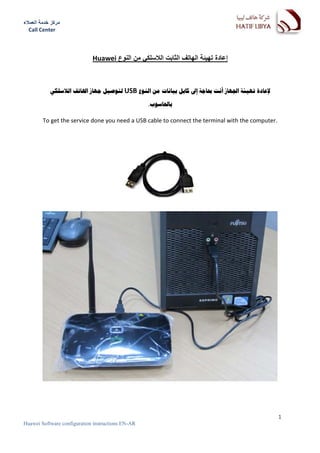
            ‫ ﻟﺘﻮﺻﻴﻞ ﺟﻬﺎﺯ ﺍﳍﺎﺗﻒ ﺍﻟﻼﺳﻠﻜﻲ‬USB ‫ﻹﻋﺎﺩﺓ ﺗﻬﻴﺌﺔ ﺍﳉﻬﺎﺯ ﺃﻧﺖ ﲝﺎﺟﺔ ﺇﱃ ﻛﺎﺑﻞ ﺑﻴﺎﻧﺎﺕ ﻣﻦ ﺍﻟﻨﻮﻉ‬

                                                   .‫ﺑﺎﳊﺎﺳﻮﺏ‬

         To get the service done you need a USB cable to connect the terminal with the computer.


                                                                                                   1
Huawei Software configuration instructions EN-AR
‫ء‬      ‫ا‬      ‫آ‬
    Call Center


         ‫ﺍﻧﺘﻘﻞ ﺇﱃ ﺇﻳﻘﻮﻧﺔ ﺟﻬﺎﺯ ﺍﻟﻜﻮﻣﺒﻴﻮﺗﺮ ﺍﳌﻮﺟﻮﺩﺓ ﻋﻠﻰ ﺳﻄﺢ ﺍﳌﻜﺘﺐ ﻛﻤﺎ ﻫﻮ ﺑﺎﻟﺼﻮﺭﺓ ﻭﺍﺧﱰ ﻣﻦ ﺍﻟﻘﺎﺋﻤﺔ ﺍﳋﻴﺎﺭ‬

                                                    ‫"ﺇﺩﺍﺭﺓ‬
                                                    ‫ﺇﺩﺍﺭﺓ‬
                                                   "‫ﺇﺩﺍﺭﺓ‬

                         Right click on My Computer Icon and choose Manage


                                                                                                  2
Huawei Software configuration instructions EN-AR
‫ء‬      ‫ا‬      ‫آ‬
    Call Center


                        ‫ﻣﻦ ﺍﻟﻘﺎﺋﻤﺔ ﺍﳌﻌﺮﻭﺿﺔ ﻋﻠﻰ ﺍﳉﺰء ﺍﻷﻳﺴﺮ ﻣﻦ ﺍﻟﻨﺎﻓﺪﺓ ﺍﺧﱰ ﺇﺩﺍﺭﺓ ﺍﻷﺟﻬﺰﺓ‬

                       Choose DEVICE MANGER option and then follow the steps below:


                                                                                        3
Huawei Software configuration instructions EN-AR
‫ء‬      ‫ا‬      ‫آ‬
    Call Center


                                PORTS ‫ﻣﻦ ﺍﻟﻘﺎﺋﻤﺔ ﺍﳌﻌﺮﻭﺿﺔ ﻋﻠﻰ ﺍﳉﻬﺔ ﺍﳌﻘﺎﺑﻠﺔ ﺍﺧﱰ‬

                  Expand the Ports option to get the terminal port number as it shows below:


                                                                                               4
Huawei Software configuration instructions EN-AR
‫ء‬      ‫ا‬      ‫آ‬
    Call Center


                                ‫ﺑﺬﻟﻚ ﺳﻴﺘﻢ ﻋﺮﺽ ﺍﳌﻨﻔﺬ ﺍﳋﺎﺹ ﲜﻬﺎﺯ ﺍﳍﺎﺗﻒ ﻭﺭﻗﻤﻪ‬


                                                                            5
Huawei Software configuration instructions EN-AR
‫ء‬      ‫ا‬      ‫آ‬
    Call Center

                  ‫ﺑﻌﺪ ﺫﻟﻚ ﺍﻧﺘﻘﻞ ﺇﱃ ﺍﳌﻠﻒ ﺍﳌﺮﻓﻖ ﻭﻗﻢ ﺑﺎﻟﻨﻘﺮ ﺍﳌﺰﺩﻭﺝ ﻋﻠﻰ ﺭﻣﺰ ﺍﻷﻳﻘﻮﻧﺔ ﺍﳌﻮﺿﺢ ﺑﺎﻟﺸﻜﻞ ﺍﻟﺘﺎﱄ‬

                                Double – click on the symbol icon as it shows below


                                               ‫ﺳﺘﻈﻬﺮ ﺍﻟﻨﺎﻓﺬﺓ ﺍﻟﺘﺎﻟﻴﺔ‬

                                         The following window will appear


                                         ‫ر ا‬   ‫ا‬


                                     ‫“ ﺛﻢ ﺍﺧﱰ ﺭﻗﻢ ﺍﳌﻨﻔﺬ ﻣﻦ ﺍﻟﻘﺎﺋﻤﺔ‬SysConfig” ‫ﺍﺧﱰ‬

                   Choose “SysConfig” option and then choose the proper Port Number from the list.


                                                                                                     6
Huawei Software configuration instructions EN-AR
‫ء‬      ‫ا‬      ‫آ‬
    Call Center


                          :‫“ ﺛﻢ ﺍﺗﺒﻊ ﺍﳋﻄﻮﺍﺕ ﺍﻟﺘﺎﻟﻴﺔ‬ServMaintenance” ‫ﺍﺧﱰ ﻣﻦ ﺍﻟﻘﺎﺋﻤﺔ‬

                       Choose “ServMaintenance” option and then follow the steps below:


                                                                              1


                                                                              2


                                                   3
                                                                              4


                                          .‫ﻗﻢ ﲟﻸ ﺍﳊﻘﻮﻝ ﺑﺎﳌﻌﻠﻮﻣﺎﺕ ﺍﳌﻨﺎﺳﺒﺔ‬

                               Fill in all required fields with the proper information.


                                                                                          7
Huawei Software configuration instructions EN-AR
‫ء‬      ‫ا‬      ‫آ‬
    Call Center


                                                   (       ) .‫ﺍﺻﻔﺎﺭ‬    ‫1. ﺍﺩﺧﻞ ﻛﻠﻤﺔ ﺍﳌﺮﻭﺭ ﻭﻫﻲ ﻣﻜﻮﻧﺔ ﻣﻦ ﻋﺪﺩ‬

        Type the SPC code which consists of the number Zeros.

                                               –       -   -      ‫. ﺗﺎﻛﺪ ﻣﻦ ﻇﻬﻮﺭ ﺍﻻﺭﻗﺎﻡ ﺍﻟﺘﺎﻟﻴﺔ ﻋﻠﻰ ﺍﻟﺸﺎﺷﺔ‬

        Make sure you got the following numbers on the computer screen           –    -     -

               .(F ‫ﺣﺮﻓﺎ )ﻳﺘﻢ ﺫﻟﻚ ﺑﺎﻟﻀﻐﻂ ﺍﳌﺘﻮﺍﺻﻞ ﻋﻠﻰ ﺯﺭ ﺍﳊﺮﻑ‬       ‫ ﻋﺪﺩ‬F ‫. ﺍﺩﺧﻞ ﺭﻣﺰ ﺍﳊﻤﺎﻳﺔ ﺍﳌﻜﻮﻥ ﻣﻦ ﺍﳊﺮﻑ‬

        Type the security code which is consists of the letter F the number of 16 characters.

                                                                      ‫. ﺍﺩﺧﻞ ﺭﻗﻢ ﺍﳍﺎﺗﻒ ﻛﺎﻣﻼ ﻋﻠﻰ ﺍﻟﻨﺤﻮ ﺍﻟﺘﺎﱄ‬

        You must enter a full phone number, for example                    .


                                              .‫ ﻟﻺﻧﻬﺎء‬Write ‫ﺛﻢ ﺍﺿﻐﻂ ﺍﻟﺰﺭ‬


                  .‫ﻟﻠﻤﺰﻳﺪ ﻣﻦ ﺍﳌﻌﻠﻮﻣﺎﺕ ﻳﺮﺟﻰ ﺍﻻﺗﺼﺎﻝ ﲟﺮﻛﺰ ﺧﺪﻣﺔ ﺍﻟﻌﻤﻼء ﺍﻭ ﻣﺮﺍﺳﻠﺘﻨﺎ ﻋﻠﻰ ﺍﻟﱪﻳﺪ ﺍﻻﻟﻜﱰﻭﻧﻲ ﺍﻟﺘﺎﱄ‬

        If you have any questions, or need further assistant please let us know.

        HATIF LIBYA Co.
         Call center
        Tel:
        Email: info@hlc.ly


                                                                                                              8
Huawei Software configuration instructions EN-AR

Huawei software

  • 1.
    ‫ء‬ ‫ا‬ ‫آ‬ Call Center Huawei ‫ا ع‬ ‫ا‬ ‫ا‬ ‫ا‬ ‫إ دة‬ ‫ ﻟﺘﻮﺻﻴﻞ ﺟﻬﺎﺯ ﺍﳍﺎﺗﻒ ﺍﻟﻼﺳﻠﻜﻲ‬USB ‫ﻹﻋﺎﺩﺓ ﺗﻬﻴﺌﺔ ﺍﳉﻬﺎﺯ ﺃﻧﺖ ﲝﺎﺟﺔ ﺇﱃ ﻛﺎﺑﻞ ﺑﻴﺎﻧﺎﺕ ﻣﻦ ﺍﻟﻨﻮﻉ‬ .‫ﺑﺎﳊﺎﺳﻮﺏ‬ To get the service done you need a USB cable to connect the terminal with the computer. 1 Huawei Software configuration instructions EN-AR
  • 2.
    ‫ء‬ ‫ا‬ ‫آ‬ Call Center ‫ﺍﻧﺘﻘﻞ ﺇﱃ ﺇﻳﻘﻮﻧﺔ ﺟﻬﺎﺯ ﺍﻟﻜﻮﻣﺒﻴﻮﺗﺮ ﺍﳌﻮﺟﻮﺩﺓ ﻋﻠﻰ ﺳﻄﺢ ﺍﳌﻜﺘﺐ ﻛﻤﺎ ﻫﻮ ﺑﺎﻟﺼﻮﺭﺓ ﻭﺍﺧﱰ ﻣﻦ ﺍﻟﻘﺎﺋﻤﺔ ﺍﳋﻴﺎﺭ‬ ‫"ﺇﺩﺍﺭﺓ‬ ‫ﺇﺩﺍﺭﺓ‬ "‫ﺇﺩﺍﺭﺓ‬ Right click on My Computer Icon and choose Manage 2 Huawei Software configuration instructions EN-AR
  • 3.
    ‫ء‬ ‫ا‬ ‫آ‬ Call Center ‫ﻣﻦ ﺍﻟﻘﺎﺋﻤﺔ ﺍﳌﻌﺮﻭﺿﺔ ﻋﻠﻰ ﺍﳉﺰء ﺍﻷﻳﺴﺮ ﻣﻦ ﺍﻟﻨﺎﻓﺪﺓ ﺍﺧﱰ ﺇﺩﺍﺭﺓ ﺍﻷﺟﻬﺰﺓ‬ Choose DEVICE MANGER option and then follow the steps below: 3 Huawei Software configuration instructions EN-AR
  • 4.
    ‫ء‬ ‫ا‬ ‫آ‬ Call Center PORTS ‫ﻣﻦ ﺍﻟﻘﺎﺋﻤﺔ ﺍﳌﻌﺮﻭﺿﺔ ﻋﻠﻰ ﺍﳉﻬﺔ ﺍﳌﻘﺎﺑﻠﺔ ﺍﺧﱰ‬ Expand the Ports option to get the terminal port number as it shows below: 4 Huawei Software configuration instructions EN-AR
  • 5.
    ‫ء‬ ‫ا‬ ‫آ‬ Call Center ‫ﺑﺬﻟﻚ ﺳﻴﺘﻢ ﻋﺮﺽ ﺍﳌﻨﻔﺬ ﺍﳋﺎﺹ ﲜﻬﺎﺯ ﺍﳍﺎﺗﻒ ﻭﺭﻗﻤﻪ‬ 5 Huawei Software configuration instructions EN-AR
  • 6.
    ‫ء‬ ‫ا‬ ‫آ‬ Call Center ‫ﺑﻌﺪ ﺫﻟﻚ ﺍﻧﺘﻘﻞ ﺇﱃ ﺍﳌﻠﻒ ﺍﳌﺮﻓﻖ ﻭﻗﻢ ﺑﺎﻟﻨﻘﺮ ﺍﳌﺰﺩﻭﺝ ﻋﻠﻰ ﺭﻣﺰ ﺍﻷﻳﻘﻮﻧﺔ ﺍﳌﻮﺿﺢ ﺑﺎﻟﺸﻜﻞ ﺍﻟﺘﺎﱄ‬ Double – click on the symbol icon as it shows below ‫ﺳﺘﻈﻬﺮ ﺍﻟﻨﺎﻓﺬﺓ ﺍﻟﺘﺎﻟﻴﺔ‬ The following window will appear ‫ر ا‬ ‫ا‬ ‫“ ﺛﻢ ﺍﺧﱰ ﺭﻗﻢ ﺍﳌﻨﻔﺬ ﻣﻦ ﺍﻟﻘﺎﺋﻤﺔ‬SysConfig” ‫ﺍﺧﱰ‬ Choose “SysConfig” option and then choose the proper Port Number from the list. 6 Huawei Software configuration instructions EN-AR
  • 7.
    ‫ء‬ ‫ا‬ ‫آ‬ Call Center :‫“ ﺛﻢ ﺍﺗﺒﻊ ﺍﳋﻄﻮﺍﺕ ﺍﻟﺘﺎﻟﻴﺔ‬ServMaintenance” ‫ﺍﺧﱰ ﻣﻦ ﺍﻟﻘﺎﺋﻤﺔ‬ Choose “ServMaintenance” option and then follow the steps below: 1 2 3 4 .‫ﻗﻢ ﲟﻸ ﺍﳊﻘﻮﻝ ﺑﺎﳌﻌﻠﻮﻣﺎﺕ ﺍﳌﻨﺎﺳﺒﺔ‬ Fill in all required fields with the proper information. 7 Huawei Software configuration instructions EN-AR
  • 8.
    ‫ء‬ ‫ا‬ ‫آ‬ Call Center ( ) .‫ﺍﺻﻔﺎﺭ‬ ‫1. ﺍﺩﺧﻞ ﻛﻠﻤﺔ ﺍﳌﺮﻭﺭ ﻭﻫﻲ ﻣﻜﻮﻧﺔ ﻣﻦ ﻋﺪﺩ‬ Type the SPC code which consists of the number Zeros. – - - ‫. ﺗﺎﻛﺪ ﻣﻦ ﻇﻬﻮﺭ ﺍﻻﺭﻗﺎﻡ ﺍﻟﺘﺎﻟﻴﺔ ﻋﻠﻰ ﺍﻟﺸﺎﺷﺔ‬ Make sure you got the following numbers on the computer screen – - - .(F ‫ﺣﺮﻓﺎ )ﻳﺘﻢ ﺫﻟﻚ ﺑﺎﻟﻀﻐﻂ ﺍﳌﺘﻮﺍﺻﻞ ﻋﻠﻰ ﺯﺭ ﺍﳊﺮﻑ‬ ‫ ﻋﺪﺩ‬F ‫. ﺍﺩﺧﻞ ﺭﻣﺰ ﺍﳊﻤﺎﻳﺔ ﺍﳌﻜﻮﻥ ﻣﻦ ﺍﳊﺮﻑ‬ Type the security code which is consists of the letter F the number of 16 characters. ‫. ﺍﺩﺧﻞ ﺭﻗﻢ ﺍﳍﺎﺗﻒ ﻛﺎﻣﻼ ﻋﻠﻰ ﺍﻟﻨﺤﻮ ﺍﻟﺘﺎﱄ‬ You must enter a full phone number, for example . .‫ ﻟﻺﻧﻬﺎء‬Write ‫ﺛﻢ ﺍﺿﻐﻂ ﺍﻟﺰﺭ‬ .‫ﻟﻠﻤﺰﻳﺪ ﻣﻦ ﺍﳌﻌﻠﻮﻣﺎﺕ ﻳﺮﺟﻰ ﺍﻻﺗﺼﺎﻝ ﲟﺮﻛﺰ ﺧﺪﻣﺔ ﺍﻟﻌﻤﻼء ﺍﻭ ﻣﺮﺍﺳﻠﺘﻨﺎ ﻋﻠﻰ ﺍﻟﱪﻳﺪ ﺍﻻﻟﻜﱰﻭﻧﻲ ﺍﻟﺘﺎﱄ‬ If you have any questions, or need further assistant please let us know. HATIF LIBYA Co. Call center Tel: Email: info@hlc.ly 8 Huawei Software configuration instructions EN-AR