HTML
for
Bloggers

BlogHer
2009

By
Nelly
Yusupova

CTO
Webgrrls
Interna<onal

www.webgrrls.com

What
is
HTML?

HTML
is
a
language
used
to

Create
Web
pages


Basic
HTML
Jargon

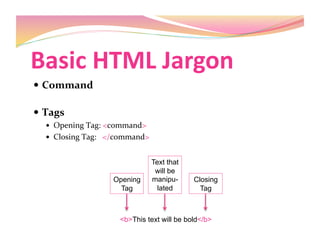
  Command

  Tags


  Opening
Tag:
<command>


  Closing
Tag:


</command>

<b>This text will be bold</b>
Opening
Tag
Text that
will be
manipu-
lated
Closing
Tag
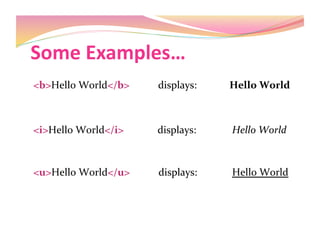
Some
Examples…

<b>Hello
World</b>


displays:


Hello
World

<i>Hello
World</i>


displays:


Hello
World

<u>Hello
World</u>


displays:


Hello
World

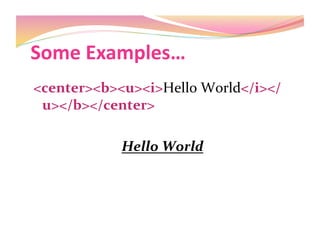
Some
Examples…

<center><b><u><i>Hello
World</i></
u></b></center>


Hello
World

Basic
HTML
Jargon

  Attributes

  Color,
size,
width,
height,
etc

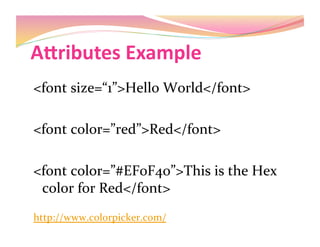
AJributes
Example

<font
size=“1”>Hello
World</font>


<font
color=”red”>Red</font>

<font
color=”#EF0F40”>This
is
the
Hex

color
for
Red</font>


http://www.colorpicker.com/


AJributes

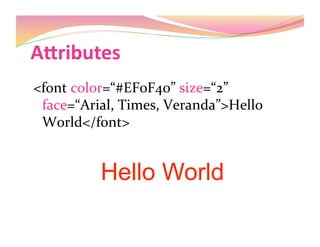
<font
color=“#EF0F40”
size=“2”

face=“Arial,
Times,
Veranda”>Hello

World</font>

Hello World

Image
Tag

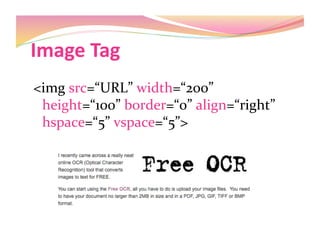
<img
src=“URL”
width=“200”

height=“100”
border=“0”
align=“right”

hspace=“5”
vspace=“5”>

Link
Tag

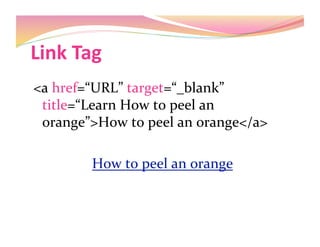
<a
href=“URL”
target=“_blank”

title=“Learn
How
to
peel
an

orange”>How
to
peel
an
orange</a>

How
to
peel
an
orange


Links

<a
href="mailto:nelly@cgim.com">Contact
me</a>


<a
href=“URL”><img
src=“URL”
width=“200”
height=“200”

border=“0”></a>

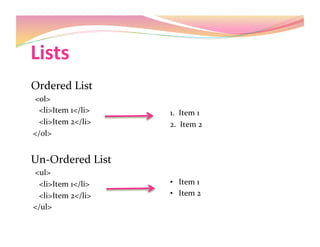
Lists

Ordered
List


<0l>


<li>Item
1</li>


<li>Item
2</li>


</0l>

Un‐Ordered
List


<ul>


<li>Item
1</li>


<li>Item
2</li>


</ul>

1.

Item
1

2.

Item
2

•  Item
1

•  Item
2

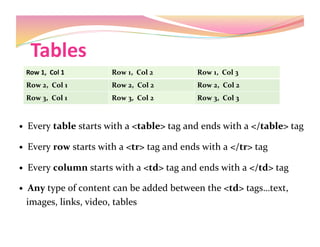
Tables

  Every
table
starts
with
a
<table>
tag
and
ends
with
a
</table>
tag

  Every
row
starts
with
a
<tr>
tag
and
ends
with
a
</tr>
tag

  Every
column
starts
with
a
<td>
tag
and
ends
with
a
</td>
tag

  Any
type
of
content
can
be
added
between
the
<td>
tags…text,


images,
links,
video,
tables

Row
1,

Col
1
 Row
1,

Col
2
 Row
1,

Col
3

Row
2,

Col
1
 Row
2,

Col
2
 Row
2,

Col
2

Row
3,

Col
1
 Row
3,

Col
2
 Row
3,

Col
3

Tables

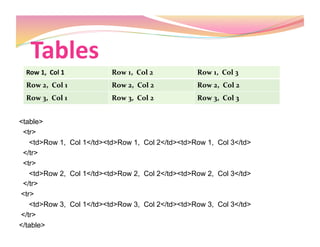
<table>
<tr>
<td>Row 1, Col 1</td><td>Row 1, Col 2</td><td>Row 1, Col 3</td>
</tr>
<tr>
<td>Row 2, Col 1</td><td>Row 2, Col 2</td><td>Row 2, Col 3</td>
</tr>
<tr>
<td>Row 3, Col 1</td><td>Row 3, Col 2</td><td>Row 3, Col 3</td>
</tr>
</table>
Row
1,

Col
1
 Row
1,

Col
2
 Row
1,

Col
3

Row
2,

Col
1
 Row
2,

Col
2
 Row
2,

Col
2

Row
3,

Col
1
 Row
3,

Col
2
 Row
3,

Col
3

Tables

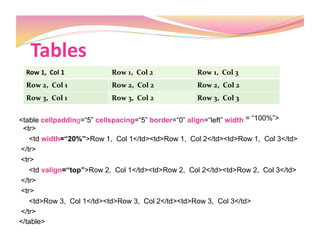
<table cellpadding=“5” cellspacing=“5” border=“0” align=“left” width = “100%”>
<tr>
<td width=“20%”>Row 1, Col 1</td><td>Row 1, Col 2</td><td>Row 1, Col 3</td>
</tr>
<tr>
<td valign=“top”>Row 2, Col 1</td><td>Row 2, Col 2</td><td>Row 2, Col 3</td>
</tr>
<tr>
<td>Row 3, Col 1</td><td>Row 3, Col 2</td><td>Row 3, Col 3</td>
</tr>
</table>
Row
1,

Col
1
 Row
1,

Col
2
 Row
1,

Col
3

Row
2,

Col
1
 Row
2,

Col
2
 Row
2,

Col
2

Row
3,

Col
1
 Row
3,

Col
2
 Row
3,

Col
3

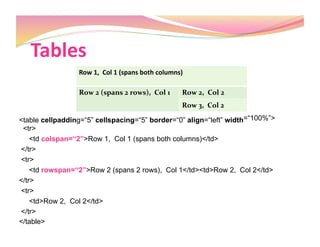
Tables

<table cellpadding=“5” cellspacing=“5” border=“0” align=“left” width=“100%”>
<tr>
<td colspan=“2”>Row 1, Col 1 (spans both columns)</td>
</tr>
<tr>
<td rowspan=“2”>Row 2 (spans 2 rows), Col 1</td><td>Row 2, Col 2</td>
</tr>
<tr>
<td>Row 2, Col 2</td>
</tr>
</table>
Row
1,

Col
1
(spans
both
columns)

Row
2
(spans
2
rows),

Col
1
 Row
2,

Col
2

Row
3,

Col
2

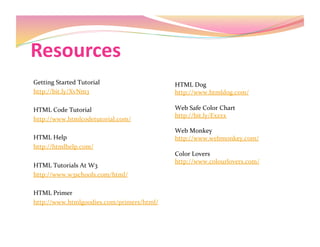
Resources

Getting
Started
Tutorial

http://bit.ly/XvNm3

HTML
Code
Tutorial

http://www.htmlcodetutorial.com/

HTML
Help

http://htmlhelp.com/

HTML
Tutorials
At
W3

http://www.w3schools.com/html/

HTML
Primer

http://www.htmlgoodies.com/primers/html/

HTML
Dog

http://www.htmldog.com/


Web
Safe
Color
Chart

http://bit.ly/Exzxx

Web
Monkey

http://www.webmonkey.com/


Color
Lovers


http://www.colourlovers.com/


Q
&
A

Contact Information:
Nelly Yusupova
Email: nelly@cgim.com
Phone: (917) 603-9226
Twitter: @DigitalWoman

Html For Bloggers