ENGLISH VERSION
2016 – Created by Manon CASUCCIO
Summary
Why should you use Urkund ?
What differences with an assigment ?
I. Register on « Urkund Connection » ;
II. Draw up a paper ;
III. Receive the similarities report of Urkund.
22016 – Created by Manon CASUCCIO
Why should you use Urkund ?
3
Expand the survey of some documents (master thesis, internship reports)
to ALL your students :
- True equality before the anti-plagiarism system (one of each students is
checked in the same way) ;
- 100% of checked master thesis prevent next year’s students from cheating,
exchanging information and buying already existing thesis online.
- 100% of checked master thesis enable your institution to create its own
database ;
- The check is fairer ; indeed, the system will check the quality of the document
according to the quality of other students’ documents to provide the best
correction.
2016 – Created by Manon CASUCCIO
What differences with an assigment ?
4
Urkund is a different tool than an « assigment »:
- The exercise is individual ; no group work
- Same rules and process for every student
- Only one try available
It makes the use and the configuration of Urkund far simpler.
2016 – Created by Manon CASUCCIO
I. Register on « Urkund connection »
1) Log in on learn.kedgebs.com
2) In « Course management », open the
tab named « Course Tools »
3) Click on « Urkund Connection »
52016 – Created by Manon CASUCCIO
6
4) Choose « Register
URKUND Analysis
Account »
5) In « Account », enter your
email adress like this :
« firstname.lastname.kedgebs@a
nalyse.urkund.com
6) Click on
I. Register on « Urkund connection »
2016 – Created by Manon CASUCCIO
II. Draw up a paper
7
1) In « Assesment », choose the
tap named « Tools »
2) Click on « Urkund assigment »
2016 – Created by Manon CASUCCIO
8
II. Draw up a paper
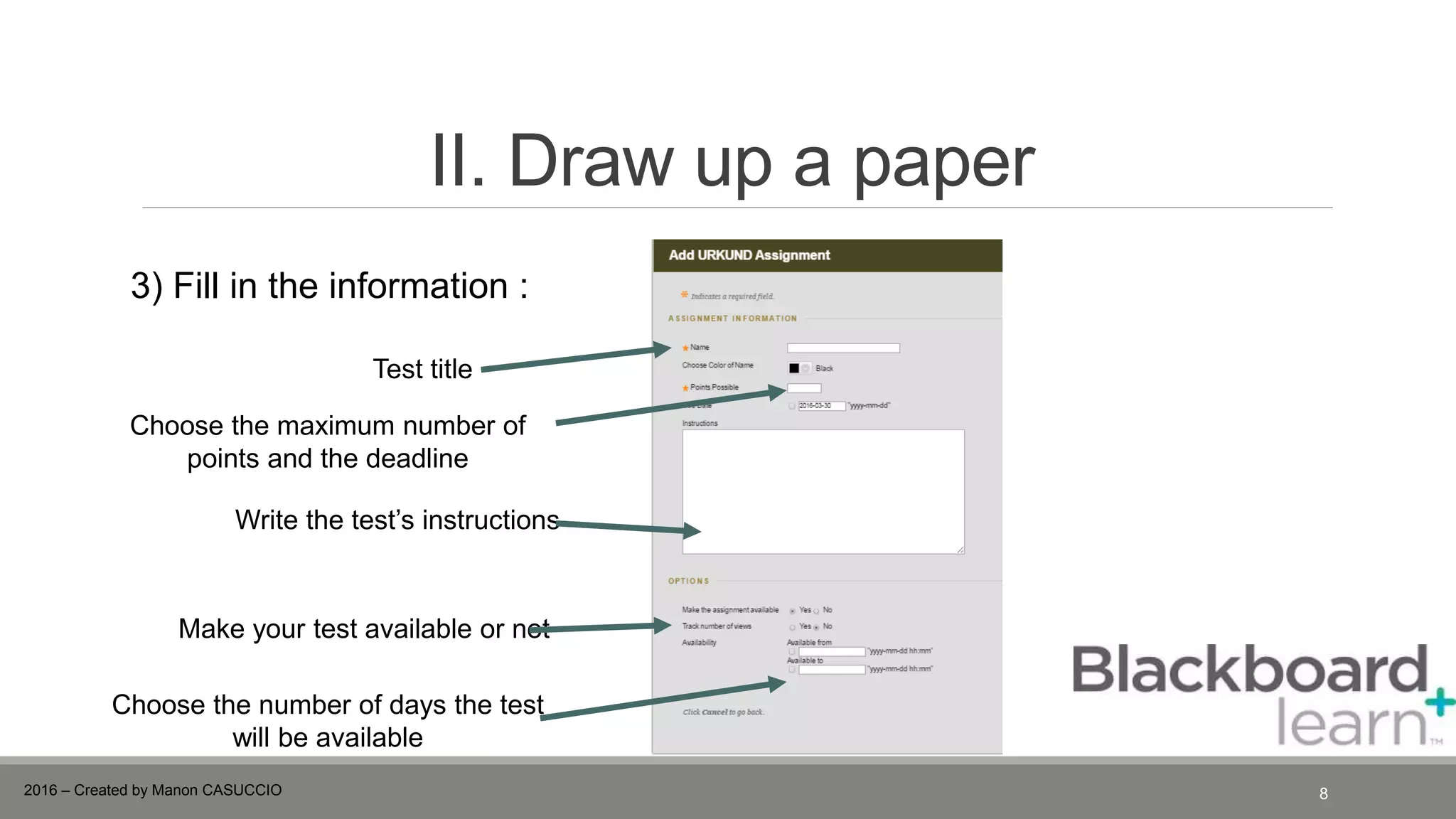
3) Fill in the information :
Test title
Choose the maximum number of
points and the deadline
Write the test’s instructions
Make your test available or not
Choose the number of days the test
will be available
2016 – Created by Manon CASUCCIO
III. Receive the similarities report of
Urkund
9
Click on this link to get the
document
You will receive this mail in your mailbox :
2016 – Created by Manon CASUCCIO
III. Receive the similarities report of
Urkund
10
Should you click on the analysis :
2016 – Created by Manon CASUCCIO
IV. Start grading your students
11
1) In « Course Management », select « Grade Centre »
2 ) Click on «Needs Marking »
2016 – Created by Manon CASUCCIO
12
IV. Start grading your students
3) Click on « Grade all
users »
2016 – Created by Manon CASUCCIO

How to use Urkund on Blackboard

  • 1.
    ENGLISH VERSION 2016 –Created by Manon CASUCCIO
  • 2.
    Summary Why should youuse Urkund ? What differences with an assigment ? I. Register on « Urkund Connection » ; II. Draw up a paper ; III. Receive the similarities report of Urkund. 22016 – Created by Manon CASUCCIO
  • 3.
    Why should youuse Urkund ? 3 Expand the survey of some documents (master thesis, internship reports) to ALL your students : - True equality before the anti-plagiarism system (one of each students is checked in the same way) ; - 100% of checked master thesis prevent next year’s students from cheating, exchanging information and buying already existing thesis online. - 100% of checked master thesis enable your institution to create its own database ; - The check is fairer ; indeed, the system will check the quality of the document according to the quality of other students’ documents to provide the best correction. 2016 – Created by Manon CASUCCIO
  • 4.
    What differences withan assigment ? 4 Urkund is a different tool than an « assigment »: - The exercise is individual ; no group work - Same rules and process for every student - Only one try available It makes the use and the configuration of Urkund far simpler. 2016 – Created by Manon CASUCCIO
  • 5.
    I. Register on« Urkund connection » 1) Log in on learn.kedgebs.com 2) In « Course management », open the tab named « Course Tools » 3) Click on « Urkund Connection » 52016 – Created by Manon CASUCCIO
  • 6.
    6 4) Choose «Register URKUND Analysis Account » 5) In « Account », enter your email adress like this : « firstname.lastname.kedgebs@a nalyse.urkund.com 6) Click on I. Register on « Urkund connection » 2016 – Created by Manon CASUCCIO
  • 7.
    II. Draw upa paper 7 1) In « Assesment », choose the tap named « Tools » 2) Click on « Urkund assigment » 2016 – Created by Manon CASUCCIO
  • 8.
    8 II. Draw upa paper 3) Fill in the information : Test title Choose the maximum number of points and the deadline Write the test’s instructions Make your test available or not Choose the number of days the test will be available 2016 – Created by Manon CASUCCIO
  • 9.
    III. Receive thesimilarities report of Urkund 9 Click on this link to get the document You will receive this mail in your mailbox : 2016 – Created by Manon CASUCCIO
  • 10.
    III. Receive thesimilarities report of Urkund 10 Should you click on the analysis : 2016 – Created by Manon CASUCCIO
  • 11.
    IV. Start gradingyour students 11 1) In « Course Management », select « Grade Centre » 2 ) Click on «Needs Marking » 2016 – Created by Manon CASUCCIO
  • 12.
    12 IV. Start gradingyour students 3) Click on « Grade all users » 2016 – Created by Manon CASUCCIO