How to Install a CCTV Camera System with a
DVR?
Cameras should be installed in the right place and with the right tools for the complete
protection of the area.
Placing the camera at the right place maximises the coverage and minimises cable length.
Reduced cable length eliminates the risk of in line losses that may lead to poor video quality.
For indoor CCTV cameras, choose a corner of the room from where most of the entry points
are visible. The availability of a power socket nearby also should be checked.
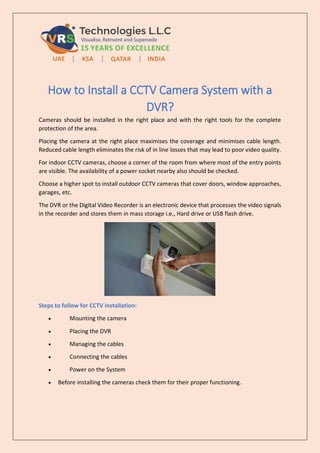
Choose a higher spot to install outdoor CCTV cameras that cover doors, window approaches,
garages, etc.
The DVR or the Digital Video Recorder is an electronic device that processes the video signals
in the recorder and stores them in mass storage i.e., Hard drive or USB flash drive.
Steps to follow for CCTV installation:
 Mounting the camera
 Placing the DVR
 Managing the cables
 Connecting the cables
 Power on the System
 Before installing the cameras check them for their proper functioning.
 Connect the video and power BNC and cable connector to the “Camera only” labelled
and power respectively. Ensure the camera BNC connectors are connected tightly,
twist and lock.
 Connect the video connector labelled as “DVR only” to the rear/backside of the DVR
in the camera input slot.
 Now connect the red power supply connector from the camera to the yellow
connector of the power supply.
 Connect all the power splitters from the camera to the 12V DC power supply adapter.
 Connect the monitor/LCD or PC and laptops through VGA cables. For HD, use the HDMI
cables and connect to the PC and DVR HDMI slot in DVR.
 Now connect the power adapter to the 120V AC by connecting the three-pin plug of
the power adapter into the three-pin socket.
 It is recommended to connect the camera and DVR to the UPS for a 24×7 security
system.
 Finally, connect the DVR power adapter to the 120V supply. Check the system for its
proper functioning by viewing the LCD screen, which shows the live camera recording.
VRS Technologies LLC offers highly professional CCTV Camera Installation Services in Dubai.
Our experienced technicians use modern-day tools to install CCTV cameras at your premises.
CCTV cameras are installed at the right place to ensure maximum coverage and fool-proof
security by our technicians, following a thorough inspection of the premises.
We utilise branded CCTV cameras for their effective functionality and durability.
Visit www.cctvinstallationdubai.ae for professional CCTV installation services in Dubai.

How to Install a CCTV Camera System with a DVR?

  • 1.
    How to Installa CCTV Camera System with a DVR? Cameras should be installed in the right place and with the right tools for the complete protection of the area. Placing the camera at the right place maximises the coverage and minimises cable length. Reduced cable length eliminates the risk of in line losses that may lead to poor video quality. For indoor CCTV cameras, choose a corner of the room from where most of the entry points are visible. The availability of a power socket nearby also should be checked. Choose a higher spot to install outdoor CCTV cameras that cover doors, window approaches, garages, etc. The DVR or the Digital Video Recorder is an electronic device that processes the video signals in the recorder and stores them in mass storage i.e., Hard drive or USB flash drive. Steps to follow for CCTV installation:  Mounting the camera  Placing the DVR  Managing the cables  Connecting the cables  Power on the System  Before installing the cameras check them for their proper functioning.
  • 2.
     Connect thevideo and power BNC and cable connector to the “Camera only” labelled and power respectively. Ensure the camera BNC connectors are connected tightly, twist and lock.  Connect the video connector labelled as “DVR only” to the rear/backside of the DVR in the camera input slot.  Now connect the red power supply connector from the camera to the yellow connector of the power supply.  Connect all the power splitters from the camera to the 12V DC power supply adapter.  Connect the monitor/LCD or PC and laptops through VGA cables. For HD, use the HDMI cables and connect to the PC and DVR HDMI slot in DVR.  Now connect the power adapter to the 120V AC by connecting the three-pin plug of the power adapter into the three-pin socket.  It is recommended to connect the camera and DVR to the UPS for a 24×7 security system.  Finally, connect the DVR power adapter to the 120V supply. Check the system for its proper functioning by viewing the LCD screen, which shows the live camera recording. VRS Technologies LLC offers highly professional CCTV Camera Installation Services in Dubai. Our experienced technicians use modern-day tools to install CCTV cameras at your premises. CCTV cameras are installed at the right place to ensure maximum coverage and fool-proof security by our technicians, following a thorough inspection of the premises. We utilise branded CCTV cameras for their effective functionality and durability. Visit www.cctvinstallationdubai.ae for professional CCTV installation services in Dubai.