How to fix
corrupted Labels

                         1.9
    By Maryel Mendiola


    By Maryel Mendiola
Have you ever seen (or write) a Label
with corrupt html or some script that
Moodle doesn't recognize ?


And suddenly You . . .
    • can't edit the label,
    • can't delete it,
    • can't do anything,
and the edit icons have all disappeared.

               Well . . .
               Don’t worry     , Be happy
               Because it is very easy to fix corrupt labels.
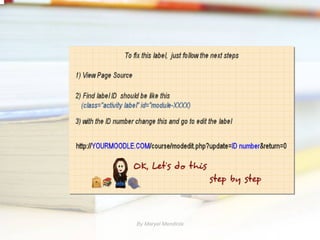
               Just follow the next Step by Step


               By Maryel Mendiola
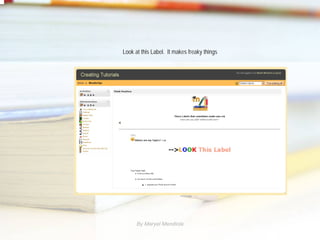
Look at this Label. It makes freaky things


      By Maryel Mendiola
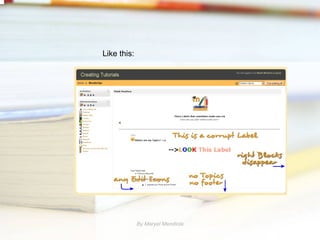
Like this:


             By Maryel Mendiola
By Maryel Mendiola
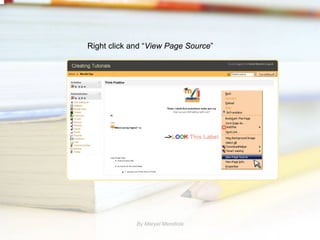
Right click and “View Page Source”


             By Maryel Mendiola
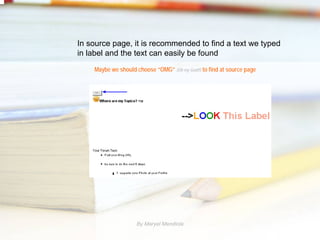
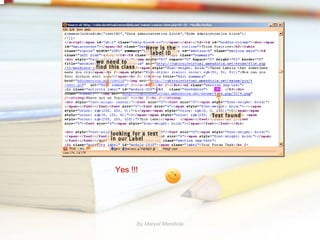
In source page, it is recommended to find a text we typed
in label and the text can easily be found
    Maybe we should choose “OMG” (Oh my God!!) to find at source page


                    By Maryel Mendiola
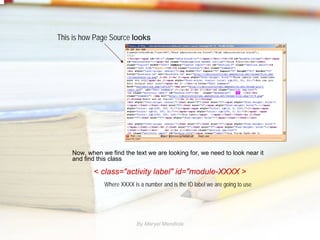
This is how Page Source looks


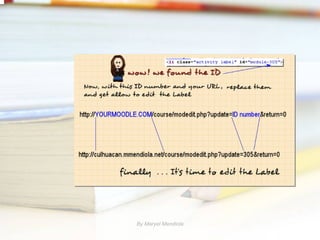
    Now, when we find the text we are looking for, we need to look near it
    and find this class

           < class="activity label" id="module-XXXX >
               Where XXXX is a number and is the ID label we are going to use


                            By Maryel Mendiola
Yes !!!


      By Maryel Mendiola
By Maryel Mendiola
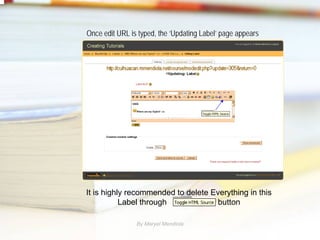
Once edit URL is typed, the ‘Updating Label’ page appears


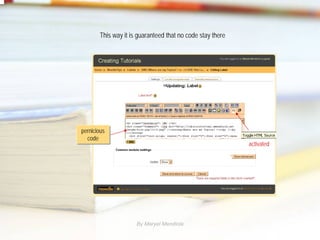
It is highly recommended to delete Everything in this
           Label through             button

                By Maryel Mendiola
This way it is guaranteed that no code stay there


pernicious
pernicious
  code
   code
                                                           activated


                     By Maryel Mendiola
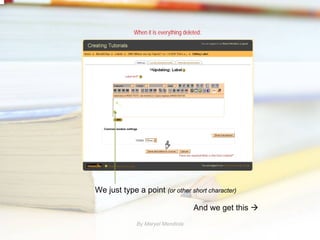
When it is everything deleted:


We just type a point (or other short character)

                                      And we get this
             By Maryel Mendiola
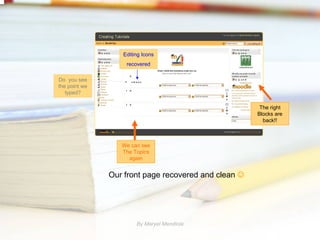
Editing Icons
                   recovered

Do you see
the point we
   typed?

                                                       The right
                                                      Blocks are
                                                        back!!


                  We can see
                  The Topics
                    again


               Our front page recovered and clean ☺


                       By Maryel Mendiola
Maria


        By Maryel Mendiola

How to fix corrupted Labels Moodle 1.9

  • 1.
    How to fix corruptedLabels 1.9 By Maryel Mendiola By Maryel Mendiola
  • 2.
    Have you everseen (or write) a Label with corrupt html or some script that Moodle doesn't recognize ? And suddenly You . . . • can't edit the label, • can't delete it, • can't do anything, and the edit icons have all disappeared. Well . . . Don’t worry , Be happy Because it is very easy to fix corrupt labels. Just follow the next Step by Step By Maryel Mendiola
  • 3.
    Look at thisLabel. It makes freaky things By Maryel Mendiola
  • 4.
    Like this: By Maryel Mendiola
  • 5.
  • 6.
    Right click and“View Page Source” By Maryel Mendiola
  • 7.
    In source page,it is recommended to find a text we typed in label and the text can easily be found Maybe we should choose “OMG” (Oh my God!!) to find at source page By Maryel Mendiola
  • 8.
    This is howPage Source looks Now, when we find the text we are looking for, we need to look near it and find this class < class="activity label" id="module-XXXX > Where XXXX is a number and is the ID label we are going to use By Maryel Mendiola
  • 9.
    Yes !!! By Maryel Mendiola
  • 10.
  • 11.
    Once edit URLis typed, the ‘Updating Label’ page appears It is highly recommended to delete Everything in this Label through button By Maryel Mendiola
  • 12.
    This way itis guaranteed that no code stay there pernicious pernicious code code activated By Maryel Mendiola
  • 13.
    When it iseverything deleted: We just type a point (or other short character) And we get this By Maryel Mendiola
  • 14.
    Editing Icons recovered Do you see the point we typed? The right Blocks are back!! We can see The Topics again Our front page recovered and clean ☺ By Maryel Mendiola
  • 15.
    Maria By Maryel Mendiola