© 2013 Pearson Education, Inc.  Publishing as Prentice Hall
1
CHAPTER 8:CHAPTER 8:
DATABASE APPLICATIONDATABASE APPLICATION
DEVELOPMENTDEVELOPMENT
Modern Database Management
11th
Edition
Jeffrey A. Hoffer, V. Ramesh,
Heikki Topi
Chapter 8 © 2013 Pearson Education, Inc. Publishing as Prentice Hall© 2013 Pearson Education, Inc. Publishing as Prentice Hall
OBJECTIVESOBJECTIVES
 Define terms
 Explain three components of client/server systems:
presentation, processing, and storage
 Distinguish between two-tier and three-tier architectures
 Describe how to connect to databases in 2-tier systems using
VB.NET and Java
 Describe key components and information flow in Web
applications
 Describe how to connect to databases in 3-tier applications
using JSP, PHP, and ASP .NET
 Explain the purpose of XML
 See how XQuery can be used to query XML documents
 Explain how XML fosters Web services and SOAs
2
Chapter 8 © 2013 Pearson Education, Inc. Publishing as Prentice Hall© 2013 Pearson Education, Inc. Publishing as Prentice Hall
CLIENT/SERVER ARCHITECTURESCLIENT/SERVER ARCHITECTURES
 Networked computing model
 Processes distributed between clients and
servers
 Client–Workstation (usually a PC) that requests
and uses a service
 Server–Computer (PC/mini/mainframe) that
provides a service
 For DBMS, server is a database server
3
Chapter 8 © 2013 Pearson Education, Inc. Publishing as Prentice Hall© 2013 Pearson Education, Inc. Publishing as Prentice Hall
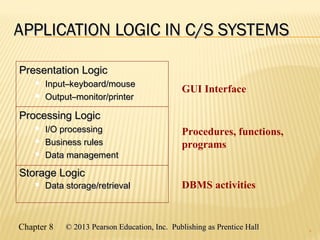
APPLICATION LOGIC IN C/S SYSTEMSAPPLICATION LOGIC IN C/S SYSTEMS
4
GUI Interface
Procedures, functions,
programs
DBMS activities
Processing LogicProcessing Logic
 I/O processingI/O processing
 Business rulesBusiness rules
 Data managementData management
Storage LogicStorage Logic
 Data storage/retrievalData storage/retrieval
Presentation LogicPresentation Logic
 Input–keyboard/mouseInput–keyboard/mouse
 Output–monitor/printerOutput–monitor/printer
Chapter 8 © 2013 Pearson Education, Inc. Publishing as Prentice Hall© 2013 Pearson Education, Inc. Publishing as Prentice Hall
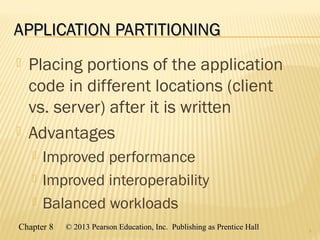
APPLICATION PARTITIONINGAPPLICATION PARTITIONING
 Placing portions of the application
code in different locations (client
vs. server) after it is written
 Advantages
 Improved performance
 Improved interoperability
 Balanced workloads
5
Chapter 8 © 2013 Pearson Education, Inc. Publishing as Prentice Hall© 2013 Pearson Education, Inc. Publishing as Prentice Hall
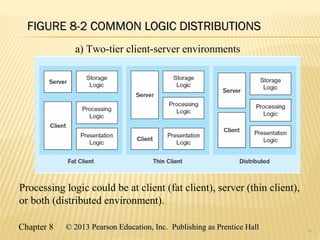
FIGURE 8-2 COMMON LOGIC DISTRIBUTIONSFIGURE 8-2 COMMON LOGIC DISTRIBUTIONS
6
a) Two-tier client-server environments
Processing logic could be at client (fat client), server (thin client),
or both (distributed environment).
Chapter 8 © 2013 Pearson Education, Inc. Publishing as Prentice Hall© 2013 Pearson Education, Inc. Publishing as Prentice Hall
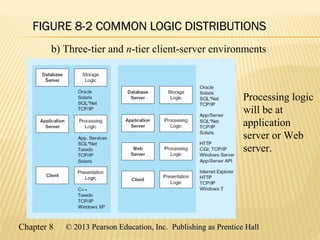
FIGURE 8-2 COMMON LOGIC DISTRIBUTIONSFIGURE 8-2 COMMON LOGIC DISTRIBUTIONS
7
b) Three-tier and n-tier client-server environments
Processing logic
will be at
application
server or Web
server.
Chapter 8 © 2013 Pearson Education, Inc. Publishing as Prentice Hall© 2013 Pearson Education, Inc. Publishing as Prentice Hall
TWO-TIER DATABASE SERVERTWO-TIER DATABASE SERVER
ARCHITECTURESARCHITECTURES
 Client workstation is responsible for
 Presentation logic
 Data processing logic
 Business rules logic
 Server performs all data storage, access,
and processing
 Typically called a database server
 DBMS is only on serverDBMS is only on server
8
9
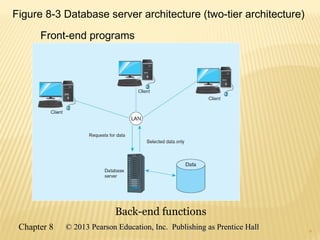
Figure 8-3 Database server architecture (two-tier architecture)
Front-end programs
Back-end functions
9
Chapter 8 © 2013 Pearson Education, Inc. Publishing as Prentice Hall© 2013 Pearson Education, Inc. Publishing as Prentice Hall
CHARACTERISTICS OF TWO-TIERCHARACTERISTICS OF TWO-TIER
CLIENT/SERVER SYSTEMSCLIENT/SERVER SYSTEMS
 Departmental in scope (few users)
 Not mission-critical
 Low transaction volumes
 Common programming languages:
 Java, VB .NET, C#
 Interface database via middleware, APIs
10
Chapter 8 © 2013 Pearson Education, Inc. Publishing as Prentice Hall© 2013 Pearson Education, Inc. Publishing as Prentice Hall
MIDDLEWARE AND APISMIDDLEWARE AND APIS
 Middleware – software that allows an
application to interoperate with other
software without requiring user to
understand and code low-level operations
 Application Program Interface (API) –
routines that an application uses to direct
the performance of procedures by the
computer’s operating system
 Common database APIs – ODBC, ADO .NET,
JDBC
11
Chapter 8 © 2013 Pearson Education, Inc. Publishing as Prentice Hall© 2013 Pearson Education, Inc. Publishing as Prentice Hall
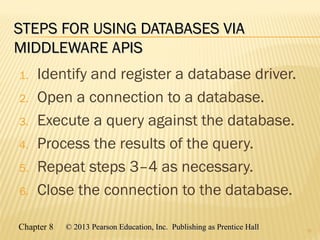
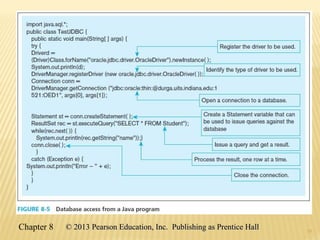
STEPS FOR USING DATABASES VIASTEPS FOR USING DATABASES VIA
MIDDLEWARE APISMIDDLEWARE APIS
1. Identify and register a database driver.
2. Open a connection to a database.
3. Execute a query against the database.
4. Process the results of the query.
5. Repeat steps 3–4 as necessary.
6. Close the connection to the database.
12
1313
Chapter 8 © 2013 Pearson Education, Inc. Publishing as Prentice Hall© 2013 Pearson Education, Inc. Publishing as Prentice Hall
THREE-TIER ARCHITECTURESTHREE-TIER ARCHITECTURES
14
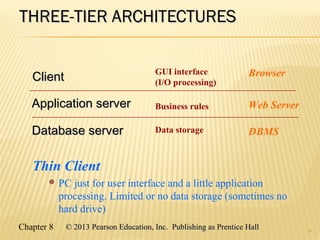
Thin Client
 PC just for user interface and a little application
processing. Limited or no data storage (sometimes no
hard drive)
GUI interface
(I/O processing)
Browser
Business rules Web Server
Data storage DBMS
ClientClient
Application serverApplication server
Database serverDatabase server
15
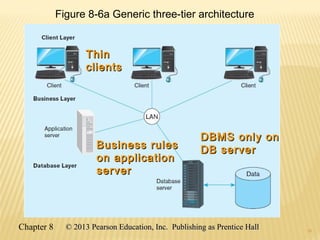
Figure 8-6a Generic three-tier architecture
ThinThin
clientsclients
Business rulesBusiness rules
on applicationon application
serverserver
DBMS only onDBMS only on
DB serverDB server
15
Chapter 8 © 2013 Pearson Education, Inc. Publishing as Prentice Hall© 2013 Pearson Education, Inc. Publishing as Prentice Hall
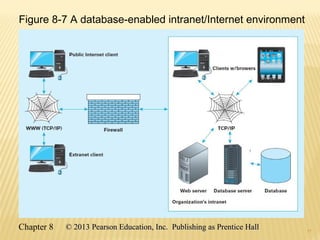
THIN CLIENTTHIN CLIENT
 An application where the client (PC)
accessing the application primarily
provides the user interfaces and some
application processing, usually with no
or limited local data storage.
 Usually, thin client application is a Web
browser and the 3-tier architecture
involves a Web application.
16
17
Figure 8-7 A database-enabled intranet/Internet environment
17
Chapter 8 © 2013 Pearson Education, Inc. Publishing as Prentice Hall© 2013 Pearson Education, Inc. Publishing as Prentice Hall
WEB APPLICATION COMPONENTSWEB APPLICATION COMPONENTS
 Database server – hosts the DBMS
 e.g. Oracle, SQL Server, Informix, MS Access, MySql
 Web server – receives and responds to browser
requests using HTTP protocol
 e.g. Apache, Internet Information Services (IIS)
 Application server – software building blocks for
creating dynamic web sites
 e.g. MS ASP .NET framework, Java EE, ColdFusion, PHP
 Web browser – client program that sends web
requests and receives web pages
 e.g. Internet Explorer, Firefox, Safari, Google Chrome
18
Chapter 8 © 2013 Pearson Education, Inc. Publishing as Prentice Hall© 2013 Pearson Education, Inc. Publishing as Prentice Hall
LANGUAGES FOR CREATING WEB PAGESLANGUAGES FOR CREATING WEB PAGES
 Hypertext Markup Language (HTML)
 Markup language specifically for Web pages
 Standard Generalized Markup Language (SGML)
 Markup language standard
 Extensible Markup Language (XML)
 Markup language allowing customized tags
 XHTML
 XML-compliant extension of HTML
 JavaScript/VBScript
 Scripting languages that enable interactivity in HTML documents
 Cascading Style Sheets (CSS)
 Control appearance of Web elements in an HML document
 XSL and XSLT
 XMS style sheet and transformation to HTML
19
Standards and Web
conventions established
by
World Wide WebWorld Wide Web
Consortium (W3C)Consortium (W3C)
Chapter 8 © 2013 Pearson Education, Inc. Publishing as Prentice Hall© 2013 Pearson Education, Inc. Publishing as Prentice Hall
PROCESSING IN 3-TIERPROCESSING IN 3-TIER
APPLICATIONSAPPLICATIONS
 Static page requests
 .htm or .html requests handled by the Web server
 Dynamic page requests
 .jsp, .aspx, and .php requests are routed to the
application server
 Server-side processing by JSP servlet, ASP .NET
application, ColdFusion, or PHP
 Database access via JDBC, ADO .NET, or other
database middleware
20
21
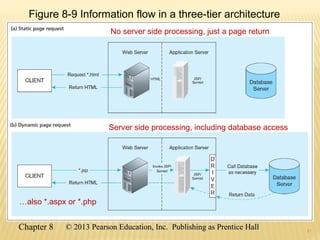
Figure 8-9 Information flow in a three-tier architecture
No server side processing, just a page return
Server side processing, including database access
…also *.aspx or *.php
21
Chapter 8 © 2013 Pearson Education, Inc. Publishing as Prentice Hall© 2013 Pearson Education, Inc. Publishing as Prentice Hall
22
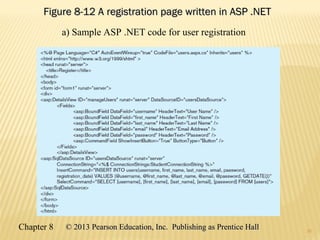
Figure 8-12 A registration page written in ASP .NETFigure 8-12 A registration page written in ASP .NET
a) Sample ASP .NET code for user registration
22
Chapter 8 © 2013 Pearson Education, Inc. Publishing as Prentice Hall© 2013 Pearson Education, Inc. Publishing as Prentice Hall
23
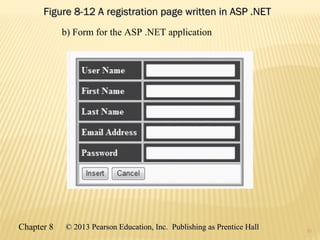
Figure 8-12 A registration page written in ASP .NETFigure 8-12 A registration page written in ASP .NET
b) Form for the ASP .NET application
23
Chapter 8 © 2013 Pearson Education, Inc. Publishing as Prentice Hall© 2013 Pearson Education, Inc. Publishing as Prentice Hall
CONSIDERATIONS IN 3-TIER APPLICATIONSCONSIDERATIONS IN 3-TIER APPLICATIONS
 Stored procedures
 Code logic embedded in DBMS
 Improve performance, but proprietary
 Transactions
 Involve many database updates
 Either all must succeed, or none should occur
 Database connections
 Maintaining an open connection is resource-intensive
 Use of connection pooling
24
Chapter 8 © 2013 Pearson Education, Inc. Publishing as Prentice Hall© 2013 Pearson Education, Inc. Publishing as Prentice Hall
BENEFITS OF STORED PROCEDURESBENEFITS OF STORED PROCEDURES
 Performance improves for compiled
SQL statements
 Reduced network traffic
 Improved security
 Improved data integrity
 Thinner clients
25
Chapter 8 © 2013 Pearson Education, Inc. Publishing as Prentice Hall© 2013 Pearson Education, Inc. Publishing as Prentice Hall
BENEFITS OF THREE-TIERBENEFITS OF THREE-TIER
ARCHITECTURESARCHITECTURES
 Scalability
 Technological flexibility
 Long-term cost reduction
 Better match of systems to business needs
 Improved customer service
 Competitive advantage
 Reduced risk
26
Chapter 8 © 2013 Pearson Education, Inc. Publishing as Prentice Hall© 2013 Pearson Education, Inc. Publishing as Prentice Hall
CLOUD COMPUTINGCLOUD COMPUTING
 A model for creating ubiquitous, convenient, on-
demand access to network services
 Characteristics: on-demand, broad network
access, resource pooling, rapid elasticity,
measured service
 Types of cloud computing:
 Infrastructure-as-a-service (IaaS)
 Platform-as-a-service (PaaS)
 Software-as-a-service (SaaS)
27
Chapter 8 © 2013 Pearson Education, Inc. Publishing as Prentice Hall© 2013 Pearson Education, Inc. Publishing as Prentice Hall
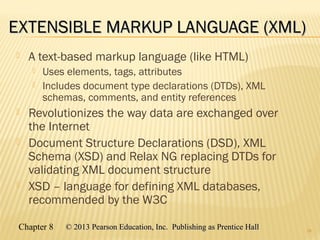
EXTENSIBLE MARKUP LANGUAGE (XML)EXTENSIBLE MARKUP LANGUAGE (XML)
 A text-based markup language (like HTML)
 Uses elements, tags, attributes
 Includes document type declarations (DTDs), XML
schemas, comments, and entity references
 Revolutionizes the way data are exchanged over
the Internet
 Document Structure Declarations (DSD), XML
Schema (XSD) and Relax NG replacing DTDs for
validating XML document structure
 XSD – language for defining XML databases,
recommended by the W3C
28
Chapter 8 © 2013 Pearson Education, Inc. Publishing as Prentice Hall© 2013 Pearson Education, Inc. Publishing as Prentice Hall
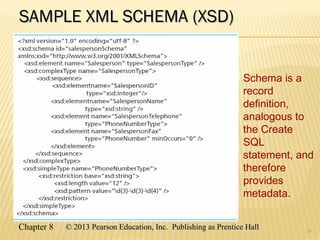
SAMPLE XML SCHEMA (XSD)SAMPLE XML SCHEMA (XSD)
29
Schema is a
record
definition,
analogous to
the Create
SQL
statement, and
therefore
provides
metadata.
Chapter 8 © 2013 Pearson Education, Inc. Publishing as Prentice Hall© 2013 Pearson Education, Inc. Publishing as Prentice Hall
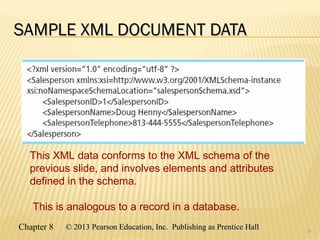
SAMPLE XML DOCUMENT DATASAMPLE XML DOCUMENT DATA
30
This XML data conforms to the XML schema of the
previous slide, and involves elements and attributes
defined in the schema.
This is analogous to a record in a database.
Chapter 8 © 2013 Pearson Education, Inc. Publishing as Prentice Hall© 2013 Pearson Education, Inc. Publishing as Prentice Hall
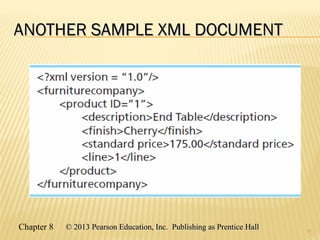
ANOTHER SAMPLE XML DOCUMENTANOTHER SAMPLE XML DOCUMENT
31
Chapter 8 © 2013 Pearson Education, Inc. Publishing as Prentice Hall© 2013 Pearson Education, Inc. Publishing as Prentice Hall
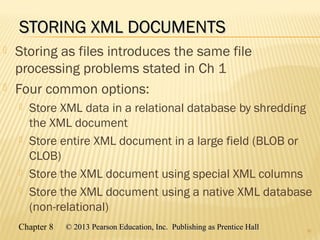
STORING XML DOCUMENTSSTORING XML DOCUMENTS
 Storing as files introduces the same file
processing problems stated in Ch 1
 Four common options:
 Store XML data in a relational database by shredding
the XML document
 Store entire XML document in a large field (BLOB or
CLOB)
 Store the XML document using special XML columns
 Store the XML document using a native XML database
(non-relational)
32
Chapter 8 © 2013 Pearson Education, Inc. Publishing as Prentice Hall© 2013 Pearson Education, Inc. Publishing as Prentice Hall
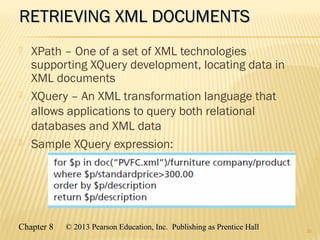
RETRIEVING XML DOCUMENTSRETRIEVING XML DOCUMENTS
 XPath – One of a set of XML technologies
supporting XQuery development, locating data in
XML documents
 XQuery – An XML transformation language that
allows applications to query both relational
databases and XML data
 Sample XQuery expression:
33
Chapter 8 © 2013 Pearson Education, Inc. Publishing as Prentice Hall© 2013 Pearson Education, Inc. Publishing as Prentice Hall
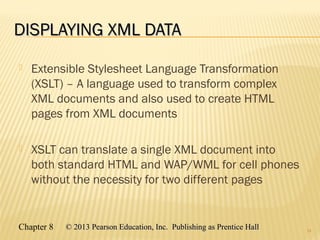
DISPLAYING XML DATADISPLAYING XML DATA
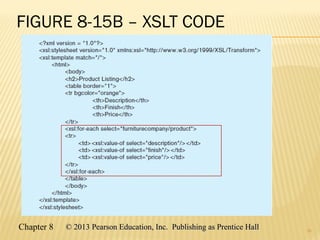
 Extensible Stylesheet Language Transformation
(XSLT) – A language used to transform complex
XML documents and also used to create HTML
pages from XML documents
 XSLT can translate a single XML document into
both standard HTML and WAP/WML for cell phones
without the necessity for two different pages
34
Chapter 8 © 2013 Pearson Education, Inc. Publishing as Prentice Hall© 2013 Pearson Education, Inc. Publishing as Prentice Hall
FIGURE 8-15B – XSLT CODE
35
36
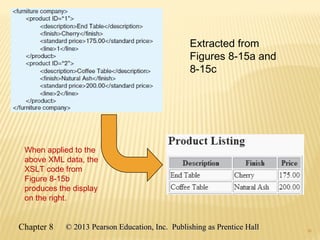
Extracted from
Figures 8-15a and
8-15c
When applied to the
above XML data, the
XSLT code from
Figure 8-15b
produces the display
on the right.
36
Chapter 8 © 2013 Pearson Education, Inc. Publishing as Prentice Hall© 2013 Pearson Education, Inc. Publishing as Prentice Hall
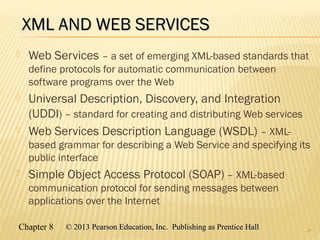
XML AND WEB SERVICESXML AND WEB SERVICES
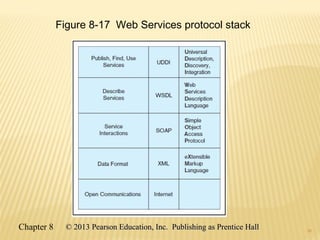
 Web Services – a set of emerging XML-based standards that
define protocols for automatic communication between
software programs over the Web
 Universal Description, Discovery, and Integration
(UDDI) – standard for creating and distributing Web services
 Web Services Description Language (WSDL) – XML-
based grammar for describing a Web Service and specifying its
public interface
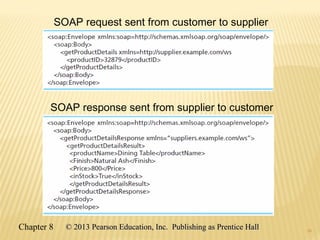
 Simple Object Access Protocol (SOAP) – XML-based
communication protocol for sending messages between
applications over the Internet
37
38
Figure 8-17 Web Services protocol stack
38
Chapter 8 © 2013 Pearson Education, Inc. Publishing as Prentice Hall© 2013 Pearson Education, Inc. Publishing as Prentice Hall
39
SOAP request sent from customer to supplier
SOAP response sent from supplier to customer
39
Chapter 8 © 2013 Pearson Education, Inc. Publishing as Prentice Hall© 2013 Pearson Education, Inc. Publishing as Prentice Hall
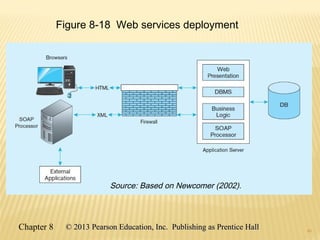
40
Figure 8-18 Web services deployment
40
Chapter 8 © 2013 Pearson Education, Inc. Publishing as Prentice Hall© 2013 Pearson Education, Inc. Publishing as Prentice Hall
Source: Based on Newcomer (2002).
Chapter 8 © 2013 Pearson Education, Inc. Publishing as Prentice Hall© 2013 Pearson Education, Inc. Publishing as Prentice Hall
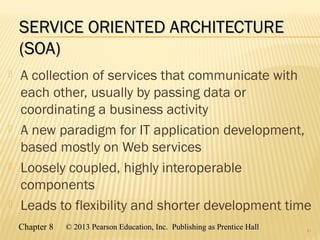
SERVICE ORIENTED ARCHITECTURESERVICE ORIENTED ARCHITECTURE
(SOA)(SOA)
 A collection of services that communicate with
each other, usually by passing data or
coordinating a business activity
 A new paradigm for IT application development,
based mostly on Web services
 Loosely coupled, highly interoperable
components
 Leads to flexibility and shorter development time
41
4242
Copyright © 2013 Pearson Education, Inc.  Publishing as Prentice HallCopyright © 2013 Pearson Education, Inc.  Publishing as Prentice Hall
Chapter 8 © 2013 Pearson Education, Inc. Publishing as Prentice Hall© 2013 Pearson Education, Inc. Publishing as Prentice Hall

Hoffer mdm11e pp_ch08

  • 1.
    © 2013 PearsonEducation, Inc.  Publishing as Prentice Hall 1 CHAPTER 8:CHAPTER 8: DATABASE APPLICATIONDATABASE APPLICATION DEVELOPMENTDEVELOPMENT Modern Database Management 11th Edition Jeffrey A. Hoffer, V. Ramesh, Heikki Topi
  • 2.
    Chapter 8 ©2013 Pearson Education, Inc. Publishing as Prentice Hall© 2013 Pearson Education, Inc. Publishing as Prentice Hall OBJECTIVESOBJECTIVES  Define terms  Explain three components of client/server systems: presentation, processing, and storage  Distinguish between two-tier and three-tier architectures  Describe how to connect to databases in 2-tier systems using VB.NET and Java  Describe key components and information flow in Web applications  Describe how to connect to databases in 3-tier applications using JSP, PHP, and ASP .NET  Explain the purpose of XML  See how XQuery can be used to query XML documents  Explain how XML fosters Web services and SOAs 2
  • 3.
    Chapter 8 ©2013 Pearson Education, Inc. Publishing as Prentice Hall© 2013 Pearson Education, Inc. Publishing as Prentice Hall CLIENT/SERVER ARCHITECTURESCLIENT/SERVER ARCHITECTURES  Networked computing model  Processes distributed between clients and servers  Client–Workstation (usually a PC) that requests and uses a service  Server–Computer (PC/mini/mainframe) that provides a service  For DBMS, server is a database server 3
  • 4.
    Chapter 8 ©2013 Pearson Education, Inc. Publishing as Prentice Hall© 2013 Pearson Education, Inc. Publishing as Prentice Hall APPLICATION LOGIC IN C/S SYSTEMSAPPLICATION LOGIC IN C/S SYSTEMS 4 GUI Interface Procedures, functions, programs DBMS activities Processing LogicProcessing Logic  I/O processingI/O processing  Business rulesBusiness rules  Data managementData management Storage LogicStorage Logic  Data storage/retrievalData storage/retrieval Presentation LogicPresentation Logic  Input–keyboard/mouseInput–keyboard/mouse  Output–monitor/printerOutput–monitor/printer
  • 5.
    Chapter 8 ©2013 Pearson Education, Inc. Publishing as Prentice Hall© 2013 Pearson Education, Inc. Publishing as Prentice Hall APPLICATION PARTITIONINGAPPLICATION PARTITIONING  Placing portions of the application code in different locations (client vs. server) after it is written  Advantages  Improved performance  Improved interoperability  Balanced workloads 5
  • 6.
    Chapter 8 ©2013 Pearson Education, Inc. Publishing as Prentice Hall© 2013 Pearson Education, Inc. Publishing as Prentice Hall FIGURE 8-2 COMMON LOGIC DISTRIBUTIONSFIGURE 8-2 COMMON LOGIC DISTRIBUTIONS 6 a) Two-tier client-server environments Processing logic could be at client (fat client), server (thin client), or both (distributed environment).
  • 7.
    Chapter 8 ©2013 Pearson Education, Inc. Publishing as Prentice Hall© 2013 Pearson Education, Inc. Publishing as Prentice Hall FIGURE 8-2 COMMON LOGIC DISTRIBUTIONSFIGURE 8-2 COMMON LOGIC DISTRIBUTIONS 7 b) Three-tier and n-tier client-server environments Processing logic will be at application server or Web server.
  • 8.
    Chapter 8 ©2013 Pearson Education, Inc. Publishing as Prentice Hall© 2013 Pearson Education, Inc. Publishing as Prentice Hall TWO-TIER DATABASE SERVERTWO-TIER DATABASE SERVER ARCHITECTURESARCHITECTURES  Client workstation is responsible for  Presentation logic  Data processing logic  Business rules logic  Server performs all data storage, access, and processing  Typically called a database server  DBMS is only on serverDBMS is only on server 8
  • 9.
    9 Figure 8-3 Databaseserver architecture (two-tier architecture) Front-end programs Back-end functions 9 Chapter 8 © 2013 Pearson Education, Inc. Publishing as Prentice Hall© 2013 Pearson Education, Inc. Publishing as Prentice Hall
  • 10.
    Chapter 8 ©2013 Pearson Education, Inc. Publishing as Prentice Hall© 2013 Pearson Education, Inc. Publishing as Prentice Hall CHARACTERISTICS OF TWO-TIERCHARACTERISTICS OF TWO-TIER CLIENT/SERVER SYSTEMSCLIENT/SERVER SYSTEMS  Departmental in scope (few users)  Not mission-critical  Low transaction volumes  Common programming languages:  Java, VB .NET, C#  Interface database via middleware, APIs 10
  • 11.
    Chapter 8 ©2013 Pearson Education, Inc. Publishing as Prentice Hall© 2013 Pearson Education, Inc. Publishing as Prentice Hall MIDDLEWARE AND APISMIDDLEWARE AND APIS  Middleware – software that allows an application to interoperate with other software without requiring user to understand and code low-level operations  Application Program Interface (API) – routines that an application uses to direct the performance of procedures by the computer’s operating system  Common database APIs – ODBC, ADO .NET, JDBC 11
  • 12.
    Chapter 8 ©2013 Pearson Education, Inc. Publishing as Prentice Hall© 2013 Pearson Education, Inc. Publishing as Prentice Hall STEPS FOR USING DATABASES VIASTEPS FOR USING DATABASES VIA MIDDLEWARE APISMIDDLEWARE APIS 1. Identify and register a database driver. 2. Open a connection to a database. 3. Execute a query against the database. 4. Process the results of the query. 5. Repeat steps 3–4 as necessary. 6. Close the connection to the database. 12
  • 13.
    1313 Chapter 8 ©2013 Pearson Education, Inc. Publishing as Prentice Hall© 2013 Pearson Education, Inc. Publishing as Prentice Hall
  • 14.
    Chapter 8 ©2013 Pearson Education, Inc. Publishing as Prentice Hall© 2013 Pearson Education, Inc. Publishing as Prentice Hall THREE-TIER ARCHITECTURESTHREE-TIER ARCHITECTURES 14 Thin Client  PC just for user interface and a little application processing. Limited or no data storage (sometimes no hard drive) GUI interface (I/O processing) Browser Business rules Web Server Data storage DBMS ClientClient Application serverApplication server Database serverDatabase server
  • 15.
    15 Figure 8-6a Genericthree-tier architecture ThinThin clientsclients Business rulesBusiness rules on applicationon application serverserver DBMS only onDBMS only on DB serverDB server 15 Chapter 8 © 2013 Pearson Education, Inc. Publishing as Prentice Hall© 2013 Pearson Education, Inc. Publishing as Prentice Hall
  • 16.
    Chapter 8 ©2013 Pearson Education, Inc. Publishing as Prentice Hall© 2013 Pearson Education, Inc. Publishing as Prentice Hall THIN CLIENTTHIN CLIENT  An application where the client (PC) accessing the application primarily provides the user interfaces and some application processing, usually with no or limited local data storage.  Usually, thin client application is a Web browser and the 3-tier architecture involves a Web application. 16
  • 17.
    17 Figure 8-7 Adatabase-enabled intranet/Internet environment 17 Chapter 8 © 2013 Pearson Education, Inc. Publishing as Prentice Hall© 2013 Pearson Education, Inc. Publishing as Prentice Hall
  • 18.
    Chapter 8 ©2013 Pearson Education, Inc. Publishing as Prentice Hall© 2013 Pearson Education, Inc. Publishing as Prentice Hall WEB APPLICATION COMPONENTSWEB APPLICATION COMPONENTS  Database server – hosts the DBMS  e.g. Oracle, SQL Server, Informix, MS Access, MySql  Web server – receives and responds to browser requests using HTTP protocol  e.g. Apache, Internet Information Services (IIS)  Application server – software building blocks for creating dynamic web sites  e.g. MS ASP .NET framework, Java EE, ColdFusion, PHP  Web browser – client program that sends web requests and receives web pages  e.g. Internet Explorer, Firefox, Safari, Google Chrome 18
  • 19.
    Chapter 8 ©2013 Pearson Education, Inc. Publishing as Prentice Hall© 2013 Pearson Education, Inc. Publishing as Prentice Hall LANGUAGES FOR CREATING WEB PAGESLANGUAGES FOR CREATING WEB PAGES  Hypertext Markup Language (HTML)  Markup language specifically for Web pages  Standard Generalized Markup Language (SGML)  Markup language standard  Extensible Markup Language (XML)  Markup language allowing customized tags  XHTML  XML-compliant extension of HTML  JavaScript/VBScript  Scripting languages that enable interactivity in HTML documents  Cascading Style Sheets (CSS)  Control appearance of Web elements in an HML document  XSL and XSLT  XMS style sheet and transformation to HTML 19 Standards and Web conventions established by World Wide WebWorld Wide Web Consortium (W3C)Consortium (W3C)
  • 20.
    Chapter 8 ©2013 Pearson Education, Inc. Publishing as Prentice Hall© 2013 Pearson Education, Inc. Publishing as Prentice Hall PROCESSING IN 3-TIERPROCESSING IN 3-TIER APPLICATIONSAPPLICATIONS  Static page requests  .htm or .html requests handled by the Web server  Dynamic page requests  .jsp, .aspx, and .php requests are routed to the application server  Server-side processing by JSP servlet, ASP .NET application, ColdFusion, or PHP  Database access via JDBC, ADO .NET, or other database middleware 20
  • 21.
    21 Figure 8-9 Informationflow in a three-tier architecture No server side processing, just a page return Server side processing, including database access …also *.aspx or *.php 21 Chapter 8 © 2013 Pearson Education, Inc. Publishing as Prentice Hall© 2013 Pearson Education, Inc. Publishing as Prentice Hall
  • 22.
    22 Figure 8-12 Aregistration page written in ASP .NETFigure 8-12 A registration page written in ASP .NET a) Sample ASP .NET code for user registration 22 Chapter 8 © 2013 Pearson Education, Inc. Publishing as Prentice Hall© 2013 Pearson Education, Inc. Publishing as Prentice Hall
  • 23.
    23 Figure 8-12 Aregistration page written in ASP .NETFigure 8-12 A registration page written in ASP .NET b) Form for the ASP .NET application 23 Chapter 8 © 2013 Pearson Education, Inc. Publishing as Prentice Hall© 2013 Pearson Education, Inc. Publishing as Prentice Hall
  • 24.
    Chapter 8 ©2013 Pearson Education, Inc. Publishing as Prentice Hall© 2013 Pearson Education, Inc. Publishing as Prentice Hall CONSIDERATIONS IN 3-TIER APPLICATIONSCONSIDERATIONS IN 3-TIER APPLICATIONS  Stored procedures  Code logic embedded in DBMS  Improve performance, but proprietary  Transactions  Involve many database updates  Either all must succeed, or none should occur  Database connections  Maintaining an open connection is resource-intensive  Use of connection pooling 24
  • 25.
    Chapter 8 ©2013 Pearson Education, Inc. Publishing as Prentice Hall© 2013 Pearson Education, Inc. Publishing as Prentice Hall BENEFITS OF STORED PROCEDURESBENEFITS OF STORED PROCEDURES  Performance improves for compiled SQL statements  Reduced network traffic  Improved security  Improved data integrity  Thinner clients 25
  • 26.
    Chapter 8 ©2013 Pearson Education, Inc. Publishing as Prentice Hall© 2013 Pearson Education, Inc. Publishing as Prentice Hall BENEFITS OF THREE-TIERBENEFITS OF THREE-TIER ARCHITECTURESARCHITECTURES  Scalability  Technological flexibility  Long-term cost reduction  Better match of systems to business needs  Improved customer service  Competitive advantage  Reduced risk 26
  • 27.
    Chapter 8 ©2013 Pearson Education, Inc. Publishing as Prentice Hall© 2013 Pearson Education, Inc. Publishing as Prentice Hall CLOUD COMPUTINGCLOUD COMPUTING  A model for creating ubiquitous, convenient, on- demand access to network services  Characteristics: on-demand, broad network access, resource pooling, rapid elasticity, measured service  Types of cloud computing:  Infrastructure-as-a-service (IaaS)  Platform-as-a-service (PaaS)  Software-as-a-service (SaaS) 27
  • 28.
    Chapter 8 ©2013 Pearson Education, Inc. Publishing as Prentice Hall© 2013 Pearson Education, Inc. Publishing as Prentice Hall EXTENSIBLE MARKUP LANGUAGE (XML)EXTENSIBLE MARKUP LANGUAGE (XML)  A text-based markup language (like HTML)  Uses elements, tags, attributes  Includes document type declarations (DTDs), XML schemas, comments, and entity references  Revolutionizes the way data are exchanged over the Internet  Document Structure Declarations (DSD), XML Schema (XSD) and Relax NG replacing DTDs for validating XML document structure  XSD – language for defining XML databases, recommended by the W3C 28
  • 29.
    Chapter 8 ©2013 Pearson Education, Inc. Publishing as Prentice Hall© 2013 Pearson Education, Inc. Publishing as Prentice Hall SAMPLE XML SCHEMA (XSD)SAMPLE XML SCHEMA (XSD) 29 Schema is a record definition, analogous to the Create SQL statement, and therefore provides metadata.
  • 30.
    Chapter 8 ©2013 Pearson Education, Inc. Publishing as Prentice Hall© 2013 Pearson Education, Inc. Publishing as Prentice Hall SAMPLE XML DOCUMENT DATASAMPLE XML DOCUMENT DATA 30 This XML data conforms to the XML schema of the previous slide, and involves elements and attributes defined in the schema. This is analogous to a record in a database.
  • 31.
    Chapter 8 ©2013 Pearson Education, Inc. Publishing as Prentice Hall© 2013 Pearson Education, Inc. Publishing as Prentice Hall ANOTHER SAMPLE XML DOCUMENTANOTHER SAMPLE XML DOCUMENT 31
  • 32.
    Chapter 8 ©2013 Pearson Education, Inc. Publishing as Prentice Hall© 2013 Pearson Education, Inc. Publishing as Prentice Hall STORING XML DOCUMENTSSTORING XML DOCUMENTS  Storing as files introduces the same file processing problems stated in Ch 1  Four common options:  Store XML data in a relational database by shredding the XML document  Store entire XML document in a large field (BLOB or CLOB)  Store the XML document using special XML columns  Store the XML document using a native XML database (non-relational) 32
  • 33.
    Chapter 8 ©2013 Pearson Education, Inc. Publishing as Prentice Hall© 2013 Pearson Education, Inc. Publishing as Prentice Hall RETRIEVING XML DOCUMENTSRETRIEVING XML DOCUMENTS  XPath – One of a set of XML technologies supporting XQuery development, locating data in XML documents  XQuery – An XML transformation language that allows applications to query both relational databases and XML data  Sample XQuery expression: 33
  • 34.
    Chapter 8 ©2013 Pearson Education, Inc. Publishing as Prentice Hall© 2013 Pearson Education, Inc. Publishing as Prentice Hall DISPLAYING XML DATADISPLAYING XML DATA  Extensible Stylesheet Language Transformation (XSLT) – A language used to transform complex XML documents and also used to create HTML pages from XML documents  XSLT can translate a single XML document into both standard HTML and WAP/WML for cell phones without the necessity for two different pages 34
  • 35.
    Chapter 8 ©2013 Pearson Education, Inc. Publishing as Prentice Hall© 2013 Pearson Education, Inc. Publishing as Prentice Hall FIGURE 8-15B – XSLT CODE 35
  • 36.
    36 Extracted from Figures 8-15aand 8-15c When applied to the above XML data, the XSLT code from Figure 8-15b produces the display on the right. 36 Chapter 8 © 2013 Pearson Education, Inc. Publishing as Prentice Hall© 2013 Pearson Education, Inc. Publishing as Prentice Hall
  • 37.
    Chapter 8 ©2013 Pearson Education, Inc. Publishing as Prentice Hall© 2013 Pearson Education, Inc. Publishing as Prentice Hall XML AND WEB SERVICESXML AND WEB SERVICES  Web Services – a set of emerging XML-based standards that define protocols for automatic communication between software programs over the Web  Universal Description, Discovery, and Integration (UDDI) – standard for creating and distributing Web services  Web Services Description Language (WSDL) – XML- based grammar for describing a Web Service and specifying its public interface  Simple Object Access Protocol (SOAP) – XML-based communication protocol for sending messages between applications over the Internet 37
  • 38.
    38 Figure 8-17 WebServices protocol stack 38 Chapter 8 © 2013 Pearson Education, Inc. Publishing as Prentice Hall© 2013 Pearson Education, Inc. Publishing as Prentice Hall
  • 39.
    39 SOAP request sentfrom customer to supplier SOAP response sent from supplier to customer 39 Chapter 8 © 2013 Pearson Education, Inc. Publishing as Prentice Hall© 2013 Pearson Education, Inc. Publishing as Prentice Hall
  • 40.
    40 Figure 8-18 Webservices deployment 40 Chapter 8 © 2013 Pearson Education, Inc. Publishing as Prentice Hall© 2013 Pearson Education, Inc. Publishing as Prentice Hall Source: Based on Newcomer (2002).
  • 41.
    Chapter 8 ©2013 Pearson Education, Inc. Publishing as Prentice Hall© 2013 Pearson Education, Inc. Publishing as Prentice Hall SERVICE ORIENTED ARCHITECTURESERVICE ORIENTED ARCHITECTURE (SOA)(SOA)  A collection of services that communicate with each other, usually by passing data or coordinating a business activity  A new paradigm for IT application development, based mostly on Web services  Loosely coupled, highly interoperable components  Leads to flexibility and shorter development time 41
  • 42.
    4242 Copyright © 2013Pearson Education, Inc.  Publishing as Prentice HallCopyright © 2013 Pearson Education, Inc.  Publishing as Prentice Hall Chapter 8 © 2013 Pearson Education, Inc. Publishing as Prentice Hall© 2013 Pearson Education, Inc. Publishing as Prentice Hall