Hierarchy Viewer Internals

Kyungmin Lee
Software Platform Lab., LG Electronics
snailee@gmail.com
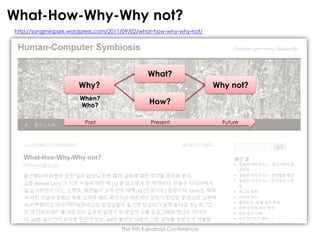
What-How-Why-Why not?
http://sangminpark.wordpress.com/2011/09/02/what-how-why-why-not/

What?
Why?

Why not?

When?
Who?

How?

Past

Present

The 9th Kandroid Conference

Future
Goal
Android와 같은 S/W 플랫폼이 성장하고 널리 확산되는데 있어 SDK(Software
Development Kit)의 역할은 매우 큽니다. 아무리 좋은 기능과 성능을 제공하는
플랫폼이라 할지라도 그 위에서 동작하는 앱을 만드는 게 어렵다면 그 플랫폼은
개발자들로부터 외면 받게 됩니다. 이는 해당 플랫폼에서 이용 가능한 앱의 개수가 줄고
품질이 저하되는 결과를 만들게 되어 그 플랫폼은 사용자들에게도 외면 받게 됩니다. 이로
인해 개발자들이 다시금 그 플랫폼을 외면하게 만드는 악순환이 형성됩니다. 이러한
악순환을 끊기 위한 첫 걸음은 바로 개발 생산성을 높여주는 SDK를 잘 만들어 제공하는
것입니다. 따라서 Android 기술 분야에서 경쟁력을 확보하고 주도권을 갖기 위해서는
Android 플랫폼을 제대로 이해하는 것 뿐만 아니라 Android SDK를 제대로 분석하고
개선할 수 있어야 합니다.
이번 세션에서는 "Android SDK 기술의 이해"라는 큰 주제의 첫 꼭지로써 Android
UI(User Interface)를 디버깅하고 프로파일링하는데 사용하는 Hierarchy Viewer를
분석하고자 합니다. 먼저, Hierarchy Viewer를 분석하는데 필요한 몇몇 배경 지식을
설명한 후 Hierarchy Viewer의 내부 구조와 동작 방식을 살펴보겠습니다.
From the Conference Program Overview

The 9th Kandroid Conference
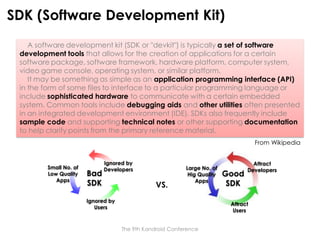
SDK (Software Development Kit)
A software development kit (SDK or "devkit") is typically a set of software
development tools that allows for the creation of applications for a certain
software package, software framework, hardware platform, computer system,
video game console, operating system, or similar platform.
It may be something as simple as an application programming interface (API)
in the form of some files to interface to a particular programming language or
include sophisticated hardware to communicate with a certain embedded
system. Common tools include debugging aids and other utilities often presented
in an integrated development environment (IDE). SDKs also frequently include
sample code and supporting technical notes or other supporting documentation
to help clarify points from the primary reference material.
From Wikipedia

Small No. of
Low Quality
Apps

Bad
SDK

Ignored by
Developers

VS.

Large No. of
Hig Quality
Apps

Ignored by
Users

Good
SDK

Attract
Developers

Attract
Users
The 9th Kandroid Conference
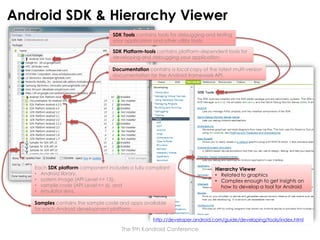
Android SDK & Hierarchy Viewer
SDK Tools contains tools for debugging and testing
your application and other utility tools.
SDK Platform-tools contains platform-dependent tools for
developing and debugging your application.
Documentation contains a local copy of the latest multi-version
documentation for the Android framework API.

Each SDK platform component includes a fully compliant
• Android library,
• system image (API Level <= 13),
• sample code (API Level <= 6), and
• emulator skins.

Hierarchy Viewer
• Related to graphics
• Complex enough to get insights on
how to develop a tool for Android

Samples contains the sample code and apps available
for each Android development platform.
http://developer.android.com/guide/developing/tools/index.html

The 9th Kandroid Conference
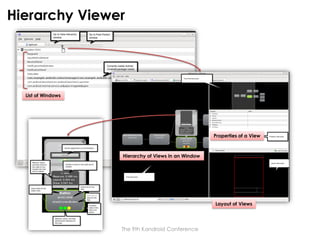
Hierarchy Viewer

List of Windows

Properties of a View

Hierarchy of Views in an Window

Layout of Views

The 9th Kandroid Conference
Hierarchy Viewer Architecture
4939

Another Target or Emulator

…

Hierarchy
Viewer

4940
4939

4939

Window
Window
Window
…

system server

View
View

View
…

user app.
View

Port Forwarding
View

adb forward tcp:4939 tcp:4939

View
…

user app.
View

ADB
Server

ADB
Daemon

View

View
…

user app.
USB|TCP
Host

Target|Emulator
The 9th Kandroid Conference
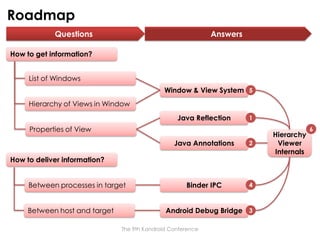
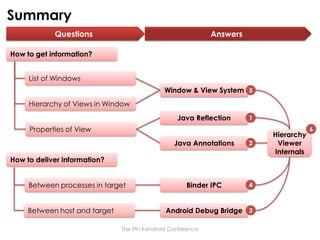
Roadmap
Questions

Answers

How to get information?
List of Windows

Window & View System 5
Hierarchy of Views in Window
Java Reflection

1

Properties of View
Java Annotations

2

Binder IPC

4

How to deliver information?
Between processes in target
Between host and target

Android Debug Bridge 3
The 9th Kandroid Conference

Hierarchy
Viewer
Internals

6
Reflection & Annotation in General
In computer science, reflection is
the process by which a computer
program can observe and
modify its own structure and
behavior at runtime.

Type, interface, class, methods, attributes,
variables, functions, control structures, etc.

Metadata

From Wikipedia
Meta Object

Meta Level

Set/Get
Metadata
(Value)

1

Add New
Metadata
(Type)

2
Application

Base Level

Base Object

Annotation

Reflection
1

Introspection

2

Intercession

In programming, annotations are used mainly for
the purpose of expanding code documentation
and comments. … as a special form of syntactic
metadata in the source code.

From Wikipedia
The 9th Kandroid Conference
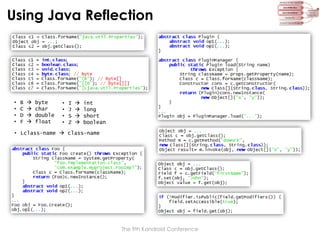
Using Java Reflection

•
•
•
•

B
C
D
F






byte
char
double
float

•
•
•
•

I
J
S
Z






int
long
short
boolean

• Lclass-name  class-name

The 9th Kandroid Conference
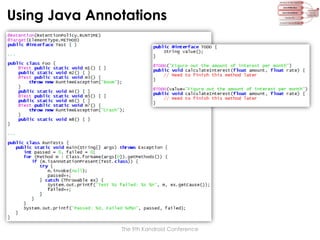
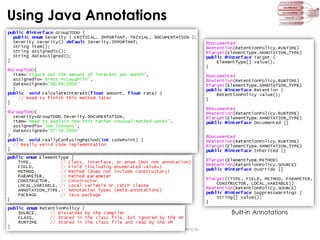
Using Java Annotations

The 9th Kandroid Conference
Using Java Annotations

Built-in Annotations
The 9th Kandroid Conference
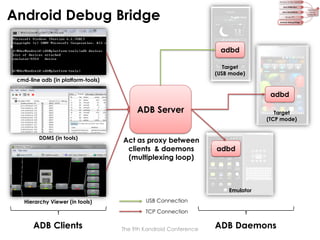
Android Debug Bridge
adbd
Target
(USB mode)
cmd-line adb (in platform-tools)

adbd

ADB Server
DDMS (in tools)

Act as proxy between
clients & daemons
(multiplexing loop)

Target
(TCP mode)

adbd

Emulator
Hierarchy Viewer (in tools)

USB Connection
TCP Connection

ADB Clients

The 9th Kandroid Conference

ADB Daemons
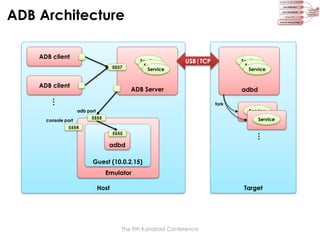
ADB Architecture
ADB client

Service
Service
Service

5037

ADB client

USB|TCP

Service
Service
Service

ADB Server

adbd

…

fork

Service

adb port
console port

5555

Service

5554

…

5555

adbd
Guest (10.0.2.15)
Emulator
Host

Target

The 9th Kandroid Conference
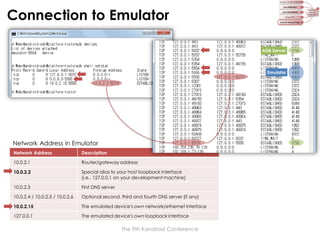
Connection to Emulator
ADB Server

Emulator

Network Address in Emulator
Network Address

Description

10.0.2.1

Router/gateway address

10.0.2.2

Special alias to your host loopback interface
(i.e., 127.0.0.1 on your development machine)

10.0.2.3

First DNS server

10.0.2.4 / 10.0.2.5 / 10.0.2.6

Optional second, third and fourth DNS server (if any)

10.0.2.15

The emulated device's own network/ethernet interface

127.0.0.1

The emulated device's own loopback interface

The 9th Kandroid Conference
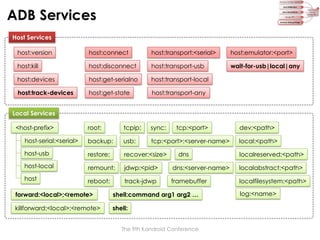
ADB Services
Host Services

host:version

host:connect

host:transport:<serial>

host:emulator:<port>

host:kill

host:disconnect

host:transport-usb

wait-for-usb|local|any

host:devices

host:get-serialno

host:transport-local

host:track-devices

host:get-state

host:transport-any

root:

tcpip:

sync:

tcp:<port>

dev:<path>

host-serial:<serial>

backup:

usb:

tcp:<port>:<server-name>

local:<path>

host-usb

restore:

recover:<size>

host-local

remount:

jdwp:<pid>

dns:<server-name>

localabstract:<path>

host

reboot:

track-jdwp

framebuffer

localfilesystem:<path>

Local Services

<host-prefix>

dns

forward:<local>;<remote>

shell:command arg1 arg2 …

killforward:<local>;<remote>

shell:
The 9th Kandroid Conference

localreserved:<path>

log:<name>
Providing “Simple” Host Service
<Request> := <Length><Payload>
• <Length> := Payload length, as 4-byte
hexadecimal string in ASCII
• <Payload> := Request data

ADB client
connect 3

10 “OKAY0004001d”
7 “000Chost:version”

fdevent
loop

5037

listen 2

8 read

4

alistener
[smart]

5

create

6
create

install_listener 1

main()

A listener is an entity which
• binds and listens to a local port,
• creates an asocket upon receiving a
connection on that port, and
• connect the new local connection to a
specific service.

asocket
[local]

accept

<Response> :=
• “OKAY”, for success
• “FAIL”<Length><Reason>, for failure
• “OKAY”<Length><Version>, for version query
• …

9

enqueue

asocket
[smart]

struct alistener {
alistener *next;
alistener *prev;

ADB Server
Host

fdevent fde;
int fd;

Phase 1: ADB Server Startup

const char *local_name;
const char *connect_to;
atransport *transport;
adisconnect disconnect;

Phase 2: Connection Establishment

Phase 3: Service Request/Response

The 9th Kandroid Conference

};
Providing “Not-so-simple” Host Service
An asocket represents one half of a connection
between local and remote entity.
• A local asocket is bound to a file descriptor.
• A remote asocket is bound to an atransport.

ADB client

1

<request>

15 <response>
11

struct asocket {
asocket *next;
asocket *prev;

<response>

unsigned id;
int closing;
asocket *peer;

14 write

7

2 read

“OKAY”

asocket
[local]

8

3

12
13

read

enqueue

enqueue

asocket
[smart]

9 close

asocket
[local]

6 create

write

create

5

fdevent fde;
int fd;

10
service
thread

apacket *pkt_first;
apacket *pkt_last;

4 create

int (*enqueue)(asocket *s, apacket *pkt);
void (*ready)(asocket *s);
void (*close)(asocket *s);

ADB Server
Host

void *extra;
atransport *transport;
};

Phase 3: Service Request
Phase 4: Service Response
* Phase 1 & 2 Omitted

The 9th Kandroid Conference
Providing “Complex” Local Service
struct apacket {
apacket *next;
unsigned len;
unsigned char *ptr;
amessage msg;
unsigned char data[MAX_PAYLOAD];
};

ADB client
<request>

1

12 “OKAY”

22 <response>

21 write

struct amessage {
unsigned command;
unsigned arg0;
unsigned arg1;
unsigned data_length;
unsigned data_check;
unsigned magic;
};

enqueue

asocket
[remote]

asocket
[local]

6

3

enqueue

7 close

4 send

Host

18
<A_WRTE>

atransport

ADB Server

create

13

20

enqueue

asocket
[smart]

read

17

2 read

<A_OKAY>

5

asocket
[remote]
send

19

12

atransport

<A_OPEN>

Phase 3: Service Request
Phase 4: Service Response
• Phase 1 & 2 Omitted

The 9th Kandroid Conference

16
asocket
[local]

11 create

10 create

8

<response>

create

create

service
thread

adbd

9

14 write

Target
#define
#define
#define
#define
#define
#define

A_SYNC
A_CNXN
A_OPEN
A_OKAY
A_CLSE
A_WRTE

0x434e5953
0x4e584e43
0x4e45504f
0x59414b4f
0x45534c43
0x45545257

15
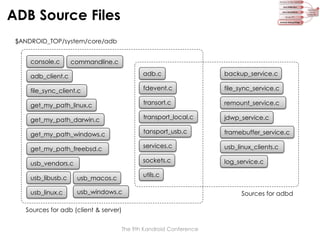
ADB Source Files
$ANDROID_TOP/system/core/adb
console.c

commandline.c

adb_client.c

adb.c

backup_service.c

file_sync_client.c

fdevent.c

file_sync_service.c

get_my_path_linux.c

transort.c

remount_service.c

get_my_path_darwin.c

transport_local.c

jdwp_service.c

get_my_path_windows.c

tansport_usb.c

framebuffer_service.c

get_my_path_freebsd.c

services.c

usb_linux_clients.c

usb_vendors.c

sockets.c

log_service.c

utils.c

usb_libusb.c

usb_macos.c

usb_linux.c

usb_windows.c

Sources for adb (client & server)
The 9th Kandroid Conference

Sources for adbd
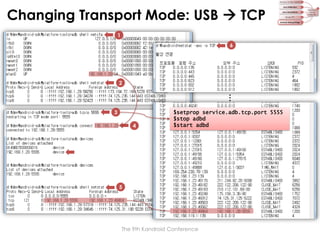
Changing Transport Mode: USB  TCP
1
6

2

…

3

$setprop service.adb.tcp.port 5555
$stop adbd
$start adbd

4

2

5

The 9th Kandroid Conference
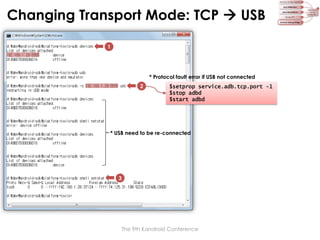
Changing Transport Mode: TCP  USB
1

* Protocol fault error if USB not connected
2

$setprop service.adb.tcp.port -1
$stop adbd
$start adbd

* USB need to be re-connected

3

The 9th Kandroid Conference
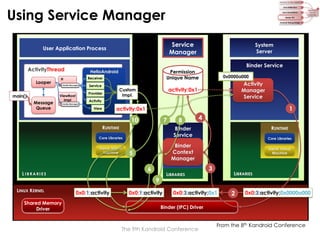
Using Service Manager
Service
Manager

User Application Process

Binder Service

ActivityThread
Looper
main()

Message
Queue

Permission
Unique Name

HelloAndroid
Receiver

H
Handle Message()

Service

Provider

ViewRoot
Impl

Activity
Manager
Service

Activity

Handle Message()

1

activity:0x1

View

7

RUNTIME

Dalvik Virtual
Machine

5

LIBRARIES

9
0x0:1:activity

4
RUNTIME
Core Libraries

Binder
Context
Manager

6

L IBRARIES

8
Binder
Service

Core Libraries

Shared Memory
Driver

0x0000a000

activity:0x1

Custom
Impl.

10

LINUX KERNEL

System
Server

0x0:1:activity

Dalvik Virtual
Machine

3

LIBRARIES

0x0:3:activity:0x1

2

0x0:3:activity:0x0000a000

Binder (IPC) Driver

The 9th Kandroid Conference

From the 8th Kandroid Conference
Invoking Service

Binder Service

ActivityThread
Looper
main()

Message
Queue

Permission
Unique Name

HelloAndroid
Receiver

H
Handle Message()

Service
Provider

ViewRoot
Impl
Handle Message()

ActivityManager
Service
IActivityManager
3 : startActivity
…
[parcel]

Activity

activity:0x1

View

1

Core Libraries

L IBRARIES

Binder
Thread
Pool

Binder
Service
Binder
Context
Manager

Dalvik Virtual
Machine

Shared Memory
Driver

0x0000a000

activity:0x1

Custom
Impl.

RUNTIME

LINUX KERNEL

System
Server

Service
Manager

User Application Process

BT #1

3

2

Core Libraries
Dalvik Virtual
Machine

…

LIBRARIES

LIBRARIES

0x1:3:[parcel]

RUNTIME
4

0x0000a000:3:[parcel]
Binder (IPC) Driver

The 9th Kandroid Conference

From the 8th Kandroid Conference
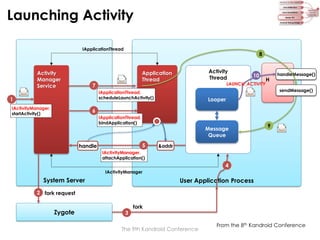
Launching Activity
IApplicationThread

Activity
Manager
Service

8
Activity
Thread

Application
Thread

7

LAUNCH_ACTIVITY

IActivityManager.
startActivity()

H

handleMessage()
sendMessage()

IApplicationThread.
scheduleLaunchActivity()

1

10

Looper

6
IApplicationThread.
bindApplication()

Message
Queue
5

handle

9

&addr

IActivityManager.
attachApplication()

4
IActivityManager

System Server

User Application Process

2 fork request

Zygote

3

fork

The 9th Kandroid Conference

From the 8th Kandroid Conference
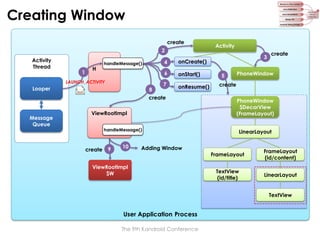
Creating Window
create
2
Activity
Thread

1

H

4

LAUNCH_ACTIVITY

Looper

8

onStart()

7

onResume()

create

Message
Queue

ViewRootImpl
handleMessage()

create

9

10

3

onCreate()

6

handleMessage()

Activity

Adding Window

ViewRootImpl
$W

5

create

PhoneWindow

create
PhoneWindow
$DecorView
(FrameLayout)
LinearLayout

FrameLayout

FrameLayout
(id/content)

TextView
(id/title)

LinearLayout

TextView

User Application Process
The 9th Kandroid Conference
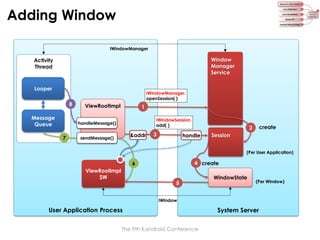
Adding Window
IWindowManager

Window
Manager
Service

Activity
Thread

Looper
8
Message
Queue

IWindowManager.
openSession( )

ViewRootImpl

1
IWindowSession.
add( )

handleMessage()

7

&addr

sendMessage()

3

create

2

handle

Session
(Per User Application)

4 create

6

ViewRootImpl
$W

5

WindowState

(Per Window)

IWindow

User Application Process
The 9th Kandroid Conference

System Server
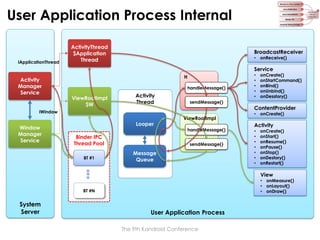
User Application Process Internal

IApplicationThread

ActivityThread
$Application
Thread

BroadcastReceiver
• onReceive()

Service
Activity
Manager
Service

H
handleMessage()

ViewRootImpl
$W

Activity
Thread

sendMessage()

IWindow

Window
Manager
Service

Looper
Binder IPC
Thread Pool
BT #1

ViewRootImpl
handleMessage()

sendMessage()

Message
Queue

•
•
•
•
•

onCreate()
onStartCommand()
onBind()
onUnbind()
onDesstory()

ContentProvider
• onCreate()

Activity
•
•
•
•
•
•
•

onCreate()
onStart()
onResume()
onPause()
onStop()
onDestory()
onRestart()

View

• onMeasure()
• onLayout()
• onDraw()

BT #N

System
Server

User Application Process
The 9th Kandroid Conference
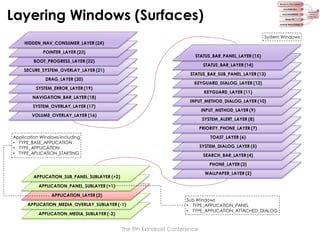
Layering Windows (Surfaces)
System Windows
HIDDEN_NAV_CONSUMER_LAYER (24)
POINTER_LAYER (23)

STATUS_BAR_PANEL_LAYER (15)

BOOT_PROGRESS_LAYER (22)

STATUS_BAR_LAYER (14)

SECURE_SYSTEM_OVERLAY_LAYER (21)

STATUS_BAR_SUB_PANEL_LAYER (13)

DRAG_LAYER (20)

KEYGUARD_DIALOG_LAYER (12)

SYSTEM_ERROR_LAYER (19)

KEYGUARD_LAYER (11)

NAVIGATION_BAR_LAYER (18)

INPUT_METHOD_DIALOG_LAYER (10)

SYSTEM_OVERLAY_LAYER (17)

INPUT_METHOD_LAYER (9)

VOLUME_OVERLAY_LAYER (16)

SYSTEM_ALERT_LAYER (8)
PRIORITY_PHONE_LAYER (7)

Application Windows Including
• TYPE_BASE_APPLICATION
• TYPE_APPLICATION
• TYPE_APLICATION_STARTING

TOAST_LAYER (6)

SYSTEM_DIALOG_LAYER (5)
SEARCH_BAR_LAYER (4)
PHONE_LAYER (3)
WALLPAPER_LAYER (2)

APPLICATION_SUB_PANEL_SUBLAYER (+2)
APPLICATION_PANEL_SUBLAYER (+1)
APPLICATION_LAYER (2)
APPLICATION_MEDIA_OVERLAY_SUBLAYER (-1)
APPLICATION_MEDIA_SUBLAYER (-2)

Sub Windows
• TYPE_APPLICATION_PANEL
• TYPE_APPLICATION_ATTACHED_DIALOG

The 9th Kandroid Conference
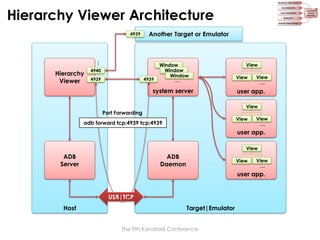
Hierarchy Viewer Architecture
4939

Another Target or Emulator

…

Hierarchy
Viewer

4940
4939

4939

Window
Window
Window
…

system server

View
View

View
…

user app.
View

Port Forwarding
View

adb forward tcp:4939 tcp:4939

View
…

user app.
View

ADB
Server

ADB
Daemon

View

View
…

user app.
USB|TCP
Host

Target|Emulator
The 9th Kandroid Conference
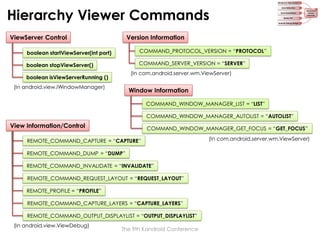
Hierarchy Viewer Commands
ViewServer Control

Version Information

boolean startViewServer(int port)

COMMAND_PROTOCOL_VERSION = “PROTOCOL”

boolean stopViewServer()

COMMAND_SERVER_VERSION = “SERVER”
(In com.android.server.wm.ViewServer)

boolean isViewServerRunning ()
(In android.view.IWindowManager)

Window Information
COMMAND_WINDOW_MANAGER_LIST = “LIST”
COMMAND_WINDOW_MANAGER_AUTOLIST = “AUTOLIST”

View Information/Control

COMMAND_WINDOW_MANAGER_GET_FOCUS = “GET_FOCUS”

REMOTE_COMMAND_CAPTURE = “CAPTURE”
REMOTE_COMMAND_DUMP = “DUMP”
REMOTE_COMMAND_INVALIDATE = “INVALIDATE”
REMOTE_COMMAND_REQUEST_LAYOUT = “REQUEST_LAYOUT”
REMOTE_PROFILE = “PROFILE”
REMOTE_COMMAND_CAPTURE_LAYERS = “CAPTURE_LAYERS”
REMOTE_COMMAND_OUTPUT_DISPLAYLIST = “OUTPUT_DISPLAYLIST”
(In android.view.ViewDebug)

The 9th Kandroid Conference

(In com.android.server.wm.ViewServer)
Controlling View Server
Remote View Server [port=4939]
4939

4939

Hierarchy
Viewer
1
2

10
create

8

listen

Thread

9

create

…

Thread Pool
ViewServer

“host:transport:<serialno>”

WindowManagerService
“shell:service call window 1 i32 4939”

7

create & start

system server
6

ADB
Server

IWindowManager.startViewServer(4939)

shell:service call window 1 i32 <port>
/system/bin/

shell:service call window 2
shell:service call window 3

service

/system/bin/

sh

3

T

T

“shell:service call window 1 i32 4939”

adbd

4

5

[fork] service call window 1 i32 4939

[fork] /system/bin/sh –c service call window 1 i32 4939

USB|TCP

Target

Host
The 9th Kandroid Conference
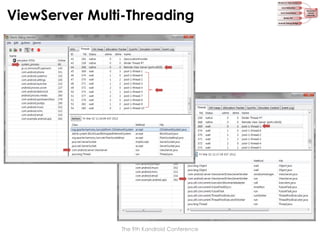
ViewServer Multi-Threading

The 9th Kandroid Conference
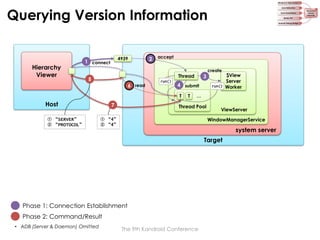
Querying Version Information

Hierarchy
Viewer

4939

1 connect

2

accept

Thread

5

6 read

run()

4 submit
T

Host
① “SERVER”
② “PROTOCOL”

7

3

T

create

run()

…

Thread Pool

ViewServer
WindowManagerService

① “4”
② “4”

system server
Target

Phase 1: Connection Establishment
Phase 2: Command/Result
• ADB (Server & Daemon) Omitted

$View
Server
Worker

The 9th Kandroid Conference
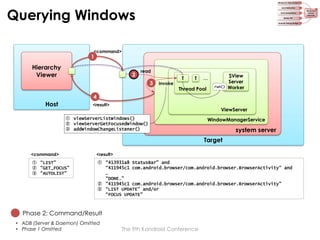
Querying Windows
<command>

1

Hierarchy
Viewer

2

read

3

invoke

T

T

…

Thread Pool

run()

$View
Server
Worker

4

Host

<result>

ViewServer

① viewServerListWindows()
② viewServerGetFocusedWindow()
③ addWindowChangeListener()

WindowManagerService

system server
Target

<command>

<result>

① “LIST”
② “GET_FOCUS”
③ “AUTOLIST”

① “413931a8 StatusBar” and
“411945c1 com.android.browser/com.android.browser.BrowserActivity“ and
…
“DONE.”
② “411945c1 com.android.browser/com.android.browser.BrowserActivity”
③ “LIST UPDATE” and/or
“FOCUS UPDATE”

Phase 2: Command/Result
• ADB (Server & Daemon) Omitted
• Phase 1 Omitted

The 9th Kandroid Conference
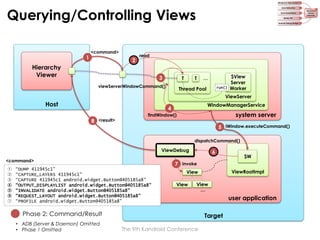
Querying/Controlling Views
1

<command>

2

Hierarchy
Viewer

read

3

T

T

viewServerWindowCommand()

…

Thread Pool

run()

$View
Server
Worker

ViewServer

Host

WindowManagerService

4
8 <result>

system server

findWindow()

5 IWindow.executeCommand()
dispatchCommand()

ViewDebug
<command>
①
②
③
④
⑤
⑥
⑦

6

7 invoke

“DUMP 411945c1”
“CAPTURE_LAYERS 411945c1”
“CAPTURE 411945c1 android.widget.Button@405185a8”
“OUTPUT_DISPLAYLIST android.widget.Button@405185a8”
“INVALIDATE android.widget.Button@405185a8”
“REQUEST_LAYOUT android.widget.Button@405185a8”
“PROFILE android.widget.Button@405185a8”

ViewRootImpl

View
View

View
…

Phase 2: Command/Result
• ADB (Server & Daemon) Omitted
• Phase 1 Omitted

$W

user application
Target

The 9th Kandroid Conference
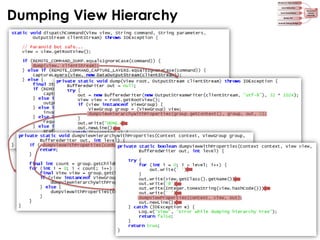
Dumping View Hierarchy

The 9th Kandroid Conference
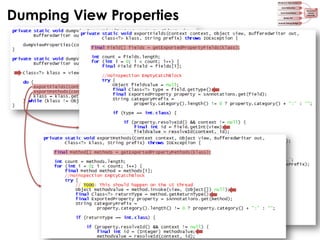
Dumping View Properties

The 9th Kandroid Conference
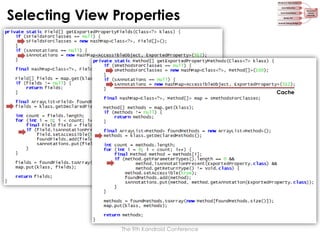
Selecting View Properties

Cache

The 9th Kandroid Conference
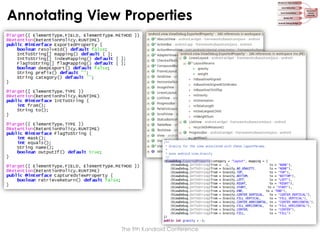
Annotating View Properties

The 9th Kandroid Conference
Summary
Questions

Answers

How to get information?
List of Windows

Window & View System 5
Hierarchy of Views in Window
Java Reflection

1

Properties of View
Java Annotations

2

Binder IPC

4

How to deliver information?
Between processes in target
Between host and target

Android Debug Bridge 3
The 9th Kandroid Conference

Hierarchy
Viewer
Internals

6
References
•

General
–
–
–
–

•

Java Reflection
–
–

•

http://www.kandroid.org/board/board.php?board=conference&command=body&no=76

Window and View System
–

•

http://www.slideshare.net/tetsu.koba/adbandroid-debug-bridge-how-it-works
http://developer.android.com/guide/developing/tools/adb.html
http://developer.android.com/guide/developing/tools/emulator.html

Binder IPC
–

•

http://docs.oracle.com/javase/tutorial/java/javaOO/annotations.html
http://www.ibm.com/developerworks/kr/library/j-annotate1/index.html
http://www.ibm.com/developerworks/kr/library/j-annotate2.html
http://www.slideshare.net/jennapederson/decorating-code-7252638

Android Debug Bridge
–
–
–

•

http://docs.oracle.com/javase/tutorial/reflect/index.html
http://www.slideshare.net/CiaranMcHale/java-reflection-explained-simply

Java Annotations
–
–
–
–

•

Wikipedia (http://en.wikipedia.org/wiki/)
Java Documentation (http://docs.oracle.com/javase/6/docs/)
Android Documentation (http://developer.android.com/index.html)
Android Source Code (http://source.android.com/)

http://www.kandroid.org/board/board.php?board=conference&command=body&no=19

Hierarchy Viewer
–

http://developer.android.com/guide/developing/debugging/debugging-ui.html
The 9th Kandroid Conference

Hierarchy Viewer Internals

  • 1.
    Hierarchy Viewer Internals KyungminLee Software Platform Lab., LG Electronics snailee@gmail.com
  • 2.
  • 3.
    Goal Android와 같은 S/W플랫폼이 성장하고 널리 확산되는데 있어 SDK(Software Development Kit)의 역할은 매우 큽니다. 아무리 좋은 기능과 성능을 제공하는 플랫폼이라 할지라도 그 위에서 동작하는 앱을 만드는 게 어렵다면 그 플랫폼은 개발자들로부터 외면 받게 됩니다. 이는 해당 플랫폼에서 이용 가능한 앱의 개수가 줄고 품질이 저하되는 결과를 만들게 되어 그 플랫폼은 사용자들에게도 외면 받게 됩니다. 이로 인해 개발자들이 다시금 그 플랫폼을 외면하게 만드는 악순환이 형성됩니다. 이러한 악순환을 끊기 위한 첫 걸음은 바로 개발 생산성을 높여주는 SDK를 잘 만들어 제공하는 것입니다. 따라서 Android 기술 분야에서 경쟁력을 확보하고 주도권을 갖기 위해서는 Android 플랫폼을 제대로 이해하는 것 뿐만 아니라 Android SDK를 제대로 분석하고 개선할 수 있어야 합니다. 이번 세션에서는 "Android SDK 기술의 이해"라는 큰 주제의 첫 꼭지로써 Android UI(User Interface)를 디버깅하고 프로파일링하는데 사용하는 Hierarchy Viewer를 분석하고자 합니다. 먼저, Hierarchy Viewer를 분석하는데 필요한 몇몇 배경 지식을 설명한 후 Hierarchy Viewer의 내부 구조와 동작 방식을 살펴보겠습니다. From the Conference Program Overview The 9th Kandroid Conference
  • 4.
    SDK (Software DevelopmentKit) A software development kit (SDK or "devkit") is typically a set of software development tools that allows for the creation of applications for a certain software package, software framework, hardware platform, computer system, video game console, operating system, or similar platform. It may be something as simple as an application programming interface (API) in the form of some files to interface to a particular programming language or include sophisticated hardware to communicate with a certain embedded system. Common tools include debugging aids and other utilities often presented in an integrated development environment (IDE). SDKs also frequently include sample code and supporting technical notes or other supporting documentation to help clarify points from the primary reference material. From Wikipedia Small No. of Low Quality Apps Bad SDK Ignored by Developers VS. Large No. of Hig Quality Apps Ignored by Users Good SDK Attract Developers Attract Users The 9th Kandroid Conference
  • 5.
    Android SDK &Hierarchy Viewer SDK Tools contains tools for debugging and testing your application and other utility tools. SDK Platform-tools contains platform-dependent tools for developing and debugging your application. Documentation contains a local copy of the latest multi-version documentation for the Android framework API. Each SDK platform component includes a fully compliant • Android library, • system image (API Level <= 13), • sample code (API Level <= 6), and • emulator skins. Hierarchy Viewer • Related to graphics • Complex enough to get insights on how to develop a tool for Android Samples contains the sample code and apps available for each Android development platform. http://developer.android.com/guide/developing/tools/index.html The 9th Kandroid Conference
  • 6.
    Hierarchy Viewer List ofWindows Properties of a View Hierarchy of Views in an Window Layout of Views The 9th Kandroid Conference
  • 7.
    Hierarchy Viewer Architecture 4939 AnotherTarget or Emulator … Hierarchy Viewer 4940 4939 4939 Window Window Window … system server View View View … user app. View Port Forwarding View adb forward tcp:4939 tcp:4939 View … user app. View ADB Server ADB Daemon View View … user app. USB|TCP Host Target|Emulator The 9th Kandroid Conference
  • 8.
    Roadmap Questions Answers How to getinformation? List of Windows Window & View System 5 Hierarchy of Views in Window Java Reflection 1 Properties of View Java Annotations 2 Binder IPC 4 How to deliver information? Between processes in target Between host and target Android Debug Bridge 3 The 9th Kandroid Conference Hierarchy Viewer Internals 6
  • 9.
    Reflection & Annotationin General In computer science, reflection is the process by which a computer program can observe and modify its own structure and behavior at runtime. Type, interface, class, methods, attributes, variables, functions, control structures, etc. Metadata From Wikipedia Meta Object Meta Level Set/Get Metadata (Value) 1 Add New Metadata (Type) 2 Application Base Level Base Object Annotation Reflection 1 Introspection 2 Intercession In programming, annotations are used mainly for the purpose of expanding code documentation and comments. … as a special form of syntactic metadata in the source code. From Wikipedia The 9th Kandroid Conference
  • 10.
  • 11.
    Using Java Annotations The9th Kandroid Conference
  • 12.
    Using Java Annotations Built-inAnnotations The 9th Kandroid Conference
  • 13.
    Android Debug Bridge adbd Target (USBmode) cmd-line adb (in platform-tools) adbd ADB Server DDMS (in tools) Act as proxy between clients & daemons (multiplexing loop) Target (TCP mode) adbd Emulator Hierarchy Viewer (in tools) USB Connection TCP Connection ADB Clients The 9th Kandroid Conference ADB Daemons
  • 14.
    ADB Architecture ADB client Service Service Service 5037 ADBclient USB|TCP Service Service Service ADB Server adbd … fork Service adb port console port 5555 Service 5554 … 5555 adbd Guest (10.0.2.15) Emulator Host Target The 9th Kandroid Conference
  • 15.
    Connection to Emulator ADBServer Emulator Network Address in Emulator Network Address Description 10.0.2.1 Router/gateway address 10.0.2.2 Special alias to your host loopback interface (i.e., 127.0.0.1 on your development machine) 10.0.2.3 First DNS server 10.0.2.4 / 10.0.2.5 / 10.0.2.6 Optional second, third and fourth DNS server (if any) 10.0.2.15 The emulated device's own network/ethernet interface 127.0.0.1 The emulated device's own loopback interface The 9th Kandroid Conference
  • 16.
  • 17.
    Providing “Simple” HostService <Request> := <Length><Payload> • <Length> := Payload length, as 4-byte hexadecimal string in ASCII • <Payload> := Request data ADB client connect 3 10 “OKAY0004001d” 7 “000Chost:version” fdevent loop 5037 listen 2 8 read 4 alistener [smart] 5 create 6 create install_listener 1 main() A listener is an entity which • binds and listens to a local port, • creates an asocket upon receiving a connection on that port, and • connect the new local connection to a specific service. asocket [local] accept <Response> := • “OKAY”, for success • “FAIL”<Length><Reason>, for failure • “OKAY”<Length><Version>, for version query • … 9 enqueue asocket [smart] struct alistener { alistener *next; alistener *prev; ADB Server Host fdevent fde; int fd; Phase 1: ADB Server Startup const char *local_name; const char *connect_to; atransport *transport; adisconnect disconnect; Phase 2: Connection Establishment Phase 3: Service Request/Response The 9th Kandroid Conference };
  • 18.
    Providing “Not-so-simple” HostService An asocket represents one half of a connection between local and remote entity. • A local asocket is bound to a file descriptor. • A remote asocket is bound to an atransport. ADB client 1 <request> 15 <response> 11 struct asocket { asocket *next; asocket *prev; <response> unsigned id; int closing; asocket *peer; 14 write 7 2 read “OKAY” asocket [local] 8 3 12 13 read enqueue enqueue asocket [smart] 9 close asocket [local] 6 create write create 5 fdevent fde; int fd; 10 service thread apacket *pkt_first; apacket *pkt_last; 4 create int (*enqueue)(asocket *s, apacket *pkt); void (*ready)(asocket *s); void (*close)(asocket *s); ADB Server Host void *extra; atransport *transport; }; Phase 3: Service Request Phase 4: Service Response * Phase 1 & 2 Omitted The 9th Kandroid Conference
  • 19.
    Providing “Complex” LocalService struct apacket { apacket *next; unsigned len; unsigned char *ptr; amessage msg; unsigned char data[MAX_PAYLOAD]; }; ADB client <request> 1 12 “OKAY” 22 <response> 21 write struct amessage { unsigned command; unsigned arg0; unsigned arg1; unsigned data_length; unsigned data_check; unsigned magic; }; enqueue asocket [remote] asocket [local] 6 3 enqueue 7 close 4 send Host 18 <A_WRTE> atransport ADB Server create 13 20 enqueue asocket [smart] read 17 2 read <A_OKAY> 5 asocket [remote] send 19 12 atransport <A_OPEN> Phase 3: Service Request Phase 4: Service Response • Phase 1 & 2 Omitted The 9th Kandroid Conference 16 asocket [local] 11 create 10 create 8 <response> create create service thread adbd 9 14 write Target #define #define #define #define #define #define A_SYNC A_CNXN A_OPEN A_OKAY A_CLSE A_WRTE 0x434e5953 0x4e584e43 0x4e45504f 0x59414b4f 0x45534c43 0x45545257 15
  • 20.
  • 21.
    Changing Transport Mode:USB  TCP 1 6 2 … 3 $setprop service.adb.tcp.port 5555 $stop adbd $start adbd 4 2 5 The 9th Kandroid Conference
  • 22.
    Changing Transport Mode:TCP  USB 1 * Protocol fault error if USB not connected 2 $setprop service.adb.tcp.port -1 $stop adbd $start adbd * USB need to be re-connected 3 The 9th Kandroid Conference
  • 23.
    Using Service Manager Service Manager UserApplication Process Binder Service ActivityThread Looper main() Message Queue Permission Unique Name HelloAndroid Receiver H Handle Message() Service Provider ViewRoot Impl Activity Manager Service Activity Handle Message() 1 activity:0x1 View 7 RUNTIME Dalvik Virtual Machine 5 LIBRARIES 9 0x0:1:activity 4 RUNTIME Core Libraries Binder Context Manager 6 L IBRARIES 8 Binder Service Core Libraries Shared Memory Driver 0x0000a000 activity:0x1 Custom Impl. 10 LINUX KERNEL System Server 0x0:1:activity Dalvik Virtual Machine 3 LIBRARIES 0x0:3:activity:0x1 2 0x0:3:activity:0x0000a000 Binder (IPC) Driver The 9th Kandroid Conference From the 8th Kandroid Conference
  • 24.
    Invoking Service Binder Service ActivityThread Looper main() Message Queue Permission UniqueName HelloAndroid Receiver H Handle Message() Service Provider ViewRoot Impl Handle Message() ActivityManager Service IActivityManager 3 : startActivity … [parcel] Activity activity:0x1 View 1 Core Libraries L IBRARIES Binder Thread Pool Binder Service Binder Context Manager Dalvik Virtual Machine Shared Memory Driver 0x0000a000 activity:0x1 Custom Impl. RUNTIME LINUX KERNEL System Server Service Manager User Application Process BT #1 3 2 Core Libraries Dalvik Virtual Machine … LIBRARIES LIBRARIES 0x1:3:[parcel] RUNTIME 4 0x0000a000:3:[parcel] Binder (IPC) Driver The 9th Kandroid Conference From the 8th Kandroid Conference
  • 25.
  • 26.
  • 27.
    Adding Window IWindowManager Window Manager Service Activity Thread Looper 8 Message Queue IWindowManager. openSession( ) ViewRootImpl 1 IWindowSession. add() handleMessage() 7 &addr sendMessage() 3 create 2 handle Session (Per User Application) 4 create 6 ViewRootImpl $W 5 WindowState (Per Window) IWindow User Application Process The 9th Kandroid Conference System Server
  • 28.
    User Application ProcessInternal IApplicationThread ActivityThread $Application Thread BroadcastReceiver • onReceive() Service Activity Manager Service H handleMessage() ViewRootImpl $W Activity Thread sendMessage() IWindow Window Manager Service Looper Binder IPC Thread Pool BT #1 ViewRootImpl handleMessage() sendMessage() Message Queue • • • • • onCreate() onStartCommand() onBind() onUnbind() onDesstory() ContentProvider • onCreate() Activity • • • • • • • onCreate() onStart() onResume() onPause() onStop() onDestory() onRestart() View • onMeasure() • onLayout() • onDraw() BT #N System Server User Application Process The 9th Kandroid Conference
  • 29.
    Layering Windows (Surfaces) SystemWindows HIDDEN_NAV_CONSUMER_LAYER (24) POINTER_LAYER (23) STATUS_BAR_PANEL_LAYER (15) BOOT_PROGRESS_LAYER (22) STATUS_BAR_LAYER (14) SECURE_SYSTEM_OVERLAY_LAYER (21) STATUS_BAR_SUB_PANEL_LAYER (13) DRAG_LAYER (20) KEYGUARD_DIALOG_LAYER (12) SYSTEM_ERROR_LAYER (19) KEYGUARD_LAYER (11) NAVIGATION_BAR_LAYER (18) INPUT_METHOD_DIALOG_LAYER (10) SYSTEM_OVERLAY_LAYER (17) INPUT_METHOD_LAYER (9) VOLUME_OVERLAY_LAYER (16) SYSTEM_ALERT_LAYER (8) PRIORITY_PHONE_LAYER (7) Application Windows Including • TYPE_BASE_APPLICATION • TYPE_APPLICATION • TYPE_APLICATION_STARTING TOAST_LAYER (6) SYSTEM_DIALOG_LAYER (5) SEARCH_BAR_LAYER (4) PHONE_LAYER (3) WALLPAPER_LAYER (2) APPLICATION_SUB_PANEL_SUBLAYER (+2) APPLICATION_PANEL_SUBLAYER (+1) APPLICATION_LAYER (2) APPLICATION_MEDIA_OVERLAY_SUBLAYER (-1) APPLICATION_MEDIA_SUBLAYER (-2) Sub Windows • TYPE_APPLICATION_PANEL • TYPE_APPLICATION_ATTACHED_DIALOG The 9th Kandroid Conference
  • 30.
    Hierarchy Viewer Architecture 4939 AnotherTarget or Emulator … Hierarchy Viewer 4940 4939 4939 Window Window Window … system server View View View … user app. View Port Forwarding View adb forward tcp:4939 tcp:4939 View … user app. View ADB Server ADB Daemon View View … user app. USB|TCP Host Target|Emulator The 9th Kandroid Conference
  • 31.
    Hierarchy Viewer Commands ViewServerControl Version Information boolean startViewServer(int port) COMMAND_PROTOCOL_VERSION = “PROTOCOL” boolean stopViewServer() COMMAND_SERVER_VERSION = “SERVER” (In com.android.server.wm.ViewServer) boolean isViewServerRunning () (In android.view.IWindowManager) Window Information COMMAND_WINDOW_MANAGER_LIST = “LIST” COMMAND_WINDOW_MANAGER_AUTOLIST = “AUTOLIST” View Information/Control COMMAND_WINDOW_MANAGER_GET_FOCUS = “GET_FOCUS” REMOTE_COMMAND_CAPTURE = “CAPTURE” REMOTE_COMMAND_DUMP = “DUMP” REMOTE_COMMAND_INVALIDATE = “INVALIDATE” REMOTE_COMMAND_REQUEST_LAYOUT = “REQUEST_LAYOUT” REMOTE_PROFILE = “PROFILE” REMOTE_COMMAND_CAPTURE_LAYERS = “CAPTURE_LAYERS” REMOTE_COMMAND_OUTPUT_DISPLAYLIST = “OUTPUT_DISPLAYLIST” (In android.view.ViewDebug) The 9th Kandroid Conference (In com.android.server.wm.ViewServer)
  • 32.
    Controlling View Server RemoteView Server [port=4939] 4939 4939 Hierarchy Viewer 1 2 10 create 8 listen Thread 9 create … Thread Pool ViewServer “host:transport:<serialno>” WindowManagerService “shell:service call window 1 i32 4939” 7 create & start system server 6 ADB Server IWindowManager.startViewServer(4939) shell:service call window 1 i32 <port> /system/bin/ shell:service call window 2 shell:service call window 3 service /system/bin/ sh 3 T T “shell:service call window 1 i32 4939” adbd 4 5 [fork] service call window 1 i32 4939 [fork] /system/bin/sh –c service call window 1 i32 4939 USB|TCP Target Host The 9th Kandroid Conference
  • 33.
  • 34.
    Querying Version Information Hierarchy Viewer 4939 1connect 2 accept Thread 5 6 read run() 4 submit T Host ① “SERVER” ② “PROTOCOL” 7 3 T create run() … Thread Pool ViewServer WindowManagerService ① “4” ② “4” system server Target Phase 1: Connection Establishment Phase 2: Command/Result • ADB (Server & Daemon) Omitted $View Server Worker The 9th Kandroid Conference
  • 35.
    Querying Windows <command> 1 Hierarchy Viewer 2 read 3 invoke T T … Thread Pool run() $View Server Worker 4 Host <result> ViewServer ①viewServerListWindows() ② viewServerGetFocusedWindow() ③ addWindowChangeListener() WindowManagerService system server Target <command> <result> ① “LIST” ② “GET_FOCUS” ③ “AUTOLIST” ① “413931a8 StatusBar” and “411945c1 com.android.browser/com.android.browser.BrowserActivity“ and … “DONE.” ② “411945c1 com.android.browser/com.android.browser.BrowserActivity” ③ “LIST UPDATE” and/or “FOCUS UPDATE” Phase 2: Command/Result • ADB (Server & Daemon) Omitted • Phase 1 Omitted The 9th Kandroid Conference
  • 36.
    Querying/Controlling Views 1 <command> 2 Hierarchy Viewer read 3 T T viewServerWindowCommand() … Thread Pool run() $View Server Worker ViewServer Host WindowManagerService 4 8<result> system server findWindow() 5 IWindow.executeCommand() dispatchCommand() ViewDebug <command> ① ② ③ ④ ⑤ ⑥ ⑦ 6 7 invoke “DUMP 411945c1” “CAPTURE_LAYERS 411945c1” “CAPTURE 411945c1 android.widget.Button@405185a8” “OUTPUT_DISPLAYLIST android.widget.Button@405185a8” “INVALIDATE android.widget.Button@405185a8” “REQUEST_LAYOUT android.widget.Button@405185a8” “PROFILE android.widget.Button@405185a8” ViewRootImpl View View View … Phase 2: Command/Result • ADB (Server & Daemon) Omitted • Phase 1 Omitted $W user application Target The 9th Kandroid Conference
  • 37.
    Dumping View Hierarchy The9th Kandroid Conference
  • 38.
    Dumping View Properties The9th Kandroid Conference
  • 39.
    Selecting View Properties Cache The9th Kandroid Conference
  • 40.
    Annotating View Properties The9th Kandroid Conference
  • 41.
    Summary Questions Answers How to getinformation? List of Windows Window & View System 5 Hierarchy of Views in Window Java Reflection 1 Properties of View Java Annotations 2 Binder IPC 4 How to deliver information? Between processes in target Between host and target Android Debug Bridge 3 The 9th Kandroid Conference Hierarchy Viewer Internals 6
  • 42.
    References • General – – – – • Java Reflection – – • http://www.kandroid.org/board/board.php?board=conference&command=body&no=76 Window andView System – • http://www.slideshare.net/tetsu.koba/adbandroid-debug-bridge-how-it-works http://developer.android.com/guide/developing/tools/adb.html http://developer.android.com/guide/developing/tools/emulator.html Binder IPC – • http://docs.oracle.com/javase/tutorial/java/javaOO/annotations.html http://www.ibm.com/developerworks/kr/library/j-annotate1/index.html http://www.ibm.com/developerworks/kr/library/j-annotate2.html http://www.slideshare.net/jennapederson/decorating-code-7252638 Android Debug Bridge – – – • http://docs.oracle.com/javase/tutorial/reflect/index.html http://www.slideshare.net/CiaranMcHale/java-reflection-explained-simply Java Annotations – – – – • Wikipedia (http://en.wikipedia.org/wiki/) Java Documentation (http://docs.oracle.com/javase/6/docs/) Android Documentation (http://developer.android.com/index.html) Android Source Code (http://source.android.com/) http://www.kandroid.org/board/board.php?board=conference&command=body&no=19 Hierarchy Viewer – http://developer.android.com/guide/developing/debugging/debugging-ui.html The 9th Kandroid Conference
  • 43.
    The 9th KandroidConference