Intel Developers Relations Division
androidndk:Enteringthenativeworld
Eduardo Carrara
Developer Evangelist – Intel
@DuCarrara
+EduardoCarraraDeAraujo
Intel Developers Relations Division 2
Agenda
The Android NDK
Are you using and is not aware?
Be careful with the Binary Interface
Starting with Android Studio + gradle-experimental
Questions?
Intel Developers Relations Division
Androidndk
The Native Development Kit
Intel Developers Relations Division 4
“The Android NDK is a set of tools that allows the
implementation of parts of your app using native code
languages like C and C++."
- NDK Android Developers Portal
Intel Developers Relations Division 5
and maybe you are doing that already...
... let’s a few interesting NDK usages.
Intel Developers Relations Division
UsagesofNDK
What can we do with it?
Intel Developers Relations Division 7
Game Engines
Others+…
*Other names and brands may be claimed as the property of others.
Intel Developers Relations Division 8
Computer Vision
• Linear and Non-Linear image filtering.
• Images Geometric Transformations.
• Moviments Prediction in Videos.
• Background segmentation on Videos.
• Object Tracking.
• ...
Outras: Cardboard-SDK, Vuforia, Layar, LibCCV,
Wikitude ...
OpenCV.org
*Other names and brands may be claimed as the property of others.
Intel Developers Relations Division 9
Cross Platform Development
*Other names and brands may be claimed as the property of others.
Intel Developers Relations Division 10
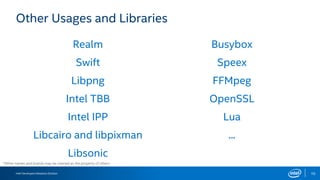
Other Usages and Libraries
Realm
Swift
Libpng
Intel TBB
Intel IPP
Libcairo and libpixman
Libsonic
Busybox
Speex
FFMpeg
OpenSSL
Lua
...
*Other names and brands may be claimed as the property of others.
Intel Developers Relations Division 11
So many interesting usages!
Can we use NDK for
everything?!
Intel Developers Relations Division
Understandingthendk
Intel Developers Relations Division
Source: Using the NDK Performantly (Big Android BBQ 2015)
15
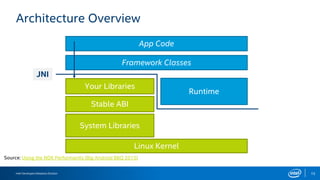
Architecture Overview
App Code
Framework Classes
Runtime
System Libraries
Linux Kernel
JNI
Your Libraries
Stable ABI
Intel Developers Relations Division 16
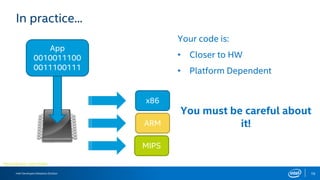
In practice...
Microchip Icon – Icon Finder.
App
0010011100
0011100111
x86
ARM
MIPS
Your code is:
• Closer to HW
• Platform Dependent
You must be careful about
it!
Intel Developers Relations Division 17
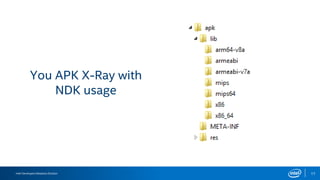
You APK X-Ray with
NDK usage
Intel Developers Relations Division 18
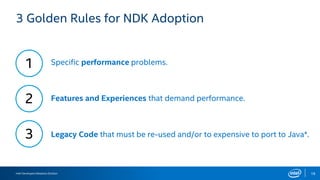
3 Golden Rules for NDK Adoption
1
2
3 Legacy Code that must be re-used and/or to expensive to port to Java*.
Specific performance problems.
Features and Experiences that demand performance.
Intel Developers Relations Division 19
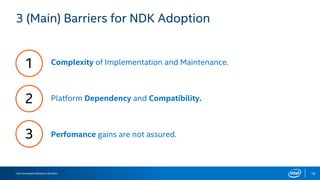
3 (Main) Barriers for NDK Adoption
1
2
3 Perfomance gains are not assured.
Complexity of Implementation and Maintenance.
Platform Dependency and Compatibility.
Intel Developers Relations Division 20
We can, but we should not use NDK for everything.
So...
Still interested?
Take the “red pill” and we will show you how far this
can go...
Intel Developers Relations Division
usingthendk
Intel Developers Relations Division 22
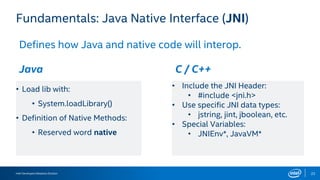
Fundamentals: Java Native Interface (JNI)
Defines how Java and native code will interop.
Java C / C++
• Load lib with:
• System.loadLibrary()
• Definition of Native Methods:
• Reserved word native
• Include the JNI Header:
• #include <jni.h>
• Use specific JNI data types:
• jstring, jint, jboolean, etc.
• Special Variables:
• JNIEnv*, JavaVM*
Intel Developers Relations Division 23
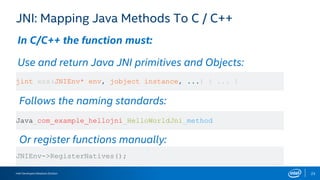
JNI: Mapping Java Methods To C / C++
In C/C++ the function must:
Use and return Java JNI primitives and Objects:
Follows the naming standards:
Or register functions manually:
jint xxx(JNIEnv* env, jobject instance, ...) { ... }
Java_com_example_hellojni_HelloWorldJni_method
JNIEnv->RegisterNatives();
Intel Developers Relations Division 24
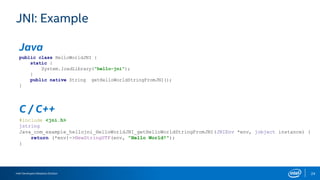
JNI: Example
Java
C / C++
public class HelloWorldJNI {
static {
System.loadLibrary("hello-jni");
}
public native String getHelloWorldStringFromJNI();
}
#include <jni.h>
jstring
Java_com_example_hellojni_HelloWorldJNI_getHelloWorldStringFromJNI(JNIEnv *env, jobject instance) {
return (*env)->NewStringUTF(env, "Hello World!");
}
Intel Developers Relations Division 25
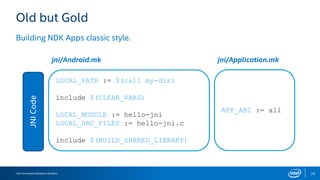
Old but Gold
Building NDK Apps classic style.
JNICode
LOCAL_PATH := $(call my-dir)
include $(CLEAR_VARS)
LOCAL_MODULE := hello-jni
LOCAL_SRC_FILES := hello-jni.c
include $(BUILD_SHARED_LIBRARY)
APP_ABI := all
jni/Android.mk jni/Application.mk
Intel Developers Relations Division 26
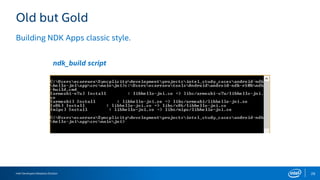
Old but Gold
ndk_build script
Building NDK Apps classic style.
Intel Developers Relations Division 27
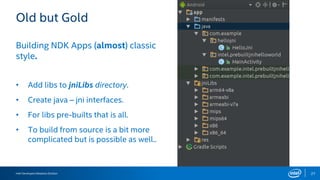
Old but Gold
Building NDK Apps (almost) classic
style.
• Add libs to jniLibs directory.
• Create java – jni interfaces.
• For libs pre-builts that is all.
• To build from source is a bit more
complicated but is possible as well..
Intel Developers Relations Division 28
Limitations
• Debug is not possible on AS. It is necessary to use ndk-gdb and/or Eclipse.
• Current support of gradle plugin was deprecated (ouch).
Intel Developers Relations Division 29
... So where do we go?
Intel Developers Relations Division
Androidstudio+ndk+gradle-experimental
Intel Developers Relations Division 31
Important Warnings
• The experimental version of android gradle plugin will be used.
• Integration with Android Studio was improved but it stills unstable and has
some bugs.
• On Windows there are issues with the Editor and/or build that prevent its
usage. (Issues 195483 and 204552).
• Documentation is virtually inexistent or incomplete.
Intel Developers Relations Division 32
AS Integration
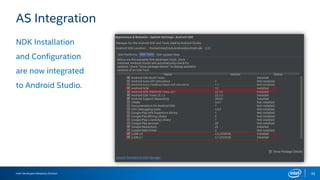
NDK Installation
and Configuration
are now integrated
to Android Studio.
Intel Developers Relations Division 33
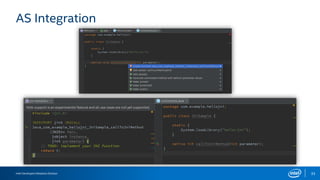
AS Integration
Intel Developers Relations Division 34
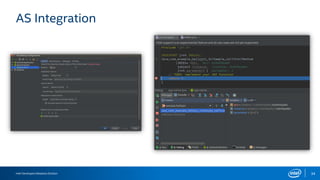
AS Integration
Intel Developers Relations Division 35
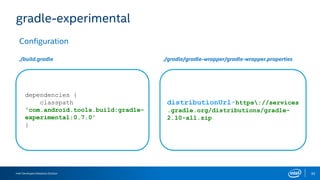
gradle-experimental
Configuration
distributionUrl=https://services
.gradle.org/distributions/gradle-
2.10-all.zip
./build.gradle ./gradle/gradle-wrapper/gradle-wrapper.properties
dependencies {
classpath
'com.android.tools.build:gradle-
experimental:0.7.0'
}
Intel Developers Relations Division 36
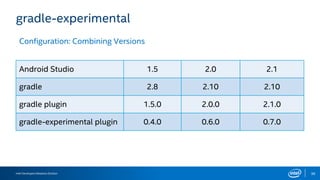
gradle-experimental
Configuration: Combining Versions
Android Studio 1.5 2.0 2.1
gradle 2.8 2.10 2.10
gradle plugin 1.5.0 2.0.0 2.1.0
gradle-experimental plugin 0.4.0 0.6.0 0.7.0
Intel Developers Relations Division 37
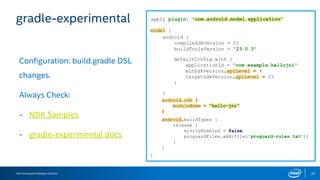
gradle-experimental
Configuration: build.gradle DSL
changes.
Always Check:
- NDK Samples
- gradle-experimental docs
apply plugin: 'com.android.model.application'
model {
}
android {
compileSdkVersion = 23
buildToolsVersion = "23.0.3"
defaultConfig.with {
applicationId = "com.example.hellojni"
minSdkVersion.apiLevel = 4
targetSdkVersion.apiLevel = 23
}
}
android.ndk {
moduleName = "hello-jni"
}
android.buildTypes {
release {
minifyEnabled = false
proguardFiles.add(file('proguard-rules.txt'))
}
}
Intel Developers Relations Division 38
gradle-experimental
Configuration: multiple apks.
apply plugin: 'com.android.model.application'
model {
}
android.productFlavors {
}
// … standard gradle stuff
// … other gradle stuff
create ("armv7") {
}
create (“x86") {
}
ndk.abiFilters.add("armeabi-v7a")
ndk.abiFilters.add(“x86")
versionCode = calculateVersionCodeFor(
"armeabi-v7a")
versionCode = calculateVersionCodeFor(
“x86")
create (“fat")
Intel Developers Relations Division 39
gradle-experimental
Configuration: multiple apks.
apply plugin: 'com.android.model.application'
model {
}
def actualVersionCode = 13;
// … gradle stuff
// … other gradle stuff
def baseVersionCode = 1000000;
def versionCodeABIPrefixes = [
'armeabi':1, 'armeabi-v7a':2, 'arm64-v8a':3,
'mips': 5,'mips64': 6,
'x86': 8, 'x86_64': 9];
def calculateVersionCodeFor = { String abi ->
return versionCodeABIPrefixes.get(abi, 0) *
baseVersionCode + actualVersionCode
}
Intel Developers Relations Division 40
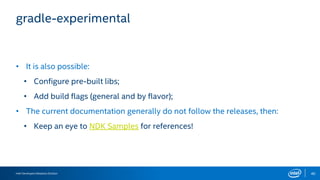
gradle-experimental
• It is also possible:
• Configure pre-built libs;
• Add build flags (general and by flavor);
• The current documentation generally do not follow the releases, then:
• Keep an eye to NDK Samples for references!
Intel Developers Relations Division 42
Final Thoughts
When using NDK, direct or inderectly,add
support to as many platform architectures as
possibles.
Use NDK wisely: test, create benchmarks and
assure that it is the right solution to your
problem.
Follow and test the gradle-experimental plugin
for the NDK!
Intel Developers Relations Division
Questions?
Intel Developers Relations Division
References
Intel Developers Relations Division 47
References
• NDK Development on Intel
• Intel Tools
• Android* NDK Official Documentation
• Android* NDK Gradle Experimental Documentation
• Android* NDK Google* Samples
• Gradle Stable NDK Support - Xavier Hallade
• New Android Studio NDK Support - Xavier Hallade
Intel Developers Relations Division
thanks
Intel Developers Relations Division
Legal Notices and Disclaimers
 INFORMATION IN THIS DOCUMENT IS PROVIDED IN CONNECTION WITH INTEL® PRODUCTS. NO LICENSE, EXPRESS OR IMPLIED, BY ESTOPPEL OR OTHERWISE, TO ANY INTELLECTUAL
PROPERTY RIGHTS IS GRANTED BY THIS DOCUMENT. EXCEPT AS PROVIDED IN INTEL’S TERMS AND CONDITIONS OF SALE FOR SUCH PRODUCTS, INTEL ASSUMES NO LIABILITY
WHATSOEVER, AND INTEL DISCLAIMS ANY EXPRESS OR IMPLIED WARRANTY, RELATING TO SALE AND/OR USE OF INTEL® PRODUCTS INCLUDING LIABILITY OR WARRANTIES
RELATING TO FITNESS FOR A PARTICULAR PURPOSE, MERCHANTABILITY, OR INFRINGEMENT OF ANY PATENT, COPYRIGHT OR OTHER INTELLECTUAL PROPERTY RIGHT. INTEL
PRODUCTS ARE NOT INTENDED FOR USE IN MEDICAL, LIFE SAVING, OR LIFE SUSTAINING APPLICATIONS.
 Intel may make changes to specifications and product descriptions at any time, without notice. Products with an “L” or “T” in the Price Point reference (e.g. U-L1, YT3, etc.) may be
discontinued by Intel at any time without an end of life announcement or “last time buy” opportunity.
 All products, dates, and figures specified are preliminary based on current expectations, and are subject to change without notice.
 Intel, processors, chipsets, and desktop boards may contain design defects or errors known as errata, which may cause the product to deviate from published specifications. Current
characterized errata are available on request.
 Any code names featured are used internally within Intel to identify products that are in development and not yet publicly announced for release. Customers, licensees and other third
parties are not authorized by Intel to use code names in advertising, promotion or marketing of any product or services and any such use of Intel's internal code names is at the sole risk
of the user.
 Software and workloads used in performance tests may have been optimized for performance only on Intel microprocessors. Performance tests, such as SYSmark and MobileMark, are
measured using specific computer systems, components, software, operations and functions. Any change to any of those factors may cause the results to vary. You should consult other
information and performance tests to assist you in fully evaluating your contemplated purchases, including the performance of that product when combined with other products. For
more information go to http://www.intel.com/performance
 Intel, Intel Inside, the Intel logo, Centrino, Centrino Inside, Intel Core, Intel Atom and Pentium are trademarks of Intel Corporation in the United States and other countries.
 Material in this presentation is intended as product positioning and not approved end user messaging.
 This document contains information on products in the design phase of development.
 *Other names and brands may be claimed as the property of others.
Copyright © 2016 Intel Corporation.
Intel Developers Relations Division
 Security features enabled by Intel® AMT require an enabled chipset, network hardware and software and a corporate network connection. Intel AMT may not be available or
certain capabilities may be limited over a host OS-based VPN or when connecting wirelessly, on battery power, sleeping, hibernating or powered off. Setup requires
configuration and may require scripting with the management console or further integration into existing security frameworks, and modifications or implementation of new
business processes. For more information, see http://www.intel.com/technology/manage/iamt.
 WiMAX connectivity requires a WiMAX enabled device and subscription to a WiMAX broadband service. WiMAX connectivity may require you to purchase additional software
or hardware at extra cost. Availability of WiMAX is limited, check with your service provider for details on availability and network limitations. Broadband performance and
results may vary due to environment factors and other variables. See www.intel.com/go/wimax for more information.
 Intel® My WiFi Technology is an optional feature and requires additional software and a Centrino® wireless adapter. Wi-Fi devices must be certified by the Wi-Fi Alliance for
802.11b/g/a in order to connect. See mywifi.intel.com for more details.
 Hyper-Threading Technology requires a computer system with a processor supporting HT Technology and an HT Technology-enabled chipset, BIOS and operating system.
Performance will vary depending on the specific hardware and software you use. For more information including details on which processors support HT Technology, see
here
 No system can provide absolute security under all conditions. Requires an enabled chipset, BIOS, firmware and software and a subscription with a capable Service
Provider. Consult your system manufacturer and Service Provider for availability and functionality. Intel assumes no liability for lost or stolen data and/or systems or any
other damages resulting thereof. For more information, visit http://www.intel.com/go/anti-theft Intel® Turbo Boost Technology requires a PC with a processor with Intel
Turbo Boost Technology capability. Intel Turbo Boost Technology performance varies depending on hardware, software and overall system configuration. Check with your
PC manufacturer on whether your system delivers Intel Turbo Boost Technology. For more information, see http://www.intel.com/technology/turboboost
 Requires an Intel® Wireless Display enabled PC, TV Adapter, and compatible television. Available on select Intel® Core processors. Does not support Blu-Ray or other
protected content playback. Consult your PC manufacturer. For more information, see www.intel.com/go/wirelessdisplay
 (Built-in Visuals) Available on the 2nd gen Intel® Core™ processor family. Includes Intel® HD Graphics, Intel® Quick Sync Video, Intel® Clear Video HD Technology, Intel® InTru™
3D Technology, and Intel® Advanced Vector Extensions. Also optionally includes Intel® Wireless Display depending on whether enabled on a given system or not. Whether you
will receive the benefits of built-in visuals depends upon the particular design of the PC you choose. Consult your PC manufacturer whether built-in visuals are enabled on
your system. Learn more about built-in visuals at http://www.intel.com/technology/visualtechnology/index.htm.
Legal Notices and Disclaimers, cont.
Intel Developers Relations Division

Android ndk: Entering the native world

  • 1.
    Intel Developers RelationsDivision androidndk:Enteringthenativeworld Eduardo Carrara Developer Evangelist – Intel @DuCarrara +EduardoCarraraDeAraujo
  • 2.
    Intel Developers RelationsDivision 2 Agenda The Android NDK Are you using and is not aware? Be careful with the Binary Interface Starting with Android Studio + gradle-experimental Questions?
  • 3.
    Intel Developers RelationsDivision Androidndk The Native Development Kit
  • 4.
    Intel Developers RelationsDivision 4 “The Android NDK is a set of tools that allows the implementation of parts of your app using native code languages like C and C++." - NDK Android Developers Portal
  • 5.
    Intel Developers RelationsDivision 5 and maybe you are doing that already... ... let’s a few interesting NDK usages.
  • 6.
    Intel Developers RelationsDivision UsagesofNDK What can we do with it?
  • 7.
    Intel Developers RelationsDivision 7 Game Engines Others+… *Other names and brands may be claimed as the property of others.
  • 8.
    Intel Developers RelationsDivision 8 Computer Vision • Linear and Non-Linear image filtering. • Images Geometric Transformations. • Moviments Prediction in Videos. • Background segmentation on Videos. • Object Tracking. • ... Outras: Cardboard-SDK, Vuforia, Layar, LibCCV, Wikitude ... OpenCV.org *Other names and brands may be claimed as the property of others.
  • 9.
    Intel Developers RelationsDivision 9 Cross Platform Development *Other names and brands may be claimed as the property of others.
  • 10.
    Intel Developers RelationsDivision 10 Other Usages and Libraries Realm Swift Libpng Intel TBB Intel IPP Libcairo and libpixman Libsonic Busybox Speex FFMpeg OpenSSL Lua ... *Other names and brands may be claimed as the property of others.
  • 11.
    Intel Developers RelationsDivision 11 So many interesting usages! Can we use NDK for everything?!
  • 12.
    Intel Developers RelationsDivision Understandingthendk
  • 13.
    Intel Developers RelationsDivision Source: Using the NDK Performantly (Big Android BBQ 2015) 15 Architecture Overview App Code Framework Classes Runtime System Libraries Linux Kernel JNI Your Libraries Stable ABI
  • 14.
    Intel Developers RelationsDivision 16 In practice... Microchip Icon – Icon Finder. App 0010011100 0011100111 x86 ARM MIPS Your code is: • Closer to HW • Platform Dependent You must be careful about it!
  • 15.
    Intel Developers RelationsDivision 17 You APK X-Ray with NDK usage
  • 16.
    Intel Developers RelationsDivision 18 3 Golden Rules for NDK Adoption 1 2 3 Legacy Code that must be re-used and/or to expensive to port to Java*. Specific performance problems. Features and Experiences that demand performance.
  • 17.
    Intel Developers RelationsDivision 19 3 (Main) Barriers for NDK Adoption 1 2 3 Perfomance gains are not assured. Complexity of Implementation and Maintenance. Platform Dependency and Compatibility.
  • 18.
    Intel Developers RelationsDivision 20 We can, but we should not use NDK for everything. So... Still interested? Take the “red pill” and we will show you how far this can go...
  • 19.
    Intel Developers RelationsDivision usingthendk
  • 20.
    Intel Developers RelationsDivision 22 Fundamentals: Java Native Interface (JNI) Defines how Java and native code will interop. Java C / C++ • Load lib with: • System.loadLibrary() • Definition of Native Methods: • Reserved word native • Include the JNI Header: • #include <jni.h> • Use specific JNI data types: • jstring, jint, jboolean, etc. • Special Variables: • JNIEnv*, JavaVM*
  • 21.
    Intel Developers RelationsDivision 23 JNI: Mapping Java Methods To C / C++ In C/C++ the function must: Use and return Java JNI primitives and Objects: Follows the naming standards: Or register functions manually: jint xxx(JNIEnv* env, jobject instance, ...) { ... } Java_com_example_hellojni_HelloWorldJni_method JNIEnv->RegisterNatives();
  • 22.
    Intel Developers RelationsDivision 24 JNI: Example Java C / C++ public class HelloWorldJNI { static { System.loadLibrary("hello-jni"); } public native String getHelloWorldStringFromJNI(); } #include <jni.h> jstring Java_com_example_hellojni_HelloWorldJNI_getHelloWorldStringFromJNI(JNIEnv *env, jobject instance) { return (*env)->NewStringUTF(env, "Hello World!"); }
  • 23.
    Intel Developers RelationsDivision 25 Old but Gold Building NDK Apps classic style. JNICode LOCAL_PATH := $(call my-dir) include $(CLEAR_VARS) LOCAL_MODULE := hello-jni LOCAL_SRC_FILES := hello-jni.c include $(BUILD_SHARED_LIBRARY) APP_ABI := all jni/Android.mk jni/Application.mk
  • 24.
    Intel Developers RelationsDivision 26 Old but Gold ndk_build script Building NDK Apps classic style.
  • 25.
    Intel Developers RelationsDivision 27 Old but Gold Building NDK Apps (almost) classic style. • Add libs to jniLibs directory. • Create java – jni interfaces. • For libs pre-builts that is all. • To build from source is a bit more complicated but is possible as well..
  • 26.
    Intel Developers RelationsDivision 28 Limitations • Debug is not possible on AS. It is necessary to use ndk-gdb and/or Eclipse. • Current support of gradle plugin was deprecated (ouch).
  • 27.
    Intel Developers RelationsDivision 29 ... So where do we go?
  • 28.
    Intel Developers RelationsDivision Androidstudio+ndk+gradle-experimental
  • 29.
    Intel Developers RelationsDivision 31 Important Warnings • The experimental version of android gradle plugin will be used. • Integration with Android Studio was improved but it stills unstable and has some bugs. • On Windows there are issues with the Editor and/or build that prevent its usage. (Issues 195483 and 204552). • Documentation is virtually inexistent or incomplete.
  • 30.
    Intel Developers RelationsDivision 32 AS Integration NDK Installation and Configuration are now integrated to Android Studio.
  • 31.
    Intel Developers RelationsDivision 33 AS Integration
  • 32.
    Intel Developers RelationsDivision 34 AS Integration
  • 33.
    Intel Developers RelationsDivision 35 gradle-experimental Configuration distributionUrl=https://services .gradle.org/distributions/gradle- 2.10-all.zip ./build.gradle ./gradle/gradle-wrapper/gradle-wrapper.properties dependencies { classpath 'com.android.tools.build:gradle- experimental:0.7.0' }
  • 34.
    Intel Developers RelationsDivision 36 gradle-experimental Configuration: Combining Versions Android Studio 1.5 2.0 2.1 gradle 2.8 2.10 2.10 gradle plugin 1.5.0 2.0.0 2.1.0 gradle-experimental plugin 0.4.0 0.6.0 0.7.0
  • 35.
    Intel Developers RelationsDivision 37 gradle-experimental Configuration: build.gradle DSL changes. Always Check: - NDK Samples - gradle-experimental docs apply plugin: 'com.android.model.application' model { } android { compileSdkVersion = 23 buildToolsVersion = "23.0.3" defaultConfig.with { applicationId = "com.example.hellojni" minSdkVersion.apiLevel = 4 targetSdkVersion.apiLevel = 23 } } android.ndk { moduleName = "hello-jni" } android.buildTypes { release { minifyEnabled = false proguardFiles.add(file('proguard-rules.txt')) } }
  • 36.
    Intel Developers RelationsDivision 38 gradle-experimental Configuration: multiple apks. apply plugin: 'com.android.model.application' model { } android.productFlavors { } // … standard gradle stuff // … other gradle stuff create ("armv7") { } create (“x86") { } ndk.abiFilters.add("armeabi-v7a") ndk.abiFilters.add(“x86") versionCode = calculateVersionCodeFor( "armeabi-v7a") versionCode = calculateVersionCodeFor( “x86") create (“fat")
  • 37.
    Intel Developers RelationsDivision 39 gradle-experimental Configuration: multiple apks. apply plugin: 'com.android.model.application' model { } def actualVersionCode = 13; // … gradle stuff // … other gradle stuff def baseVersionCode = 1000000; def versionCodeABIPrefixes = [ 'armeabi':1, 'armeabi-v7a':2, 'arm64-v8a':3, 'mips': 5,'mips64': 6, 'x86': 8, 'x86_64': 9]; def calculateVersionCodeFor = { String abi -> return versionCodeABIPrefixes.get(abi, 0) * baseVersionCode + actualVersionCode }
  • 38.
    Intel Developers RelationsDivision 40 gradle-experimental • It is also possible: • Configure pre-built libs; • Add build flags (general and by flavor); • The current documentation generally do not follow the releases, then: • Keep an eye to NDK Samples for references!
  • 39.
    Intel Developers RelationsDivision 42 Final Thoughts When using NDK, direct or inderectly,add support to as many platform architectures as possibles. Use NDK wisely: test, create benchmarks and assure that it is the right solution to your problem. Follow and test the gradle-experimental plugin for the NDK!
  • 40.
    Intel Developers RelationsDivision Questions?
  • 41.
    Intel Developers RelationsDivision References
  • 42.
    Intel Developers RelationsDivision 47 References • NDK Development on Intel • Intel Tools • Android* NDK Official Documentation • Android* NDK Gradle Experimental Documentation • Android* NDK Google* Samples • Gradle Stable NDK Support - Xavier Hallade • New Android Studio NDK Support - Xavier Hallade
  • 43.
  • 44.
    Intel Developers RelationsDivision Legal Notices and Disclaimers  INFORMATION IN THIS DOCUMENT IS PROVIDED IN CONNECTION WITH INTEL® PRODUCTS. NO LICENSE, EXPRESS OR IMPLIED, BY ESTOPPEL OR OTHERWISE, TO ANY INTELLECTUAL PROPERTY RIGHTS IS GRANTED BY THIS DOCUMENT. EXCEPT AS PROVIDED IN INTEL’S TERMS AND CONDITIONS OF SALE FOR SUCH PRODUCTS, INTEL ASSUMES NO LIABILITY WHATSOEVER, AND INTEL DISCLAIMS ANY EXPRESS OR IMPLIED WARRANTY, RELATING TO SALE AND/OR USE OF INTEL® PRODUCTS INCLUDING LIABILITY OR WARRANTIES RELATING TO FITNESS FOR A PARTICULAR PURPOSE, MERCHANTABILITY, OR INFRINGEMENT OF ANY PATENT, COPYRIGHT OR OTHER INTELLECTUAL PROPERTY RIGHT. INTEL PRODUCTS ARE NOT INTENDED FOR USE IN MEDICAL, LIFE SAVING, OR LIFE SUSTAINING APPLICATIONS.  Intel may make changes to specifications and product descriptions at any time, without notice. Products with an “L” or “T” in the Price Point reference (e.g. U-L1, YT3, etc.) may be discontinued by Intel at any time without an end of life announcement or “last time buy” opportunity.  All products, dates, and figures specified are preliminary based on current expectations, and are subject to change without notice.  Intel, processors, chipsets, and desktop boards may contain design defects or errors known as errata, which may cause the product to deviate from published specifications. Current characterized errata are available on request.  Any code names featured are used internally within Intel to identify products that are in development and not yet publicly announced for release. Customers, licensees and other third parties are not authorized by Intel to use code names in advertising, promotion or marketing of any product or services and any such use of Intel's internal code names is at the sole risk of the user.  Software and workloads used in performance tests may have been optimized for performance only on Intel microprocessors. Performance tests, such as SYSmark and MobileMark, are measured using specific computer systems, components, software, operations and functions. Any change to any of those factors may cause the results to vary. You should consult other information and performance tests to assist you in fully evaluating your contemplated purchases, including the performance of that product when combined with other products. For more information go to http://www.intel.com/performance  Intel, Intel Inside, the Intel logo, Centrino, Centrino Inside, Intel Core, Intel Atom and Pentium are trademarks of Intel Corporation in the United States and other countries.  Material in this presentation is intended as product positioning and not approved end user messaging.  This document contains information on products in the design phase of development.  *Other names and brands may be claimed as the property of others. Copyright © 2016 Intel Corporation.
  • 45.
    Intel Developers RelationsDivision  Security features enabled by Intel® AMT require an enabled chipset, network hardware and software and a corporate network connection. Intel AMT may not be available or certain capabilities may be limited over a host OS-based VPN or when connecting wirelessly, on battery power, sleeping, hibernating or powered off. Setup requires configuration and may require scripting with the management console or further integration into existing security frameworks, and modifications or implementation of new business processes. For more information, see http://www.intel.com/technology/manage/iamt.  WiMAX connectivity requires a WiMAX enabled device and subscription to a WiMAX broadband service. WiMAX connectivity may require you to purchase additional software or hardware at extra cost. Availability of WiMAX is limited, check with your service provider for details on availability and network limitations. Broadband performance and results may vary due to environment factors and other variables. See www.intel.com/go/wimax for more information.  Intel® My WiFi Technology is an optional feature and requires additional software and a Centrino® wireless adapter. Wi-Fi devices must be certified by the Wi-Fi Alliance for 802.11b/g/a in order to connect. See mywifi.intel.com for more details.  Hyper-Threading Technology requires a computer system with a processor supporting HT Technology and an HT Technology-enabled chipset, BIOS and operating system. Performance will vary depending on the specific hardware and software you use. For more information including details on which processors support HT Technology, see here  No system can provide absolute security under all conditions. Requires an enabled chipset, BIOS, firmware and software and a subscription with a capable Service Provider. Consult your system manufacturer and Service Provider for availability and functionality. Intel assumes no liability for lost or stolen data and/or systems or any other damages resulting thereof. For more information, visit http://www.intel.com/go/anti-theft Intel® Turbo Boost Technology requires a PC with a processor with Intel Turbo Boost Technology capability. Intel Turbo Boost Technology performance varies depending on hardware, software and overall system configuration. Check with your PC manufacturer on whether your system delivers Intel Turbo Boost Technology. For more information, see http://www.intel.com/technology/turboboost  Requires an Intel® Wireless Display enabled PC, TV Adapter, and compatible television. Available on select Intel® Core processors. Does not support Blu-Ray or other protected content playback. Consult your PC manufacturer. For more information, see www.intel.com/go/wirelessdisplay  (Built-in Visuals) Available on the 2nd gen Intel® Core™ processor family. Includes Intel® HD Graphics, Intel® Quick Sync Video, Intel® Clear Video HD Technology, Intel® InTru™ 3D Technology, and Intel® Advanced Vector Extensions. Also optionally includes Intel® Wireless Display depending on whether enabled on a given system or not. Whether you will receive the benefits of built-in visuals depends upon the particular design of the PC you choose. Consult your PC manufacturer whether built-in visuals are enabled on your system. Learn more about built-in visuals at http://www.intel.com/technology/visualtechnology/index.htm. Legal Notices and Disclaimers, cont.
  • 46.