Encode: Hack Africa Challenge
Overview
SUSHI
WORKSHOP 2
Chillichelli
TWITTER: CHILLICHELLI
DISCORD: CHILLICHELLI#7371
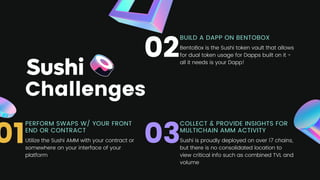
COLLECT & PROVIDE INSIGHTS FOR
MULTICHAIN AMM ACTIVITY
Sushi is proudly deployed on over 17 chains,
but there is no consolidated location to
view critical info such as combined TVL and
volume
Challenges
PERFORM SWAPS W/ YOUR FRONT
END OR CONTRACT
Utilize the Sushi AMM with your contract or
somewhere on your interface of your
platform
BUILD A DAPP ON BENTOBOX
BentoBox is the Sushi token vault that allows
for dual token usage for Dapps built on it -
all it needs is your Dapp!
01
02
03
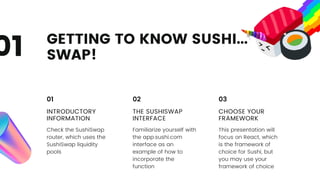
GETTING TO KNOW SUSHI...
SWAP!
01
INTRODUCTORY
INFORMATION
Check the SushiSwap
router, which uses the
SushiSwap liquidity
pools
01
THE SUSHISWAP
INTERFACE
Familiarize yourself with
the app.sushi.com
interface as an
example of how to
incorporate the
function
02
CHOOSE YOUR
FRAMEWORK
This presentation will
focus on React, which
is the framework of
choice for Sushi, but
you may use your
framework of choice
03
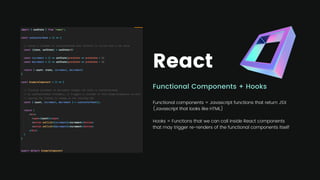
React
Functional Components + Hooks
Functional components = Javascript functions that return JSX
(Javascript that looks like HTML)
Hooks = Functions that we can call inside React components
that may trigger re-renders of the functional components itself
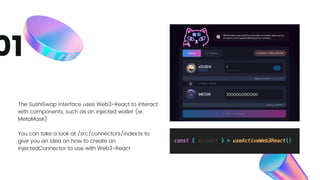
The SushiSwap interface uses Web3-React to interact
with components, such as an injected wallet (ie.
MetaMask)
You can take a look at /src/connectors/index.ts to
give you an idea on how to create an
InjectedConnector to use with Web3-React
01
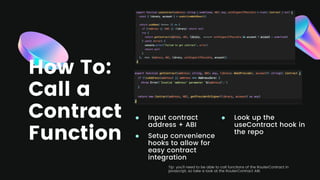
How To:
Call a
Contract
Function
Input contract
address + ABI
Setup convenience
hooks to allow for
easy contract
integration
Look up the
useContract hook in
the repo
Tip: you’ll need to be able to call functions of the RouterContract in
javascript, so take a look at the RouterContract ABI.
HOW TO PERFORM A SWAP
USING A CONTRACT
Example triangular arbitrage: SUSHI -> SAK3, SAK3 -> USDC, USDC -> SUSHI
Include SushiSwapRouter contract interface in your contract
Approve first token once (SUSHI in this case) to spend funds
Use the path argument for arbitrage (do you know why?)
Things to
Lookout For
5 TIPS & TRICKS TO DEFEAT THIS CHALLENGE
If swapping a non-native token,
the token will have to be
approved first
You will have to call functions of
the RouterContract, so look at its
ABI and functions and input
requirements
Take a look at the Trade class in
the SDK. Trade.bestTradeExactIn
or Trade.bestTradeExactOut
could be helpful
Not all currencies have the
default amount of decimals.
USDC for example has 6
decimals
The SDK class CurrencyAmount
will handle decimals for you. All
you need to do is provide it with
a currency and an amount
Whether i'd be frontend or
contract. You will call the same
function of the same contract,
just in a different context.
Challenge 1
Contenders...

Hack africa workshop_2_part_one_chilli_chelli

  • 1.
    Encode: Hack AfricaChallenge Overview SUSHI WORKSHOP 2
  • 2.
  • 3.
    COLLECT & PROVIDEINSIGHTS FOR MULTICHAIN AMM ACTIVITY Sushi is proudly deployed on over 17 chains, but there is no consolidated location to view critical info such as combined TVL and volume Challenges PERFORM SWAPS W/ YOUR FRONT END OR CONTRACT Utilize the Sushi AMM with your contract or somewhere on your interface of your platform BUILD A DAPP ON BENTOBOX BentoBox is the Sushi token vault that allows for dual token usage for Dapps built on it - all it needs is your Dapp! 01 02 03
  • 4.
    GETTING TO KNOWSUSHI... SWAP! 01 INTRODUCTORY INFORMATION Check the SushiSwap router, which uses the SushiSwap liquidity pools 01 THE SUSHISWAP INTERFACE Familiarize yourself with the app.sushi.com interface as an example of how to incorporate the function 02 CHOOSE YOUR FRAMEWORK This presentation will focus on React, which is the framework of choice for Sushi, but you may use your framework of choice 03
  • 5.
    React Functional Components +Hooks Functional components = Javascript functions that return JSX (Javascript that looks like HTML) Hooks = Functions that we can call inside React components that may trigger re-renders of the functional components itself
  • 6.
    The SushiSwap interfaceuses Web3-React to interact with components, such as an injected wallet (ie. MetaMask) You can take a look at /src/connectors/index.ts to give you an idea on how to create an InjectedConnector to use with Web3-React 01
  • 7.
    How To: Call a Contract Function Inputcontract address + ABI Setup convenience hooks to allow for easy contract integration Look up the useContract hook in the repo Tip: you’ll need to be able to call functions of the RouterContract in javascript, so take a look at the RouterContract ABI.
  • 8.
    HOW TO PERFORMA SWAP USING A CONTRACT Example triangular arbitrage: SUSHI -> SAK3, SAK3 -> USDC, USDC -> SUSHI Include SushiSwapRouter contract interface in your contract Approve first token once (SUSHI in this case) to spend funds Use the path argument for arbitrage (do you know why?)
  • 9.
    Things to Lookout For 5TIPS & TRICKS TO DEFEAT THIS CHALLENGE If swapping a non-native token, the token will have to be approved first You will have to call functions of the RouterContract, so look at its ABI and functions and input requirements Take a look at the Trade class in the SDK. Trade.bestTradeExactIn or Trade.bestTradeExactOut could be helpful Not all currencies have the default amount of decimals. USDC for example has 6 decimals The SDK class CurrencyAmount will handle decimals for you. All you need to do is provide it with a currency and an amount Whether i'd be frontend or contract. You will call the same function of the same contract, just in a different context.
  • 10.