Group 5
Security Policiesand Acess Control
Team Members Names
Gilbert Mashawi
Godknows Mugaduyi
John Moyo
Innocent Manyange
Panashe Chinyerere
Sam Chiveya
Phylosophy Betera
Tadiwanashe Magaracha
2.
Overview
• Security policiesdefine rules for access control.
• Aim to protect data and resources from unauthorized use.
• Implemented through different models like:
• Mandatory Access Control (MAC)
• Discretionary Access Control (DAC)
• Role-Based Access Control (RBAC)
3.
What is AccessControl?
• Mechanism to regulate who can access what in a system.
• Enforces confidentiality, integrity, and availability.
• Composed of:
• Subjects (users/processes)
• Objects (files, databases)
• Access rights (read, write, execute)
4.
Mandatory Access Control(MAC)
• Access control decided by the system.
• Users cannot change access rules.
• Common in government/military systems.
• Labels like Top Secret, Secret, Confidential.
• Based on security clearance and classification.
5.
Pros and Cons
Pros:
•Very secure, difficult to bypass
Cons:
• Inflexible, hard to manage in dynamic environments
6.
Discretionary Access Control(DAC)
• Access control defined by the resource owner.
• Users can grant/restrict access to others.
• Uses Access Control Lists (ACLs).
• Common in personal and commercial systems.
7.
Pros and Cons
Pros:
•Flexible and user-friendly
Cons:
• Less secure, prone to accidental or malicious sharing
8.
Role-Based Access Control(RBAC)
• Access is based on user roles (e.g., admin, editor).
• Permissions assigned to roles, not individuals.
• Users are assigned roles dynamically.
Pros
Scalable and easy to manage
Ideal for enterprise environments
Cons
Requires clear role definitions and policy design
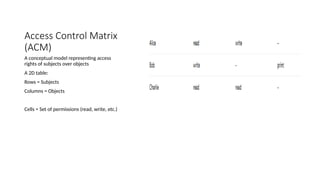
Access Control Matrix
(ACM)
Aconceptual model representing access
rights of subjects over objects
A 2D table:
Rows = Subjects
Columns = Objects
Cells = Set of permissions (read, write, etc.)
11.
Characteristics of ACM
•Simple and general model
• Helps visualize who has access to what
• Not practical for large systems due to sparsity and size
12.
Implementations of ACM
AccessControl Lists (ACLs):
• Stored per object
• Lists subjects and their permissions
• Example: File A → {Alice: read, Bob: write}
Capability Lists:
Stored per subject
Lists objects and access rights
Example: Alice → {File A: read, File B: write}
13.
Access Control ModelsOverview
• Formal models help define and enforce security policies.
• Common models:
• Discretionary Access Control (DAC)
• Mandatory Access Control (MAC)
• Role-Based Access Control (RBAC)
• Attribute-Based Access Control (ABAC)
• Bell-LaPadula (Confidentiality)
• Biba (Integrity)
14.
Bell-LaPadula Model (Confidentiality)
•Focus: Protecting confidentiality of data
Key Rules:
• No Read Up (Simple Security Property)
• No Write Down (Star Property)
• Used in military and government
15.
Biba Model (Integrity)
•Focus: Maintaining data integrity
• Key Rules:
• No Read Down (can’t read lower integrity data)
• No Write Up (can’t write to higher integrity level)
• Prevents contamination of critical data
16.
Clark-Wilson Model
• Focuseson commercial integrity policies
• Enforces well-formed transactions and separation of duties
• Uses:
• Users,
• Transformation Procedures (TPs),
• Constrained Data Items (CDIs)
17.
Understanding The Principleof Least
Privilege?
• Users, programs, and systems should be granted the minimum access
rights necessary to perform their tasks.
• Applies to:
• Users
• Applications
• Services
• Processes
18.
Why Is PoLPImportant?
• Reduces Attack Surface
• Limits Damage from malware or human error
• Improves System Stability
• Helps meet compliance and audit requirements
19.
Real Wolrd Application
•Layman Terms
• Like giving a janitor access to only the rooms they clean, not the whole building.
• Or an employee given access only to their department’s documents, not the
company’s entire database.
• Technical Terms
• A user with read-only access to reports, not edit/delete rights.
• A backup program that can read files but not modify them.
• A web server process that only accesses web content, not system files.
20.
Implementing PoLP
• Role-BasedAccess Control (RBAC)
• Use of permissions and ACLs
• Regular review and auditing of access rights
• Temporary privilege elevation when needed ("just-in-time access")
21.
Benefits of PoLP
•Prevents privilege escalation attacks
• Reduces risk of insider threats
• Enhances compliance (e.g., GDPR, HIPAA)
• Promotes accountability and auditability
22.
Challenges and BestPractices
• Can be hard to enforce in complex environments
• Must avoid over-restriction that impairs productivity
• Best Practices:
• Start with default deny
• Use automation and role reviews
• Log and monitor privileged access








![Security policy(DAS, MAS, PAS) model [in]](https://cdn.slidesharecdn.com/ss_thumbnails/lectureno05-260108015939-e0fede22-thumbnail.jpg?width=640&height=640&fit=bounds)


