Chapter 5 – Security Mechanisms and
Techniques
2
 Security mechanisms are also known as security services,
security controls, safeguards
 Security mechanisms are elements of the security subsystem
of
 An operating system
 A database management system
 An application system
 A communication system
 Access protection (access control): controls access to
resources
 Authentication: ensures the authenticity of actors
 Information flow control: controls the flow of information
between entities
5.1 Introduction
3
 Encryption: keeps data secret and prevents unnoticed
corruption
 Digital signature: ensures the authenticity of documents,
programs, ...
 Auditing: bookkeeping on all security-related events in a system
 Firewalls: control traffic between the Internet and the local
system or intranet
 Intrusion detection: detects attempted or successful attacks on
a system
4
 Note: the relationship between security and protection remains
fuzzy
 It is a common experience that the amount of damage caused by a
security violation is not easily quantified ( risk assessment)
 Whether or not a certain gain in security is worth the protection
effort required often remains an open question
 There is a never-ending race between the security experts and the
adversaries: for each security hole that is closed a new kind of
threat pops up
5
5.2 Access Control (Access Protection)
 Is meant to prevent undesirable access of objects by subjects
 A protection system describes the conditions under which a
system is secure
 Access control is used to identify a user to a system
 Associated with each user, there can be a profile that specifies
permissible operations and accesses (authorization)
 The operating system can enforce rules based on user profile
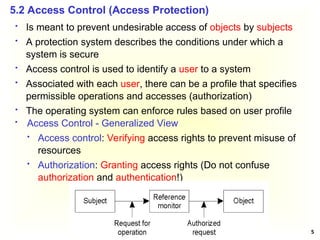
 Access Control - Generalized View
 Access control: Verifying access rights to prevent misuse of
resources
 Authorization: Granting access rights (Do not confuse
authorization and authentication!)
6
 Access Control Matrix (ACM)
 The access control matrix arose both in operating systems and
in database research
 It describes allowed accesses using a matrix
 Basic elements of ACM
 Subject: An entity capable of accessing objects, such as
processes and users; subjects are active; subjects are given
security clearance
 Object: Anything to which access is controlled (files,
programs, memory segments, …); objects are passive;
objects have security classification
 Access right: The way in which an object is accessed by a
subject (read, write, execute, …); the exact meaning of the
operation depends on the nature of the object; “reading from”
a file is obvious but what is “reading from” a process; it could
mean that the reader accepts messages from the process
being read
7
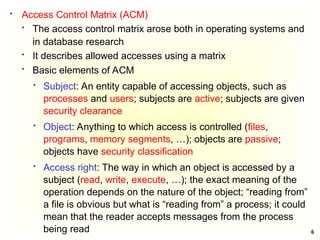
 Access Control Matrix
Subject Object
 In the ACM, each subject is represented by a row and each
object as a column
 Capabilities: are stored row-wise - with the subjects
 Permissions: are stored column-wise - with the objects
 ACM [s, o] lists precisely which operations subject s can
request to be carried out on object o
8
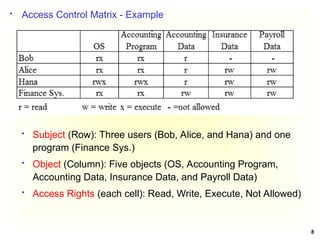
 Access Control Matrix - Example
 Subject (Row): Three users (Bob, Alice, and Hana) and one
program (Finance Sys.)
 Object (Column): Five objects (OS, Accounting Program,
Accounting Data, Insurance Data, and Payroll Data)
 Access Rights (each cell): Read, Write, Execute, Not Allowed)
9
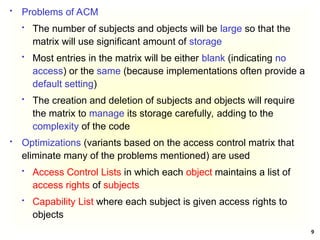
 Problems of ACM
 The number of subjects and objects will be large so that the
matrix will use significant amount of storage
 Most entries in the matrix will be either blank (indicating no
access) or the same (because implementations often provide a
default setting)
 The creation and deletion of subjects and objects will require
the matrix to manage its storage carefully, adding to the
complexity of the code
 Optimizations (variants based on the access control matrix that
eliminate many of the problems mentioned) are used
 Access Control Lists in which each object maintains a list of
access rights of subjects
 Capability List where each subject is given access rights to
objects
10
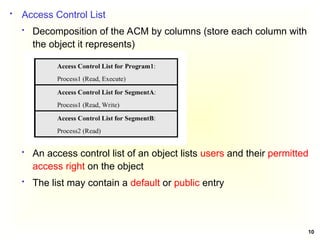
 Access Control List
 Decomposition of the ACM by columns (store each column with
the object it represents)
 An access control list of an object lists users and their permitted
access right on the object
 The list may contain a default or public entry
11
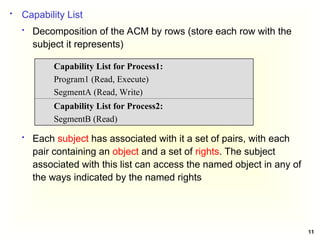
 Capability List
 Decomposition of the ACM by rows (store each row with the
subject it represents)
 Each subject has associated with it a set of pairs, with each
pair containing an object and a set of rights. The subject
associated with this list can access the named object in any of
the ways indicated by the named rights
Capability List for Process1:
Program1 (Read, Execute)
SegmentA (Read, Write)
Capability List for Process2:
SegmentB (Read)
12
 Protection Domain
 An Access Control List or a Capability List can still become too
large
 One way of reducing ACLs is to make use of protection
domains
 A protection domain is a set of (object, access rights)
 Requests for carrying out an operation are always issued within
a domain
 A user should be a member of a domain that has the required
access rights to invoke an object
13
 Security policy governs a set of rules and objectives needed by
an organization
 A security model can be used by an organization to help
express the policy or business rules to be used in a computer
system
 Access control policies are high-level requirements that specify
how access is managed and who may access information
under what circumstances
 For instance, policies may pertain to resource usage within or
across organizational units or may be based on need-to-know,
competence, authority, or obligation
 Access Control Policies and Models
 There are two types of access control models
 Discretionary Access Control Model and
 Non Discretionary Access Control Model
14
 Discretionary Access Controls (DACs) is an access policy
determined by the owner of an object. The owner decides who is
allowed to access the object and with what privileges
 They are called discretionary as users can be given the ability
of passing on their privileges of any of the objects under them
to other users, without the intervention of the system
administrator
 Non Discretionary Access Controls (NDACs) are controls that
cannot be changed by users, but only through administrative
action. Users cannot pass access permissions on to other users
at their discretion. NDAC has three popular forms of access
control policies
1. Mandatory Access Control (MAC),
2. Role-Based Access Control (RBAC), and
3. Temporal Authorization (TA)
15
1. Mandatory Access Control (MAC) is a means of restricting access
to objects based on the sensitivity of the information contained in
the objects and the formal authorization of subjects to access
information of such sensitivity
 In MAC, decisions are made by a central authority, not by the
individual owner of an object, and the owner cannot change
access rights
 An example of MAC occurs in military security, where an
individual data owner does not decide who has a Top Secret
clearance, nor can the owner change the classification of an
object from Top Secret to Secret
16
2. Role-Based Access Control (RBAC) bases access control
decisions on the functions/roles of a user that he/she is allowed to
perform within an organization
 This includes the specification of duties, responsibilities, and
qualifications. For example, the role “individual associated with
a hospital” can include doctor, nurse and patient
3. Temporal Authorization (TA) are formal statements of access
policies that involve time-based access restrictions
17
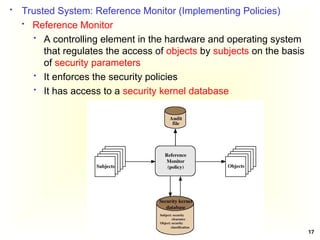
 Trusted System: Reference Monitor (Implementing Policies)
 Reference Monitor
 A controlling element in the hardware and operating system
that regulates the access of objects by subjects on the basis
of security parameters
 It enforces the security policies
 It has access to a security kernel database
18
 Properties of the Reference Monitor
 Complete mediation: Security rules are enforced on every
access
 Isolation: The reference monitor and its database themselves
are protected from unauthorized modification
 Verifiability: The reference monitor’s correctness must be
provable
 A system that can provide such verifications is referred to as a
trusted system
19
 Multilevel Security Models
 Multilevel Security
 Military-style classifications
 Subjects and objects are partitioned into different security
levels
 Protection is based on levels of security
 A subject can only access objects at certain levels
determined by its security level and model in use
 There are two Multilevel Security Models
 Bell-LaPadula (BLP) Model
 Biba Integrity Model
20
 Bell-LaPadula (BLP) model is one of the first multilevel security
models that was created to control access to data in
government and military applications
 It was developed by David Elliott Bell and Leonard J. LaPadula
 The two basic properties of the Bell-LaPadula model are
 “no read up” : A subject can only read an object of less or
equal security level (Simple Security Property)
 “no write down”: A subject can only write into an object of
greater or equal security level (*-Property) or (Star Property);
this prevents an illegal information flow
5.2.1 Bell-LaPadula Model
 For instance, if we have two levels of security namely
unclassified and top secret
 Unclassified personnel cannot read data at top secret level
(no read up) and
 Top secret data cannot be written into files at unclassified
level (no write down)
21
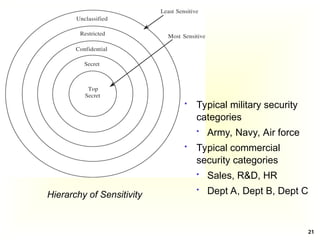
Hierarchy of Sensitivity
 Typical military security
categories
 Army, Navy, Air force
 Typical commercial
security categories
 Sales, R&D, HR
 Dept A, Dept B, Dept C
22
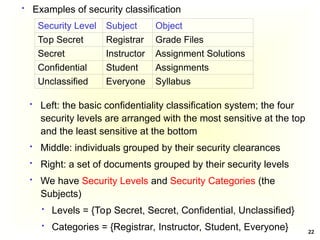
 Examples of security classification
 Left: the basic confidentiality classification system; the four
security levels are arranged with the most sensitive at the top
and the least sensitive at the bottom
 Middle: individuals grouped by their security clearances
 Right: a set of documents grouped by their security levels
 We have Security Levels and Security Categories (the
Subjects)
 Levels = {Top Secret, Secret, Confidential, Unclassified}
 Categories = {Registrar, Instructor, Student, Everyone}
Security Level Subject Object
Top Secret Registrar Grade Files
Secret Instructor Assignment Solutions
Confidential Student Assignments
Unclassified Everyone Syllabus
23
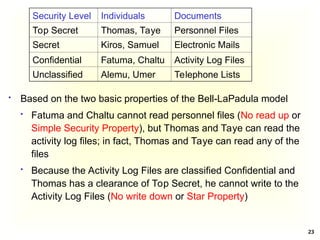
 Based on the two basic properties of the Bell-LaPadula model
 Fatuma and Chaltu cannot read personnel files (No read up or
Simple Security Property), but Thomas and Taye can read the
activity log files; in fact, Thomas and Taye can read any of the
files
 Because the Activity Log Files are classified Confidential and
Thomas has a clearance of Top Secret, he cannot write to the
Activity Log Files (No write down or Star Property)
Security Level Individuals Documents
Top Secret Thomas, Taye Personnel Files
Secret Kiros, Samuel Electronic Mails
Confidential Fatuma, Chaltu Activity Log Files
Unclassified Alemu, Umer Telephone Lists
24
 Kenneth Biba (1975) proposed three different integrity access
control policies
1. The Low Water Mark Integrity Policy
2. The Ring Policy
3. Strict Integrity Policy
 All assume that we associate integrity levels with subjects and
objects, analogous to clearance levels in BLP
 Only Strict Integrity Policy had much continuing influence; it is
the one typically referred to as the “Biba Model” or “Biba
Integrity”
 It was published in 1977 at the Mitre Corporation, one year
after the Bell La-Padula model was published
 It is designed so that subjects may not corrupt objects in a level
ranked higher than the subject, or be corrupted by objects from
a lower level than the subject
5.2.2 Biba Integrity Model
25
 A problem with the BLP model is, it does not deal with the
integrity of data as the *-property makes it possible for a lower
level subject to write to a higher classified object that motivated
the creation of the Biba model
 BLP is for Confidentiality and controlled access to classified
information while Biba is for Integrity of data and they can, at
least theoretically, be used together
 If used together it results in reading and writing at a single level
which is not what is usually desired; hence it is better to choose
one of them depending on the security requirements
 Military policy focuses on confidentiality
 Commercial policy focuses on integrity
 Mandatory commercial controls typically involve who gets
to do what type of transaction rather than who sees what
26
 Integrity
 Integrity refers to the trustworthiness of data or resources
 Integrity is usually defined in terms of preventing improper or
unauthorized change to data
 There are three main goals of integrity
 Preventing unauthorized users from making modifications to
data or programs
 Preventing authorized users from making improper or
unauthorized modifications
 Maintaining internal and external consistency of data and
programs, i.e., data reflects the real world
27
 Biba Integrity Model – Access Modes
 The Biba model consists of the following access modes
 Modify: the modify right allows a subject to write to an object.
This mode is similar to the write mode in other models
 Observe: the observe right allows a subject to read an
object. This is synonyms with the read mode of most other
models
 Invoke: the invoke right allows a subject to communicate with
another subject
 Execute: the execute right allows a subject to execute an
object. It essentially allows a subject to execute a program
which is the object
28
 Biba Integrity Model – Policies
 Let S be the set of subjects, O the set of objects, I the set of
integrity levels, s a subject, o an object, and i(x) the integrity
level of x (subject or object)
 Then Biba Strict Integrity Policy consists of the following
1. Simple Integrity Property: s S
∈ can observe o O
∈ if and
only if i(s) ≤ i(o) (“no read-down”)
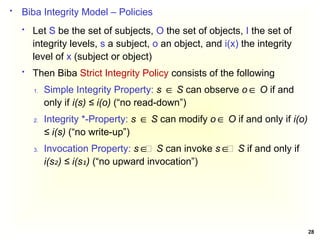
2. Integrity *-Property: s S
∈ can modify o O
∈ if and only if i(o)
≤ i(s) (“no write-up”)
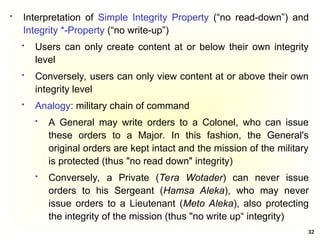
3. Invocation Property: s ∈ S
∈ can invoke s ∈ S
∈ if and only if
i(s ) ≤ i(s )
₂ ₁ (“no upward invocation”)
29
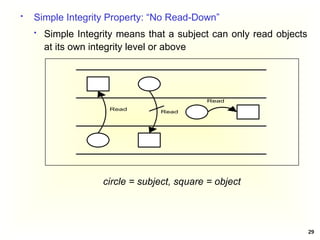
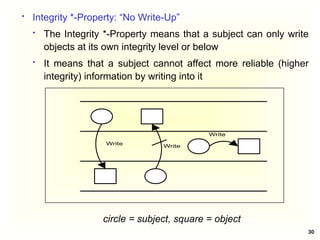
 Simple Integrity Property: “No Read-Down”
 Simple Integrity means that a subject can only read objects
at its own integrity level or above
Read
Read
Read
circle = subject, square = object
30
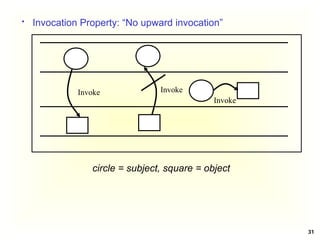
 Integrity *-Property: “No Write-Up”
 The Integrity *-Property means that a subject can only write
objects at its own integrity level or below
 It means that a subject cannot affect more reliable (higher
integrity) information by writing into it
circle = subject, square = object
Write
Write
Write
31
 Invocation Property: “No upward invocation”
circle = subject, square = object
Invoke Invoke
Invoke
32
 Interpretation of Simple Integrity Property (“no read-down”) and
Integrity *-Property (“no write-up”)
 Users can only create content at or below their own integrity
level
 Conversely, users can only view content at or above their own
integrity level
 Analogy: military chain of command
 A General may write orders to a Colonel, who can issue
these orders to a Major. In this fashion, the General's
original orders are kept intact and the mission of the military
is protected (thus "no read down" integrity)
 Conversely, a Private (Tera Wotader) can never issue
orders to his Sergeant (Hamsa Aleka), who may never
issue orders to a Lieutenant (Meto Aleka), also protecting
the integrity of the mission (thus "no write up“ integrity)
33
 The Biba strict integrity policy enforces “no write-up” and “no
read-down” on the data in the system, which is the opposite of
the Bell-LaPadula model
 This policy restricts the “contamination” of data at higher level,
since a subject is only allowed to modify data at its level or at a
lower level
 The “no write-up” limits the damage that can be done by
malicious programs in the system.
 For instance, “no write-up” limits the amount of damage that
can be done by a Trojan Horse in the system. The Trojan
horse would only be able to write to objects at its integrity
level or lower. This is important because it limits the
damage that can be done to the operating system
 The “no read-down” prevents a trusted subject from being
“contaminated” by a less trusted object
34
 Read about
 The Biba model: The Low Water Mark Integrity Policy and
The Ring Policy
 Clark-Wilson Model – for Integrity
 Chinese Wall Model
35
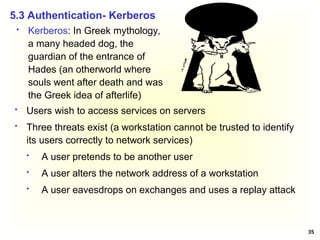
 Kerberos: In Greek mythology,
a many headed dog, the
guardian of the entrance of
Hades (an otherworld where
souls went after death and was
the Greek idea of afterlife)
5.3 Authentication- Kerberos
 Users wish to access services on servers
 Three threats exist (a workstation cannot be trusted to identify
its users correctly to network services)
 A user pretends to be another user
 A user alters the network address of a workstation
 A user eavesdrops on exchanges and uses a replay attack
36
 Provides centralised symmetric third-party authentication in a
distributed network
 allows users to access services distributed through
networks
 without needing to trust all workstations
 rather all trust a central authentication server
 Kerberos provides a centralized authentication server whose
function is to authenticate users to servers and servers to
users; it is a trusted system from MIT
 Relies on symmetric encryption, making no use of public-key
encryption
37
 Terms (Assume Kerberos Version 4)
 C = Client Module
 AS = authentication server (knows the passwords of all
users and stores these in a centralized database; It shares
a unique secret key with each server)
 V = server
 IDc = identifier of user on C
 IDv = identifier of V
 Pc = password of user on C
 ADc = network address of C
 Kv = secret encryption key shared by AS and V
 TS = timestamp
 || = concatenation
38
 A Simple Authentication Dialogue; the user logs on to a
workstation and requests access to server V (3 steps)
(1) C  AS: IDc || Pc || IDv
 The client module C in the user’s workstation requests the
user’s password and then sends a message to the AS that
includes the user’s ID, the user’s password, and the
server’s ID
(2) AS  C: Ticket
 The AS checks its database to see if the user has supplied
the proper password for this user ID and whether this user
is permitted access to server V; then the AS creates a
ticket that contains the user’s ID and network address and
the server’s ID
Ticket = E(Kv, [IDc || ADc || IDv])
 The ticket is encrypted using the secret key shared by the
AS and the server
39
(3) C  V: IDc || Ticket
 With this ticket, C can now apply to V for service. C sends a
message to V containing C’s ID and the ticket. V decrypts
the ticket and verifies that the user ID in the ticket is the
same as the unencrypted user ID in the message. If these
two match, the server considers the user authenticated and
grants the requested service
 There are two problems with the Simple Authentication Dialogue
 First, we would like to minimize the number of times that a
user has to enter a password
 The second problem is that the earlier scenario involved a
plaintext transmission of the password; An eavesdropper
could capture the password and use any service accessible to
the victim
 To solve these problems, we need a scheme for avoiding
plaintext passwords
 For this a new server, known as the Ticket-Granting Server
(TGS), is introduced that issues tickets to users who have been
authenticated to AS
40
 A More Secure Authentication Dialogue
 Once per user login session
(1) C  AS: IDc || IDtgs
 The client requests a ticket-granting ticket (Tickettgs) on
behalf of the user by sending its user’s ID to the AS,
together with the TGS ID, indicating a request to use the
TGS service
(2) AS  C: E(Kc, Tickettgs)
Tickettgs = E(Ktgs, [IDc||ADc||IDtgs||TS1|| Lifetime1])
 The AS responds with a ticket that is encrypted with a key
that is derived from the user’s password (KC), which is
already stored at the AS
 When the response arrives at the client, the client prompts
the user for his/her password, generates the key (Kc), and
attempts to decrypt the incoming message. If the correct
password is supplied, the ticket is successfully recovered
and saved
41
 Note: the ticket includes a timestamp, indicating the date and time
at which the ticket was issued, and a lifetime, indicating the length
of time for which the ticket is valid (e.g., eight hours)
 Note: Ktgs is known only by the AS and the TGS
 Once per type of service
(3) C  TGS: IDc || IDv ||Tickettgs
 Each time the user requires access to a new service, the client
requests a service-granting ticket on behalf of the user. It
transmits a message to the TGS containing the user’s ID, the
ID of the desired service, and the ticket-granting ticket
42
(4) TGS  C: Ticketv
Ticketv = E(Kv, [IDc||ADc||IDv ||TS2|| Lifetime2]
 The TGS decrypts the incoming ticket (of step 3) using Ktgs
and verifies the success of the decryption by the presence of
its ID. It checks to make sure that the lifetime has not expired.
Then it compares the user ID and network address with the
incoming information to authenticate the user. If the user is
permitted access to the server V, the TGS issues a ticket to
grant access to the requested service
 The client saves each service-granting ticket (Ticketv) and
uses it to authenticate its user to a server each time a
particular service is requested
 Once per service session
(5) C  V: IDc || Ticketv
 The client requests access to a service on behalf of the user. It
transmits a message to the server containing the user’s ID and
the service granting ticket. The server authenticates by using
the contents of the ticket
43
 Two additional problems remain
(1) The lifetime associated with the ticket-granting ticket
 If this lifetime is very short (e.g., minutes), then the user
will be repeatedly asked for a password. If the lifetime is
long (e.g., hours), then an opponent has a greater
opportunity for replay. An opponent could eavesdrop on
the network and capture a copy of the ticket-granting ticket
and then wait for the legitimate user to log out and forge
the legitimate user’s network address and send the
message of step (3) to the TGS
 If an opponent captures a service-granting ticket and uses
it before it expires, the opponent has access to the
corresponding service
 Hence, we need an additional requirement; a network
service (the TGS or an application service) must be able to
prove that the person using a ticket is the same person to
whom that ticket was issued
44
(2) The second problem is that there may be a requirement for
servers to authenticate themselves to users. Without such
authentication, an opponent could sabotage the configuration
so that messages to a server were directed to another
location. The false server would then be in a position to act
as a real server and capture any information from the user
and deny the true service to the user
45
Kc,tgs Session key accessible to client created by AS
to permit secure exchange between client and
TGS without requiring them to share a
permanent key
TS2 Informs client of time this ticket was issued
Lifetime2 Informs client of the lifetime of this ticket
 Kerberos V4 Authentication Dialogue
 Authentication Service Exhange: To obtain Ticket-Granting
Ticket
(1) C  AS: IDc || IDtgs ||TS1
TS1 Allows AS to verify that client’s clock is synchronized
with that of AS
(2) AS  C: E(Kc, [Kc,tgs|| IDtgs || TS2 || Lifetime2 || Tickettgs])
Tickettgs = E(Ktgs, [Kc,tgs||IDc||ADc||IDtgs||TS2||Lifetime2])
46
 Ticket-Granting Service Echange: To obtain Service-Granting
Ticket
(3) C  TGS: IDv ||Tickettgs ||Authenticatorc
 Authenticatorc = E(Kc,tgs, [IDc||ADc||TS3]) - Generated by
client to validate ticket
 TS3 Informs TGS of time this authenticator was
generated
Kc,v Session key accessible to client created by TGS
to permit secure exchange between client and
server without requiring them to share a
permanent key
TS4 Informs client of time this ticket was issued
(4) TGS  C: E(Kc,tgs, [Kc,v|| IDv || TS4 || Ticketv])
Ticketv = E(Kv, [Kc,v||IDc||ADc||TS4||Lifetime4])
47
 Client/Server Authentication Exhange: To Obtain Service
(5) C  V: Ticketv || Authenticatorc
 Authenticatorc = E(Kc,v, [IDc || ADc || TS5])
 The server decrypts the ticket, recovers the session
key, and decrypts the authenticator
(6) V  C: E(Kc,v, [TS5 +1]) (Step for mutual authentication)
 The server returns the value of the timestamp from the
authenticator, incremented by 1, and encrypted using
the session key. C can decrypt this message to recover
the incremented timestamp. Because the message was
encrypted by the session key, C is assured that it could
have been created only by V. The contents of the
message assure C that this is not a replay of an old
reply
48
 Kerberos in Practice
 Currently there are two Kerberos versions
 V4: restricted to a single realm (a Kerberos realm is a set of
managed nodes that share the same Kerberos database)
 V5: allows inter-realm authentication
 V5 is an Internet standard: specified in RFC 1510, and used by
many utilities
 To use Kerberos: You
 need to have a KDC on your network
 need to have Kerberised applications running on all
participating systems
 Major problem - US export restrictions
 Kerberos cannot be directly distributed outside the US in
source format (crypto libraries must be re-implemented
locally)
49
 Read about the following
 PAP: Password Authentication Protocol is the simplest form of
authentication and the least secure where usernames and
passwords are sent unencrypted, in plain text
 SPAP: Shiva Password Authentication Protocol is an extension
to PAP that encrypts the username and password that is sent
over the Internet
 CHAP: Challenge Handshake Authentication Protocol
calculates a hash after the user has logged in. Then it shares
that hash with the client system. Periodically the server will ask
the client to provide that hash (this is the challenge part). If the
client cannot, then it is clear that the communications have
been compromised. MS-CHAP is a Microsoft-specific
extension to CHAP
50
5.4 Firewall
 A network firewall provides a barrier between networks that
prevents or denies unwanted or unauthorized traffic
 A Network Firewall is a system or group of systems used to
control access between two networks: a trusted network and an
untrusted network, using pre-configured rules or filters
 A device that provides secure connectivity between networks
(internal/external; varying levels of trust)
 Used to implement and enforce a security policy for
communication between networks
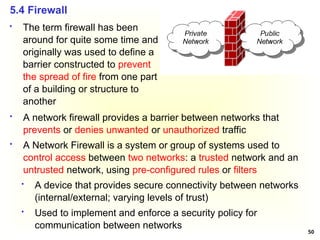
 The term firewall has been
around for quite some time and
originally was used to define a
barrier constructed to prevent
the spread of fire from one part
of a building or structure to
another
51
 Firewalls are combinations of hardware and software
 Firewalls can be composed of a single router, multiple routers, a
single host system or multiple hosts running firewall software,
hardware appliances specifically designed to provide firewall
services, or any combinations
 They vary greatly in design, functionality, architecture, and cost
 A firewall is also called a Border Protection Device (BPD) in
certain military contexts where a firewall separates networks by
creating perimeter networks in a DMZ “Demilitarized Zone”
 DMZ is a sub network that contains an organization’s external
facing services like Web services, Mail services, FTP Services,
etc.
 Firewall technology emerged in the late 1980s when the Internet
was a fairly new technology in terms of its global use and
connectivity. The original idea was formed in response to a
number of major Internet security breaches, which occurred in the
late 1980s
52
 It is more feasible to secure a community of users by putting
some control at the entrance rather than trying to secure every
host (Boarder Security)
 This is done in the real world
 Countries protect themselves at their borders
 Neighborhoods protect the whole neighbors
 A firewall provides secured access between two networks
 When information moves from the Internet to the internal network,
confidentiality is not an issue. However, integrity is. The firewall
must not accept messages that will cause servers to work
incorrectly or to crash
 When information moves from the internal network to the Internet,
confidentiality and integrity are both concerns. The firewall must
ensure that no confidential information goes to the Internet and
that the information that reaches the Internet is correct
5.4.1 Firewall Overview
53
 Firewall – Design Goals
 All traffic from outside to inside must pass through the firewall
(physically blocking all access to the local network except via
the firewall)
 Only authorized traffic (defined by the local security policy) will
be allowed to pass
 The firewall itself is immune to penetration (use of trusted
system with a secure operating system)
 Internal clients are generally allowed to create connections to
outside hosts, and external hosts are usually prevented from
initiating connection attempts (except on machines in the DMZ)
54
 Firewall - Features
 Port Control: allow some (e.g., 80 for a Web server, 25 for a
mail server, 21 and 20 for FTP server) and deny others
 Network Address Translation (NAT): translates the IP
addresses of internal hosts to hide them from outside
monitoring; NATs were originally designed to solve the IP
address depletion problem
 Application Monitoring
 Packet Filtering: rejects TCP/IP packets from unauthorized
hosts; rejects connection attempts to unauthorized services
 Data encryption: confidentiality of outgoing packets
 Content Filtering: to block internal users from accessing certain
types of content by category, such as hate group propaganda,
pornography, etc.
 Virus Scanning
 Popup advertisement blocking/Spam protection
 Spyware protection
55
 Firewalls can be categorized depending on
1. The firewall methodology
2. Whether the communication is being done between a single
node and the network, or between two or more networks
3. Whether the communication state is being tracked at the
firewall or not
5.4.2 Types of Firewalls
1. By the Firewall Methodology
 Packet Filtering Firewall
 Stateful Packet Inspection Firewall
 Application Gateways/Proxies
 Adaptive Proxies
 Circuit Level Gateway
56
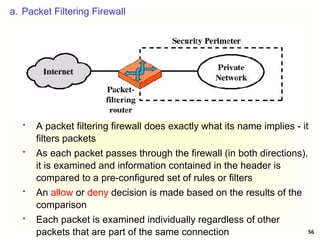
a. Packet Filtering Firewall
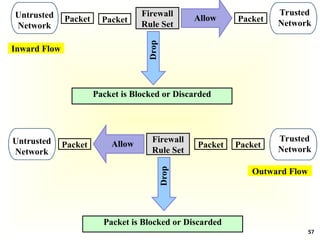
 A packet filtering firewall does exactly what its name implies - it
filters packets
 As each packet passes through the firewall (in both directions),
it is examined and information contained in the header is
compared to a pre-configured set of rules or filters
 An allow or deny decision is made based on the results of the
comparison
 Each packet is examined individually regardless of other
packets that are part of the same connection
57
Packet
Trusted
Network
Untrusted
Network
Packet Packet
Firewall
Rule Set
Allow
Packet is Blocked or Discarded
Drop
Inward Flow
Packet Packet
Packet
Allow
Trusted
Network
Untrusted
Network
Firewall
Rule Set
Drop
Packet is Blocked or Discarded
Outward Flow
58
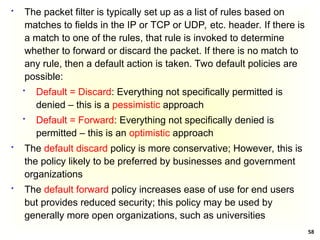
 The packet filter is typically set up as a list of rules based on
matches to fields in the IP or TCP or UDP, etc. header. If there is
a match to one of the rules, that rule is invoked to determine
whether to forward or discard the packet. If there is no match to
any rule, then a default action is taken. Two default policies are
possible:
 Default = Discard: Everything not specifically permitted is
denied – this is a pessimistic approach
 Default = Forward: Everything not specifically denied is
permitted – this is an optimistic approach
 The default discard policy is more conservative; However, this is
the policy likely to be preferred by businesses and government
organizations
 The default forward policy increases ease of use for end users
but provides reduced security; this policy may be used by
generally more open organizations, such as universities
59
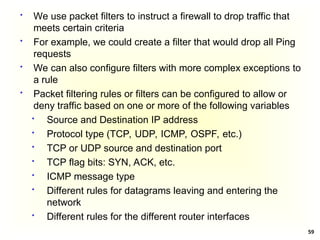
 We use packet filters to instruct a firewall to drop traffic that
meets certain criteria
 For example, we could create a filter that would drop all Ping
requests
 We can also configure filters with more complex exceptions to
a rule
 Packet filtering rules or filters can be configured to allow or
deny traffic based on one or more of the following variables
 Source and Destination IP address
 Protocol type (TCP, UDP, ICMP, OSPF, etc.)
 TCP or UDP source and destination port
 TCP flag bits: SYN, ACK, etc.
 ICMP message type
 Different rules for datagrams leaving and entering the
network
 Different rules for the different router interfaces
60
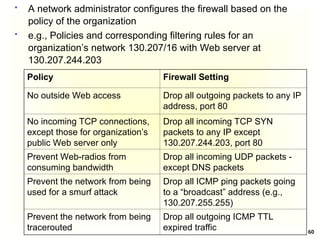
 A network administrator configures the firewall based on the
policy of the organization
Policy Firewall Setting
No outside Web access Drop all outgoing packets to any IP
address, port 80
No incoming TCP connections,
except those for organization’s
public Web server only
Drop all incoming TCP SYN
packets to any IP except
130.207.244.203, port 80
Prevent Web-radios from
consuming bandwidth
Drop all incoming UDP packets -
except DNS packets
Prevent the network from being
used for a smurf attack
Drop all ICMP ping packets going
to a “broadcast” address (e.g.,
130.207.255.255)
Prevent the network from being
tracerouted
Drop all outgoing ICMP TTL
expired traffic
 e.g., Policies and corresponding filtering rules for an
organization’s network 130.207/16 with Web server at
130.207.244.203
61
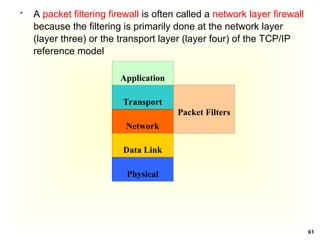
 A packet filtering firewall is often called a network layer firewall
because the filtering is primarily done at the network layer
(layer three) or the transport layer (layer four) of the TCP/IP
reference model
Application
Transport
Network
Data Link
Physical
Packet Filters
62
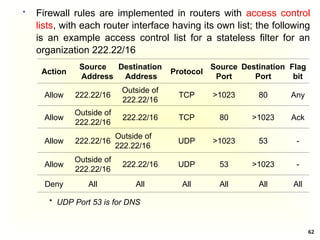
 Firewall rules are implemented in routers with access control
lists, with each router interface having its own list; the following
is an example access control list for a stateless filter for an
organization 222.22/16
Action
Source
Address
Destination
Address
Protocol
Source
Port
Destination
Port
Flag
bit
Allow 222.22/16
Outside of
222.22/16
TCP >1023 80 Any
Allow
Outside of
222.22/16
222.22/16 TCP 80 >1023 Ack
Allow 222.22/16
Outside of
222.22/16
UDP >1023 53 -
Allow
Outside of
222.22/16
222.22/16 UDP 53 >1023 -
Deny All All All All All All
* UDP Port 53 is for DNS
63
 Rules are applied to each datagram that passes through the
interface from top to bottom
 The first two rules together allow internal users to surf the
Web: The first rule allows any TCP packet with destination port
80 to leave the organization’s network; the second rule allows
any TCP packet with source port 80 and the ACK bit set to
enter the organization’s network
 Note that if an external source attempts to establish a TCP
connection with an internal host, the connection will be
blocked, even if the source or destination port is 80 (because
of the ACK flag)
 The third and fourth rules together allow DNS packets to enter
and leave the organization’s network
 In summary, this rather restrictive access control list blocks all
traffic except Web traffic initiated from within the organization
and DNS traffic
64
 Advantages of Packet filtering
 Simplicity
 Transparency to users
 High speed
 Disadvantages of Packet filtering
 Difficulty of setting up packet filter rules
 Lack of Authentication
65
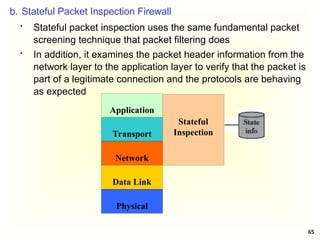
b. Stateful Packet Inspection Firewall
 Stateful packet inspection uses the same fundamental packet
screening technique that packet filtering does
 In addition, it examines the packet header information from the
network layer to the application layer to verify that the packet is
part of a legitimate connection and the protocols are behaving
as expected
Application
Transport
Network
Data Link
Physical
Stateful
Inspection
66
 As packets pass through the firewall, packet header
information is examined and fed into a connection state table
where it is stored. The packets are compared to pre-configured
rules or filters and allow or deny decisions are made based on
the results of the comparison
 The data in the connection state table is then used to evaluate
subsequent packets to verify that they are part of the same
connection
 Decisions based on one or more of the following
 Source and Destination IP address
 Protocol type (TCP, UDP, ICMP, OSPF, etc.)
 TCP or UDP source and destination port
 TCP flag bits: SYN, ACK, etc
 ICMP message type
 Different rules for datagrams leaving and entering the
network
 Different rules for the different router interfaces
 Connection state
67
 The connection state is derived from information gathered in
previous packets
 It is an essential factor in making the decision for new
communication attempts
 Stateful packet inspection compares the packets against the
rules or filters and then checks the connection state table to
verify that the packets are part of a valid, established
connection
 By having the ability to "remember" the status of a connection,
this method of packet screening is better equipped to guard
against attacks than standard packet filtering
68
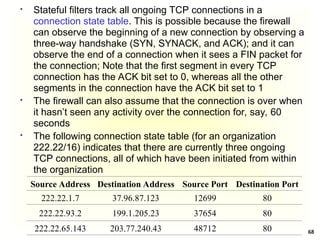
 Stateful filters track all ongoing TCP connections in a
connection state table. This is possible because the firewall
can observe the beginning of a new connection by observing a
three-way handshake (SYN, SYNACK, and ACK); and it can
observe the end of a connection when it sees a FIN packet for
the connection; Note that the first segment in every TCP
connection has the ACK bit set to 0, whereas all the other
segments in the connection have the ACK bit set to 1
 The firewall can also assume that the connection is over when
it hasn’t seen any activity over the connection for, say, 60
seconds
 The following connection state table (for an organization
222.22/16) indicates that there are currently three ongoing
TCP connections, all of which have been initiated from within
the organization
Source Address Destination Address Source Port Destination Port
222.22.1.7 37.96.87.123 12699 80
222.22.93.2 199.1.205.23 37654 80
222.22.65.143 203.77.240.43 48712 80
69
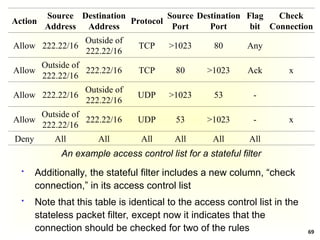
 Additionally, the stateful filter includes a new column, “check
connection,” in its access control list
 Note that this table is identical to the access control list in the
stateless packet filter, except now it indicates that the
connection should be checked for two of the rules
An example access control list for a stateful filter
Action
Source
Address
Destination
Address
Protocol
Source
Port
Destination
Port
Flag
bit
Check
Connection
Allow 222.22/16
Outside of
222.22/16
TCP >1023 80 Any
Allow
Outside of
222.22/16
222.22/16 TCP 80 >1023 Ack x
Allow 222.22/16
Outside of
222.22/16
UDP >1023 53 -
Allow
Outside of
222.22/16
222.22/16 UDP 53 >1023 - x
Deny All All All All All All
70
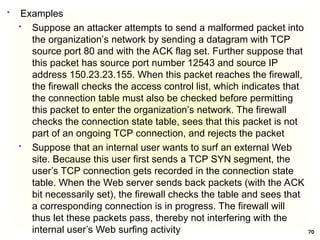
 Examples
 Suppose an attacker attempts to send a malformed packet into
the organization’s network by sending a datagram with TCP
source port 80 and with the ACK flag set. Further suppose that
this packet has source port number 12543 and source IP
address 150.23.23.155. When this packet reaches the firewall,
the firewall checks the access control list, which indicates that
the connection table must also be checked before permitting
this packet to enter the organization’s network. The firewall
checks the connection state table, sees that this packet is not
part of an ongoing TCP connection, and rejects the packet
 Suppose that an internal user wants to surf an external Web
site. Because this user first sends a TCP SYN segment, the
user’s TCP connection gets recorded in the connection state
table. When the Web server sends back packets (with the ACK
bit necessarily set), the firewall checks the table and sees that
a corresponding connection is in progress. The firewall will
thus let these packets pass, thereby not interfering with the
internal user’s Web surfing activity
71
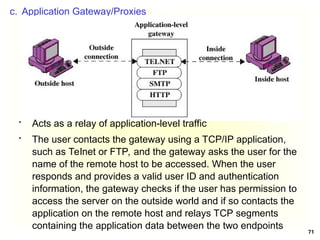
c. Application Gateway/Proxies
 Acts as a relay of application-level traffic
 The user contacts the gateway using a TCP/IP application,
such as Telnet or FTP, and the gateway asks the user for the
name of the remote host to be accessed. When the user
responds and provides a valid user ID and authentication
information, the gateway checks if the user has permission to
access the server on the outside world and if so contacts the
application on the remote host and relays TCP segments
containing the application data between the two endpoints
72
 This type of firewall operates at the application layer. For source
and destination endpoints to be able to communicate with each
other, a proxy service must be implemented for each application
protocol
 If the gateway does not implement the proxy code for a specific
application, the service is not supported and cannot be forwarded
across the firewall
 Hence, the application gateway/proxy acts as an intermediary
between the two endpoints
 This packet screening method breaks the client/server model in
that two connections are required: one from the source to the
gateway/proxy and one from the gateway/proxy to the destination
 The gateways/proxies are carefully designed to be reliable and
secure because they are the only connection points between the
two networks
73
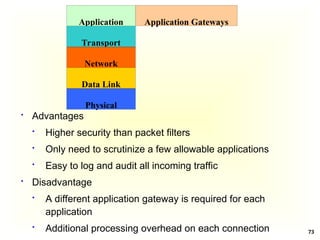
 Advantages
 Higher security than packet filters
 Only need to scrutinize a few allowable applications
 Easy to log and audit all incoming traffic
 Disadvantage
 A different application gateway is required for each
application
 Additional processing overhead on each connection
Application
Transport
Network
Data Link
Physical
Application Gateways
74
d. Adaptive Proxies
 Also known as dynamic proxies
 Developed as an enhanced form of application
gateways/proxies, combining the merits of both application
gateways/proxies and packet filtering
 Note that proxies were originally designed to make the WWW
faster
e. Circuit-Level Gateway/Circuit-Level Proxy
 It sets up two TCP connections; one between itself and a TCP
user on an inner host and one between itself and a TCP user
on an outside host
 The gateway typically relays TCP segments from one
connection to the other without examining the contents
 The security function consists of determining which
connections will be allowed
 Unlike a packet filtering firewall, a circuit-level gateway does
not examine individual packets. Instead, circuit-level gateways
monitor TCP or UDP sessions
75
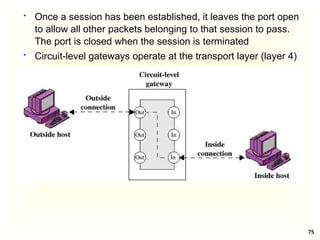
 Once a session has been established, it leaves the port open
to allow all other packets belonging to that session to pass.
The port is closed when the session is terminated
 Circuit-level gateways operate at the transport layer (layer 4)
76
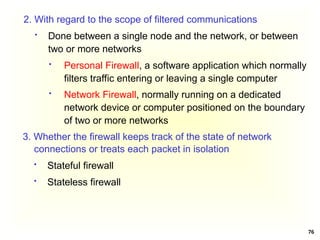
2. With regard to the scope of filtered communications
 Done between a single node and the network, or between
two or more networks
 Personal Firewall, a software application which normally
filters traffic entering or leaving a single computer
 Network Firewall, normally running on a dedicated
network device or computer positioned on the boundary
of two or more networks
3. Whether the firewall keeps track of the state of network
connections or treats each packet in isolation
 Stateful firewall
 Stateless firewall
77
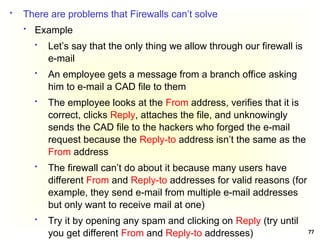
 There are problems that Firewalls can’t solve
 Example
 Let’s say that the only thing we allow through our firewall is
e-mail
 An employee gets a message from a branch office asking
him to e-mail a CAD file to them
 The employee looks at the From address, verifies that it is
correct, clicks Reply, attaches the file, and unknowingly
sends the CAD file to the hackers who forged the e-mail
request because the Reply-to address isn’t the same as the
From address
 The firewall can’t do about it because many users have
different From and Reply-to addresses for valid reasons (for
example, they send e-mail from multiple e-mail addresses
but only want to receive mail at one)
 Try it by opening any spam and clicking on Reply (try until
you get different From and Reply-to addresses)
78
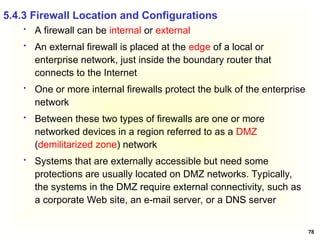
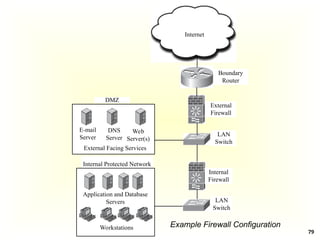
 A firewall can be internal or external
 An external firewall is placed at the edge of a local or
enterprise network, just inside the boundary router that
connects to the Internet
 One or more internal firewalls protect the bulk of the enterprise
network
 Between these two types of firewalls are one or more
networked devices in a region referred to as a DMZ
(demilitarized zone) network
 Systems that are externally accessible but need some
protections are usually located on DMZ networks. Typically,
the systems in the DMZ require external connectivity, such as
a corporate Web site, an e-mail server, or a DNS server
5.4.3 Firewall Location and Configurations
79
DMZ
Boundary
Router
External
Firewall
E-mail
Server
DNS
Server
Web
Server(s)
Internal Protected Network
Application and Database
Servers
Workstations
Internal
Firewall
LAN
Switch
LAN
Switch
External Facing Services
Internet
Example Firewall Configuration
80
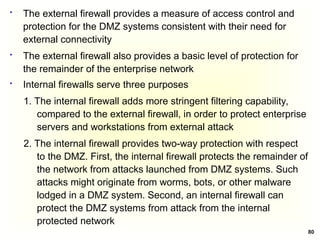
 The external firewall provides a measure of access control and
protection for the DMZ systems consistent with their need for
external connectivity
 The external firewall also provides a basic level of protection for
the remainder of the enterprise network
 Internal firewalls serve three purposes
1. The internal firewall adds more stringent filtering capability,
compared to the external firewall, in order to protect enterprise
servers and workstations from external attack
2. The internal firewall provides two-way protection with respect
to the DMZ. First, the internal firewall protects the remainder of
the network from attacks launched from DMZ systems. Such
attacks might originate from worms, bots, or other malware
lodged in a DMZ system. Second, an internal firewall can
protect the DMZ systems from attack from the internal
protected network
81
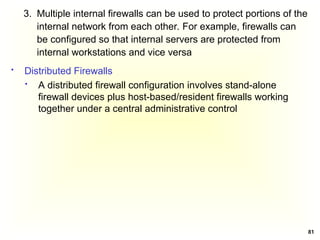
3. Multiple internal firewalls can be used to protect portions of the
internal network from each other. For example, firewalls can
be configured so that internal servers are protected from
internal workstations and vice versa
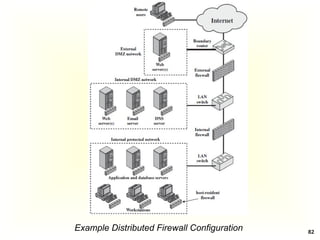
 Distributed Firewalls
 A distributed firewall configuration involves stand-alone
firewall devices plus host-based/resident firewalls working
together under a central administrative control
82
Example Distributed Firewall Configuration
83
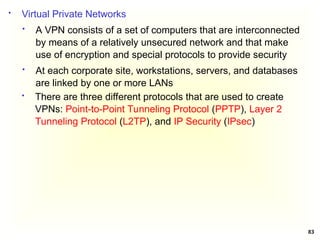
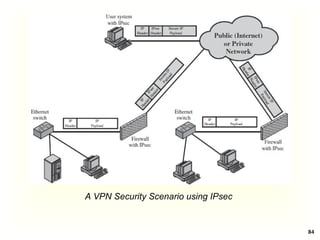
 Virtual Private Networks
 A VPN consists of a set of computers that are interconnected
by means of a relatively unsecured network and that make
use of encryption and special protocols to provide security
 At each corporate site, workstations, servers, and databases
are linked by one or more LANs
 There are three different protocols that are used to create
VPNs: Point-to-Point Tunneling Protocol (PPTP), Layer 2
Tunneling Protocol (L2TP), and IP Security (IPsec)
84
A VPN Security Scenario using IPsec
85
 Firewalls generally don’t detect internal attacks or attacks once
the system is compromised
 An Intrusion Detection System (IDS) sends an alert to the
administrator in an e-mail message or to the network
management system or could simply be logged for future
inspection
 An Intrusion Prevention System (IPS) tries to take corrective
measures once it detects a threat (e.g., denying a malicious
process access to local system resources or dropping packets);
it is proactive
 We will use the term IDS to mean both IDS and IPS since both
work the same way except the last stage
5.5 Intrusion Detection/Prevention
86
 IDS and Firewall products
 Commercial: McAfee, Cisco, Check Point
 Open Source: Snort
 An IDS gathers and analyzes information from various areas
within a computer or a network to identify possible security
breaches
 It detects both intrusions and misuse
 Intrusion detection functions include
 Monitoring and analyzing both user and system activities
 Analyzing system configurations and vulnerabilities
 Assessing system and file integrity
 Ability to recognize patterns typical of attacks
 Analysis of abnormal activity patterns
 Tracking user policy violations
87
 IDS Categorization
 There are a number of ways in which Intrusion Detection
Systems can be categorized
 Misuse detection versus anomaly detection
 Passive systems versus reactive systems
 Network-based systems versus host-based systems
 Misuse Detection vs. Anomaly Detection
 An IDS that uses misuse detection analyzes the information
it gathers and compares it to large databases of attack
signatures (IDS signatures); similar to a virus-detection
system
 Anomaly detection tries to detect intrusion attempts and
notify the administrator
88
 The system looks for any anomalous behavior; any activity
that does not match the pattern of normal user access is
noted and logged
 With anomaly-based IDS, it can take some time to create
what is considered “normal” activity patterns. While these
activity patterns are being established, a high rate of false
alarms may be experienced
 Note also that, if the network already contains malicious
code, then the activity of this code would be considered
normal
 Passive Systems Versus Reactive Systems
 In a passive system, the IDS detects a potential security
breach, logs the information, and signals an alert. In a
reactive system, the IDS responds to the suspicious activity
by logging off a user or reprogramming the firewall to block
network traffic from the suspected malicious source
89
 Network-Based System Versus Host-Based System
 In a network-based system, the individual packets flowing
through a network are analyzed
 This system can detect malicious packets that are designed
to be overlooked by a firewall’s simplistic filtering rules
 In a host-based system, the activity of each individual
computer or host is examined
 IDS Approaches
 Preemptive Blocking
 This approach seeks to prevent intrusions before they occur
 This is done by noting any danger signs of impending
threats and then blocking the user or IP address from which
these signs originate
90
 For example, if a particular IP address is the source of
frequent port scans and other scans of a system, then block
that IP address at the firewall
 But there is a risk of blocking out legitimate users. It is
better if a human administrator makes the decision whether
or not to block the suspicion
 Intrusion Deflection
 An attempt is made to attract the intruder to a subsystem
set up for the purpose of observing her/him. This is done by
tricking the intruder into believing that s/he has succeeded
in accessing system resources when, in fact, s/he has been
directed to a specially designed environment
 This is often done by using what is commonly referred to as
a honey pot
 A honey pot assumes that an attacker is able to breach a
network security
91
 Create a server that has fake but attractive data such as
account numbers or research and just a little less secure
than a real server. Then, since none of the actual users
ever access this server, monitoring software is installed to
alert when someone does access this server
 A honey pot achieves two goals
 First, it will take the attacker’s attention away from the
data to be protected
 Second, it will provide interesting and valuable data,
thus leading the attacker to stay connected to the fake
server, giving time to try and track them
 There are commercial solutions for honey pots, like Specter
(www.specter.com/default50.htm)
 Check also www.honeypots.org for more information on
honey pots in general, and on specific implementations
 Read about
 Infiltration and Intrusion Deterrence
 Software Security
92
That is all I have
Thank you very much for attending and
Good Luck 

Chapter 5-Security Mechanisms and Techniques.ppt

  • 1.
    Chapter 5 –Security Mechanisms and Techniques
  • 2.
    2  Security mechanismsare also known as security services, security controls, safeguards  Security mechanisms are elements of the security subsystem of  An operating system  A database management system  An application system  A communication system  Access protection (access control): controls access to resources  Authentication: ensures the authenticity of actors  Information flow control: controls the flow of information between entities 5.1 Introduction
  • 3.
    3  Encryption: keepsdata secret and prevents unnoticed corruption  Digital signature: ensures the authenticity of documents, programs, ...  Auditing: bookkeeping on all security-related events in a system  Firewalls: control traffic between the Internet and the local system or intranet  Intrusion detection: detects attempted or successful attacks on a system
  • 4.
    4  Note: therelationship between security and protection remains fuzzy  It is a common experience that the amount of damage caused by a security violation is not easily quantified ( risk assessment)  Whether or not a certain gain in security is worth the protection effort required often remains an open question  There is a never-ending race between the security experts and the adversaries: for each security hole that is closed a new kind of threat pops up
  • 5.
    5 5.2 Access Control(Access Protection)  Is meant to prevent undesirable access of objects by subjects  A protection system describes the conditions under which a system is secure  Access control is used to identify a user to a system  Associated with each user, there can be a profile that specifies permissible operations and accesses (authorization)  The operating system can enforce rules based on user profile  Access Control - Generalized View  Access control: Verifying access rights to prevent misuse of resources  Authorization: Granting access rights (Do not confuse authorization and authentication!)
  • 6.
    6  Access ControlMatrix (ACM)  The access control matrix arose both in operating systems and in database research  It describes allowed accesses using a matrix  Basic elements of ACM  Subject: An entity capable of accessing objects, such as processes and users; subjects are active; subjects are given security clearance  Object: Anything to which access is controlled (files, programs, memory segments, …); objects are passive; objects have security classification  Access right: The way in which an object is accessed by a subject (read, write, execute, …); the exact meaning of the operation depends on the nature of the object; “reading from” a file is obvious but what is “reading from” a process; it could mean that the reader accepts messages from the process being read
  • 7.
    7  Access ControlMatrix Subject Object  In the ACM, each subject is represented by a row and each object as a column  Capabilities: are stored row-wise - with the subjects  Permissions: are stored column-wise - with the objects  ACM [s, o] lists precisely which operations subject s can request to be carried out on object o
  • 8.
    8  Access ControlMatrix - Example  Subject (Row): Three users (Bob, Alice, and Hana) and one program (Finance Sys.)  Object (Column): Five objects (OS, Accounting Program, Accounting Data, Insurance Data, and Payroll Data)  Access Rights (each cell): Read, Write, Execute, Not Allowed)
  • 9.
    9  Problems ofACM  The number of subjects and objects will be large so that the matrix will use significant amount of storage  Most entries in the matrix will be either blank (indicating no access) or the same (because implementations often provide a default setting)  The creation and deletion of subjects and objects will require the matrix to manage its storage carefully, adding to the complexity of the code  Optimizations (variants based on the access control matrix that eliminate many of the problems mentioned) are used  Access Control Lists in which each object maintains a list of access rights of subjects  Capability List where each subject is given access rights to objects
  • 10.
    10  Access ControlList  Decomposition of the ACM by columns (store each column with the object it represents)  An access control list of an object lists users and their permitted access right on the object  The list may contain a default or public entry
  • 11.
    11  Capability List Decomposition of the ACM by rows (store each row with the subject it represents)  Each subject has associated with it a set of pairs, with each pair containing an object and a set of rights. The subject associated with this list can access the named object in any of the ways indicated by the named rights Capability List for Process1: Program1 (Read, Execute) SegmentA (Read, Write) Capability List for Process2: SegmentB (Read)
  • 12.
    12  Protection Domain An Access Control List or a Capability List can still become too large  One way of reducing ACLs is to make use of protection domains  A protection domain is a set of (object, access rights)  Requests for carrying out an operation are always issued within a domain  A user should be a member of a domain that has the required access rights to invoke an object
  • 13.
    13  Security policygoverns a set of rules and objectives needed by an organization  A security model can be used by an organization to help express the policy or business rules to be used in a computer system  Access control policies are high-level requirements that specify how access is managed and who may access information under what circumstances  For instance, policies may pertain to resource usage within or across organizational units or may be based on need-to-know, competence, authority, or obligation  Access Control Policies and Models  There are two types of access control models  Discretionary Access Control Model and  Non Discretionary Access Control Model
  • 14.
    14  Discretionary AccessControls (DACs) is an access policy determined by the owner of an object. The owner decides who is allowed to access the object and with what privileges  They are called discretionary as users can be given the ability of passing on their privileges of any of the objects under them to other users, without the intervention of the system administrator  Non Discretionary Access Controls (NDACs) are controls that cannot be changed by users, but only through administrative action. Users cannot pass access permissions on to other users at their discretion. NDAC has three popular forms of access control policies 1. Mandatory Access Control (MAC), 2. Role-Based Access Control (RBAC), and 3. Temporal Authorization (TA)
  • 15.
    15 1. Mandatory AccessControl (MAC) is a means of restricting access to objects based on the sensitivity of the information contained in the objects and the formal authorization of subjects to access information of such sensitivity  In MAC, decisions are made by a central authority, not by the individual owner of an object, and the owner cannot change access rights  An example of MAC occurs in military security, where an individual data owner does not decide who has a Top Secret clearance, nor can the owner change the classification of an object from Top Secret to Secret
  • 16.
    16 2. Role-Based AccessControl (RBAC) bases access control decisions on the functions/roles of a user that he/she is allowed to perform within an organization  This includes the specification of duties, responsibilities, and qualifications. For example, the role “individual associated with a hospital” can include doctor, nurse and patient 3. Temporal Authorization (TA) are formal statements of access policies that involve time-based access restrictions
  • 17.
    17  Trusted System:Reference Monitor (Implementing Policies)  Reference Monitor  A controlling element in the hardware and operating system that regulates the access of objects by subjects on the basis of security parameters  It enforces the security policies  It has access to a security kernel database
  • 18.
    18  Properties ofthe Reference Monitor  Complete mediation: Security rules are enforced on every access  Isolation: The reference monitor and its database themselves are protected from unauthorized modification  Verifiability: The reference monitor’s correctness must be provable  A system that can provide such verifications is referred to as a trusted system
  • 19.
    19  Multilevel SecurityModels  Multilevel Security  Military-style classifications  Subjects and objects are partitioned into different security levels  Protection is based on levels of security  A subject can only access objects at certain levels determined by its security level and model in use  There are two Multilevel Security Models  Bell-LaPadula (BLP) Model  Biba Integrity Model
  • 20.
    20  Bell-LaPadula (BLP)model is one of the first multilevel security models that was created to control access to data in government and military applications  It was developed by David Elliott Bell and Leonard J. LaPadula  The two basic properties of the Bell-LaPadula model are  “no read up” : A subject can only read an object of less or equal security level (Simple Security Property)  “no write down”: A subject can only write into an object of greater or equal security level (*-Property) or (Star Property); this prevents an illegal information flow 5.2.1 Bell-LaPadula Model  For instance, if we have two levels of security namely unclassified and top secret  Unclassified personnel cannot read data at top secret level (no read up) and  Top secret data cannot be written into files at unclassified level (no write down)
  • 21.
    21 Hierarchy of Sensitivity Typical military security categories  Army, Navy, Air force  Typical commercial security categories  Sales, R&D, HR  Dept A, Dept B, Dept C
  • 22.
    22  Examples ofsecurity classification  Left: the basic confidentiality classification system; the four security levels are arranged with the most sensitive at the top and the least sensitive at the bottom  Middle: individuals grouped by their security clearances  Right: a set of documents grouped by their security levels  We have Security Levels and Security Categories (the Subjects)  Levels = {Top Secret, Secret, Confidential, Unclassified}  Categories = {Registrar, Instructor, Student, Everyone} Security Level Subject Object Top Secret Registrar Grade Files Secret Instructor Assignment Solutions Confidential Student Assignments Unclassified Everyone Syllabus
  • 23.
    23  Based onthe two basic properties of the Bell-LaPadula model  Fatuma and Chaltu cannot read personnel files (No read up or Simple Security Property), but Thomas and Taye can read the activity log files; in fact, Thomas and Taye can read any of the files  Because the Activity Log Files are classified Confidential and Thomas has a clearance of Top Secret, he cannot write to the Activity Log Files (No write down or Star Property) Security Level Individuals Documents Top Secret Thomas, Taye Personnel Files Secret Kiros, Samuel Electronic Mails Confidential Fatuma, Chaltu Activity Log Files Unclassified Alemu, Umer Telephone Lists
  • 24.
    24  Kenneth Biba(1975) proposed three different integrity access control policies 1. The Low Water Mark Integrity Policy 2. The Ring Policy 3. Strict Integrity Policy  All assume that we associate integrity levels with subjects and objects, analogous to clearance levels in BLP  Only Strict Integrity Policy had much continuing influence; it is the one typically referred to as the “Biba Model” or “Biba Integrity”  It was published in 1977 at the Mitre Corporation, one year after the Bell La-Padula model was published  It is designed so that subjects may not corrupt objects in a level ranked higher than the subject, or be corrupted by objects from a lower level than the subject 5.2.2 Biba Integrity Model
  • 25.
    25  A problemwith the BLP model is, it does not deal with the integrity of data as the *-property makes it possible for a lower level subject to write to a higher classified object that motivated the creation of the Biba model  BLP is for Confidentiality and controlled access to classified information while Biba is for Integrity of data and they can, at least theoretically, be used together  If used together it results in reading and writing at a single level which is not what is usually desired; hence it is better to choose one of them depending on the security requirements  Military policy focuses on confidentiality  Commercial policy focuses on integrity  Mandatory commercial controls typically involve who gets to do what type of transaction rather than who sees what
  • 26.
    26  Integrity  Integrityrefers to the trustworthiness of data or resources  Integrity is usually defined in terms of preventing improper or unauthorized change to data  There are three main goals of integrity  Preventing unauthorized users from making modifications to data or programs  Preventing authorized users from making improper or unauthorized modifications  Maintaining internal and external consistency of data and programs, i.e., data reflects the real world
  • 27.
    27  Biba IntegrityModel – Access Modes  The Biba model consists of the following access modes  Modify: the modify right allows a subject to write to an object. This mode is similar to the write mode in other models  Observe: the observe right allows a subject to read an object. This is synonyms with the read mode of most other models  Invoke: the invoke right allows a subject to communicate with another subject  Execute: the execute right allows a subject to execute an object. It essentially allows a subject to execute a program which is the object
  • 28.
    28  Biba IntegrityModel – Policies  Let S be the set of subjects, O the set of objects, I the set of integrity levels, s a subject, o an object, and i(x) the integrity level of x (subject or object)  Then Biba Strict Integrity Policy consists of the following 1. Simple Integrity Property: s S ∈ can observe o O ∈ if and only if i(s) ≤ i(o) (“no read-down”) 2. Integrity *-Property: s S ∈ can modify o O ∈ if and only if i(o) ≤ i(s) (“no write-up”) 3. Invocation Property: s ∈ S ∈ can invoke s ∈ S ∈ if and only if i(s ) ≤ i(s ) ₂ ₁ (“no upward invocation”)
  • 29.
    29  Simple IntegrityProperty: “No Read-Down”  Simple Integrity means that a subject can only read objects at its own integrity level or above Read Read Read circle = subject, square = object
  • 30.
    30  Integrity *-Property:“No Write-Up”  The Integrity *-Property means that a subject can only write objects at its own integrity level or below  It means that a subject cannot affect more reliable (higher integrity) information by writing into it circle = subject, square = object Write Write Write
  • 31.
    31  Invocation Property:“No upward invocation” circle = subject, square = object Invoke Invoke Invoke
  • 32.
    32  Interpretation ofSimple Integrity Property (“no read-down”) and Integrity *-Property (“no write-up”)  Users can only create content at or below their own integrity level  Conversely, users can only view content at or above their own integrity level  Analogy: military chain of command  A General may write orders to a Colonel, who can issue these orders to a Major. In this fashion, the General's original orders are kept intact and the mission of the military is protected (thus "no read down" integrity)  Conversely, a Private (Tera Wotader) can never issue orders to his Sergeant (Hamsa Aleka), who may never issue orders to a Lieutenant (Meto Aleka), also protecting the integrity of the mission (thus "no write up“ integrity)
  • 33.
    33  The Bibastrict integrity policy enforces “no write-up” and “no read-down” on the data in the system, which is the opposite of the Bell-LaPadula model  This policy restricts the “contamination” of data at higher level, since a subject is only allowed to modify data at its level or at a lower level  The “no write-up” limits the damage that can be done by malicious programs in the system.  For instance, “no write-up” limits the amount of damage that can be done by a Trojan Horse in the system. The Trojan horse would only be able to write to objects at its integrity level or lower. This is important because it limits the damage that can be done to the operating system  The “no read-down” prevents a trusted subject from being “contaminated” by a less trusted object
  • 34.
    34  Read about The Biba model: The Low Water Mark Integrity Policy and The Ring Policy  Clark-Wilson Model – for Integrity  Chinese Wall Model
  • 35.
    35  Kerberos: InGreek mythology, a many headed dog, the guardian of the entrance of Hades (an otherworld where souls went after death and was the Greek idea of afterlife) 5.3 Authentication- Kerberos  Users wish to access services on servers  Three threats exist (a workstation cannot be trusted to identify its users correctly to network services)  A user pretends to be another user  A user alters the network address of a workstation  A user eavesdrops on exchanges and uses a replay attack
  • 36.
    36  Provides centralisedsymmetric third-party authentication in a distributed network  allows users to access services distributed through networks  without needing to trust all workstations  rather all trust a central authentication server  Kerberos provides a centralized authentication server whose function is to authenticate users to servers and servers to users; it is a trusted system from MIT  Relies on symmetric encryption, making no use of public-key encryption
  • 37.
    37  Terms (AssumeKerberos Version 4)  C = Client Module  AS = authentication server (knows the passwords of all users and stores these in a centralized database; It shares a unique secret key with each server)  V = server  IDc = identifier of user on C  IDv = identifier of V  Pc = password of user on C  ADc = network address of C  Kv = secret encryption key shared by AS and V  TS = timestamp  || = concatenation
  • 38.
    38  A SimpleAuthentication Dialogue; the user logs on to a workstation and requests access to server V (3 steps) (1) C  AS: IDc || Pc || IDv  The client module C in the user’s workstation requests the user’s password and then sends a message to the AS that includes the user’s ID, the user’s password, and the server’s ID (2) AS  C: Ticket  The AS checks its database to see if the user has supplied the proper password for this user ID and whether this user is permitted access to server V; then the AS creates a ticket that contains the user’s ID and network address and the server’s ID Ticket = E(Kv, [IDc || ADc || IDv])  The ticket is encrypted using the secret key shared by the AS and the server
  • 39.
    39 (3) C V: IDc || Ticket  With this ticket, C can now apply to V for service. C sends a message to V containing C’s ID and the ticket. V decrypts the ticket and verifies that the user ID in the ticket is the same as the unencrypted user ID in the message. If these two match, the server considers the user authenticated and grants the requested service  There are two problems with the Simple Authentication Dialogue  First, we would like to minimize the number of times that a user has to enter a password  The second problem is that the earlier scenario involved a plaintext transmission of the password; An eavesdropper could capture the password and use any service accessible to the victim  To solve these problems, we need a scheme for avoiding plaintext passwords  For this a new server, known as the Ticket-Granting Server (TGS), is introduced that issues tickets to users who have been authenticated to AS
  • 40.
    40  A MoreSecure Authentication Dialogue  Once per user login session (1) C  AS: IDc || IDtgs  The client requests a ticket-granting ticket (Tickettgs) on behalf of the user by sending its user’s ID to the AS, together with the TGS ID, indicating a request to use the TGS service (2) AS  C: E(Kc, Tickettgs) Tickettgs = E(Ktgs, [IDc||ADc||IDtgs||TS1|| Lifetime1])  The AS responds with a ticket that is encrypted with a key that is derived from the user’s password (KC), which is already stored at the AS  When the response arrives at the client, the client prompts the user for his/her password, generates the key (Kc), and attempts to decrypt the incoming message. If the correct password is supplied, the ticket is successfully recovered and saved
  • 41.
    41  Note: theticket includes a timestamp, indicating the date and time at which the ticket was issued, and a lifetime, indicating the length of time for which the ticket is valid (e.g., eight hours)  Note: Ktgs is known only by the AS and the TGS  Once per type of service (3) C  TGS: IDc || IDv ||Tickettgs  Each time the user requires access to a new service, the client requests a service-granting ticket on behalf of the user. It transmits a message to the TGS containing the user’s ID, the ID of the desired service, and the ticket-granting ticket
  • 42.
    42 (4) TGS C: Ticketv Ticketv = E(Kv, [IDc||ADc||IDv ||TS2|| Lifetime2]  The TGS decrypts the incoming ticket (of step 3) using Ktgs and verifies the success of the decryption by the presence of its ID. It checks to make sure that the lifetime has not expired. Then it compares the user ID and network address with the incoming information to authenticate the user. If the user is permitted access to the server V, the TGS issues a ticket to grant access to the requested service  The client saves each service-granting ticket (Ticketv) and uses it to authenticate its user to a server each time a particular service is requested  Once per service session (5) C  V: IDc || Ticketv  The client requests access to a service on behalf of the user. It transmits a message to the server containing the user’s ID and the service granting ticket. The server authenticates by using the contents of the ticket
  • 43.
    43  Two additionalproblems remain (1) The lifetime associated with the ticket-granting ticket  If this lifetime is very short (e.g., minutes), then the user will be repeatedly asked for a password. If the lifetime is long (e.g., hours), then an opponent has a greater opportunity for replay. An opponent could eavesdrop on the network and capture a copy of the ticket-granting ticket and then wait for the legitimate user to log out and forge the legitimate user’s network address and send the message of step (3) to the TGS  If an opponent captures a service-granting ticket and uses it before it expires, the opponent has access to the corresponding service  Hence, we need an additional requirement; a network service (the TGS or an application service) must be able to prove that the person using a ticket is the same person to whom that ticket was issued
  • 44.
    44 (2) The secondproblem is that there may be a requirement for servers to authenticate themselves to users. Without such authentication, an opponent could sabotage the configuration so that messages to a server were directed to another location. The false server would then be in a position to act as a real server and capture any information from the user and deny the true service to the user
  • 45.
    45 Kc,tgs Session keyaccessible to client created by AS to permit secure exchange between client and TGS without requiring them to share a permanent key TS2 Informs client of time this ticket was issued Lifetime2 Informs client of the lifetime of this ticket  Kerberos V4 Authentication Dialogue  Authentication Service Exhange: To obtain Ticket-Granting Ticket (1) C  AS: IDc || IDtgs ||TS1 TS1 Allows AS to verify that client’s clock is synchronized with that of AS (2) AS  C: E(Kc, [Kc,tgs|| IDtgs || TS2 || Lifetime2 || Tickettgs]) Tickettgs = E(Ktgs, [Kc,tgs||IDc||ADc||IDtgs||TS2||Lifetime2])
  • 46.
    46  Ticket-Granting ServiceEchange: To obtain Service-Granting Ticket (3) C  TGS: IDv ||Tickettgs ||Authenticatorc  Authenticatorc = E(Kc,tgs, [IDc||ADc||TS3]) - Generated by client to validate ticket  TS3 Informs TGS of time this authenticator was generated Kc,v Session key accessible to client created by TGS to permit secure exchange between client and server without requiring them to share a permanent key TS4 Informs client of time this ticket was issued (4) TGS  C: E(Kc,tgs, [Kc,v|| IDv || TS4 || Ticketv]) Ticketv = E(Kv, [Kc,v||IDc||ADc||TS4||Lifetime4])
  • 47.
    47  Client/Server AuthenticationExhange: To Obtain Service (5) C  V: Ticketv || Authenticatorc  Authenticatorc = E(Kc,v, [IDc || ADc || TS5])  The server decrypts the ticket, recovers the session key, and decrypts the authenticator (6) V  C: E(Kc,v, [TS5 +1]) (Step for mutual authentication)  The server returns the value of the timestamp from the authenticator, incremented by 1, and encrypted using the session key. C can decrypt this message to recover the incremented timestamp. Because the message was encrypted by the session key, C is assured that it could have been created only by V. The contents of the message assure C that this is not a replay of an old reply
  • 48.
    48  Kerberos inPractice  Currently there are two Kerberos versions  V4: restricted to a single realm (a Kerberos realm is a set of managed nodes that share the same Kerberos database)  V5: allows inter-realm authentication  V5 is an Internet standard: specified in RFC 1510, and used by many utilities  To use Kerberos: You  need to have a KDC on your network  need to have Kerberised applications running on all participating systems  Major problem - US export restrictions  Kerberos cannot be directly distributed outside the US in source format (crypto libraries must be re-implemented locally)
  • 49.
    49  Read aboutthe following  PAP: Password Authentication Protocol is the simplest form of authentication and the least secure where usernames and passwords are sent unencrypted, in plain text  SPAP: Shiva Password Authentication Protocol is an extension to PAP that encrypts the username and password that is sent over the Internet  CHAP: Challenge Handshake Authentication Protocol calculates a hash after the user has logged in. Then it shares that hash with the client system. Periodically the server will ask the client to provide that hash (this is the challenge part). If the client cannot, then it is clear that the communications have been compromised. MS-CHAP is a Microsoft-specific extension to CHAP
  • 50.
    50 5.4 Firewall  Anetwork firewall provides a barrier between networks that prevents or denies unwanted or unauthorized traffic  A Network Firewall is a system or group of systems used to control access between two networks: a trusted network and an untrusted network, using pre-configured rules or filters  A device that provides secure connectivity between networks (internal/external; varying levels of trust)  Used to implement and enforce a security policy for communication between networks  The term firewall has been around for quite some time and originally was used to define a barrier constructed to prevent the spread of fire from one part of a building or structure to another
  • 51.
    51  Firewalls arecombinations of hardware and software  Firewalls can be composed of a single router, multiple routers, a single host system or multiple hosts running firewall software, hardware appliances specifically designed to provide firewall services, or any combinations  They vary greatly in design, functionality, architecture, and cost  A firewall is also called a Border Protection Device (BPD) in certain military contexts where a firewall separates networks by creating perimeter networks in a DMZ “Demilitarized Zone”  DMZ is a sub network that contains an organization’s external facing services like Web services, Mail services, FTP Services, etc.  Firewall technology emerged in the late 1980s when the Internet was a fairly new technology in terms of its global use and connectivity. The original idea was formed in response to a number of major Internet security breaches, which occurred in the late 1980s
  • 52.
    52  It ismore feasible to secure a community of users by putting some control at the entrance rather than trying to secure every host (Boarder Security)  This is done in the real world  Countries protect themselves at their borders  Neighborhoods protect the whole neighbors  A firewall provides secured access between two networks  When information moves from the Internet to the internal network, confidentiality is not an issue. However, integrity is. The firewall must not accept messages that will cause servers to work incorrectly or to crash  When information moves from the internal network to the Internet, confidentiality and integrity are both concerns. The firewall must ensure that no confidential information goes to the Internet and that the information that reaches the Internet is correct 5.4.1 Firewall Overview
  • 53.
    53  Firewall –Design Goals  All traffic from outside to inside must pass through the firewall (physically blocking all access to the local network except via the firewall)  Only authorized traffic (defined by the local security policy) will be allowed to pass  The firewall itself is immune to penetration (use of trusted system with a secure operating system)  Internal clients are generally allowed to create connections to outside hosts, and external hosts are usually prevented from initiating connection attempts (except on machines in the DMZ)
  • 54.
    54  Firewall -Features  Port Control: allow some (e.g., 80 for a Web server, 25 for a mail server, 21 and 20 for FTP server) and deny others  Network Address Translation (NAT): translates the IP addresses of internal hosts to hide them from outside monitoring; NATs were originally designed to solve the IP address depletion problem  Application Monitoring  Packet Filtering: rejects TCP/IP packets from unauthorized hosts; rejects connection attempts to unauthorized services  Data encryption: confidentiality of outgoing packets  Content Filtering: to block internal users from accessing certain types of content by category, such as hate group propaganda, pornography, etc.  Virus Scanning  Popup advertisement blocking/Spam protection  Spyware protection
  • 55.
    55  Firewalls canbe categorized depending on 1. The firewall methodology 2. Whether the communication is being done between a single node and the network, or between two or more networks 3. Whether the communication state is being tracked at the firewall or not 5.4.2 Types of Firewalls 1. By the Firewall Methodology  Packet Filtering Firewall  Stateful Packet Inspection Firewall  Application Gateways/Proxies  Adaptive Proxies  Circuit Level Gateway
  • 56.
    56 a. Packet FilteringFirewall  A packet filtering firewall does exactly what its name implies - it filters packets  As each packet passes through the firewall (in both directions), it is examined and information contained in the header is compared to a pre-configured set of rules or filters  An allow or deny decision is made based on the results of the comparison  Each packet is examined individually regardless of other packets that are part of the same connection
  • 57.
    57 Packet Trusted Network Untrusted Network Packet Packet Firewall Rule Set Allow Packetis Blocked or Discarded Drop Inward Flow Packet Packet Packet Allow Trusted Network Untrusted Network Firewall Rule Set Drop Packet is Blocked or Discarded Outward Flow
  • 58.
    58  The packetfilter is typically set up as a list of rules based on matches to fields in the IP or TCP or UDP, etc. header. If there is a match to one of the rules, that rule is invoked to determine whether to forward or discard the packet. If there is no match to any rule, then a default action is taken. Two default policies are possible:  Default = Discard: Everything not specifically permitted is denied – this is a pessimistic approach  Default = Forward: Everything not specifically denied is permitted – this is an optimistic approach  The default discard policy is more conservative; However, this is the policy likely to be preferred by businesses and government organizations  The default forward policy increases ease of use for end users but provides reduced security; this policy may be used by generally more open organizations, such as universities
  • 59.
    59  We usepacket filters to instruct a firewall to drop traffic that meets certain criteria  For example, we could create a filter that would drop all Ping requests  We can also configure filters with more complex exceptions to a rule  Packet filtering rules or filters can be configured to allow or deny traffic based on one or more of the following variables  Source and Destination IP address  Protocol type (TCP, UDP, ICMP, OSPF, etc.)  TCP or UDP source and destination port  TCP flag bits: SYN, ACK, etc.  ICMP message type  Different rules for datagrams leaving and entering the network  Different rules for the different router interfaces
  • 60.
    60  A networkadministrator configures the firewall based on the policy of the organization Policy Firewall Setting No outside Web access Drop all outgoing packets to any IP address, port 80 No incoming TCP connections, except those for organization’s public Web server only Drop all incoming TCP SYN packets to any IP except 130.207.244.203, port 80 Prevent Web-radios from consuming bandwidth Drop all incoming UDP packets - except DNS packets Prevent the network from being used for a smurf attack Drop all ICMP ping packets going to a “broadcast” address (e.g., 130.207.255.255) Prevent the network from being tracerouted Drop all outgoing ICMP TTL expired traffic  e.g., Policies and corresponding filtering rules for an organization’s network 130.207/16 with Web server at 130.207.244.203
  • 61.
    61  A packetfiltering firewall is often called a network layer firewall because the filtering is primarily done at the network layer (layer three) or the transport layer (layer four) of the TCP/IP reference model Application Transport Network Data Link Physical Packet Filters
  • 62.
    62  Firewall rulesare implemented in routers with access control lists, with each router interface having its own list; the following is an example access control list for a stateless filter for an organization 222.22/16 Action Source Address Destination Address Protocol Source Port Destination Port Flag bit Allow 222.22/16 Outside of 222.22/16 TCP >1023 80 Any Allow Outside of 222.22/16 222.22/16 TCP 80 >1023 Ack Allow 222.22/16 Outside of 222.22/16 UDP >1023 53 - Allow Outside of 222.22/16 222.22/16 UDP 53 >1023 - Deny All All All All All All * UDP Port 53 is for DNS
  • 63.
    63  Rules areapplied to each datagram that passes through the interface from top to bottom  The first two rules together allow internal users to surf the Web: The first rule allows any TCP packet with destination port 80 to leave the organization’s network; the second rule allows any TCP packet with source port 80 and the ACK bit set to enter the organization’s network  Note that if an external source attempts to establish a TCP connection with an internal host, the connection will be blocked, even if the source or destination port is 80 (because of the ACK flag)  The third and fourth rules together allow DNS packets to enter and leave the organization’s network  In summary, this rather restrictive access control list blocks all traffic except Web traffic initiated from within the organization and DNS traffic
  • 64.
    64  Advantages ofPacket filtering  Simplicity  Transparency to users  High speed  Disadvantages of Packet filtering  Difficulty of setting up packet filter rules  Lack of Authentication
  • 65.
    65 b. Stateful PacketInspection Firewall  Stateful packet inspection uses the same fundamental packet screening technique that packet filtering does  In addition, it examines the packet header information from the network layer to the application layer to verify that the packet is part of a legitimate connection and the protocols are behaving as expected Application Transport Network Data Link Physical Stateful Inspection
  • 66.
    66  As packetspass through the firewall, packet header information is examined and fed into a connection state table where it is stored. The packets are compared to pre-configured rules or filters and allow or deny decisions are made based on the results of the comparison  The data in the connection state table is then used to evaluate subsequent packets to verify that they are part of the same connection  Decisions based on one or more of the following  Source and Destination IP address  Protocol type (TCP, UDP, ICMP, OSPF, etc.)  TCP or UDP source and destination port  TCP flag bits: SYN, ACK, etc  ICMP message type  Different rules for datagrams leaving and entering the network  Different rules for the different router interfaces  Connection state
  • 67.
    67  The connectionstate is derived from information gathered in previous packets  It is an essential factor in making the decision for new communication attempts  Stateful packet inspection compares the packets against the rules or filters and then checks the connection state table to verify that the packets are part of a valid, established connection  By having the ability to "remember" the status of a connection, this method of packet screening is better equipped to guard against attacks than standard packet filtering
  • 68.
    68  Stateful filterstrack all ongoing TCP connections in a connection state table. This is possible because the firewall can observe the beginning of a new connection by observing a three-way handshake (SYN, SYNACK, and ACK); and it can observe the end of a connection when it sees a FIN packet for the connection; Note that the first segment in every TCP connection has the ACK bit set to 0, whereas all the other segments in the connection have the ACK bit set to 1  The firewall can also assume that the connection is over when it hasn’t seen any activity over the connection for, say, 60 seconds  The following connection state table (for an organization 222.22/16) indicates that there are currently three ongoing TCP connections, all of which have been initiated from within the organization Source Address Destination Address Source Port Destination Port 222.22.1.7 37.96.87.123 12699 80 222.22.93.2 199.1.205.23 37654 80 222.22.65.143 203.77.240.43 48712 80
  • 69.
    69  Additionally, thestateful filter includes a new column, “check connection,” in its access control list  Note that this table is identical to the access control list in the stateless packet filter, except now it indicates that the connection should be checked for two of the rules An example access control list for a stateful filter Action Source Address Destination Address Protocol Source Port Destination Port Flag bit Check Connection Allow 222.22/16 Outside of 222.22/16 TCP >1023 80 Any Allow Outside of 222.22/16 222.22/16 TCP 80 >1023 Ack x Allow 222.22/16 Outside of 222.22/16 UDP >1023 53 - Allow Outside of 222.22/16 222.22/16 UDP 53 >1023 - x Deny All All All All All All
  • 70.
    70  Examples  Supposean attacker attempts to send a malformed packet into the organization’s network by sending a datagram with TCP source port 80 and with the ACK flag set. Further suppose that this packet has source port number 12543 and source IP address 150.23.23.155. When this packet reaches the firewall, the firewall checks the access control list, which indicates that the connection table must also be checked before permitting this packet to enter the organization’s network. The firewall checks the connection state table, sees that this packet is not part of an ongoing TCP connection, and rejects the packet  Suppose that an internal user wants to surf an external Web site. Because this user first sends a TCP SYN segment, the user’s TCP connection gets recorded in the connection state table. When the Web server sends back packets (with the ACK bit necessarily set), the firewall checks the table and sees that a corresponding connection is in progress. The firewall will thus let these packets pass, thereby not interfering with the internal user’s Web surfing activity
  • 71.
    71 c. Application Gateway/Proxies Acts as a relay of application-level traffic  The user contacts the gateway using a TCP/IP application, such as Telnet or FTP, and the gateway asks the user for the name of the remote host to be accessed. When the user responds and provides a valid user ID and authentication information, the gateway checks if the user has permission to access the server on the outside world and if so contacts the application on the remote host and relays TCP segments containing the application data between the two endpoints
  • 72.
    72  This typeof firewall operates at the application layer. For source and destination endpoints to be able to communicate with each other, a proxy service must be implemented for each application protocol  If the gateway does not implement the proxy code for a specific application, the service is not supported and cannot be forwarded across the firewall  Hence, the application gateway/proxy acts as an intermediary between the two endpoints  This packet screening method breaks the client/server model in that two connections are required: one from the source to the gateway/proxy and one from the gateway/proxy to the destination  The gateways/proxies are carefully designed to be reliable and secure because they are the only connection points between the two networks
  • 73.
    73  Advantages  Highersecurity than packet filters  Only need to scrutinize a few allowable applications  Easy to log and audit all incoming traffic  Disadvantage  A different application gateway is required for each application  Additional processing overhead on each connection Application Transport Network Data Link Physical Application Gateways
  • 74.
    74 d. Adaptive Proxies Also known as dynamic proxies  Developed as an enhanced form of application gateways/proxies, combining the merits of both application gateways/proxies and packet filtering  Note that proxies were originally designed to make the WWW faster e. Circuit-Level Gateway/Circuit-Level Proxy  It sets up two TCP connections; one between itself and a TCP user on an inner host and one between itself and a TCP user on an outside host  The gateway typically relays TCP segments from one connection to the other without examining the contents  The security function consists of determining which connections will be allowed  Unlike a packet filtering firewall, a circuit-level gateway does not examine individual packets. Instead, circuit-level gateways monitor TCP or UDP sessions
  • 75.
    75  Once asession has been established, it leaves the port open to allow all other packets belonging to that session to pass. The port is closed when the session is terminated  Circuit-level gateways operate at the transport layer (layer 4)
  • 76.
    76 2. With regardto the scope of filtered communications  Done between a single node and the network, or between two or more networks  Personal Firewall, a software application which normally filters traffic entering or leaving a single computer  Network Firewall, normally running on a dedicated network device or computer positioned on the boundary of two or more networks 3. Whether the firewall keeps track of the state of network connections or treats each packet in isolation  Stateful firewall  Stateless firewall
  • 77.
    77  There areproblems that Firewalls can’t solve  Example  Let’s say that the only thing we allow through our firewall is e-mail  An employee gets a message from a branch office asking him to e-mail a CAD file to them  The employee looks at the From address, verifies that it is correct, clicks Reply, attaches the file, and unknowingly sends the CAD file to the hackers who forged the e-mail request because the Reply-to address isn’t the same as the From address  The firewall can’t do about it because many users have different From and Reply-to addresses for valid reasons (for example, they send e-mail from multiple e-mail addresses but only want to receive mail at one)  Try it by opening any spam and clicking on Reply (try until you get different From and Reply-to addresses)
  • 78.
    78  A firewallcan be internal or external  An external firewall is placed at the edge of a local or enterprise network, just inside the boundary router that connects to the Internet  One or more internal firewalls protect the bulk of the enterprise network  Between these two types of firewalls are one or more networked devices in a region referred to as a DMZ (demilitarized zone) network  Systems that are externally accessible but need some protections are usually located on DMZ networks. Typically, the systems in the DMZ require external connectivity, such as a corporate Web site, an e-mail server, or a DNS server 5.4.3 Firewall Location and Configurations
  • 79.
    79 DMZ Boundary Router External Firewall E-mail Server DNS Server Web Server(s) Internal Protected Network Applicationand Database Servers Workstations Internal Firewall LAN Switch LAN Switch External Facing Services Internet Example Firewall Configuration
  • 80.
    80  The externalfirewall provides a measure of access control and protection for the DMZ systems consistent with their need for external connectivity  The external firewall also provides a basic level of protection for the remainder of the enterprise network  Internal firewalls serve three purposes 1. The internal firewall adds more stringent filtering capability, compared to the external firewall, in order to protect enterprise servers and workstations from external attack 2. The internal firewall provides two-way protection with respect to the DMZ. First, the internal firewall protects the remainder of the network from attacks launched from DMZ systems. Such attacks might originate from worms, bots, or other malware lodged in a DMZ system. Second, an internal firewall can protect the DMZ systems from attack from the internal protected network
  • 81.
    81 3. Multiple internalfirewalls can be used to protect portions of the internal network from each other. For example, firewalls can be configured so that internal servers are protected from internal workstations and vice versa  Distributed Firewalls  A distributed firewall configuration involves stand-alone firewall devices plus host-based/resident firewalls working together under a central administrative control
  • 82.
  • 83.
    83  Virtual PrivateNetworks  A VPN consists of a set of computers that are interconnected by means of a relatively unsecured network and that make use of encryption and special protocols to provide security  At each corporate site, workstations, servers, and databases are linked by one or more LANs  There are three different protocols that are used to create VPNs: Point-to-Point Tunneling Protocol (PPTP), Layer 2 Tunneling Protocol (L2TP), and IP Security (IPsec)
  • 84.
    84 A VPN SecurityScenario using IPsec
  • 85.
    85  Firewalls generallydon’t detect internal attacks or attacks once the system is compromised  An Intrusion Detection System (IDS) sends an alert to the administrator in an e-mail message or to the network management system or could simply be logged for future inspection  An Intrusion Prevention System (IPS) tries to take corrective measures once it detects a threat (e.g., denying a malicious process access to local system resources or dropping packets); it is proactive  We will use the term IDS to mean both IDS and IPS since both work the same way except the last stage 5.5 Intrusion Detection/Prevention
  • 86.
    86  IDS andFirewall products  Commercial: McAfee, Cisco, Check Point  Open Source: Snort  An IDS gathers and analyzes information from various areas within a computer or a network to identify possible security breaches  It detects both intrusions and misuse  Intrusion detection functions include  Monitoring and analyzing both user and system activities  Analyzing system configurations and vulnerabilities  Assessing system and file integrity  Ability to recognize patterns typical of attacks  Analysis of abnormal activity patterns  Tracking user policy violations
  • 87.
    87  IDS Categorization There are a number of ways in which Intrusion Detection Systems can be categorized  Misuse detection versus anomaly detection  Passive systems versus reactive systems  Network-based systems versus host-based systems  Misuse Detection vs. Anomaly Detection  An IDS that uses misuse detection analyzes the information it gathers and compares it to large databases of attack signatures (IDS signatures); similar to a virus-detection system  Anomaly detection tries to detect intrusion attempts and notify the administrator
  • 88.
    88  The systemlooks for any anomalous behavior; any activity that does not match the pattern of normal user access is noted and logged  With anomaly-based IDS, it can take some time to create what is considered “normal” activity patterns. While these activity patterns are being established, a high rate of false alarms may be experienced  Note also that, if the network already contains malicious code, then the activity of this code would be considered normal  Passive Systems Versus Reactive Systems  In a passive system, the IDS detects a potential security breach, logs the information, and signals an alert. In a reactive system, the IDS responds to the suspicious activity by logging off a user or reprogramming the firewall to block network traffic from the suspected malicious source
  • 89.
    89  Network-Based SystemVersus Host-Based System  In a network-based system, the individual packets flowing through a network are analyzed  This system can detect malicious packets that are designed to be overlooked by a firewall’s simplistic filtering rules  In a host-based system, the activity of each individual computer or host is examined  IDS Approaches  Preemptive Blocking  This approach seeks to prevent intrusions before they occur  This is done by noting any danger signs of impending threats and then blocking the user or IP address from which these signs originate
  • 90.
    90  For example,if a particular IP address is the source of frequent port scans and other scans of a system, then block that IP address at the firewall  But there is a risk of blocking out legitimate users. It is better if a human administrator makes the decision whether or not to block the suspicion  Intrusion Deflection  An attempt is made to attract the intruder to a subsystem set up for the purpose of observing her/him. This is done by tricking the intruder into believing that s/he has succeeded in accessing system resources when, in fact, s/he has been directed to a specially designed environment  This is often done by using what is commonly referred to as a honey pot  A honey pot assumes that an attacker is able to breach a network security
  • 91.
    91  Create aserver that has fake but attractive data such as account numbers or research and just a little less secure than a real server. Then, since none of the actual users ever access this server, monitoring software is installed to alert when someone does access this server  A honey pot achieves two goals  First, it will take the attacker’s attention away from the data to be protected  Second, it will provide interesting and valuable data, thus leading the attacker to stay connected to the fake server, giving time to try and track them  There are commercial solutions for honey pots, like Specter (www.specter.com/default50.htm)  Check also www.honeypots.org for more information on honey pots in general, and on specific implementations  Read about  Infiltration and Intrusion Deterrence  Software Security
  • 92.
    92 That is allI have Thank you very much for attending and Good Luck 