Google App Engine in Google Apps Deploying Google App Engine applications to Google Apps  +
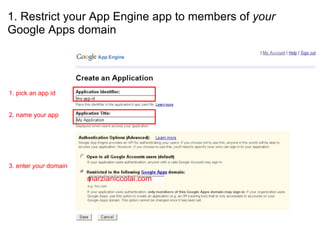
1. Restrict your App Engine app to members of  your  Google Apps domain marzianiccolai.com     1. pick an app id 2. name your app 3. enter  your  domain
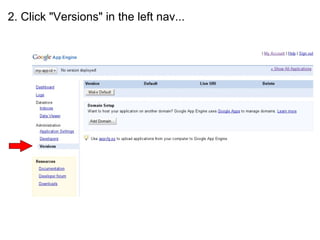
2. Click "Versions" in the left nav...
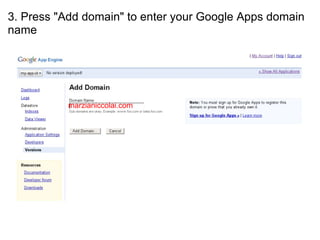
3. Press "Add domain" to enter your Google Apps domain name marzianiccolai.com
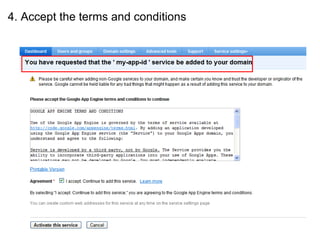
4. Accept the terms and conditions
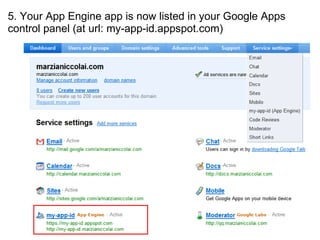
5. Your App Engine app is now listed in your Google Apps control panel (at url: my-app-id.appspot.com)
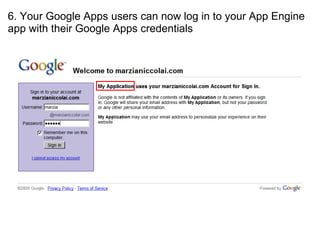
6. Your Google Apps users can now log in to your App Engine app with their Google Apps credentials
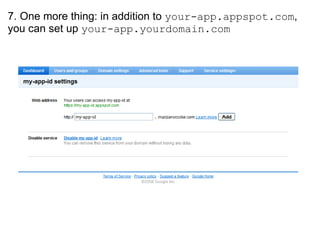
7. One more thing: in addition to  your-app.appspot.com , you can set up  your-app.yourdomain.com

Google App Engine Google Apps

  • 1.
    Google App Enginein Google Apps Deploying Google App Engine applications to Google Apps +
  • 2.
    1. Restrict yourApp Engine app to members of your Google Apps domain marzianiccolai.com     1. pick an app id 2. name your app 3. enter your domain
  • 3.
  • 4.
    3. Press "Adddomain" to enter your Google Apps domain name marzianiccolai.com
  • 5.
    4. Accept theterms and conditions
  • 6.
    5. Your AppEngine app is now listed in your Google Apps control panel (at url: my-app-id.appspot.com)
  • 7.
    6. Your GoogleApps users can now log in to your App Engine app with their Google Apps credentials
  • 8.
    7. One morething: in addition to your-app.appspot.com , you can set up your-app.yourdomain.com