Git usage
(Basics and workflow)
- YEASIN ABEDIN SIAM (NAUTISK TEAM)
- HASAN IBRAHIM SHUVO (NAUTISK TEAM)
What is Git?
 Version Controlling System
 Distributed Mechanism
 Thus if any server dies, and these systems were collaborating via it, any of
the client repositories can be copied back up to the server to restore it
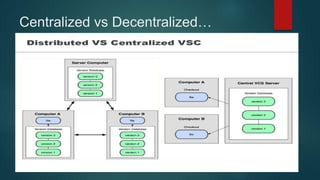
Centralized vs Decentralized VCS
 Centralized version control systems are based on the idea that there is a
single “central” copy of your project somewhere (probably on a server),
and programmers will “commit” their changes to this central copy.
 “Committing” a change simply means recording the change in the central
system. Other programmers can then see this change. They can also pull
down the change, and the version control tool will automatically update the
contents of any files that were changed.
 Example CVS, Subversion (or SVN) and Perforce
Centralized vs Decentralized…
Git tools
 Install Git
 Install Git Client (TortoiseGit, SourceTree, Git for VisualStudio)
 Some client includes git as well (example Github Desktop, SourceTree)
Working with Git
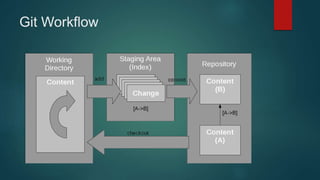
 To start working with Git, you just need to run the "git init" command. It
turns the current directory into the Git working directory and creates the
repository in the .git (hidden) directory it creates there.
 The “git add” command adds untracked file in the staging area.
 The “git commit” command commits the changes in the file.
 The “git checkout” checks out a branch from repository into the working
directory
Git Workflow
File tracking
Git sees every file in your working copy as one of three things:
 tracked - a file which has been previously staged or committed;
 untracked - a file which has not been staged or committed; or
 ignored - a file which Git has been explicitly told to ignore.
.gitignore file
 Dependency caches, such as the contents of /node_modules or /packages
 Compiled code, such as .o, .pyc, and .class files
 Build output directories, such as /bin, /out, or /target
 Files generated at runtime, such as .log, .lock, or .tmp
 personal IDE configuration files, such as .idea/workspace.xml
 Existing ignore patterns : https://github.com/github/gitignore
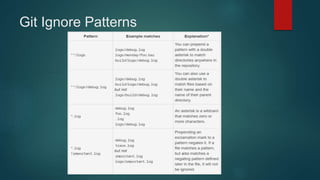
Git Ignore Patterns
Git vs SVN
 Git is distributed system whereas SVN is centralized.
 Git is faster than SVN.
 Git repositories are much smaller than SVN.
 Git are simpler and lees resource heavy than SVN’s.
 Git tracks content unlike SVN’s file tracking
 Merging is simpler in Git; because you don’t need to remember the last
revision you merged from which is required in SVN.
 Git is perfectly suited for Open Source projects: Just Fork it, commit your
changes to your own Fork, and then ask the original project maintainer to
pull your changes.
Git vs Mercurial
 Mercurial is much simpler than Git.
 Git has better history control than Mercurial.
 Branching is more powerful in Git.
 Git has staging area, mercurial doesn’t have
 Mercurial has better GUI support
GitFlow
What is GitFlow?
 GitFlow is a branching model for Git.
 Created by Vincent Driessen.
 Well suited to collaboration and scaling the development team.
Motivations
 Parallel Development
 Collaboration
 Release staging area
 Support for emergency fixes
Branches
 Feature branch
 Develop branch
 Release branch
 Hotfix branch
 Master branch
Feature Branch
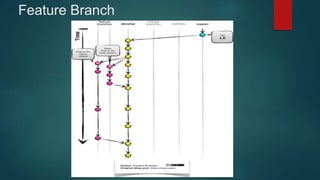
 Feature branches are started off of the develop branch.
 Finished features and fixes are merged back into the develop
branch when they’re ready for release
Feature Branch
Release
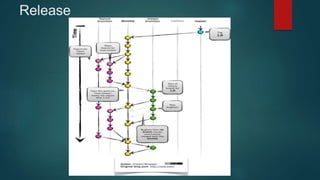
 When it is time to make a release, a release branch is created off
of develop branch
 The code in the release branch is deployed onto a suitable test
environment, tested, and any problems are fixed directly in the release
branch. This deploy -> test -> fix -> redeploy -> retest cycle continues
until you’re happy that the release is good enough to release to customers.
 When the release is finished, the release branch is merged
into master and into develop too, to make sure that any changes made in
the release branch aren’t accidentally lost by new development.
Release
Master Branch
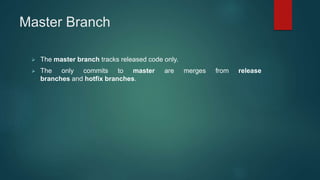
 The master branch tracks released code only.
 The only commits to master are merges from release
branches and hotfix branches.
Hotfix Branch
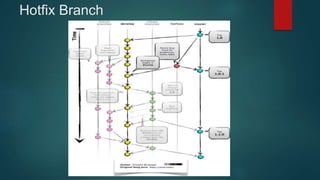
Hotfix branches are used to create emergency fixes.
Hotfix Branch
Git Usage Scenario
Git Stash
 We have changes which are temporary
 But, we don’t want to commit this
 Neither, we want to loose it
 Stash saves state of current working changes
 But Git does not track them for commit
 We can compare working copy with stash
 Stash can be merged to master
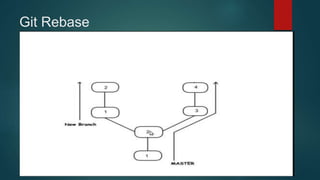
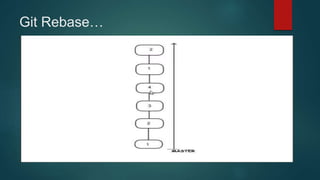
Git Rebase
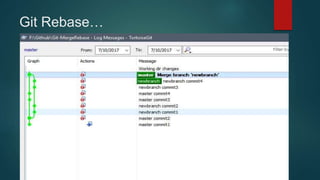
Git Rebase…
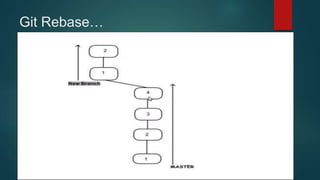
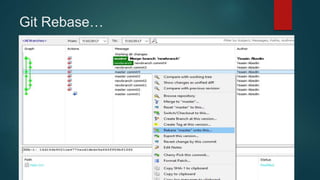
Git Rebase…
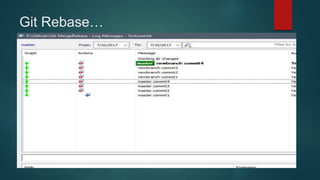
Git Rebase…
Git Rebase…
Git Rebase…
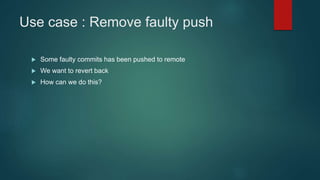
Use case : Remove faulty push
 Some faulty commits has been pushed to remote
 We want to revert back
 How can we do this?
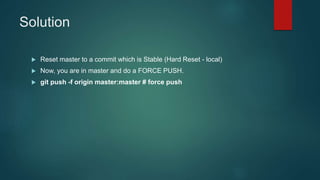
Solution
 Reset master to a commit which is Stable (Hard Reset - local)
 Now, you are in master and do a FORCE PUSH.
 git push -f origin master:master # force push
Cherry Pick
 You're working in a feature branch
 Isn't quite ready for a full merge.
 But you do have a few commits in there that you want to push to master
 We can do this by Cherry Pick
 Allow us to merge specific number of commits
Refrences
 https://git-scm.com/book/en/v2/Getting-Started-Git-Basics
 https://www.ibm.com/developerworks/library/d-learn-workings-
git/index.html
 https://www.atlassian.com/git/tutorials/gitignore
 https://www.atlassian.com/git/tutorials/gitignore#git-ignore-patterns
 https://datasift.github.io/gitflow/IntroducingGitFlow.html
 http://nvie.com/posts/a-successful-git-branching-model/

Git usage (Basics and workflow)

  • 1.
    Git usage (Basics andworkflow) - YEASIN ABEDIN SIAM (NAUTISK TEAM) - HASAN IBRAHIM SHUVO (NAUTISK TEAM)
  • 2.
    What is Git? Version Controlling System  Distributed Mechanism  Thus if any server dies, and these systems were collaborating via it, any of the client repositories can be copied back up to the server to restore it
  • 3.
    Centralized vs DecentralizedVCS  Centralized version control systems are based on the idea that there is a single “central” copy of your project somewhere (probably on a server), and programmers will “commit” their changes to this central copy.  “Committing” a change simply means recording the change in the central system. Other programmers can then see this change. They can also pull down the change, and the version control tool will automatically update the contents of any files that were changed.  Example CVS, Subversion (or SVN) and Perforce
  • 4.
  • 5.
    Git tools  InstallGit  Install Git Client (TortoiseGit, SourceTree, Git for VisualStudio)  Some client includes git as well (example Github Desktop, SourceTree)
  • 6.
    Working with Git To start working with Git, you just need to run the "git init" command. It turns the current directory into the Git working directory and creates the repository in the .git (hidden) directory it creates there.  The “git add” command adds untracked file in the staging area.  The “git commit” command commits the changes in the file.  The “git checkout” checks out a branch from repository into the working directory
  • 7.
  • 8.
    File tracking Git seesevery file in your working copy as one of three things:  tracked - a file which has been previously staged or committed;  untracked - a file which has not been staged or committed; or  ignored - a file which Git has been explicitly told to ignore.
  • 9.
    .gitignore file  Dependencycaches, such as the contents of /node_modules or /packages  Compiled code, such as .o, .pyc, and .class files  Build output directories, such as /bin, /out, or /target  Files generated at runtime, such as .log, .lock, or .tmp  personal IDE configuration files, such as .idea/workspace.xml  Existing ignore patterns : https://github.com/github/gitignore
  • 10.
  • 11.
    Git vs SVN Git is distributed system whereas SVN is centralized.  Git is faster than SVN.  Git repositories are much smaller than SVN.  Git are simpler and lees resource heavy than SVN’s.  Git tracks content unlike SVN’s file tracking  Merging is simpler in Git; because you don’t need to remember the last revision you merged from which is required in SVN.  Git is perfectly suited for Open Source projects: Just Fork it, commit your changes to your own Fork, and then ask the original project maintainer to pull your changes.
  • 12.
    Git vs Mercurial Mercurial is much simpler than Git.  Git has better history control than Mercurial.  Branching is more powerful in Git.  Git has staging area, mercurial doesn’t have  Mercurial has better GUI support
  • 13.
  • 14.
    What is GitFlow? GitFlow is a branching model for Git.  Created by Vincent Driessen.  Well suited to collaboration and scaling the development team.
  • 15.
    Motivations  Parallel Development Collaboration  Release staging area  Support for emergency fixes
  • 16.
    Branches  Feature branch Develop branch  Release branch  Hotfix branch  Master branch
  • 17.
    Feature Branch  Featurebranches are started off of the develop branch.  Finished features and fixes are merged back into the develop branch when they’re ready for release
  • 18.
  • 19.
    Release  When itis time to make a release, a release branch is created off of develop branch  The code in the release branch is deployed onto a suitable test environment, tested, and any problems are fixed directly in the release branch. This deploy -> test -> fix -> redeploy -> retest cycle continues until you’re happy that the release is good enough to release to customers.  When the release is finished, the release branch is merged into master and into develop too, to make sure that any changes made in the release branch aren’t accidentally lost by new development.
  • 20.
  • 21.
    Master Branch  Themaster branch tracks released code only.  The only commits to master are merges from release branches and hotfix branches.
  • 22.
    Hotfix Branch Hotfix branchesare used to create emergency fixes.
  • 23.
  • 24.
  • 25.
    Git Stash  Wehave changes which are temporary  But, we don’t want to commit this  Neither, we want to loose it  Stash saves state of current working changes  But Git does not track them for commit  We can compare working copy with stash  Stash can be merged to master
  • 26.
  • 27.
  • 28.
  • 29.
  • 30.
  • 31.
  • 32.
    Use case :Remove faulty push  Some faulty commits has been pushed to remote  We want to revert back  How can we do this?
  • 33.
    Solution  Reset masterto a commit which is Stable (Hard Reset - local)  Now, you are in master and do a FORCE PUSH.  git push -f origin master:master # force push
  • 34.
    Cherry Pick  You'reworking in a feature branch  Isn't quite ready for a full merge.  But you do have a few commits in there that you want to push to master  We can do this by Cherry Pick  Allow us to merge specific number of commits
  • 35.
    Refrences  https://git-scm.com/book/en/v2/Getting-Started-Git-Basics  https://www.ibm.com/developerworks/library/d-learn-workings- git/index.html https://www.atlassian.com/git/tutorials/gitignore  https://www.atlassian.com/git/tutorials/gitignore#git-ignore-patterns  https://datasift.github.io/gitflow/IntroducingGitFlow.html  http://nvie.com/posts/a-successful-git-branching-model/