
Repository Control System using Git
Prepared By
Md. Mujahid Islam
1
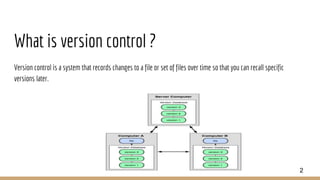
What is version control ?
Version control is a system that records changes to a file or set of files over time so that you can recall specific
versions later.
2
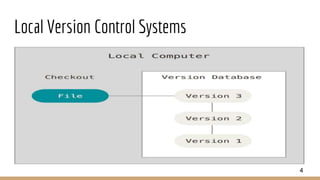
Local Version Control Systems
Many people’s version-control method of choice is to copy files into another directory (perhaps a time-stamped
directory, if they’re clever).
This approach is very common because it is so simple, but it is also incredibly error prone.
3
Local Version Control Systems
4
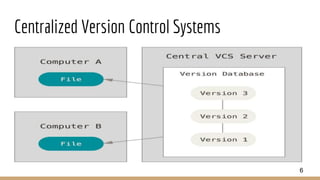
Centralized Version Control Systems
❖These systems, such as CVS, Subversion, and Perforce, have a single server that contains all the versioned files,
and a number of clients that check out files from that central place.
❖This setup offers many advantages, especially over local VCSs. For example, everyone knows to a certain degree
what everyone else on the project is doing.
❖Local VCS systems suffer from this same problem – whenever you have the entire history of the project in a
single place, you risk losing everything.
5
Centralized Version Control Systems
6
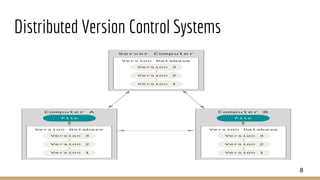
Distributed Version Control Systems
❖This is where Distributed Version Control Systems (DVCSs) step in. In a DVCS (such as Git, Mercurial, Bazaar or
Darcs), clients don’t just check out the latest snapshot of the files: they fully mirror the repository. Thus if any
server dies, and these systems were collaborating via it, any of the client repositories can be copied back up to
the server to restore it.
❖if any server dies, and these systems were collaborating via it, any of the client repositories can be copied back
up to the server to restore it. Every clone is really a full backup of all the data.
7
Distributed Version Control Systems
8
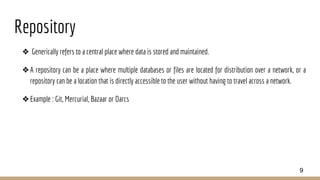
Repository
❖ Generically refers to a central place where data is stored and maintained.
❖A repository can be a place where multiple databases or files are located for distribution over a network, or a
repository can be a location that is directly accessible to the user without having to travel across a network.
❖Example : Git, Mercurial, Bazaar or Darcs
9
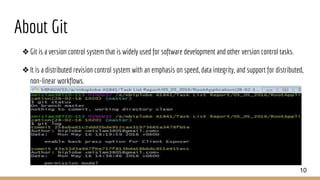
About Git
❖Git is a version control system that is widely used for software development and other version control tasks.
❖It is a distributed revision control system with an emphasis on speed, data integrity, and support for distributed,
non-linear workflows.
10
A Short History of Git
❖In 2002, the Linux kernel project began using a proprietary DVCS called BitKeeper.
❖In 2005, the relationship between the community that developed the Linux kernel and the commercial company
that developed BitKeeper broke down, and the tool’s free-of-charge status was revoked.
❖Since its birth in 2005, Git has evolved and matured to be easy to use and yet retain these initial qualities.
11
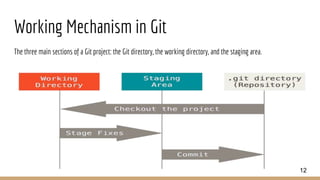
Working Mechanism in Git
The three main sections of a Git project: the Git directory, the working directory, and the staging area.
12
How to use Git
❖Almost Every IDE support git plugin . Installing this plugin we perform git operation through UI console their
Like Android Studio, Eclipse, Netbeans etc.
❖Using Command we can perform following operation . In this slide we perform git operation using Git console .
13
Git Topics
❖Git Basic Command
❖Git Branching & Branching Command
❖Git Reset & Reset Command
❖Git Stash Command
❖Git Server
❖Git Communication Command with Remote Server
❖Git Alias Command
14
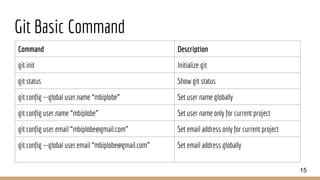
Git Basic Command
Command Description
git init Initialize git
git status Show git status
git config --global user.name “mbiplobe” Set user name globally
git config user.name “mbiplobe” Set user name only for current project
git config user.email “mbiplobe@gmail.com” Set email address only for current project
git config --global user.email “mbiplobe@gmail.com” Set email address globally
15
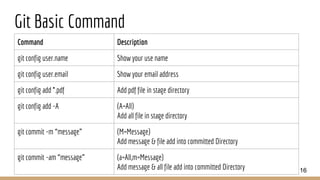
Git Basic Command
Command Description
git config user.name Show your use name
git config user.email Show your email address
git config add *.pdf Add pdf file in stage directory
git config add -A (A=All)
Add all file in stage directory
git commit -m “message” (M=Message)
Add message & file add into committed Directory
git commit -am “message” (a=All,m=Message)
Add message & all file add into committed Directory 16
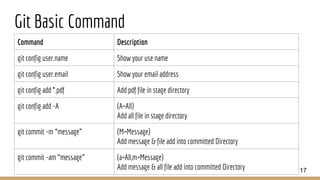
Git Basic Command
Command Description
git config user.name Show your use name
git config user.email Show your email address
git config add *.pdf Add pdf file in stage directory
git config add -A (A=All)
Add all file in stage directory
git commit -m “message” (M=Message)
Add message & file add into committed Directory
git commit -am “message” (a=All,m=Message)
Add message & all file add into committed Directory 17
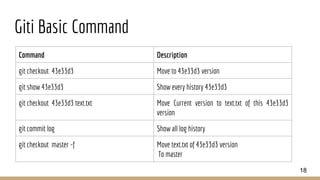
Giti Basic Command
Command Description
git checkout 43e33d3 Move to 43e33d3 version
git show 43e33d3 Show every history 43e33d3
git checkout 43e33d3 text.txt Move Current version to text.txt of this 43e33d3
version
git commit log Show all log history
git checkout master -f Move text.txt of 43e33d3 version
To master
18
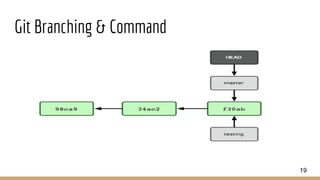
Git Branching & Command
19
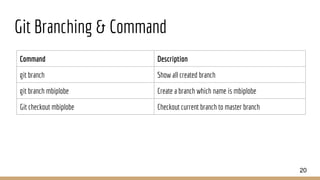
Git Branching & Command
Command Description
git branch Show all created branch
git branch mbiplobe Create a branch which name is mbiplobe
Git checkout mbiplobe Checkout current branch to master branch
20
Git Reset & Reset Command
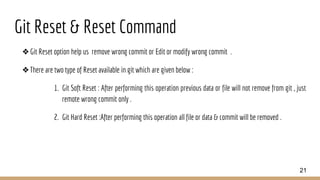
❖Git Reset option help us remove wrong commit or Edit or modify wrong commit .
❖There are two type of Reset available in git which are given below :
1. Git Soft Reset : After performing this operation previous data or file will not remove from git , just
remote wrong commit only .
2. Git Hard Reset :After performing this operation all file or data & commit will be removed .
21
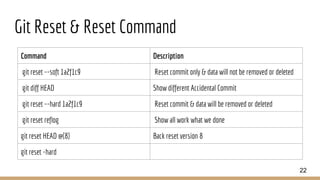
Git Reset & Reset Command
Command Description
git reset --soft 1a2f1c9 Reset commit only & data will not be removed or deleted
git diff HEAD Show different Accidental Commit
git reset --hard 1a2f1c9 Reset commit & data will be removed or deleted
git reset reflog Show all work what we done
git reset HEAD @{8} Back reset version 8
git reset -hard
22
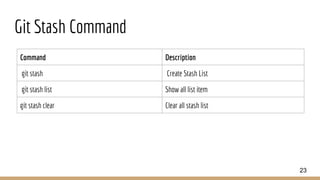
Git Stash Command
Command Description
git stash Create Stash List
git stash list Show all list item
git stash clear Clear all stash list
23
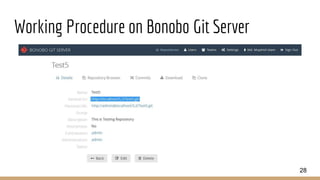
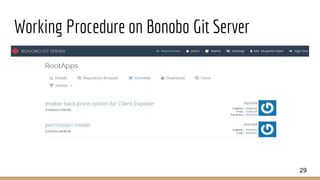
Git Server
❖Git Server is a place where we host our local git repository . There are two type of git Server available which are
given below :
1. Local Git Server : Bonobo git Server , GitLab git server .
2. Global Git Server : github , Bitbucket etc
❖In this presentation we discuss about Bonobo Git Server (Local git Server) which are discussion below :
24
Bonobo Git Server
❖Bonobo Git Server for Windows is a web application you can install on your IIS. It provides an easy management
tool and access to your git repositories that are self hosted on your server.
❖Bonobo Git Server is an open-source project as it is licensed with a MIT License.
❖Bonobo Git Server is a free git server for Windows and it should stay free.
25
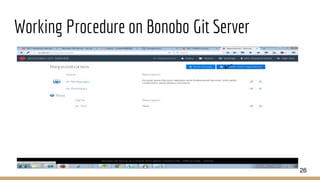
Working Procedure on Bonobo Git Server
26
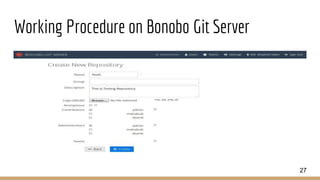
Working Procedure on Bonobo Git Server
27
Working Procedure on Bonobo Git Server
28
Working Procedure on Bonobo Git Server
29
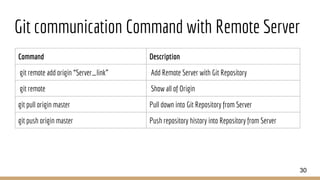
Git communication Command with Remote Server
Command Description
git remote add origin “Server_link” Add Remote Server with Git Repository
git remote Show all of Origin
git pull origin master Pull down into Git Repository from Server
git push origin master Push repository history into Repository from Server
30
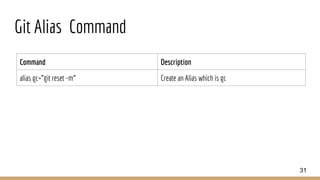
Git Alias Command
Command Description
alias gc=”git reset -m” Create an Alias which is gc
31
Reference
❖https://git-scm.com/
❖https://bonobogitserver.com/
❖https://youtu.be/j1oFazXrzN4
❖https://www.youtube.com/watch?v=M2a7OQX8te4
❖https://progit2.s3.amazonaws.com/en/2016-03-22-f3531/progit-en.1084.pdf
32
Question & Answer
33
34

Presentation on Repository Control System

  • 1.
    Repository Control Systemusing Git Prepared By Md. Mujahid Islam 1
  • 2.
    What is versioncontrol ? Version control is a system that records changes to a file or set of files over time so that you can recall specific versions later. 2
  • 3.
    Local Version ControlSystems Many people’s version-control method of choice is to copy files into another directory (perhaps a time-stamped directory, if they’re clever). This approach is very common because it is so simple, but it is also incredibly error prone. 3
  • 4.
  • 5.
    Centralized Version ControlSystems ❖These systems, such as CVS, Subversion, and Perforce, have a single server that contains all the versioned files, and a number of clients that check out files from that central place. ❖This setup offers many advantages, especially over local VCSs. For example, everyone knows to a certain degree what everyone else on the project is doing. ❖Local VCS systems suffer from this same problem – whenever you have the entire history of the project in a single place, you risk losing everything. 5
  • 6.
  • 7.
    Distributed Version ControlSystems ❖This is where Distributed Version Control Systems (DVCSs) step in. In a DVCS (such as Git, Mercurial, Bazaar or Darcs), clients don’t just check out the latest snapshot of the files: they fully mirror the repository. Thus if any server dies, and these systems were collaborating via it, any of the client repositories can be copied back up to the server to restore it. ❖if any server dies, and these systems were collaborating via it, any of the client repositories can be copied back up to the server to restore it. Every clone is really a full backup of all the data. 7
  • 8.
  • 9.
    Repository ❖ Generically refersto a central place where data is stored and maintained. ❖A repository can be a place where multiple databases or files are located for distribution over a network, or a repository can be a location that is directly accessible to the user without having to travel across a network. ❖Example : Git, Mercurial, Bazaar or Darcs 9
  • 10.
    About Git ❖Git isa version control system that is widely used for software development and other version control tasks. ❖It is a distributed revision control system with an emphasis on speed, data integrity, and support for distributed, non-linear workflows. 10
  • 11.
    A Short Historyof Git ❖In 2002, the Linux kernel project began using a proprietary DVCS called BitKeeper. ❖In 2005, the relationship between the community that developed the Linux kernel and the commercial company that developed BitKeeper broke down, and the tool’s free-of-charge status was revoked. ❖Since its birth in 2005, Git has evolved and matured to be easy to use and yet retain these initial qualities. 11
  • 12.
    Working Mechanism inGit The three main sections of a Git project: the Git directory, the working directory, and the staging area. 12
  • 13.
    How to useGit ❖Almost Every IDE support git plugin . Installing this plugin we perform git operation through UI console their Like Android Studio, Eclipse, Netbeans etc. ❖Using Command we can perform following operation . In this slide we perform git operation using Git console . 13
  • 14.
    Git Topics ❖Git BasicCommand ❖Git Branching & Branching Command ❖Git Reset & Reset Command ❖Git Stash Command ❖Git Server ❖Git Communication Command with Remote Server ❖Git Alias Command 14
  • 15.
    Git Basic Command CommandDescription git init Initialize git git status Show git status git config --global user.name “mbiplobe” Set user name globally git config user.name “mbiplobe” Set user name only for current project git config user.email “mbiplobe@gmail.com” Set email address only for current project git config --global user.email “mbiplobe@gmail.com” Set email address globally 15
  • 16.
    Git Basic Command CommandDescription git config user.name Show your use name git config user.email Show your email address git config add *.pdf Add pdf file in stage directory git config add -A (A=All) Add all file in stage directory git commit -m “message” (M=Message) Add message & file add into committed Directory git commit -am “message” (a=All,m=Message) Add message & all file add into committed Directory 16
  • 17.
    Git Basic Command CommandDescription git config user.name Show your use name git config user.email Show your email address git config add *.pdf Add pdf file in stage directory git config add -A (A=All) Add all file in stage directory git commit -m “message” (M=Message) Add message & file add into committed Directory git commit -am “message” (a=All,m=Message) Add message & all file add into committed Directory 17
  • 18.
    Giti Basic Command CommandDescription git checkout 43e33d3 Move to 43e33d3 version git show 43e33d3 Show every history 43e33d3 git checkout 43e33d3 text.txt Move Current version to text.txt of this 43e33d3 version git commit log Show all log history git checkout master -f Move text.txt of 43e33d3 version To master 18
  • 19.
    Git Branching &Command 19
  • 20.
    Git Branching &Command Command Description git branch Show all created branch git branch mbiplobe Create a branch which name is mbiplobe Git checkout mbiplobe Checkout current branch to master branch 20
  • 21.
    Git Reset &Reset Command ❖Git Reset option help us remove wrong commit or Edit or modify wrong commit . ❖There are two type of Reset available in git which are given below : 1. Git Soft Reset : After performing this operation previous data or file will not remove from git , just remote wrong commit only . 2. Git Hard Reset :After performing this operation all file or data & commit will be removed . 21
  • 22.
    Git Reset &Reset Command Command Description git reset --soft 1a2f1c9 Reset commit only & data will not be removed or deleted git diff HEAD Show different Accidental Commit git reset --hard 1a2f1c9 Reset commit & data will be removed or deleted git reset reflog Show all work what we done git reset HEAD @{8} Back reset version 8 git reset -hard 22
  • 23.
    Git Stash Command CommandDescription git stash Create Stash List git stash list Show all list item git stash clear Clear all stash list 23
  • 24.
    Git Server ❖Git Serveris a place where we host our local git repository . There are two type of git Server available which are given below : 1. Local Git Server : Bonobo git Server , GitLab git server . 2. Global Git Server : github , Bitbucket etc ❖In this presentation we discuss about Bonobo Git Server (Local git Server) which are discussion below : 24
  • 25.
    Bonobo Git Server ❖BonoboGit Server for Windows is a web application you can install on your IIS. It provides an easy management tool and access to your git repositories that are self hosted on your server. ❖Bonobo Git Server is an open-source project as it is licensed with a MIT License. ❖Bonobo Git Server is a free git server for Windows and it should stay free. 25
  • 26.
    Working Procedure onBonobo Git Server 26
  • 27.
    Working Procedure onBonobo Git Server 27
  • 28.
    Working Procedure onBonobo Git Server 28
  • 29.
    Working Procedure onBonobo Git Server 29
  • 30.
    Git communication Commandwith Remote Server Command Description git remote add origin “Server_link” Add Remote Server with Git Repository git remote Show all of Origin git pull origin master Pull down into Git Repository from Server git push origin master Push repository history into Repository from Server 30
  • 31.
    Git Alias Command CommandDescription alias gc=”git reset -m” Create an Alias which is gc 31
  • 32.
  • 33.
  • 34.