Git
A Distrubuted version
control system
Hello!
I am Sai Kumar
Satapathy
I am here to give presentation on Git
2
Basics of Version
Control System
1
4
Benefits of the Version Control
System
◇ Enhances the project development speed by providing
efficient collaboration,
◇ Leverages the productivity, expedite product delivery,
and skills of the employees through better
communication and assistance,
◇ Reduce possibilities of errors and conflicts meanwhile
project development through traceability to every small
change,
◇ Informs us about Who, What, When, Why changes have
been made
5
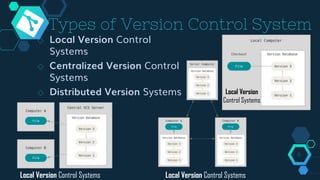
Types of Version Control System
◇ Local Version Control
Systems
◇ Centralized Version Control
Systems
◇ Distributed Version Systems
6
Local Version
Control Systems
Local Version Control Systems Local Version Control Systems
Basics of Git
2
What is GIT?
◇ Git is a free and open source distributed version
control system.
◇ Initially designed and developed by Linus Toryalds
for Linux kenal development in 2005.
◇ Git allows a term of people to work together, all
using the some files. 8
Characteristics
of Git
9
3
Branching
◇ Git allows its users to work on a line that runs
parallel to the main project files. These lines are
called branches.
◇ Git branches is lightweight that other VCS models
◇ Branches in Git provide a feature to make changes
in the project without affecting the original version. 10
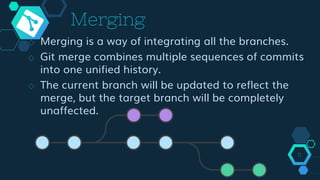
Merging
◇ Merging is a way of integrating all the branches.
◇ Git merge combines multiple sequences of commits
into one unified history.
◇ The current branch will be updated to reflect the
merge, but the target branch will be completely
unaffected.
11
Synchronizing with
Remote Repositories
◇ Push: This command is used to push all the commits of the
current repository to the tracked remote repository.
◇ Syntax:
$ git push -u origin master
◇ Pull: Pull command is used to fetch the commits from a
remote repository and stores them in the remote branches.
◇ Syntax:
$ git pull 12
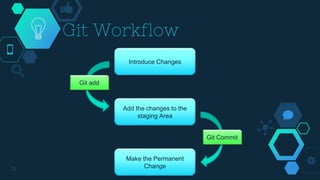
Git Workflow
13
Introduce Changes
Add the changes to the
staging Area
Make the Permanent
Change
Git add
Git Commit
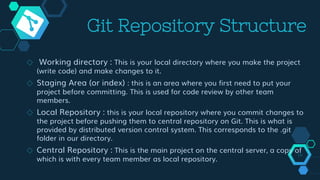
Git Repository Structure
◇ Working directory : This is your local directory where you make the project
(write code) and make changes to it.
◇ Staging Area (or index) : this is an area where you first need to put your
project before committing. This is used for code review by other team
members.
◇ Local Repository : this is your local repository where you commit changes to
the project before pushing them to central repository on Git. This is what is
provided by distributed version control system. This corresponds to the .git
folder in our directory.
◇ Central Repository : This is the main project on the central server, a copy of
which is with every team member as local repository.
14
GIT
Commands
15
4
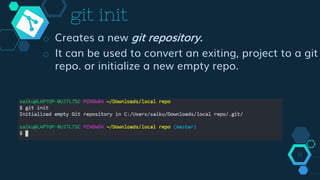
git init
◇ Creates a new git repository.
◇ It can be used to convert an exiting, project to a git
repo. or initialize a new empty repo.
16
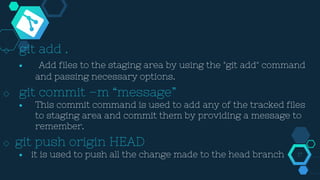
◇ git add .
■ Add files to the staging area by using the "git add" command
and passing necessary options.
◇ git commit –m “message”
■ This commit command is used to add any of the tracked files
to staging area and commit them by providing a message to
remember.
◇ git push origin HEAD
■ it is used to push all the change made to the head branch 17
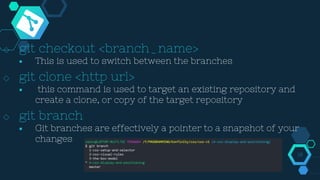
◇ git checkout <branch_name>
■ This is used to switch between the branches
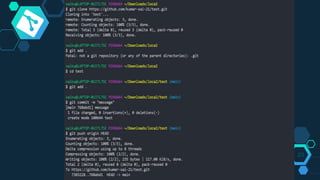
◇ git clone <http url>
■ this command is used to target an existing repository and
create a clone, or copy of the target repository
◇ git branch
■ Git branches are effectively a pointer to a snapshot of your
changes
18
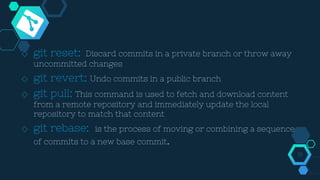
◇ git reset: Discard commits in a private branch or throw away
uncommitted changes
◇ git revert: Undo commits in a public branch
◇ git pull: This command is used to fetch and download content
from a remote repository and immediately update the local
repository to match that content
◇ git rebase: is the process of moving or combining a sequence
of commits to a new base commit.
19
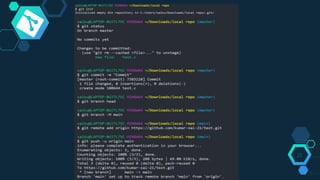
Push Local
Repo. to a
remote Repo.
20
5
21
Clone a repo. in
your Local
System 22
6
asd
23
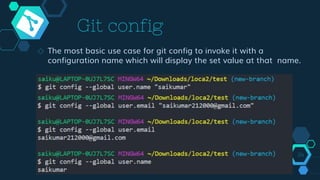
Git config
◇ The most basic use case for git config to invoke it with a
configuration name which will display the set value at that name.
24
25
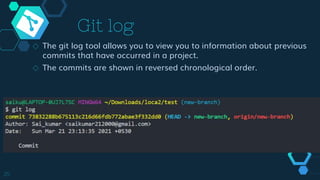
Git log
◇ The git log tool allows you to view you to information about previous
commits that have occurred in a project.
◇ The commits are shown in reversed chronological order.
Advantages of
GIT
26
7
◇ Performance
■ best performance when it comes to version control systems. Committing,
branching, merging all are optimized for a better performance than
other systems.
◇ Lightweight
■ Git follows the criteria of lossless compression that compresses the data
and stores it in the local repository occupying very minimal space.
◇ Secure
■ Git keeps a record of all the commits done by each of the collaborators
on the local copy of the developer.
27
◇ Speed
■ The fetching power from a local repository is about 100 times faster than
what possible with the remote server
◇ Distributed – System
■ Distributed systems are those which allow the users to perform work on
a project from all over the world.
◇ Open Source
■ Git is a free and open-source distributed version control system designed
to handle everything from small to very large projects with speed and
efficiency.
■ It is called open-source because it provides the flexibility to modify its
source code according to the user’s needs. 28
Why Git for
your
organization
29
8
8
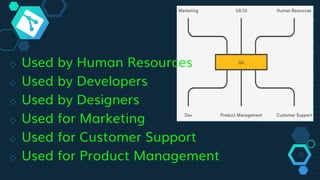
◇ Used by Human Resources
◇ Used by Developers
◇ Used by Designers
◇ Used for Marketing
◇ Used for Customer Support
◇ Used for Product Management 30
Thanks!
31

Git presentation

  • 1.
  • 2.
    Hello! I am SaiKumar Satapathy I am here to give presentation on Git 2
  • 3.
  • 4.
  • 5.
    Benefits of theVersion Control System ◇ Enhances the project development speed by providing efficient collaboration, ◇ Leverages the productivity, expedite product delivery, and skills of the employees through better communication and assistance, ◇ Reduce possibilities of errors and conflicts meanwhile project development through traceability to every small change, ◇ Informs us about Who, What, When, Why changes have been made 5
  • 6.
    Types of VersionControl System ◇ Local Version Control Systems ◇ Centralized Version Control Systems ◇ Distributed Version Systems 6 Local Version Control Systems Local Version Control Systems Local Version Control Systems
  • 7.
  • 8.
    What is GIT? ◇Git is a free and open source distributed version control system. ◇ Initially designed and developed by Linus Toryalds for Linux kenal development in 2005. ◇ Git allows a term of people to work together, all using the some files. 8
  • 9.
  • 10.
    Branching ◇ Git allowsits users to work on a line that runs parallel to the main project files. These lines are called branches. ◇ Git branches is lightweight that other VCS models ◇ Branches in Git provide a feature to make changes in the project without affecting the original version. 10
  • 11.
    Merging ◇ Merging isa way of integrating all the branches. ◇ Git merge combines multiple sequences of commits into one unified history. ◇ The current branch will be updated to reflect the merge, but the target branch will be completely unaffected. 11
  • 12.
    Synchronizing with Remote Repositories ◇Push: This command is used to push all the commits of the current repository to the tracked remote repository. ◇ Syntax: $ git push -u origin master ◇ Pull: Pull command is used to fetch the commits from a remote repository and stores them in the remote branches. ◇ Syntax: $ git pull 12
  • 13.
    Git Workflow 13 Introduce Changes Addthe changes to the staging Area Make the Permanent Change Git add Git Commit
  • 14.
    Git Repository Structure ◇Working directory : This is your local directory where you make the project (write code) and make changes to it. ◇ Staging Area (or index) : this is an area where you first need to put your project before committing. This is used for code review by other team members. ◇ Local Repository : this is your local repository where you commit changes to the project before pushing them to central repository on Git. This is what is provided by distributed version control system. This corresponds to the .git folder in our directory. ◇ Central Repository : This is the main project on the central server, a copy of which is with every team member as local repository. 14
  • 15.
  • 16.
    git init ◇ Createsa new git repository. ◇ It can be used to convert an exiting, project to a git repo. or initialize a new empty repo. 16
  • 17.
    ◇ git add. ■ Add files to the staging area by using the "git add" command and passing necessary options. ◇ git commit –m “message” ■ This commit command is used to add any of the tracked files to staging area and commit them by providing a message to remember. ◇ git push origin HEAD ■ it is used to push all the change made to the head branch 17
  • 18.
    ◇ git checkout<branch_name> ■ This is used to switch between the branches ◇ git clone <http url> ■ this command is used to target an existing repository and create a clone, or copy of the target repository ◇ git branch ■ Git branches are effectively a pointer to a snapshot of your changes 18
  • 19.
    ◇ git reset:Discard commits in a private branch or throw away uncommitted changes ◇ git revert: Undo commits in a public branch ◇ git pull: This command is used to fetch and download content from a remote repository and immediately update the local repository to match that content ◇ git rebase: is the process of moving or combining a sequence of commits to a new base commit. 19
  • 20.
    Push Local Repo. toa remote Repo. 20 5
  • 21.
  • 22.
    Clone a repo.in your Local System 22 6
  • 23.
  • 24.
    Git config ◇ Themost basic use case for git config to invoke it with a configuration name which will display the set value at that name. 24
  • 25.
    25 Git log ◇ Thegit log tool allows you to view you to information about previous commits that have occurred in a project. ◇ The commits are shown in reversed chronological order.
  • 26.
  • 27.
    ◇ Performance ■ bestperformance when it comes to version control systems. Committing, branching, merging all are optimized for a better performance than other systems. ◇ Lightweight ■ Git follows the criteria of lossless compression that compresses the data and stores it in the local repository occupying very minimal space. ◇ Secure ■ Git keeps a record of all the commits done by each of the collaborators on the local copy of the developer. 27
  • 28.
    ◇ Speed ■ Thefetching power from a local repository is about 100 times faster than what possible with the remote server ◇ Distributed – System ■ Distributed systems are those which allow the users to perform work on a project from all over the world. ◇ Open Source ■ Git is a free and open-source distributed version control system designed to handle everything from small to very large projects with speed and efficiency. ■ It is called open-source because it provides the flexibility to modify its source code according to the user’s needs. 28
  • 29.
  • 30.
    ◇ Used byHuman Resources ◇ Used by Developers ◇ Used by Designers ◇ Used for Marketing ◇ Used for Customer Support ◇ Used for Product Management 30
  • 31.