
Git Flow
A Git branching model
Why git?
1. Git is Fast
2. Git is Small
3. Distributed
4. GitHub
5. Git is the new standard
6. Easy to Learn( 21 commands)
7. Cheap Local Branching
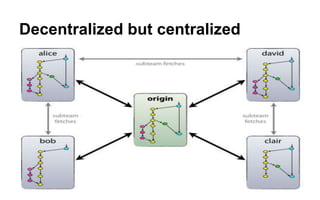
Decentralized but centralized
GIT FLOW
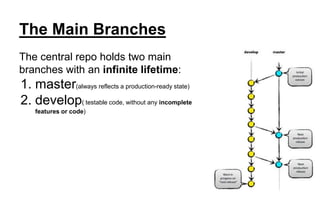
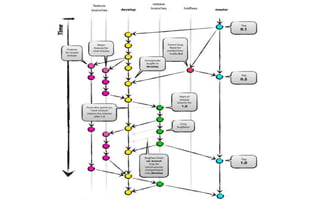
The Main Branches
The central repo holds two main
branches with an infinite lifetime:
1. master(always reflects a production-ready state)
2. develop( testable code, without any incomplete
features or code)
Supporting Branches
1. Supporting branches are used for:
a. parallel development between team members
b. ease tracking of features
c. prepare for production releases
d. assist in quickly fixing live production problems
2. These branches always have a limited lifetime
Type of branches:
1. Feature branches
2. Release branches
3. Hotfix branches
4. Issue Branches
5. Your choice
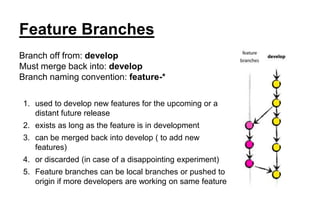
Feature Branches
Branch off from: develop
Must merge back into: develop
Branch naming convention: feature-*
1. used to develop new features for the upcoming or a
distant future release
2. exists as long as the feature is in development
3. can be merged back into develop ( to add new
features)
4. or discarded (in case of a disappointing experiment)
5. Feature branches can be local branches or pushed to
origin if more developers are working on same feature
Release Branches
Branch off from: develop
Must merge back into: develop and master
Branch naming convention: release-*
1. preparation of a new production release
2. allow for minor bug fixes
3. meta-data for a release (version number, build dates, etc.)
When?
develop branch (almost) reflects the desired state of the new
release.
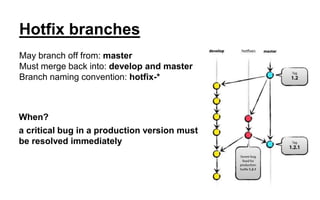
Hotfix branches
May branch off from: master
Must merge back into: develop and master
Branch naming convention: hotfix-*
When?
a critical bug in a production version must
be resolved immediately
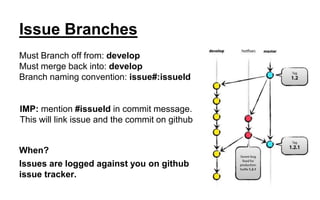
Issue Branches
Must Branch off from: develop
Must merge back into: develop
Branch naming convention: issue#:issueId
IMP: mention #issueId in commit message.
This will link issue and the commit on github
When?
Issues are logged against you on github
issue tracker.
Branch Per Task Approach:
1. Nobody must ever work on develop or master branch.
2. Always create a new branch for every task/issue/feature
3. Write code.
4. Test
5. Merge it back
6. Next task/feature/issue
Starting a task/feature/issue
1. switch to develop branch ( : git checkout develop)
2. pull latest develop from origin ( : git pull origin develop )
3. create new branch ( : git branch branch-name )
4. Switch to newly created branch( : git checkout branch-name)
5. Continue working….
After completing task/feature/issue
1. commit your code( : git commit -a -m “commit message” )
2. pull develop into current branch to make sure your code works with
latest develop branch(if updated by someone)(imp)
3. test functionality again
4. switch to develop branch ( : git checkout develop)
5. merge the task branch into develop ( : git merge branch-name)
6. delete branch branch-name ( : git branch -d branch-name )
7. Push develop back to origin ( : git push origin develop )
8. Next task / feature / issue
Things to remember:
1. Never perform more than one task in same branch
2. Use stashing if you don’t want to commit your code but still want to
checkout other branch or use later
3. Strictly follow naming conventions for branches and commit
messages
4. Delete branches once merged completely
Pull Requests:( Github )
1. Allows to review the code and then merge( not a git feature )
2. Open source project are managed with this approach
Thank You

Git flow

  • 1.
    Git Flow A Gitbranching model
  • 2.
    Why git? 1. Gitis Fast 2. Git is Small 3. Distributed 4. GitHub 5. Git is the new standard 6. Easy to Learn( 21 commands) 7. Cheap Local Branching
  • 3.
  • 4.
  • 5.
    The Main Branches Thecentral repo holds two main branches with an infinite lifetime: 1. master(always reflects a production-ready state) 2. develop( testable code, without any incomplete features or code)
  • 6.
    Supporting Branches 1. Supportingbranches are used for: a. parallel development between team members b. ease tracking of features c. prepare for production releases d. assist in quickly fixing live production problems 2. These branches always have a limited lifetime Type of branches: 1. Feature branches 2. Release branches 3. Hotfix branches 4. Issue Branches 5. Your choice
  • 7.
    Feature Branches Branch offfrom: develop Must merge back into: develop Branch naming convention: feature-* 1. used to develop new features for the upcoming or a distant future release 2. exists as long as the feature is in development 3. can be merged back into develop ( to add new features) 4. or discarded (in case of a disappointing experiment) 5. Feature branches can be local branches or pushed to origin if more developers are working on same feature
  • 8.
    Release Branches Branch offfrom: develop Must merge back into: develop and master Branch naming convention: release-* 1. preparation of a new production release 2. allow for minor bug fixes 3. meta-data for a release (version number, build dates, etc.) When? develop branch (almost) reflects the desired state of the new release.
  • 9.
    Hotfix branches May branchoff from: master Must merge back into: develop and master Branch naming convention: hotfix-* When? a critical bug in a production version must be resolved immediately
  • 10.
    Issue Branches Must Branchoff from: develop Must merge back into: develop Branch naming convention: issue#:issueId IMP: mention #issueId in commit message. This will link issue and the commit on github When? Issues are logged against you on github issue tracker.
  • 12.
    Branch Per TaskApproach: 1. Nobody must ever work on develop or master branch. 2. Always create a new branch for every task/issue/feature 3. Write code. 4. Test 5. Merge it back 6. Next task/feature/issue
  • 13.
    Starting a task/feature/issue 1.switch to develop branch ( : git checkout develop) 2. pull latest develop from origin ( : git pull origin develop ) 3. create new branch ( : git branch branch-name ) 4. Switch to newly created branch( : git checkout branch-name) 5. Continue working….
  • 14.
    After completing task/feature/issue 1.commit your code( : git commit -a -m “commit message” ) 2. pull develop into current branch to make sure your code works with latest develop branch(if updated by someone)(imp) 3. test functionality again 4. switch to develop branch ( : git checkout develop) 5. merge the task branch into develop ( : git merge branch-name) 6. delete branch branch-name ( : git branch -d branch-name ) 7. Push develop back to origin ( : git push origin develop ) 8. Next task / feature / issue
  • 15.
    Things to remember: 1.Never perform more than one task in same branch 2. Use stashing if you don’t want to commit your code but still want to checkout other branch or use later 3. Strictly follow naming conventions for branches and commit messages 4. Delete branches once merged completely
  • 16.
    Pull Requests:( Github) 1. Allows to review the code and then merge( not a git feature ) 2. Open source project are managed with this approach
  • 17.