GIT and its Extension Training

Eric Guo
                         2012-03-27
Training Agenda
•   Version Control History, GIT Design Goal
•   GIT Extension Installation and Setup
•   GIT Concept and Terminology
•   GIT Daily Usage in SVN way
•   Create your own GIT repo (local &
    remote)
•   New GIT feature and further more manual
Version Control History
   manually keep track of versions of code! (1960s)
   keep lots of versions in one file! (1972, SCCS)
   You can each have your own copy checked out! (1982,
    RCS)
   version multiple files at once! (1986, CVS, atomic by
    Subversion 2000)
   shared repository can be on a remote machine! (1994,
    CVS with )
   open source version control hosting! (1999,
    SourceForge)
   no central repository! (2005, GIT)
   When you checkout that’s a fork too, and you can do
    that in public! (2008, GIThub)
GIT & GitHub History
   Torvalds wanted a distributed system that he could
    use like BitKeeper, but none of the available free
    systems met his needs, particularly his performance
    needs. From an email he wrote on 7 April 2005 while
    writing the first prototype.
   GitHub is a web-based hosting service for software
    development projects that use the Git revision
    control system. GitHub offers both commercial plans
    and free accounts for open source projects.
    According to the Git User's Survey in 2009, GitHub is
    the most popular Git hosting site.
GIT Design Goal
•   Take CVS as an example of what not to do; if in
    doubt, make the exact opposite decision.
•   Support a distributed, BitKeeper-like workflow
•   Very high performanc and strong safeguards
    against corruption, either accidental or malicious
GIT Extension Design Goal
•   GitExtensions is a shell extension, a Visual Studio
    2008 / 2010 plug-in and a standalone GIT
    repository tool.
•   Great tools enable you think and work in Unix style
    gradually
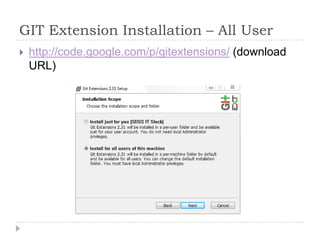
GIT Extension Installation – All User
   http://code.google.com/p/gitextensions/ (download
    URL)
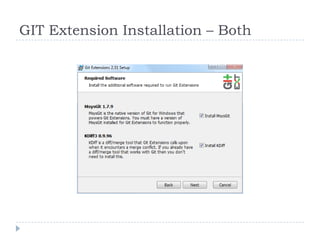
GIT Extension Installation – Both
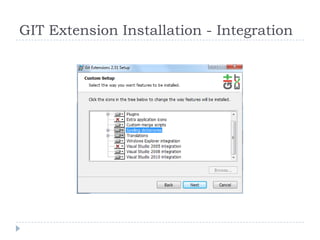
GIT Extension Installation - Integration
GIT Extension Installation - PuTTY
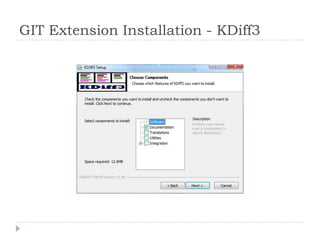
GIT Extension Installation - KDiff3
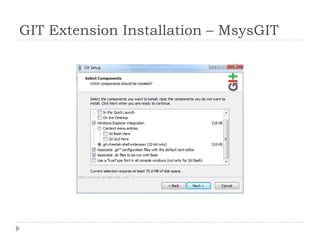
GIT Extension Installation – MsysGIT
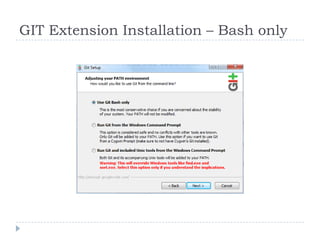
GIT Extension Installation – Bash only
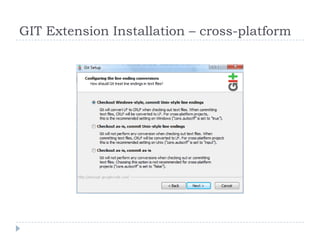
GIT Extension Installation – cross-platform
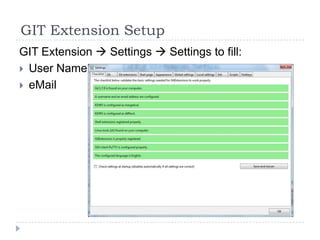
GIT Extension Setup
GIT Extension  Settings  Settings to fill:
 User Name
 eMail
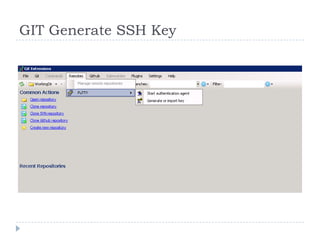
GIT Generate SSH Key
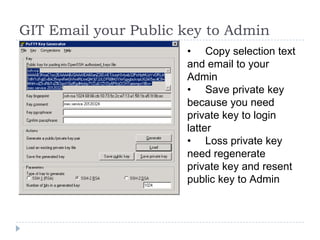
GIT Email your Public key to Admin
                      • Copy selection text
                      and email to your
                      Admin
                      • Save private key
                      because you need
                      private key to login
                      latter
                      • Loss private key
                      need regenerate
                      private key and resent
                      public key to Admin
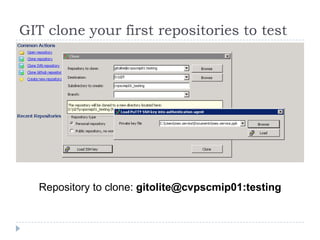
GIT clone your first repositories to test


   Repository to clone: gitolite@cvpscmip01:testing
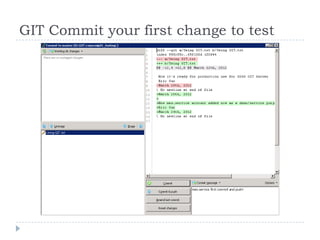
GIT Commit your first change to test
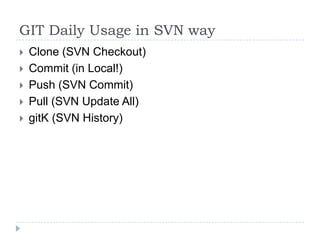
GIT Daily Usage in SVN way
   Clone (SVN Checkout)
   Commit (in Local!)
   Push (SVN Commit)
   Pull (SVN Update All)
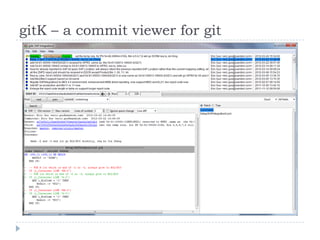
   gitK (SVN History)
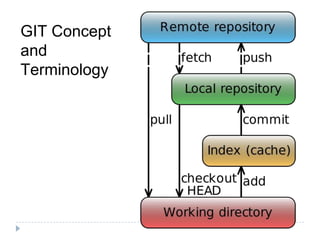
GIT Concept
and
Terminology
gitK – a commit viewer for git
GIT Key Sales Point

• Very fast and user friendly
• Source Code Repository is
    distributed, isolated, history
    complete
•   All action can run in Local except
    pull and push
•   Submit and rollback always success
    (until pull and push)
•   Can fix last submit very easily
Create your GIT repository in GIT Extension
Open Repopsitory  Your not GIT init yet folder  Initialize Repository
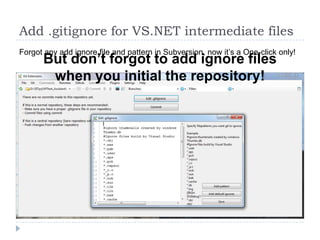
Add .gitignore for VS.NET intermediate files
Forgot any add ignore file and pattern in Subversion, now it’s a One-click only!
      But don’t forgot to add ignore files
       when you initial the repository!
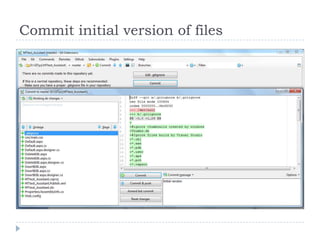
Commit initial version of files
Push your repository to CVPSCMIP01
You can to put any repository to: (no need inform GIT admin!)
gitolite@cvpscmip01:/usr/[yourname]/[your_repository_name]
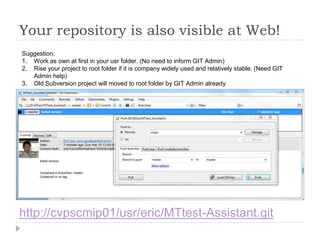
Your repository is also visible at Web!
Suggestion:
1. Work as own at first in your usr folder. (No need to inform GIT Admin)
2. Rise your project to root folder if it is company widely used and relatively stable. (Need GIT
   Admin help)
3. Old Subversion project will moved to root folder by GIT Admin already


http://cvpscmip01/usr/eric/MTtest-Assistant.git
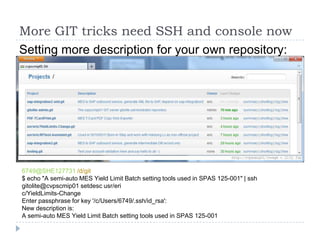
More GIT tricks need SSH and console now
Setting more description for your own repository:


6749@SHE127731 /d/git
$ echo "A semi-auto MES Yield Limit Batch setting tools used in SPAS 125-001" | ssh
gitolite@cvpscmip01 setdesc usr/eri
c/YieldLimits-Change
Enter passphrase for key '/c/Users/6749/.ssh/id_rsa':
New description is:
A semi-auto MES Yield Limit Batch setting tools used in SPAS 125-001
More document and essay about GIT
 GitExtensions User Manual (in your
  hard drive after install GIT Extension)
 Pro GIT (Chinese)
 GIT Magic (Chinese)
 《Git权威指南》
Things we not mentioned:
 GIT command line
 Branch, Merge, Rebase, Cherry Pick

Git extension-training

  • 1.
    GIT and itsExtension Training Eric Guo 2012-03-27
  • 2.
    Training Agenda • Version Control History, GIT Design Goal • GIT Extension Installation and Setup • GIT Concept and Terminology • GIT Daily Usage in SVN way • Create your own GIT repo (local & remote) • New GIT feature and further more manual
  • 3.
    Version Control History  manually keep track of versions of code! (1960s)  keep lots of versions in one file! (1972, SCCS)  You can each have your own copy checked out! (1982, RCS)  version multiple files at once! (1986, CVS, atomic by Subversion 2000)  shared repository can be on a remote machine! (1994, CVS with )  open source version control hosting! (1999, SourceForge)  no central repository! (2005, GIT)  When you checkout that’s a fork too, and you can do that in public! (2008, GIThub)
  • 4.
    GIT & GitHubHistory  Torvalds wanted a distributed system that he could use like BitKeeper, but none of the available free systems met his needs, particularly his performance needs. From an email he wrote on 7 April 2005 while writing the first prototype.  GitHub is a web-based hosting service for software development projects that use the Git revision control system. GitHub offers both commercial plans and free accounts for open source projects. According to the Git User's Survey in 2009, GitHub is the most popular Git hosting site.
  • 5.
    GIT Design Goal • Take CVS as an example of what not to do; if in doubt, make the exact opposite decision. • Support a distributed, BitKeeper-like workflow • Very high performanc and strong safeguards against corruption, either accidental or malicious
  • 6.
    GIT Extension DesignGoal • GitExtensions is a shell extension, a Visual Studio 2008 / 2010 plug-in and a standalone GIT repository tool. • Great tools enable you think and work in Unix style gradually
  • 7.
    GIT Extension Installation– All User  http://code.google.com/p/gitextensions/ (download URL)
  • 8.
  • 9.
  • 10.
  • 11.
  • 12.
  • 13.
  • 14.
    GIT Extension Installation– cross-platform
  • 15.
    GIT Extension Setup GITExtension  Settings  Settings to fill:  User Name  eMail
  • 16.
  • 17.
    GIT Email yourPublic key to Admin • Copy selection text and email to your Admin • Save private key because you need private key to login latter • Loss private key need regenerate private key and resent public key to Admin
  • 18.
    GIT clone yourfirst repositories to test Repository to clone: gitolite@cvpscmip01:testing
  • 19.
    GIT Commit yourfirst change to test
  • 20.
    GIT Daily Usagein SVN way  Clone (SVN Checkout)  Commit (in Local!)  Push (SVN Commit)  Pull (SVN Update All)  gitK (SVN History)
  • 21.
  • 22.
    gitK – acommit viewer for git
  • 23.
    GIT Key SalesPoint • Very fast and user friendly • Source Code Repository is distributed, isolated, history complete • All action can run in Local except pull and push • Submit and rollback always success (until pull and push) • Can fix last submit very easily
  • 24.
    Create your GITrepository in GIT Extension Open Repopsitory  Your not GIT init yet folder  Initialize Repository
  • 25.
    Add .gitignore forVS.NET intermediate files Forgot any add ignore file and pattern in Subversion, now it’s a One-click only! But don’t forgot to add ignore files when you initial the repository!
  • 26.
  • 27.
    Push your repositoryto CVPSCMIP01 You can to put any repository to: (no need inform GIT admin!) gitolite@cvpscmip01:/usr/[yourname]/[your_repository_name]
  • 28.
    Your repository isalso visible at Web! Suggestion: 1. Work as own at first in your usr folder. (No need to inform GIT Admin) 2. Rise your project to root folder if it is company widely used and relatively stable. (Need GIT Admin help) 3. Old Subversion project will moved to root folder by GIT Admin already http://cvpscmip01/usr/eric/MTtest-Assistant.git
  • 29.
    More GIT tricksneed SSH and console now Setting more description for your own repository: 6749@SHE127731 /d/git $ echo "A semi-auto MES Yield Limit Batch setting tools used in SPAS 125-001" | ssh gitolite@cvpscmip01 setdesc usr/eri c/YieldLimits-Change Enter passphrase for key '/c/Users/6749/.ssh/id_rsa': New description is: A semi-auto MES Yield Limit Batch setting tools used in SPAS 125-001
  • 30.
    More document andessay about GIT  GitExtensions User Manual (in your hard drive after install GIT Extension)  Pro GIT (Chinese)  GIT Magic (Chinese)  《Git权威指南》 Things we not mentioned:  GIT command line  Branch, Merge, Rebase, Cherry Pick