Git 101
27/01/2018
Credit: Ry’s Git Tutorial
GIT?
Git is a distributed version
control system
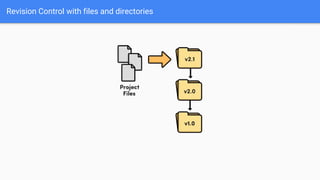
Revision Control with files and directories
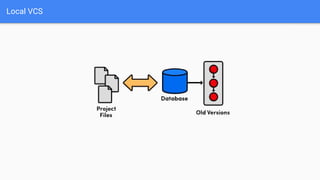
Local VCS
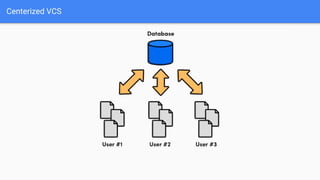
Centerized VCS
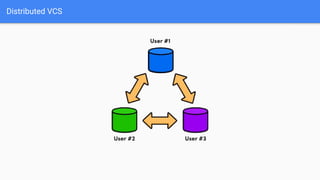
Distributed VCS
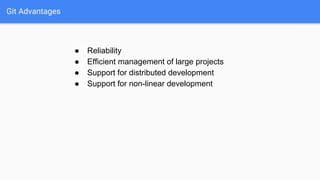
Git Advantages
● Reliability
● Efficient management of large projects
● Support for distributed development
● Support for non-linear development
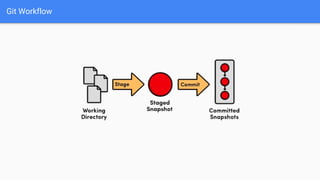
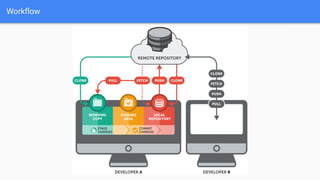
Git Workflow
Workflow
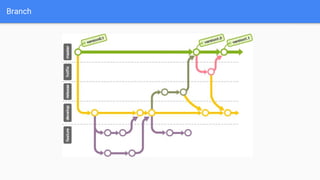
Branch
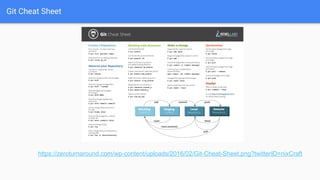
Git Cheat Sheet
https://zeroturnaround.com/wp-content/uploads/2016/02/Git-Cheat-Sheet.png?twitterID=nixCraft
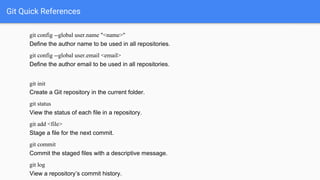
Git Quick References
git config --global user.name "<name>"
Define the author name to be used in all repositories.
git config --global user.email <email>
Define the author email to be used in all repositories.
git init
Create a Git repository in the current folder.
git status
View the status of each file in a repository.
git add <file>
Stage a file for the next commit.
git commit
Commit the staged files with a descriptive message.
git log
View a repository’s commit history.
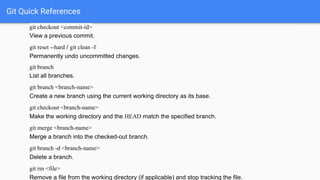
Git Quick References
git checkout <commit-id>
View a previous commit.
git reset --hard / git clean -f
Permanently undo uncommitted changes.
git branch
List all branches.
git branch <branch-name>
Create a new branch using the current working directory as its base.
git checkout <branch-name>
Make the working directory and the HEAD match the specified branch.
git merge <branch-name>
Merge a branch into the checked-out branch.
git branch -d <branch-name>
Delete a branch.
git rm <file>
Remove a file from the working directory (if applicable) and stop tracking the file.
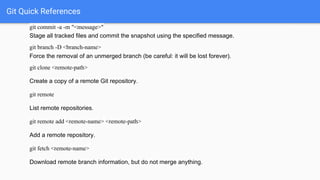
Git Quick References
git commit -a -m "<message>"
Stage all tracked files and commit the snapshot using the specified message.
git branch -D <branch-name>
Force the removal of an unmerged branch (be careful: it will be lost forever).
git clone <remote-path>
Create a copy of a remote Git repository.
git remote
List remote repositories.
git remote add <remote-name> <remote-path>
Add a remote repository.
git fetch <remote-name>
Download remote branch information, but do not merge anything.
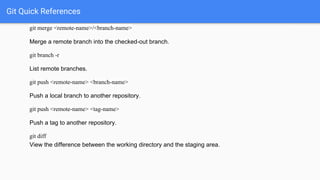
Git Quick References
git merge <remote-name>/<branch-name>
Merge a remote branch into the checked-out branch.
git branch -r
List remote branches.
git push <remote-name> <branch-name>
Push a local branch to another repository.
git push <remote-name> <tag-name>
Push a tag to another repository.
git diff
View the difference between the working directory and the staging area.
Best Link for Tutorial Git
https://github.com/alokc83/Basic-Tutorials/blob/master/rypress.com%20Git/
4_%20Branches%2C%20Part%20I.pdf

Git 101

  • 1.
  • 2.
    GIT? Git is adistributed version control system
  • 3.
    Revision Control withfiles and directories
  • 4.
  • 5.
  • 6.
  • 7.
    Git Advantages ● Reliability ●Efficient management of large projects ● Support for distributed development ● Support for non-linear development
  • 8.
  • 9.
  • 10.
  • 11.
  • 12.
    Git Quick References gitconfig --global user.name "<name>" Define the author name to be used in all repositories. git config --global user.email <email> Define the author email to be used in all repositories. git init Create a Git repository in the current folder. git status View the status of each file in a repository. git add <file> Stage a file for the next commit. git commit Commit the staged files with a descriptive message. git log View a repository’s commit history.
  • 13.
    Git Quick References gitcheckout <commit-id> View a previous commit. git reset --hard / git clean -f Permanently undo uncommitted changes. git branch List all branches. git branch <branch-name> Create a new branch using the current working directory as its base. git checkout <branch-name> Make the working directory and the HEAD match the specified branch. git merge <branch-name> Merge a branch into the checked-out branch. git branch -d <branch-name> Delete a branch. git rm <file> Remove a file from the working directory (if applicable) and stop tracking the file.
  • 14.
    Git Quick References gitcommit -a -m "<message>" Stage all tracked files and commit the snapshot using the specified message. git branch -D <branch-name> Force the removal of an unmerged branch (be careful: it will be lost forever). git clone <remote-path> Create a copy of a remote Git repository. git remote List remote repositories. git remote add <remote-name> <remote-path> Add a remote repository. git fetch <remote-name> Download remote branch information, but do not merge anything.
  • 15.
    Git Quick References gitmerge <remote-name>/<branch-name> Merge a remote branch into the checked-out branch. git branch -r List remote branches. git push <remote-name> <branch-name> Push a local branch to another repository. git push <remote-name> <tag-name> Push a tag to another repository. git diff View the difference between the working directory and the staging area.
  • 16.
    Best Link forTutorial Git https://github.com/alokc83/Basic-Tutorials/blob/master/rypress.com%20Git/ 4_%20Branches%2C%20Part%20I.pdf