What is Git?
Distributed version control system
Linus Torvalds - to track linux kernel development
Free and open source
Designed to handle small/large projects with speed and
efficiency
Fast branching and merging
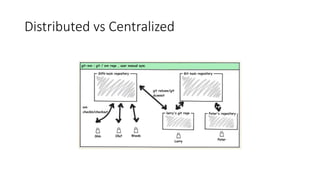
Distributed vs Centralized
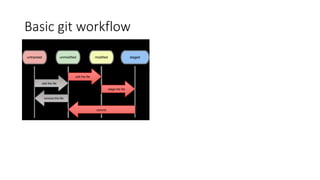
Basic git workflow
Initializing a git repo
# got some code in directory
$ git init [--bare]
# or clone
$ git clone --depth 1 –b <branch>
$ git clone /var/www/code.git
Then push to remote with upstream set for tracking
$ git push –u origin <master>
Example of gitignore
$ cat .gitignore
*.[oa]
*~ # ending with ~
*.a # no .a files
!lib.a # but do track lib.a, even though you're ignoring .a files above
/TODO # only ignore the root TODO file, not subdir/TODO
build/ # ignore all files in the build/ directory
doc/*.txt # ignore doc/notes.txt, but not doc/server/arch.txt
Doc/**/*.txt # all nested .txt files
Viewing staged and unstaged changes
• git status
• git diff (Compares working directory with staging area)
• git diff --staged
• git diff HEAD
• git diff v1.0 v1.1
• git diff master adposting
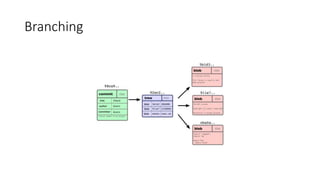
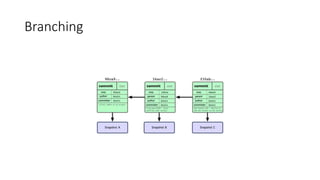
Branching
Branching
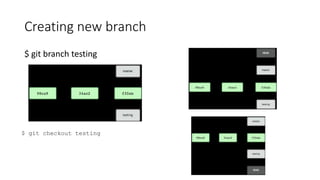
Creating new branch
$ git branch testing
$ git checkout testing
Basic branching and merging
$ git checkout iss53
Switched to branch "iss53"
$ vim index.html
$ git commit -a -m 'finished the new footer [issue 53]'
[iss53]: created ad82d7a: "finished the new footer [issue 53]"
1 files changed, 1 insertions(+), 0 deletions(-)
$ git checkout master
$ git merge iss53
Merge made by recursive.
README | 1 +
1 files changed, 1 insertions(+), 0 deletions(-)
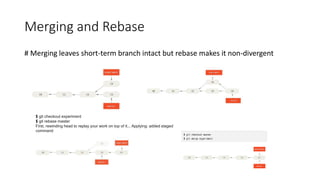
Merging and Rebase
# Merging leaves short-term branch intact but rebase makes it non-divergent
$ git checkout experiment
$ git rebase master
First, rewinding head to replay your work on top of it... Applying: added staged
command
Branch management
$ git branch # Shows all the active branches
$ git branch -v # Shows last commit on each branch
$ git branch --merged # Shows which branches are merged with the branch you are on
$ git branch --no-merged # Shows all branches that contain work you haven’t merged
$ git branch -d testing # To delete a branch. Will fail if the branch is not yet merged
Remote branches
# Branches are just reference
# as many branch as you may as remote
$ git fetch origin # Fetches any data you don’t have from remote ‘origin’ repository
$ git pull origin # Fetches any data you don’t have and merges it with local branch
$ git fetch origin master # Fetches data only from ‘master’ branch
$ git pull origin master # Fetches data from master and merges it with local master branch
git fetch origin
$ git push origin develop # Pushes data from local ‘develop’ branch to remote ‘develop’ branch
$ git push origin develop:release # Pushes data from local ‘develop’ branch to remote ‘release’ branch
Tagging and release
$ git tag -a v1.0.1 # applies v1.0.1 tag to current commit
$ git tag # To list all tags
$ git tag -1 ‘v1.4.2*‘ # List all tags starting with 1.4.2
$ git tag -a v1.0.1 -m ‘my version 1.0.1’
$ git show v1.4
tag v1.4
Tagger: Scott Chacon <schacon@gee-mail.com>
Date: Mon Feb 9 14:45:11 2009 -0800
my version 1.4
commit 15027957951b64cf874c3557a0f3547bd83b3ff6
Merge: 4a447f7... a6b4c97...
Author: Scott Chacon <schacon@gee-mail.com>
Date: Sun Feb 8 19:02:46 2009 -0800
Merge branch 'experiment'
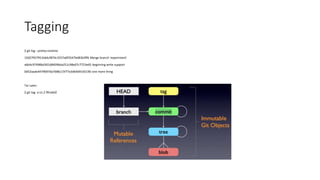
Tagging
$ git log --pretty=oneline
15027957951b64cf874c3557a0f3547bd83b3ff6 Merge branch 'experiment'
a6b4c97498bd301d84096da251c98a07c7723e65 beginning write support
0d52aaab4479697da7686c15f77a3d64d9165190 one more thing
Tar Later:
$ git tag -a v1.2 9fceb02
Git remote server
# HTTP and smart HTTP
# SSH and GIT protocol
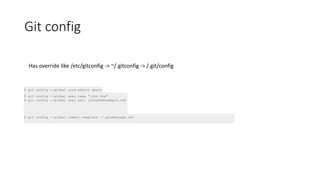
Git config
$ git config --global core.editor emacs
$ git config --global user.name "John Doe"
$ git config --global user.eail johndoe@example.com
Has override like /etc/gitconfig -> ~/.gitconfig -> /.git/config
$ git config --global commit.template ~/.gitmessage.txt
Git attributes
.gitattributes
*.pbcpropj binary
*.docs diff=word
*.png diff=exif
*.pbxproj binary
Hooks
# to streamline workflows
# client side hook
# server-side hook
Bundling and archiving
# bundle to transfer git repo
# archive to provide just the files

Get going with_git_ppt

  • 1.
    What is Git? Distributedversion control system Linus Torvalds - to track linux kernel development Free and open source Designed to handle small/large projects with speed and efficiency Fast branching and merging
  • 2.
  • 3.
  • 4.
    Initializing a gitrepo # got some code in directory $ git init [--bare] # or clone $ git clone --depth 1 –b <branch> $ git clone /var/www/code.git Then push to remote with upstream set for tracking $ git push –u origin <master>
  • 5.
    Example of gitignore $cat .gitignore *.[oa] *~ # ending with ~ *.a # no .a files !lib.a # but do track lib.a, even though you're ignoring .a files above /TODO # only ignore the root TODO file, not subdir/TODO build/ # ignore all files in the build/ directory doc/*.txt # ignore doc/notes.txt, but not doc/server/arch.txt Doc/**/*.txt # all nested .txt files
  • 6.
    Viewing staged andunstaged changes • git status • git diff (Compares working directory with staging area) • git diff --staged • git diff HEAD • git diff v1.0 v1.1 • git diff master adposting
  • 7.
  • 8.
  • 9.
    Creating new branch $git branch testing $ git checkout testing
  • 10.
    Basic branching andmerging $ git checkout iss53 Switched to branch "iss53" $ vim index.html $ git commit -a -m 'finished the new footer [issue 53]' [iss53]: created ad82d7a: "finished the new footer [issue 53]" 1 files changed, 1 insertions(+), 0 deletions(-) $ git checkout master $ git merge iss53 Merge made by recursive. README | 1 + 1 files changed, 1 insertions(+), 0 deletions(-)
  • 11.
    Merging and Rebase #Merging leaves short-term branch intact but rebase makes it non-divergent $ git checkout experiment $ git rebase master First, rewinding head to replay your work on top of it... Applying: added staged command
  • 12.
    Branch management $ gitbranch # Shows all the active branches $ git branch -v # Shows last commit on each branch $ git branch --merged # Shows which branches are merged with the branch you are on $ git branch --no-merged # Shows all branches that contain work you haven’t merged $ git branch -d testing # To delete a branch. Will fail if the branch is not yet merged
  • 13.
    Remote branches # Branchesare just reference # as many branch as you may as remote $ git fetch origin # Fetches any data you don’t have from remote ‘origin’ repository $ git pull origin # Fetches any data you don’t have and merges it with local branch $ git fetch origin master # Fetches data only from ‘master’ branch $ git pull origin master # Fetches data from master and merges it with local master branch git fetch origin $ git push origin develop # Pushes data from local ‘develop’ branch to remote ‘develop’ branch $ git push origin develop:release # Pushes data from local ‘develop’ branch to remote ‘release’ branch
  • 14.
    Tagging and release $git tag -a v1.0.1 # applies v1.0.1 tag to current commit $ git tag # To list all tags $ git tag -1 ‘v1.4.2*‘ # List all tags starting with 1.4.2 $ git tag -a v1.0.1 -m ‘my version 1.0.1’ $ git show v1.4 tag v1.4 Tagger: Scott Chacon <schacon@gee-mail.com> Date: Mon Feb 9 14:45:11 2009 -0800 my version 1.4 commit 15027957951b64cf874c3557a0f3547bd83b3ff6 Merge: 4a447f7... a6b4c97... Author: Scott Chacon <schacon@gee-mail.com> Date: Sun Feb 8 19:02:46 2009 -0800 Merge branch 'experiment'
  • 15.
    Tagging $ git log--pretty=oneline 15027957951b64cf874c3557a0f3547bd83b3ff6 Merge branch 'experiment' a6b4c97498bd301d84096da251c98a07c7723e65 beginning write support 0d52aaab4479697da7686c15f77a3d64d9165190 one more thing Tar Later: $ git tag -a v1.2 9fceb02
  • 16.
    Git remote server #HTTP and smart HTTP # SSH and GIT protocol
  • 17.
    Git config $ gitconfig --global core.editor emacs $ git config --global user.name "John Doe" $ git config --global user.eail johndoe@example.com Has override like /etc/gitconfig -> ~/.gitconfig -> /.git/config $ git config --global commit.template ~/.gitmessage.txt
  • 18.
    Git attributes .gitattributes *.pbcpropj binary *.docsdiff=word *.png diff=exif *.pbxproj binary
  • 19.
    Hooks # to streamlineworkflows # client side hook # server-side hook
  • 20.
    Bundling and archiving #bundle to transfer git repo # archive to provide just the files